
Standard federal repayment runs 10 years. On a $48,000 loan at 6% that means about $533 a month and roughly $15,950 in interest, but adding around $167 a month to reach $700 clears the balance in about 7 years and cuts total interest to roughly $10,900. You can find your own debt-free date with the Google Sheets PMT and NPER functions, or with the calculator below.
The standard federal repayment plan takes 10 years and costs thousands in interest. Even small accelerations cut years off. On a $48,000 balance at 6%, an extra $50 a month trims total interest by about 12% and pulls payoff forward by roughly a year, while an extra $100 a month trims it by about 22% and pulls payoff forward by about two years.
Understanding the math behind student loans helps with planning. The numbers themselves aren’t complicated, but seeing exactly how extra payments compound over time can be motivating, or at least clarifying.
How long it takes to pay off loans depends heavily on what you studied. Our student loan burden analysis found wide differences across majors: median debt for Computer Engineering graduates works out to about 3.5 months of median earnings, while for Drama and Theatre Arts graduates it works out to about 14 months. The gap is mostly about starting salaries, not debt levels.
Enter your balance, rate, and income below to compare a standard 10-year plan against extended and income-driven options, then read on for the formulas behind each number.
Run the numbers on one debt: The Debt Payoff Calculator takes a balance, a rate, a minimum payment and an extra payment, then shows payoff time, total interest and how much interest the extra payment saves against minimums alone. No signup required.
Understanding Your Loans
Before calculating payoff, gather information on each loan. Most people have multiple loans with different rates, balances, and terms. Knowing what you’re working with is the starting point:
| Loan | Balance | Interest Rate | Type | Servicer |
|---|---|---|---|---|
| Federal Direct | $25,000 | 5.5% | Federal | MOHELA |
| Grad PLUS | $15,000 | 7.0% | Federal | Nelnet |
| Private | $8,000 | 8.5% | Private | SoFi |
The distinction between federal and private loans matters significantly. Federal loans offer income-driven repayment plans, Public Service Loan Forgiveness eligibility, deferment and forbearance options, and generally lower interest rates. Private loans may offer lower rates with excellent credit but come with fewer protections, less flexibility, and no forgiveness programs. This distinction affects which payoff strategies make sense.
The Basic Calculation
Google Sheets handles loan calculations with built-in functions. The PMT function calculates monthly payments: =PMT(rate/12, months, -balance). For a $25,000 loan at 5.5% over 10 years, the formula =PMT(0.055/12, 120, -25000) returns $271.32/month.
Total interest paid equals (Monthly_Payment × Total_Months) - Original_Balance, which comes to about $7,558 for this example. That’s nearly a third of the original balance paid just in interest over the standard repayment period.
To calculate months until payoff at a given payment amount, NPER does the reverse calculation: =NPER(Rate/12, -Payment, Balance). This formula is particularly useful for seeing how extra payments accelerate the timeline.
Payoff Scenarios: $48,000 at 6%
Looking at concrete numbers helps illustrate the impact of different payment levels. Here’s how the same $48,000 loan plays out under various approaches:
| Approach | Monthly | Payoff | Total Interest |
|---|---|---|---|
| Standard 10-year | $533 | 10 years | ~$15,950 |
| Accelerated $700/mo | $700 | 7 years | ~$10,900 |
| Accelerated $800/mo | $800 | 6 years | ~$9,200 |
| Income-driven $200/mo | $200 | Balance stops falling | Interest keeps accruing |
The difference between standard and accelerated repayment is stark. An extra $167/month cuts about three years off the loan and saves roughly $5,000 in interest. The income-driven row works on a different principle: payments there track income rather than the balance, and $200 sits below the $240 of interest a $48,000 balance at 6% accrues in a month, so the balance stops falling. Under the Repayment Assistance Plan, interest left unpaid after a qualifying payment is subsidized, and any balance still outstanding after 360 qualifying payments is forgiven.
Payoff Strategies
Different strategies optimize for different outcomes, and the two best known, debt snowball and debt avalanche, pull in opposite directions. The avalanche method (highest interest first) minimizes total interest paid. Pay minimums on all loans while putting extra money toward the highest rate loan. When that’s paid, move to the next highest. This approach typically saves 5-15% more interest than other methods.
The snowball method (smallest balance first) optimizes for motivation rather than math. Pay minimums on all loans while attacking the smallest balance first, then roll that payment to the next smallest. Quick wins early on keep people engaged, even if the total interest cost is slightly higher.
A hybrid approach combines both: pay off one small loan quickly for the psychological win, then switch to avalanche for the remaining interest savings. This balances motivation with optimization.
Refinancing combines multiple loans into one new loan at a lower rate. Worth considering if you have good credit (720+), private loans have high rates, or you don’t need federal loan protections. Worth skipping if you might use PSLF, need income-driven payment flexibility, or federal rates are already competitive.
Accelerated Payoff Tactics
Beyond choosing a strategy, several tactics can speed up payoff regardless of which method you use.
Biweekly payments work by splitting your monthly payment in half and paying every two weeks instead of monthly. This creates 26 half-payments (13 full payments) per year instead of 12. On the $25,000 loan above, splitting the $271.32 payment in half and paying every two weeks clears the balance in about 108 months instead of 120, close to a year earlier.
Rounding up payments adds small amounts that compound over time. Rounding a $271.32 payment to $300 doesn’t feel like much each month, but it accelerates payoff meaningfully over years. Tax refunds, bonuses, and unexpected income can also go directly toward loans. Some people commit all side hustle income specifically to loan payoff, keeping their regular income for expenses.
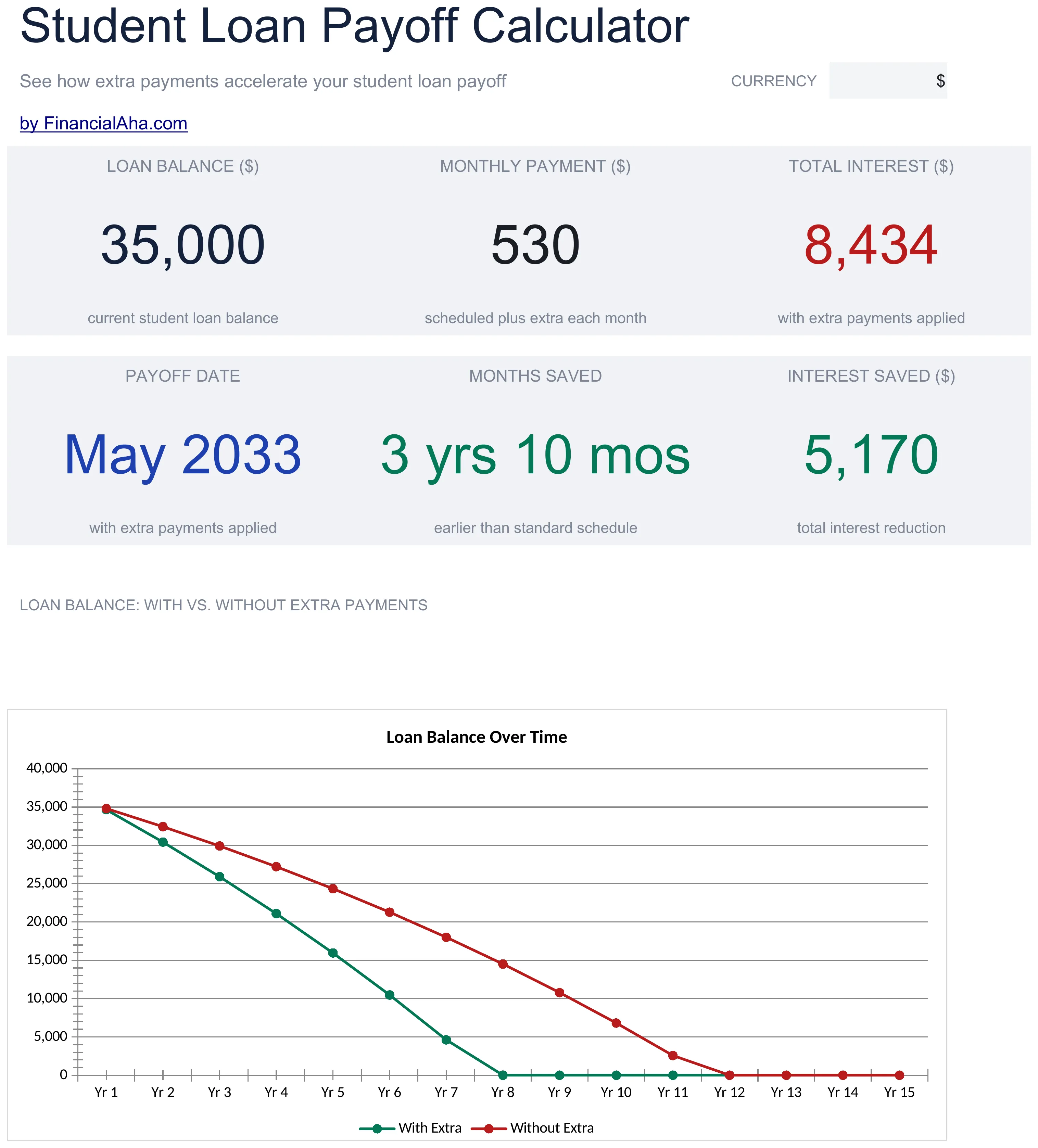
The Student Loan Payoff (Essentials) template turns these tactics into a live payoff date. Change the extra payment and the months-saved and interest-saved figures update alongside the balance chart.
When NOT to Aggressively Pay Student Loans
Aggressive loan payoff isn’t the right choice for every situation. Building an emergency fund first tends to matter because without emergency savings, unexpected expenses go on credit cards at 20%+ interest, worse than student loan rates. Having $1,000-3,000 set aside before accelerating loan payoff provides a buffer.
Employer 401(k) matches represent 100% returns. If your employer matches 3% and you’re not contributing, that’s foregone money that won’t come back. The math: a 3% match beats paying down 5% student loan interest.
High-interest debt also typically takes priority. Credit cards at 20% cost more than student loans at 5-7%. One common sequence: emergency fund ($1,000), then employer match, then high-interest debt, then student loans, then additional savings and investing.
Income-Driven Repayment and Forgiveness
Income-driven repayment (IDR) caps payments at a percentage of discretionary income, with the remaining balance forgiven after a set number of years. The available plans changed in 2026: a court order ended the SAVE plan in March 2026, and the new Repayment Assistance Plan (RAP) opened on July 1, 2026, forgiving any remaining balance after 30 years of qualifying payments. Income-Based Repayment (IBR) remains available to borrowers with loans disbursed before July 1, 2026, and forgives the remaining balance after 20 or 25 years depending on when the first loans were taken out. When every loan was disbursed on or after that date, RAP is the only income-driven plan on offer, so the current list on your servicer account is the reliable one.
IDR makes sense in specific situations: a very high loan balance relative to income, planning for PSLF, needing lower payments currently, or expecting income to remain moderate long-term. For someone earning $50,000 with $150,000 in loans, an income-driven plan with eventual forgiveness may result in lower total payments than aggressive standard repayment.
Public Service Loan Forgiveness (PSLF) forgives remaining federal Direct Loans after 120 qualifying payments while working full-time for a qualifying employer (government or nonprofit). For borrowers who might qualify, staying on federal loans, using an income-driven plan, and avoiding refinancing to private loans keeps this option open.
Tracking Progress
Regular tracking maintains motivation and catches any issues early. Monthly reviews work well for most people: update balances and track total remaining debt, month-over-month change, interest paid this month, and principal paid this month. Seeing principal decrease faster than interest is satisfying once payments reach that tipping point.
Marking progress points helps maintain momentum over what can be a decade-long journey. First loan paid off, 50% of debt eliminated, under $10,000 remaining, and finally the debt-free date all deserve acknowledgment. Some people find that celebrating these milestones keeps them engaged through the long slog.
To turn this into your own numbers, start with the calculator above to compare plans, then run a single loan through the Student Loan Payoff (Essentials) template to watch how one changed payment moves your debt-free date.
Related
- Student Loan Payoff (Essentials) template - live payoff date, months saved, and interest saved
- Student Loan Calculator - compare standard, extended, and income-driven plans
- Student Loan Burden by Major - debt-to-earnings ratios for college majors
- Debt Payoff Calculator - payoff time and interest saved for one debt
- Debt Snowball vs. Debt Avalanche - which payoff order fits you
- Monthly Budget Template - track extra payments in your budget
Frequently asked questions
Should I pay off student loans or invest?
When loan rates sit below roughly 6-7%, investing has historically outperformed loan payoff on net returns. Guaranteed debt elimination still carries value beyond pure math: risk tolerance and the psychological weight of debt both matter, so the answer is personal rather than universal.
Does refinancing federal student loans lose forgiveness options?
Yes. Refinancing federal loans into a private loan permanently removes access to income-driven repayment, Public Service Loan Forgiveness, and federal deferment and forbearance. Refinancing typically only makes sense for private loans, or for federal loans held by someone who is certain they will not use any federal protection.
What happened to the SAVE plan?
A court order ended the SAVE plan in March 2026. Borrowers who were enrolled are moving to other repayment plans, and the new Repayment Assistance Plan (RAP) opened for applications on July 1, 2026, forgiving any remaining balance after 30 years of qualifying payments. Federal Student Aid contacts affected borrowers directly.
How do I calculate my payoff date in Google Sheets?
Use NPER to get the number of months: =NPER(rate/12, -payment, balance). For a $25,000 balance at 5.5% paid at $350 a month, that returns about 87 months, a little over seven years. Multiply the months by the payment and subtract the balance to see the total interest.
How do I manage loans with multiple servicers?
Track each loan separately and send each payment to the correct servicer. Consolidation can simplify management when multiple servicers become overwhelming, though it resets some benefit clocks and may change which repayment plans you can use.
Sources
- Income-Driven Repayment (IDR) Plans - Federal Student Aid (U.S. Department of Education)
- Public Service Loan Forgiveness (PSLF) - Federal Student Aid (U.S. Department of Education)
- Federal Student Loan Repayment Plans - Federal Student Aid (U.S. Department of Education)
About this article
Monthly payment and interest figures are computed with the Google Sheets PMT and NPER functions on the loan amounts shown, recomputed on 2026-09-10. Repayment-plan, forgiveness, and PSLF rules checked on 2026-09-10 against Federal Student Aid (studentaid.gov) and U.S. Department of Education announcements covering the end of SAVE and the Repayment Assistance Plan. On-site calculator claims checked on 2026-09-10 against the shipped Student Loan Calculator and Debt Payoff Calculator components. Template claims checked on 2026-09-10 against the shipped Student Loan Payoff (Essentials) workbook (Dashboard, Loan Setup, Payoff Schedule, How to Use sheets). Last reviewed September 2026.