Best Value Complete Financial Planning Bundle
✓ Financial Planning✓ Net Worth Tracker✓ Monthly Budgeting✓ Travel Budget Planner✓ Annual Budgeting Planner✓ Monthly Expense Tracker✓ Annual Tax Planner✓ Retirement Planning
View Bundle →
Ultimate Template - Excel & Google Sheets

Ultimate Monthly Budget Spreadsheet Template for Google Sheets & Excel

Named categories laid across all twelve months, with budget against actual and the variance in money and as a percentage. The Ultimate Monthly Budget spreadsheet template counts how many categories are past what was planned for them, groups them into sections on the setup sheet with a share-of-income column, and compares year over year with the change on every category. Six working sheets, savings trends among them. Google Sheets and Excel, one file.

See Preview
Monthly Budget Spreadsheet Template - Ultimate version for Google Sheets and Excel

What's Included

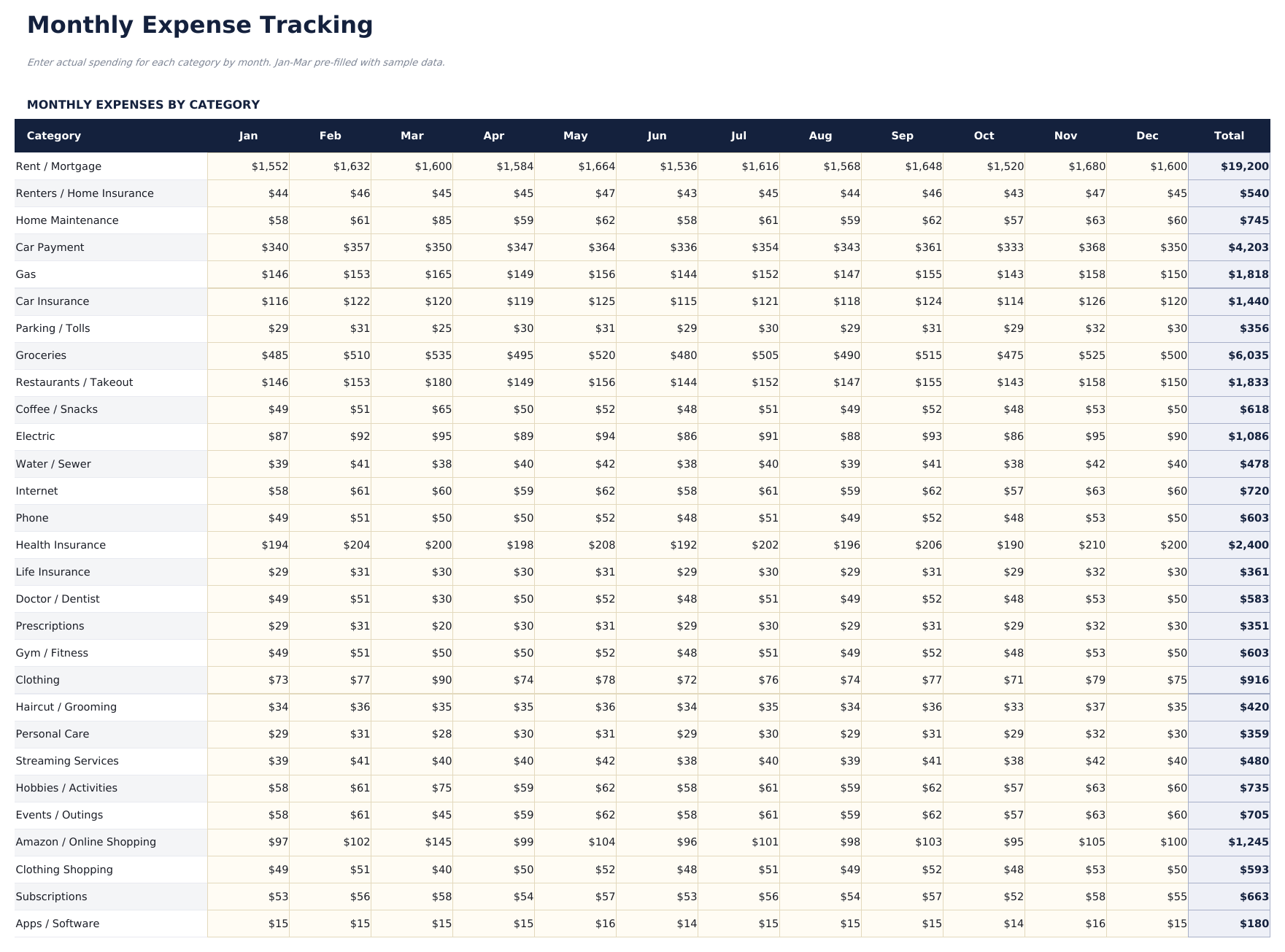
  • Named categories laid across the twelve months
  • A count of how many categories are past what was planned for them
  • Budget against actual with the variance in money and as a percentage
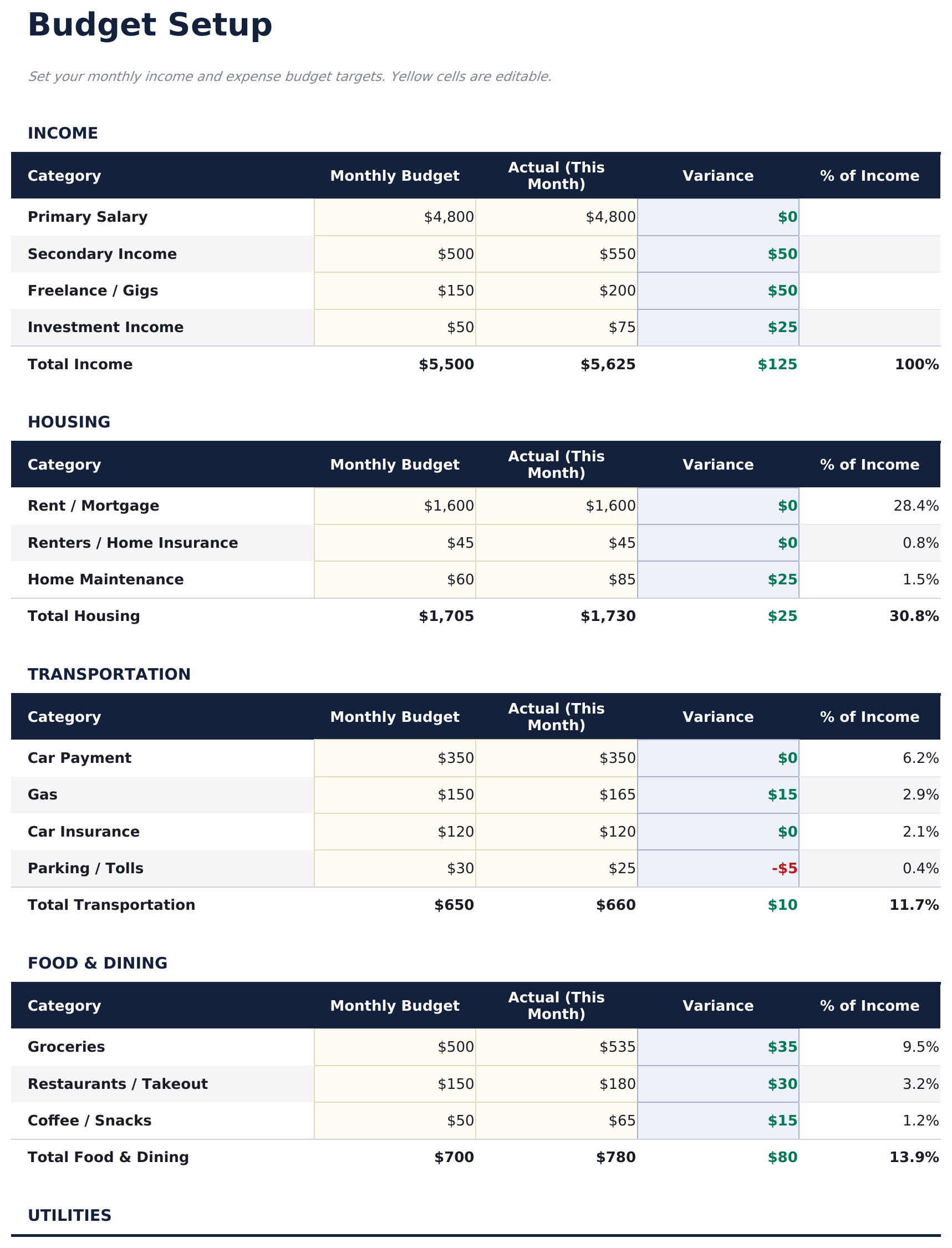
  • Categories grouped into sections on the setup sheet, with a share-of-income column
  • Year-over-year comparison with the change on every category
  • Savings rate traced month by month rather than reported once
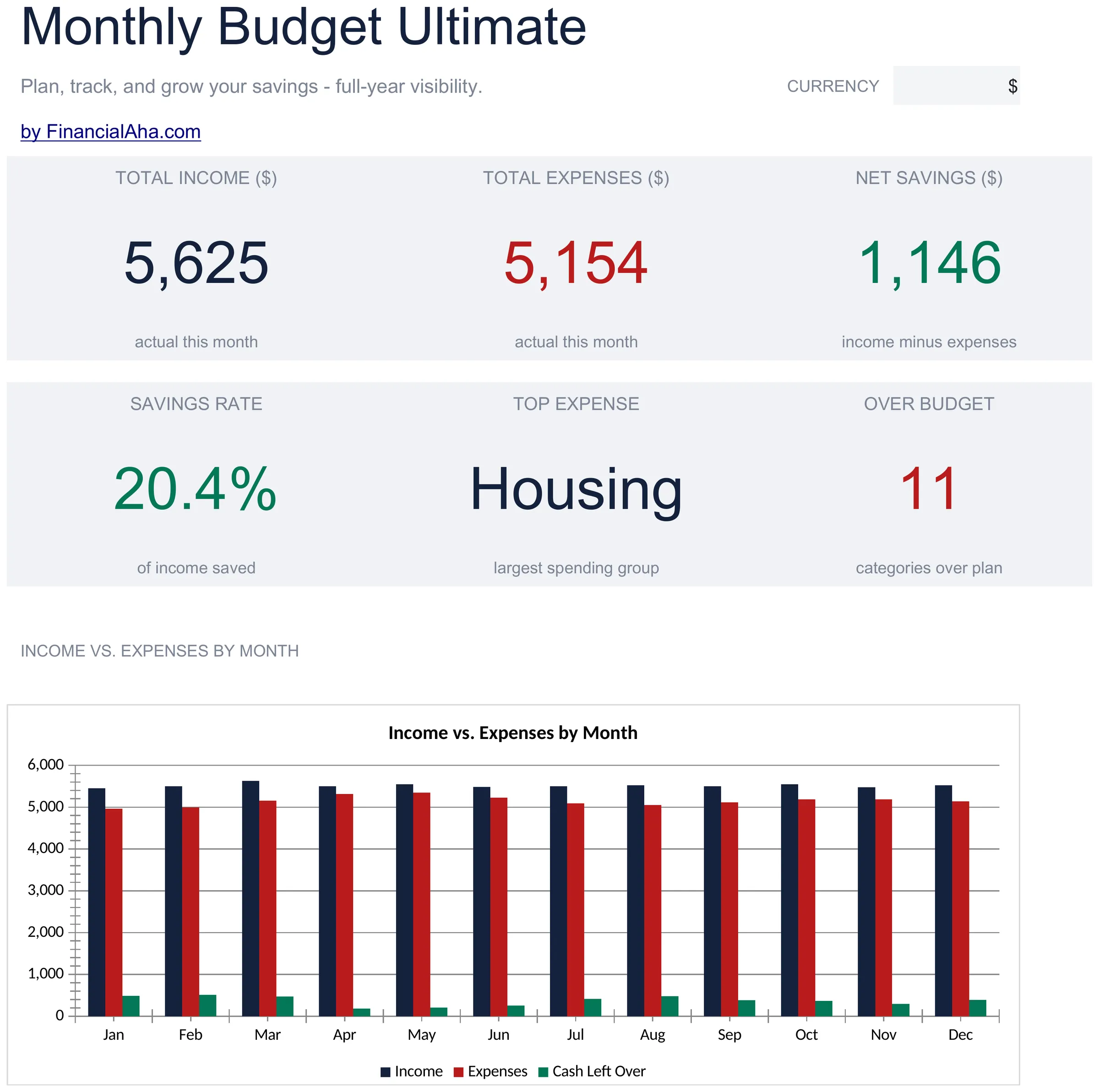
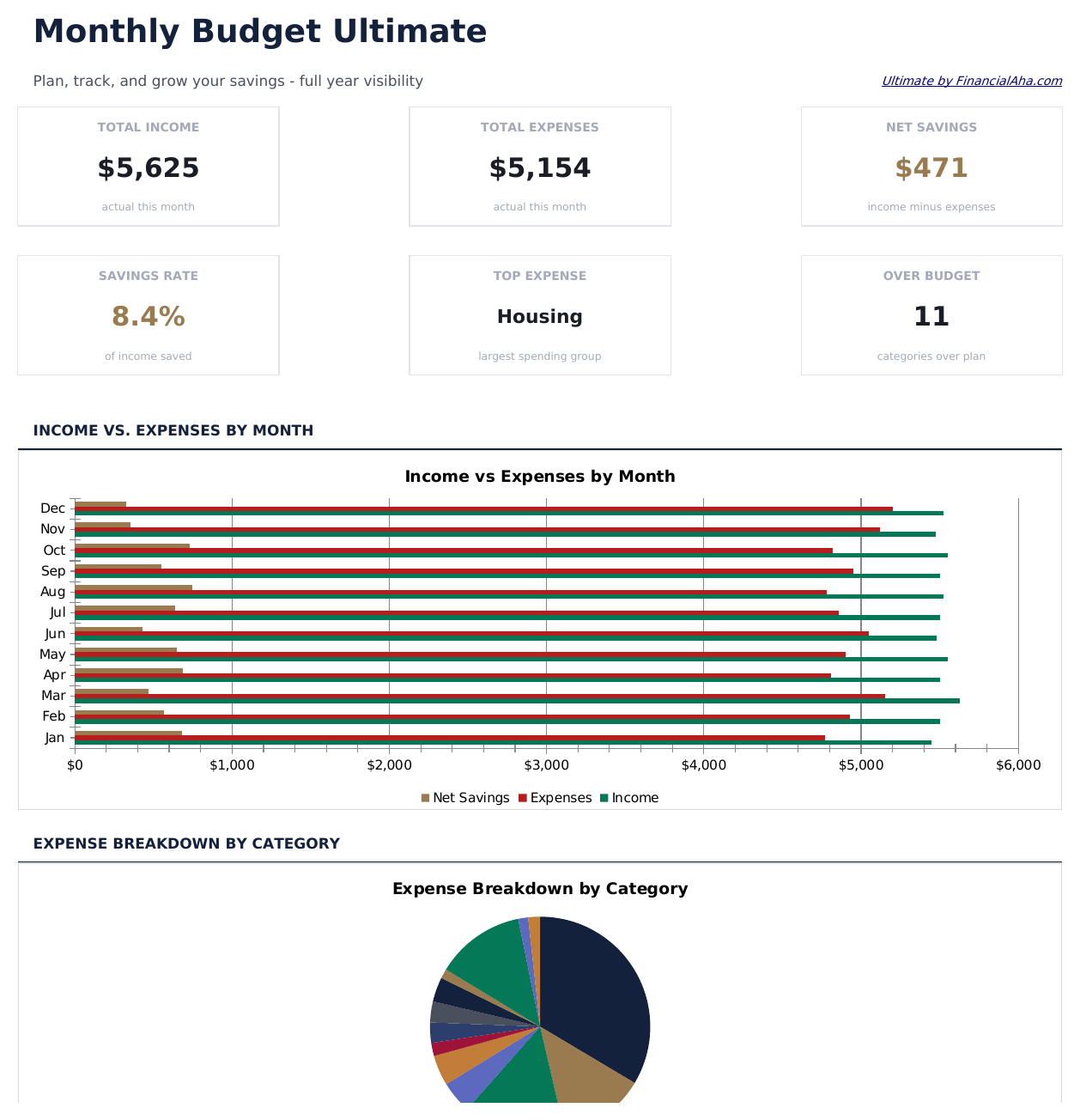
  • Total income, expenses, net savings and the largest spending group on the dashboard
  • Two charts on the dashboard
  • Works in Microsoft Excel and Google Sheets with no macros required

The FinancialAha Ultimate Monthly Budget Spreadsheet Template for Google Sheets and Excel is a six-sheet workbook covering a full year, with a How to Use guide on a seventh tab. It ships as an Ultimate Monthly Budget Excel template and an Ultimate Monthly Budget Google Sheets template in one file. This Ultimate Monthly Budget spreadsheet template tracks every category month by month, counts how many are over plan, compares the year against the one before it, and traces the savings rate across the months. No macros, no VBA.

Inside the workbook

What's inside the FinancialAha Ultimate Monthly Budget spreadsheet template

The FinancialAha Ultimate Monthly Budget Spreadsheet Template runs on six working sheets - four take entries from you, two report back - plus the guide. It works in both Microsoft Excel and Google Sheets and here is what the Ultimate Monthly Budget spreadsheet holds.

  1. 01 of 06

    Dashboard

    The position in six figures: income, expenses, what is left, the savings rate, which category took the most that month, and how many categories are past what was planned for them. That last one is the figure that changes how a month reads - a budget can be met overall while a third of its categories were missed, and only a count makes that visible.

  2. 02 of 06

    Budget Setup

    The categories grouped into sections, each with what is planned for the month, what has actually gone, the variance and its share of income. This is where the plan is defined, and everything downstream reads from it rather than being re-entered.

  3. 03 of 06

    Monthly Tracking

    Named categories laid across the twelve months. Spending that only appears occasionally - insurance renewals, holidays, school costs - is invisible in any single month and obvious here, which is the difference between a budget that survives a year and one that is rebuilt every January.

  4. 04 of 06

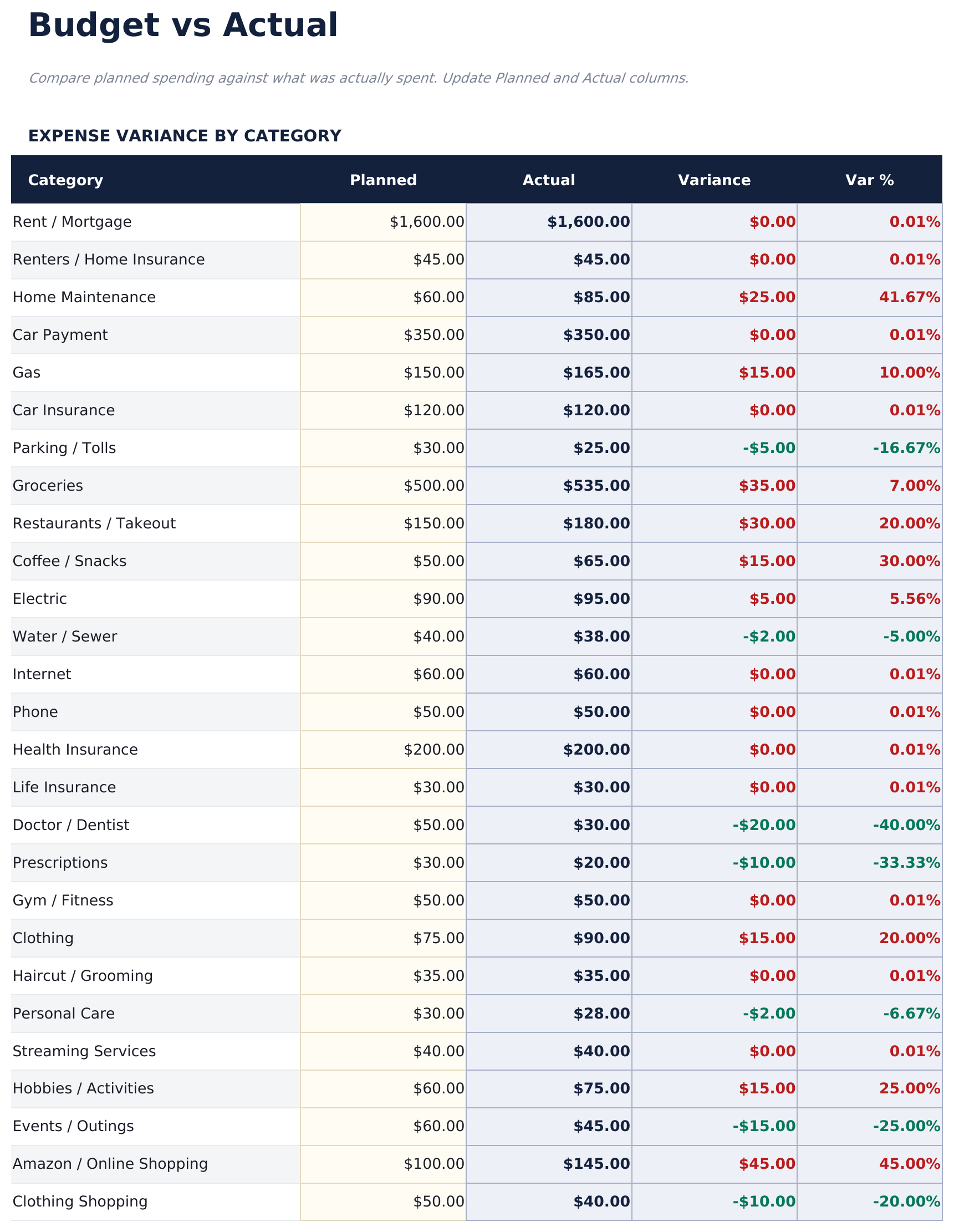
    Budget vs Actual

    Every category with what was planned, what happened, the variance in money and the variance as a percentage. The percentage matters because a small category missed badly and a large one missed slightly can show the same money figure while meaning very different things.

  5. 05 of 06

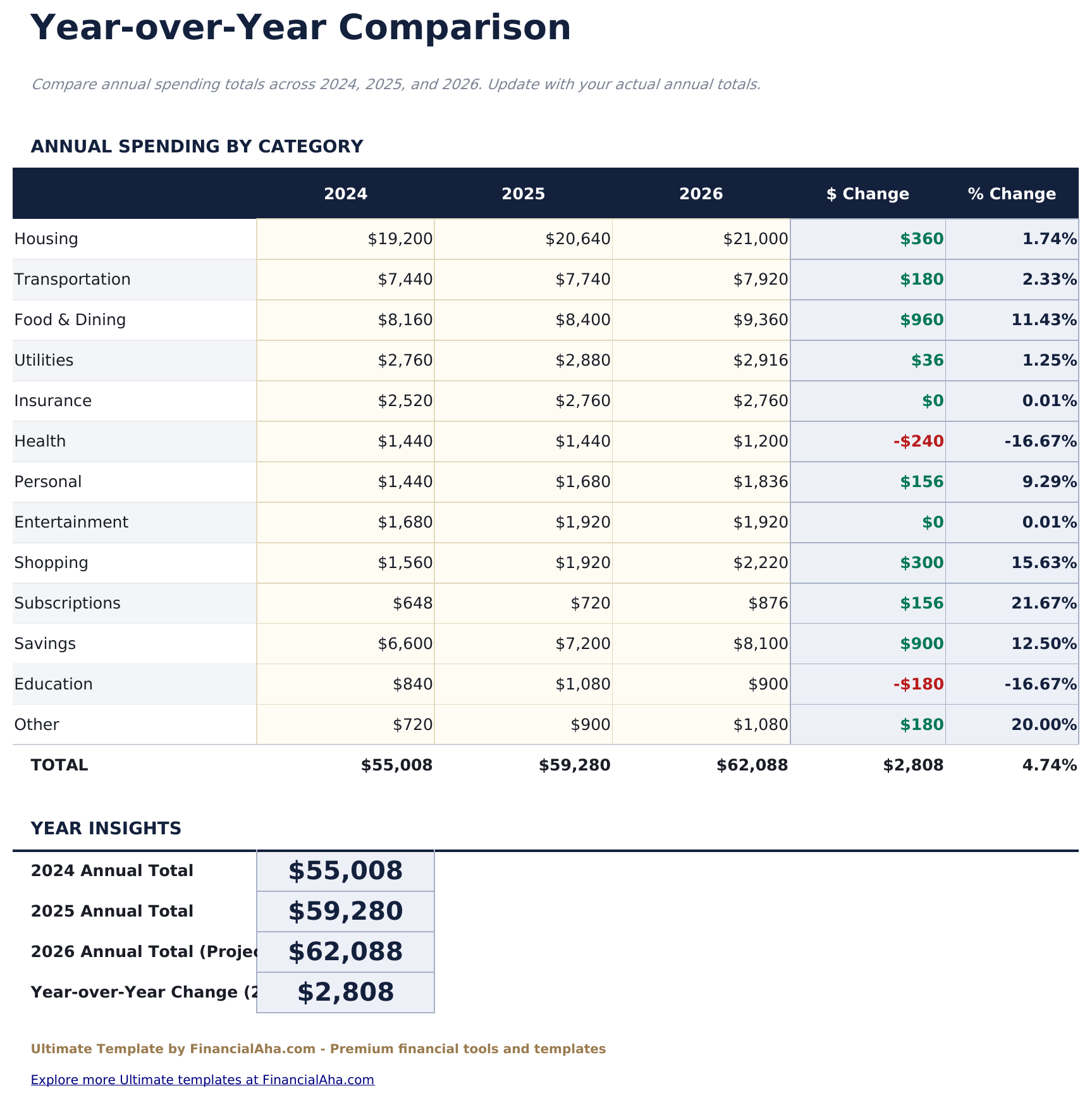
    Year-over-Year

    Each category compared against the previous year, with the change in money and in percentage terms. A category that grows a little every year never looks like a problem in any single month, and this is the sheet where that pattern becomes a number.

  6. 06 of 06

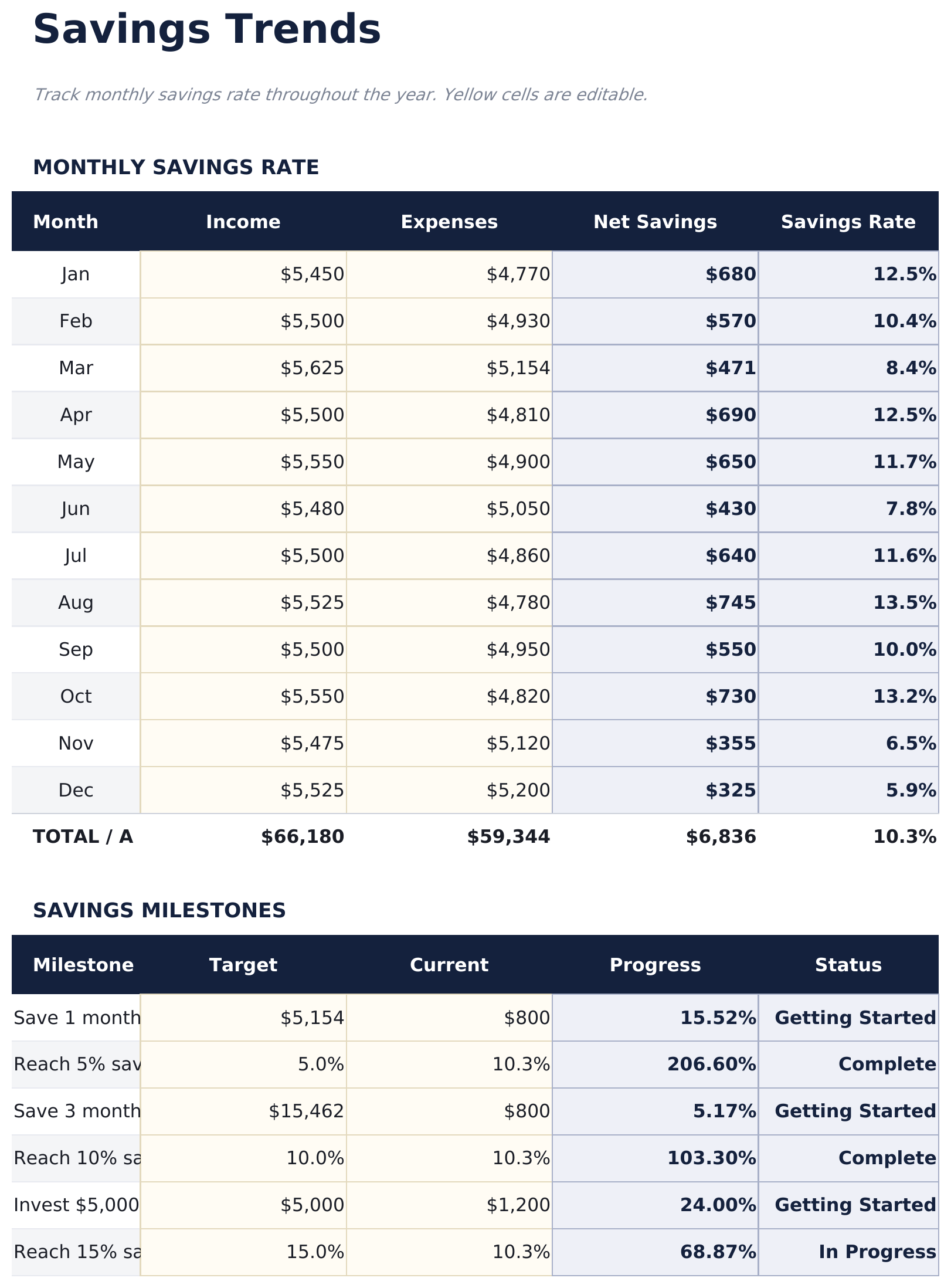
    Savings Trends

    Each month with what came in, what went out, what was left and the savings rate. Read as a column rather than one month at a time, a rate that drifts is visible long before the balance says anything.

  7. Included guide

    How to Use

    A step-by-step guide on its own tab, covering setup, how the tracking grid and the variance sheet read from the plan, and how the year-over-year comparison is built. Because it ships inside the file, the instructions travel with the template wherever it is opened.

Works in both Google Sheets and Excel

Ultimate Monthly Budget Spreadsheet template for Google Sheets

Upload the Ultimate Monthly Budget Spreadsheet Template to Drive, right-click it, and choose "Open with Google Sheets". This Ultimate Monthly Budget Google Sheets template needs no conversion step and both charts survive the trip intact. The cross-sheet references that build the tracking and variance sheets rely on the existing tab names, so those are worth leaving alone.

Ultimate Monthly Budget Google Sheets template setup

A shared copy of the Ultimate Monthly Budget Google Sheets template suits a household running a year in one file, where one person keeps the plan and both fill in what happened. Sheets version history covers a figure typed over.

Sharing the Ultimate Monthly Budget Google Sheet

The Ultimate Monthly Budget Google Sheet is built around two rhythms: quick entries through the month, and a longer sitting at the end of it with the variance sheet and the savings trend. The year-over-year sheet is for once a year.

Ultimate Monthly Budget Spreadsheet template for Excel

The Ultimate Monthly Budget spreadsheet Excel download is a plain .xlsx. Excel opens this Ultimate Monthly Budget Excel template directly, with no import step and no compatibility prompt, and both charts are native Excel charts that redraw as figures change. There are no macros and no VBA in the file, so it opens without a security warning.

Ultimate Monthly Budget Excel template setup

The same Ultimate Monthly Budget Excel template opens in Excel on Windows, Excel on Mac, and Excel for the web. It is also the identical file you would upload to Drive, so there is no separate Ultimate Monthly Budget spreadsheet download to choose between.

Ultimate Monthly Budget spreadsheet Excel notes

The Ultimate Monthly Budget spreadsheet Excel file carries no macros and no VBA, so Excel opens it without a trust prompt. The same Ultimate Monthly Budget spreadsheet Excel download also opens in Excel for the web, which matters when a figure needs entering away from a desk.

Opening the Ultimate Monthly Budget spreadsheet Excel file

Nothing in the Ultimate Monthly Budget Excel template is version-specific, so this Ultimate Monthly Budget spreadsheet Excel workbook behaves identically in Excel on Windows, Excel on Mac, and older builds.

Spreadsheet template highlights

What the Ultimate Monthly Budget spreadsheet template tracks

The plan is set once and the reporting sheets read against it. These are the columns the Ultimate Monthly Budget Spreadsheet Template works from:

Category
the line, inside the section it belongs to
Monthly Budget
what is planned for it
Actual (This Month)
what has actually gone
Variance auto
derived, the gap between the two
% of Income auto
derived, what that line takes out of what came in
Planned
what was budgeted for a category across the period
Actual
what it really came to
Var % auto
derived, the variance as a percentage rather than an amount
$ Change auto
derived, the category against the previous year
% Change auto
derived, that same movement in proportional terms
Net Savings auto
derived, income less expenses for the month
Savings Rate auto
derived, that figure as a share of income

Compare builds

FinancialAha Monthly Budget spreadsheet template: Free, Essentials, and Ultimate compared

Feature Free View Spreadsheet Template Essentials View Spreadsheet Template Ultimate This page
Working sheets 1 2 6
Period covered One month One month, labelled 12 months
Category lines 16, one flat list Grouped into sections 35 on the tracking grid
Budget against actual Per line Per line and per section Per category, with variance
Share of income Per line Per line
Savings rate Yes Month by month
Top expense category Yes Yes
Categories over plan Counted Counted
Year-over-year Yes
Charts 2 2

The FinancialAha Ultimate Monthly Budget Spreadsheet Template covers six working sheets and a full year. The Free Monthly Budget Spreadsheet Template is a flat list for one month. The Essentials Monthly Budget Spreadsheet Template for Google Sheets and Excel groups the categories into sections with subtotals and reports the savings rate for a month at a time. This build carries every category across twelve months, sets budget against actual with the variance as a percentage, counts how many categories are past plan, compares every category against the previous year, and traces the savings rate month by month - which is what turns a budget into something that survives more than one January.

Good to know

Notes on working in the Ultimate Monthly Budget spreadsheet template

  • The count of categories over plan is what stops a budget that was met overall from hiding a third of its lines being missed.
  • The twelve-month grid is where insurance renewals, holidays and school costs stop being invisible.
  • Variance as a percentage separates a small category missed badly from a large one missed slightly.
  • A savings rate read as a column shows drift long before any single month's balance does.
  • The currency dropdown sits on the Dashboard and relabels money columns across the whole Ultimate Monthly Budget spreadsheet. It changes the label only and does not convert the numbers.

How to Use This Template

1

Set the plan

On Budget Setup, enter what you plan for each category inside its section.

2

Track the months

Fill the twelve-month grid as the year runs. The variance sheet reads from it.

3

Watch what is over

The dashboard counts how many categories are past plan, not just the overall position.

4

Compare across years

The year-over-year sheet shows which categories have grown, and the savings trend shows drift.

Customer Reviews

What Our Customers Say

"If I get half as good at handling my finances as you are at customer service, this'll be the best $26 I've spent lately."

J Jenny Verified Buyer

"Great tool! Simplifies financial planning without the hassle of complex spreadsheets."

F Fazia Search Marketing Manager

"I recently purchased your super convenient spreadsheet, it really helps me!"

J John Verified Buyer

"They're great and super intuitive. Thank you!"

M Mira Verified Buyer

Built by Claude AI. Perfected by us.

We use Claude AI to draft each template, after a deep research. Then our team steps in. We refine the layout, stress-test every formula, fix edge cases, and polish the design until it feels like something we would actually use ourselves. The AI gets us 80% there. The last 20% is all human judgment.

One-time purchase. No subscription. Works in Excel & Google Sheets.

Frequently Asked Questions

Is the FinancialAha Ultimate Monthly Budget Spreadsheet Template a Google Sheets template?

Yes. Upload the file to Drive and choose "Open with Google Sheets". The Ultimate Monthly Budget Google Sheets template needs no conversion step and both charts survive the trip intact. The cross-sheet references rely on the existing tab names, so those are worth leaving alone.

Is the FinancialAha Ultimate Monthly Budget Spreadsheet Template an Excel template?

Yes. The download is a plain .xlsx, so the Ultimate Monthly Budget Excel template opens directly in Excel with no import step. Both charts are native Excel charts, and there are no macros or VBA.

Will the FinancialAha Ultimate Monthly Budget spreadsheet Excel file open in older versions of Excel?

Yes. The Ultimate Monthly Budget spreadsheet Excel workbook ships as a plain .xlsx, so it opens identically in current Excel and in builds that predate dynamic arrays.

What does the count of categories over plan tell me in the Ultimate Monthly Budget spreadsheet?

Whether a month that looks fine overall actually was. A budget can be met in total while a third of its lines were missed, and only a count makes that visible.

Why does the Ultimate Monthly Budget spreadsheet show variance as a percentage as well as an amount?

Because a small category missed badly and a large one missed slightly can produce the same money figure while meaning very different things.

How many categories does the Ultimate Monthly Budget spreadsheet track?

Thirty-five across the twelve-month grid, with the plan set in sections on the setup sheet. The Free build holds twelve for one month and the Essentials build groups a single month into sections.

What is the year-over-year sheet for in the Ultimate Monthly Budget spreadsheet?

Catching the categories that grow a little every year. That pattern never looks like a problem in any single month, and this is where it becomes a number.

Why does the Ultimate Monthly Budget spreadsheet trace the savings rate across months?

Because drift is visible in a column long before it shows up in any single month's balance.

What do I get after buying the Ultimate Monthly Budget spreadsheet template?

You receive the Ultimate Monthly Budget spreadsheet template as an Excel file (.xlsx) that works in Microsoft Excel and Google Sheets. Download it immediately after purchase - no signup or account required.

Is there a free Ultimate Monthly Budget spreadsheet template?

Yes. A free version of the Ultimate Monthly Budget spreadsheet template is available with basic features. The Ultimate version adds advanced analysis, more capacity, and additional sheets.

What if the Ultimate Monthly Budget spreadsheet template does not work for me?

Contact us and we will help troubleshoot. The Ultimate Monthly Budget spreadsheet template works in Microsoft Excel and Google Sheets with no macros required.

Ultimate

Highlights:

Instant download after purchase
No macros or VBA required
All formulas auto-calculate
No subscription required
Works in
Excel Google Sheets

Looking for more Ultimate templates?

We offer Ultimate versions of our most popular spreadsheet templates with advanced features, more capacity, and deeper analysis.

Private & secure

Your financial data stays on your device. We never see it.

Learn more →

Need help?

Check our guides or reach out with questions.

View FAQ →