Lifetime Deal Complete Personal Financial Planning Bundle →
✓ Financial Planning✓ Net Worth Tracker✓ Monthly Budgeting✓ Travel Budget Planner✓ Annual Budgeting Planner✓ Monthly Expense Tracker✓ Annual Tax Planner✓ Retirement Planning
View Bundle →

Instant digital delivery · Terms & Conditions apply

Essentials Template - Excel & Google Sheets

Essentials Account Register Spreadsheet Template for Google Sheets & Excel

A starting balance sits in a labelled cell outside the transaction range, and fifty rows run beneath it with blanks to carry on into. The Essentials Account Register spreadsheet template holds a reference column for cheque and transaction numbers, leaves the running balance empty on any row with neither a debit nor a credit, and totals both columns at the foot with the balance restated as a check. A dashboard reports where the account stands. Google Sheets and Excel. No macros, no VBA.

Instant digital delivery · Terms & Conditions apply

Essentials Account Register spreadsheet template - Google Sheets and Excel preview

What's Included

  • A starting balance in a labelled cell outside the transaction range
  • A row per transaction, with blanks beneath to carry on into
  • A reference column for cheque and transaction numbers
  • A running balance that stays blank on a row with neither a debit nor a credit
  • Debits and credits totalled at the foot, with the balance restated as a check
  • A dashboard with the current balance and the net change
  • A currency dropdown that relabels the money columns across both sheets
  • Works in Microsoft Excel and Google Sheets with no setup required

The FinancialAha Essentials Account Register Spreadsheet Template is a two-sheet workbook for Google Sheets and Excel, with a How to Use guide on a third tab. It works as an Essentials Account Register Excel template and an Essentials Account Register Google Sheets template from the same download. A starting balance in a cell of its own, a reference and a running balance on every row, and a dashboard reporting where the account stands. No macros, no VBA.

Inside the workbook

What's inside the FinancialAha Essentials Account Register spreadsheet template

The FinancialAha Essentials Account Register Spreadsheet Template runs on two working sheets, with the instructions on a tab of their own. It works in both Microsoft Excel and Google Sheets and here is what the Essentials Account Register spreadsheet holds.

  1. 01 of 02

    Register

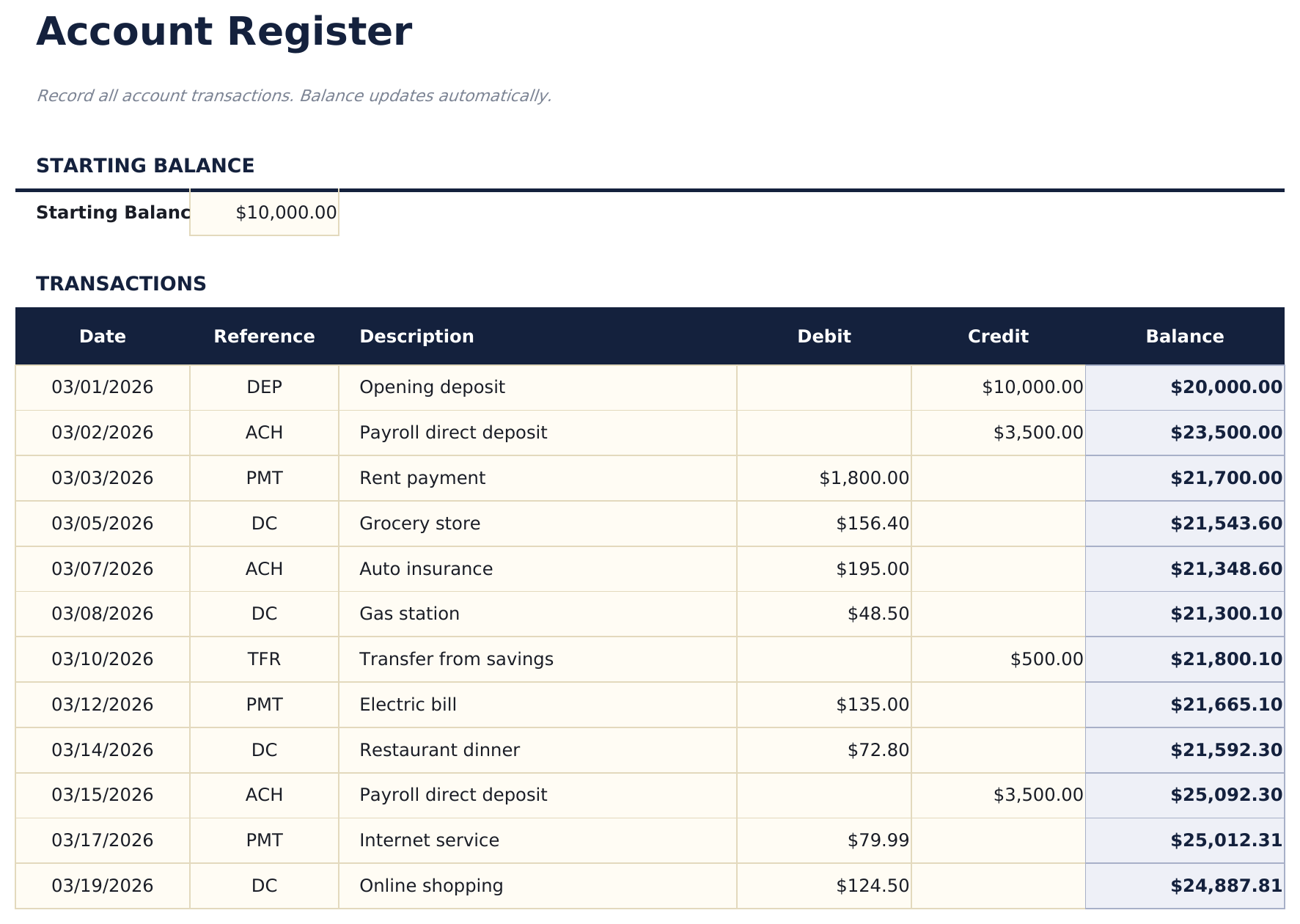
    The starting balance sits in a labelled cell of its own above the table rather than as the first row of it. That is a small structural difference with a real consequence: the opening figure is not a transaction, and keeping it out of the transaction range means it cannot be swept into a total or sorted away. Fifty rows follow: the date, a reference, a description, a debit, a credit and the balance. The reference column is what a register is for - a cheque number, a transaction ID, whatever the statement will call this line. Reconciling is matching two lists, and the reference is what makes the match possible when the descriptions differ. The balance column returns blank when a row has neither a debit nor a credit, so the unused rows at the bottom stay empty instead of repeating the last balance forty times. It is the detail that decides whether a half-filled register looks finished or looks broken. At the foot both money columns total and the balance is restated from the starting figure - which is a check as much as a total: if the running column and the restated figure disagree, something in between was overwritten.

  2. 02 of 02

    Dashboard

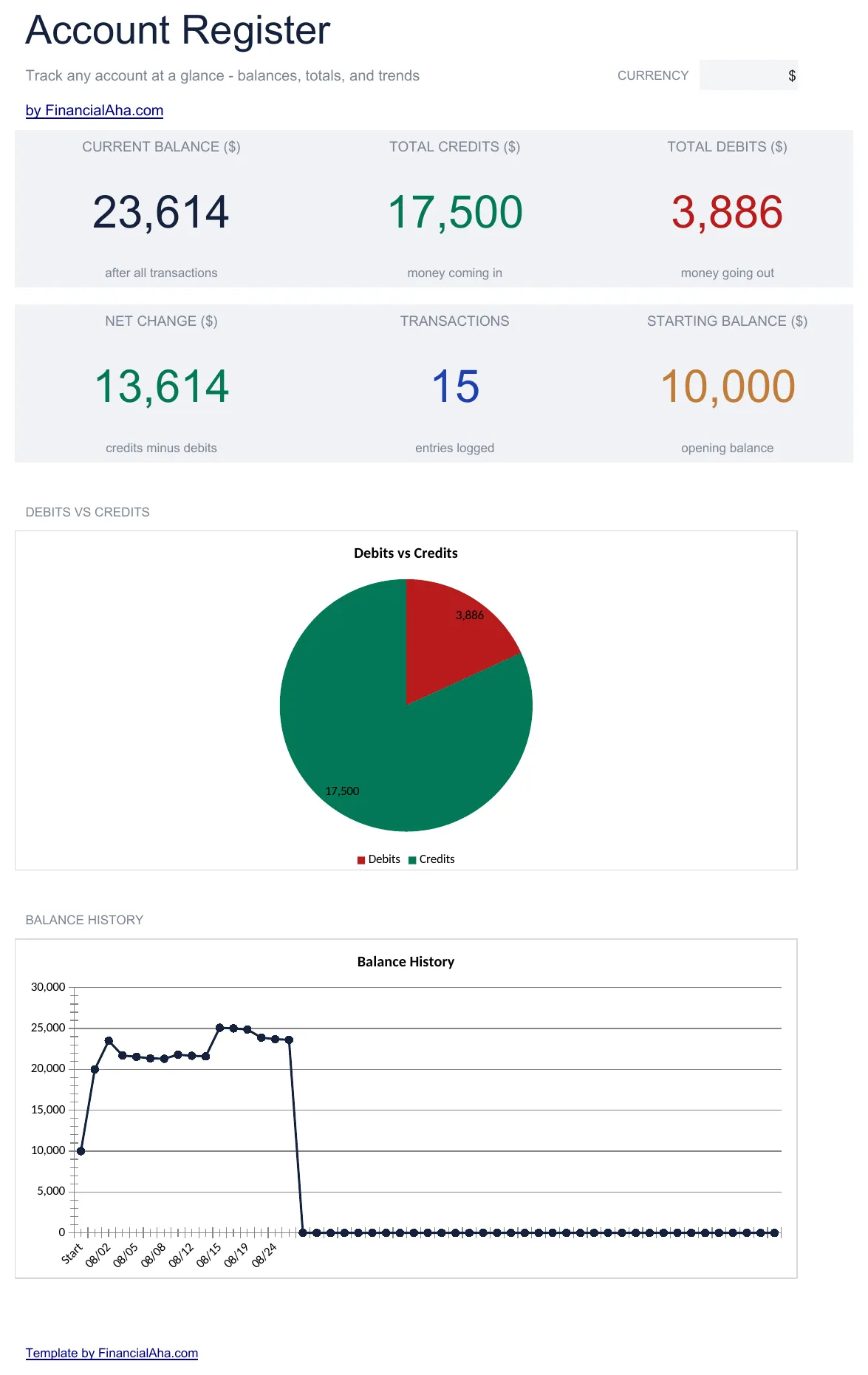
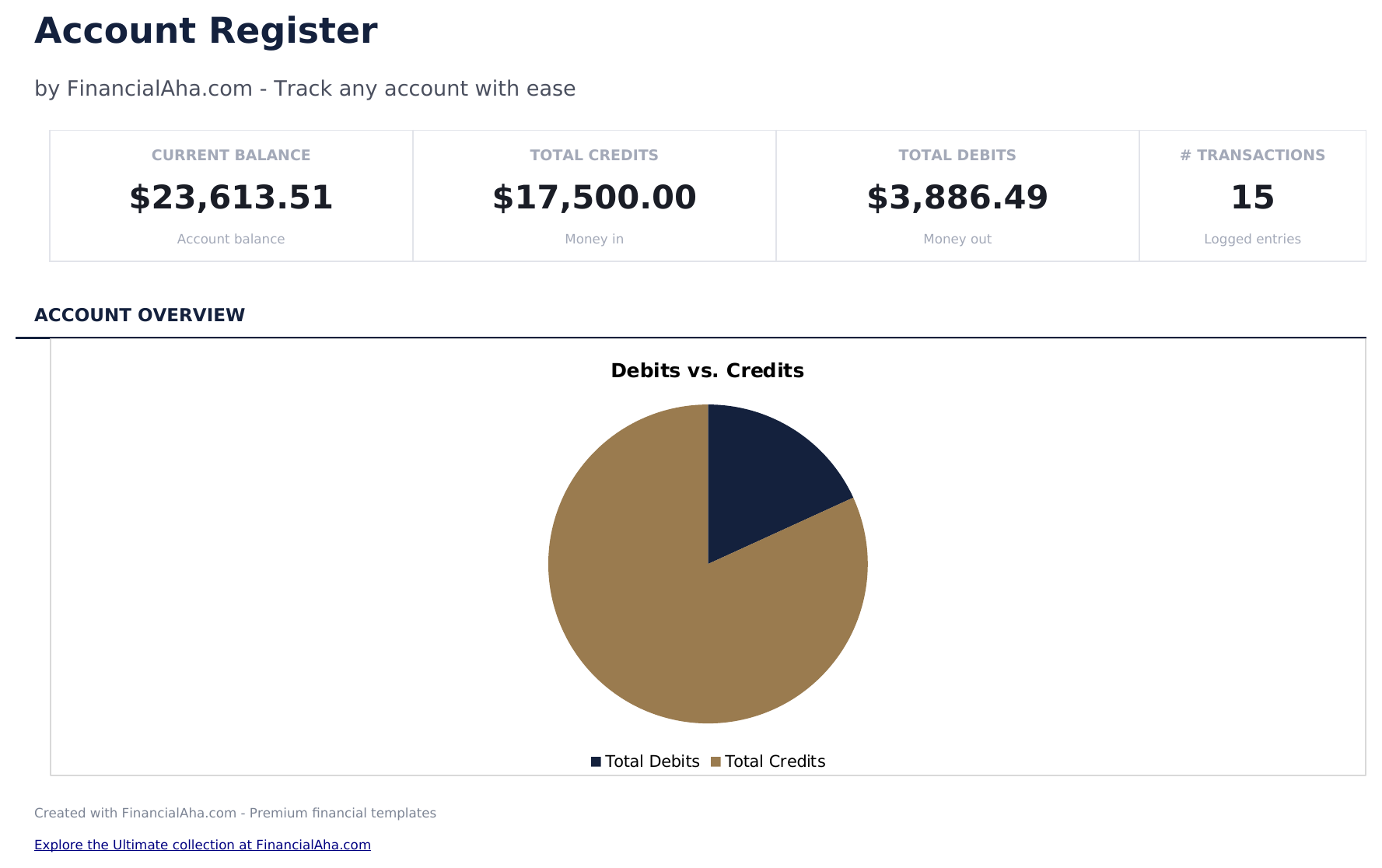
    The current balance, the net change, and the totals for credits and debits, all read from the register beneath, with two charts. Net change is the figure the running balance cannot give you at a glance: the balance says where you are, and the net change says how far the period moved you.

  3. Included guide

    How to Use

    A step-by-step guide on its own tab, covering the starting balance cell, the reference column, how the running balance carries, and how to change the currency. Because it ships inside the file, the instructions travel with the template wherever it is opened.

Works in both Google Sheets and Excel

Essentials Account Register Spreadsheet template for Google Sheets

Upload the Essentials Account Register Spreadsheet Template to Drive, right-click it, and choose "Open with Google Sheets". This Essentials Account Register Google Sheets template needs no conversion step and both charts come across intact.

Essentials Account Register Google Sheets template setup

A shared copy of the Essentials Account Register Google Sheets template suits a shared account or a treasurer reporting to a committee, since the dashboard answers the question without anyone reading the register.

Running the Essentials Account Register Google Sheets template

The Essentials Account Register Google Sheet is filled in per movement or per statement. The reference column is what makes the later reconciliation quick rather than archaeological.

Essentials Account Register Spreadsheet template for Excel

The Essentials Account Register spreadsheet Excel download is a plain .xlsx. Excel opens this Essentials Account Register Excel template directly, with no import step, and both charts are native Excel charts. There are no macros and no VBA in the file.

Essentials Account Register Excel template setup

The same Essentials Account Register Excel template opens in Excel on Windows, Excel on Mac, and Excel for the web. It is also the identical file you would upload to Drive, so there is no separate Essentials Account Register spreadsheet download to choose between.

Essentials Account Register spreadsheet template notes for Excel

The Essentials Account Register spreadsheet Excel file carries no macros and no VBA, so Excel opens it without a trust prompt.

Opening the Essentials Account Register spreadsheet Excel file

Nothing in the Essentials Account Register Excel template is version-specific, so this Essentials Account Register spreadsheet Excel workbook behaves identically in Excel on Windows, Excel on Mac, and older builds.

Spreadsheet template highlights

What the Essentials Account Register spreadsheet template tracks

A row per transaction. This is what the Essentials Account Register Spreadsheet Template records for each:

Date
when it happened
Reference
the cheque number or transaction ID the statement will call it
Description
what it was, in terms you would recognise
Debit ($)
money out
Credit ($)
money in
Balance ($) auto
derived, and blank on a row with neither

Compare builds

FinancialAha Account Register spreadsheet template: Free and Essentials compared

Feature Free View Spreadsheet Template Essentials This page
Working sheets 1 2
Transaction rows 15 50
Running balance Yes Yes
Starting balance as its own field A row A labelled cell
Reference column on every line – Yes
Category column Yes –
Totals row – Yes
Charts – 2

The Free Account Register Spreadsheet Template logs each movement with a category on it. The FinancialAha Essentials Account Register Spreadsheet Template puts the starting balance in a labelled cell outside the transaction range, adds a reference column for cheque and transaction numbers, totals debits and credits at the foot with the balance restated as a check, and carries a dashboard with two charts. What it does not carry is the free build's category column.

Good to know

Notes on working in the Essentials Account Register spreadsheet template

  • The starting balance sits outside the transaction range, so it cannot be swept into a total or sorted away.
  • The reference column is what makes reconciling against a statement a match rather than a hunt.
  • The balance stays blank on a row with neither a debit nor a credit, so a half-filled register does not repeat itself.
  • The totals row restates the balance from the starting figure, which is a check as much as a total.
  • The columns run debit then credit here - the bookkeeping order - where the free build runs deposit then withdrawal.
  • The currency dropdown on the dashboard relabels the money columns across both sheets. It changes the label only and does not convert the numbers.

How to Use the Essentials Account Register Spreadsheet Template

1

Set the starting balance

In its own cell, above the table.

2

Log each movement

Date, reference and description.

3

Debit or credit

The amount, in the column it belongs to.

4

Check the totals row

It restates the balance from the starting figure.

Stress-tested with AI.

Every template starts with deep research into how people actually track the topic. We design the layout, build the formulas, and polish the design until it feels like something we would use ourselves. Along the way, we use AI to stress-test the calculations: unusual inputs, edge cases, and formula behavior, checked until the numbers hold.

Instant digital delivery · Terms & Conditions apply

Frequently Asked Questions

Is the FinancialAha Essentials Account Register Spreadsheet Template a Google Sheets template?

Yes. Upload the file to Drive and choose "Open with Google Sheets". The Essentials Account Register Google Sheets template needs no conversion step and both charts come across intact.

Is the FinancialAha Essentials Account Register Spreadsheet Template an Excel template?

Yes. The download is a plain .xlsx, so the Essentials Account Register Excel template opens directly in Excel with no import step, and both charts are native Excel charts.

Will the FinancialAha Essentials Account Register spreadsheet Excel file open in older versions of Excel?

Yes. The Essentials Account Register spreadsheet Excel workbook ships as a plain .xlsx, so it opens identically in current Excel and in builds that predate dynamic arrays.

Why is the starting balance outside the table?

Because it is not a transaction. Keeping it out of the transaction range means it cannot be swept into a total or sorted away when the rows are reordered.

What is the reference column for?

Reconciling. It holds the cheque number or transaction ID the statement will use, which is what makes matching two lists possible when the descriptions differ.

What happens to rows I have not used?

The balance stays blank on a row with neither a debit nor a credit, so a half-filled register does not repeat the last balance down the blank rows.

What does the totals row check?

It restates the balance from the starting figure and the two column totals. If that disagrees with the running column, something in between was overwritten.

Does the FinancialAha Essentials Account Register spreadsheet categorise transactions?

No. It records the reference, the description and the amounts. A category column is on the Free build; grouping spending by category is what a budget or an expense tracker is for.

How do I open the Essentials Account Register spreadsheet template in Google Sheets?

Upload the .xlsx file to Google Drive, then open it with Google Sheets. All formulas and formatting will be preserved.

More Essentials Special Purpose Templates

Essentials

Highlights:

Dashboard with charts and KPIs
Pre-filled categories and sample data
No sign-up, no subscription
Lifetime free updates
Works in
Excel Google Sheets

Looking for premium spreadsheet templates?

Our paid templates include advanced multi-sheet dashboards, native Excel charts, and ongoing updates.

Private & secure

Your financial data stays on your device. We never see it.

Learn more →

Need help?

Check our guides or reach out with questions.

View FAQ →