Best Value Complete Financial Planning Bundle
✓ Financial Planning✓ Net Worth Tracker✓ Monthly Budgeting✓ Travel Budget Planner✓ Annual Budgeting Planner✓ Monthly Expense Tracker✓ Annual Tax Planner✓ Retirement Planning
View Bundle →
College Savings Calculator Ultimate

Instant digital delivery · Terms & Conditions apply

Essentials Template - Excel & Google Sheets

Essentials College Savings Calculator Spreadsheet Template for Google Sheets & Excel

The child's age today and at college start drive the whole projection, with what you have already saved counted alongside the monthly contribution and a scholarship estimate taken off the total. The Essentials College Savings Calculator spreadsheet template builds the cost as an inflating series and runs the year-by-year table through college rather than stopping at eighteen, which is where the bill actually starts. Three working sheets. Google Sheets and Excel. No macros, no VBA.

See Ultimate Spreadsheet Template

Instant digital delivery · Terms & Conditions apply

View Ultimate College Savings Calculator Spreadsheet Template
$29
Essentials College Savings Calculator spreadsheet template - Google Sheets and Excel preview

What's Included

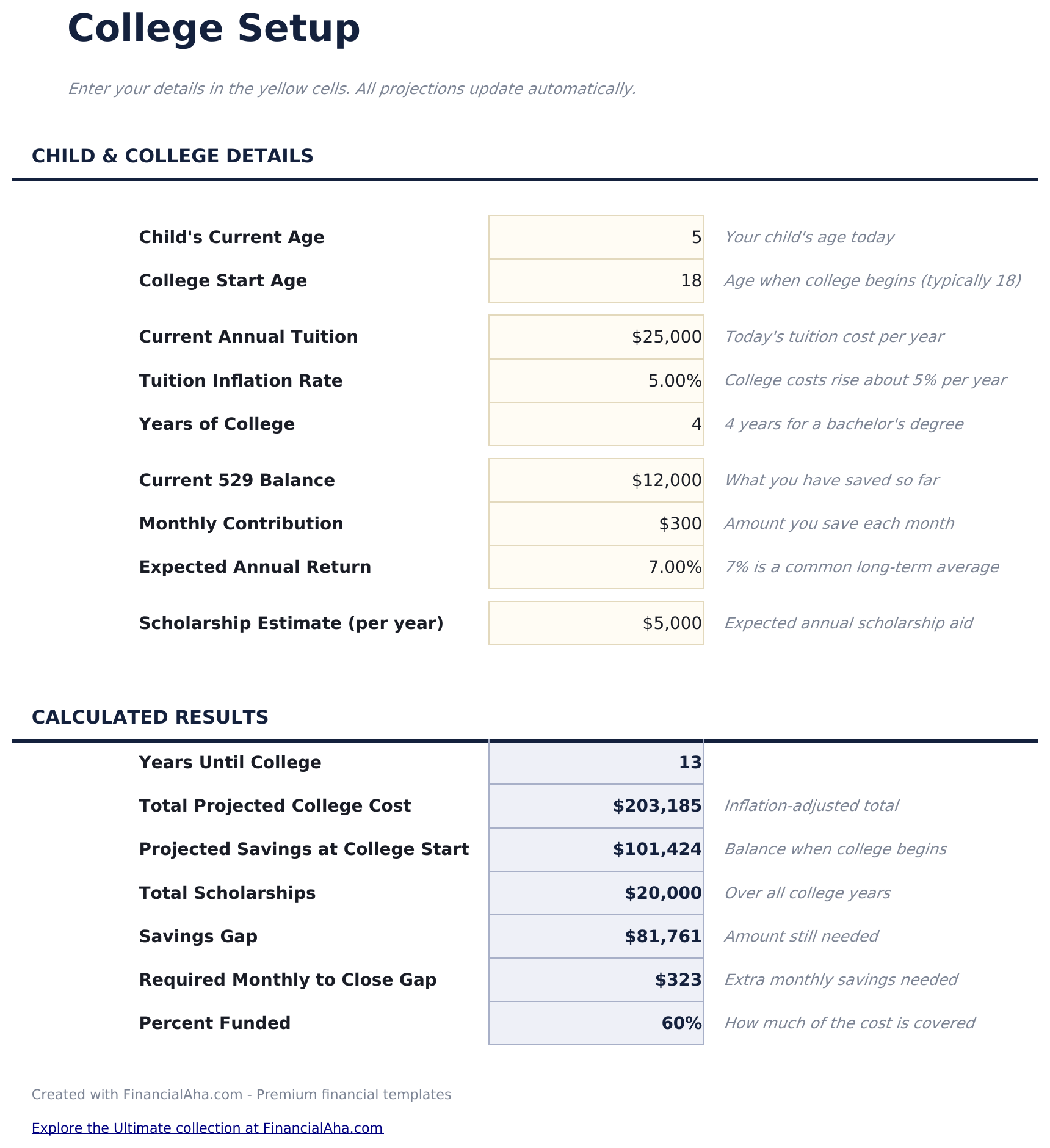
  • The child's age today and at college start, driving the whole projection
  • An existing balance counted alongside the monthly contribution
  • A scholarship estimate taken off the total
  • A total cost built as an inflating series
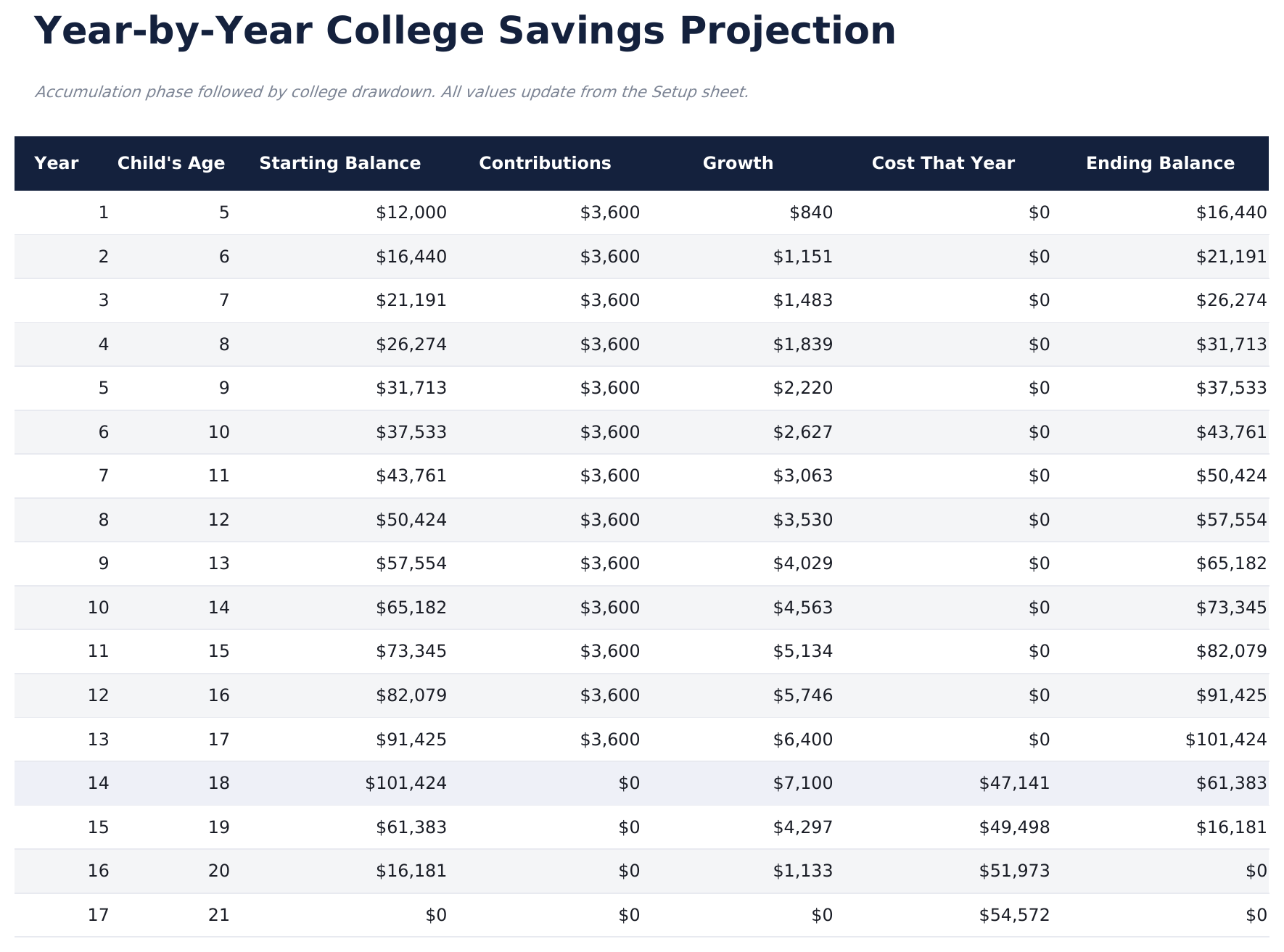
  • A year-by-year table running through college, not stopping at eighteen
  • A savings gap floored at zero rather than reporting a negative shortfall
  • Rows that blank themselves beyond the horizon
  • The monthly contribution that would close the gap, worked out for you
  • A percent-funded figure, capped at a hundred rather than running past it
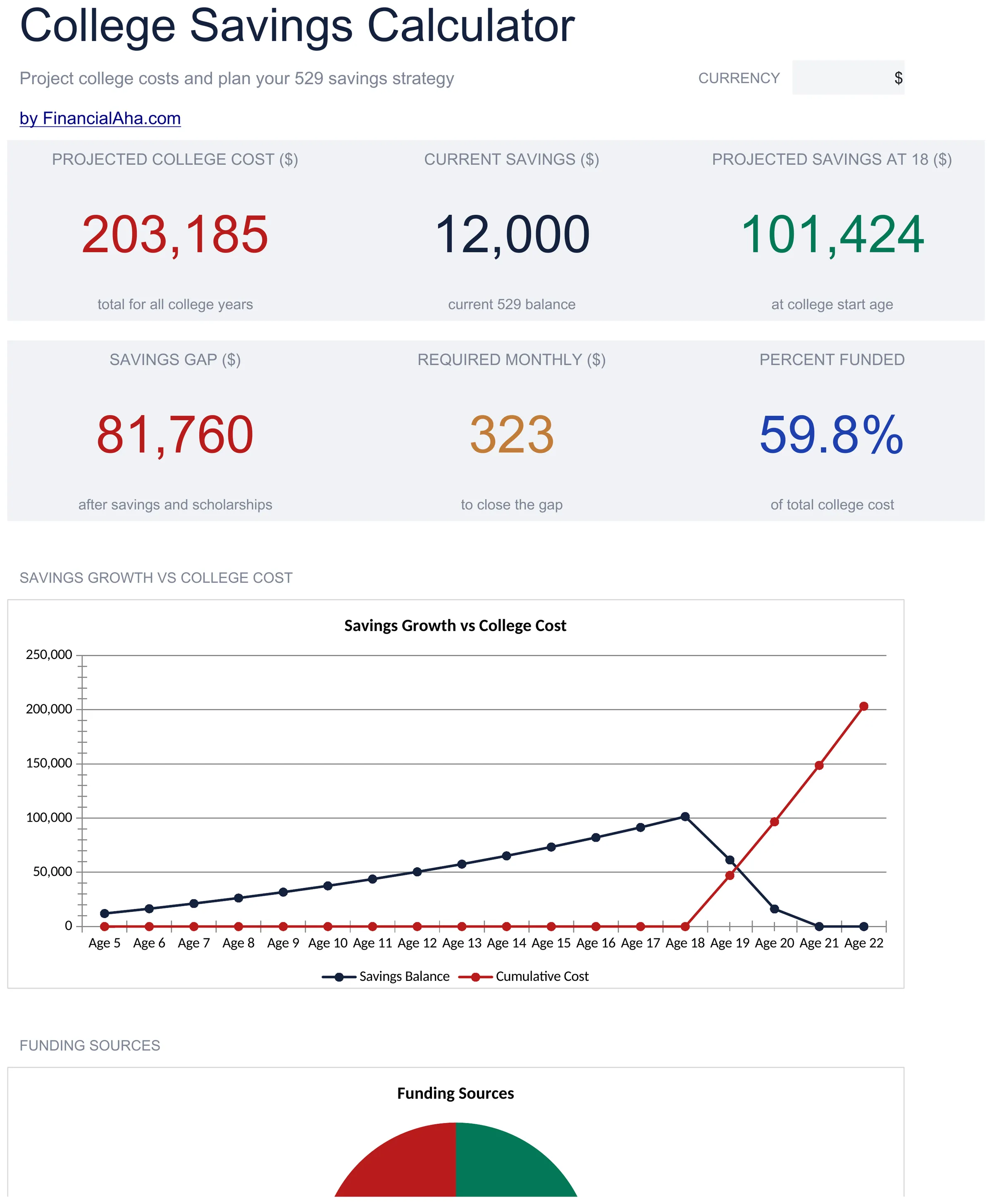
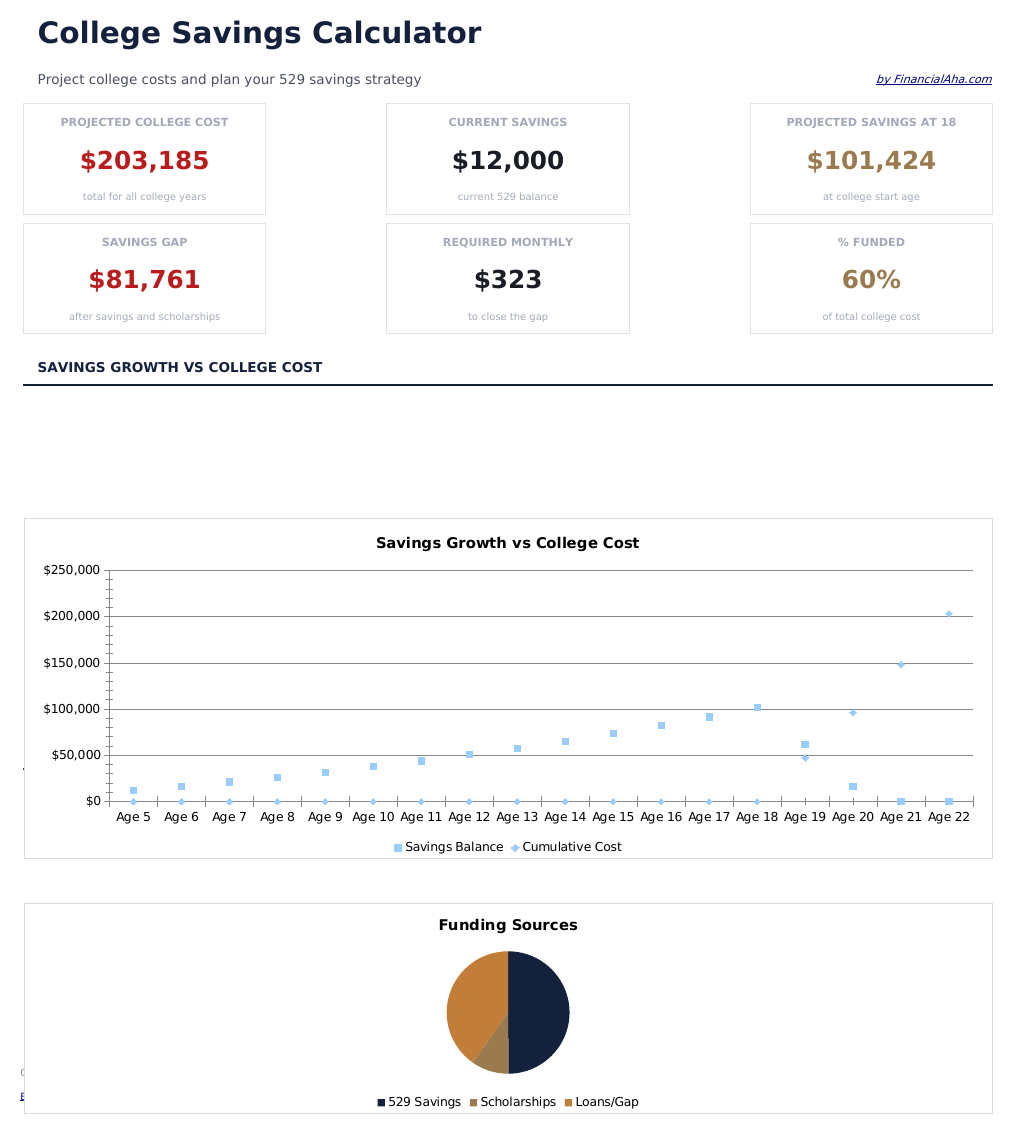
  • A dashboard with six headline figures
  • A line chart of savings against cost, and a pie splitting the funding sources
  • A currency dropdown that relabels the money columns across every sheet
  • Works in Microsoft Excel and Google Sheets with no setup required
Ultimate Version Available

Need more from this template?

The Essentials Spreadsheet Template covers everyday tracking. The Ultimate Spreadsheet Template gives each part of the template its own sheet, with more capacity and deeper reporting on top.

See what's in the Ultimate version One-time purchase. No subscription.

The FinancialAha Essentials College Savings Calculator Spreadsheet Template is a three-sheet workbook for Google Sheets and Excel, with a How to Use guide on a fourth tab. It works as an Essentials College Savings Calculator Excel template and an Essentials College Savings Calculator Google Sheets template from the same download. What you already have counted in, scholarships estimated, and a year-by-year projection that runs through college rather than stopping at the door. No macros, no VBA.

Inside the workbook

What's inside the FinancialAha Essentials College Savings Calculator spreadsheet template

The FinancialAha Essentials College Savings Calculator Spreadsheet Template runs on three working sheets, with the instructions on a tab of their own. It works in both Microsoft Excel and Google Sheets and here is what the Essentials College Savings Calculator spreadsheet holds.

  1. 01 of 03

    College Setup

    Everything the projection reads, in one place: the child's age now and at college start, the tuition today with an inflation rate and a number of years, what is already saved with a monthly contribution and an expected return, and an estimate of annual scholarship aid. The results underneath run from the position to what to do about it. The total projected cost - an inflating series, so the later years cost more than the first. What the savings will have become by the first day. What scholarships take off. The gap between them, floored at zero rather than reporting a negative shortfall when the plan is ahead. Then the monthly contribution that would close that gap, and how much of the whole cost is funded already. That monthly figure is the one worth having. It is a contribution compounding at the return you set over the years remaining, rather than the gap divided by the number of months - which is why it comes out lower than the plain division, and why it moves so sharply with the child's age. The scholarship line is worth using even as a guess. Left at zero it makes the gap look larger than the likely outcome; set to something honest it makes the number a family can actually work with. What it should be is nobody else's call.

  2. 02 of 03

    Projection Table

    A row per year from the child's current age through the last year of college, each with the balance it started at, the contributions, the growth, the cost that year, and the balance it ended with. Running the table through college rather than stopping at eighteen is the part that changes the answer. A fund is not spent on the first day; it keeps earning while it is being drawn down, and four years of that is not a rounding error. A calculator that stops at the door overstates what is needed. Rows beyond the horizon blank themselves rather than filling with zeros, so a five-year-old and a fifteen-year-old both get a table the right length.

  3. 03 of 03

    Dashboard

    Six figures read from the sheets beneath. The total cost for all college years, the balance today and what it becomes by college start on the top row; the gap left after savings and scholarships, the monthly contribution that would close it, and how much of the whole cost is funded on the second. The required monthly figure is the one to read last and act on first. Everything above it describes the position; that one says what closing it would take, worked out as a contribution compounding at the return you set rather than the gap divided by the months. Two charts: a line running the savings balance against the cost as it accumulates, and a pie splitting the funding into what the fund covers, what scholarships cover and what is left over.

  4. Included guide

    How to Use

    A step-by-step guide on its own tab, covering what each input drives, how the projection is built, and how to change the currency. Because it ships inside the file, the instructions travel with the template wherever it is opened.

Works in both Google Sheets and Excel

Essentials College Savings Calculator Spreadsheet template for Google Sheets

Upload the Essentials College Savings Calculator Spreadsheet Template to Drive, right-click it, and choose "Open with Google Sheets". This Essentials College Savings Calculator Google Sheets template needs no conversion step and both charts come across intact.

Essentials College Savings Calculator Google Sheets template setup

A shared copy of the Essentials College Savings Calculator Google Sheets template suits two parents, since the assumptions are the part worth settling in writing rather than remembering differently.

Running the Essentials College Savings Calculator Google Sheets template

The Essentials College Savings Calculator Google Sheet is revisited when a contribution or an assumption changes rather than on a schedule.

Essentials College Savings Calculator Spreadsheet template for Excel

The Essentials College Savings Calculator spreadsheet Excel download is a plain .xlsx. Excel opens this Essentials College Savings Calculator Excel template directly, with no import step, and both charts are native Excel charts. There are no macros and no VBA in the file.

Essentials College Savings Calculator Excel template setup

The same Essentials College Savings Calculator Excel template opens in Excel on Windows, Excel on Mac, and Excel for the web. It is also the identical file you would upload to Drive, so there is no separate Essentials College Savings Calculator spreadsheet download to choose between.

Essentials College Savings Calculator spreadsheet template notes for Excel

The Essentials College Savings Calculator spreadsheet Excel file carries no macros and no VBA, so Excel opens it without a trust prompt.

Opening the Essentials College Savings Calculator spreadsheet Excel file

Nothing in the Essentials College Savings Calculator Excel template is version-specific, so this Essentials College Savings Calculator spreadsheet Excel workbook behaves identically in Excel on Windows, Excel on Mac, and older builds.

Spreadsheet template highlights

What the Essentials College Savings Calculator spreadsheet template tracks

The projection runs a row per year. This is what each year records:

Year
the number, counting from now
Child's Age
which is what makes the table readable at a glance
Starting Balance ($)
what the fund held at the start of that year
Contributions ($)
what went in during it
Growth ($)
what the balance earned at the rate you set
Cost That Year ($)
what college takes out, once the years begin
Ending Balance ($) auto
derived, and the next year's starting figure

Compare builds

FinancialAha College Savings Calculator spreadsheet template: Free, Essentials, and Ultimate compared

Feature Free View Spreadsheet Template Essentials This page Ultimate View Spreadsheet Template
Working sheets 1 3 6
Children planned for One One Three
Year-by-year projection Yes Yes
Existing balance counted Yes Yes
Scholarships estimated Yes
Cost projected per college year Yes Its own sheet
Monthly needed to close the gap Yes A contribution planner
Percent funded Yes
Account types compared Three
Charts 2 2

The Free College Savings Calculator Spreadsheet Template takes five inputs and assumes you start from nothing. The FinancialAha Essentials College Savings Calculator Spreadsheet Template counts what you already have, estimates scholarships, runs a year-by-year projection that continues through college rather than stopping at the first day, and turns the gap it finds into the monthly contribution that would close it. The Ultimate College Savings Calculator Spreadsheet Template plans for two children at once, gives the cost projection its own sheet, compares three account types after tax, and carries a contribution planner.

Good to know

Notes on working in the Essentials College Savings Calculator spreadsheet template

  • The projection runs through college rather than stopping at eighteen, because a fund keeps earning while it is drawn down.
  • The total cost is an inflating series, so the later years cost more than the first.
  • The savings gap floors at zero rather than reporting a negative shortfall when the plan is ahead.
  • The scholarship line is worth an honest guess - left at zero it makes the gap look larger than the likely outcome.
  • Rows beyond the horizon blank themselves, so a five-year-old and a fifteen-year-old get tables the right length.
  • The required monthly figure compounds at the return you set over the years remaining, so it is smaller than dividing the gap by the months - and it rises steeply as those years run out.
  • Percent funded is capped at a hundred, so a plan that is comfortably ahead reads fully funded rather than a figure above it.
  • The currency dropdown on the dashboard relabels the money columns across every sheet. It changes the label only and does not convert the numbers.

How to Use the Essentials College Savings Calculator Spreadsheet Template

1

Enter the ages

Today's age, and the age college begins.

2

Set the tuition

Today's cost, the inflation rate and the years.

3

Add your savings

Balance, monthly contribution and expected return.

4

Read the gap

Cost less savings less scholarships.

Stress-tested with AI.

Every template starts with deep research into how people actually track the topic. We design the layout, build the formulas, and polish the design until it feels like something we would use ourselves. Along the way, we use AI to stress-test the calculations: unusual inputs, edge cases, and formula behavior, checked until the numbers hold.

See Ultimate Spreadsheet Template

Instant digital delivery · Terms & Conditions apply

Frequently Asked Questions

Is the FinancialAha Essentials College Savings Calculator Spreadsheet Template a Google Sheets template?

Yes. Upload the file to Drive and choose "Open with Google Sheets". The Essentials College Savings Calculator Google Sheets template needs no conversion step and both charts come across intact.

Is the FinancialAha Essentials College Savings Calculator Spreadsheet Template an Excel template?

Yes. The download is a plain .xlsx, so the Essentials College Savings Calculator Excel template opens directly in Excel with no import step, and both charts are native Excel charts.

Will the FinancialAha Essentials College Savings Calculator spreadsheet Excel file open in older versions of Excel?

Yes. The Essentials College Savings Calculator spreadsheet Excel workbook ships as a plain .xlsx, so it opens identically in current Excel and in builds that predate dynamic arrays.

Why does the projection continue through college?

Because a fund is not spent on the first day. It keeps earning while it is being drawn down, and four years of that is not a rounding error - a calculator that stops at the door overstates what is needed.

What does the scholarship line do?

Comes off the total before the gap is worked out. Left at zero it makes the gap look larger than the likely outcome; what it should be is nobody else's call.

What happens if the plan is already ahead?

The savings gap reads zero rather than reporting a negative shortfall.

Does the table adjust to the child's age?

Yes. Rows beyond the horizon blank themselves, so a five-year-old and a fifteen-year-old both get a table the right length.

Does the FinancialAha Essentials College Savings Calculator spreadsheet compare account types?

No. It plans the fund. A comparison of a 529, a taxable brokerage account and an UTMA or UGMA after tax is on the Ultimate build.

How do I open the Essentials College Savings Calculator spreadsheet template in Google Sheets?

Upload the .xlsx file to Google Drive, then open it with Google Sheets. All formulas and formatting will be preserved.

More Essentials Savings & Retirement Templates

Essentials

Highlights:

Dashboard with charts and KPIs
Pre-filled categories and sample data
No sign-up, no subscription
Lifetime free updates
Works in
Excel Google Sheets

Looking for premium spreadsheet templates?

Our paid templates include advanced multi-sheet dashboards, native Excel charts, and ongoing updates.

Private & secure

Your financial data stays on your device. We never see it.

Learn more →

Need help?

Check our guides or reach out with questions.

View FAQ →