Best Value Complete Financial Planning Bundle
✓ Financial Planning✓ Net Worth Tracker✓ Monthly Budgeting✓ Travel Budget Planner✓ Annual Budgeting Planner✓ Monthly Expense Tracker✓ Annual Tax Planner✓ Retirement Planning
View Bundle →
Essentials Template - Excel & Google Sheets

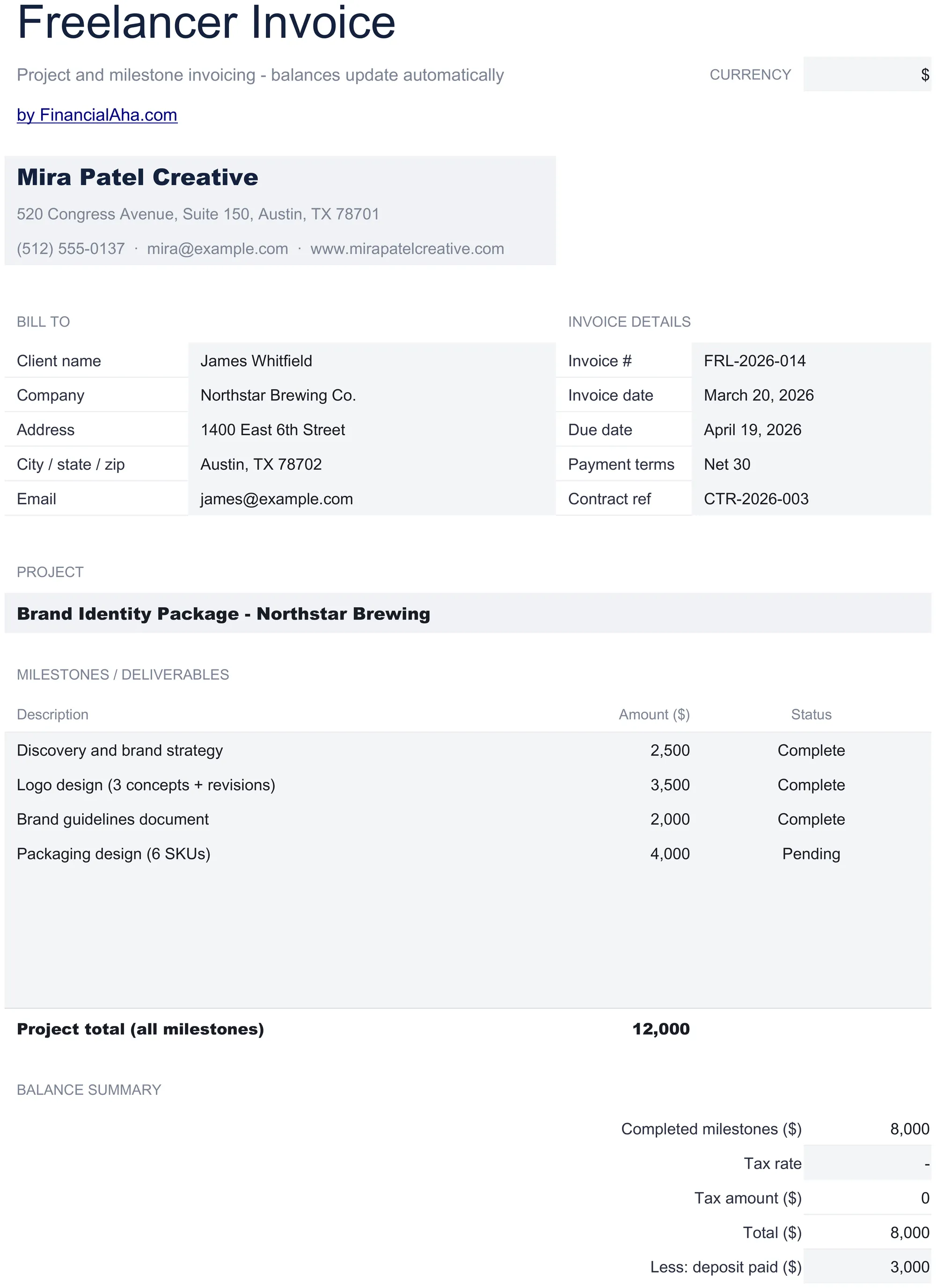
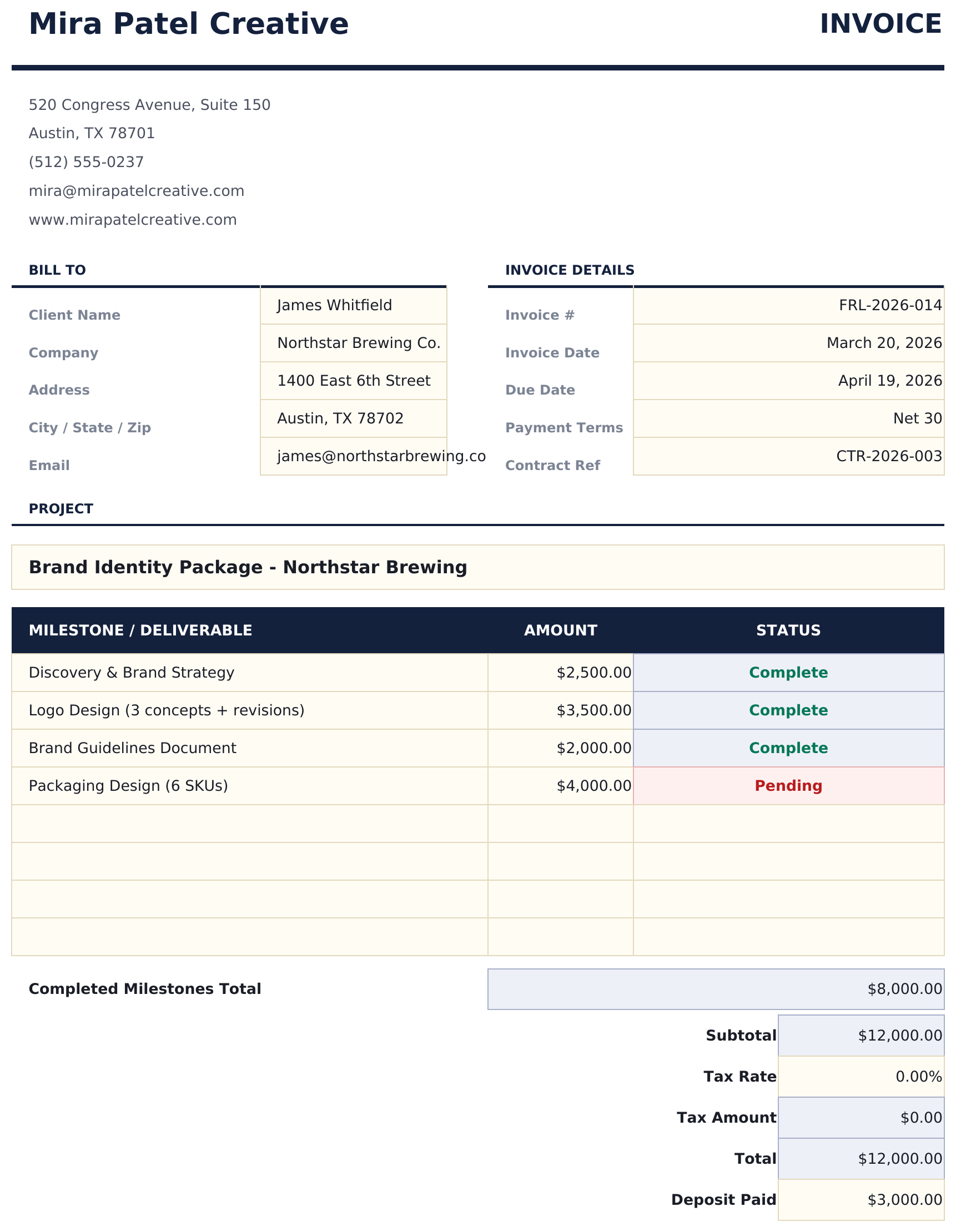
Freelancer Invoice Essentials Template

Invoice template for freelance work with support for milestone and project-based billing. Clean layout with flexible line item descriptions.

Freelancer Invoice preview

What's Included

  • Freelancer-friendly invoice layout supporting both hourly billing and flat-rate project-based pricing
  • Project and milestone billing support with description fields for deliverables, phases, and completion status
  • Flexible rate and amount fields - enter hourly rate with hours or a flat project fee per line item
  • Payment terms and due date section with fields for payment method, late fee policy, and notes to client
  • Automatic total calculations with print-ready formatting and color-coded input cells for quick invoicing
  • Works in Microsoft Excel, Google Sheets, and LibreOffice Calc with no setup required

How to Use This Freelancer Invoice Template

1

Add your details

Enter your name or business name, address, and contact information in the header. Add invoice number and date.

2

Enter project details

Describe each deliverable or milestone with a description and amount. Use hourly rate with hours or a flat project fee.

3

Set payment terms

Fill in the due date, accepted payment methods, and any late fee policy in the payment terms section.

4

Send to client

Review the total, add any notes, and export to PDF or print for the client.

Customer Reviews

What Our Customers Say

"If I get half as good at handling my finances as you are at customer service, this'll be the best $26 I've spent lately."

J Jenny Verified Buyer

"Great tool! Simplifies financial planning without the hassle of complex spreadsheets."

F Fazia Search Marketing Manager

"I recently purchased your super convenient spreadsheet, it really helps me!"

J John Verified Buyer

"They're great and super intuitive. Thank you!"

M Mira Verified Buyer

Built by Claude AI. Perfected by us.

We use Claude AI to draft each template, after a deep research. Then our team steps in. We refine the layout, stress-test every formula, fix edge cases, and polish the design until it feels like something we would actually use ourselves. The AI gets us 80% there. The last 20% is all human judgment.

Frequently Asked Questions

Can I bill by milestone instead of hours?

Yes. Enter each milestone as a line item with a flat fee. Leave the hours column blank or enter 1 with the full milestone price as the rate.

How do I handle partial payments?

Create separate invoices for each payment milestone, or note the partial payment terms in the notes section of a single invoice.

Can I add a late fee notice?

Yes. The payment terms section includes a field for late fee policy. Common approaches include a percentage per month on overdue balances.

Does it work for recurring clients?

Yes. Create a new invoice for each billing period or project. Increment the invoice number and update the dates and line items.

How do I open this in Google Sheets?

Upload the .xlsx file to Google Drive, then open it with Google Sheets. All formulas and formatting will be preserved.

More Essentials Invoicing & Billing Templates

Essentials 37% off
Preview $19 37% off

Highlights:

Dashboard with charts and KPIs
Pre-filled categories and sample data
No sign-up, no subscription
Lifetime free updates
Works in
Excel Google Sheets

Looking for premium spreadsheet templates?

Our paid templates include advanced multi-sheet dashboards, native Excel charts, and ongoing updates.

Private & secure

Your financial data stays on your device. We never see it.

Learn more →

Need help?

Check our guides or reach out with questions.

View FAQ →