Mejor valor Paquete Todo-en-Uno de Planificación Financiera
✓ Planificación Financiera✓ Rastreador de Patrimonio Neto✓ Presupuesto Mensual✓ Planificador de Presupuesto de Viaje✓ Planificador de Presupuesto Anual✓ Rastreador de Gastos Mensuales✓ Planificador de Impuestos Anual✓ Planificación de Jubilación
Ver paquete →
Plantilla Essentials - Excel y Google Sheets

Simple Budget Worksheet Plantilla Essentials

A minimal, beginner-friendly budget worksheet. List income and expenses, see the balance - nothing more, nothing less.

Simple Budget Worksheet preview

Qué incluye

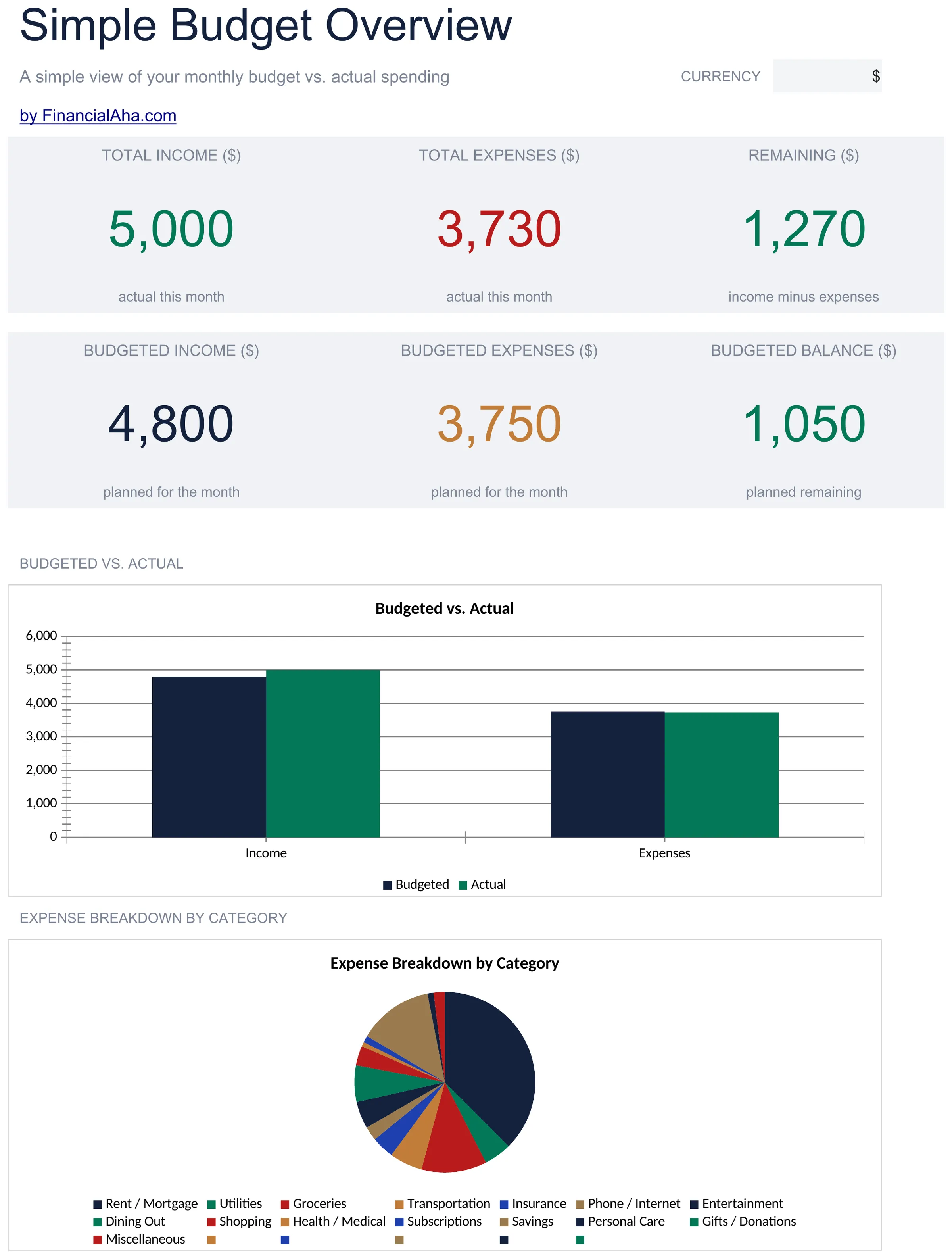
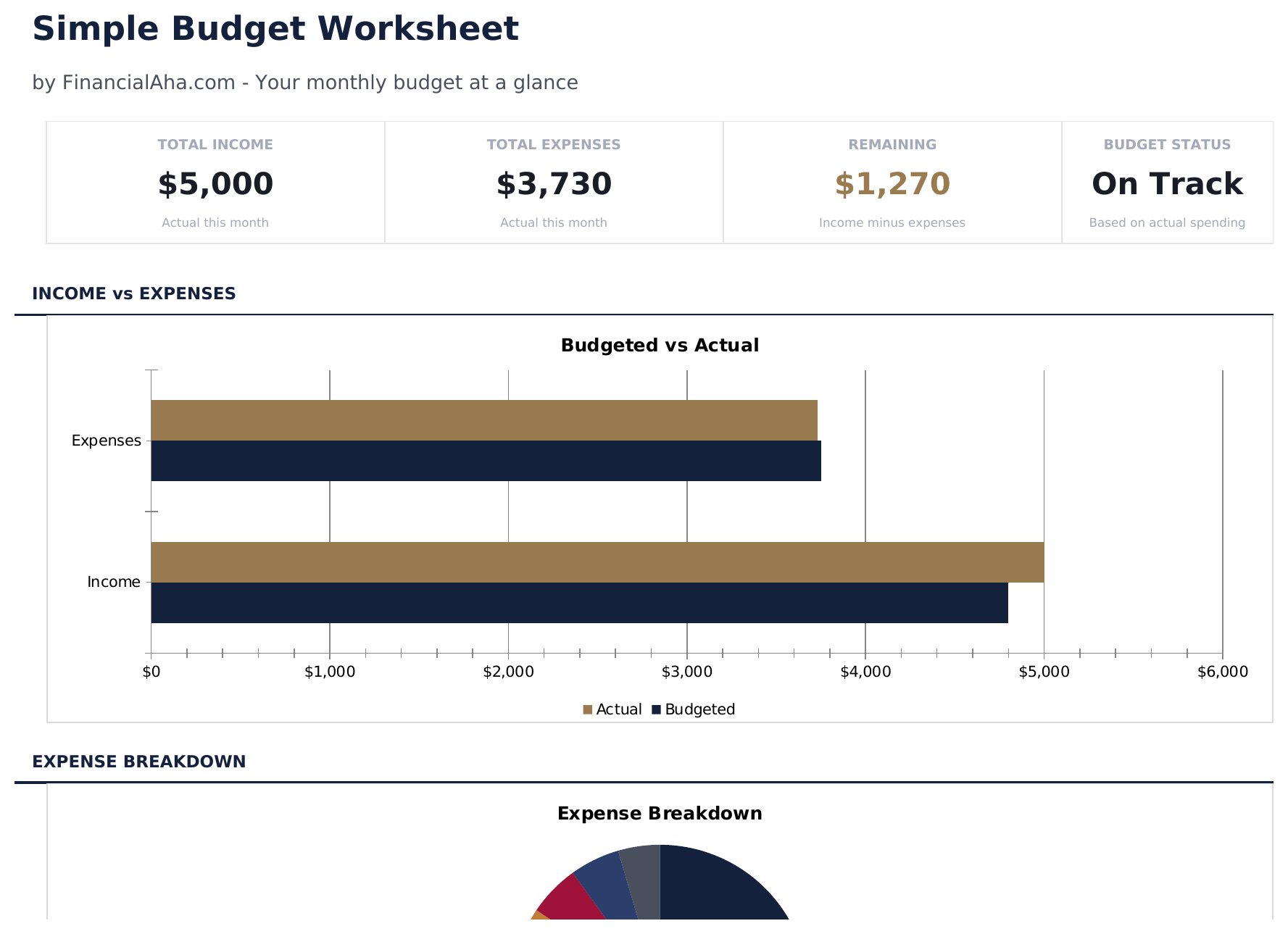
  • Dashboard with simple income vs. expense view showing total income, total spending, and net balance
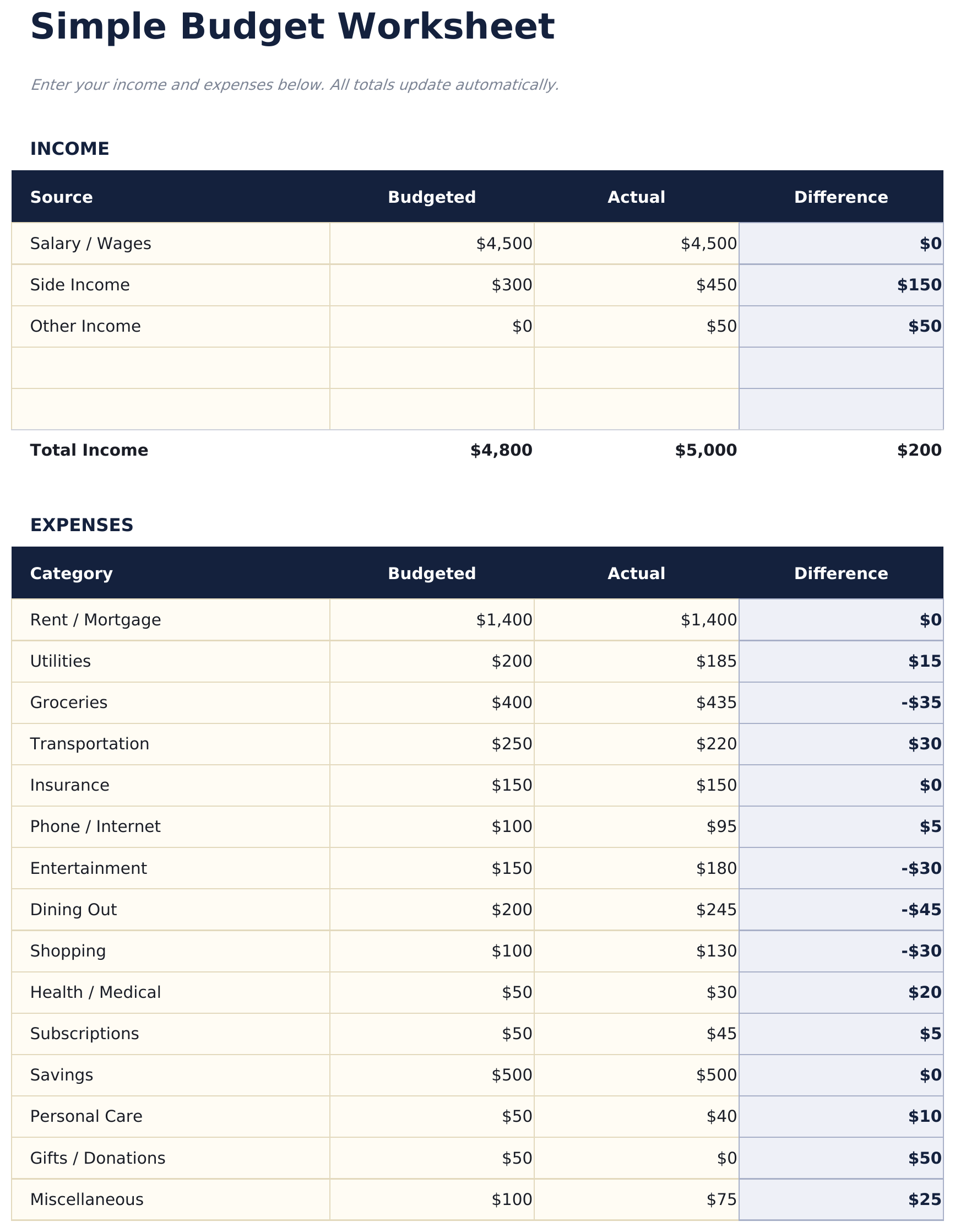
  • Minimal budget worksheet with just two sections - income sources and expense categories
  • Pre-filled common categories including rent, utilities, groceries, insurance, and transportation
  • Automatic balance calculation that shows whether monthly income covers all listed expenses
  • Color-coded input cells (yellow) and auto-calculated result cells (blue) for beginner-friendly entry
  • Works in Microsoft Excel, Google Sheets, and LibreOffice Calc with no setup required

Cómo usar esta plantilla de Simple Budget Worksheet

1

List your income

Enter all income sources - salary, side income, or any other earnings. The template keeps it to one simple section.

2

List your expenses

Fill in the pre-built expense categories with your monthly amounts. Common items like rent, groceries, and utilities are already listed.

3

Check the balance

The net balance at the bottom shows income minus expenses. A positive number means surplus; negative means overspending.

4

Adjust as needed

If the balance is negative, review expenses to find areas where spending could be reduced. All totals update automatically.

Creadas por Claude AI. Perfeccionadas por nosotros.

Usamos Claude AI para crear el borrador de cada plantilla, después de una investigación profunda. Luego nuestro equipo interviene. Refinamos el diseño, probamos cada fórmula a fondo, corregimos casos especiales y pulimos el diseño hasta que se siente como algo que realmente usaríamos nosotros mismos. La IA nos lleva al 80%. El último 20% es criterio humano.

Preguntas frecuentes

How is this different from other budget templates?

This is the most minimal option - just income, expenses, and a balance. No dashboards, no charts, no percentages. It is a starting point for people who want simplicity.

Can I add more expense categories?

Yes. Insert new rows above the totals row and enter your additional categories. The SUM formulas adjust to include new rows automatically.

Does it track monthly or weekly?

The template is set up for monthly tracking. You can use it weekly by entering weekly amounts - just be consistent with the time period across all entries.

Is there a savings category?

There is a savings row in the expense section. Treating savings as an expense ensures it is accounted for before discretionary spending.

¿Cómo abro esto en Google Sheets?

Sube el archivo .xlsx a Google Drive y luego ábrelo con Google Sheets. Todas las fórmulas y el formato se conservarán.

Más plantillas Essentials de Personal Budgeting

¿Buscas plantillas premium?

Nuestras plantillas de pago incluyen paneles avanzados con múltiples hojas, gráficos nativos de Excel y actualizaciones continuas.

Privado y seguro

Sus datos financieros permanecen en su dispositivo. Nunca los vemos.

Saber más →

¿Necesita ayuda?

Consulte nuestras guías o contáctenos con preguntas.

Ver FAQ →