
YNAB lists at $109/year; the four-rule method behind it maps to cells you can build in Google Sheets. Give Every Dollar a Job becomes an income-minus-allocations check, True Expenses become monthly funding lines, Roll With the Punches becomes a pair of edited budget cells, and Age Your Money becomes a days-of-expenses calculation. Our Monthly Budget Template covers the first rule with a Zero-Based block on its Summary and planned-versus-actual targets per category, for $29 once.
YNAB is a good product. The method is the value, not the software. If you understand the four rules, a spreadsheet implements them as well as the app does, at a fraction of the cost. This post walks through each rule and shows the cell-level structure that replaces it.
YNAB’s four rules
For people new to YNAB, here’s the thumbnail version.
- Give Every Dollar a Job. Take all the money you have available and assign each dollar to a category before you spend it. The “to be budgeted” or “ready to assign” amount should reach zero.
- Embrace Your True Expenses. Treat irregular expenses (annual insurance, holidays, car repair) as monthly funding into a category, so they don’t surprise you when they hit.
- Roll With the Punches. When you overspend a category mid-month, move money from another category to cover it. Don’t ignore the overspend; reallocate.
- Age Your Money. Aim to spend money you earned at least 30 days ago. Increases the buffer between income and spending so timing surprises don’t break the budget.
YNAB enforces these in software. The spreadsheet implements them in cells. Same outcomes; different mechanics.
Cost over time
YNAB lists at $109/year, or $14.99/month billed monthly. The Monthly Budget Template is $29 paid once. Over any horizon longer than a few months the gap only widens.
| Tool | Year 1 | Year 5 | Year 10 |
|---|---|---|---|
| YNAB ($109/yr) | $109 | $545 | $1,090 |
| FinancialAha Monthly Budget ($29 once) | $29 | $29 | $29 |
After year 1 the spreadsheet costs less than two months of YNAB. Over 10 years it’s under 3 percent of YNAB’s total cost. The trade-off: YNAB’s UX is more polished and the iOS/Android apps are nicer.
Rule 1: Give Every Dollar a Job
YNAB’s “to be budgeted” amount must equal zero before the month starts. Every dollar of income gets assigned to a category.
Spreadsheet implementation:
A cell at the top of your monthly sheet:
Available to budget = (Cash on hand at month start + Income this month) - SUM(All category allocations)Below that, a row per category with an Allocated column. As you fill in allocations, the Available to budget cell drops. When it hits zero, you’re done allocating.
| Category | Allocated |
|---|---|
| Rent | 2,400 |
| Utilities | 200 |
| Groceries | 950 |
| Dining | 350 |
| Transportation | 250 |
| Entertainment | 150 |
| Subscriptions | 100 |
| Health | 80 |
| Personal care | 100 |
| Gifts | 100 |
| Travel reserve | 200 |
| Home maintenance reserve | 150 |
| Vehicle maintenance reserve | 75 |
| Emergency fund | 400 |
| 401(k) contribution | 1,650 |
| Roth IRA contribution | 600 |
| Brokerage | 500 |
| Total allocated | 8,255 |
If “available to budget” doesn’t reach zero after this allocation, either you have leftover income (assign more to savings) or you over-allocated (cut something). Either way, the rule is enforced by the cell.
Our Monthly Budget Template runs the same arithmetic in the Zero-Based block on its Summary sheet: income minus expenses minus savings, with the remainder shown as unallocated until it reaches zero, where the block reads On Track.
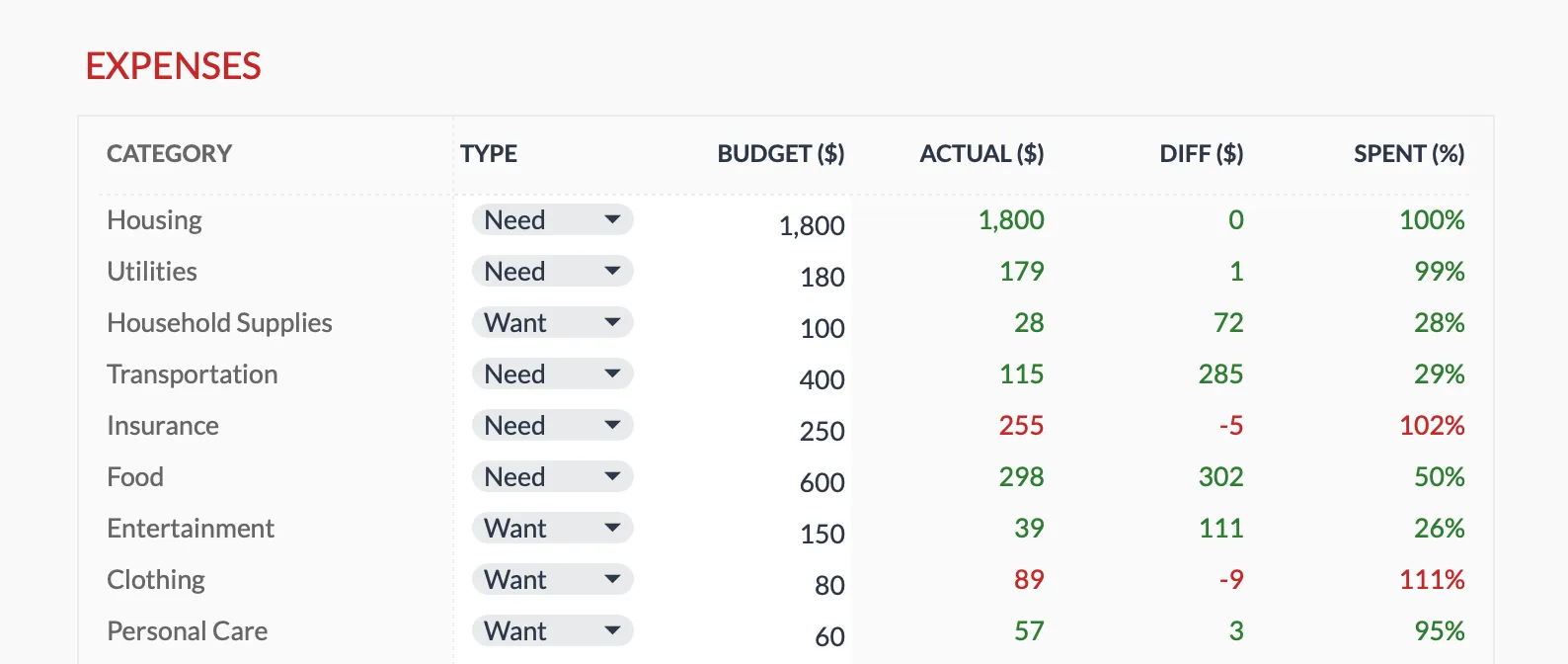
The Monthly Budget Template (Premium tier) tracks each category’s budget against actual spend, with the difference and percent-spent updating as you enter transactions.
Rule 2: Embrace Your True Expenses
YNAB calls these “true expenses” or “monthly average obligations.” The idea: treat a $1,200 annual car insurance payment as $100/month into a Car Insurance category. When the bill hits, you have the money already.
Spreadsheet implementation:
A “sinking funds” section in your monthly allocation. Each row is an irregular expense, with three columns: Annual amount, Monthly funding (annual / 12), Current balance.
| Sinking fund | Annual | Monthly | Balance YTD |
|---|---|---|---|
| Auto insurance | 1,400 | 117 | 467 |
| Property tax | 7,000 | 583 | 2,332 |
| Holidays | 2,000 | 167 | 668 |
| Travel reserve | 2,400 | 200 | 800 |
| Home maintenance | 1,800 | 150 | 600 |
| Vehicle maintenance | 900 | 75 | 300 |
| Annual subscriptions (Adobe, Costco) | 600 | 50 | 200 |
| Total monthly funding | 1,342 | 5,367 |
Each month, the Monthly column gets allocated alongside your regular categories. The Balance YTD increments. When the bill hits, you draw from the balance.
This single section eliminates most of the “surprise” spending that wrecks budgets. It’s the highest-use YNAB rule.
Rule 3: Roll With the Punches
You overspent dining by $80 this month. YNAB makes you move $80 from another category (entertainment, gifts, travel reserve) to cover it. The total stays balanced.
Spreadsheet implementation:
A “Move from / Move to” log on your monthly sheet. When a category is over, log the move:
| Date | From category | To category | Amount | Notes |
|---|---|---|---|---|
| 2026-05-22 | Entertainment | Dining | 80 | Restaurant overspend |
Then update the Allocated column for both categories accordingly. Entertainment drops by 80; Dining rises by 80. Total allocations unchanged; the rule is honored.
Some users handle this with a single “buffer” category that absorbs all moves. The downside is you lose visibility into which categories are consistently over. The category-by-category move is more disciplined.
Rule 4: Age Your Money
YNAB’s most aspirational rule. Track how old the money you’re spending is. The goal: 30 days plus, ideally 60 days plus.
Spreadsheet implementation:
A single calculation:
Age of money = Current cash balance / Average monthly spendingIf your cash balance is $9,000 and your average monthly spending is $7,500, your age of money is approximately 36 days.
In a spreadsheet, two cells:
- B1: Current cash balance (manual update or formula linking to balance sheet)
- B2: 3-month rolling average spending (
=AVERAGE(prior 3 months total spending)) - B3: Age of money in days (
=B1 / B2 * 30)
That’s it. The rule turns from a vague intent into a number you watch over time.
Putting it all together: a worked month
Beth uses our Monthly Budget Template and works zero-based. May 2026:
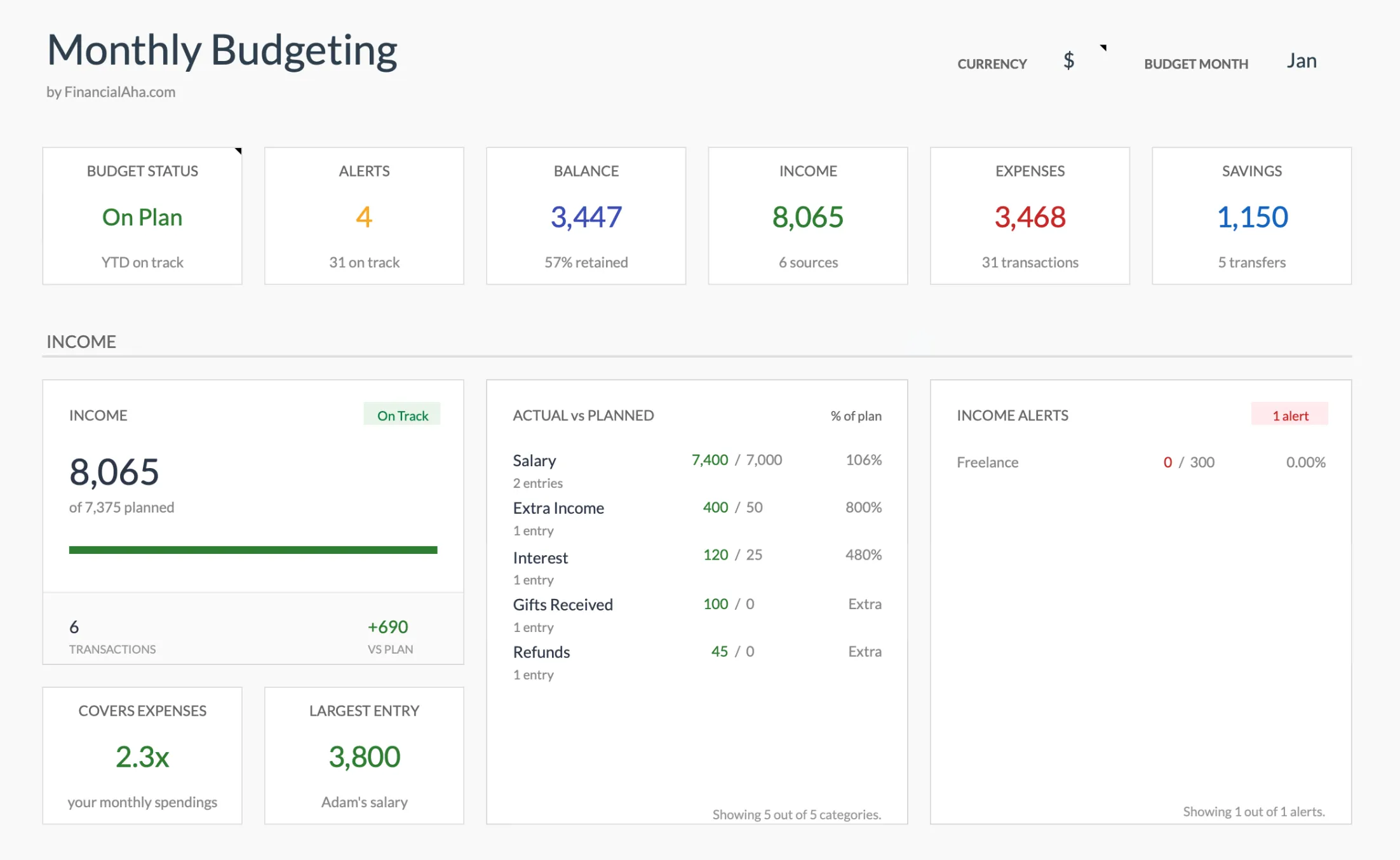
The Summary rolls the month up into status tiles and a planned-versus-actual view, with the 50/30/20 and Zero-Based blocks further down the same sheet.
Income: $7,200 take-home (one paycheck)
Available to budget: $7,200
Allocations (Rule 1):
- Regular categories: $5,700
- Monthly funding for the irregular ones (Rule 2): $1,342
- Savings: $158
- Zero-based result: $0, so the Summary block reads On Track
Mid-month, May 18: Food is at $310 against a budget of $250. Beth raises the Food budget to $310 and drops Entertainment from $100 to $40 on the Budget Plan sheet (Rule 3). The totals are unchanged, so the Zero-Based block still reads On Track.
End of month: Every category shows its budget, actual, difference and percent spent. The funds Beth treats as sinking funds sit on the Goals sheet, which carries a target, the amount saved before this month, this month’s contribution, the current total, what remains and progress percent for each one. Age of money is not in the template, so it lives in a spare cell: $5,840 of cash against $6,890 of average monthly spending is about 25 days.
The whole flow took maybe 25 minutes of attention across the month. Same time investment as YNAB; same rule-following; different cost.
What YNAB does that the spreadsheet doesn’t
Honest list.
Bank sync. YNAB pulls transactions from your bank automatically. Spreadsheet requires manual entry or weekly CSV paste. For most people this is the single biggest practical difference.
Mobile UX. YNAB’s app is purpose-built for quick on-the-go entry. Google Sheets mobile is functional but generic.
Goal tracking. YNAB has a goals UI with target dates and a funding schedule for each savings goal. The spreadsheet has a Goals sheet holding a target, the amount saved, this month’s contribution, the current total, what remains and progress percent, repeated as a list on the Summary. No dates, no schedule.
Onboarding. YNAB walks new users through the rules with prompts. Spreadsheet expects you to know what you’re doing.
Family sharing. YNAB supports multi-user editing with role permissions. Google Sheets does multi-user but without the role granularity.
If any of these are deal-breakers, pay for YNAB. The cost is real but so is the polish.
What the spreadsheet does that YNAB doesn’t
Also honest.
Cost. $29 once vs $109/yr.
Customization. Want a category for “rabbit hutch maintenance” or want to track in Bulgarian leva? Categories are typed straight into the Categories sheet, and the currency symbol at the top of the Summary feeds every money label. YNAB constrains category structure and currency.
Sits alongside other financial spreadsheets. The files are separate, with no live link between them, but the Annual Budget Template is built to take monthly totals copied across from the Monthly Budget, and the Net Worth Tracker (assets, liabilities, milestones) and Annual Tax Planner (income, deductions, quarterly payments) cover the ground a one-month budget leaves out. One categorization habit, several files.
Data ownership. Your file lives in your Drive. YNAB stores your data on their servers (with bank credentials via Plaid).
Country agnosticism. YNAB is US/CA-focused. Spreadsheet works anywhere.
Migration from YNAB
If you’ve been on YNAB and want to try a one-time template, the path:
- In YNAB, export your category and budget data. YNAB allows full data export.
- Open our Monthly Budget Template.
- Copy your category list into the template’s Categories sheet.
- Copy your current month allocations into the Budget column on the Budget Plan sheet.
- Reconcile the month’s totals against YNAB to verify nothing’s missing.
- Cancel YNAB before the next billing date.
The first month using the spreadsheet feels different (you’ll miss the bank sync). After 4 to 6 weeks, the manual rhythm is set and most users don’t go back.
Where to start
The fastest way to start is a file with the categories, targets and totals already wired. Pick by how far you want the structure built out.
- Monthly Budget Template ($29 once): one month of planned versus actual, with a Summary sheet, a budget target and a Need or Want tag per category, a Zero-Based block for Rule 1 and a Goals sheet. Rules 2 to 4 are rows and cells you set up yourself.
- Budgeting Bundle: the Annual, Monthly, and Travel budget templates together, if you want the year-long view alongside the monthly one.
- Zero-Based Budget Ultimate ($29): a Budget Allocation sheet with a Remaining to Assign check, a spending log that feeds its actual column, and a Monthly History sheet tracking allocations by category group across 12 months, for the reader who leaned hardest into Rule 1.
FinancialAha’s templates are one-time purchases used by 1,000+ customers across 65+ countries, so the $29 is the last money the method costs.
Related
- Aspire Budgeting Alternative: Maintained Templates with Real Updates
- Free Monthly Budget Template for Google Sheets (2026 Edition)
- Tiller Alternative: Google Sheets Without the Subscription
- Zero-Based Budgeting Template: A Step-by-Step Tutorial
- Lunch Money Alternative: Self-Hosted Spreadsheet Workflow - another app workflow mapped into a sheet you own
Frequently asked questions
Does the spreadsheet enforce zero-based budgeting like YNAB does?
Not as a hard rule. The Summary has a Zero-Based block that takes income minus expenses minus savings and labels whatever is left as unallocated, switching to On Track when the result is zero. Nothing stops you from saving the file with money still unassigned, so the signal is the number rather than a block.
Can I sync my bank to the spreadsheet?
No. There is no bank connection and no CSV importer. Rows go into the Transactions sheet by hand, with the category picked from a dropdown that reads the Categories sheet, so a weekly session with a bank export is the closest equivalent. For bank sync, Tiller does this for $79/yr (different product, different trade-offs).
Will my YNAB data import?
There is no importer, so it is copy-paste. Category names go into the Categories sheet, planned amounts into the Budget column of the Budget Plan sheet, and past transactions into the Transactions sheet, where each row needs a category that matches the Categories list. Some remapping is usually part of that.
Does the spreadsheet handle credit card payments the way YNAB does?
No. YNAB has a specific credit-card workflow that "moves" the budgeted amount when you spend on credit, so the cash is there to pay the card later. The spreadsheet has no equivalent: a card payment is logged like any other expense, against the shipped Debt Payoff category or one you add yourself on the Categories sheet.
Can I run YNAB and the spreadsheet in parallel?
Yes. Some people do this for a transition month. After 30 days, almost everyone consolidates to one tool. The cognitive overhead of running both isn't worth it long-term.
Sources
- YNAB Pricing - You Need A Budget
About this article
YNAB pricing checked against the company's published pricing page. Template price, sheets, inputs and outputs checked on 2026-09-10 against the shipped Monthly Budgeting Google Sheet (Summary, Budget Plan, Transactions, Goals, Categories, Setup) and the Zero-Based Budget Ultimate workbook. Last reviewed September 2026.