
The best free monthly budget templates for Google Sheets in 2026 are Google's built-in Monthly Budget (Template gallery > Personal > Monthly Budget), Aspire Budgeting (zero-based envelope method, free core with an optional paid upgrade), the Reddit r/personalfinance community templates, and Vertex42's Excel-first library. They cover the basics at zero cost. When you want a dashboard, planned-vs-actual targets, and more category depth for the month you are in, the FinancialAha Monthly Budget Template is a $29 one-time upgrade.
Free is the right starting point for most people, because it costs nothing, takes ten minutes to set up, and reveals whether budgeting is actually going to work for your life before you commit any money to a paid template with more features than you’ll end up using. If the free version sits untouched for a month, that’s useful information, and you’ve only spent ten minutes finding it out.
This guide covers the four free monthly budget templates worth using in 2026, what each does well, where each runs out of room, and a clear signal for when paying $29 once is the right move.
How to access Google’s built-in template
Google ships a free Monthly Budget template inside Sheets itself. It’s the simplest way to start.
- Open sheets.google.com.
- Click Template gallery in the upper right.
- Scroll to the Personal section.
- Click Monthly Budget.
You get a single-month template with two sheets: Summary and Transactions. The categories are pre-populated (Income: Salary, Other; Expenses: Entertainment, Food, Gifts, Health, Home, Transportation, etc.). You enter expenses on the Transactions sheet, the Summary sheet rolls them up.
Total setup time: under five minutes. Total cost: zero.
The four free options worth using
Option 1: Google’s built-in Monthly Budget
Strengths
- Zero setup, zero cost.
- Clean layout. Categories that match how most people spend.
- Cloud sync, automatic save, mobile access via Google Sheets app.
Limitations
- Single month. There’s no built-in way to compare January to February without copying the file.
- No dashboard. Just a Summary sheet with category totals; no charts beyond a basic pie.
- Eight expense categories. Fine for simple tracking; cramped if you want subcategories.
- No planned vs. actual comparison. The template tracks what you spent, not what you planned to spend.
Use it if you’ve never budgeted in a spreadsheet before. It’s the lowest-friction way to find out if budgeting works for you.
Option 2: Aspire Budgeting (free core, optional paid upgrade)
Aspire Budgeting is a community-built Google Sheets template that implements the zero-based envelope method (think: YNAB in a spreadsheet). The core budget is free forever; an optional paid upgrade (Aspire Turbo) adds advanced features, but the zero-based method runs fully without it.
Strengths
- Real envelope budgeting in a spreadsheet, including monthly funding and rollover logic.
- Active community on Reddit (r/aspirebudgeting).
- Privacy-clean: no data leaves your Google Drive.
- Multiple methodologies supported (zero-based and traditional category budgeting).
Limitations
- Steep learning curve. The methodology is powerful and intimidating.
- No formal support. Issues get resolved on Reddit or not at all.
- Single methodology (envelope). If you don’t want zero-based, the template fights you.
- Update cadence depends on the maintainer’s time.
Use it if you specifically want zero-based envelope budgeting and don’t want to pay $109 a year for YNAB. See our best YNAB alternatives guide for the method-by-method comparison.
Option 3: Reddit r/personalfinance community templates
Search “budget spreadsheet” on r/personalfinance and you’ll find several user-built templates posted over the years. The most popular, often called the “PF flowchart spreadsheet” or “EngineeredTruth spreadsheet,” is a multi-sheet workbook covering budget, savings goals, and investment allocation.
Strengths
- Built by people who care deeply about personal finance, not by a marketing team.
- Often well-thought-out methodology baked into the structure.
- Reddit comment threads provide ongoing context and debate.
Limitations
- Quality varies enormously. Some are excellent; others are abandoned half-built.
- No update commitment. The original author may have moved on years ago.
- Often heavily personalized, which means parts won’t match your situation.
- No support.
Use it if you enjoy tinkering and want to start from someone else’s structure. Plan to spend an hour customizing.
Option 4: Vertex42’s free Excel templates (works in Sheets with caveats)
Vertex42 has the largest library of free budget templates online. Most are Excel-first but also work in Google Sheets after upload, with some formula breakage.
Strengths
- Massive variety. Monthly, biweekly, family, college student, holiday, project, you name it.
- Long history. Templates have been refined over 20 plus years.
- Detailed instructions on each template page.
Limitations
- Excel-first. Conditional formatting, array formulas, and VBA macros often break in Google Sheets.
- Page design is dated and ad-heavy.
- Per-template pages are thin: download and a screenshot, no walkthrough.
- No unified system. Each template is a silo.
Use it if you want a specific template (like a holiday budget or a vehicle expense tracker) that the other free options don’t cover. For monthly budgeting, the Vertex42 Monthly Budget Planner is fine but won’t surprise anyone.
Comparison table
| Template | Setup time | Methodology | Dashboard | Mobile | Planned vs. actual | Cost |
|---|---|---|---|---|---|---|
| Google built-in | 5 min | Traditional | Basic | Good | No | Free |
| Aspire Budgeting | 30 min | Zero-based envelope | Yes | OK | Partial | Free (paid upgrade optional) |
| Reddit PF templates | 60 min | Varies | Varies | Varies | Varies | Free |
| Vertex42 templates | 15 min | Traditional | Limited | OK | No | Free |
| FinancialAha Monthly Budget | 5 min | Traditional or zero-based | Full | Good | Yes | $29 one-time |
The catch with most free templates is that they’re designed to look useful on a product page but not to survive a year of actual use, which means you’ll often discover the limits at exactly the moment you need the feature that the template doesn’t have.
When free runs out of room
Free templates work until they don’t. Three signs you’ve outgrown them:
- You’re tired of copying the file every month. Single-month templates make multi-month trends hard to see. You want one workbook with rolling history.
- Your category list keeps growing. You started with eight categories and you’re now at 22 with subcategories. Free templates don’t scale here without manual restructuring.
- You want a planned vs. actual view. Most free templates are tracking-only. You want to set targets at the start of the month and see variance throughout, not just where the money went after the fact.
Signs two and three are what the Monthly Budget Template handles, at $29 once. It works one month at a time, the same as the free options, so the first sign points elsewhere: the Annual Budgeting Planner puts twelve months of plan and actual columns in a single sheet, also $29. Neither one renews.
What our paid template adds
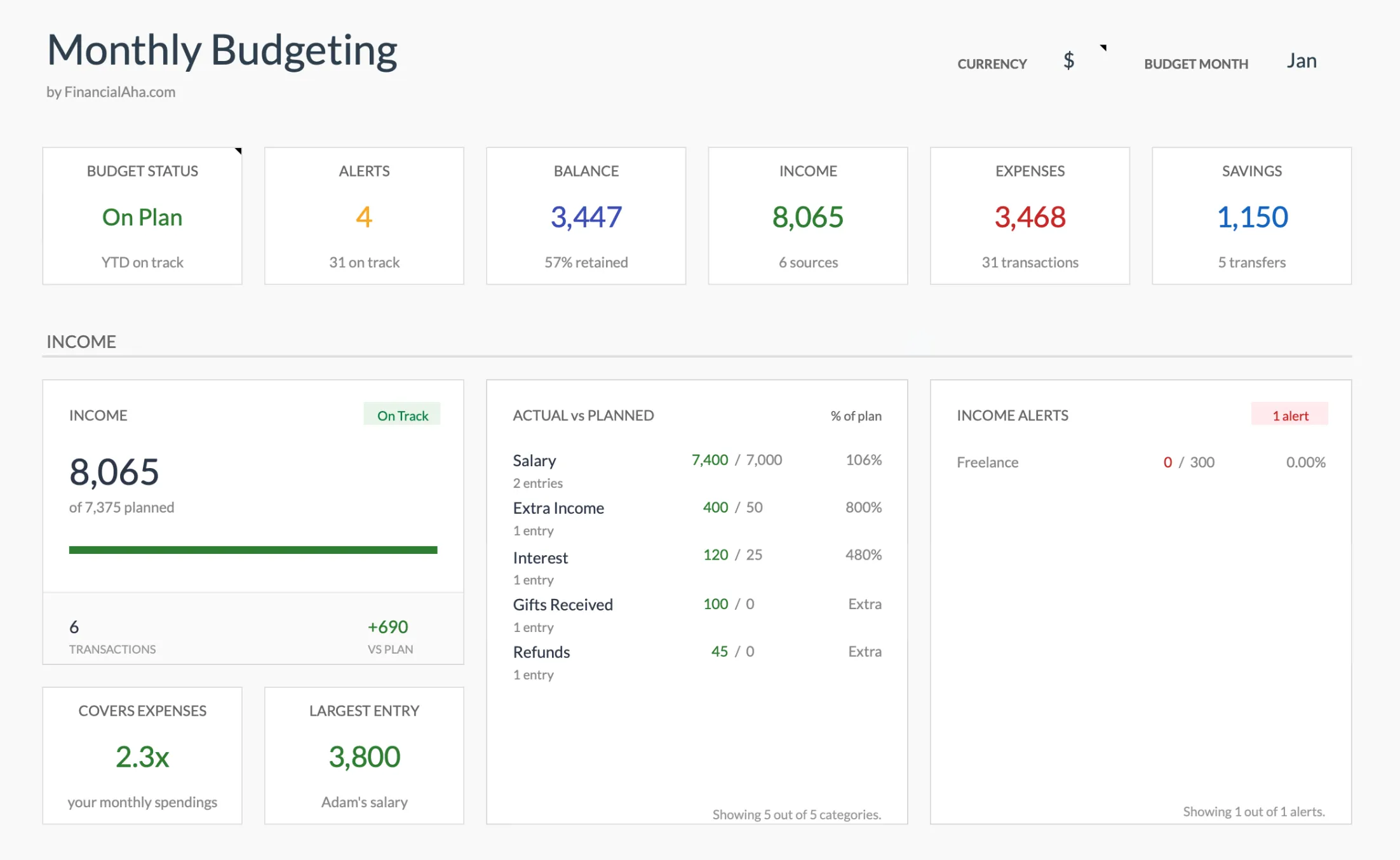 The Monthly Budget Template (Premium tier) dashboard: budget status, savings, and actual-vs-planned figures roll up automatically as you log transactions.
Honest scope. Here’s what you get for $29 that you don’t get free.
- Pre-built dashboard. Budget status, alerts, balance, income, expenses and savings tiles across the top, then actual-vs-planned figures for every category, savings and spending rate, and distribution donuts for income, expenses and savings.
- Category depth. 31 categories to start with, 17 expense, 11 income and 3 savings, all renameable on a Categories sheet that feeds the Budget Plan rows and the Transactions dropdowns.
- Planned vs. actual variance. Set targets at month start, watch the variance column update as you log expenses.
- Two budgeting views. The Summary shows a 50/30/20 split of needs, wants and savings, built from the Need or Want tag you set per category, plus a zero-based result of income minus expenses minus savings.
- Updates. Lifetime access to the sheet, with any updates we release included at no extra cost.
- Sits alongside the rest of the suite. The Annual Budgeting Planner instructions cover copying your monthly totals into its twelve-month plan and actual grid, and the Net Worth Tracker covers assets, liabilities and net worth over time. Each is a separate Google Sheets file, so figures move across by copy and paste rather than automatically.
If you don’t need any of those, free is the correct answer. Don’t pay for capability you won’t use.
A practical sequence to figure out what you need
- Start with Google’s built-in template tonight. Spend a week logging.
- After two weeks, ask yourself: am I still using it? Most people stop here, and that’s fine; the answer is to find a different tool entirely.
- If you’re still using it after a month, start a list of things you wish it did differently. The list is your spec.
- If your spec matches what Aspire or a Reddit template offers free, switch. If it matches what a paid template offers, decide whether $29 is worth the time saved.
The order matters. Paying for a budget template before you’ve validated that you’ll budget consistently is a $29 way to feel like you’re solving the problem without solving it.
Before you set up any template, it can help to see roughly how your income splits across needs, savings, and everything else. The budget calculator does that math instantly, and the numbers it produces map straight onto the categories in any template below:
Get the template
- Monthly Budget Template - Planned-vs-actual monthly budget with a dashboard and category targets.
- Monthly Expense Tracker - Simple daily log with category totals. No targets, just tracking.
- Budgeting Bundle - Annual, Monthly, and Travel budget templates bundled.
Related
- Monthly Budget Template - dashboard, planned-vs-actual, and category depth when free runs out of room
- Free Expense Tracker in Google Sheets - the pure-tracking counterpart when you only need to log spending
- Best Free Annual Budget Templates - the year-long companion to monthly budgeting
- How to Create a Monthly Budget in Google Sheets - build one from scratch, step by step
- Google Sheets vs Excel for Budgeting - which spreadsheet app fits your workflow
- Best Personal Finance Spreadsheets for 2026 - free and paid options compared
Frequently asked questions
Is Google Sheets actually free for budgeting?
Yes. Anyone with a Google account gets Sheets at no cost. Storage is included up to 15 GB across Drive, Gmail, and Photos. A budget spreadsheet uses well under 1 MB.
Can I edit a budget on my phone?
The Google Sheets mobile app works on iOS and Android and supports editing. Some templates render better on mobile than others; the Google built-in template is mobile-friendly by default.
Will a free template tell me where to cut spending?
No. It'll show you where your money goes. What to do with that information is your call. We're cautious about templates that prescribe action; the value is in the visibility.
How long until budgeting feels like a habit?
It varies. The first two weeks tend to feel like work while you set up categories and log entries. Once the routine settles, ten minutes a week is usually enough to keep it current.
What if I switch templates after using one for a few months?
Easy. Export your data as a CSV from the old template and paste it into the new one. Categories may need light remapping. The history isn't lost; it just moves.
Is Aspire Budgeting still completely free?
The core Aspire budget is free forever in Google Sheets. There is now an optional paid upgrade (Aspire Turbo) for advanced features, but you can run the zero-based envelope method without paying anything.
What's the difference between the free Google template and the paid FinancialAha one?
The free Google template tracks a single month with a Summary and Transactions sheet. The paid Monthly Budget Template also covers one month, and adds a Summary dashboard, planned-vs-actual variance on every category, a Goals sheet, and 31 editable categories across expenses, income, and savings. If you only need simple tracking, free is the right answer.
Sources
- YNAB Pricing - You Need A Budget
- Aspire Budgeting - Aspire Budgeting
- Google One storage plans - Google
- Vertex42 budget templates - Vertex42
About this article
Competitor prices and features for YNAB and Aspire Budgeting were checked against each company's live pricing and product pages. Google Sheets template steps and the 15 GB free storage figure were checked against Google's own Sheets and Google One pages. Template sheets, inputs and outputs checked on 2026-09-10 against the shipped Monthly Budgeting Google Sheet (Summary, Budget Plan, Transactions, Goals, Categories, Setup, Instructions tabs). Last reviewed September 2026.