
Aspire Budgeting's free spreadsheet does envelope-style zero-based budgeting well, but three things that make it comfortable now sit behind Aspire Turbo at $5/month: CSV import, auto-categorization, and the mobile app. Our Monthly Budget Template is a maintained Google Sheets alternative at $29 once, a planned-vs-actual budget with a transactions tab that categorizes from dropdowns tied to your own category list, needs/wants tagging, savings goals, and a dashboard, with no subscription. Aspire still wins for people set on strict envelope budgeting; the template wins if you want to start tonight instead of spending a weekend on setup.
Aspire Budgeting is a real piece of work, in the good sense. Whoever built it cared about envelope budgeting in a way that shows. The categories nest properly, the rollover logic actually works, and the dashboard tells you what you need to know. For people committed to zero-based envelope budgeting and willing to invest a weekend learning the structure, the free base spreadsheet is a strong option.
There is a catch worth knowing before you commit a weekend to it. The features that make Aspire comfortable day to day, its CSV import, auto-categorization, and mobile app, now sit behind Aspire Turbo at $5 a month. The free spreadsheet is still free, but the parts that stop budgeting from feeling like data entry are a subscription. Our Monthly Budget Template takes the other side of that trade: $29 once, with every sheet in the file, from the transactions log to the dashboard, part of that one price. This post compares the two honestly.
What Aspire does well
Real envelope budgeting in a spreadsheet. Most “envelope” templates are wishful labeling. Aspire actually implements monthly funding with rollover, just like YNAB. Each category gets a budgeted amount, the unspent portion rolls forward, you see your envelope balances at any point in the month.
Privacy-clean. The file lives in your Google Drive. The Aspire team doesn’t see your data, and there’s no aggregator collecting it. This is genuine, not marketing.
An active user community. Aspire has a community of users who share setups and answer questions, which helps when you get stuck partway through setup. If you don’t mind community-supported software, that shared knowledge is a real asset.
A genuinely free core. The base spreadsheet does envelope zero-based budgeting, a dashboard, several built-in reports, partner sharing, and multi-currency at no cost. You copy a Google Sheet and start; no account, no card.
A structure you can extend. Aspire is a starting point that experienced spreadsheet users build on. The layout is legible, the formulas are visible, and the free base includes a YNAB import path if you are coming from there.
Where Aspire stops working for people
The free base is powerful, but the same traits that make it deep make it slow to start and, once you want convenience, no longer free. A few patterns come up often.
Onboarding takes a weekend. The template has many sheets, many categories, and a setup process that leans on reading guides and watching a walkthrough video. It is common to stall before logging a first transaction.
Single methodology. Aspire is built around zero-based envelope budgeting. If you want to try traditional category budgeting, 50/30/20, or paycheck-based budgeting, you are working against the structure rather than with it.
Convenience is a subscription. In the free spreadsheet you enter transactions by hand. CSV import, auto-categorization, recurring-expense tracking, split transactions, and the mobile app are all part of Aspire Turbo at $5 a month. That is $60 a year, ongoing, for the features most people assume come with a budgeting tool. It is a fair price for active development; it is still a recurring cost.
No retirement, net worth, or tax view. Aspire is a budgeting tool, full stop. If you want budgeting alongside net worth or tax tracking, you assemble it from separate, unrelated templates.
How our Monthly Budget Template compares
Honest scope: our Monthly Budget Template is a planned-vs-actual budget rather than an envelope tool. It does the day-to-day tracking most people actually need, in a one-time package.
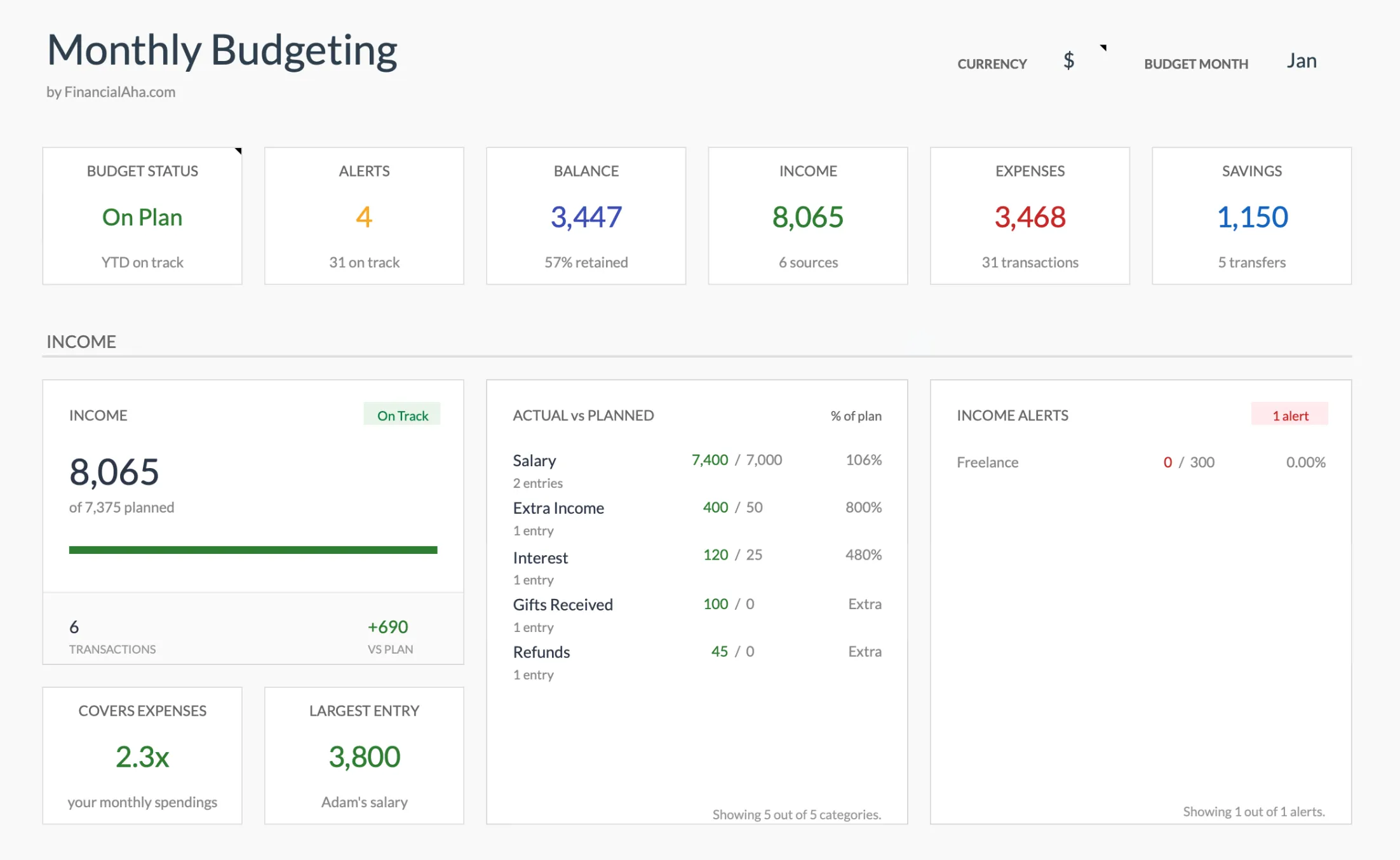 The Monthly Budget Template dashboard (Premium tier): planned vs actual income, expenses, and savings at a glance.
Planned vs actual, with needs and wants. You set a target per category and track actual spending against it, with the difference and percent-spent shown per row. Each expense category carries a Need or Want tag, so you can see the split without switching tools.
Entry is manual, the arithmetic is not. Each transaction takes its category from a dropdown fed by the Categories sheet, and the Budget Plan pulls the actuals back in by category, so nothing is totalled by hand. Recurring items can be flagged as subscriptions in the same row. Aspire’s automatic categorizer is a Turbo feature and the template has no equivalent, so this is hand entry with the sums handled.
Faster start. The category list is pre-populated with common items and the dashboard renders without configuration, so most people are logging the same afternoon rather than the next weekend.
Updated by email. When a fix or improvement ships, customers get the new file by email. No subscription, no re-purchase.
Part of a broader budgeting suite. The same maker offers an Annual Budget Template built on the same category list and the same Summary layout, so the 12-month view is not a re-learn. A Net Worth Tracker covering assets and liabilities and an Annual Tax Planner covering income, deductions and quarterly estimates sit alongside it with their own structures.
Side-by-side comparison
| Feature | Aspire Budgeting | FinancialAha Monthly Budget |
|---|---|---|
| Cost | Free core; $5/mo Turbo for convenience features | $29 one-time |
| Method | Zero-based envelope | Planned vs actual, needs/wants tagging |
| Onboarding time | A weekend of reading and setup | Same afternoon |
| Categorizing entries | Turbo auto-categorizes ($5/mo) | Category dropdown per row, actuals roll up on their own |
| CSV import | Turbo only ($5/mo) | No importer; paste rows into the transactions sheet |
| Mobile app | Aspire Mobile (Turbo) | Google Sheets mobile app |
| Multi-currency | Supported in free base | Single currency, pick the symbol |
| Net worth / tax | None | Separate companion templates |
| Privacy | Your Google Drive | Your Google Drive |
Both are good. They serve different needs.
The honest one-line version: Aspire wins on philosophical purity and depth of the envelope method, and the template wins if the goal is to budget tonight without spending a weekend learning the structure or a monthly fee for the parts that make it comfortable.
When Aspire is the right choice
Three situations where Aspire wins.
You’re committed to zero-based envelope budgeting. Aspire is built for this exact methodology. If that’s the only way you’ll budget, the depth and rigor of the implementation matters.
You enjoy spreadsheet customization. Aspire is a starting point that experienced spreadsheet users extend. If tinkering is the appeal, paying for a polished tool defeats the purpose.
Your budget is your only financial spreadsheet. If you don’t want or need integrated net worth, retirement, or tax tracking, the standalone budgeting depth of Aspire is fine.
When our Monthly Budget Template is the right choice
Five situations where it’s the better fit.
You want to start budgeting tonight, not next weekend. Setup time matters more than people admit. Most templates that take two hours to set up never get set up.
You want the whole file for one price. The categories, the needs and wants tagging, the goals sheet and the dashboard are all in the file from the start, with nothing held back for a plan. Entry is still by hand, one dropdown per row.
You want a maintained product without a subscription. Fixes and improvements arrive by email, and the file keeps working whether or not a new version ever ships. The trade for $29 once is that no part of the file is metered.
You want a matching set of templates. The annual budget uses the same category list and Summary layout, so the year view does not mean learning a new sheet, and a net worth tracker and a tax planner cover the ground a budget does not.
You would rather not price out a subscription tier. Sometimes you just want a thing that works and is paid for. $29 buys that.
A realistic migration path
If you’ve been on Aspire and want to try something new without losing your data, here’s the path.
- Export your Aspire transactions as CSV (Aspire has a transactions tab; download as CSV).
- Open the new template’s transactions or expense log sheet.
- Paste the CSV. Categories may need light remapping; the column structure is similar.
- Reconcile this month’s category totals between the two. They should match within a few dollars (rounding).
- Use both for one cycle. Compare the dashboards, the alerts, the mobile experience.
- Pick the one that feels less like work.
Most people who do this exercise pick based on feel, not features. That’s the right way to choose.
Cost over time
The comparison depends on whether you stay on Aspire’s free base or add Turbo. If manual entry is fine and you never want import, auto-categorization, or the mobile app, Aspire is free and stays free, which is a genuinely good deal. The moment you want those conveniences, Aspire Turbo is $5 a month, and that is $60 in year one, $300 over five years, $600 over ten, for as long as you keep it.
The Monthly Budget Template is $29 once and stays at $29. It does not match Turbo feature for feature: there is no importer and no automatic categorizer, so transactions are entered by hand from a category dropdown. The honest framing is not free versus paid. It is a subscription that buys automation against a one-time price that buys a finished sheet. Free is the right call when the free base is genuinely enough, and the one-time price is the trade for people who want the monthly fee gone.
Where to start
If the pull toward Aspire is the strict envelope method itself, match it directly: the Envelope Budget template shows allocated, spent and remaining for each envelope, and the Zero-Based Budget template gives every dollar a job in the same spirit.
If the pull is really day-to-day tracking without a weekend of setup or a monthly fee, the Monthly Budget Template is the one-time-$29 path, with the category list, the targets and the dashboard already wired so the first budget is a matter of typing in your own numbers. It is the flagship budget template used by 1,000+ customers across 65+ countries. To spread it across the year, the Budgeting Bundle pairs it with the Annual and Travel budgets.
Related
Frequently asked questions
Is the FinancialAha Monthly Budget Template envelope-style or category-style?
It's a planned-vs-actual category budget. You set a target per category and track actual spending against it, and each expense category can be tagged as a need or a want. It is not a strict envelope template with monthly fund rollover. If that specific method is what you want, the dedicated Envelope Budget template is the closer match.
Does the Monthly Budget Template roll unspent category funding into next month?
No. Each month starts fresh with its own targets and actuals, which is how planned-vs-actual budgeting works. Aspire's envelope rollover is a different model. The Envelope Budget template is the closer shape, showing allocated, spent and remaining per envelope, though it also runs a month at a time rather than carrying leftovers forward.
Is there a mobile app?
There's no dedicated app on either side once you compare like for like. Aspire's own mobile app is part of Aspire Turbo at $5/month; our template opens in the standard Google Sheets mobile app, the same as any Google Sheet in your Drive.
What happens if FinancialAha goes out of business?
Your file still works. It's a Google Sheets file in your Drive. Updates would stop, but the math doesn't depend on a server. This is a deliberate design choice; we didn't want to leave customers stranded if we ever shut down.
Can I import an existing budget from Aspire or YNAB?
Yes, by pasting. Because Aspire is a Google Sheet, you can download any tab as CSV and paste the rows into the template's Transactions sheet, which keeps expenses and income in separate blocks. There is no import tool, and category names need to match the Categories sheet or be added to it. A YNAB "All Transactions" export works the same way.
Sources
- Aspire Budgeting (official site and Aspire Turbo pricing) - Aspire Budgeting
About this article
Aspire's free-versus-Turbo features and the $5/month price were checked against the official Aspire Budgeting site. Monthly Budget Template features were checked on 2026-09-10 against the shipped Monthly Budgeting Google Sheet (Summary, Budget Plan, Transactions, Goals, Categories, Setup and Instructions tabs) and the product screenshots. Last reviewed September 2026.