
A 90-day summer savings challenge runs Memorial Day to Labor Day as twelve weekly targets with a running total, a variance column, and a catch-up column that redistributes any shortfall across the weeks left. A $2,400 target is $200 a week or about $27 a day; the example tiers run $900, $2,400, and $4,800 over the 90 days. It suits adults better than the 52-week challenge because the season is defined and repeatable, and the structure does the work willpower otherwise would.
For people who want a focused savings push, the 90-day stretch from Memorial Day to Labor Day is a real opportunity, not a marketing one. The piece below covers how to set up the challenge as a spreadsheet, what targets look like in dollar terms, the categories where summer overspending hides (dining out, drink runs, weekend spending, impulse buys, and dormant subscriptions), and how to handle the inevitable missed week. Our Monthly Expense Tracker is the simplest place to log what’s actually moving while the challenge runs.
Why a summer window specifically
Three reasons summer works as a savings season, even though it doesn’t feel like one.
First, the absence of major gift-giving holidays. The stretch from Memorial Day through Labor Day has Father’s Day, the Fourth of July, and back-to-school as the only spending pressure points. Compare that to the Halloween-through-Valentine’s run, which compresses Halloween, Thanksgiving, Christmas, New Year’s, and Valentine’s Day into about 16 weeks.
Second, lower variable utility costs in many regions. Heating-dominated households see their lowest electric and gas months between May and September. Cooling-dominated households shift the curve to mid-summer but still hit a lighter month or two in spring and early fall.
Third, the daylight effect. Longer evenings shift entertainment outdoors (parks, walks, free events) and trim dining-out frequency for many households. Partial substitution, not total.
None of this is automatic. People who travel heavily, run kids through camps and activities, or have summer-heavy social calendars often spend more in summer, not less. The challenge structure below works either way: if your baseline summer spending is high, the savings come from compressing it.
The 12-week structure
A 90-day challenge fits cleanly into 12 weeks with a few days of buffer. Pick a Sunday-to-Saturday or Monday-to-Sunday cadence and keep it consistent. The spreadsheet columns:
| Week | Start date | Target | Actual | Running total | Variance | Catch-up adjustment |
|---|---|---|---|---|---|---|
| 1 | Jun 1 | $200 | ||||
| 2 | Jun 8 | $200 | ||||
| … | … | … | ||||
| 12 | Aug 17 | $200 |
Target is the weekly contribution. Flat is simplest; front-loaded (higher early, lower later) works when there’s a known cost in week 11 or 12.
Actual is what you moved into the savings account that week. Honest entry, don’t smooth.
Running total is a SUM of prior actuals - the single number that shows where you are.
Variance is actual minus target. Positive is a surplus, negative is a shortfall.
Catch-up adjustment distributes a shortfall across remaining weeks: (target - running total at week N) / (12 - N) gives the new weekly target for the rest of the challenge. The column makes the math visible rather than letting a missed week silently shift the goal post.
Picking a 90-day target
Targets are not a prescription. They are math. Three example tiers that show up in worksheets like this one:
| 90-day target | Weekly | Daily | What it implies |
|---|---|---|---|
| $900 | $75 | $11 | Modest, reachable on most incomes with small cuts |
| $2,400 | $200 | $27 | Requires noticeable behavior change for most households |
| $4,800 | $400 | $57 | Significant, usually requires a windfall, side income, or low-cost lifestyle |
The middle tier is the common starting point because $27 a day maps cleanly to a few visible decisions (one fewer takeout meal, one fewer drink, one cancelled subscription). The top tier is realistic for higher earners or households diverting a tax refund or bonus into the challenge.
Picking a target by copying what someone else chose tends to misfire. A more useful approach: look at three months of recent bank or card statements, find the categories with real flex, and back into a number that hurts a little without breaking the rest of the budget. The Monthly Expense Tracker logs one month per file and ranks that month’s categories by share of total spending, so three months means three files and three rankings to compare.
To see what a weekly figure adds up to over the season, plug a monthly contribution into the savings calculator below and read the balance at 3 months:
Where summer savings hide
Five categories where money tends to leak in summer, in rough order of impact for most households.
Dining out and takeout. The dominant category for almost every challenger. Summer brings patio season and small social occasions where “let’s just grab something” defaults to delivery. A household that spends $600 a month here can often find $150 to $250 by halving the frequency, not banning it.
Coffee and drink runs. Iced coffee, smoothies, soft drinks, drinks with friends. $7 a day for 90 days is $630, a number people don’t picture when they buy each individual cup.
Impulse buys and online orders. Summer correlates with more browsing time and more “treat yourself” purchases. A 24-hour rule (wait a day before any non-grocery purchase over $30) works for some people not because they buy nothing, but because they only buy what still feels worth it the next day.
Weekend spending. Friday-through-Sunday spend often runs 40 to 60 percent of total weekly variable spend. A “no-spend weekend” once a month is one approach; tracking weekend vs weekday separately is another.
Dormant subscriptions. Streaming services, app subscriptions, summer-dormant gym memberships, software trials that converted to paid. An audit before the challenge starts usually surfaces $30 to $80 a month people forgot about.
The point of naming categories is not to ban them. It’s to make the trade-off visible: dollar X goes here, so dollar X cannot also go to the challenge.
A patterns list, not a rules list
Patterns people use during a 90-day challenge. None are required.
- The 24-hour rule. Wait a day before non-essential purchases over a threshold ($30, $50, your call).
- One no-spend day per week. Variable-spend categories only; rent and bills still happen.
- One no-spend weekend per month. Same idea, longer window.
- Cash for variable spend. Withdraw the weekly variable budget in cash; when it’s out, it’s out.
- Subscription pause. Cancel or pause non-essential subscriptions for the 90 days. Most are trivially recoverable in September.
- Pay yourself first. Transfer the weekly target to the savings account on day one of each week, before any spending decisions.
Trade-offs: cash is hard for online spend, pay-yourself-first only works with enough buffer to absorb a surprise, no-spend days are easy to break and demotivating when broken. Try one or two; drop what doesn’t fit.
Tracking weekly, not daily
Daily check-ins create friction that compounds; people who try them often abandon the challenge by week 3 or 4 when the ritual collides with travel or a busy stretch. Weekly check-ins, on a fixed day (Sunday evening is common), catch problems early without turning the tracking into another chore.
The routine: open the spreadsheet, enter the week’s actual transfer, look at running total and variance, check the catch-up column if variance is negative, close the spreadsheet. Five minutes a week.
What happens at day 90
Three things challengers typically handle as the window closes, in roughly this order.
Moving the balance. The balance gets transferred to its destination (emergency fund top-up, vacation fund, down payment account, retirement contribution). The destination is personal; moving it out is structural. A lump sum left sitting in the challenge account makes it harder to start the next push.
Debriefing in writing. Three bullets on one page: what worked, what didn’t, what would change. Capture the behavioral learning while it’s still fresh.
Deciding what’s next. Some people repeat with a fall window (September through November), some shift to ongoing automatic transfers at the rate that proved sustainable, some stop. The contribution rate that actually held for twelve weeks is the useful output, not the dollar total.
How this compares to other savings methods
Three methods people run instead of or alongside a 90-day challenge.
Automatic transfers. Schedule a weekly or monthly amount from checking to savings. Lowest friction of all of this. Trade-off: invisible. People forget the transfer exists and don’t adjust it when income or expenses change.
Round-up apps. Spare change from card purchases rounds up to the next dollar; the difference goes to savings. Useful as a passive supplement, rarely enough as a primary method - typical annual totals are a few hundred dollars.
Bucket budgeting. Money is allocated to categories in advance; the savings bucket is one of them. Tracking-heavy, planning-heavy. Some people thrive on it.
The 90-day challenge differs in having a defined start, a defined end, and a behavioral check-in. The structure does the work willpower would otherwise have to.
When the simple tracker isn’t enough
The 12-week table works for a focused push. Its limits show up when the challenge interacts with the rest of the household budget: tracking which categories funded the push (so the $600-to-$400 dining-out delta is named, not guessed), coordinating with bills outside the weekly cadence, sharing data with a partner, or continuing past 90 days.
This is where a budgeting template earns its keep over a single-purpose sheet. The Monthly Expense Tracker logs each transaction against a category and its Summary tab ranks those categories by share of the month’s spending, so “where did the savings come from” has a real answer for the month in question.
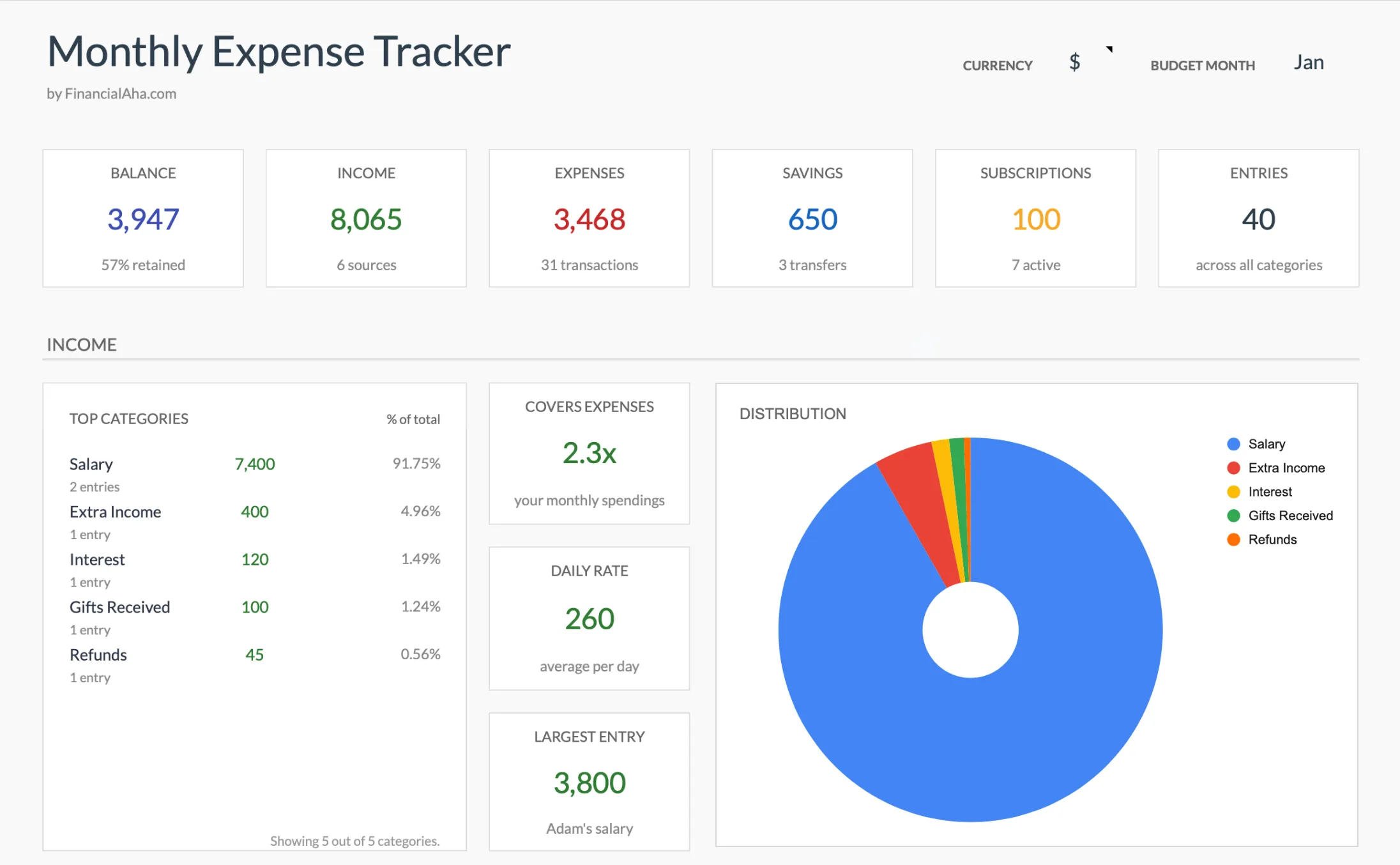 The summary tab of the Monthly Expense Tracker (Premium tier) rolls up income, expenses, savings, and active subscriptions, with top categories ranked by share of the total. The Monthly Budget Template adds a planned column for people who want explicit category targets alongside the actuals. Neither replaces the challenge sheet; they sit underneath it.
A note on where the money sits
Having a separate account matters more than which one. Two reference points:
- The FDIC national average savings rate sits at about 0.38 percent as of August 2026, while online high-yield savings accounts commonly pay 4 to 5 percent APY. On a $2,400 90-day balance, the difference between 4.3 and 4.5 percent is roughly $1.20 in interest, not the part to optimize for.
- The account matters for visibility, not yield. Money in a separate account named “Summer Challenge” is harder to spend by accident than the same balance in checking.
For the bank choice itself, there is a longer comparison piece on high-yield savings account options for an emergency fund that applies to challenge accounts too.
Get the template
The 90-day challenge sheet itself is simple enough to build from the table above. The templates that make the challenge stick once it’s running:
- Monthly Expense Tracker - Simple spending log by category. The fastest way to see which categories actually moved during the challenge.
- Monthly Budget Template - Planned-vs-actual budget with category targets. Useful if the challenge is bleeding into a longer reset.
- Savings Goal Tracker - Multiple goals at once with target dates and progress percentages, if the 90-day balance is heading toward a named goal afterward.
The Monthly Expense Tracker and Monthly Budget Template are Google Sheets templates; the Savings Goal Tracker comes as an Excel file and a Google Sheet. No bank linking, and each is a one-time purchase.
Related
Frequently asked questions
How is this different from the 52-week challenge?
The 52-week challenge ramps from $1 to $52 weekly, ending at $1,378. It is designed for kids learning the habit. A 90-day adult version uses a flat or front-loaded weekly target and lasts a defined season, which makes it easier to commit to and easier to repeat.
What is a realistic 90-day target?
Targets vary by income and circumstance. Common ranges in the worksheet are $900, $2,400, and $4,800 over 90 days. The middle tier requires noticeable behavior change for most households; the others sit above and below that threshold.
What if I miss a week?
The spreadsheet has a 'catch-up' column that distributes the shortfall across remaining weeks. Missing one week is structural; missing four in a row means the target was wrong, not your discipline.
Where should the money go?
A separate high-yield savings account is what most challengers use. Keeping it visible but not mixed with checking matters more than the specific bank.
Do I need a special spreadsheet, or can I build the challenge sheet myself?
The 12-week table in this article is simple enough to build by hand: a row per week with target, actual, running total, variance, and a catch-up column. A budgeting template earns its place only once you want to see which categories funded the push, coordinate with the rest of the month's bills, or continue past 90 days.
Does the interest on the savings account matter for a 90-day challenge?
Barely. On a $2,400 balance held for 90 days, the gap between a 4.3 and a 4.5 percent account is roughly a dollar. Over a short window the account is about visibility, not yield: money sitting apart from checking is harder to spend by accident.
Sources
- National Rates and Rate Caps - FDIC
About this article
Savings-account rates checked against the FDIC national deposit rate table Template claims checked on 2026-09-10 against the shipped Monthly Expense Tracker Google Sheet (Summary, Transactions, Categories, Instructions tabs), the Monthly Budgeting Google Sheet (Budget Plan tab) and the Essentials Savings Goal Tracker (Goals Setup tab) Last reviewed September 2026.