
Mint shut down in March 2024, and Credit Karma is not a real budgeting replacement. The closest apps are Quicken Simplifi (about $48/year) and Monarch Money ($99/year); Empower stays free for investment and net worth tracking; and the no-subscription, privacy-first route is a Google Sheets template you own outright. This guide compares each on price, features, and data ownership.
Mint shut down in March 2024 after 15+ years. Credit Karma, where Intuit pushed users, isn’t really a budgeting app. It’s credit monitoring with basic transaction viewing.
If you’re looking for an actual replacement, here’s what works.
Spreadsheet Budgeting
Before jumping to another app, consider whether you need one at all. The Mint experience left many users questioning whether automatic bank connections are worth the hassle - account linking breaks, categorization needs constant fixing, and apparently the whole service can just disappear.
Spreadsheets offer complete privacy and data ownership. No bank linking, no subscriptions, works offline, never shuts down unexpectedly. Templates like the Monthly Budget Template and Net Worth Tracker replicate what Mint did for tracking. The trade-off is manual data entry instead of automatic import, but many former Mint users find they actually prefer the intentionality of entering transactions themselves. If skipping the bank connection entirely is the appeal, our guide to budgeting without linking a bank account walks through the manual-entry workflow, and why a spreadsheet beats personal finance apps covers the wider trade-offs.
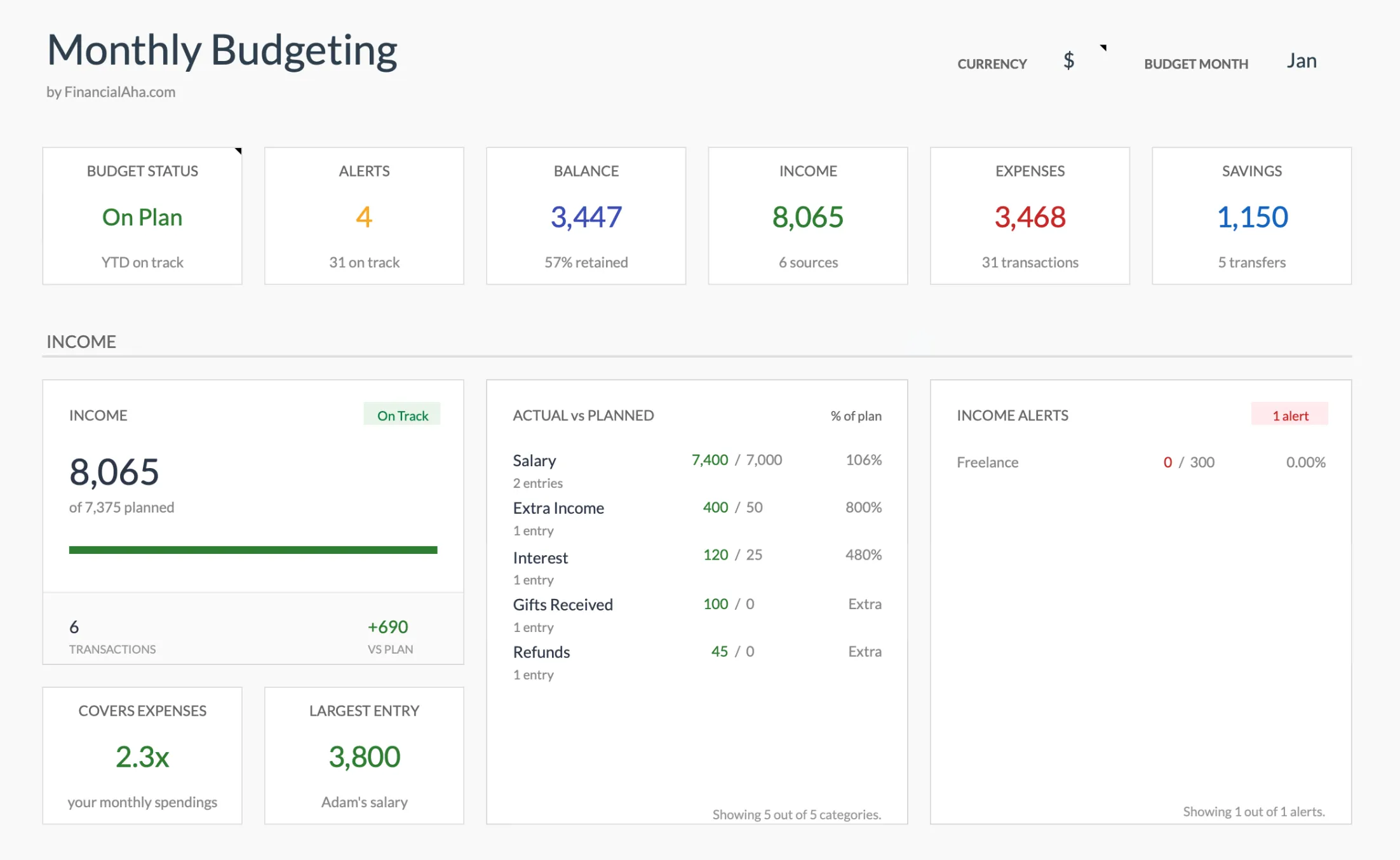
The Monthly Budget Template (Premium tier) summary dashboard: the income, expense, and savings tracking Mint handled, in a Google Sheets file you own outright.
Quicken Simplifi
If you want the closest experience to what Mint was, Simplifi is probably it. Automatic transaction import, spending categories, budget tracking - the core features work similarly.
The spending plan approach feels familiar to Mint users, showing money in versus money out with clear visual progress. At about $48/year ($3.99/month billed annually), it’s affordable for an app with automatic imports. The company has been around for decades, which provides some stability reassurance after the Mint shutdown.
Monarch Money
Built by a former Mint product manager who apparently saw the writing on the wall. Monarch was literally designed to be what Mint could have become with continued investment.
Joint account access makes it popular with couples who want to budget together. The budget vs. actual tracking is more detailed than Mint offered, and cash flow projections help with planning. At $99/year it costs more than Simplifi, but users who’ve tried both often prefer Monarch’s polish and features.
YNAB (You Need A Budget)
This one takes a different philosophy entirely. Instead of tracking what you spent (Mint’s approach), YNAB has you assign every dollar a job before spending it.
The learning curve is steeper - expect a few weeks to really get comfortable. But YNAB users often report significant financial improvements from the methodology itself, not just the software. At $109/year, it’s the most expensive option here, though the approach works for people who struggled with passive tracking.
Empower Personal Dashboard
Empower is free, which is notable given Mint’s fate. The focus is different though - strong investment tracking and net worth monitoring, less emphasis on day-to-day budgeting.
If Mint’s net worth and investment features mattered most to you, Empower actually exceeds what Mint offered in those areas. The catch is that Empower makes money through wealth management services, so expect some sales pitches. For basic tracking though, the free tier works well.
Tiller Money
Tiller takes an interesting approach - it pulls transactions automatically into Google Sheets or Excel. You get the automation of app-based tracking with the flexibility of a spreadsheet you control.
At $99/year it matches Monarch’s price. The appeal is having your data in a format that will never become inaccessible because a company decided to shut down. Good middle ground for people who want some automation but also want true data ownership.
PocketGuard
PocketGuard suits people who realized they never used most of Mint’s features. Its central number, how much is safe to spend after bills and savings are accounted for, answers the question a lot of people actually opened Mint to check. PocketGuard Plus runs $74.99/year with a 7-day free trial to test the safe-to-spend workflow first.
Goodbudget
Goodbudget uses the envelope method, where money gets divided into categories and each one is spent down until it’s empty. The free plan gives you a set of envelopes with no bank linking, which some former Mint users now count as a benefit rather than a limitation. A Premium plan at $10/month (or $80/year) adds unlimited envelopes and more accounts for people who want more.
What About Credit Karma?
Intuit pushed Mint users toward Credit Karma, but it’s not really a replacement. Credit Karma lacks category budgeting, spending targets, and budget vs. actual tracking - basically everything that made Mint useful for budgeting purposes.
Credit Karma is a credit monitoring service, not a budgeting tool. It shows your credit score and lets you see transactions, but there’s no budget functionality. If you switched and wondered why it felt inadequate, that’s why. The products serve different purposes.
Quick Comparison
| Tool | Cost | Bank Sync | Budget Tracking | Net Worth | Data Ownership | Best For |
|---|---|---|---|---|---|---|
| Mint (defunct) | Was free | Yes | Basic categories | Yes | Intuit servers | No longer available |
| Quicken Simplifi | ~$48/yr | Yes | Spending plan | Yes | Cloud | Closest Mint experience |
| Monarch Money | $99/yr | Yes | Budget vs. actual | Yes | Cloud | Full-featured upgrade from Mint |
| YNAB | $109/yr | Yes | Zero-based (every dollar assigned) | No | Cloud | Active dollar-by-dollar control |
| Empower Dashboard | Free | Yes (read-only) | Limited | Excellent | Cloud | Investment and net worth tracking |
| Tiller | $99/yr | Yes (into Sheets) | Spreadsheet-based | Yes | Your spreadsheet | Automation with data ownership |
| PocketGuard | $74.99/yr | Yes | Safe-to-spend number | No | Cloud | Quick-answer budgeting |
| Goodbudget | Free / $80/yr | Paid only | Envelope method | No | Local + cloud | Privacy-conscious envelope fans |
| Credit Karma | Free | Yes | No real budgeting | Credit score only | Intuit servers | Credit monitoring only |
| Spreadsheet templates | One-time | No | Full categories + targets | Yes (separate tracker) | Your Google Drive | Data ownership, no subscription |
Prices checked August 2026.
How to Choose
The right choice depends on what you actually valued about Mint. If you valued simplicity and just want something that works, Quicken Simplifi or PocketGuard recreate that experience well. If you want better budgeting than Mint ever offered, YNAB or Monarch provide more robust methodologies.
Privacy-conscious users tend toward spreadsheets or Goodbudget’s free plan, which works without linking bank accounts. Investment-focused users often prefer Empower for its portfolio tracking. Couples budgeting together generally like Monarch or Goodbudget for shared access.
The Lesson
Mint’s closure taught something worth remembering: when you rely on a free service, you’re vulnerable to the company’s decisions. Millions of users lost access to years of tracking data with limited notice. This risk exists with any service where you don’t own your data.
Whether you choose an app or spreadsheet, a few questions are worth considering. Can you export your data? What happens if the service shuts down? Who controls your financial information?
Spreadsheet-based tracking offers permanent data ownership - your files exist on your computer or Google Drive forever. Apps offer convenience but come with platform risk. There’s no wrong answer, but the Mint situation made the tradeoffs clearer.
If owning the file outright is what you want, the Monthly Budget Template rebuilds Mint’s spending tracking and the Net Worth Tracker covers its net worth view. For a free starting point, the roundup of free net worth tracker spreadsheets is a low-commitment place to test the workflow before buying anything.
Related
- Net Worth Tracker - replaces Mint’s net worth tracking
- Annual Budget Template - year-long budget view
- Monthly Budget Template - replaces Mint’s spending tracking
- Privacy-First Personal Finance
- Why a Financial Planning Spreadsheet Beats Personal Finance Apps
- Monarch Money vs Rocket Money: Which Fits Which User - two of the apps former Mint users compare most
- Empower (Personal Capital) as a Mint Replacement - where the free option covers the gap and where it does not
- PocketGuard Alternative: The Spreadsheet Approach - rebuilding the daily-spendable number without a subscription
Frequently asked questions
What happened to Mint?
Intuit shut down Mint in March 2024 and moved users to Credit Karma. Credit Karma focuses on credit monitoring and isn't a full budgeting replacement - it lacks budget categories, goals, and the spending analysis that Mint offered.
What happened to my Mint data?
Intuit offered a data export window before the shutdown. If you missed it, Credit Karma retained some transaction history but not the full budgeting setup. The budget categories, goals, and spending rules were not carried over.
What is the best free alternative to Mint?
For free automated budgeting, options include Empower (formerly Personal Capital) for investment-focused tracking and Credit Karma for basic transaction viewing. For full budget control with no subscription, Google Sheets spreadsheet templates offer the most flexibility.
Is YNAB worth the price as a Mint replacement?
YNAB costs $109 per year ($14.99 monthly) and uses a zero-based budgeting method that's different from Mint's automatic tracking. It works well for people who want active control over every dollar, but it requires more hands-on management than Mint did.
Can I use a spreadsheet instead of a budgeting app?
Yes. Spreadsheet templates in Google Sheets handle expense tracking, budget categories, and savings goals with complete privacy, since your data stays in your Google account. The tradeoff is manual entry instead of automatic bank syncing.
How much do Mint alternatives cost per year?
As of August 2026: Quicken Simplifi is about $48/year, Tiller and Monarch Money are $99/year, YNAB is $109/year, PocketGuard Plus is $74.99/year, and Goodbudget Premium is $80/year. Empower's dashboard is free, and Google Sheets templates are a one-time purchase with no renewal.
Can a spreadsheet import my bank transactions automatically?
Most spreadsheet templates use manual entry or a periodic CSV paste. Tiller is the exception in this list: it pulls transactions into Google Sheets or Excel automatically for $99/year. A free template plus a weekly CSV download from your bank covers the same ground without a subscription.
Sources
- YNAB Pricing - YNAB
- Monarch Money Pricing - Monarch Money
- Quicken Simplifi Pricing - Quicken
- Tiller Pricing - Tiller
- PocketGuard Pricing - PocketGuard
- Goodbudget Plans and Pricing - Goodbudget
About this article
Every competitor price in this article was checked against the vendor's own published pricing page. Mint's March 2024 shutdown and the Credit Karma migration reflect Intuit's own announcements. Last reviewed August 2026.