
PocketGuard's 'In My Pocket' number is expected income minus committed bills minus scheduled savings, and it collapses into one Google Sheets cell. Rebuild it with four inputs, bills, goals, transactions, and pay-cycle dates, and you keep the app's signature feature in a file you own, without the $74.99-a-year subscription.
PocketGuard sells one number: “In My Pocket.” Expected income minus committed bills minus scheduled savings equals what is safe to spend right now, and that whole calculation collapses into a single Google Sheets cell. The app charges $12.99 a month or $74.99 a year to surface it on a phone. In a sheet it is four SUMIFS terms you write once, in a file you own. Our Monthly Budget Template at $29 does not ship that cell, but it carries the parts that feed it: a Transactions log, a Budget Plan with a planned figure for every category, and a Goals sheet.
The rest of this article is built around that one cell. Everything PocketGuard does, the Bills tab, the Goals tab, the pay-cycle logic, the green/amber/red color band, exists to feed it. Rebuild the cell, give it honest inputs, and the app’s signature feature is portable.
This post is for people who like the In-My-Pocket framing but would rather not rent it, want their data in a file they own, or bank outside the US where PocketGuard’s coverage thins out.
The one cell
Place it on a Dashboard tab, top-left, large font:
=SUMIFS(Income!C:C, Income!A:A, ">="&B1, Income!A:A, "<="&B2)
 - SUMIFS(Bills!C:C, Bills!D:D, ">="&B1, Bills!D:D, "<="&B2)
 - SUMIFS(Goals!C:C, Goals!A:A, ">="&B1, Goals!A:A, "<="&B2)
 - SUMIFS(Transactions!D:D, Transactions!A:A, ">="&B1, Transactions!A:A, "<="&B2, Transactions!E:E, "Discretionary")
B1 is the pay-cycle start. B2 is the end. The four terms map directly to PocketGuard’s model: expected income, committed bills, scheduled goal contributions, and discretionary transactions logged so far. The result is the number safe to spend before this cycle closes. As transactions land in the log, the cell drops in real time.
Conditional formatting on the cell: green above 15 percent of expected income remaining, amber between 0 and 15, red if negative. Same color logic PocketGuard uses.
Four inputs feed it. The rest of this article is each input.
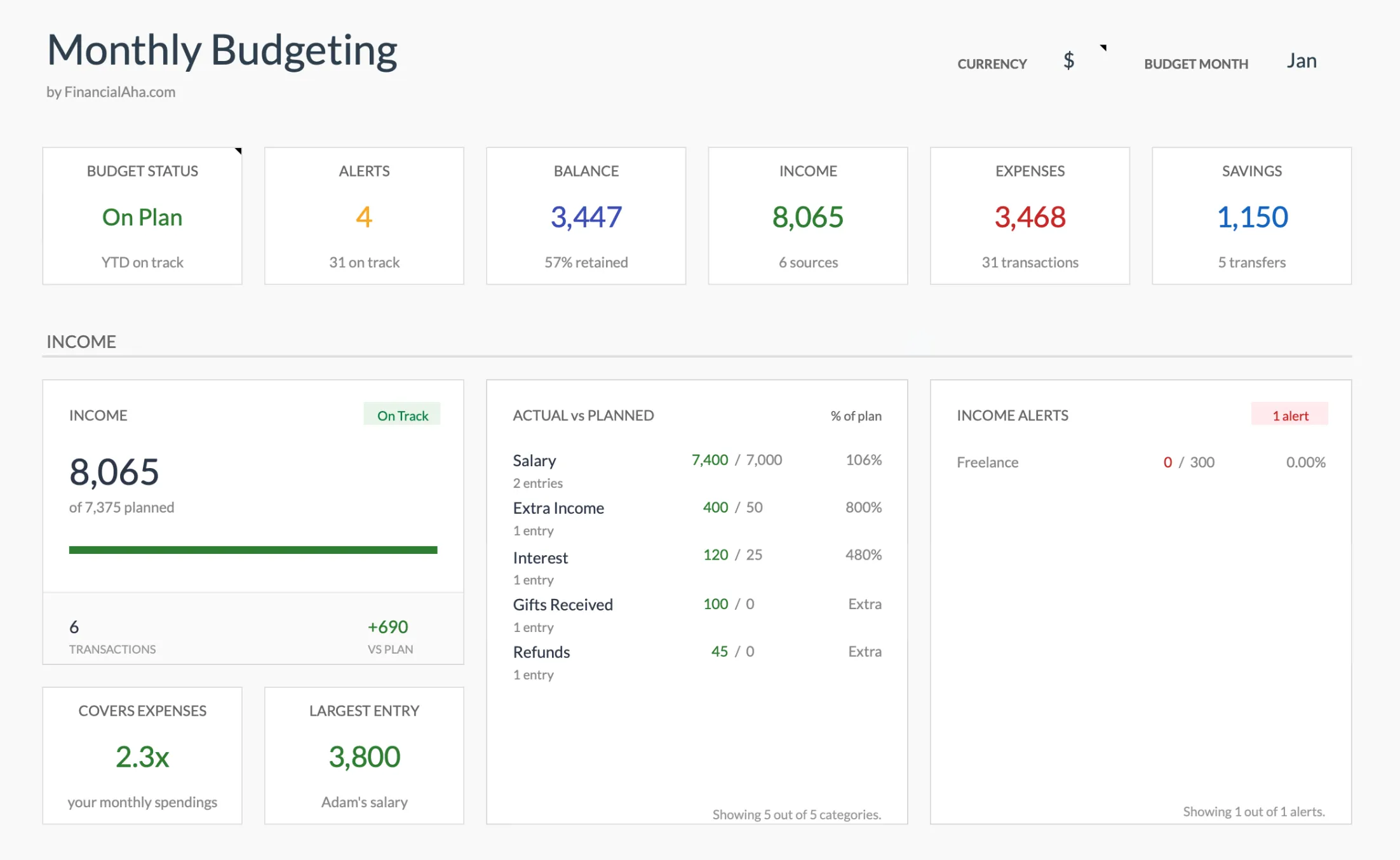
The dashboard in the Monthly Budget Template (Premium tier): balance, income, expenses, and savings surface at the top of the sheet, the same at-a-glance read PocketGuard puts on the home screen.
What the subscription costs
PocketGuard’s pricing page lists $12.99 a month, or $6.25 a month on annual billing that works out to $74.99 a year (the page frames it as saving $81 a year over monthly). Rounded, that is $156 a year monthly versus $75 a year annually. A lifetime offer surfaces for some accounts but is not listed on the public page, so the figure is not something we can quote.
| Years | Annual ($75/yr) | Monthly ($156/yr) |
|---|---|---|
| 1 | $75 | $156 |
| 5 | $375 | $779 |
| 10 | $750 | $1,559 |
Whether $75 a year is fair depends on how often the app is open. Daily users get a useful nudge per dollar. People who drift see the renewal charge before they remember opening the app.
Input 1: Bills
PocketGuard detects bills from your bank feed; Sheets asks for the list up front. One Sunday afternoon is realistic.
| Bill | Category | Amount | Due day | Frequency | Paid this cycle? |
|---|---|---|---|---|---|
| Rent | Housing | 1,650 | 1 | Monthly | Yes |
| Internet | Utilities | 65 | 5 | Monthly | Yes |
| Phone | Utilities | 45 | 8 | Monthly | No |
| Streaming bundle | Subscriptions | 28 | 12 | Monthly | No |
| Car insurance | Insurance | 142 | 15 | Monthly | No |
| Gym | Health | 49 | 20 | Monthly | No |
| Electricity | Utilities | 85 | 22 | Monthly | No |
| Annual domain | Subscriptions | 18 | 4 | Annual (Nov) | No |
| Quarterly water | Utilities | 95 | 10 | Quarterly | No |
Two columns earn their place. Due day sorts by when the cash hits. Frequency makes annual and quarterly bills behave: a helper column flags whether each bill’s actual due date falls inside the current pay-cycle window, and the formula’s second SUMIFS only sums the “yes” rows.
Input 2: Goals (which PocketGuard treats as bills)
The design choice most people underrate: a savings goal contribution leaves In My Pocket the same way rent does, even if the transfer has not happened yet. Discretionary spending cannot silently eat the savings transfer because the transfer is already gone, in the math.
A row per goal with a monthly contribution:
| Goal | Target | Current balance | Monthly contribution | Target date |
|---|---|---|---|---|
| Emergency fund | 10,000 | 3,400 | 300 | 2028-06-01 |
| Vacation (Aug) | 2,400 | 1,150 | 250 | 2026-08-01 |
| Car repair fund | 1,500 | 800 | 100 | 2027-01-01 |
| Holiday gifts | 900 | 380 | 75 | 2026-12-01 |
| Total contributions | 725 |
The 725 total flows into the In My Pocket formula via the third SUMIFS term.
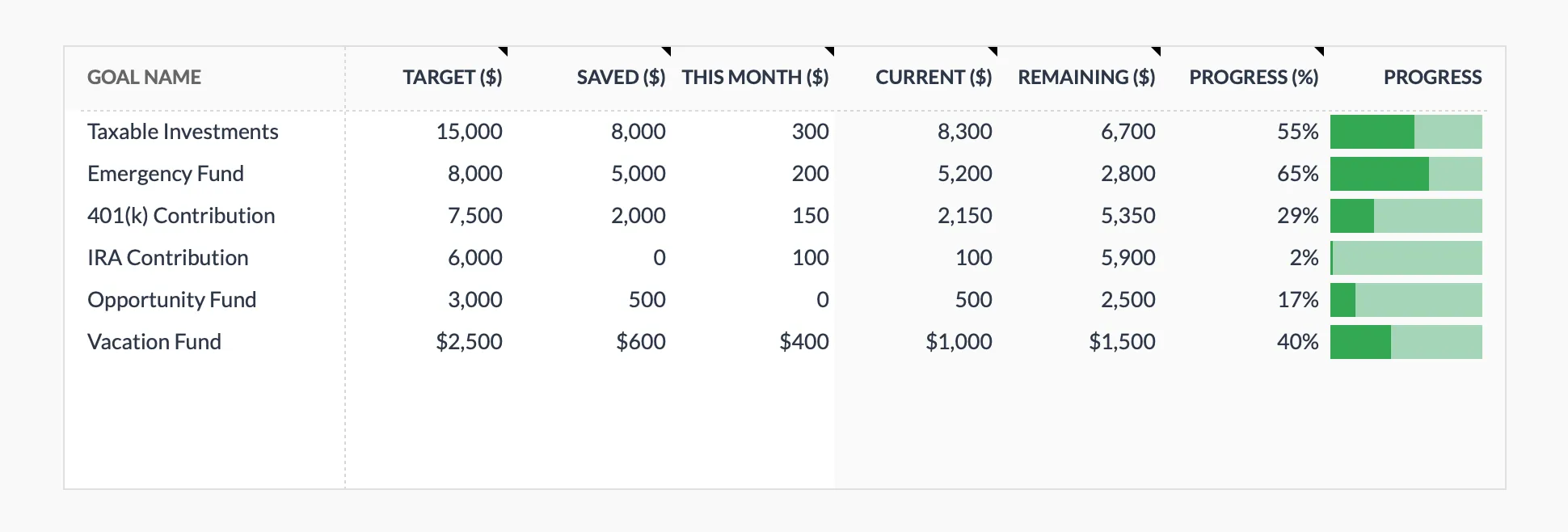
The Goals tab in the Monthly Budget Template (Premium tier). Each goal carries a target, what is saved so far, and what went in this month, with remaining and progress calculated from those. A validation check at the top of the tab compares the month’s goal contributions against the savings transfers logged.
One behavior to keep: do not subtract a goal contribution twice. If you transfer 300 to the emergency fund and also log it as a discretionary transaction, the math double-counts. The clean convention is a “Savings” category on goal transfers that the discretionary SUMIFS filters out.
Input 3: Transactions, with a “Type” column that does real work
| Date | Merchant | Amount | Category | Type |
|---|---|---|---|---|
| 2026-06-01 | Grocery store | 64.20 | Groceries | Discretionary |
| 2026-06-02 | Coffee | 5.40 | Eating out | Discretionary |
| 2026-06-02 | Gas station | 38.00 | Transportation | Discretionary |
| 2026-06-03 | Rent | 1,650.00 | Housing | Bill |
| 2026-06-04 | Pharmacy | 22.50 | Health | Discretionary |
| 2026-06-05 | Internet | 65.00 | Utilities | Bill |
| 2026-06-05 | Emergency fund transfer | 300.00 | Savings | Goal |
The Type column is the lever. Only Discretionary rows pull from In My Pocket. Bill and Goal rows do not, because the Bills and Goals tabs already accounted for them.
Entry frequency is the trade. PocketGuard pulls overnight. Sheets is daily (a minute on mobile) or weekly (a 5-minute statement scan). Most PocketGuard users drift toward weekly anyway, because checking the app at the checkout line is a habit, not a feature.
Input 4: The dates in B1 and B2
The reason In My Pocket feels different from a calendar-month budget is that the window matches your pay cycle, not the month. Biweekly paychecks reset the math every 14 days.
In Sheets, the entire pay-cycle behavior lives in two date cells:
| Cycle type | B1 (start) | B2 (end) |
|---|---|---|
| Calendar month | First of month | Last of month |
| Biweekly | Last payday | Last payday + 13 |
| Semi-monthly | 1st or 15th | 14th or last day |
| Custom (rent to rent) | 1st of month | Last day of month |
Biweekly is where most apps stumble. With B1 and B2 on the Dashboard, the start advances 14 days at each cycle - a five-second update, then the SUMIFS terms recompute themselves. Our biweekly paycheck budget walkthrough covers the cadence in more depth.
Worth flagging on the Bills tab specifically: the spreadsheet does not detect new recurring charges. A quarterly statement scan catches the ones that slipped in, the same audit that anchors our Rocket Money walkthrough.
The five-row comparison
Most of the rows the sibling alt-posts use are the same on both sides. The ones that decide a switch:
| PocketGuard Plus | Spreadsheet (template or DIY) | |
|---|---|---|
| Cost | $75 to $156 per year | $29 once, or free DIY |
| The cell itself | Home screen, automatic | One Sheets cell you write yourself |
| Transaction sync | Auto via Plaid (US) | Manual entry, weekly or daily |
| Bills detection | From the bank feed | Manual list, quarterly audit |
| Works outside US | Limited | Any currency |
The capability everything else flows from, the In My Pocket number, is identical on both sides. What separates them is whether transactions arrive automatically or you put them there.
Who is computing the cell, and what that costs
Both tools land at the same number. The difference is whether the number arrives on your phone with the transactions auto-loaded, or whether you keep the file and the math in your own hands. Two cases where each side genuinely earns its price.
The app earns it when In My Pocket is doing checkout-line work. That is the one place the spreadsheet cannot follow. If the look at the number happens at the register, several times a week, the visibility itself is the feature. It also earns it on volume: five cards, three accounts, 200+ monthly transactions is real data-entry tax, and PocketGuard absorbs it.
The spreadsheet earns it almost everywhere else. Renewal arithmetic alone is the first reason - $75 a year for ten years is $750, and the $29 template breaks even around month five on the annual plan. Auditability is the second: every term in the cell is visible, and you can follow each SUMIFS argument back to the rows being counted. Banking outside the US is a third (Plaid coverage thins quickly past North America). And the fourth is the slow one: a category the vendor does not have, like “Coffee” split out from “Eating out,” or “Kids: extracurricular” kept apart from “Kids: clothing.” In Sheets, that is a column. In an app, it is a feature request.
Templates that fit this
- The Monthly Budget Template at $29 runs on the calendar month rather than a pay cycle, so the In-My-Pocket cell stays something you add. What it brings is the structure underneath: a Budget Plan sheet with a planned and an actual figure for each of the 17 expense categories, a Goals sheet carrying target, saved, this month and remaining per goal, a Subscription checkbox on the Transactions log that totals recurring charges on the Summary, and 50/30/20 and zero-based views of the same month.
- If the answer to “what is the number?” still needs the question “where does the money even go?” answered first, the Monthly Expense Tracker at $19 is the simpler file. A clean log with category totals and no budget targets. Useful as a first month.
Related
- Rocket Money Alternative: Subscription + Budget in a Spreadsheet
- Copilot Money Alternative: Build the Same Workflow in Google Sheets
- Quicken Simplifi Alternative: Spreadsheet Workflow That Replaces It
- Buxfer Alternative in Google Sheets - multi-account tracking rebuilt as a sheet you own
- Mint Alternatives After the Shutdown - the wider field, PocketGuard included
Frequently asked questions
What does PocketGuard's 'in my pocket' number show?
Expected income for the period minus committed bills minus savings goals. The remainder is what is available for discretionary spending. The number updates as transactions hit.
Why would I leave PocketGuard?
Common reasons: price (PocketGuard Plus runs $12.99 a month or $74.99 a year), interest in owning the data, or wanting more granular categorization than the app supports.
Can a spreadsheet update the spendable number daily?
Yes, with a transaction log that subtracts from the running available balance. Daily entry matches most people's actual usage of PocketGuard, which often slips into weekly anyway.
What does the spreadsheet not do?
Bank sync. PocketGuard pulls transactions automatically. The spreadsheet takes manual entry, and our templates ship no importer, so rows go in by hand. For some users this is a feature (more awareness); for others it is the dealbreaker.
Is PocketGuard's lifetime plan cheaper than a spreadsheet?
A lifetime offer appears for some accounts but is not listed on PocketGuard's public pricing page, so the figure varies. The $29 template is a one-time cost either way, and it works the same outside the US, where PocketGuard's bank coverage is limited.
Sources
- PocketGuard Pricing - PocketGuard
About this article
PocketGuard pricing checked against the company's published pricing page. Template prices, sheets and columns checked on 2026-09-10 against the shipped Monthly Budgeting Google Sheet (Summary, Budget Plan, Transactions, Goals, Categories, Setup tabs) and the shipped Monthly Expense Tracker Google Sheet (Summary, Transactions, Categories tabs). Last reviewed September 2026.