
Copilot Money is $95/year for daily auto-sync, AI categorization, and a net-worth screen. Google Sheets rebuilds all three views with manual entry: a Transactions tab, a rules-based Category Spending tab, and a Net Worth tab. FinancialAha's Monthly Budget Template and Net Worth Tracker are $29 each, one time. The trade is that you lose auto-sync and gain data ownership with no subscription.
Copilot Money is a good product. The iOS app is well-built, the AI categorization is among the better attempts in the category, and the charts render fast. If you’ve tried it and liked it, that’s a fair signal it fits your habits.
This post is for people who like the workflow but not the recurring cost, the Apple-only mobile footprint, or the idea of streaming bank credentials through a third party. The equivalent workflow exists in Google Sheets, and the rest of this post walks through how to build it.
What Copilot Money does well
Worth being clear about what you’d be replacing.
Daily balance view. Today’s cash, today’s spending, the month’s running total. Data freshness is the headline.
AI categorization. New transactions get a category automatically, learning from your past corrections. After a month of training, accuracy is high for most users.
Net-worth snapshot. One screen: cash, investments, real estate, liabilities. Live valuations for stocks; Zillow-style estimates for property.
Cash-flow trend. A 12-month strip showing income vs spending. Useful for seeing whether the last quarter was tighter than the one before.
Subscription detection. Flags recurring charges, including the ones you forgot. The one feature most former users miss out loud.
These are all reproducible in Sheets. Two of them (daily auto-sync and Zillow-style valuation) need a workaround rather than a direct equivalent.
What $95 a year buys
Copilot Money is $95/year on the annual plan, or roughly $13/month if billed monthly. The annual is the typical purchase, so call it about $95 a year.
Over time, the math:
| Years | Annual ($95/yr) | Monthly (~$13 x 12 = $156/yr) |
|---|---|---|
| 1 | $95 | $156 |
| 5 | $475 | $780 |
| 10 | $950 | $1,560 |
| 30 | $2,850 | $4,680 |
A Copilot user on the monthly plan is heading toward roughly $4,700 over a 30-year horizon. The annual plan trims about $60/year off that, which adds up.
Whether $95/year is fair value depends on how often the app gets used. For software opened daily, the per-day cost is small. For software checked once a month, the math shifts, and some users find that a 15-minute weekly habit in a spreadsheet covers the same ground.
The Sheets workflow at a glance
Three tabs cover most of what Copilot does.
- Transactions. One row per transaction. Date, payee, category, amount, account, notes.
- Category Spending. A pivot or SUMIFS-based summary. Monthly totals per category, plan vs actual.
- Net Worth. Account balances entered manually or pasted from statements. Assets minus liabilities, with a monthly snapshot row.
A fourth optional tab, Subscriptions, catches the recurring-charge use case (covered below).
Setup takes about 90 minutes if you build from scratch, or 5 minutes if you start from a pre-built template. Ongoing maintenance is 10 to 15 minutes a week, which is roughly the time most Copilot users spend reviewing and correcting categorizations anyway.
Tab 1: Transactions
| Date | Payee | Category | Amount | Account | Notes |
|---|---|---|---|---|---|
| 2026-05-08 | Whole Foods | Groceries | -84.20 | Chase Debit | |
| 2026-05-08 | Spotify | Subscriptions | -10.99 | Amex | annual? |
| 2026-05-09 | Payroll | Income | 3,600.00 | Chase Checking | |
| 2026-05-09 | Shell | Transportation | -46.10 | Amex |
A few mechanics worth knowing.
Negative for outflows. Keep amounts signed (negative for spending, positive for income). It makes every downstream formula simpler.
One Account column. If you track multiple cards and a checking account, this is how the Net Worth tab knows where balances should land.
Paste from CSV weekly. Most major banks let you export a date-range CSV in under a minute. A weekly paste covers the manual-entry burden without daily friction. If you want that paste to feel closer to an automated feed, the Tiller alternative walkthrough covers the same CSV-into-Sheets loop in more depth.
You can also enter rows on your phone. Google Sheets on iOS and Android is functional but generic, and pretending it matches Copilot’s tap-to-categorize UX would be dishonest.
Tab 2: Category Spending without AI
The trick that closes most of the gap with Copilot’s AI: a small lookup table.
Build a Rules sheet with two columns.
| Match (payee contains) | Category |
|---|---|
| whole foods | Groceries |
| trader joe | Groceries |
| spotify | Subscriptions |
| netflix | Subscriptions |
| shell | Transportation |
| uber | Transportation |
| amazon | Shopping |
| payroll | Income |
In the Transactions tab, the Category column becomes a formula instead of free text:
=IF(B2="", "",
  IFERROR(
    INDEX(Rules!$B$2:$B$50,
          MATCH(1,
                ARRAYFORMULA(ISNUMBER(SEARCH(Rules!$A$2:$A$50, B2))
                             * (Rules!$A$2:$A$50 <> "")),
                0)),
    "Uncategorized"))
B2 is the payee. SEARCH returns a number when a rule string appears in the payee and an error otherwise, ISNUMBER turns that into TRUE or FALSE, and the * (Rules!$A$2:$A$50 <> "") factor is doing quiet but essential work: SEARCH treats an empty rule cell as a match for everything, so without that guard the blank rows below your rules list would “match” every payee and unmatched transactions would come back blank instead of “Uncategorized”. Bounded ranges (rows 2 to 50) rather than whole columns keep that guard honest, so extend both if the rules list grows past 50. Anything that matches nothing lands in “Uncategorized” for you to look at on Friday.
To auto-categorize new pasted rows without dragging the formula down, wrap the same lookup in BYROW at the top of the column. MATCH will not iterate row by row inside a plain ARRAYFORMULA, so BYROW with a LAMBDA is what makes the column self-maintaining:
=BYROW(B2:B, LAMBDA(payee,
  IF(payee="", "",
    IFERROR(
      INDEX(Rules!$B$2:$B$50,
            MATCH(1,
                  ARRAYFORMULA(ISNUMBER(SEARCH(Rules!$A$2:$A$50, payee))
                               * (Rules!$A$2:$A$50 <> "")),
                  0)),
      "Uncategorized"))))
It’s not AI. It’s pattern matching with a small list you grow over time. After a few weeks of corrections, most rules tables cover the majority of recurring transactions. Unlike AI categorization, every decision is auditable, so you can always see the rule that fired.
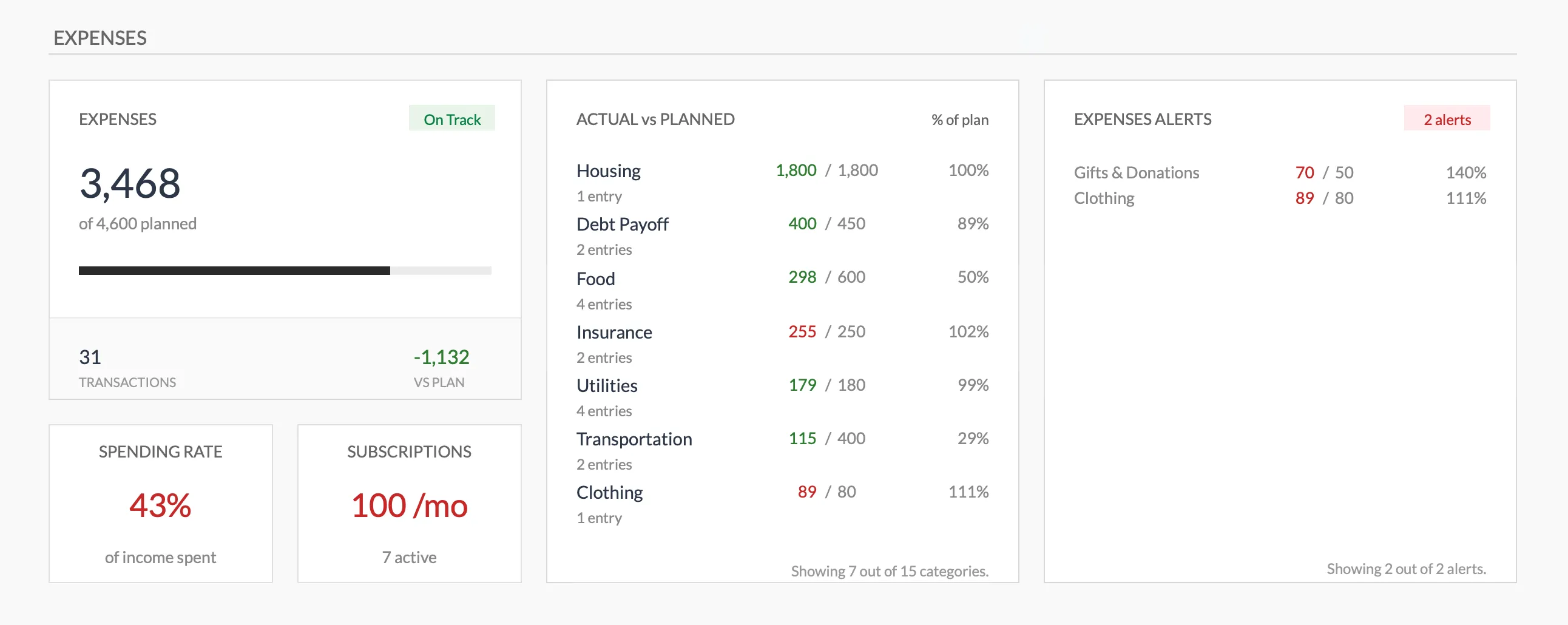
The Monthly Budget Template (Premium tier) rolls the categorized rows into an actual-vs-planned view per category, with a subscriptions count and an over-budget alerts panel on the same screen. Categories there come from a dropdown on each transaction row rather than from a rules lookup.
Tab 3: Net Worth in Sheets
Copilot’s Net Worth screen is one of its better features. The Sheets version is more manual but more transparent.
| Account | Type | Balance |
|---|---|---|
| Chase Checking | Cash | 4,200 |
| Ally Savings | Cash | 12,500 |
| Fidelity Brokerage | Investment | 38,400 |
| Vanguard Roth IRA | Retirement | 62,000 |
| 401(k) | Retirement | 104,000 |
| Primary residence | Real Estate | 410,000 |
| Vehicle | Vehicle | 18,000 |
| Mortgage | Liability | -286,000 |
| Credit cards | Liability | -1,840 |
| Total | 361,260 |
A second tab, Net Worth History, stores one row per month with the totals frozen. That’s how you build the trend chart. It’s a single cell-copy at month-end - the kind of thing you do while waiting for coffee.
The Net Worth Tracker is this structure pre-built. Assets and Liabilities each get their own sheet where every month is a column you insert, eleven asset types (vehicles and real estate among them) are classified liquid, semi-liquid or illiquid on a Setup sheet, and a Summary dashboard reads from both. $29 once.
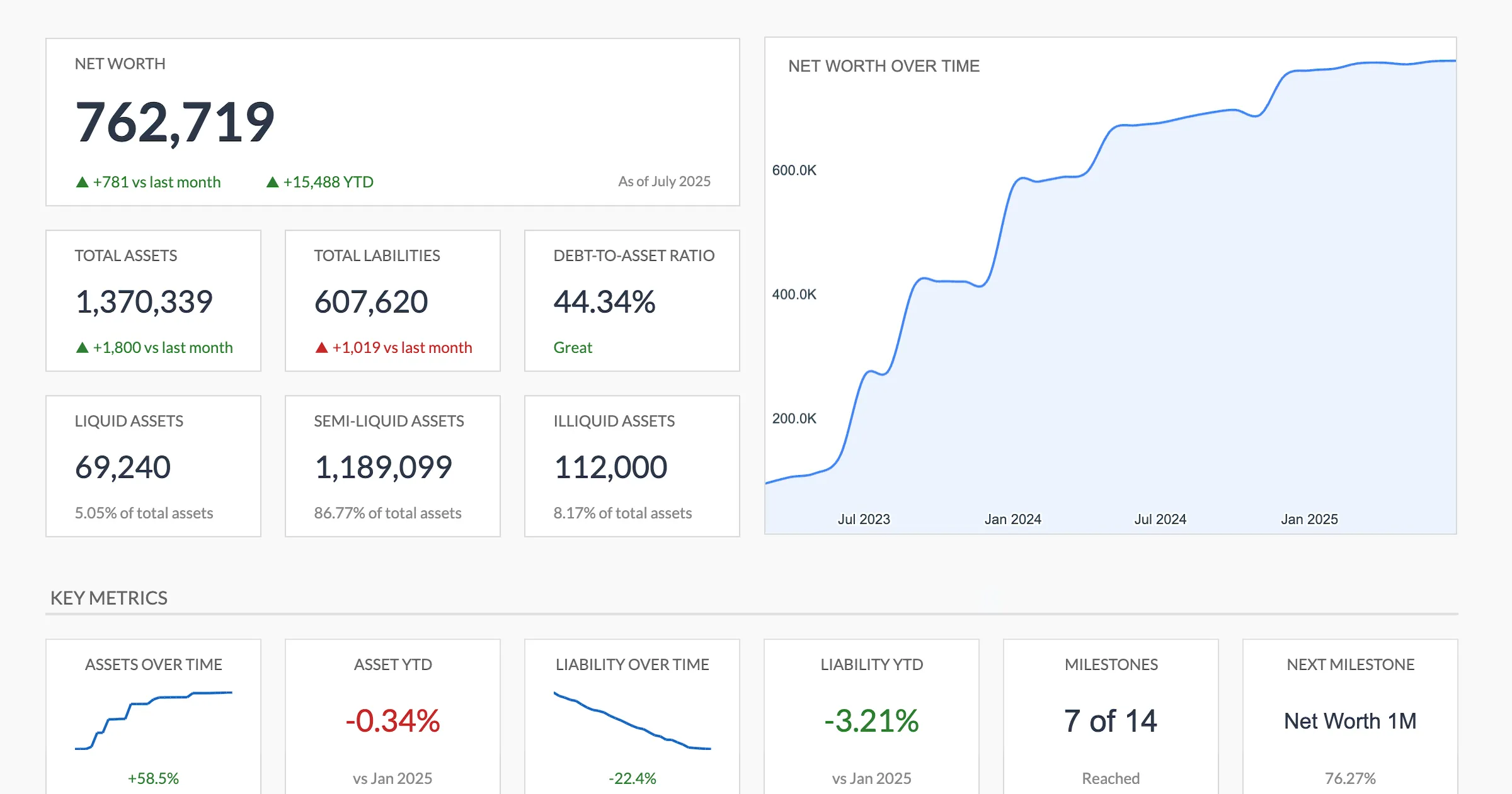
The Net Worth Tracker (Premium tier) dashboard: the same assets-minus-liabilities snapshot Copilot shows, plus a debt-to-asset ratio and a net-worth-over-time chart drawn from the monthly columns.
The subscription tab
Copilot’s subscription detection is a quietly useful feature. The Sheets version is a tab with Service, Amount, Frequency, Next charge, Last reviewed, Cancel link. Populate it once by scanning two months of statements. After that, it runs itself - recurring charges, by definition, don’t change month to month.
Worth knowing that Copilot’s value here is mostly in the initial discovery, not in ongoing maintenance.
The one feature Sheets cannot replicate
Copilot has daily, automatic transaction sync. Sheets does not. You can paste a weekly CSV, but you cannot have a phone notification at 8:47 pm that says “Uber $24.10 categorized as Transportation.”
Two ways to think about whether that matters.
It matters if you check daily. Some people genuinely review their finances every day, often for a few minutes after dinner. Daily sync is the right tool for them. The spreadsheet, with a weekly rhythm, will feel slow.
It matters less than people expect. Many people open finance apps two or three times a week, often skipping a week here and there. At that frequency, the difference between auto-sync and a weekly CSV paste is small. A weekly review may even land harder, because a batch of transactions invites reflection in a way a single push notification doesn’t.
Neither framing is wrong. They describe different users.
Setup time and ongoing cost
Setup from scratch. About 90 minutes. Build the three tabs, write the formulas, paste 60 to 90 days of historical CSV, run the categorization pass. Most of the time is in the historical clean-up, not in the formulas.
Setup from a template. About 5 to 15 minutes. Copy to your Drive, paste historical transactions, adjust the category list and the account names. The Monthly Budget Template carries the categories and the reporting; the Net Worth Tracker carries the balances.
Ongoing weekly. 10 to 15 minutes. Friday or Sunday tends to stick; other days drift. Export CSV, paste, review Uncategorized rows, add a rule if a new merchant appeared.
Ongoing monthly. 5 minutes. Snapshot the Net Worth Total into the History sheet. Glance at the cash-flow chart.
Total: about 50 minutes a month, or roughly the same as actively using Copilot if you review its categorizations.
Migrating from Copilot
If you’ve been on Copilot and want to try the spreadsheet workflow without losing your data, the path is short.
- In Copilot, export transactions as CSV. The app supports a CSV export of all transactions or a date-range subset.
- Open the Monthly Budget Template (or a blank Sheet with the structure above).
- Paste the CSV into the Transactions tab. Column order may need a one-time rearrangement.
- Run a categorization pass. Most categories will map cleanly; a handful (Copilot’s “Other” or its custom categories) will need light remapping into the template’s category list.
- Snapshot your current balances into the Net Worth tab.
- Run both tools in parallel for one month. At month-end, compare what each captured and decide whether to keep Copilot, the Sheet, or both.
Most people who do this find the transition takes a weekend afternoon. The friction is the habit change, not the tool change.
Comparison: Copilot vs Sheets vs FinancialAha template
| Capability | Copilot Money | DIY Google Sheets | FinancialAha template |
|---|---|---|---|
| Cost | ~$95/yr | Free (your time) | $29 once |
| Transaction sync | Daily auto | Weekly CSV paste | Weekly CSV paste |
| Categorization | AI, learning | Rules table | Dropdown per row |
| Net worth screen | Built in | Build it yourself | Built in |
| Subscription detection | Automatic | One-time scan | One-time scan |
| Mobile experience | Polished, iOS only | Generic, all platforms | Generic, all platforms |
| Investment tracking | Built in (live) | GOOGLEFINANCE manual | Manual balances by asset type |
| Real-estate valuation | Address-based estimate | Manual entry | Manual entry |
| Data ownership | On Copilot servers | Your Drive | Your Drive |
| Works outside US | Limited | Yes, any country | Yes, any country |
| Setup time | 15 min | 90 min | 10 min |
| Ongoing time | 5 min/wk passive | 15 min/wk active | 15 min/wk active |
The pattern: Copilot wins on automation and polish; Sheets wins on cost, ownership, and flexibility. The FinancialAha templates sit between - structure built, you bring the data.
When Copilot still wins
Five profiles where switching is the losing trade.
iPhone-first users who check daily. If you open finance apps the way other people check the weather, the polish gap between Copilot and a spreadsheet is the whole story.
Households with 5+ accounts and 200+ monthly transactions. Manual entry at that volume is genuine work. Auto-sync is what you’d be paying for.
Users who want passive review. Some people want their finances mostly out of mind, with a weekly notification rather than an active habit. Copilot’s notifications-and-categorize model fits that. Sheets doesn’t.
Users who value the live investment view. Copilot’s portfolio screen with live position values is smoother than GOOGLEFINANCE in a sheet.
Users on the annual plan who use it daily. At $95/year for daily use, per-day cost is about 26 cents. That’s the cost-per-glance math you’d be giving up.
If two or more of these fit, the spreadsheet probably costs less and delivers less.
When the spreadsheet wins
Android users. Copilot is Apple-only on mobile. A spreadsheet is the more honest answer.
Non-US bank users. Copilot’s account coverage is largely US-focused. Sheets is currency-agnostic.
Users uncomfortable with bank aggregators. Both Copilot and most alternatives use Plaid-style sync. If that’s a no for you, manual entry is the only path.
Users who want portable data. A Google Sheet is yours, exports cleanly, and lives in your Drive indefinitely. App data lives where the app lives.
Users who want categorization they can audit. A rules table is readable; AI categorization mostly is not.
Users who want a one-time cost. $29 once is less than one year of Copilot.
Templates that fit this
Three options framed by what you’re trying to do.
- “I just want to see where my money goes each month.” Monthly Budget Template at $29 once. Covers transactions, categories, planned vs actual, monthly dashboard. Most of Copilot’s daily-balance and category-spending value, rebuilt.
- “I want to track net worth and account balances over time.” Net Worth Tracker at $29 once. Cash, investments, retirement, real estate, vehicles, liabilities, with a column per month on the Assets and Liabilities sheets and a Summary dashboard.
- “I want both the monthly view and the balance sheet.” Buy both. They are separate files with separate lists, budget categories in one and asset and debt types in the other, so what Copilot keeps inside a single app sits across two files you own.
All three work the same way: copy to your Drive, paste data, no setup beyond your preferences. One-time purchase, no subscription, no aggregator.
Related
- Tiller Alternative: Google Sheets Budgeting Without the Subscription
- YNAB Alternative in Google Sheets: The Method, Mapped Cell by Cell
- Aspire Budgeting Alternative: Maintained Templates with Real Updates
- Lunch Money Alternative: Self-Hosted Spreadsheet Workflow - another app rebuilt as a sheet you keep
- Rocket Money Alternative: Subscription + Budget in a Spreadsheet - the subscription-audit workflow without the app
Frequently asked questions
Why would someone leave Copilot Money?
Commonly cited reasons are the recurring cost, Apple-only mobile coverage, and the preference to own the data rather than sync it through a third party. Some users also want categorization they can audit cell by cell.
Does a spreadsheet really replace daily auto-sync?
Auto-sync is the one feature spreadsheets cannot match without third-party tools like Tiller. The workflow trades sync convenience for ownership, lower cost, and deeper customization. Some people find weekly batch entry more useful than daily passive sync; others miss the daily glance. It depends on what you want from the habit.
Can I import Copilot data?
Copilot exports transactions as CSV. Import them into a Sheets tab and run a one-time category-mapping pass. For most account histories this takes a single sitting.
What about investment tracking?
Copilot has a passable investment screen. In Sheets, a separate portfolio tab (manual entry or the GOOGLEFINANCE function) covers the same ground. Intraday holding updates require manual refresh or scripting.
Sources
- Copilot Money Pricing - Copilot
About this article
Copilot Money's $95/year annual price checked against the company's published pricing page. Template prices verified against FinancialAha's product catalog; the categorization formula was reviewed and corrected. Template sheets, inputs and outputs checked on 2026-09-10 against the shipped Monthly Budgeting Google Sheet (Summary, Budget Plan, Transactions, Goals, Categories, Setup) and the shipped Net Worth Tracker Google Sheet (Summary, Assets, Liabilities, Milestones, Setup). Last reviewed September 2026.