
Quicken Simplifi is $6.99/month billed annually, about $84 a year at the regular rate. Its three signature features (projected cash flow, the spending plan, and watchlists) rebuild in Google Sheets as a forward-looking balance tab, a planned-vs-actual category table, and conditional formatting on filtered views. The $29 Monthly Budgeting template covers the planned-vs-actual half and the $29 Cash Flow Forecast covers the projection, and the migration takes a single sitting.
Everything people keep Quicken Simplifi for, the projected cash-flow view, the spending plan, and watchlists, rebuilds in a Google Sheet you own. The fastest route is the Monthly Budget Template ($29 once): planned-vs-actual by category, a Summary dashboard, and conditional formatting already wired, so the spending plan from this article maps straight onto its Budget Plan tab. The watchlist is a tab you add yourself. For the forward-looking balance, the Cash Flow Forecast ($29 once) carries the projection past 60 days. Simplifi itself is $6.99/month billed annually, about $83.88 a year at the regular rate, with a first-year promo around $3.99/month.
Simplifi is a genuinely good product. The mobile app is one of the better-designed in the category, projected cash flow is something competitors usually do worse, and the spending plan model lands well for people who think in monthly envelopes. The rebuild swaps the bank sync and the polished UI for a file you own and a one-time price. Whether that swap reads as a step forward or a step sideways depends on the habit you already have.
This post is for people who like the rhythm but not the recurring cost, or who want their data in a file they own, or who bank outside the US where Simplifi’s coverage thins out. The same three views can be built in Google Sheets, and the rest of this post walks through how.
The three features that justify the subscription
Strip Simplifi back to what people actually open it for and three views remain. The rest is plumbing.
Projected cash flow. A running-balance view that takes today’s balance, layers in scheduled income and upcoming bills, and projects out 30 to 60 days. It answers the awkward question: will I be okay by the 28th?
Spending plan. Each month starts with planned income minus planned bills minus planned savings minus planned variable spending. Whatever is left is the “what’s left to spend & save” number that lives at the top of the home screen.
Watchlists. A short list of categories or specific merchants you want to keep visible. Coffee, takeout, Amazon, a particular hobby. They sit on the home screen so you see them daily.
Two other features ride along (bank sync to a broad roster of US institutions, and a standard reports-and-goals section), but those are not what gets quoted in App Store reviews. The rest of this post rebuilds the three that do.
What the subscription actually costs
Simplifi’s pricing page lists the annual plan at $6.99/month billed annually, roughly $83.88 a year at the regular rate. A first-year promotion knocks that to about $3.99/month, or $47.88 for the first twelve months, before it renews at the regular rate. Run the steady-state number forward:
| Years | Total at $83.88/yr |
|---|---|
| 1 | $84 (about $48 on the first-year promo) |
| 5 | $419 |
| 10 | $839 |
| 30 | $2,517 |
Under two dollars a week for software you open every day is hard to argue with. The same bill for software you open once a month is the same arithmetic; the per-glance number is what changes.
Platform-wise, Simplifi runs on iOS, Android, and the web. The mobile app does the heavy lifting; the web app is functional but quietly secondary.
Rebuilding the three views
The order below is the order of difficulty. The projection takes the most thought. The spending plan is mostly layout. The watchlists are an afternoon.
Projected cash flow
This is the one to get right. A category sum is not the same as a projected balance.
Structure. Two tabs: Scheduled and Projection.
The Scheduled tab lists every recurring inflow and outflow with a date and amount. Rent on the 1st, payroll on the 15th, mortgage on the 5th, subscriptions scattered through the month. One row per item.
| Date | Item | Type | Amount | Account |
|---|---|---|---|---|
| 2026-06-01 | Rent | Outflow | -1,650 | Checking |
| 2026-06-05 | Internet | Outflow | -65 | Checking |
| 2026-06-10 | Car insurance | Outflow | -142 | Checking |
| 2026-06-15 | Payroll | Inflow | 3,200 | Checking |
| 2026-06-20 | Credit card payment | Outflow | -480 | Checking |
| 2026-06-30 | Payroll | Inflow | 3,200 | Checking |
The Projection tab takes today’s balance and walks forward day by day.
| Date | Starting balance | Inflows | Outflows | Ending balance |
|---|---|---|---|---|
| 2026-06-01 | 2,400 | 0 | -1,650 | 750 |
| 2026-06-05 | 750 | 0 | -65 | 685 |
| 2026-06-10 | 685 | 0 | -142 | 543 |
| 2026-06-15 | 543 | 3,200 | 0 | 3,743 |
| 2026-06-20 | 3,743 | 0 | -480 | 3,263 |
| 2026-06-30 | 3,263 | 3,200 | 0 | 6,463 |
The Inflows and Outflows columns are SUMIFS pulls from the Scheduled tab matched on date. The Ending balance is the previous day’s Ending plus today’s net. New row each day or each scheduled event, whichever is finer.
That’s the entire mechanic. Two columns of SUMIFS and a running sum. The output answers the same question Simplifi’s projected balance does: what’s the bottom of the trough this month, and is it above zero?
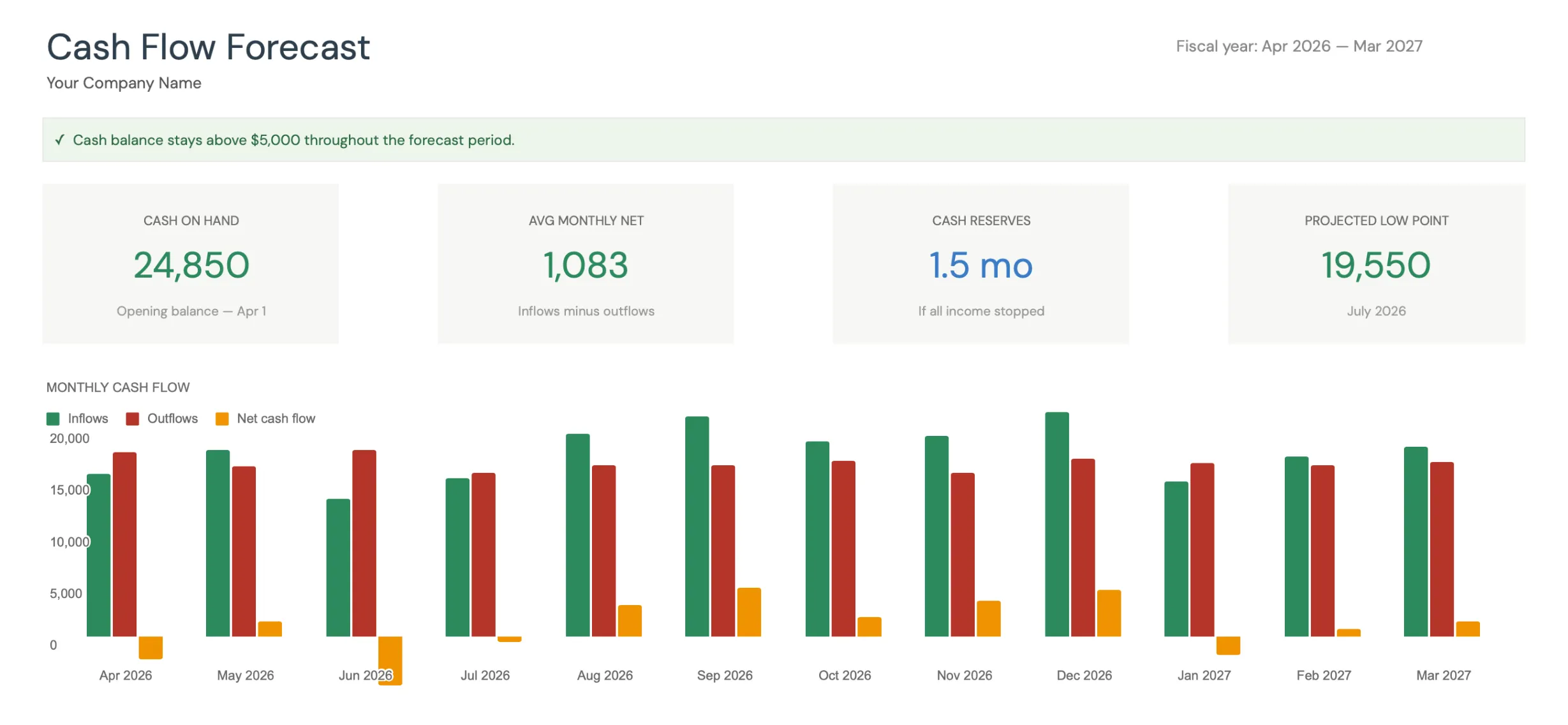
The Premium Cash Flow Forecast surfaces the projected low point directly, the spreadsheet answer to Simplifi’s “will I be okay” view.
Worth knowing the limit. Simplifi auto-pulls scheduled bills based on detected recurrence. The Sheets version asks you to list them once. After the initial setup, both run on autopilot until something changes.
The spending plan
Simplifi’s spending plan is, structurally, a category budget with a “what’s left” prominence at the top. It maps to a standard Sheets layout.
A Plan tab with one row per category:
| Category | Planned | Actual | Remaining |
|---|---|---|---|
| Groceries | 600 | 412 | 188 |
| Restaurants | 200 | 165 | 35 |
| Gas | 180 | 94 | 86 |
| Utilities | 280 | 280 | 0 |
| Subscriptions | 95 | 95 | 0 |
| Hobbies | 100 | 78 | 22 |
| Buffer | 250 | 0 | 250 |
| Total | 1,705 | 1,124 | 581 |
The Actual column is a SUMIFS against the Transactions tab filtered to the current month. The Remaining is Planned minus Actual. A summary cell at the top shows total planned, total actual, and total remaining.
The “what’s left to spend” cell that Simplifi highlights is the bottom-right Remaining total. Same data, different presentation.
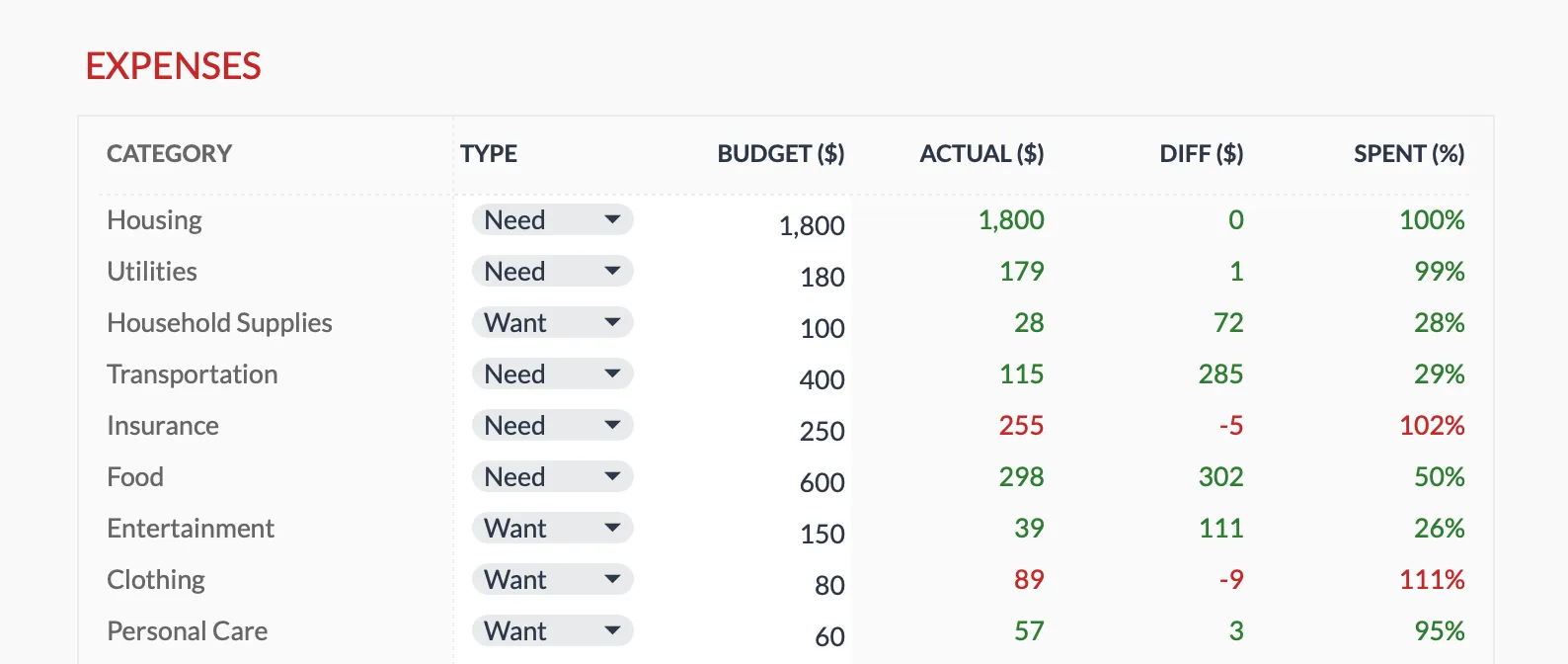
The Premium Monthly Budget Template tracks budget, actual, and difference per category, with conditional formatting doing the same nudge Simplifi’s spending plan does.
Where the spreadsheet earns its keep: you can audit every number. If the Restaurants Actual looks off, you click into the cell, see the SUMIFS formula, and trace back to the rows it counted. No black-box categorization.
The Monthly Budget Template has this structure pre-built on its Budget Plan tab: 17 expense categories each tagged Need or Want, income and savings lists alongside them, SUMIF formulas wired to the Transactions log, and a Summary dashboard. $29 once. The cell-by-cell setup if you build from scratch is roughly 60 minutes; copying a template takes about 5.
Watchlists
Watchlists are the smallest of the three features and the easiest to rebuild.
A Watchlist tab with the categories or merchants you care about. Three to five entries is the typical Simplifi setup.
| Watch item | Type | Month-to-date | Monthly budget | Status |
|---|---|---|---|---|
| Coffee shops | Merchant contains | 47 | 60 | On pace |
| Restaurants | Category | 165 | 200 | On pace |
| Amazon | Merchant contains | 218 | 150 | Over |
| Hobby | Category | 78 | 100 | On pace |
Month-to-date is a SUMIFS on the Transactions tab matched by category or by a merchant-name LIKE. Status is an IF formula returning “Over”, “On pace”, or “Close” based on the ratio of actual to budget multiplied by the percent of the month elapsed.
Conditional formatting paints the Month-to-date cell red if Status is Over, amber if Close, green if On pace. Same visual nudge Simplifi gives you on its home screen.
The behavioral value of the watchlist is the visibility, not the math. If you open the spreadsheet weekly and the Amazon row is red, that information lands the same way the Simplifi notification does.
The migration step
Moving off Simplifi without losing your data takes one sitting. The path:
- In Simplifi, export transactions as CSV. The setting is under Account, then Data, then Export.
- Open the Monthly Budget Template (or a blank Sheet with the structure described above).
- Paste the CSV into the Transactions tab. Column order may need a one-time rearrangement.
- Run a categorization pass. Simplifi’s categories are similar but not identical to the template’s. Most map cleanly; a handful need light remapping.
- Add a Scheduled tab of your own and list recurring bills and income in it. The Monthly Budget Template does not ship one. 15 to 20 minutes for most households.
- Add the Projection tab and snapshot starting account balances into it.
- Run both tools in parallel for a month. At month-end, compare what each captured.
Total time for the initial migration is typically 60 to 90 minutes. Most of that is the historical CSV clean-up, not the formulas.
What you give up
Three things, in order of how much they tend to bother people.
Daily auto-sync. Simplifi pulls transactions automatically. The spreadsheet uses a weekly CSV paste from your bank, which takes about 5 minutes. Functionally similar; not behaviorally identical. The notification-driven rhythm of an app is different from the deliberate session of opening a sheet.
Mobile-native UI. Google Sheets on iOS and Android works. It is not a designed-for-finance app the way Simplifi is. Tap targets are smaller, charts are clunkier, and quick entry on the go takes more taps. Most spreadsheet users do their weekly review on a laptop and use the mobile app for occasional checks.
Some learned categorization. Simplifi remembers that “SQ *COFFEE BAR” is Coffee Shops after you correct it once. A spreadsheet rules table does the same job, but you build the rules manually as new merchants appear. After two or three months of corrections most regular merchants are covered.
These are real losses. If they’d break the habit for you, Simplifi’s price is the price of not breaking it.
Who each tool reads as the right answer for
Less of a verdict, more of a sorting question. The two tools land in different places depending on five variables: how often you open the app, how many accounts and transactions run through it, where you bank, how much you mind the recurring cost, and whether you want to extend the model later.
The split most often comes out the same way.
If the daily-check habit already sticks, the roughly $84 a year on the annual plan is a small bill against a workflow that doesn’t need talking into. Auto-sync across 8 to 10 cards and 200+ monthly transactions is also a lot of manual entry to take back; for that volume, bank sync does real work. The projection that builds itself from detected recurring charges is a real feature, not just a polish point.
The trade reads differently for a weekly-check rhythm, banking outside the US, a 12-month forecasting horizon instead of 60 days, or a preference for category totals you can trace cell by cell. So does extending the model: a what-if comparison column, a custom calculation, a category the vendor hasn’t added yet. In a spreadsheet, those are a column. In an app, they are an update from someone else.
The owning-the-file argument is the one most often understated. A Google Sheet sits in your Drive after any subscription decision; app data lives where the app lives. That matters more in year three than in year one, which is part of why the $29 once vs $84/year math doesn’t capture the whole trade. Break-even on the price alone is around month 5 at the regular annual rate, closer to month 8 on the first-year promo. The business-versus-personal line here is worth reading in full in personal budget vs business cash flow; the Cash Flow Forecast template is built for the longer-horizon use case if that is where you’d extend.
If two or three of those variables push you toward staying with Simplifi, staying is reasonable. The piece that surprises people is how often only one variable was actually doing the work.
Side by side, six rows
A shorter comparison than these posts usually run. Four rows where the difference actually decides a switch, bookended by the two cost rows that frame the decision.
| Quicken Simplifi | Spreadsheet (template or DIY) | |
|---|---|---|
| Cost | About $84 per year ($48 first year) | $29 once, or free |
| Projected cash flow | Auto-detected, 30 to 60 days | Listed once, runs as far as you have data |
| Transaction entry | Daily auto-sync | Weekly CSV paste, about 5 minutes |
| Categorization | Rules with light learning, opaque | Picked from a category dropdown, auditable |
| Works outside the US | Limited | Any currency, any country |
| Five-year cost on the annual plan | $419 | $29 |
The four-column app-vs-DIY-vs-template spread the other posts in this series use is overkill here. The DIY and template columns differ on setup time, not on what they do.
Templates that fit this
Pick by which Simplifi view you opened most.
- If the projected balance was the screen, the Cash Flow Forecast is the file. A 12-month forecast with an opening balance, categorized inflows and outflows, and a closing balance that carries into the next month, plus a Dashboard that names the projected low point and the month it lands in. It works in months rather than days, so it answers which month runs thin rather than which date.
- If the spending plan was the screen, the Monthly Budget Template is the file. Planned-vs-actual by category, a Summary dashboard, and conditional formatting that flags the over-budget rows the way a watchlist does. Same $29, narrower scope than the projection template.
They are separate files with separate structures. The Monthly Budget Template logs individual transactions, while the Cash Flow Forecast works from monthly totals, so feeding one from the other means summing a month and typing the figure across.
Related
- Copilot Money Alternative: Build the Same Workflow in Google Sheets
- YNAB Alternative in Google Sheets: The Method, Mapped Cell by Cell
- Tiller Alternative: Google Sheets Budgeting Without the Subscription
- Personal Budget vs Business Cash Flow Template
- Cash Flow Forecast Templates for Small Business
- Buxfer Alternative in Google Sheets - multi-account and group-expense tracking rebuilt in a sheet
- Monarch Money Alternatives Worth Trying - where Simplifi lands against the pricier apps
Frequently asked questions
Is Quicken Simplifi the same as classic Quicken?
No. Simplifi is the newer, mobile-first subscription product. Classic Quicken Deluxe and Premier are separate desktop products with different feature sets and pricing.
What does Simplifi do well?
Projected cash flow through the running-balance view, the spending plan envelope-style approach, and watchlists for categories or specific merchants. The mobile app is well-designed.
Can I export my Simplifi data?
Simplifi supports CSV export of transactions. There is no direct migration tool to Google Sheets, but the CSV import typically takes 20 to 40 minutes for several months of history.
What is the long-term cost difference?
Simplifi's annual plan is $6.99 per month billed annually, about $83.88 per year at the regular rate, with a first-year promo around $3.99 per month. A one-time $29 spreadsheet template plus a free Google Sheets account is under $30 in year one and $0 in year two. The trade-off is auto-sync convenience.
Will the spreadsheet remind me the way Simplifi's notifications do?
Not with push notifications. The visibility comes from opening the sheet on a set day: conditional formatting flags an over-budget category or watchlist the moment you look. Some people find a fixed weekly session replaces the app's daily pings; others miss the automatic nudge.
Is the Cash Flow Forecast template built for personal use?
It is designed around business revenue and expenses on a 12-month horizon, and it carries a closing balance forward month by month, the same running-balance mechanic Simplifi's projection runs day by day. For a purely personal spending plan the Monthly Budget Template maps more directly; the Cash Flow Forecast fits when you want the projection to run further than 60 days.
Sources
- Quicken Products and Pricing Comparison - Quicken
About this article
Simplifi pricing checked against Quicken's published pricing page. Template sheets, inputs and outputs checked on 2026-09-10 against the shipped Monthly Budgeting Google Sheet (Summary, Budget Plan, Transactions, Goals, Categories, Setup) and the shipped Cash Flow Forecast Google Sheet (Dashboard, Forecast, Actual, Scenarios, Settings). Last reviewed September 2026.