
Empower (formerly Personal Capital) is free and strong at investment tracking, net worth, and retirement planning, but its budgeting, bill tracking, and credit-score tools are thin or missing, which is exactly the part Mint users leaned on daily. For budgeting it is a partial replacement at best. A one-time spreadsheet you own covers the net worth side without the advisory upselling or shutdown risk.
When Mint shut down, millions of users needed to find a new home for their financial data. Empower (formerly Personal Capital) was one of the most recommended alternatives. It is free, it aggregates accounts, and it tracks net worth.
But here is the honest question that many former Mint users have been asking: does Empower actually replace what Mint did?
The short answer is that it partially does. Empower is excellent at some things Mint never did well, but it is missing core features that Mint users relied on daily. If your Mint habit was investment and net worth visibility, Empower fits, and so does a spreadsheet you own outright, such as the Net Worth Tracker or the Financial Planning Template, covered near the end of this article. If it was category budgeting, neither Empower nor those two sheets rebuilds that part, and the alternatives section below covers the tools built for it.
What Empower Does Well
Investment Tracking
This is Empower’s real strength and where it goes far beyond what Mint ever offered. Portfolio allocation analysis, fee detection, performance tracking, and investment checkups are all included at no cost. For anyone with investment accounts, these tools are genuinely valuable.
Net Worth Tracking
Empower provides a clean, historical view of your net worth across all connected accounts. The dashboard shows how your net worth has changed over time, broken down by account type. This is one of its most popular features and works reliably.
Retirement Planning
The retirement planner runs Monte Carlo simulations using your actual account data. You can adjust assumptions about retirement age, spending, Social Security, and investment returns to see how different scenarios play out. For a free tool, it is remarkably detailed.
Account Aggregation
Empower connects to a wide range of financial institutions and shows all your accounts in one place. Balances update automatically, and the dashboard gives you a consolidated view of your financial picture.
Where Empower Falls Short for Mint Users
Budgeting
This is the biggest gap. Mint was primarily a budgeting tool: users could set category budgets, track spending against those budgets, and get alerts when they were overspending. Empower has a spending tracker that categorizes transactions and allows setting basic budget targets, but it is minimal compared to what Mint offered.
The transaction categorization is not as refined, the budget interface feels secondary, and there are no features like bill tracking or spending alerts that Mint users depended on. For people who primarily used Mint for budgeting, Empower feels incomplete.
Bill Tracking
Mint tracked upcoming bills and warned you about due dates. Empower does not have a dedicated bill tracking feature. This was a small but useful part of the Mint experience that former users miss.
Credit Score
Mint provided free credit score tracking. Empower does not. Credit Karma (which received Mint’s official migration) does handle this, but it means using yet another tool.
The Advisory Upselling
Empower is a wealth management company. The free tools exist to attract potential advisory clients. This means:
- Periodic emails about their advisory services
- In-app prompts to speak with an advisor
- Phone calls from their advisory team (these can be opted out of, but the initial contact catches people off guard)
Mint had ads, which were annoying in their own way. But the sales approach from Empower feels different, more personal and more persistent. Some users do not mind. Others find it uncomfortable.
What Former Mint Users Actually Need
Most Mint users relied on a few core capabilities:
- Seeing all accounts in one place - Empower handles this well
- Tracking spending by category - Empower handles this partially
- Setting and tracking budgets - Empower handles this poorly
- Getting alerts about bills and overspending - Empower does not handle this
- Credit score monitoring - Empower does not handle this
If budgeting was your primary Mint use case, Empower alone is not a sufficient replacement. You would need to pair it with a dedicated budgeting tool.
Alternatives Worth Considering
Monarch Money ($99/year) is arguably the closest all-in-one replacement for Mint. It combines budgeting, account aggregation, net worth tracking, and investment views in one platform. The subscription cost is the main barrier.
YNAB ($109/year or $14.99/month) is a strong budgeting app but focuses exclusively on budgeting, with no investment tracking or net worth beyond basic account totals.
Copilot is another option for iOS users, offering a clean interface with transaction tracking, budgeting, and investment views.
The Spreadsheet Approach
For former Mint users who are tired of switching between apps and want something more stable, spreadsheets offer a different kind of reliability. They do not depend on any company staying in business or maintaining a free tier.
The Net Worth Tracker handles the asset and liability tracking that Empower does well, but with your data staying entirely in your own Google account. The Financial Planning Template covers more ground with a Cashflow tab for monthly income and spending totals, a Goals tab holding eight targets such as net worth and average savings per month, and a Projection tab that carries assets and debt forward from six assumptions to an end year you set.
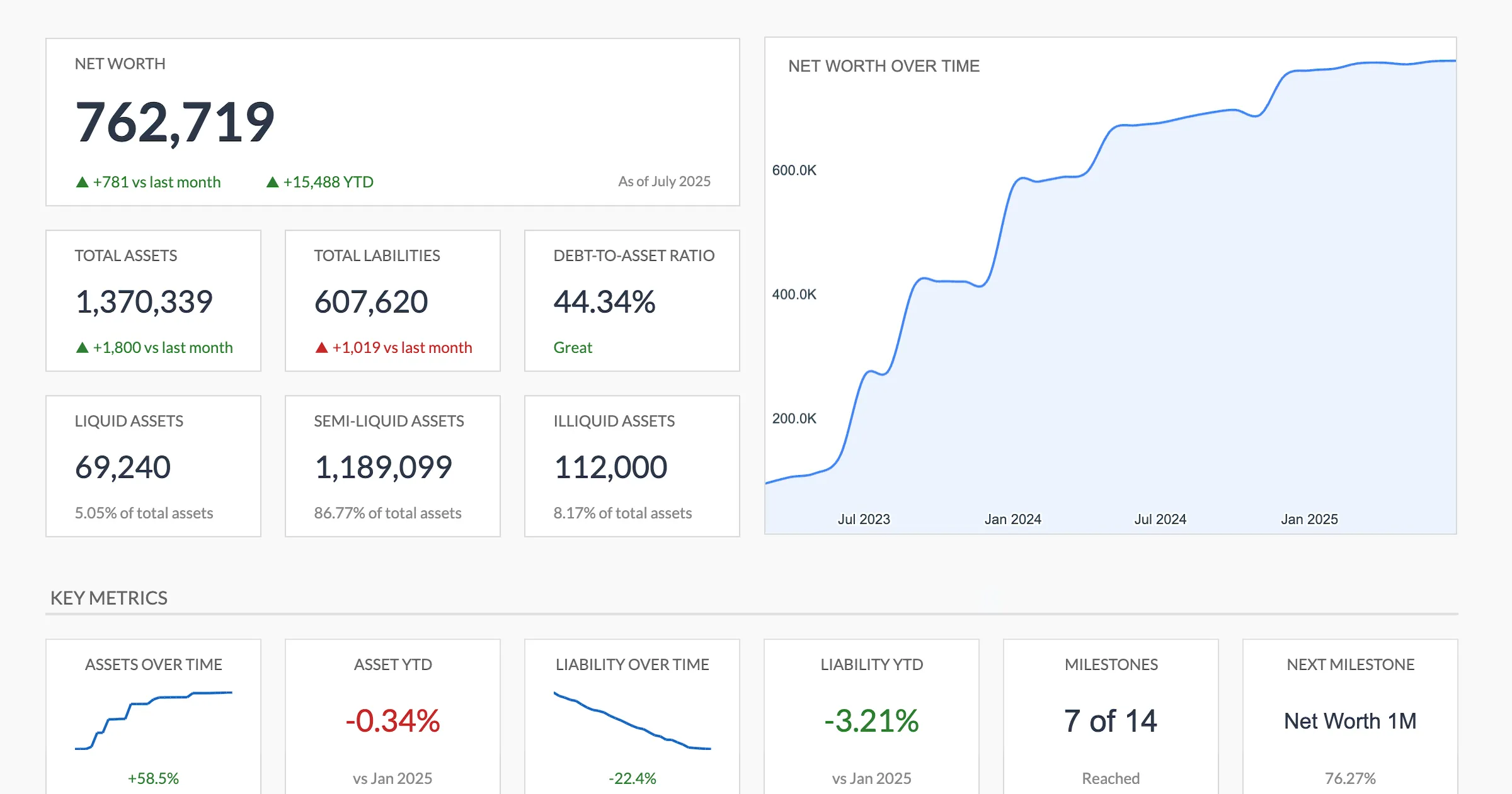
The Premium Net Worth Tracker dashboard covers the same net worth and historical trend view Empower is known for, calculated in a Google Sheet you own.
Both are one-time $29 purchases that work in Google Sheets. No subscriptions, no upselling, no risk of another app shutting down. More than 1,000 customers across 65+ countries use the templates, and the free spreadsheets have been downloaded over 7,000 times.
Bottom Line
Empower is a good tool that happens to be a mediocre Mint replacement. Its strengths sit in investment tracking, retirement planning, and net worth, none of which were Mint’s focus. Its weaknesses sit in budgeting, bill tracking, and spending management, which are exactly what Mint users valued most.
If you primarily used Mint for investment visibility and net worth tracking, Empower works well. If you primarily used Mint for budgeting, Empower will likely leave you looking for something else. On the net worth side, the Net Worth Tracker holds assets and liabilities in a column per month and the Financial Planning Template adds cashflow, goals and a projection, both in a file you own with nothing to renew.
Related
- Net Worth Tracker - Track assets and liabilities over time in Google Sheets
- Financial Planning Template - Net worth, projections, and cash flow in one workbook
- Mint Alternatives After the Shutdown - The wider field of replacements compared
- Empower vs Monarch Money - How Empower stacks up against the closest all-in-one app
- Net Worth Tracker vs Financial Planning Template - Which of our two templates fits your Mint use case
- Net Worth Trackers Compared: Apps vs Spreadsheets - How Empower’s net worth view stacks up against the spreadsheets
Frequently asked questions
Why did Mint users move to Empower?
When Mint shut down, it offered a migration path to Credit Karma. Many users found Credit Karma lacking as a budgeting tool and looked elsewhere. Empower was a common recommendation because it was free, had account aggregation, and included some spending tracking.
Does Empower have a budgeting feature?
Empower has a basic spending tracker that categorizes transactions and shows where money went. It allows setting budget targets for categories. But it is far less capable than Mint's budgeting was, and not comparable to dedicated budgeting apps.
Will Empower always be free?
Empower's free tools have been available for years and are central to their business model of attracting potential advisory clients. There is no indication they plan to charge for the personal dashboard, though features could change over time as with any product.
What is the closest true replacement for Mint?
No single tool perfectly replicates Mint. Monarch Money is probably the closest in terms of combining budgeting, account aggregation, and net worth tracking in one platform, though it requires a paid subscription. For specific features, different tools cover different parts of what Mint did.
Can I import my old Mint data into Empower?
Empower does not offer a direct Mint importer. It rebuilds your picture by connecting accounts and pulling recent transaction history, typically a few months rather than years. If you exported Mint transactions as CSV before the shutdown, a spreadsheet keeps that full history in one file that no aggregator can truncate.
Does Empower charge to link accounts or run its tools?
No. Empower's own tools page states the dashboard and financial tools are free to use. The company earns from its paid advisory services, which is why free users receive outreach about wealth management. Linking accounts and running the net worth, portfolio, and retirement tools costs nothing.
Sources
- Empower Free Financial Tools - Empower
- Monarch Money Pricing - Monarch Money
- YNAB Pricing - YNAB
About this article
Empower's free tool list checked against the company's official tools page. Monarch Money and YNAB prices checked against each company's published pricing page. Template claims, prices and compatibility checked on 2026-09-10 against the shipped Net Worth Tracking Google Sheet (Summary, Assets, Liabilities, Milestones, Setup, Instructions tabs) and the shipped Financial Planning Google Sheet (Summary, Goals, Assets, Debt, Cashflow, Projection tabs). Last reviewed September 2026.