
Empower's Personal Dashboard tracks net worth free and goes deepest for investment-heavy portfolios; Monarch Money bundles net worth with budgeting for $99.99 a year; a spreadsheet template gives full control, permanent data ownership, and no bank login for a one-time $29. Manual entry stays the most accurate because you verify every balance yourself, so the best tracker is whichever one keeps you checking in each month.
Net worth is one of the clearest financial health indicators - assets minus liabilities, one number. But how you track it matters more than most people think. The tool you choose affects what you see, how often you check, and whether you stick with it.
We’ve used both apps and spreadsheets for this, and the differences go beyond just “automatic vs. manual.”
What You’re Actually Tracking
Before comparing tools, it helps to be clear about what net worth tracking involves. At minimum: bank account balances, investment account values, property estimates, minus any debts - mortgage, student loans, credit cards, car loans.
The simple version takes 15 minutes monthly. The detailed version includes estimated home value, vehicle depreciation, business equity, and other less liquid assets. Most people land somewhere in between.
Spreadsheet Approach
The Net Worth Tracker handles the full picture - assets across categories, all liabilities, month-over-month changes, and visual charts showing the trend over time. The Financial Planning Spreadsheet goes further with projections and goal tracking built in. If you’d rather start with the free options first, our roundup of free net worth spreadsheets covers those.
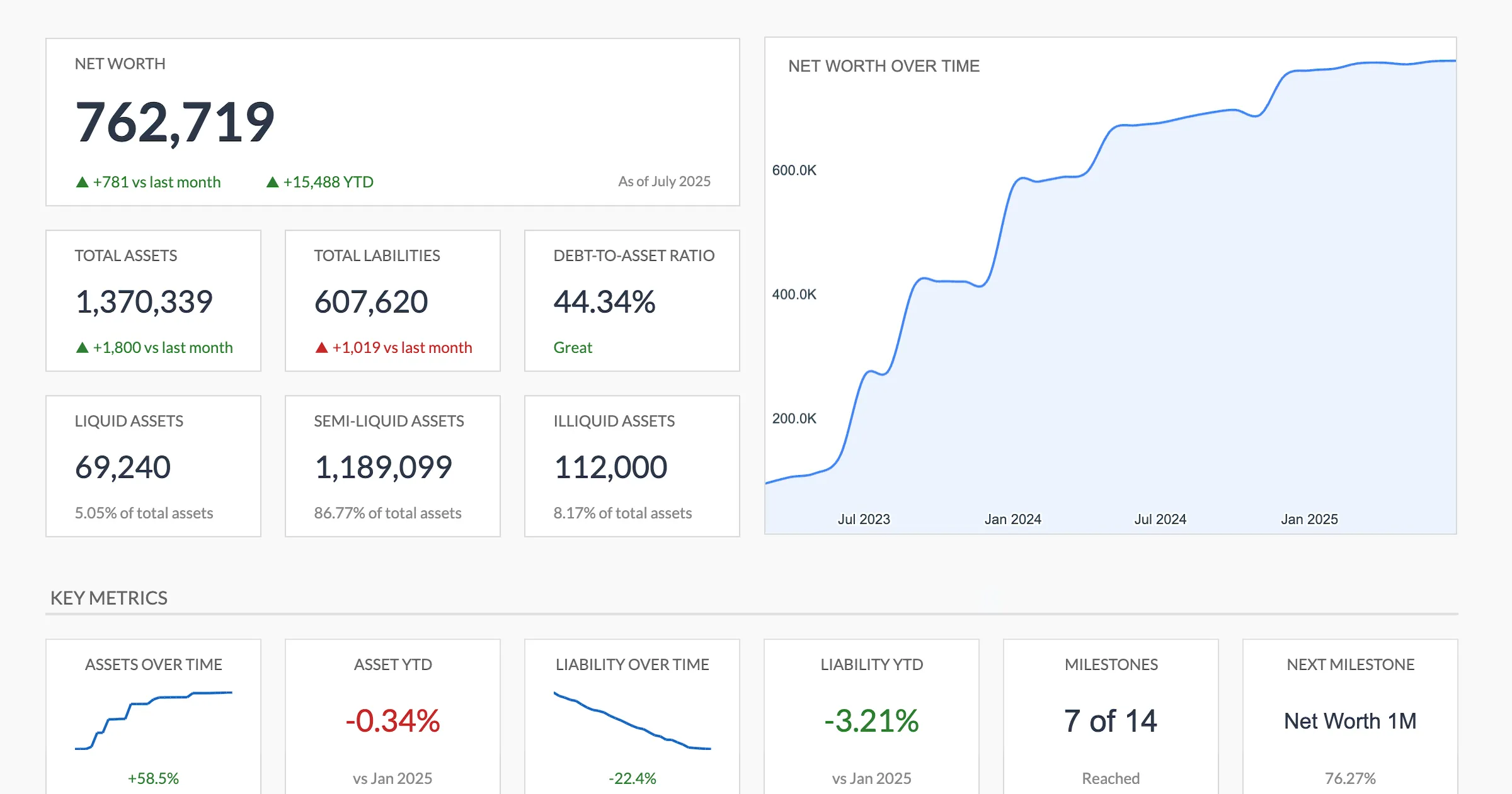
The Net Worth Tracker (Premium tier) dashboard: one number up top, the asset and liability breakdown beneath it, and the trend line built from every month you log.
What works well: Room for the accounts you actually have. Want to separate taxable and tax-advantaged investment accounts? Add a row. Track crypto separately? Cryptocurrency is one of the eleven asset types the Assets tab groups by. Include business assets? Business equity is another. Each account gets its own row inside its section, and liabilities work the same way across mortgage, credit cards, student loans, auto, personal and business debt.
The monthly process: Log into each account, note the balance, enter it into the spreadsheet. Takes 10-20 minutes depending on how many accounts you have. This sounds tedious, but it creates a monthly ritual of actually reviewing every account - something automated tools can make too passive.
Data ownership: The template is a Google Sheet you copy into your own Drive. No subscription needed, the month-by-month history stays in your copy rather than on a tracking service’s servers, and you can build any visualization or analysis you want on top of it.
Empower Personal Dashboard
Empower (formerly Personal Capital) offers the most popular free net worth tracker. Automatic account syncing pulls balances daily, and the investment analysis tools are genuinely impressive for a free product.
What works well: Investment-heavy net worth tracking. The portfolio allocation view, fee analyzer, and retirement planner add real value beyond basic balance tracking. For people whose net worth is primarily in investment accounts, Empower provides more insight than any spreadsheet.
The limitations: The budgeting features feel secondary. Account linking occasionally breaks and needs reconnecting. And Empower’s business model relies on its wealth management services, so expect periodic contact from advisors.
Privacy consideration: Automatic tracking means sharing credentials for every financial account. For some people this is fine. For others, it’s a dealbreaker.
Monarch Money
Monarch includes net worth tracking alongside its budgeting features. At $99.99 a year, or $14.99 a month, you get automatic balance updates, historical net worth charts, and the ability to include manually-tracked assets like property.
What works well: The combined budget + net worth view in one app. For people who want both, Monarch avoids maintaining separate tools. The interface is clean, and the historical tracking is well-designed.
The limitations: You’re paying primarily for budgeting features - if net worth tracking is your main need, the price is harder to justify. The investment analysis is less detailed than Empower’s.
Manual Tracking with a Simple Spreadsheet
Worth mentioning separately from template-based tracking: some people just use a basic spreadsheet with a date column and columns for each account. No formulas, no charts, just raw numbers entered monthly.
This surprisingly works for people who’ve tried and abandoned more complex tools. The simplicity means it actually gets done. A basic Google Sheet with 15 columns and a new row each month captures everything needed to see the trend, and our walkthrough on how to calculate net worth in Google Sheets covers the handful of formulas that turn those columns into a running total.
Which Approach Fits
Choose a spreadsheet template if: You want full control, care about privacy, have diverse asset types, or want to customize your tracking extensively. The one-time cost and permanent data ownership appeal to long-term trackers.
Choose Empower if: Investments make up most of your net worth and you want detailed portfolio analysis. The free price is right, and the investment tools are genuinely best-in-class.
Choose Monarch if: You want combined budgeting and net worth tracking in one polished app and don’t mind the subscription.
Choose a simple spreadsheet if: You’ve tried fancy tools and stopped using them. Sometimes the path to consistency is radical simplicity.
The common thread across people who successfully track net worth long-term isn’t the tool - it’s the habit. Monthly check-ins, whatever the method, build financial awareness that compounds over time. The “right” tracker is the one that keeps you showing up.
Related
- Net Worth Tracker Spreadsheets That Actually Work - Focused roundup of free spreadsheet options
- Net Worth Tracking for Beginners - The complete getting-started guide
- Net Worth Tracker - Balances you enter each month, with totals, liquidity split and milestones calculated for you
- Financial Planning Template - Net worth with projections and goals
- Net Worth Tracker vs Financial Planning: Which to Use - Choosing between the two templates
- Empower (Personal Capital) as a Mint Replacement - How the free app handles the net worth side, and where it falls short
Frequently asked questions
How often should I track my net worth?
Monthly is the most common cadence and works well for most people. It's frequent enough to notice trends but not so frequent that daily market fluctuations become distracting. Some people prefer quarterly for a higher-level view.
Do I need to link my bank accounts to track net worth?
No. Manual tracking works perfectly well - you enter account balances from your bank, brokerage, and loan statements. Many people prefer this approach because it avoids sharing bank credentials with third parties and forces a regular review of all accounts.
What's the most accurate way to track net worth?
Manual entry with a spreadsheet tends to be the most accurate because you verify each balance yourself. Automated tools sometimes miscategorize assets or miss accounts that don't support automatic connections. The trade-off is that manual tracking requires more effort each month.
Is net worth tracking useful if you have debt?
Especially so. Tracking net worth while paying off debt shows progress even when the number is negative. Watching it move toward zero and then into positive territory provides tangible evidence that the debt payoff strategy is working.
What happens to my net worth history if a tracking app shuts down?
With an app, the history lives on their servers, so a shutdown or an account link that stops working can leave gaps or lose the record entirely - Mint's 2024 closure is the example most people remember. A spreadsheet stores every past month in a file you own, so the history stays with you regardless of what any company does.
Can I track net worth without paying a monthly subscription?
Yes. Empower's Personal Dashboard is free, a basic spreadsheet costs nothing, and a template like the Net Worth Tracker is a one-time $29 purchase rather than a recurring fee. Monarch Money is the subscription option in this comparison, at $99.99 a year.
Do the numbers match between an app and a spreadsheet?
They can differ. Apps pull balances automatically and sometimes miscategorise an account or miss one that does not support a connection, while a spreadsheet reflects exactly what you type in from each statement. Some people run both for a month and reconcile the two to spot where an automatic feed is off.
Sources
- Monarch Pricing - Monarch
- Empower Free Financial Tools - Empower
About this article
Monarch Money's subscription price checked against Monarch's published pricing page. Template prices, sheets, inputs and outputs checked on 2026-09-10 against the shipped Net Worth Tracker Google Sheet (Summary, Assets, Liabilities, Milestones, Setup tabs) and the Financial Planning Google Sheet (Goals and Projection tabs). Last reviewed September 2026.