
Monarch Money costs about $14.99 a month or $99 a year and centers on household budgeting and net-worth tracking. Rocket Money keeps a free tier plus a sliding $4 to $12 a month Premium plan, and it leads on subscription detection and bill negotiation. They solve different jobs: Monarch fits couples and long-term planning, Rocket fits catching subscriptions and lowering bills. When neither app fits, a one-time budgeting spreadsheet holds the categories, targets, and trend chart in a file you keep.
Both apps showed up on every “best Mint replacement” list after the Mint shutdown in early 2024, so they get compared constantly. The comparison is rarely fair. They share an aesthetic and a category, then diverge sharply. One is for the person who wants to plan a household budget with a partner. The other is for the person who wants to catch the $14.99 subscription that auto-renewed last month and the cable bill that has crept upward.
Pricing in 2026
Pricing is the loudest difference, so worth getting out of the way first.
| Plan | Monarch Money | Rocket Money |
|---|---|---|
| Free tier | 7-day trial only | Yes - basic budgeting, account view |
| Premium monthly | About $14.99/mo | Sliding $4 - $12/mo |
| Premium annual | About $99/yr (~$8.25/mo) | Annual options exist at the low end |
| Couples / second user | Included | Included |
| Bill negotiation cut | N/A | ~30 - 60% of first-year savings |
Two notes on this table.
Monarch’s annual price is roughly half the monthly rate per month, the standard pay-yearly model.
Rocket’s sliding pricing is harder to read. At signup you pick what to pay between roughly $4 and $12 a month. Features unlock at the bottom of the range; the higher number is a tip jar. Whether you pay $4 or $12, the product is mostly the same. Some users move up after a negotiation saves them a few hundred dollars; some sit at $4 indefinitely.
The negotiation commission is the other line worth flagging. If Rocket gets your cable bill down by $50/month for a year, they keep $180 to $360 of that. The user can still come out ahead, but the “free Premium tier” framing is misleading - bill negotiation is its own cost on top.
What they share
Both apps do the table-stakes work of a modern budgeting app and do it well enough that it rarely shows up in reviews:
- Plaid-style bank, credit card, brokerage, and loan account aggregation
- Auto-categorization of transactions with manual override
- Category-level spending vs target tracking
- A net-worth view that adds account balances minus debts
- iOS and Android apps that match the web product
- Two-factor auth and the usual security posture
If your needs end at “I want to see my accounts in one place and roughly categorize what I spend,” you will find both serviceable. The choice depends on what you want beyond this baseline.
Where Monarch is the better fit
Four areas where Monarch outpaces Rocket.
Household and couples. Monarch is built around the idea that two people share finances. Both partners log in with their own credentials, see the same accounts, edit the same budget, and split visibility appropriately. The collaboration is a first-class feature, not an afterthought. Rocket allows shared access but the experience is more “log in as the household account” than “two people working from the same plan.”
Long-term net-worth tracking. Monarch’s net-worth view has years of history, comparable to a charting app rather than a snapshot. Combined with category trends, it answers questions like “did our discretionary spending creep up after we moved?” Rocket has a net-worth screen, but it leans toward current state rather than long-term trend analysis.
Custom categorization and rules. Monarch lets users build deep category trees - subcategories, grouped categories, rules that route specific merchants to specific buckets. Power users get a lot out of this. Rocket’s categories are flatter and faster to set up but less flexible.
Investments and goals. Monarch’s investment view shows allocation, performance, and contribution patterns. Its goal-tracking models progress with target dates. Rocket has investments tied in via account aggregation but does not develop the analytical view in the same way.
If the question is “how is our household doing financially, and where has the money gone across categories over years,” Monarch answers it more directly.
Where Rocket Money is the better fit
Rocket’s wins map to a different problem.
Subscription detection. The feature that built Rocket’s reputation. The app scans linked accounts for recurring charges and surfaces them in a clean list. Monarch will categorize a Netflix charge as “Streaming” but it does not flag the charge as recurring or prompt a review. Rocket surfaces the list of repeating charges by default, which is the reason most users mention the app to friends.
Cancellation help. For supported services, Rocket cancels on your behalf rather than handing you a phone number. For the rest, it surfaces the contact path. Less friction, and it is what users mention most often when they recommend the app.
Bill negotiation concierge. A team contacts cable, internet, mobile, or other providers and tries to lower your monthly cost. They take a cut of any savings. Whether the math works depends on the providers in your area and how long since you last called yourself. For people who would never make those calls, it is found money. For people who already negotiate annually, the commission may exceed the savings.
Faster onboarding. Rocket’s flow is opinionated and gets a new user to “here are your subscriptions” within minutes. Monarch’s onboarding is more open and assumes you want to build a budget from scratch. Time to first useful screen is shorter in Rocket.
Rocket is about bills going down. Monarch is about visibility and planning going up.
Comparison table
For anyone embedding or skimming, the head-to-head on the dimensions that usually decide it:
| Dimension | Monarch Money | Rocket Money |
|---|---|---|
| Price floor | ~$48/year ($4/mo) | |
| Price ceiling | ~$14.99/mo | ~$12/mo + negotiation cut |
| Free tier | Trial only | Yes, basic features |
| Household / couples | First-class | Functional |
| Custom categories | Deep | Flat |
| Subscription audit | Manual via categories | Auto-detected list |
| Bill negotiation | None | Concierge (commission) |
| Net-worth trend | Multi-year, deep | Current + recent |
| Investment view | Allocation + performance | Account aggregation only |
| Goal tracking | Date and amount targets | Lighter, less developed |
| Onboarding speed | Slower, more thorough | Faster, more opinionated |
| Outside US | Limited | Limited |
Monarch is the better fit for couples and household dashboards. Rocket Money is the better fit for subscription cleanup and bill negotiation. The table reads roughly six-five for Monarch on the rows above, but the count is less interesting than which rows matter to you.
User profiles that map cleanly
A few sketches readers tend to recognize themselves in.
The household planner. Two incomes, shared expenses, a partner who also wants to see the numbers, plans for a house or a kid in the next few years. Wants categories, goals, and a multi-year net-worth chart. Monarch’s collaboration and trend depth tend to do the work here.
The subscription regretter. One income, or shared with a partner who is not interested in finance apps. Has a stack of streaming services, gym memberships, and software trials that converted to paid. Sometimes forgets which credit card a charge is on. Wants the app to surface and help cancel. This is the Rocket use case.
The investor who also budgets. Mostly tracks net worth and investment allocation. Budget is loose. Wants accounts in one place and a sense of where spending lands by category. Empower is often closer to the fit; we covered the Empower vs Monarch comparison in February.
The structured-system budgeter. Wants every dollar assigned a job, manual transaction entry, a methodology to follow. Neither app is built for this. YNAB is where most of these users end up; the YNAB vs Monarch comparison covers that split.
Can you run both?
Technically yes. Some people do for a month while deciding. Most find it redundant within a few weeks - the budget views start to disagree on what counts as discretionary and the dual maintenance gets old.
If the subscription audit is the only Rocket feature you use, you can replicate most of it inside Monarch by filtering recurring charges manually. If the household budgeting in Monarch is the only feature you use, you can replicate most of it inside Rocket at a lower price floor. The “both” answer usually collapses into one after a real-world test.
When neither app fits
A real share of people who try both end up uninstalling. Common reasons:
- The bank link breaks repeatedly. Plaid is reliable for major banks and unreliable for some regional ones. A daily-broken sync is more annoying than the app is useful.
- They live outside the US. Both apps work best with US accounts. International coverage is patchy.
- They do not want a third party holding bank credentials. Even with read-only access, the security model is a no.
- They want a one-time cost rather than an open subscription. Over 10 years, Monarch at $99/year is $990. Rocket at $8/month is roughly the same. For people who would rather not rent the tool, that math matters.
A spreadsheet workflow fills this gap. It does not auto-sync, does not detect subscriptions for you, and does not negotiate bills. What it does is hold the categories, the targets, and the trend chart in a file you own forever. The trade is automation for ownership.
We walked through the Rocket-specific version of this in Rocket Money Alternative: Subscription and Budget in a Spreadsheet - the audit, the category budget, the net-worth view, and a yearly playbook for handling bill calls yourself.
For the Monarch-specific version, the recipe is similar: a category budget with planned versus actual, a 12-month view of the same categories, and a file shared with a partner from the same Drive folder. Neither budget template tracks account balances, so a net-worth snapshot stays a separate list kept by hand.
Migration notes
A few practical things if you are moving between apps or out of them:
- Monarch to Rocket. Export transactions from Monarch as CSV. Rocket does not have a direct importer, so most users start fresh and re-link accounts. Categorization rules do not move.
- Rocket to Monarch. Same situation - export CSV from Rocket, link accounts in Monarch, rebuild rules. Monarch has a YNAB importer but not a Rocket one.
- Either app to a spreadsheet. CSV export, then paste into the Transactions tab one month at a time, since the Monthly Budget Template reports on a single month. SUMIF rolls each category up from there. Three months of backfill is roughly 30 minutes of work.
- Either app to nothing. Cancel the subscription, download a full export first, store the CSV. The “I will get to it later” gap is the place data goes missing.
One pattern from helping people through these: the export goes smoothly when it happens the day someone decides to switch, less smoothly when it is left until the day the subscription is canceled.
Templates that fit this
Two need-based options framed by what someone is trying to do.
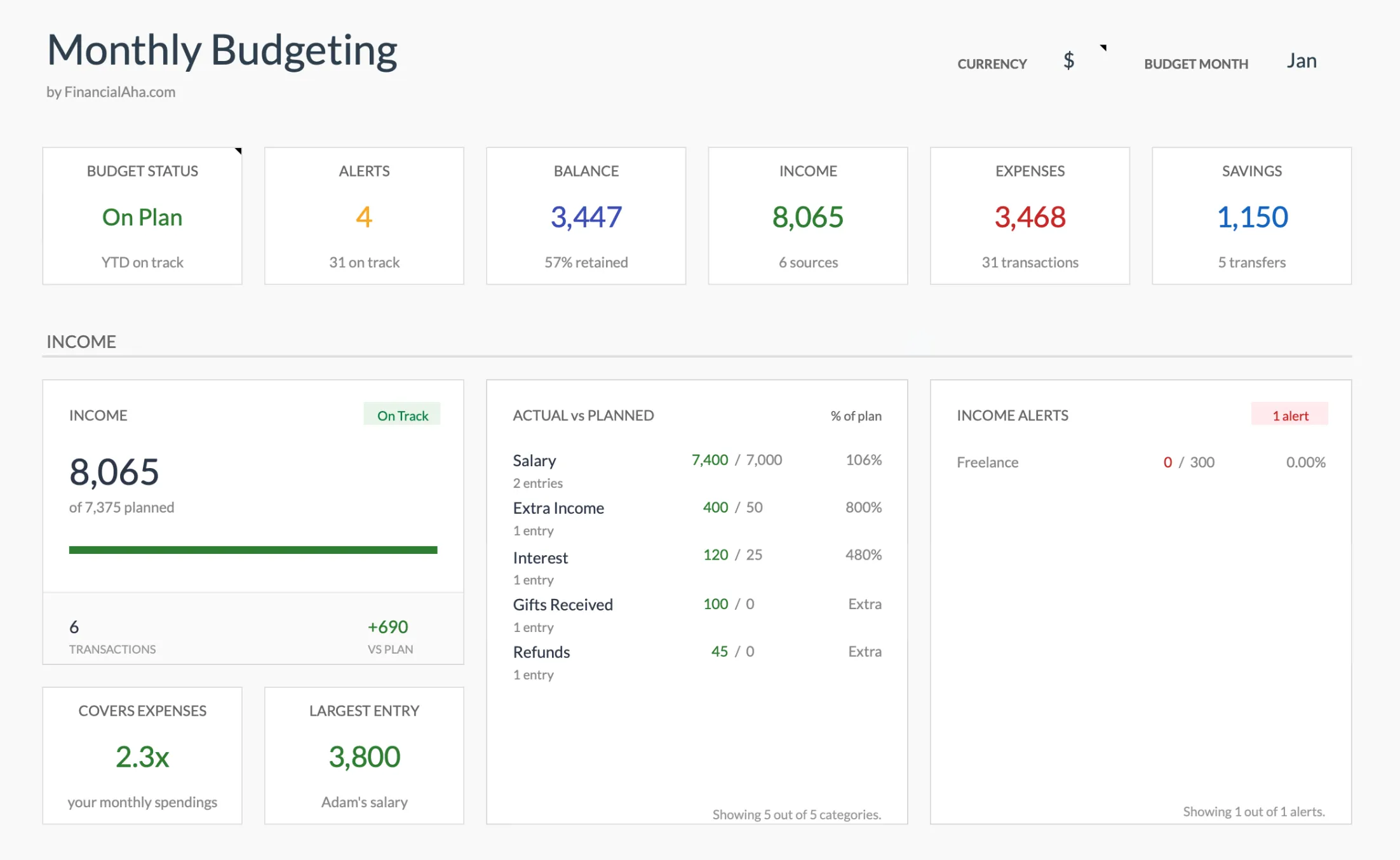
The Monthly Budget Template (Premium) dashboard: the same category, income, expenses, and savings roll-up Monarch shows, in a Google Sheet you own outright.
- “I want to plan a household budget with categories and targets.” Monthly Budget Template at $29 once. Planned vs actual per category, monthly dashboard, partner-share via Drive. Covers the budgeting half of what Monarch does, without the auto-sync.
- “I want a year-long view and to see annual patterns.” Annual Budget Template at $29 once. All 12 months side-by-side, planned vs actual by category, savings rate roll-up. Useful for the multi-year question Monarch answers via trends.
Both copy to your own Drive, calculate automatically, and stay yours after one payment. No subscription, no bank link, no commission on savings.
Related
- Rocket Money Alternative: Subscription + Budget in a Spreadsheet - the audit, budget, and net-worth workflow without an app.
- Empower vs Monarch Money: Free vs Paid Finance Dashboard - the investment-heavy alternative to Monarch.
- YNAB vs Monarch Money: Which Budgeting App Wins? - the structured-methodology alternative.
- Mint Alternatives After Shutdown - the original list that put both apps on most people’s radar.
- Monarch Money Alternatives Worth Trying - the full shortlist if Monarch is the one you are weighing.
Frequently asked questions
Does Rocket Money keep a cut of my bill savings every year?
The bill-negotiation fee is charged once, on a share of the first year's savings, not as an ongoing cut. After that, the lower bill is yours. Whether it pays off depends on how much they actually lower the bill and whether you would have called the provider yourself.
Is there a genuinely free option among these?
Rocket Money has a free tier covering basic budgeting and account views. Monarch is trial-only after the first week. A budgeting spreadsheet is a one-time purchase with no subscription and no bank link.
Do Monarch and Rocket Money work outside the United States?
Both work best with US bank and card accounts, and international coverage is patchy. A spreadsheet has no bank-link requirement, so it works the same in any country and currency.
Can a spreadsheet flag recurring subscriptions the way Rocket Money does?
Not automatically. In the Monthly Budget Template every expense row carries a Subscription flag you tick yourself, and the Summary totals what those flagged rows cost per month and counts how many are active. The trade is a few minutes of manual work for a file you own outright.
Sources
- Monarch Money Pricing - Monarch Money
- Rocket Money - Rocket Money
About this article
Monarch Money and Rocket Money pricing checked against each company's official pricing and plan pages. Template prices, sheets and features checked on 2026-09-10 against the FinancialAha product catalog and the shipped Google Sheets: Monthly Budgeting (Summary, Budget Plan, Transactions, Goals) and Annual Budgeting Planner (Summary, Annual Plan, Annual Financial Goals). Last reviewed September 2026.