For 2026 the strongest free options are Google Sheets' built-in budget templates and community sheets like Aspire; the strongest paid pick is a one-time template such as FinancialAha's Financial Planning Template ($29), while Tiller ($99/year) adds automatic bank syncing. This guide compares each option on cost, depth, and privacy.
There are dozens of budgeting apps available in 2026. Most charge a monthly fee, require bank connections, and give you a pre-set way of looking at your money. Some people prefer that. Others want more control.
If you’re in the second group, a spreadsheet is worth considering. You see every formula, you own the data, and you set it up the way your finances actually work - not the way an app designer assumed they would.
This is a practical comparison of what’s available right now, with honest tradeoffs.
If you’re in a hurry: For budgeting, the Monthly Budget Template or Annual Budget Planner are strong paid options. For a full financial picture, the Financial Planning Template covers net worth, goals, debt, and projections. For free, Google Sheets’ built-in templates and Vertex42 are solid starting points.
Why people still use spreadsheets over apps
Finance apps have gotten better. But the reasons people choose spreadsheets haven’t changed much:
- Full control. You decide what gets tracked, how it’s categorized, and how totals are calculated. No feature requests needed.
- Privacy. Your data stays in your Google or Microsoft account. No third-party bank connections, no data sharing.
- One-time cost. Free templates cost nothing. Paid ones are typically a single purchase, not a recurring $99/year or $14/month.
- Transparency. Every calculation is visible. Click on a cell and see exactly how the number was derived.
- Works anywhere. Google Sheets runs on any device with a browser. Excel works offline.
This doesn’t mean spreadsheets are right for everyone. If you want automatic bank syncing or a mobile-first experience, an app might be the better fit. But for people who want visibility into their finances without ongoing costs or data sharing, spreadsheets are hard to beat.
What to look for
Feature lists matter less than whether you’ll still be using a template a few months from now. A few things tend to decide that:
- Time per week. If tracking takes more than about ten minutes a week, it tends to become a chore. Fast data entry and a clear summary help more than a dozen extra tabs.
- Customization. Your categories aren’t the same as anyone else’s. A template that locks you into fixed buckets like “Entertainment” or “Dining Out” gets frustrating when what you actually need is something like “Dog Expenses” or “Side Project Costs.”
- What it shows back. Numbers in cells aren’t insight on their own. Charts, summaries, and trends over time are what turn data entry into a clearer view of where your money goes.
Free spreadsheets
Google Sheets built-in templates
The simplest starting point. Open Google Sheets, go to Template Gallery, and you’ll find a Monthly Budget and an Annual Budget template ready to use. They cover basic income and expense tracking with some charts.
The limitation is depth. These templates track spending but don’t help with net worth, debt payoff planning, or financial projections. For getting started with the habit of tracking, they work well.
Vertex42 templates
Vertex42 has been publishing Excel templates for years. Their collection covers household budgets, debt repayment schedules, and retirement calculators. The templates are formula-driven and reliable.
They lean more technical and less visual than newer alternatives. If you’re comfortable with Excel and want something proven, Vertex42 is worth a look.
Reddit community spreadsheets
On r/personalfinance and r/financialindependence, you’ll find community-built spreadsheets - retirement simulators, investment trackers based on the 4% rule, FIRE calculators. Some of these are genuinely well-made.
The tradeoff: quality varies significantly. There’s no guarantee of ongoing maintenance, documentation, or formula accuracy. For people who enjoy reviewing and customizing spreadsheets themselves, these can be useful. For those who want something that works out of the box, a maintained template is a safer choice.
Aspire Budget
Aspire is a free, community-maintained Google Sheets template built around envelope budgeting. It handles transaction logging, category management, and monthly reports, which is a lot for something that costs nothing. The community keeps it actively updated, which is uncommon for free templates.
Setup takes longer than the simpler options, but the result is a fairly complete system. It suits people who want envelope-style budgeting in Google Sheets without paying for an app.
Mad Fientist spreadsheet
For anyone focused on FIRE (financial independence, retire early), the free spreadsheet from the Mad Fientist blog calculates your savings rate, projects when work could become optional, and tracks investment growth. It does one thing and does it without extra tabs.
The tradeoff is scope. It covers financial independence tracking and little else, so budgeting, net worth history, or tax planning would need separate tools.
Paid spreadsheets
FinancialAha templates
After selling our software company Froala in 2018, we needed to track a sudden influx of assets: sale proceeds, new investments, and tax obligations. Nothing we tried fit. Every template was either too simple for post-acquisition finances or too rigid to adapt. That gap is why we started building our own spreadsheets, which eventually became FinancialAha. - Stefan
FinancialAha’s paid templates are Google Sheets spreadsheets built for people who want something ready to use without spending hours on setup. The collection covers:
- Monthly Budget Template - income and expense tracking with category breakdowns and visual summaries
- Net Worth Tracker - assets and liabilities in one view, with monthly tracking
- Financial Planning Template - a full financial dashboard covering budget, net worth, goals, and projections
- Retirement Planner - savings projections, withdrawal strategies, and financial independence timelines
Each template is a one-time purchase. No subscription, no bank connection needed, and updates are included. Your data stays in your own Google account.
What’s different from free templates: the paid versions include multi-sheet dashboards, native charts, pre-built formulas for common scenarios, and a level of design polish that saves real setup time. Used by 1,000+ customers across 65+ countries, including individuals and financial planners.
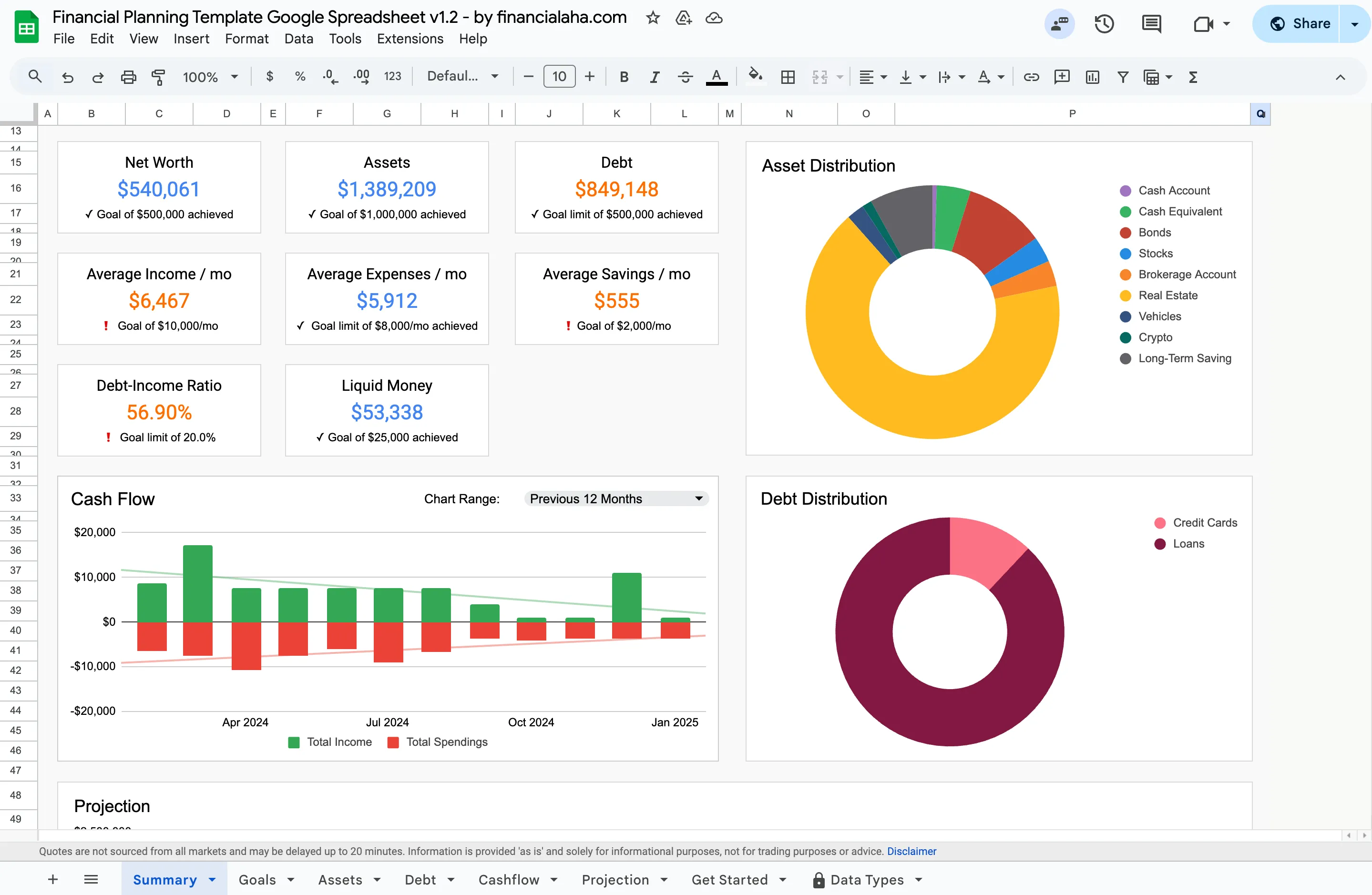
The Financial Planning Template (Premium tier): net worth, assets and liabilities, cash flow, goals, and projections on one dashboard - the depth free templates leave out.
Tiller Money
Tiller connects to your bank accounts and automatically imports transactions into Google Sheets or Excel. This saves time on manual data entry while keeping the flexibility of a spreadsheet.
The subscription is $99/year after a 30-day free trial. Bank connections depend on a third-party aggregator, which means occasional disconnections and a delay between transactions happening and appearing in your sheet. Some people find the automation worth the cost. Others prefer the control (and privacy) of manual entry.
Worth noting: Tiller requires sharing bank credentials with a third party. For people specifically choosing spreadsheets for privacy, this is a meaningful tradeoff.
Smartsheet financial templates
Smartsheet is a project management platform that also offers financial templates. These include budgets, forecasting models, and cash flow trackers with collaboration features and workflow automation.
For freelancers or small business owners already using Smartsheet, the financial templates are a natural addition. For personal budgeting, the tool’s complexity and its per-member subscription pricing are more than most people need.
Quick comparison
| Spreadsheet | Price | Good for | Strengths | Tradeoffs |
|---|---|---|---|---|
| Google Sheets templates | Free | Getting started | Simple, cloud-based, no setup | Limited depth, basic only |
| Vertex42 | Free | Excel users | Proven, formula-driven | Less visual, more technical |
| Aspire Budget | Free | Envelope budgeting | Full-featured, actively maintained | Longer setup |
| Mad Fientist | Free | FIRE tracking | Focused, no bloat | FIRE only, no budgeting |
| Reddit community | Free | DIY and FIRE | Niche calculators, flexible | Quality varies, no support |
| FinancialAha | One-time | Serious tracking | Professional, private, updated | Paid (but no subscription) |
| Tiller Money | $99/year | Automation | Bank sync, auto-import | Subscription, bank access needed |
| Smartsheet | Per-member subscription | Business finance | Robust, scalable | Too complex for personal use |
How to choose
The right spreadsheet depends on what you need right now - not what you might need eventually.
Just starting out? A free template is enough. Google Sheets’ built-in budget template or Vertex42 will get you tracking income and expenses without any cost.
Ready for more detail? A paid template like FinancialAha’s Financial Planning Template gives you budgeting, net worth, goals, and projections in one spreadsheet - without the ongoing cost of an app subscription.
Want automation? Tiller handles the data entry part. You get spreadsheet flexibility with bank syncing convenience, for $99/year.
Managing business finances too? Smartsheet might make sense if you’re already in that ecosystem. Otherwise, a dedicated business template is simpler.
The consistency of tracking matters more than which tool you pick. A free spreadsheet updated weekly is more useful than a paid one opened once. If you would rather build your own from scratch before buying anything, the walkthrough on creating an advanced personal finance tracker in Google Sheets shows what the paid dashboards automate.
Related
- Financial Planning Template - budget, net worth, goals, and projections in one Google Sheet
- Monthly Budget Template - income and expense tracking with category breakdowns
- Financial Planning Software or Spreadsheet? - the broader case for owning your data
- The Only Retirement Financial Planning Spreadsheet You Will Ever Need - for FIRE and retirement projections beyond a free calculator
- The Redesigned Financial Planning Spreadsheet Template - what changed in the flagship planning workbook
Frequently asked questions
Are spreadsheets still practical for personal finance in 2026?
They are. Spreadsheets offer full control over your data, complete privacy (no bank connections needed), and unlimited customization. Many people prefer them over apps because there are no subscriptions, no data sharing, and no features locked behind paywalls.
What is a good free personal finance spreadsheet?
Google Sheets has several free built-in budget templates that work well for getting started. Vertex42 offers reliable Excel templates. Reddit communities share niche calculators. Paid templates typically add automated formulas, visual dashboards, and pre-built categories that save significant setup time.
Google Sheets or Excel for personal finance?
Google Sheets is free, works on any device, and handles collaboration well. Excel has more advanced features and works offline. For standard budgeting and finance tracking, either works fine. Most modern templates support both.
How do spreadsheet templates compare to budgeting apps like YNAB or Monarch?
Spreadsheets give you more control and privacy - your data stays in your own account. Apps offer convenience features like automatic bank syncing. Spreadsheets are typically one-time purchases or free, while apps charge monthly or annual subscriptions.
Do I need to know formulas to use a finance spreadsheet?
Not for a pre-built template. The formulas are already in place, so you enter numbers and everything calculates on its own. Basic familiarity with Google Sheets or Excel helps, but you don't need to be a spreadsheet expert.
Can I switch from a budgeting app to a spreadsheet?
Usually, yes. Most apps let you export your history as a CSV file, which you can bring into a spreadsheet and keep going from there. The switch takes a bit of setup time, but many people find it worthwhile.
How much do FinancialAha's paid templates cost?
Each template is a one-time purchase. The Monthly Budget Template, Net Worth Tracker, and Financial Planning Template are $29 each; the Retirement Planner is $39. Bundles lower the per-template cost, and updates are included with no subscription.
What happens to my spreadsheet if I stop paying?
With a one-time template purchase there is nothing to stop paying. The file stays in your own Google or Microsoft account for as long as you keep it. With a subscription tool like Tiller, the automatic bank syncing stops when the subscription lapses, though any data already in your sheet remains.
Can I use a finance spreadsheet on my phone?
Yes. The Google Sheets and Microsoft Excel mobile apps open these templates on a phone or tablet. Entry is easier on a larger screen, so many people log transactions on mobile and review the dashboard on a laptop.
Sources
- Tiller Pricing - Tiller
- Smartsheet Pricing - Smartsheet
About this article
Competitor prices for Tiller and Smartsheet were checked against each vendor's published pricing page. FinancialAha template prices and features were checked against the site's live product catalog. Last reviewed August 2026.