
The Retirement Financial Planning Spreadsheet is a $39 Google Sheets template that projects portfolio growth across conservative, base, and optimistic scenarios, maps pension and other income, and flags whether your savings last through retirement. You enter one combined savings balance, set return and inflation assumptions, and read a projection at key ages out to the life expectancy you set. One-time purchase, runs entirely in Google Sheets.
The Retirement Financial Planning Spreadsheet is a Google Sheets template that projects retirement savings growth, models income sources, and shows whether current savings are on track. Here’s what it does and how to set it up.
Wondering calculator vs template? See Retirement Template vs Calculator for when each tool fits.
What the Template Covers
| Section | What It Does |
|---|---|
| Savings & Contributions | Tracks total current retirement savings and the amount added each year |
| Expense Projections | Models retirement expenses with inflation adjustments |
| Savings Growth | Projects portfolio growth across conservative, base, and optimistic scenarios |
| Income Sources | Takes one monthly pension figure with its own start age, plus other monthly income such as rental or part-time work |
| Goal Tracking | Shows progress toward your target retirement age and milestone multiples like 25x annual expenses |
| Safety Checks | Flags when the withdrawal rate runs high or the portfolio could run short before life expectancy |
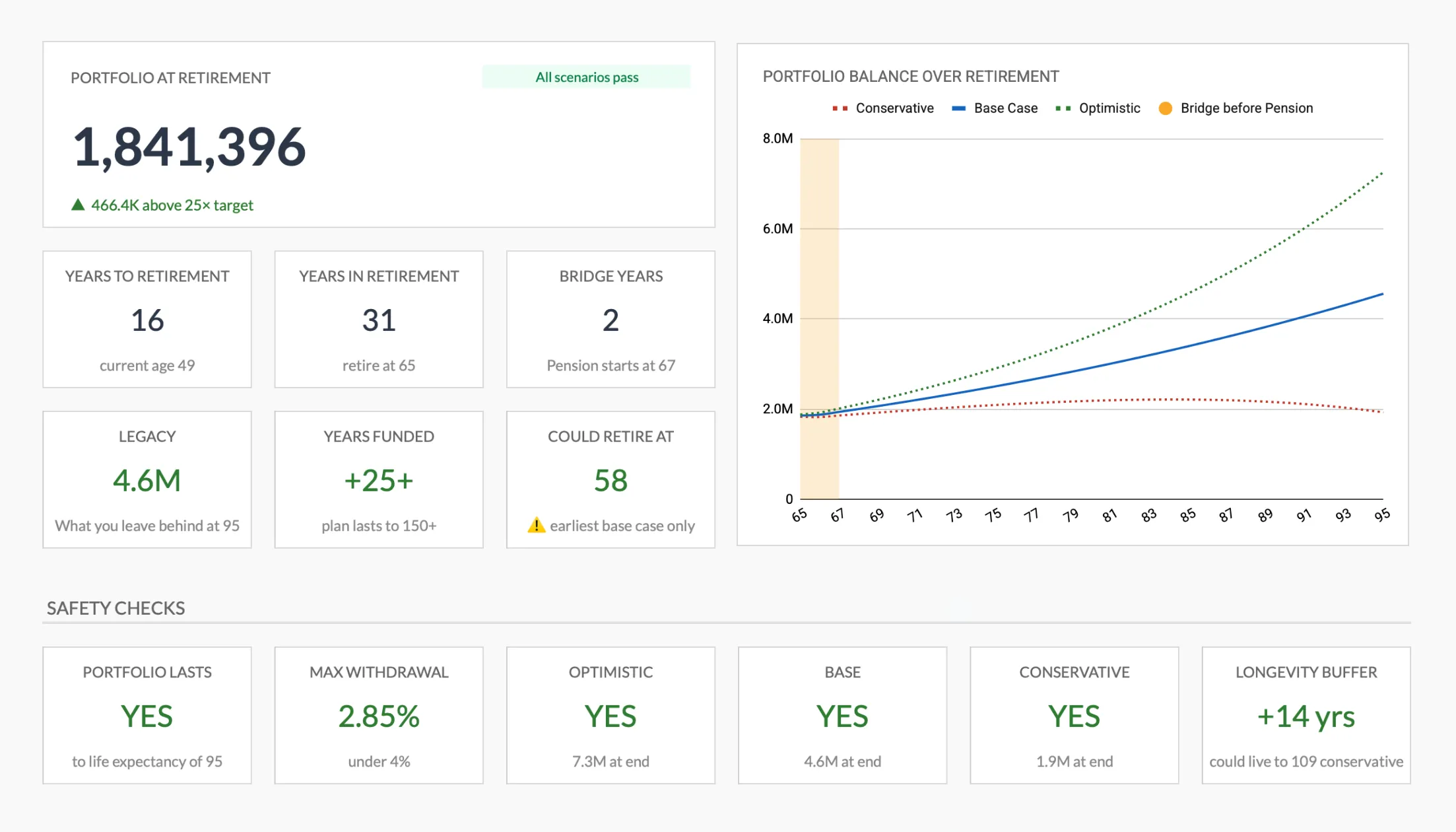
The summary dashboard from the Retirement Financial Planning Spreadsheet (Premium tier): portfolio at retirement, the conservative, base, and optimistic balance chart, and the safety-check row.
Setup Walkthrough
Step 1: Enter your savings. The template takes one combined balance for all retirement accounts and one annual savings figure, rather than a per-account breakdown. Use actual numbers from your most recent statements.
Step 2: Set your assumptions. There are two return fields, one for the years before retirement and one for the years after, both entered net of taxes, plus an inflation rate that the sheet applies to expenses. You also set your current age, target retirement age, life expectancy, and the age your pension starts. From those base numbers the sheet derives the conservative and optimistic cases, so all three scenarios update together.
Step 3: Define retirement expenses. Estimate annual spending in retirement. A starting point: 70-80% of current pre-retirement spending, adjusted for changes (no commute, more travel, higher healthcare).
Step 4: Map income sources. Retirement income is entered monthly: a total pension figure that begins at the pension age you set, and other income such as rental or part-time work that counts from the first year of retirement. The years between your retirement age and your pension age are the bridge period, when other income is the only income, and the sheet reports that stretch as its own figure. Social Security retirement benefits can begin as early as 62 and rise for each year you delay, up to 70, per the Social Security Administration, so the pension figure and start age you enter depend on the claiming age you plan for. The template then shows how these sources combine year by year.
Step 5: Read the projection. The template calculates whether projected income covers projected expenses through your expected retirement length, and prints a table at key ages out to your life expectancy. A gap means adjustments are worth exploring.
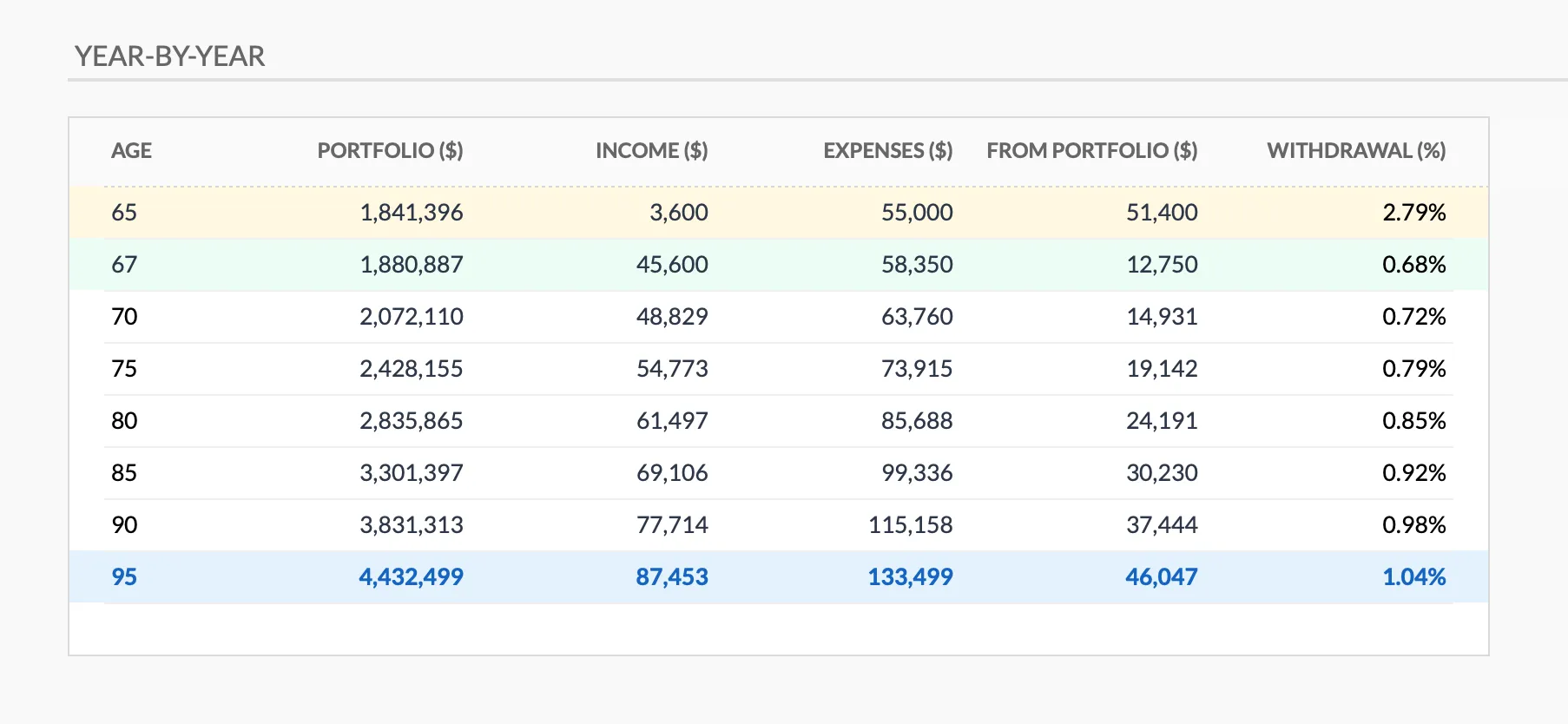
The year-by-year table tracks portfolio balance, income, expenses, and the withdrawal rate at key ages from retirement through life expectancy.
Example Scenario
| Input | Value |
|---|---|
| Current age | 35 |
| Current savings | $120,000 |
| Annual savings (contributions plus employer match) | $24,000 |
| Pre-retirement return, net of taxes | 6% |
| Target retirement age | 62 |
| Annual retirement expenses | $55,000 |
Projection result: At a 6% net return, $120K growing with $24K a year for 27 years reaches about $2.2M in the template’s projection. Measured against the 4% rule, that is roughly $88,000 a year, above the $55K expense target. The template does not take a withdrawal rate as an input. Each retirement year it withdraws expenses minus pension and other income, then reports the resulting rate and checks whether it stays under 4%.
Adjusting to a 5% return changes the projection to roughly $1.8M, or about $73,000 a year on the same 4% basis. Trying both numbers shows the range instead of betting on one. Want to sketch a target before you open the sheet? The Retirement Calculator below gives you a quick first estimate.
Spreadsheet vs Software vs Advisor
| Approach | Cost | Control | Customization |
|---|---|---|---|
| Spreadsheet template | $39, one-time | Full: see every formula | Complete: edit anything |
| Financial software (Boldin, ProjectionLab) | $129-144/year | Moderate: prebuilt models | Limited to provided options |
| Financial advisor | $1,000-5,000+/year | Low: they run the numbers | Varies by advisor |
Boldin’s paid PlannerPlus plan runs $144 a year and ProjectionLab’s Premium tier is $129 a year, both billed annually. Where those tools still win is depth: Monte Carlo simulation, tax and Roth-conversion modeling, and account linking that a spreadsheet does not replicate. The spreadsheet approach wins on transparency and cost. You see exactly how every projection is calculated, you can adjust any assumption directly, and it is a single $39 purchase rather than a recurring subscription.
Related
- Retirement Calculator: How Much Do You Actually Need? - The math behind retirement targets
- Retirement Template vs Calculator - Which tool for which purpose
- Big Improvements to Our Retirement Planning Spreadsheet - Latest template updates
- Retirement Financial Planning Spreadsheet - Get the template
- Financial Planning Template - Broader financial planning beyond retirement
Frequently asked questions
Does the retirement spreadsheet work in Excel?
It is built for Google Sheets, which is free to use with a Google account. That is the version we ship, test and support, so it is where the scenario projections and safety checks run as intended.
How does the template handle Social Security?
There is one monthly pension field with its own start age, which is where a state benefit such as Social Security goes. Social Security retirement benefits can start as early as 62 and grow for each year you wait, up to 70, so the figure and start age you enter depend on the claiming age you are planning around. Rental, business or part-time income has a separate field and counts from the first year of retirement.
What return rate should I put in?
There are two return fields, one for the years before retirement and one for the years after, both entered net of taxes. The template ships with 6 percent and 4 percent, and inflation is a separate input at 3 percent, so the return you enter is a nominal figure rather than an after-inflation one. From your base numbers the sheet derives a conservative case one point lower and an optimistic case one point higher, so you read a spread rather than a single guess.
How is this different from the free retirement calculator?
The calculator answers a single question in your browser. The spreadsheet keeps your inputs, models income and expenses out to the life expectancy you set, and adds what-if scenarios and safety checks. The template-versus-calculator guide covers when each one fits.
Sources
- PlannerPlus Pricing - Boldin
- Pricing & Subscriptions - ProjectionLab
- Benefits Planner: Delayed Retirement Credits - Social Security Administration
About this article
Template sheets, inputs and outputs checked on 2026-09-10 against the shipped Retirement Financial Planning Projections Google Sheet (Summary, Inputs, Projections, Helpers, Instructions tabs). Financial-software pricing checked against Boldin's and ProjectionLab's public pricing pages. Last reviewed September 2026.