
For free trip tracking, Google Sheets' built-in Travel expenses template logs spending with zero setup. For free pre-trip estimates, Vertex42's Travel Budget Worksheet answers "can we afford this?" before you book. The FinancialAha Travel Budget Planner ($19, one-time) sits on the planning side, pairing estimated and actual booking costs with payment deadlines and a per-day allowance for whatever is left.
A travel budget answers two questions: “How much will this trip cost?” before you go, and “How much did I actually spend?” when you’re back.
Quick pick: The Travel Budget Planner (one-time purchase) covers pre-trip estimation, booking tracking with payment status, and a per-day allowance for whatever the bookings leave over, all in Google Sheets. For a free alternative, Google Sheets’ built-in templates offer a basic trip budget.
Most people either estimate poorly or don’t track at all. Both lead to post-vacation financial surprises.
Looking for something ready to use? The Travel Budget Planner handles pre-trip budgeting, booking management, and payment tracking. Works in Google Sheets, shareable for group trips. One-time purchase.
What Matters in a Travel Budget
Pre-trip estimation gives you space to research and estimate costs before booking anything.
Expense tracking lets you log what you’ve already booked - flights, hotels, tours.
Budget vs. actual comparison shows where you went over or under your estimates.
Everything else is nice-to-have.
For pre-trip planning, the templates that work are the ones thorough enough to catch everything - flights, hotels, activities, pre-trip purchases, payment deadlines.
FinancialAha Travel Budget Planner
Set your total budget, add estimated bookings, and the dashboard shows what’s left per day for meals and activities. Track all your bookings with payment status, due dates, and cancellation deadlines. There’s also a pre-trip expense section for things like travel insurance and new luggage, plus a packing checklist.
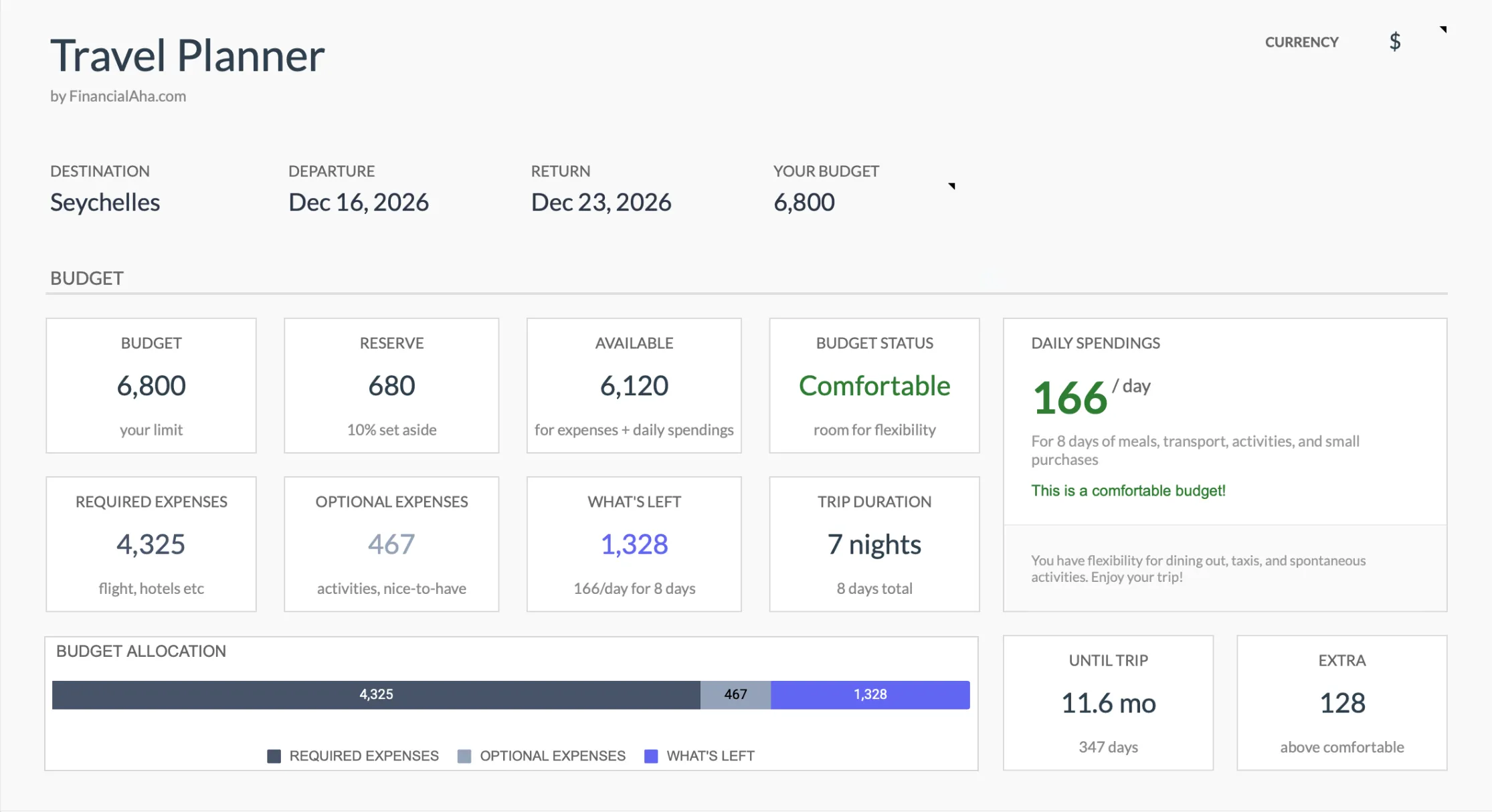
Works in Google Sheets and shareable for group trips. It’s a $19 one-time purchase. If you want a free starting point, the free trip-budget template is a single sheet of nine trip categories with budgeted, actual and difference columns, and it opens in Excel, Google Sheets or LibreOffice Calc.
Google Sheets Built-In Template
Go to File → New → From the template gallery → Travel expenses, and you’ll have a working spreadsheet immediately.
It requires zero setup and includes basic categories, a daily entry format, and automatic totals. There’s no pre-trip budgeting though - it’s pure expense tracking, not trip planning. It works well if you just want to log what you spend, and it’s free.
Vertex42 Travel Budget Worksheet
The Vertex42 Travel Budget Worksheet focuses on pre-trip planning - estimating what the trip will cost before you commit. It includes per-person breakdowns, a transportation calculator, and accommodation comparison.
It’s good for answering “can we afford this trip?” before booking, but less useful once you’re actually traveling. It’s free, though you’ll need to download and import it to Google Sheets.
The Honest Take
Most travel templates fall into two camps:
Pre-trip planners: Help you estimate costs, track bookings, and manage payments before you leave. Answer “can we afford this?” and “what have we already paid?”
Expense trackers: Log what you spend day-by-day during the trip. Useful for seeing where money went, but no help with planning.
Different tools for different jobs. Pick based on what you actually need.
Essential Categories
Whatever template you use, make sure it covers:
Transportation: Flights (including baggage fees), ground transport, rental cars, parking.
Accommodation: Nightly rates plus resort fees, taxes, tips.
Food: Restaurants, groceries, snacks, tips.
Activities: Tours, tickets, gear rentals, entrance fees.
Buffer: Unexpected expenses always appear. Build in 10-15%.
Tips That Actually Help
Research your destination because a dinner in Bangkok costs very differently than a dinner in Paris. Generic estimates tend to fail.
Track in local currency and convert at the end using actual exchange rates. This avoids the confusion of daily conversions.
For group trips, define how shared expenses work before you leave. It’s much easier to agree on splitting rules upfront, and if the tally gets complicated, the apps for splitting expenses with friends handle the running who-owes-whom math a spreadsheet leaves to you.
Save your receipts - photos on your phone work fine. Some costs are surprisingly forgettable.
Using Your Data Later
Your completed travel budget becomes valuable reference data for future trips.
One useful approach is calculating your per-person, per-day cost, which becomes a realistic baseline for similar trips in the future. It’s also worth looking at which categories consistently run over budget so you can adjust future estimates based on actual patterns.
More Travel Budgeting
- How to Plan a Trip Budget in Google Sheets - Build a trip budget from scratch
- Road Trip Budget Guide - Gas, food, hotels, and hidden costs
- International Travel Budget - Currency, fees, and real costs abroad
- Annual Travel Fund - Budget for multiple trips across the year
Related
- Travel Budget Planner - Pre-trip budgeting template
- Free trip-budget template - No-cost starting point for a single trip
- Monthly Budgeting - Save for trips in your regular budget
Frequently asked questions
Should I budget per day or per category?
Both help. Per-category for planning, per-day for on-the-ground tracking. Good templates show both views.
How do I handle pre-paid expenses?
Log them when you book and mark as paid. They're in your total but don't need tracking during the trip.
How detailed should I be?
Track at whatever level gives useful info without becoming tedious. Every coffee might be excessive, but 'food and stuff' might be too vague. Find your middle ground.
Is there a completely free travel budget spreadsheet?
Yes. Google Sheets' built-in Travel expenses template covers day-to-day tracking, and Vertex42's Travel Budget Worksheet handles pre-trip cost estimates. FinancialAha also has a free trip-budget template if you'd rather stay on the same site as the paid planner.
Can these handle a group trip where everyone splits costs?
Any Google Sheets template can be shared so a group edits the same file. None of them split costs automatically, so it helps to agree on who pays for what before you leave and record it in a notes column.
Sources
- Use templates - Google Docs Editors Help - Google
- Travel Budget Worksheet - Vertex42
About this article
Template gallery steps and the Vertex42 Travel Budget Worksheet checked against Google's and Vertex42's own pages. Travel Budget Planner sheets, inputs and outputs checked on 2026-09-10 against the shipped Travel Budget Planner Google Sheet (Summary, Bookings, Planning, Categories, Setup tabs), and the $19 one-time price against the product catalogue. Last reviewed September 2026.