
For casual one-off splits, Venmo or a Tricount link settles up in seconds. For a group trip, Splitwise or Settle Up log every expense as it happens, while a shared Google Sheet with paid-by and split-between columns gives the same running balances with no accounts and no data on a third-party server. The pick comes down to group size, multi-currency needs, and how much the group cares about privacy.
Splitting expenses with friends sounds simple until someone covers dinner, another person books the hotel, and a third grabs the rental car. By the end of a trip, the web of who-owes-whom gets tangled fast.
The real problem isn’t math. It’s tracking. A system that records every shared expense as it happens prevents the “let’s just call it even” default - which usually means someone absorbs a shortfall they quietly resent.
The Tracking Method Matters More Than the Tool
Before picking an app or building a spreadsheet, the group needs to agree on three things:
| Decision | Options |
|---|---|
| How to split | Even, proportional, or item-by-item |
| What counts as shared | All meals? Only group activities? |
| When to settle up | Daily, end of trip, monthly |
Getting this right prevents 90% of disputes. The tool just does the arithmetic.
Quick App Comparison
Apps handle the real-time logging well. Here’s how the popular ones compare:
| App | Cost | Account Required? | Best For |
|---|---|---|---|
| Splitwise | Free tier / paid Pro plan | Yes | Roommates, ongoing groups |
| Tricount | Free | No (shareable link) | Travel groups |
| Settle Up | Free | No | International trips (multi-currency) |
| Venmo/PayPal | Free | Yes | One-off splits |
Splitwise keeps a free tier and a paid Pro plan; Tricount and Settle Up are free and let anyone join through a shared link without an account. Each works. The one your group will actually use is the right choice.
The Spreadsheet Approach for Group Trips
Apps are convenient, but a shared Google Sheet gives full control and zero privacy concerns. No accounts, no data stored on someone else’s server, and everyone can see the math. For a trip you are still planning, the Travel Budget Planner covers the estimate stage, and this shared tracker takes over once the spending starts.
Simple shared expense tracker setup:
| Date | Description | Paid By | Amount | Split Between | Per Person |
|---|---|---|---|---|---|
| Apr 3 | Hotel (2 nights) | Alex | $400 | Alex, Sam, Jo | $133.33 |
| Apr 3 | Dinner | Sam | $90 | Alex, Sam, Jo | $30.00 |
| Apr 4 | Museum tickets | Jo | $45 | Alex, Sam | $22.50 |
Key detail: The “Split Between” column handles unequal splits naturally. If Jo skipped the museum, they’re simply not listed.
At the end of the trip, a summary section calculates net balances:
| Person | Total Paid | Total Owed | Net Balance |
|---|---|---|---|
| Alex | $400 | $185.83 | +$214.17 |
| Sam | $90 | $185.83 | -$95.83 |
| Jo | $45 | $163.33 | -$118.33 |
Sam pays Alex $95.83. Jo pays Alex $118.33. Done.
Roommate Expense Tracking
For ongoing shared living expenses, the structure shifts to a rolling monthly log. A shared spreadsheet with one tab per month keeps things clean.
Monthly columns:
- Date
- Category (rent, groceries, utilities, household)
- Description
- Paid by
- Amount
- Split method (even, custom)
Running a cumulative balance at the bottom of each month shows who’s ahead and who’s behind. Settle up monthly or whenever the imbalance grows large enough to matter.
The Monthly Expense Tracker sits alongside that log as the record of what the household actually spent. Its Transactions sheet takes a category, name, date and amount for each entry, and the Summary rolls those into totals by category with a spending rate, a daily average and a subscriptions count. There is no payer or split column in it, so who owes whom stays in the shared sheet above. Since it is a Google Sheet, each roommate can keep a copy or everyone can work in one shared file.
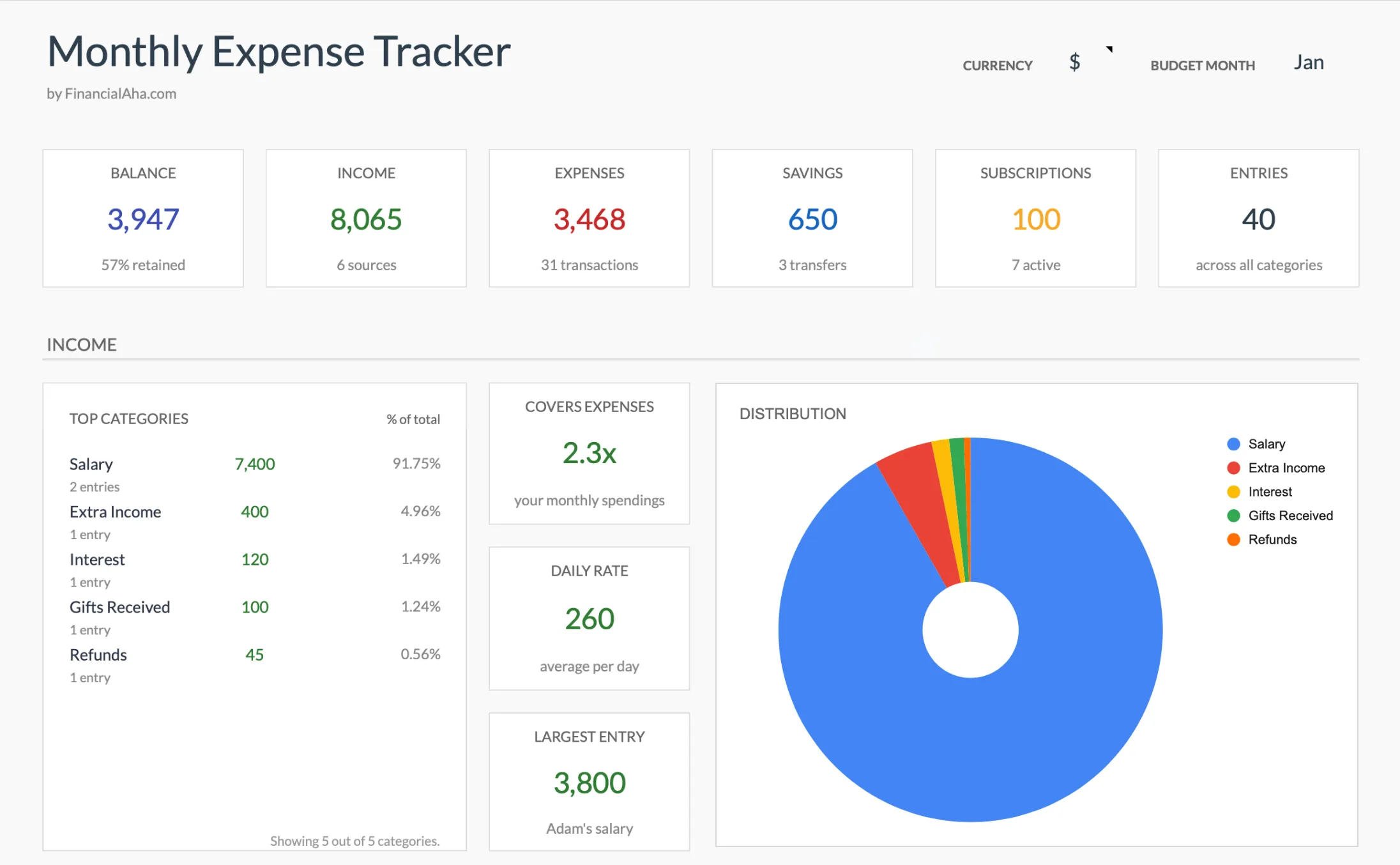
The Monthly Expense Tracker (Premium tier) rolls every logged entry into balance, income, expenses, savings and subscription totals with a category breakdown. It tracks the household’s spending as a whole rather than each person’s share of it.
When Apps Beat Spreadsheets (and Vice Versa)
| Scenario | Better choice |
|---|---|
| Weekend trip with 3 friends | Spreadsheet (simple, done in 10 minutes) |
| Week-long trip with 6+ people | App (too many entries to manage manually) |
| Roommates, ongoing | Either - depends on group preference |
| International multi-currency trip | App with currency support (Settle Up) |
| Privacy-conscious group | Spreadsheet (no third-party data) |
Tips That Make Any System Work
- Log immediately. Reconstructing a week of expenses from memory produces disputes. The same habit sits at the heart of tracking expenses while traveling.
- Set a minimum threshold. Some groups skip anything under $10. Small imbalances tend to even out.
- One person owns the sheet. For spreadsheets, designate someone to maintain the formulas and totals.
- Take photos of receipts. Useful when someone questions an entry later.
The goal isn’t mathematical perfection. It’s making sure shared spending doesn’t create awkwardness between people who enjoy each other’s company.
Related
Frequently asked questions
Does Splitwise still have a free tier, or do you have to pay now?
Splitwise keeps a free tier alongside its paid Pro plan. The free version has added usage limits over the years, so a heavy-use trip can run into caps that a shared spreadsheet never hits.
How do I split a bill unevenly when one person skips an item?
Apps like Splitwise and Tricount let you assign an expense to only the people who shared it. In a spreadsheet, a 'Split Between' column does the same job: list only the names involved, and the per-person math follows.
Which option handles multiple currencies on an international trip?
Settle Up and Tricount both convert between currencies, which is why they suit trips abroad. A spreadsheet can hold a currency column too, though you enter the exchange rate yourself rather than having it pulled automatically.
Is a spreadsheet actually more private than an app?
A shared Google Sheet keeps the expense data in your own file rather than on an app vendor's servers, and nobody needs to create an account to view or edit it. That is the main reason some groups prefer it over an app.
Sources
- Splitwise Pro - Splitwise
- Tricount - Split group expenses - Tricount
- Settle Up - Split group bills and expenses - Settle Up
About this article
App features and free-versus-paid tiers checked against the official Splitwise, Tricount, and Settle Up product pages. The spreadsheet balance tables were recomputed by hand to confirm every per-person total nets to zero across the group. Template claims checked on 2026-09-10 against the shipped Monthly Expense Tracker Google Sheet (Summary, Transactions, Categories tabs) and the shipped Travel Budget Planner Google Sheet (Summary, Bookings, Planning tabs). Last reviewed September 2026.