The tracking method that survives a real trip is a five-minute evening review. Log the day's spend in a phone spreadsheet, convert it to your home currency, and compare it against a daily budget. Larger purchases go on a card for the automatic record, and small cash spending gets lumped into one daily estimate. A halfway checkpoint catches overspending while there are still days left to adjust.
Everyone has a plan for tracking travel expenses. Write everything down. Use an app. Keep all the receipts. And then you’re standing in a cafe in Lisbon trying to figure out whether to tip on a 4.50 EUR coffee, and the plan quietly falls apart because you’re on vacation and the last thing you want to do is open a spreadsheet.
The gap between what people intend to track while traveling and what they actually track is enormous. Here’s what tends to work in practice.
Planning tool: The Travel Budget Planner covers the booked side of a trip, with an estimated and an actual figure on every flight, hotel and activity plus what is paid and what is still due. It runs in one currency you set yourself, so the day-to-day logging below stays in your own sheet.
The Real Reason to Track
The practical case for travel expense tracking isn’t about accounting precision. It’s about not discovering on Day 5 of a 10-day trip that you’ve already burned through 80% of your budget. That realization turns the second half of a vacation into an exercise in anxiety and self-denial, which is roughly the opposite of why you traveled in the first place.
Knowing your daily spend gives you something to work with. If you’re running hot on Day 3, you can downshift - skip the fancy restaurant, take public transit instead of taxis, choose the free walking tour over the paid one. If you’re under budget, you can upgrade something without guilt. Tracking creates room for intentional choices rather than vague worry.
The other benefit shows up later. Actual spending data makes future travel budgets dramatically more accurate. “Europe is expensive” becomes “Lisbon averaged $95/day with mid-range restaurants and modest accommodations, but Copenhagen hit $160/day even with a hostel.” That kind of specificity changes how you plan.
Finding a Method You’ll Actually Use
The tracking method that works is the one you’ll still be using on Day 7, when the novelty of a new city has worn off and you’d rather be wandering a neighborhood than logging a 3 EUR metro ticket.
Paper notebooks are indestructible and require no battery, which matters more than you’d think after a long day of sightseeing with a phone at 8%. The problem is manual totals, and that crumpled page in your jacket pocket has a way of becoming illegible or lost. For a short weekend trip, paper works fine.
Phone notes are always with you and sync to the cloud, but there’s no automatic calculation. You’re building a list, not a ledger. One step above paper with the convenience of being searchable.
A simple spreadsheet on your phone is where the balance tips for most regular travelers. Google Sheets on mobile is clunky, since typing numbers on a small screen while standing on a cobblestone street isn’t elegant, but you get automatic calculations, category summaries, and running totals. The mobile app works offline and syncs when you’re back on wifi.
Dedicated travel apps like Trail Wallet or TravelSpend have currency conversion built in, interfaces designed for quick entry, and satisfying visualizations. The trade-off is another app to learn, possible premium fees, and your data living inside someone else’s ecosystem.
The Spreadsheet That Earns Its Keep
For spreadsheet-inclined travelers, a simple setup does most of the work:
| Date | Item | Category | Amount | Currency | USD |
|---|---|---|---|---|---|
| Mar 10 | Hostel | Accommodation | 35 | EUR | 38 |
| Mar 10 | Breakfast cafe | Food | 8 | EUR | 9 |
| Mar 10 | Metro day pass | Transport | 12 | EUR | 13 |
| Mar 10 | Fado show | Activities | 25 | EUR | 27 |
Six columns. Categories can be as simple as accommodation, food, transport, activities, shopping, and miscellaneous. A =SUMIF formula on the date column gives you daily totals, and category sums give you a breakdown at any point during the trip. If you’d rather not build the tabs from scratch, how to plan a trip budget in Google Sheets walks through the same layout step by step.
For currency conversion, =GOOGLEFINANCE("CURRENCY:EURUSD") pulls the current exchange rate directly into your sheet - though this only works when you have internet. For offline stretches, using a fixed rate you looked up that morning is good enough. The conversion doesn’t need to be precise to the third decimal; you’re trying to know if you spent $90 today or $140, not whether it was $91.23 or $91.47.
The Currency Problem
Multiple currencies on a single trip, flying into Lisbon, taking the train to Madrid, then finishing in Paris, turn tracking into a small accounting problem. The international travel budget guide goes deeper on currency, card fees, and real costs abroad; here there are two practical approaches.
The first is converting everything to your home currency at the time of purchase. You see the price in euros, you multiply by 1.09 (or whatever the rate is), and you log it in dollars. This is clean and gives you real-time budget awareness in a currency you actually think in.
The second is tracking in local currency and converting later. This is faster at the point of purchase, since you just write down what you see on the receipt, but you don’t have an intuitive sense of your actual spend until you sit down and do the conversion. For a single-currency trip, this works fine. For a multi-currency trip, you end up with a spreadsheet full of numbers in three different currencies that you need to untangle at the end.
The mixed approach, local currency in one column and the converted amount calculated automatically in the next, is the spreadsheet user’s answer. It’s a bit more setup but gives you both the accuracy of local currency logging and the awareness of home currency totals.
The Evening Ritual
The single habit that makes travel tracking work is a five-minute review each evening. Sitting at a cafe or back at the hotel, pull out your phone, check receipts or recall the day’s expenses, and log anything you missed. Compare the daily total to your daily budget. That’s it.
This works because it’s short and tied to a natural transition point in the day. Trying to track in real time, logging every purchase as it happens, sounds disciplined but tends to fall apart by Day 3. The evening review catches everything at once, and the short delay actually helps: you remember the big stuff, and the small stuff either surfaces from receipts or gets lumped into a “misc $10-15” estimate that’s close enough.
The halfway checkpoint is the other critical moment. On Day 5 of a 10-day trip, check whether you’ve spent roughly half your budget. If you’re over, you have enough days left to adjust. If you’re under, you have permission to relax. This single check prevents the unpleasant surprise at the end.
Cards vs. Cash, and What Gets Lost Between Them
Credit cards create an automatic transaction record, which sounds like it solves the tracking problem. And for large, clear purchases like hotels, restaurant meals, and train tickets, it mostly does. But card tracking has gaps. Tips added after the initial charge might not show up for days. Foreign transaction fees appear separately. And anything paid in cash is invisible.
Cash has its own logic. It creates a natural spending limit - when the wallet is empty, you’re done for the day. No foreign transaction fees with local currency. Accepted in places that don’t take cards. But every cash transaction is a potential gap in your records, especially the small ones. The ATM that charged a 3% conversion fee and a $5 flat fee on top of that? You’ll forget about those charges unless you note them at the time.
One approach that covers most of the gaps: use cards for larger purchases where the automatic record matters, and carry limited cash for small items. Rather than logging every gelato and bus ticket individually, estimate your daily cash spending as a single line item. “Small purchases: ~$15” is close enough for budgeting purposes and saves you from tracking fatigue.
When You’re Traveling with Other People
Group travel adds a layer. Someone pays for the Uber, someone else covers dinner, a third person bought the museum tickets. By Day 4, nobody remembers who owes what, and the mental accounting is creating low-level tension that nobody wants to talk about.
Splitwise exists for exactly this reason and handles it well. But even a simple spreadsheet approach works: record who paid, who benefited, and keep a running balance. The important thing is settling up before you leave the destination. “Remember that dinner in Barcelona?” is a conversation nobody wants to have three months later over Venmo.
What to Do When You Get Home
The post-trip summary is where tracking data becomes useful beyond the current trip. Total up each category and compare to what you budgeted. The surprises are the valuable part. “Food cost 30% more than I estimated” directly improves the next trip’s budget.
| Category | Budgeted | Actual | Variance |
|---|---|---|---|
| Accommodation | $500 | $480 | -$20 |
| Food | $350 | $410 | +$60 |
| Transport | $200 | $180 | -$20 |
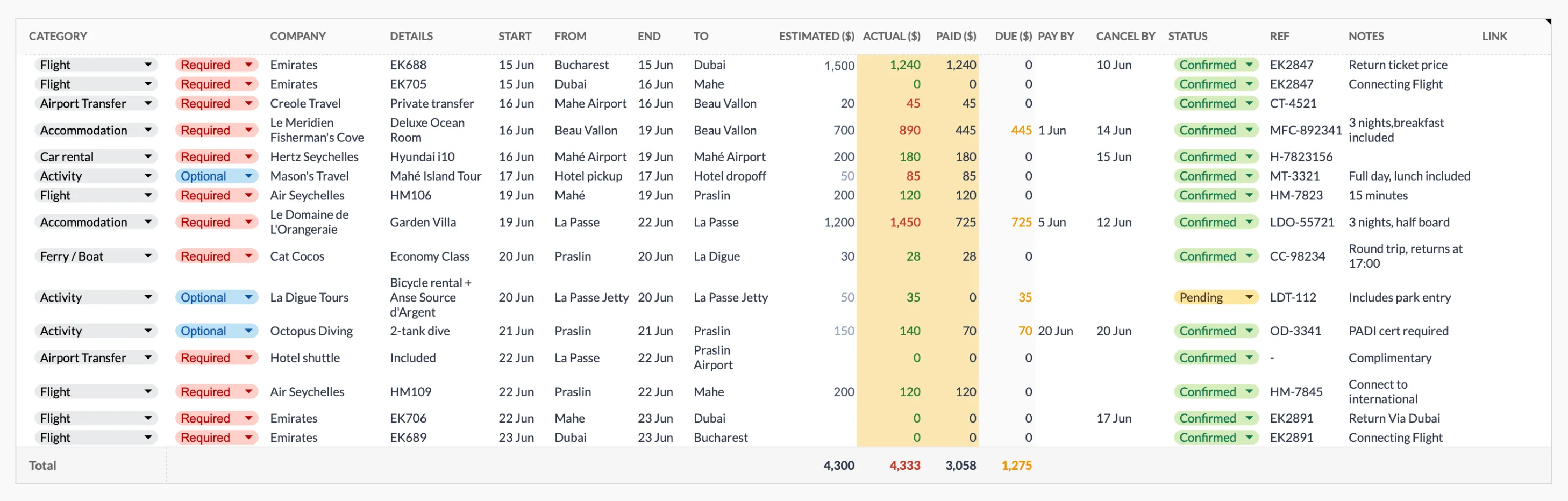
The Travel Budget Planner (Premium tier) keeps an estimated and an actual figure on every booking line, plus what is paid and what is still due, so both cost columns sit side by side once the trip is over.
The notes you write about what surprised you are worth more than the numbers themselves: “restaurants near the tourist center were 2x the price of places two blocks away,” or “the city pass wasn’t worth it because we only visited three attractions.” Numbers tell you what happened. Notes tell you why.
If you maintain a regular budget at home, the trip total slots into the Travel and Vacations category of the Monthly Expenses Tracker, which logs each expense with a category, name, date and amount and rolls the month up on its Summary tab. Or keep travel separate and just add the grand total.
Related
- Travel Budget Planner - Plan bookings and pre-trip costs
- International Travel Budget: Currency, Fees, and Real Costs
- Vacation Savings Calculator
- Budget Travel Europe Daily Costs
Frequently asked questions
Do I really need to track every expense?
Not necessarily. Track enough to know if you're on budget. For some people, that's every item. For others, daily estimates work.
What if I forget to log something?
Review credit card statement or receipts at end of day. Add a misc category for forgotten small items.
How do I track pre-trip expenses?
Flights, insurance, and bookings paid before travel count toward trip total. Track separately as pre-trip expenses.
Should I track in local or home currency?
Either works. Pick one and be consistent. Converting to home currency makes budget comparison easier, but tracking in local currency can be faster during the trip.
Does GOOGLEFINANCE update the exchange rate automatically?
It refreshes when the sheet has an internet connection, so the converted total shifts as rates move. For offline stretches, some people paste the rate as a fixed number they looked up that morning, which keeps the sheet stable until they are back on wifi.
How do I handle a trip that spans several currencies?
One column for the local amount and a second column that converts to your home currency keeps everything comparable. That way a spreadsheet with euros, pounds, and yen still rolls up to a single home-currency total you can check against your budget.
About this article
Spreadsheet formulas (SUMIF for daily totals, GOOGLEFINANCE for currency conversion) checked in Google Sheets Travel Budget Planner (Premium tier) sheets, inputs and outputs checked on 2026-09-10 against the shipped Google Sheet (Summary, Bookings, Planning, Categories, Setup): single currency set by symbol, no conversion, no on-trip daily log Last reviewed September 2026.