
The free Debt Payoff Calculator runs one debt at a time in the browser and returns a payoff date, no download. Vertex42's free spreadsheet handles up to 10 debts with a full amortization schedule, Tiller ($99/year) automates balance updates, and SeedTime keeps it snowball-only. Verdicts and the trade-offs below.
A debt payoff spreadsheet does three things: shows what you owe, calculates when you’ll be debt-free, and tells you where to put each payment. That’s it.
Quick picks: The free Debt Payoff Calculator takes one balance, its rate and your monthly payment, then returns the payoff date in the browser with nothing to download. For ongoing debt tracking alongside your full budget, the Financial Planning Template (one-time purchase) keeps debts, assets, net worth and a projection that runs to an end year you set in one Google Sheets file. For budget and expense tracking during debt payoff, the Monthly Budgeting Template (one-time purchase) tracks planned against actual spending across 17 expense categories, one of which is Debt Payoff.
The overwhelming pile of balances becomes a clear action plan, and each monthly payment has a purpose.
If you want debt tracking that lives alongside assets and net worth rather than a standalone plan, the Financial Planning Template keeps every balance, rate, and minimum payment on one tab:
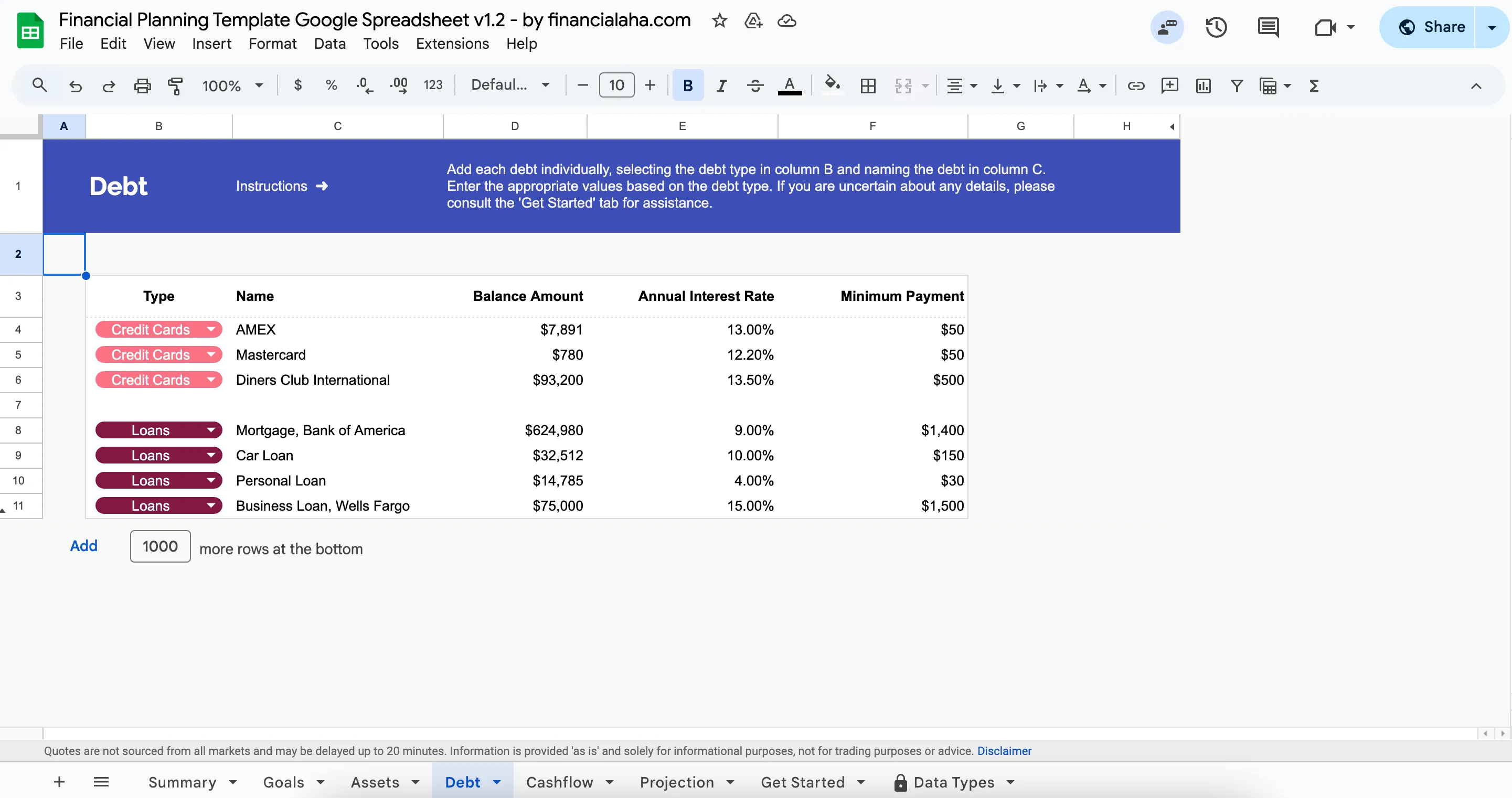 The Debt tab in the Financial Planning Template (Premium tier), listing each debt with its balance, annual interest rate and minimum payment. Balances feed the net-worth and projection tabs, and the minimum payments feed the monthly cashflow tab.
What Matters in a Debt Spreadsheet
A few things separate useful debt spreadsheets from the rest.
Strategy comparison matters most. Seeing both snowball (smallest balance first) and avalanche (highest interest first) side by side helps you actually pick one. Extra payment modeling is also valuable - being able to answer “what if I add $200/month?” without doing manual math.
Beyond that, you want payment schedules that show month-by-month breakdowns of where money goes, and accurate interest calculations that project totals under each method. Everything else is nice-to-have.
FinancialAha Debt Payoff Calculator
This calculator works one debt at a time. Enter the balance, the annual interest rate, the minimum payment and any extra amount, and it returns the payoff time, total interest, total paid, and the interest that extra amount saves against paying the minimum alone. A chart plots both balance curves, minimum only against minimum plus extra. No spreadsheet setup required.
Open the full Debt Payoff Calculator
Vertex42 Debt Reduction Calculator
Vertex42 has been making spreadsheets for years. The free version of their Debt Reduction Calculator handles up to 10 debts, compares snowball vs. avalanche vs. custom ordering, and shows the amortization schedule. Paid versions ($9.95 and $39.95) raise the limit to 20 or 40 debts.
The interface looks dated, and there’s a download-and-import step to get it into Google Sheets. That said, the strategy comparison showing interest savings per method is genuinely useful. It’s free.
Tiller Debt Planner
If you already pay for Tiller ($99/year), their debt planner pulls balances automatically from linked accounts. The automation eliminates manual balance updates, which is the main selling point. That said, it’s probably not worth subscribing just for debt tracking.
SeedTime Debt Snowball Spreadsheet
This one is simple and focused - snowball only. You enter your debts and follow the plan, with no avalanche option or strategy comparison.
It works well if other spreadsheets feel overwhelming, but it’s less useful if you want to compare methods before committing. It’s free.
The Honest Take
Most debt spreadsheets do the same basic thing. The real differences come down to setup friction and what features you actually need.
The FinancialAha calculator answers one debt at a time with no setup or downloads, though it does not rank several debts for you. Vertex42 offers more detail but requires importing files and some configuration. Tiller automates balance updates but costs $99/year. SeedTime keeps things simple but only does snowball.
Worth considering: a debt payoff calculator that shows your debt-free date in five minutes often beats a comprehensive spreadsheet that sits half-configured.
Snowball vs. Avalanche
These are two approaches to the same goal.
Snowball means paying the smallest balance first, which gives you quick wins and a psychological boost, though you may pay more interest overall. Avalanche means paying the highest interest rate first, which is mathematically optimal, though the early wins come slower.
Research suggests people using snowball are more likely to actually pay off all their debt. The motivation from quick wins matters more than the interest math for many people. But both methods work. Whichever order you pick, the Debt Payoff Calculator shows what a single debt costs in time and interest at your current payment, and what adding to that payment changes.
More on Debt Payoff
- Debt Snowball vs Debt Avalanche: Which Actually Works? - Research-backed comparison
- Credit Card Payoff Calculator - See your debt-free date
- Student Loan Payoff Calculator - Payoff timeline for student debt
- The 1% Rule for Debt Payoff - Small incremental increases that add up
Related
- Debt Payoff Calculator - Payoff time and total interest for one debt
- Financial Planning Template - Track debts, assets, and net worth in one file
- Monthly Budgeting Template - Plan and track one month by category
Frequently asked questions
How much extra should I pay beyond minimums?
Whatever feels sustainable. Even $50/month extra makes a noticeable difference over time. A debt payoff calculator shows the exact impact on your payoff date.
Should I include my mortgage?
Most people separate it out. Consumer debt like credit cards, car loans, and student loans tends to be the focus since mortgage terms are longer and rates are typically lower.
What if I can't make minimum payments?
A spreadsheet won't solve that. Contacting creditors about hardship programs or speaking with a nonprofit credit counselor are worth exploring.
Do I need to download anything to see my payoff date?
No. The Debt Payoff Calculator runs in the browser: enter a balance, its annual rate, the minimum payment and any extra amount, and it returns the payoff time and total interest. Ranking several debts by snowball or avalanche takes a downloadable sheet like Vertex42's, which needs a copy-and-import step before it works in Google Sheets.
Is a free debt spreadsheet enough, or do I need a paid tool?
For a single payoff plan, free is usually enough. Paid tools add automation (Tiller pulls balances from linked accounts) or extra capacity (Vertex42's paid versions raise the free 10-debt limit to 20 or 40). Whether that is worth a subscription depends on how many accounts you track and how often balances change.
Sources
- Tiller Pricing - Tiller
- Debt Reduction Calculator - Vertex42
About this article
Tiller's subscription price and Vertex42's free-version debt capacity were checked against each company's official pages. Template features checked on 2026-09-10 against the shipped Financial Planning Google Sheet (Debt, Cashflow and Projection tabs) and the Monthly Budgeting Google Sheet (Categories tab), and the on-site calculator against its inputs and results. Last reviewed September 2026.