Best Value Complete Financial Planning Bundle
✓ Financial Planning✓ Net Worth Tracker✓ Monthly Budgeting✓ Travel Budget Planner✓ Annual Budgeting Planner✓ Monthly Expense Tracker✓ Annual Tax Planner✓ Retirement Planning
View Bundle →

Instant digital delivery · Terms & Conditions apply

Ultimate Template - Excel & Google Sheets

Ultimate Home Expense Calculator Spreadsheet Template for Google Sheets & Excel

Thirteen categories tracked across twelve months, a fifty-entry maintenance log carrying vendor, urgency and notes on every job, and a repair reserve projected across two years. The Ultimate Home Expense Calculator spreadsheet template records home value, floor area, purchase date and household income, then reports cost per square foot, housing as a share of income, and planned against actual in money and percent. Six working sheets, Google Sheets and Excel. No macros, no VBA.

See Preview

Instant digital delivery · Terms & Conditions apply

Home Expense Calculator Spreadsheet Template - Ultimate version for Google Sheets and Excel

What's Included

  • Home value, floor area, purchase date and household income on record
  • Cost per square foot, and housing as a share of income
  • Named categories tracked across twelve months
  • A maintenance log with vendor, urgency and notes on every entry
  • Planned against actual by category, in money and percent
  • Actuals pulled from the tracking sheet rather than typed twice
  • A repair reserve projected across twenty-four months
  • Year-to-date spending against the annual estimate
  • Two charts driven by the workbook
  • Works in Microsoft Excel and Google Sheets with no setup required

The FinancialAha Ultimate Home Expense Calculator Spreadsheet Template is a six-sheet workbook for Google Sheets and Excel, with a How to Use guide on a seventh tab. It works as an Ultimate Home Expense Calculator Excel template and an Ultimate Home Expense Calculator Google Sheets template from the same download. Twelve months of actual spending by category, a maintenance log, planned against actual with the variance on each line, and a repair reserve projected across two years. No macros, no VBA.

Inside the workbook

What's inside the FinancialAha Ultimate Home Expense Calculator spreadsheet template

The FinancialAha Ultimate Home Expense Calculator Spreadsheet Template runs on six working sheets, with the instructions on a tab of their own. It works in both Microsoft Excel and Google Sheets and here is what the Ultimate Home Expense Calculator spreadsheet holds.

  1. 01 of 06

    Home Details

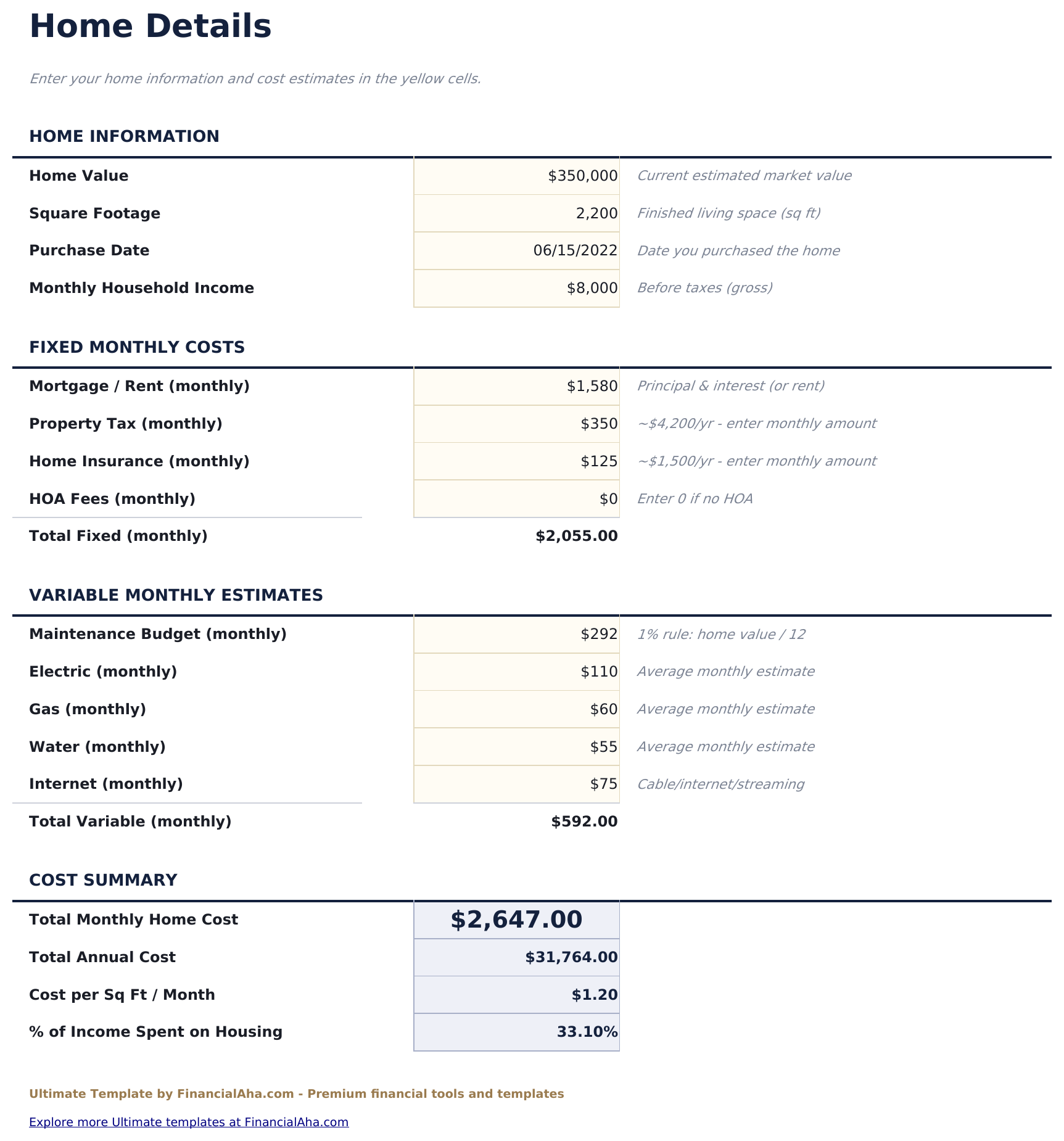
    The house itself and what it costs to hold: value, floor area, purchase date and gross household income, then the fixed monthly costs. From those it reports the monthly and annual totals, the cost per square foot and housing as a share of income. Cost per square foot is the figure that makes two houses comparable when nothing else does. A larger house at a lower rate per foot and a smaller one at a higher rate can arrive at the same monthly cost by different routes, and knowing which you have tells you where the number will go if you move. The income share is reported as a ratio rather than measured against a threshold. What proportion is workable depends on the rest of a household's commitments, and the sheet takes no position on it.

  2. 02 of 06

    Monthly Tracking

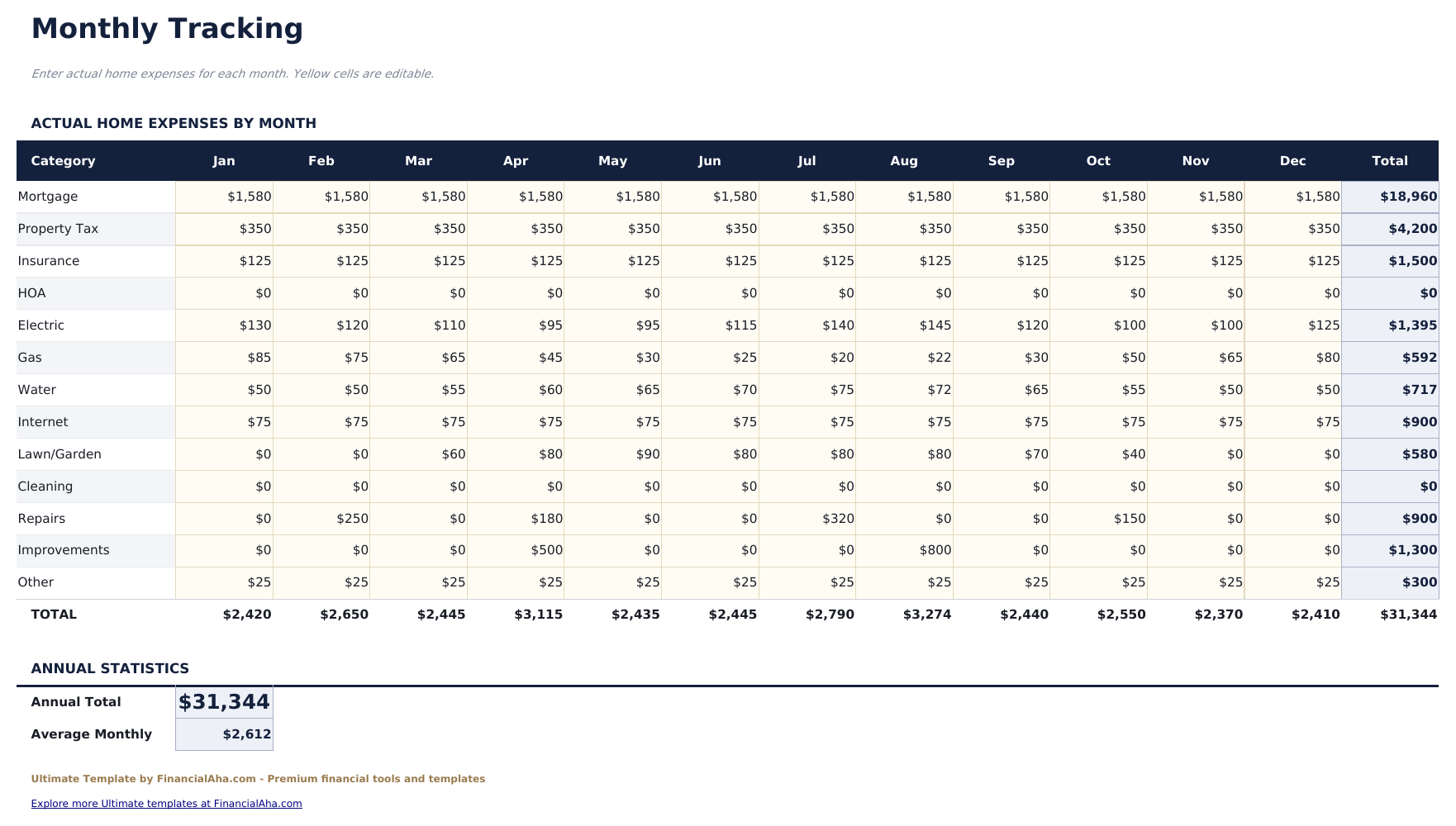
    Named categories across twelve months, filled in with what actually left the account rather than what was planned. Totals run along each row and down each column. The columns are where seasonality shows. Heating, cooling, grounds and water rarely spread evenly across a year, and an annual estimate divided by twelve describes no month that ever happened. Reading down a column tells you which months are the expensive ones - and that is the difference between a budget that survives February and one that does not.

  3. 03 of 06

    Maintenance Log

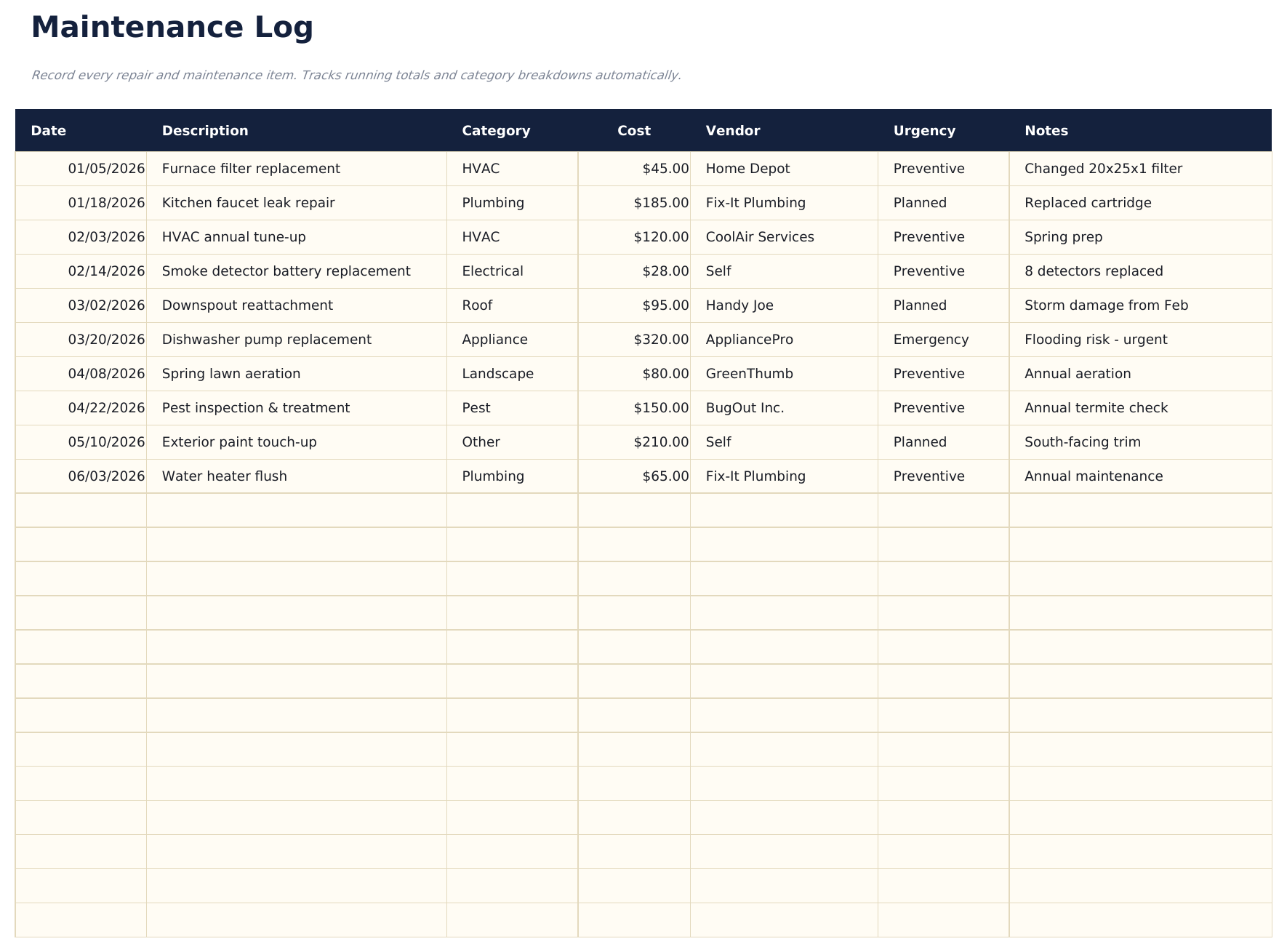
    A row per repair or upkeep job, each with a date, what was done, a category, the cost, who did it and how urgent it was, plus a note. The vendor column earns its place over years rather than months. The person who serviced the boiler two winters ago is exactly who you want when it fails again, and that name tends to be in an email nobody can find. The urgency column separates the work you chose from the work that chose you, which is the split that tells you whether the reserve is sized right.

  4. 04 of 06

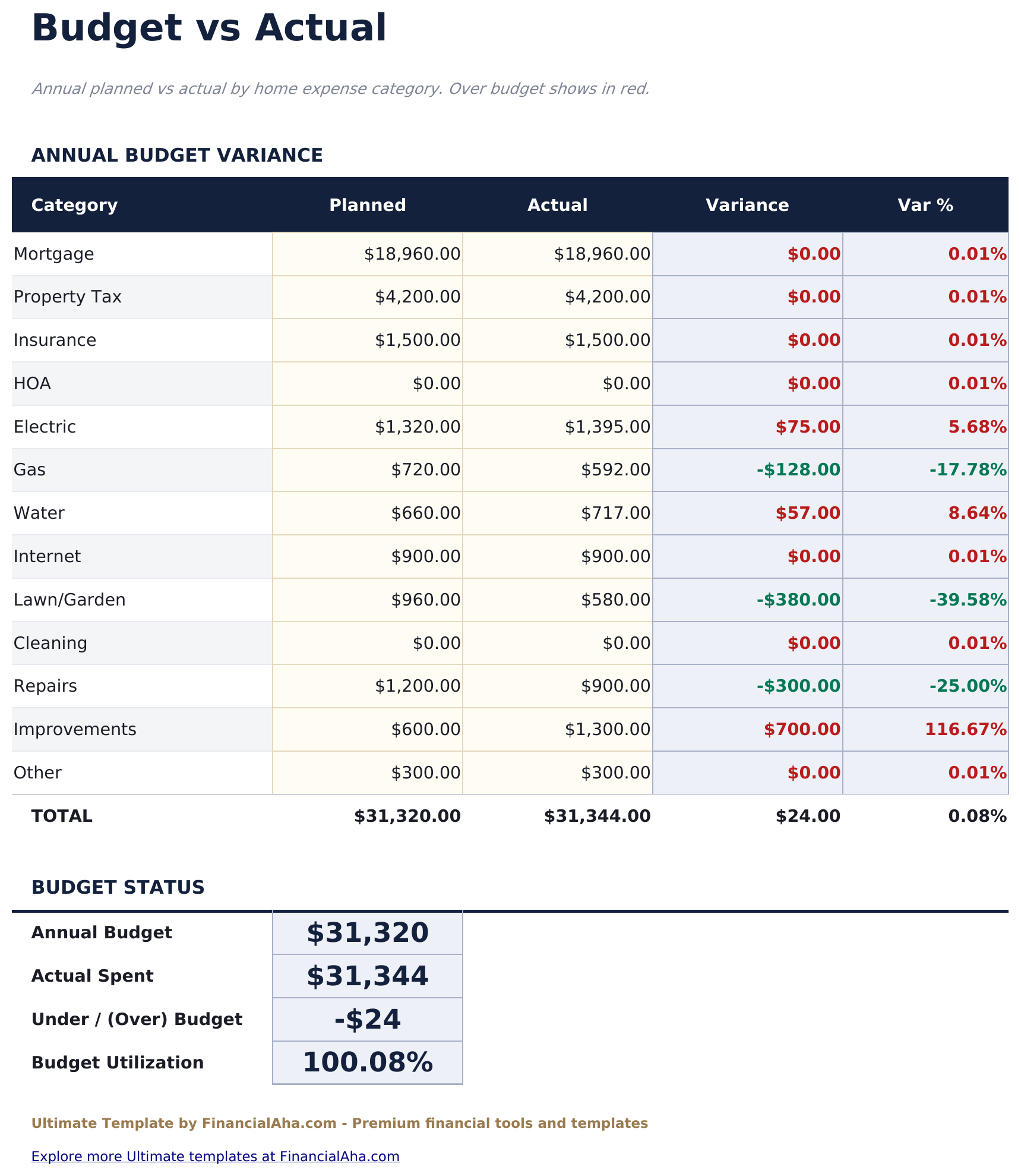
    Budget vs Actual

    Each category with what you planned beside what you spent, the variance in money and as a percentage. The actual figures read from the Monthly Tracking sheet, so the comparison follows the record rather than being maintained twice. Percentage variance is what stops the largest lines dominating. A mortgage that came in exactly as planned and a maintenance line that ran to double its budget are different kinds of miss, and the money column alone would rank them the wrong way round.

  5. 05 of 06

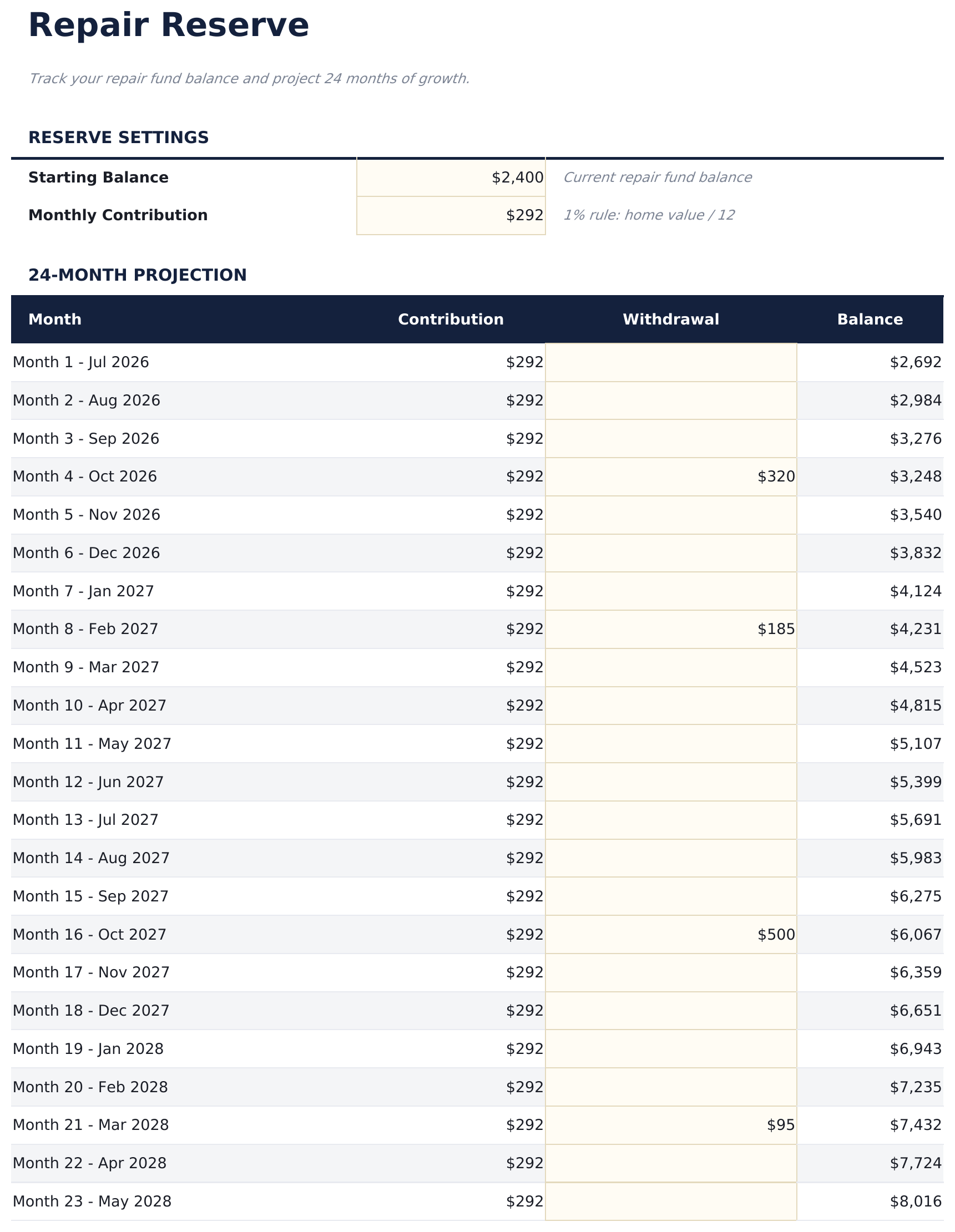
    Repair Reserve

    A starting balance, a monthly contribution and a projection running twenty-four months, with contributions going in, withdrawals coming out and the balance carried across. What it answers is whether the fund can absorb the next thing rather than the last one. A reserve is only meaningful against timing - a balance that looks healthy in month three is a different proposition if the projection shows two known jobs landing in month eight.

  6. 06 of 06

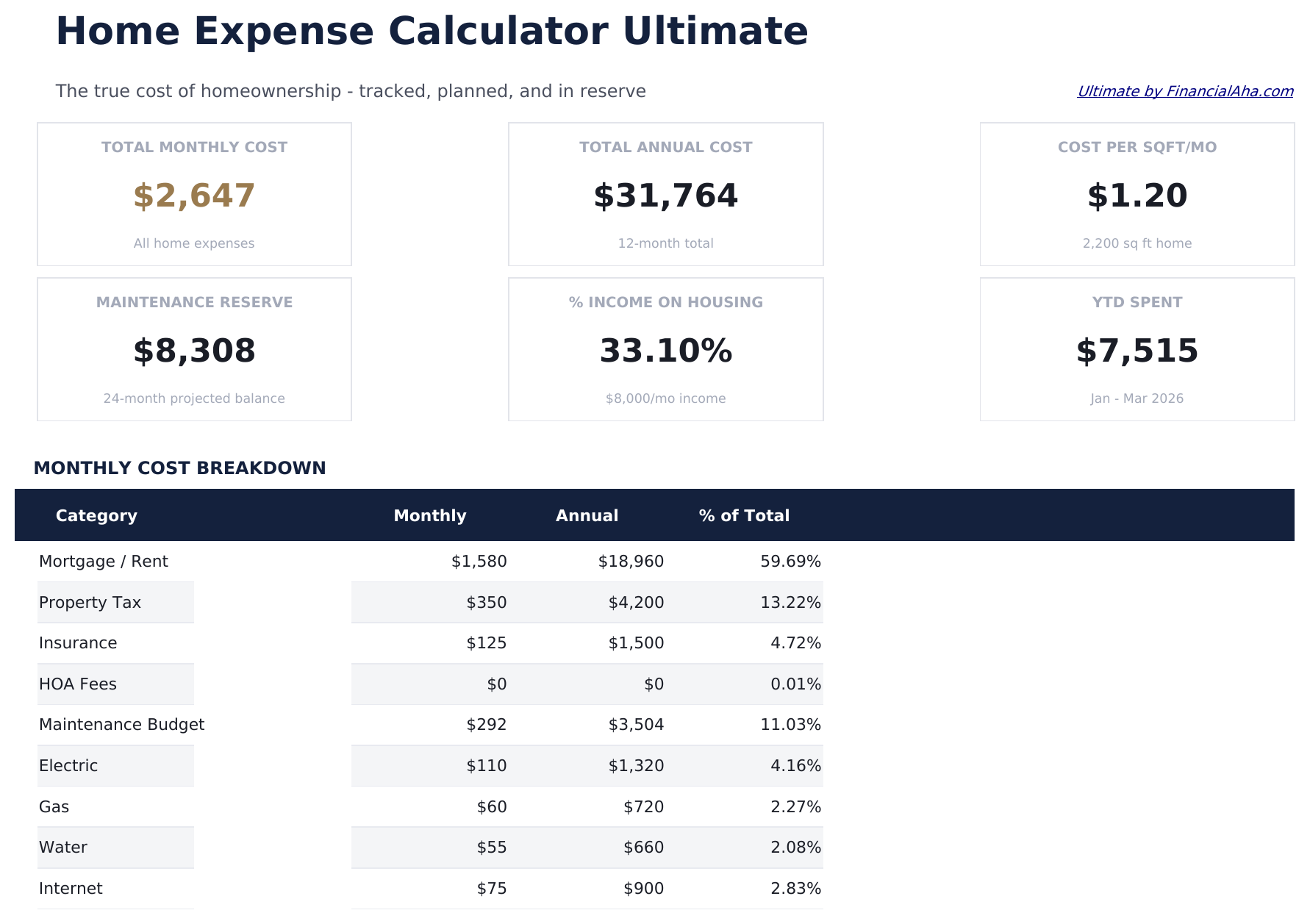
    Dashboard

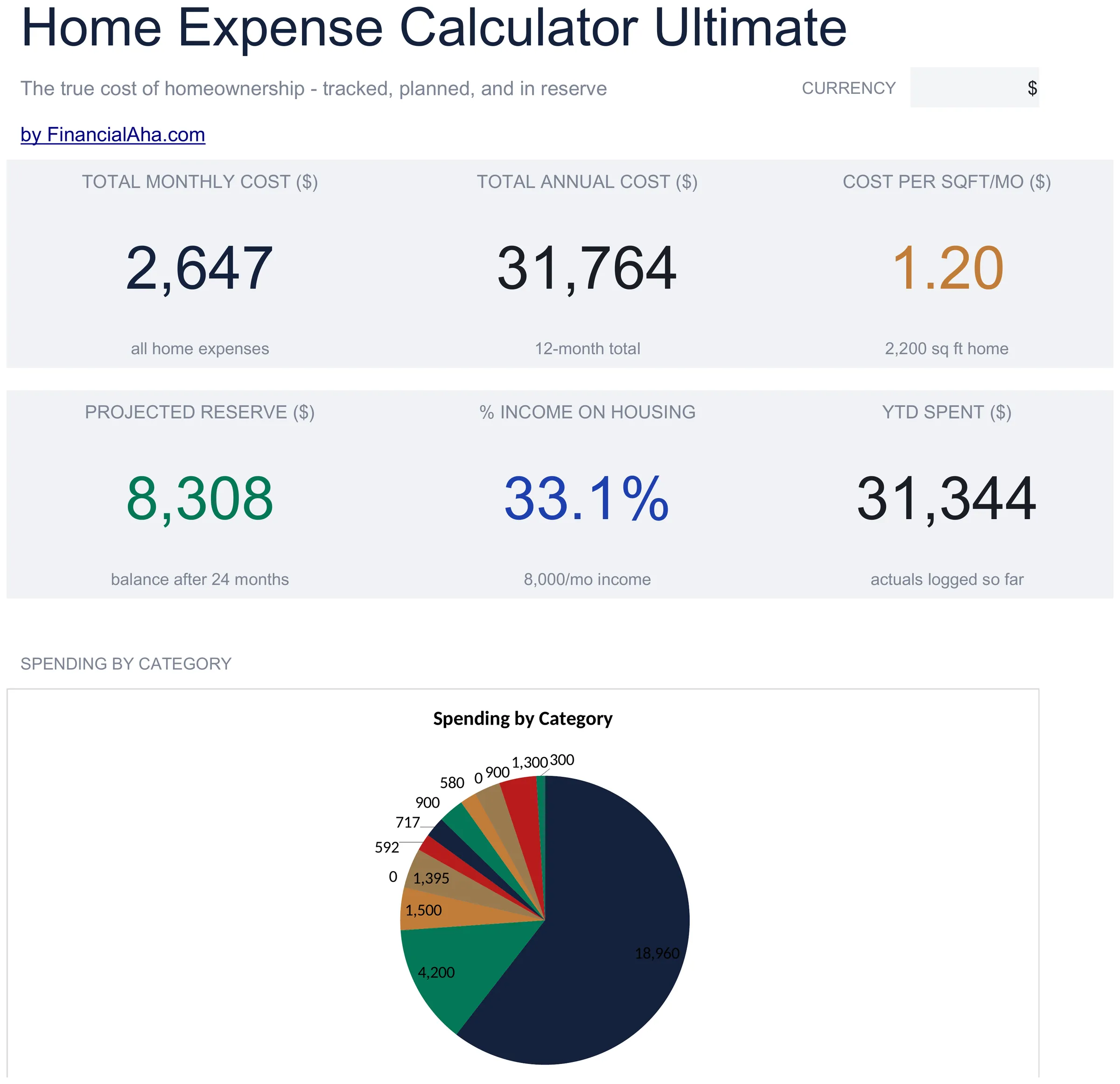
    Six figures and two charts. The monthly and annual cost, the cost per square foot, the maintenance reserve balance, housing as a share of income, and what has been spent so far this year. Setting the year-to-date figure against the annual estimate is the check that matters most. An estimate made in January and an actual read in August are the two halves of the same question, and the gap between them is the only honest measure of how good the estimate was.

  7. Included guide

    How to Use

    A step-by-step guide on its own tab, covering which sheets you fill in and which derive, what each column expects, how the reserve projection works, and how to change the currency. Because it ships inside the file, the instructions travel with the template wherever it is opened.

Works in both Google Sheets and Excel

Ultimate Home Expense Calculator Spreadsheet template for Google Sheets

Upload the Ultimate Home Expense Calculator Spreadsheet Template to Drive, right-click it, and choose "Open with Google Sheets". This Ultimate Home Expense Calculator Google Sheets template needs no conversion step, both charts come across, and the budget comparison recalculates from the tracking sheet exactly as it does in Excel.

Ultimate Home Expense Calculator Google Sheets template setup

A shared copy of the Ultimate Home Expense Calculator Google Sheets template suits a household where bills and repairs are handled by different people, and the maintenance log is worth having where both can add to it.

Running the Ultimate Home Expense Calculator Google Sheet

The Ultimate Home Expense Calculator Google Sheet takes a maintenance entry when work happens and a monthly figure per category. The comparison and the dashboard follow.

Ultimate Home Expense Calculator Spreadsheet template for Excel

The Ultimate Home Expense Calculator spreadsheet Excel download is a plain .xlsx. Excel opens this Ultimate Home Expense Calculator Excel template directly, with no import step, and both charts are native Excel charts rather than pictures. There are no macros and no VBA in the file.

Ultimate Home Expense Calculator Excel template setup

The same Ultimate Home Expense Calculator Excel template opens in Excel on Windows, Excel on Mac, and Excel for the web. It is also the identical file you would upload to Drive, so there is no separate Ultimate Home Expense Calculator spreadsheet download to choose between.

Ultimate Home Expense Calculator spreadsheet Excel notes

The Ultimate Home Expense Calculator spreadsheet Excel file carries no macros and no VBA, so Excel opens it without a trust prompt.

Opening the Ultimate Home Expense Calculator spreadsheet Excel file

Nothing in the Ultimate Home Expense Calculator Excel template is version-specific, so this Ultimate Home Expense Calculator spreadsheet Excel workbook behaves identically in Excel on Windows, Excel on Mac, and older builds.

Spreadsheet template highlights

What the Ultimate Home Expense Calculator spreadsheet template tracks

A row per maintenance job. This is what the Ultimate Home Expense Calculator Spreadsheet Template records for each one:

Date
when the work happened
Description
what was done
Category
the system it belongs to, which is what groups the spending
Cost
what it came to
Vendor
who did it, which is the column that pays off years later
Urgency
whether the work was chosen or forced
Notes
the detail you will not remember

Compare builds

FinancialAha Home Expense Calculator spreadsheet template: Free, Essentials, and Ultimate compared

Feature Free View Spreadsheet Template Essentials View Spreadsheet Template Ultimate This page
Working sheets 1 2 6
Cost lines 15 Grouped into three blocks Thirteen categories
Annual figure Per line and in total Total Total
Mortgage as a share of the total Yes
Cost per day Yes
Cost per square foot Yes
Housing as a share of income Yes
Month-by-month actuals Twelve months
Maintenance log 50 entries with vendor and urgency
Planned against actual By category, with variance
Repair reserve projection 24 months
Charts 1 2

The Free Home Expense Calculator Spreadsheet Template lists what a home costs; the Essentials build groups those costs and reports the mortgage share and a daily figure. The FinancialAha Ultimate Home Expense Calculator Spreadsheet Template turns the estimate into a record: twelve months of actuals by category, a maintenance log with vendors and urgency, planned against actual with variance in money and percent, a repair reserve projected across two years, and the cost expressed per square foot and as a share of income.

Good to know

Notes on working in the Ultimate Home Expense Calculator spreadsheet template

  • Cost per square foot is what makes two houses comparable when nothing else does.
  • Reading down a month column shows the seasonality an annual figure divided by twelve hides.
  • The vendor column pays off over years - the person who fixed it last time is who you want next time.
  • Percentage variance stops the largest lines dominating a comparison the money column would rank wrongly.
  • The reserve projection answers whether the fund can absorb the next thing, which is a question about timing rather than balance.
  • Housing as a share of income is reported as a ratio, not measured against a threshold.
  • The currency dropdown relabels the money columns across every sheet. It changes the label only and does not convert the numbers.
  • Several dashboard captions name the sample home - its square footage, its income and the months it covers. The figures above them follow your own entries; the captions do not.

How to Use This Template

1

Describe the home

Value, floor area, purchase date and income.

2

Track the months

What actually left the account, by category.

3

Log the maintenance

With the vendor and how urgent it was.

4

Compare and reserve

Planned against actual, and the fund's path.

Stress-tested with AI.

Every template starts with deep research into how people actually track the topic. We design the layout, build the formulas, and polish the design until it feels like something we would use ourselves. Along the way, we use AI to stress-test the calculations: unusual inputs, edge cases, and formula behavior, checked until the numbers hold.

One-time purchase. No subscription. Works in Excel & Google Sheets.

Frequently Asked Questions

Is the FinancialAha Ultimate Home Expense Calculator Spreadsheet Template a Google Sheets template?

Yes. Upload the file to Drive and choose "Open with Google Sheets". Both charts come across in the Ultimate Home Expense Calculator Google Sheets template, and the budget comparison recalculates from the tracking sheet exactly as it does in Excel.

Is the FinancialAha Ultimate Home Expense Calculator Spreadsheet Template an Excel template?

Yes. The download is a plain .xlsx, so the Ultimate Home Expense Calculator Excel template opens directly in Excel with no import step. Both charts are native Excel charts rather than pictures, and there are no macros or VBA.

Will the FinancialAha Ultimate Home Expense Calculator spreadsheet Excel file open in older versions of Excel?

Yes. The Ultimate Home Expense Calculator spreadsheet Excel workbook ships as a plain .xlsx, so it opens identically in current Excel and in builds that predate dynamic arrays.

Does the budget comparison in the Ultimate Home Expense Calculator spreadsheet read my actual figures?

Yes. The actual column pulls from the Monthly Tracking sheet, so the comparison follows the record rather than being maintained twice.

What is the maintenance log in the Ultimate Home Expense Calculator spreadsheet for beyond the cost?

The vendor and urgency columns. The person who serviced something two winters ago is exactly who you want when it fails again, and urgency separates the work you chose from the work that chose you.

How does the repair reserve projection help in the Ultimate Home Expense Calculator spreadsheet?

It answers whether the fund can absorb what is coming rather than what has passed. A balance that looks healthy in month three reads differently when the projection shows two known jobs landing in month eight.

Does the Ultimate Home Expense Calculator spreadsheet handle more than one property?

No. It is built around one home - its value, its floor area and its costs. The cost-per-square-foot and income-share figures all refer to that single property.

Is the housing share in the Ultimate Home Expense Calculator spreadsheet measured against a target?

No. It is reported as a ratio. What proportion is workable depends on the rest of a household's commitments, and the sheet takes no position on it.

What do I get after buying the Ultimate Home Expense Calculator spreadsheet template?

You receive the Ultimate Home Expense Calculator spreadsheet template as an Excel file (.xlsx) that works in Microsoft Excel and Google Sheets. Download it immediately after purchase - no signup or account required.

Is there a free Ultimate Home Expense Calculator spreadsheet template?

Yes. A free version of the Ultimate Home Expense Calculator spreadsheet template is available with basic features. The Ultimate version adds advanced analysis, more capacity, and additional sheets.

What if the Ultimate Home Expense Calculator spreadsheet template does not work for me?

Contact us and we will help troubleshoot. The Ultimate Home Expense Calculator spreadsheet template works in Microsoft Excel and Google Sheets with no macros required.

Ultimate

Highlights:

Instant download after purchase
No macros or VBA required
All formulas auto-calculate
No subscription required
Works in
Excel Google Sheets

Looking for more Ultimate templates?

We offer Ultimate versions of our most popular spreadsheet templates with advanced features, more capacity, and deeper analysis.

Private & secure

Your financial data stays on your device. We never see it.

Learn more →

Need help?

Check our guides or reach out with questions.

View FAQ →