Lifetime Deal Complete Personal Financial Planning Bundle →
✓ Financial Planning✓ Net Worth Tracker✓ Monthly Budgeting✓ Travel Budget Planner✓ Annual Budgeting Planner✓ Monthly Expense Tracker✓ Annual Tax Planner✓ Retirement Planning
View Bundle →

Instant digital delivery · Terms & Conditions apply

Ultimate Template - Excel & Google Sheets

Ultimate Dividend Tracker Spreadsheet Template for Google Sheets & Excel

Thirty holdings with cost basis, current price, market value and yield, tagged by sector and payment frequency, set against a hundred rows of dividend history with a reinvestment marker on each. The Ultimate Dividend Tracker spreadsheet template spreads income across all twelve months on a sheet of its own, measures yield on cost against what you originally paid rather than today's price, and adds a DRIP calculator. Seven tabs. Google Sheets and Excel, one file. No macros, no VBA.

See Preview

Instant digital delivery · Terms & Conditions apply

Dividend Tracker Spreadsheet Template - Ultimate version for Google Sheets and Excel

What's Included

  • A Holdings sheet carrying cost basis, current price, market value and yield
  • Sector and payment frequency on every holding
  • A Dividend History of what was received, with a reinvestment marker
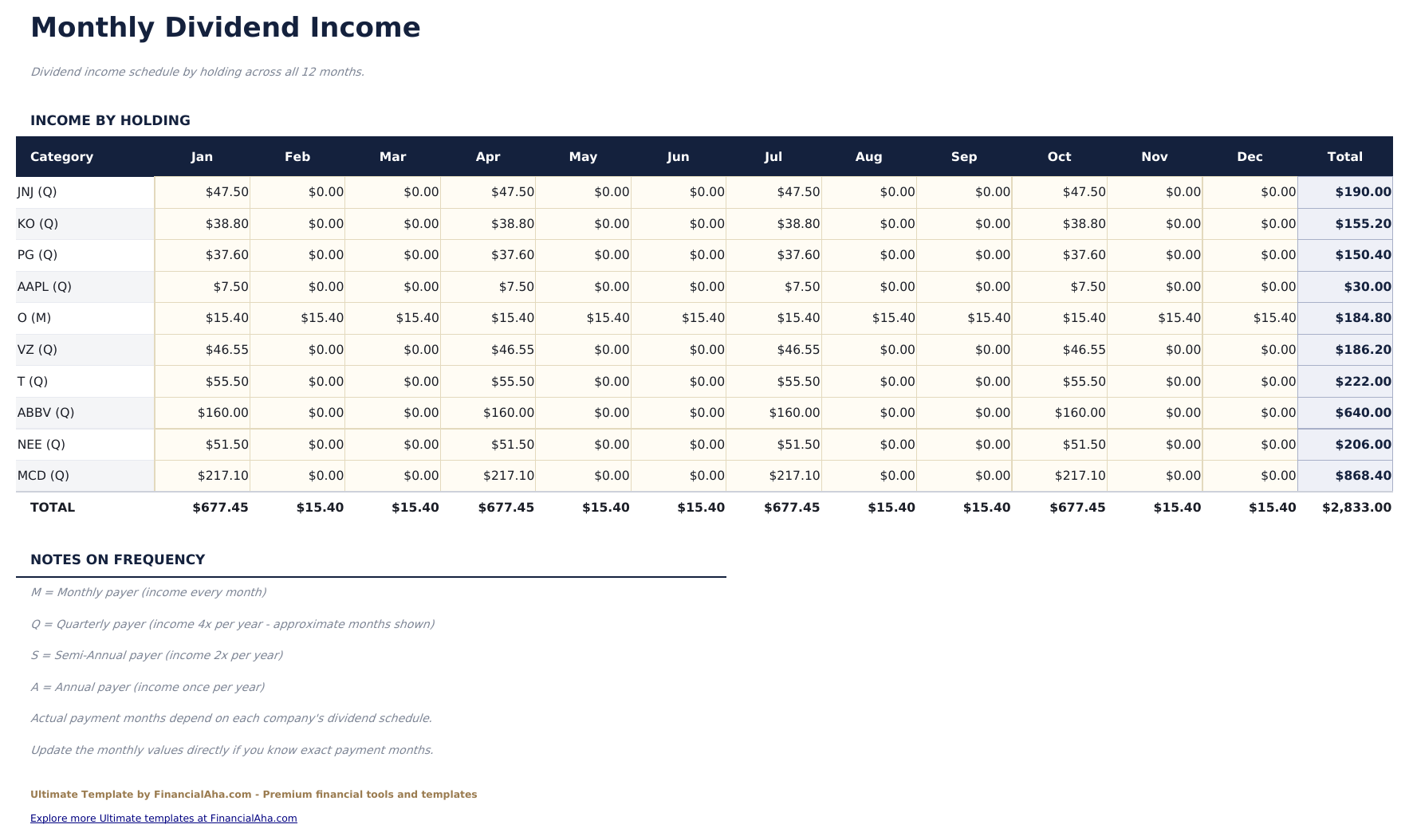
  • Monthly Income showing every holding across all twelve months
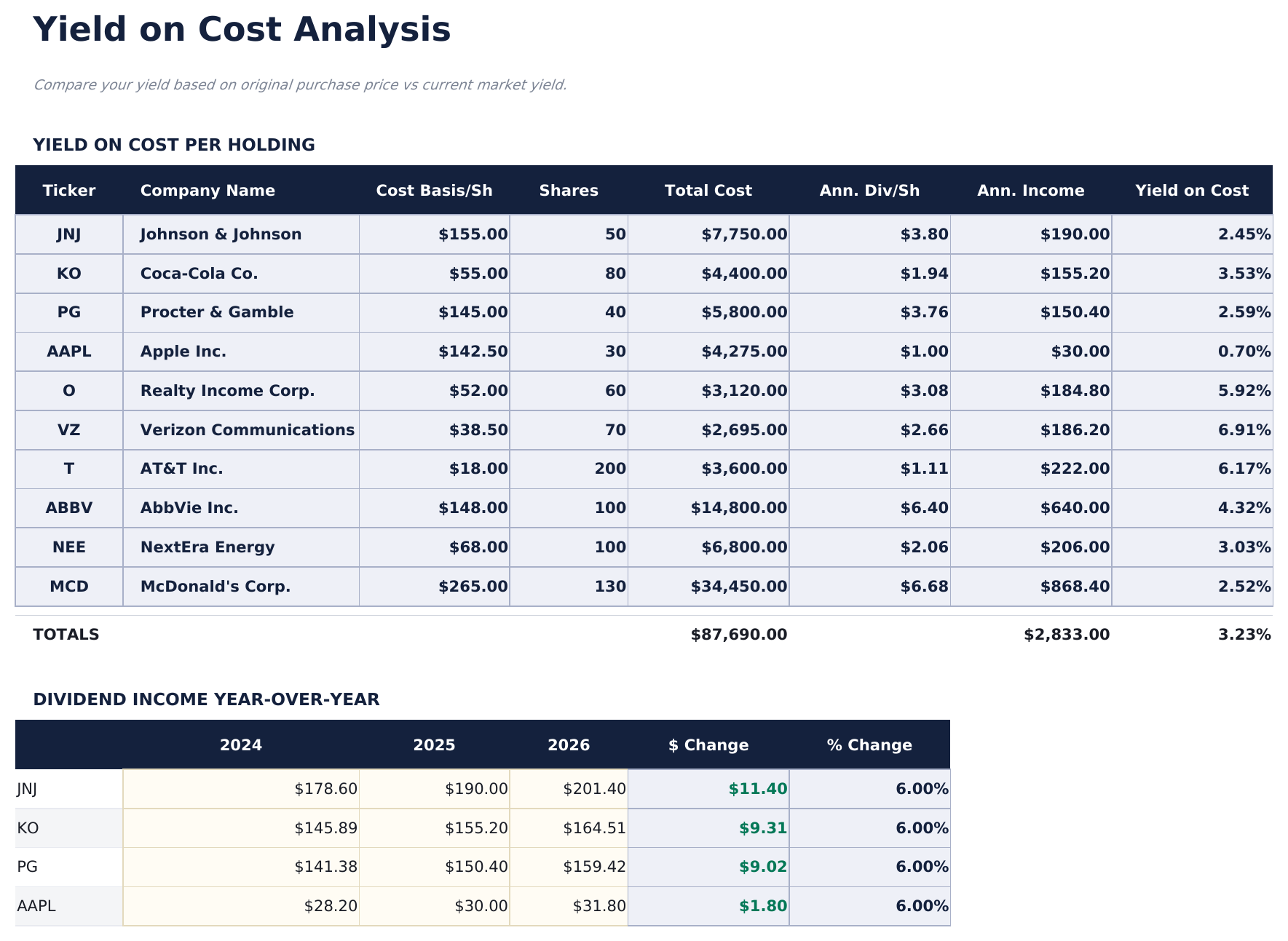
  • Yield on Cost measured against what you originally paid rather than today's price
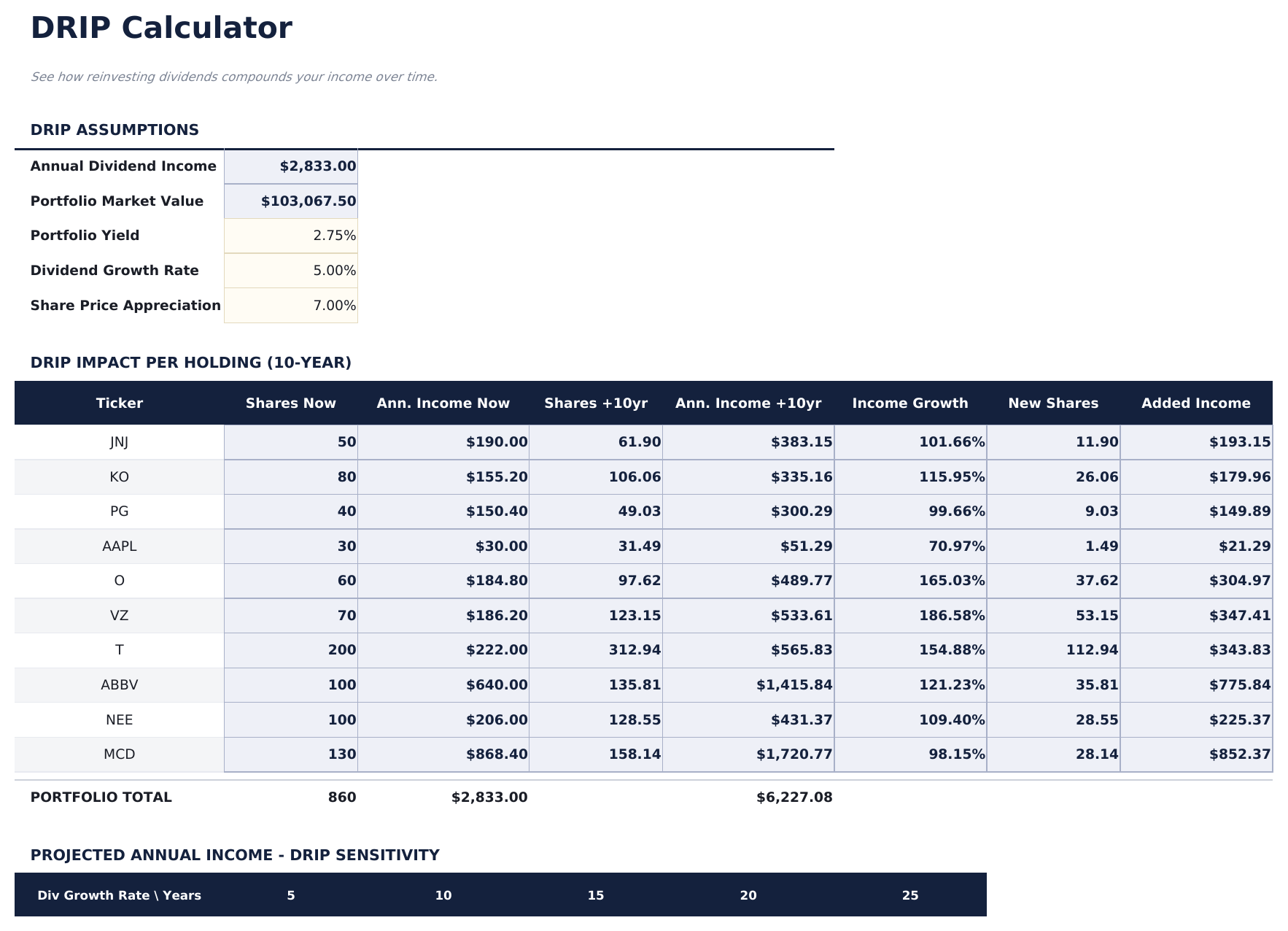
  • A reinvestment projection built from assumptions you set
  • Dashboard with six KPIs plus a forward view of the coming months
  • Both halves in one file: what the portfolio is set to pay, and what it actually paid
  • Works in Microsoft Excel and Google Sheets with no macros required

The FinancialAha Ultimate Dividend Tracker Spreadsheet Template for Google Sheets and Excel is a six-sheet workbook that holds both halves of dividend investing - what the portfolio is set to pay and what it actually paid - with a How to Use guide on a seventh tab. It ships as an Ultimate Dividend Tracker Excel template and an Ultimate Dividend Tracker Google Sheets template in one file. This Ultimate Dividend Tracker spreadsheet template carries your holdings with their sector and payment frequency, a log of what was received, income month by month, yield measured against what you originally paid, and a reinvestment projection. No macros, no VBA.

Inside the workbook

What's inside the FinancialAha Ultimate Dividend Tracker spreadsheet template

The FinancialAha Ultimate Dividend Tracker Spreadsheet Template runs on six working sheets - three you type into, three that report back - plus the guide. It works in both Microsoft Excel and Google Sheets and here is what the Ultimate Dividend Tracker spreadsheet holds.

  1. 01 of 06

    Dashboard

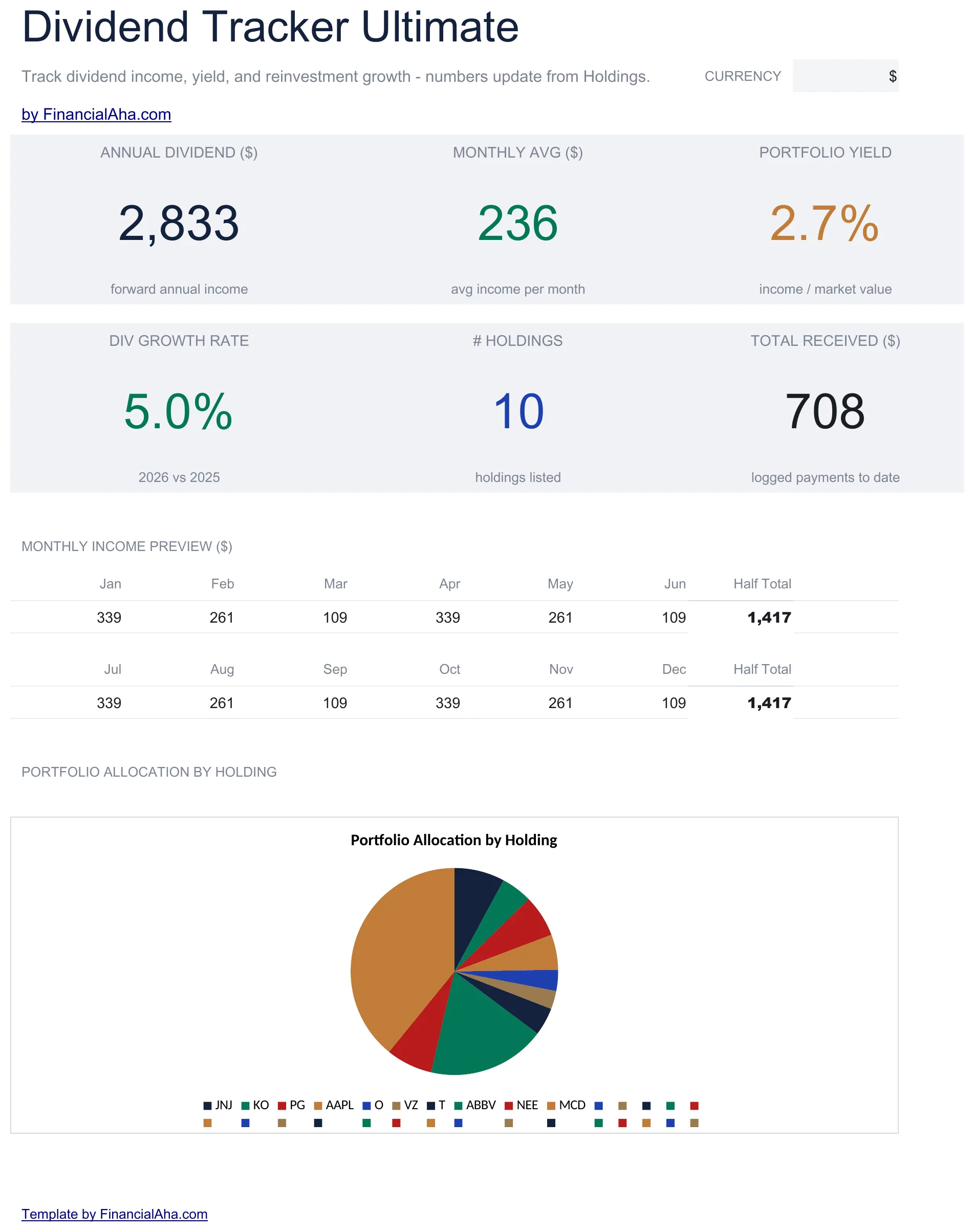
    The portfolio in six figures: what it is set to pay over a year, what that averages a month, the yield across the whole thing, how the payout has grown, and what has actually been received. A forward view of the coming months sits alongside, which is the part that turns dividend income from an annual abstraction into something with a calendar.

  2. 02 of 06

    Holdings

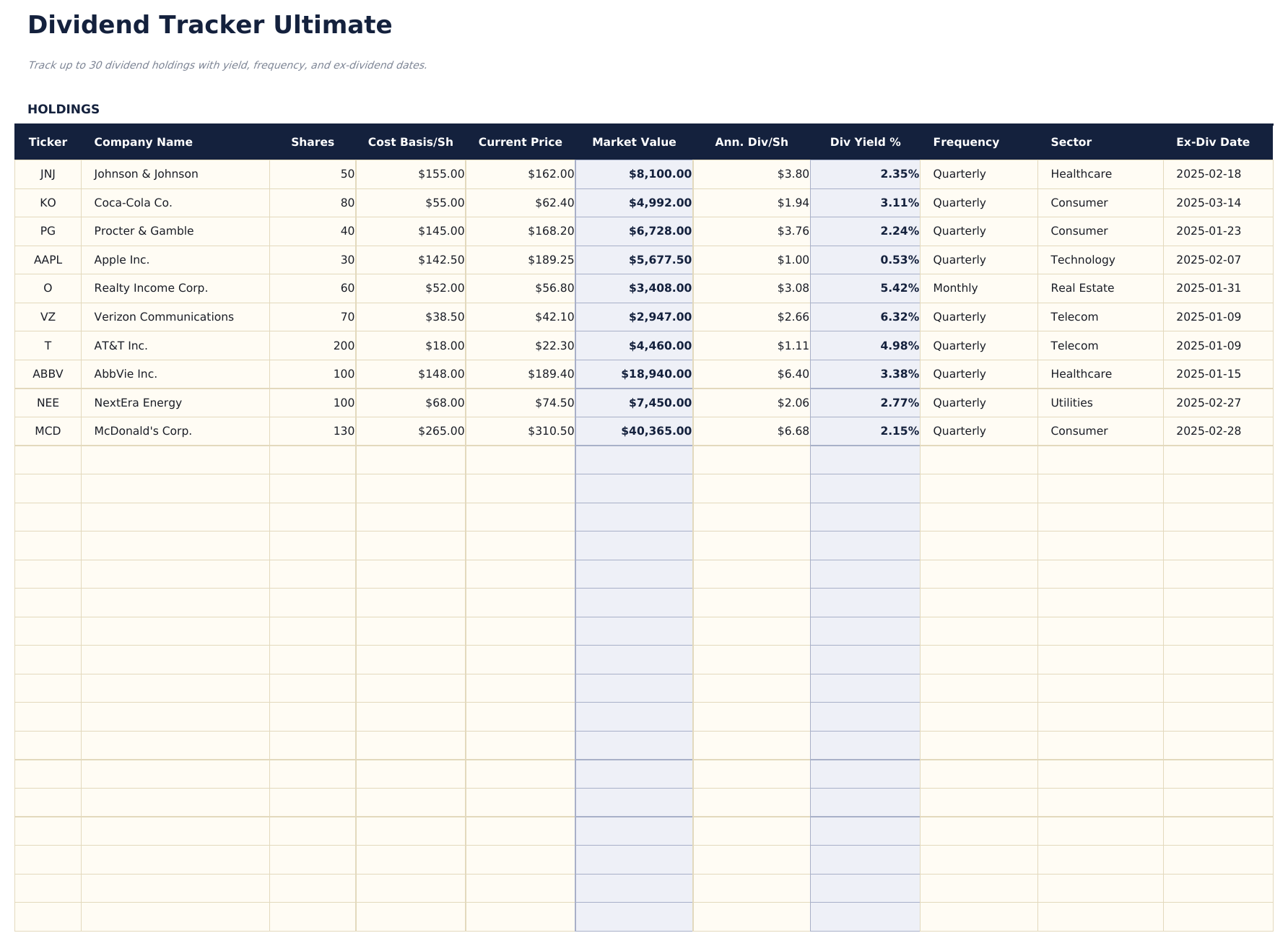
    The positions themselves, thirty deep, each with its ticker and company name, the shares held, what they cost and what they are worth now, the declared annual dividend and the yield that implies - plus the sector and how often the company pays. Those last two are what let the other sheets say something about the shape of the income rather than only its size. Prices are figures you enter rather than live quotes.

  3. 03 of 06

    Dividend History

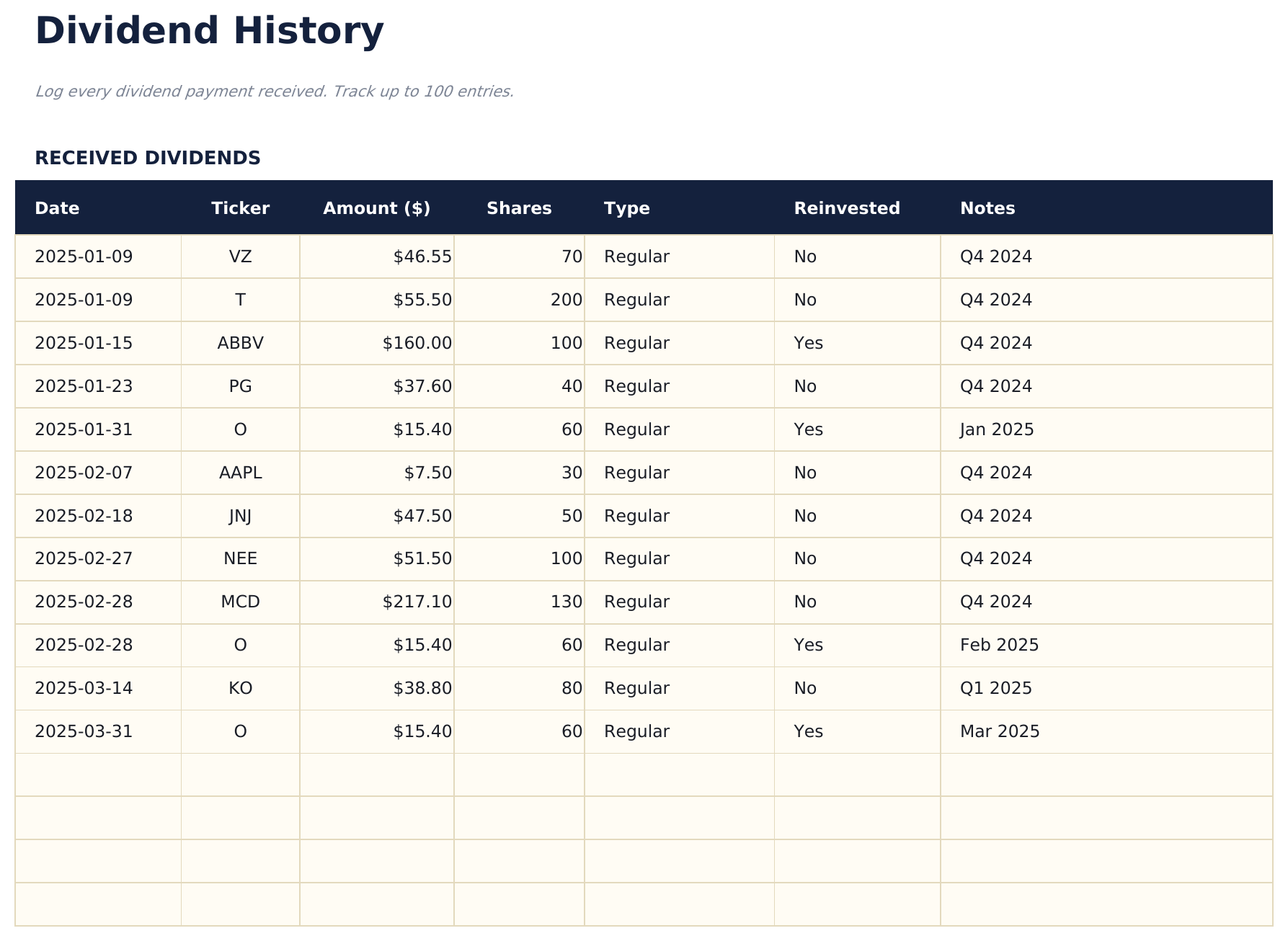
    What actually landed, a row per payment: the date, the company, the amount, the shares behind it, the type, whether it was reinvested and any note. The reinvestment marker is the one that matters most later, because a reinvested payment changes the position that generates the next one.

  4. 04 of 06

    Monthly Income

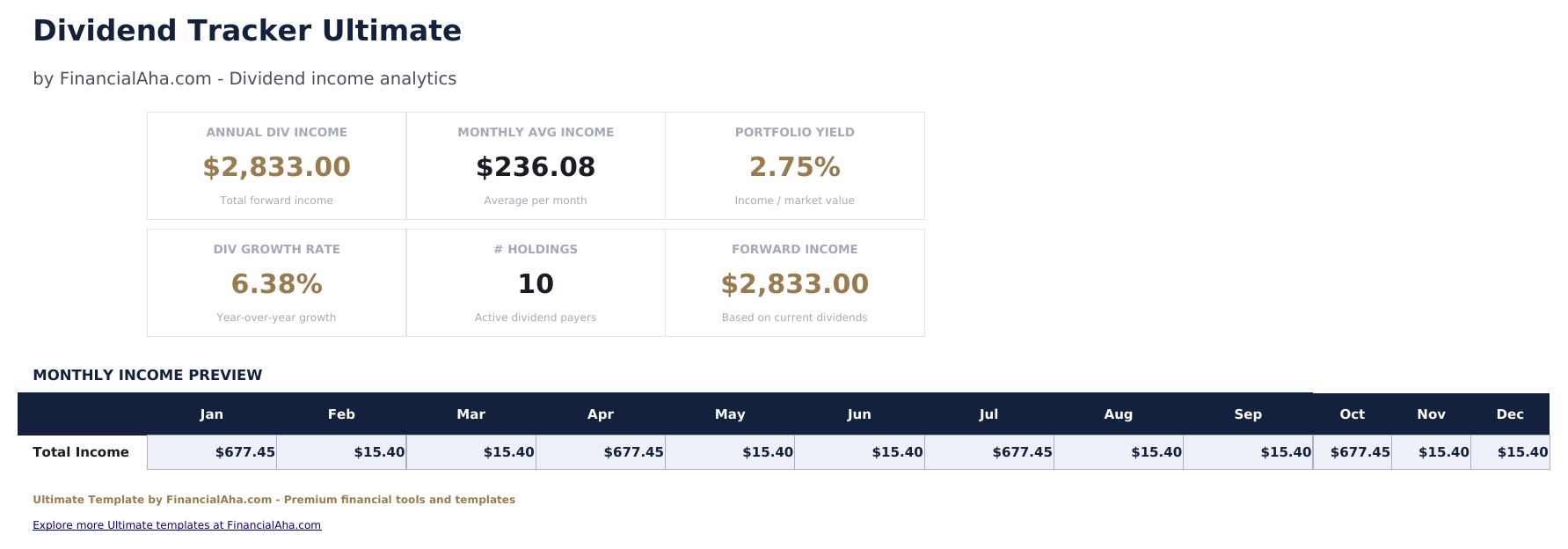
    Income by holding across all twelve months, with a total on each. It is the sheet that shows the rhythm of the income - which months are heavy, which are thin - and that is not something an annual figure or a portfolio yield can tell you.

  5. 05 of 06

    Yield on Cost

    Yield measured against what you originally paid rather than what the holding is worth today. For a position held a long time the two can diverge considerably, and this sheet is where that shows up, per holding and with the totals behind it.

  6. 06 of 06

    DRIP Calculator

    A projection of what reinvesting would do, built from assumptions you set rather than from the record. It is a model of one possible path rather than a forecast, and it is worth reading with the same caution as any projection that compounds an assumed rate forward.

  7. Included guide

    How to Use

    A step-by-step guide on its own tab, covering setup, what each sheet draws from the holdings and the history, and how yield on cost differs from the yield on the holdings sheet. Because it ships inside the file, the instructions travel with the template wherever it is opened.

Works in both Google Sheets and Excel

Ultimate Dividend Tracker Spreadsheet template for Google Sheets

Upload the Ultimate Dividend Tracker Spreadsheet Template to Drive, right-click it, and choose "Open with Google Sheets". This Ultimate Dividend Tracker Google Sheets template needs no conversion step and the chart survives the trip intact. The cross-sheet references that feed the reporting rely on the existing tab names, so those are worth leaving alone.

Ultimate Dividend Tracker Google Sheets template setup

A shared copy of the Ultimate Dividend Tracker Google Sheets template suits a portfolio held jointly or reviewed by someone else, and because holdings and history sit on separate sheets, updating positions does not disturb the record of what was paid. Sheets version history covers a payment logged twice.

Sharing the Ultimate Dividend Tracker Google Sheet

The Ultimate Dividend Tracker Google Sheet is a per-payment job with an occasional review: a line in the history when a dividend lands, and an update to the holdings when a position or a price changes. The monthly and yield-on-cost views follow without further entry.

Ultimate Dividend Tracker Spreadsheet template for Excel

The Ultimate Dividend Tracker spreadsheet Excel download is a plain .xlsx. Excel opens this Ultimate Dividend Tracker Excel template directly, with no import step and no compatibility prompt, and the chart is a native Excel chart that redraws as entries go in. There are no macros and no VBA in the file, so it opens without a security warning.

Ultimate Dividend Tracker Excel template setup

The same Ultimate Dividend Tracker Excel template opens in Excel on Windows, Excel on Mac, and Excel for the web. It is also the identical file you would upload to Drive, so there is no separate Ultimate Dividend Tracker spreadsheet download to choose between.

Ultimate Dividend Tracker spreadsheet Excel notes

The Ultimate Dividend Tracker spreadsheet Excel file carries no macros and no VBA, so Excel opens it without a trust prompt. The same Ultimate Dividend Tracker spreadsheet Excel download also opens in Excel for the web, which matters when you move between a work machine and a personal one.

Opening the Ultimate Dividend Tracker spreadsheet Excel file

Nothing in the Ultimate Dividend Tracker Excel template is version-specific, so this Ultimate Dividend Tracker spreadsheet Excel workbook behaves identically in Excel on Windows, Excel on Mac, and older builds.

Spreadsheet template highlights

What the Ultimate Dividend Tracker spreadsheet template tracks

Holdings and history are the two sheets you type into. These are the columns the Ultimate Dividend Tracker Spreadsheet Template works from:

Ticker
the holding the row covers
Company Name
the full name alongside it
Shares
how many you hold
Cost Basis / Sh
what each share cost you
Current Price
what it is worth now, entered rather than fetched
Market Value auto
derived, the shares against the current price
Ann. Div / Sh
the declared annual dividend per share
Div Yield % auto
derived, that dividend against the current price
Frequency
how often the company pays
Sector
what the holding is grouped under
Yield on Cost auto
derived, the annual income against what you originally paid

Compare builds

FinancialAha Dividend Tracker spreadsheet template: Free, Essentials, and Ultimate compared

Feature Free View Spreadsheet Template Essentials View Spreadsheet Template Ultimate This page
Working sheets 1 2 6
What it holds 16 holdings 30 payments 30 holdings + 100 payments
Records payments received – Yes, with both dates Yes, with reinvestment noted
Forward annual income Yes – Yes
Yield Per holding – Per holding and portfolio-wide
Charts – 1 1
Income by month – Average only Every month, per holding
Yield on cost – – Dedicated sheet
Reinvestment projection – – Dedicated sheet
Sector and frequency – – Yes

The FinancialAha Ultimate Dividend Tracker Spreadsheet Template covers six working sheets and is the only build that does both jobs. The Free Dividend Tracker Spreadsheet Template projects forward from a holding list with no dates and no history. The Essentials Dividend Tracker Spreadsheet Template for Google Sheets and Excel does the reverse, logging received payments with both dates but keeping no position list. This build carries holdings with sector, frequency, cost and current value alongside a log of what was received, then adds what the other two cannot: income laid out month by month, yield measured against what you originally paid rather than today's price, and a projection of what reinvesting would do under assumptions you set.

Good to know

Notes on working in the Ultimate Dividend Tracker spreadsheet template

  • Yield on cost and the yield on the holdings sheet answer different questions - one is against what you paid, the other against what the holding is worth now.
  • Prices are entered rather than fetched, so every derived figure is only as current as the last time you updated them.
  • The reinvested marker on a payment matters later, because reinvesting changes the position that produces the next one.
  • Monthly income is where the rhythm shows - an annual figure says nothing about which months are heavy and which are thin.
  • The reinvestment sheet is a projection from assumptions you supply, not a forecast of what will happen.

How to Use This Template

1

Enter your holdings

Add each position with its shares, cost basis, current price, declared dividend, frequency and sector.

2

Log what arrives

Record each payment in Dividend History, noting whether it was reinvested.

3

Read the rhythm

Monthly Income lays every holding across the twelve months, showing which are heavy and which are thin.

4

Compare the yields

Yield on Cost sets income against what you paid, and the DRIP Calculator sheet projects what reinvesting would do.

Stress-tested with AI.

Every template starts with deep research into how people actually track the topic. We design the layout, build the formulas, and polish the design until it feels like something we would use ourselves. Along the way, we use AI to stress-test the calculations: unusual inputs, edge cases, and formula behavior, checked until the numbers hold.

One-time purchase. No subscription. Works in Excel & Google Sheets.

Frequently Asked Questions

Is the FinancialAha Ultimate Dividend Tracker Spreadsheet Template a Google Sheets template?

Yes. Upload the file to Drive and choose "Open with Google Sheets". The Ultimate Dividend Tracker Google Sheets template needs no conversion step and the chart survives the trip intact. The cross-sheet references rely on the existing tab names, so those are worth leaving alone.

Is the FinancialAha Ultimate Dividend Tracker Spreadsheet Template an Excel template?

Yes. The download is a plain .xlsx, so the Ultimate Dividend Tracker Excel template opens directly in Excel with no import step. The chart is a native Excel chart, and there are no macros or VBA.

Will the FinancialAha Ultimate Dividend Tracker spreadsheet Excel file open in older versions of Excel?

Yes. The Ultimate Dividend Tracker spreadsheet Excel workbook ships as a plain .xlsx, so it opens identically in current Excel and in builds that predate dynamic arrays.

Does the Ultimate Dividend Tracker spreadsheet template pull live prices?

No. Current prices are figures you enter, so market value, yield and everything derived from them are only as current as your last update. Nothing in the workbook connects to a data feed.

What is yield on cost in the Ultimate Dividend Tracker spreadsheet?

Yield measured against what you originally paid for a holding rather than what it is worth today. For a position held a long time the two can diverge considerably, and the sheet reports both so the difference is visible.

What does the DRIP calculator do in the Ultimate Dividend Tracker spreadsheet?

It projects what reinvesting dividends would do, from assumptions you set. It models one possible path rather than forecasting an outcome, and should be read with the caution any compounded assumption deserves.

Can I add rows to the Ultimate Dividend Tracker spreadsheet?

Holdings and received payments get sheets of their own, and you can right-click inside either table and choose Insert when you need another row. Monthly income and yield on cost cover the holdings you track.

Why does the Ultimate Dividend Tracker spreadsheet record the payment frequency and sector?

They are what let the other sheets say something about the shape of the income rather than only its size - which months are heavy, and how concentrated the portfolio is.

What do I get after buying the Ultimate Dividend Tracker spreadsheet template?

You receive the Ultimate Dividend Tracker spreadsheet template as an Excel file (.xlsx) that works in Microsoft Excel and Google Sheets. Download it immediately after purchase - no signup or account required.

Is there a free Ultimate Dividend Tracker spreadsheet template?

Yes. A free version of the Ultimate Dividend Tracker spreadsheet template is available with basic features. The Ultimate version adds advanced analysis, more capacity, and additional sheets.

What if the Ultimate Dividend Tracker spreadsheet template does not work for me?

Contact us and we will help troubleshoot. The Ultimate Dividend Tracker spreadsheet template works in Microsoft Excel and Google Sheets with no macros required.

Ultimate

Highlights:

Instant download after purchase
No macros or VBA required
All formulas auto-calculate
No subscription required
Works in
Excel Google Sheets

Looking for more Ultimate templates?

We offer Ultimate versions of our most popular spreadsheet templates with advanced features, more capacity, and deeper analysis.

Private & secure

Your financial data stays on your device. We never see it.

Learn more →

Need help?

Check our guides or reach out with questions.

View FAQ →