Best Value Complete Financial Planning Bundle
✓ Financial Planning✓ Net Worth Tracker✓ Monthly Budgeting✓ Travel Budget Planner✓ Annual Budgeting Planner✓ Monthly Expense Tracker✓ Annual Tax Planner✓ Retirement Planning
View Bundle →

Instant digital delivery · Terms & Conditions apply

Ultimate Template - Excel & Google Sheets

Ultimate Capital Gains Calculator Spreadsheet Template for Google Sheets & Excel

Fifty realised lots with shares, both dates, basis and proceeds, and a percentage return on each so positions of very different sizes can be compared. The Ultimate Capital Gains Calculator spreadsheet template derives days held and term from the dates, works out an effective rate across everything realised, tests the result against other rates on a sensitivity sheet, and keeps a wash sale tracker. Five working sheets. Google Sheets and Excel.

See Preview

Instant digital delivery · Terms & Conditions apply

Capital Gains Calculator Spreadsheet Template - Ultimate version for Google Sheets and Excel

What's Included

  • Fifty realised lots with shares, both dates, basis and proceeds
  • A percentage return per lot, so positions of different sizes compare
  • Days held and the term derived from the dates
  • Both rates entered by you on a summary sheet rather than assumed
  • An effective rate across everything realised, reflecting the actual mix
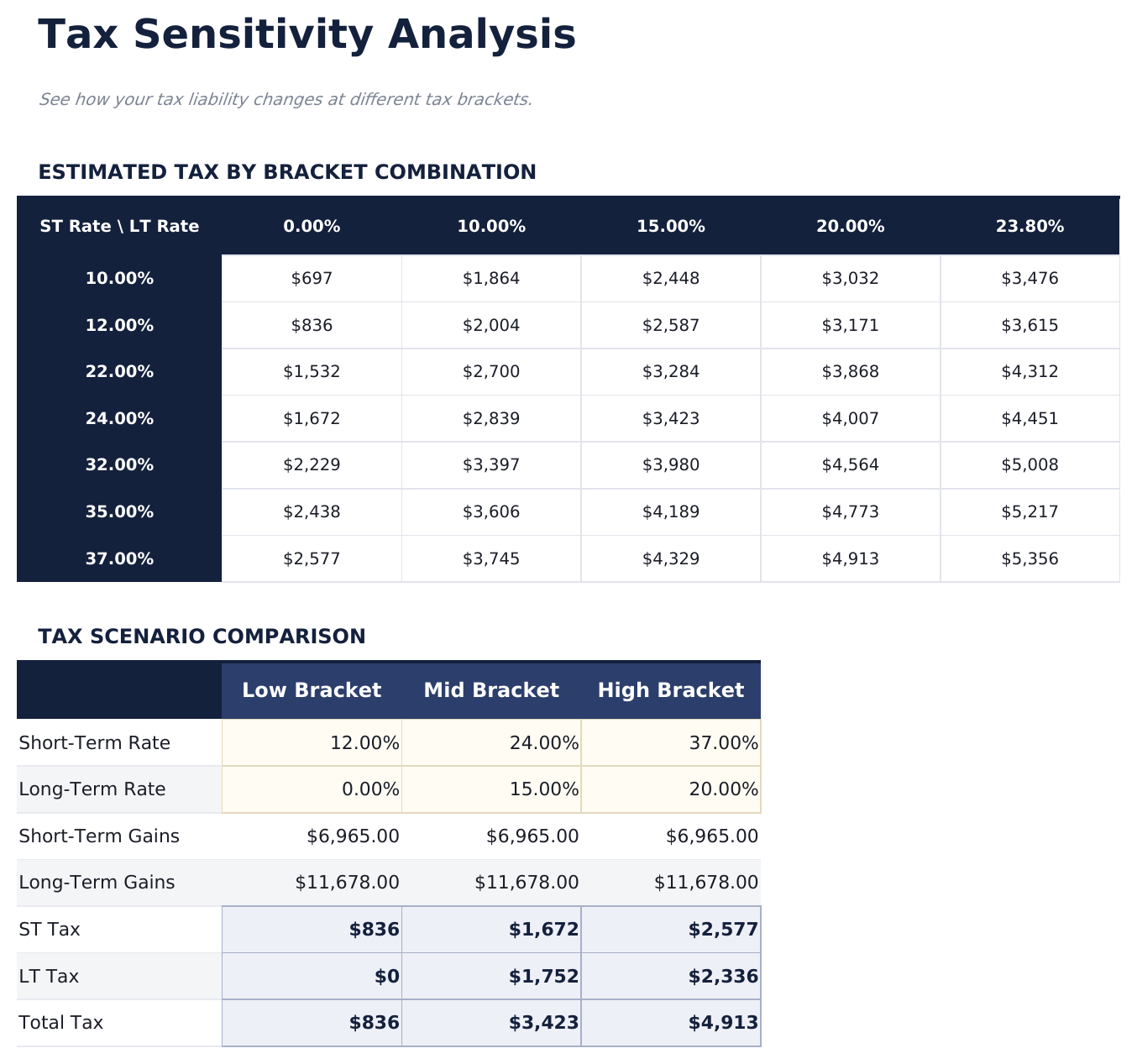
  • A grid showing the estimate at every combination of the two rates
  • A side-by-side comparison of three bracket positions
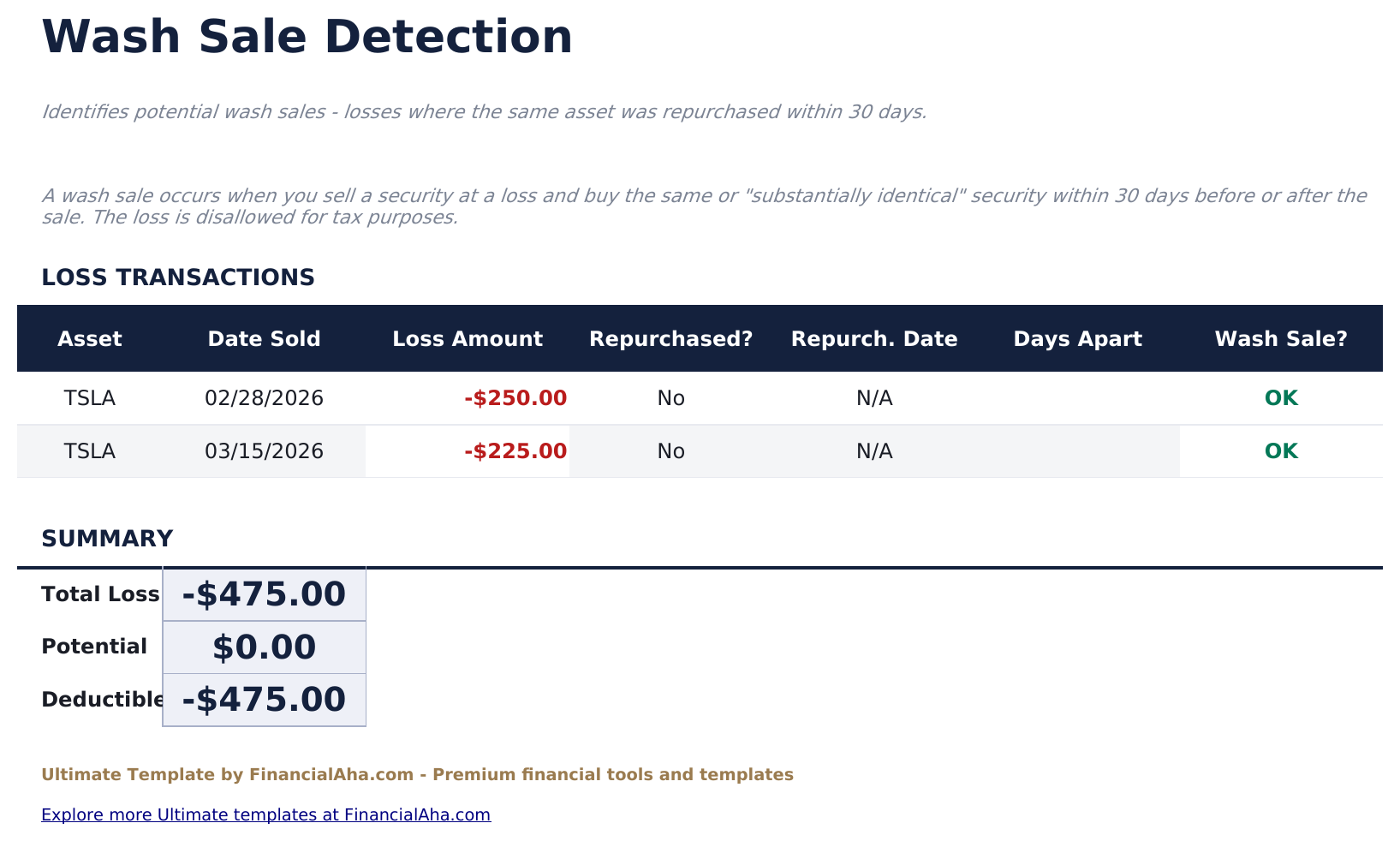
  • A wash-sale helper listing losses against any repurchase of the same asset
  • Dashboard with two charts covering the year and the split by term
  • Works in Microsoft Excel and Google Sheets with no macros required

The FinancialAha Ultimate Capital Gains Calculator Spreadsheet Template for Google Sheets and Excel is a five-sheet workbook that puts the rates under your control and then tests the answer against them, with a How to Use guide on a sixth tab. It ships as an Ultimate Capital Gains Calculator Excel template and an Ultimate Capital Gains Calculator Google Sheets template in one file. This Ultimate Capital Gains Calculator spreadsheet template holds fifty realised lots, reports an effective rate across the year, shows the estimate at every combination of rates, and flags losses where the same asset was bought back soon after. No macros, no VBA.

Inside the workbook

What's inside the FinancialAha Ultimate Capital Gains Calculator spreadsheet template

The FinancialAha Ultimate Capital Gains Calculator Spreadsheet Template runs on five working sheets - two you type into, three that report back - plus the guide. It works in both Microsoft Excel and Google Sheets and here is what the Ultimate Capital Gains Calculator spreadsheet holds.

  1. 01 of 05

    Dashboard

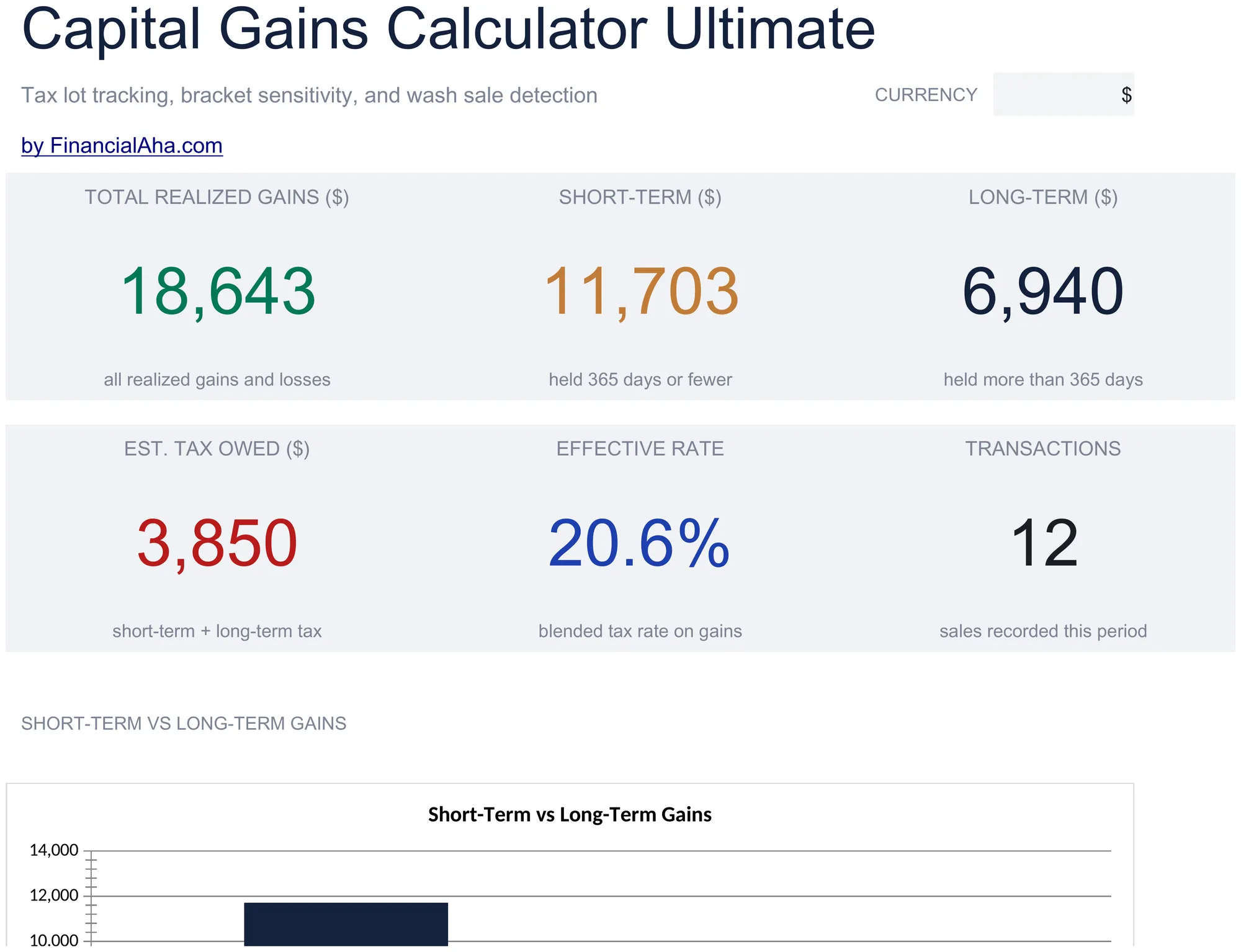
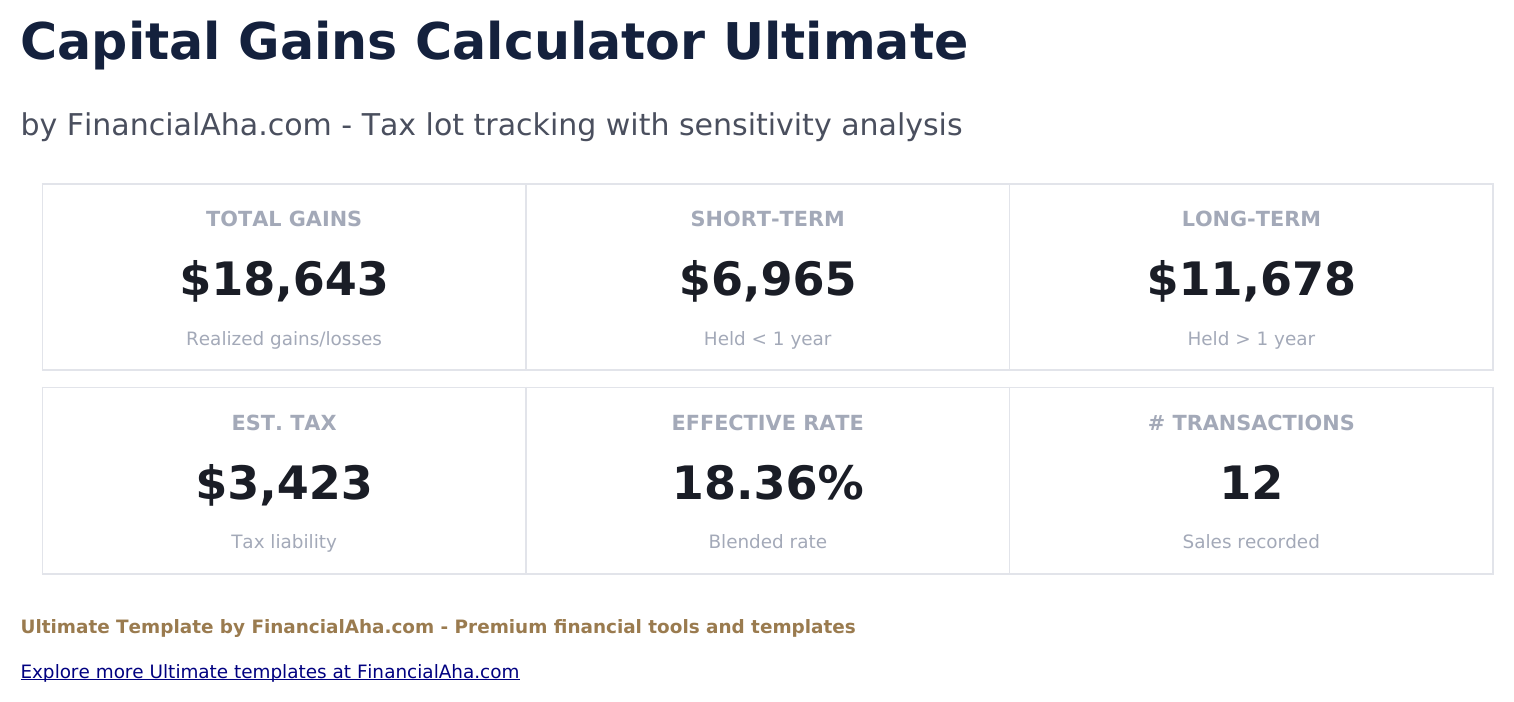
    Six figures. Everything realised, split into short-term and long-term on the top row; the estimated tax, the blended rate that represents, and how many sales were recorded on the second. The blended rate is the figure worth carrying - two term totals taxed at different rates are hard to hold in mind, and one share of the gains is not. Two charts carry the same picture. Every figure reads from the lots and the rates you set, so nothing here is maintained separately.

  2. 02 of 05

    Tax Lots

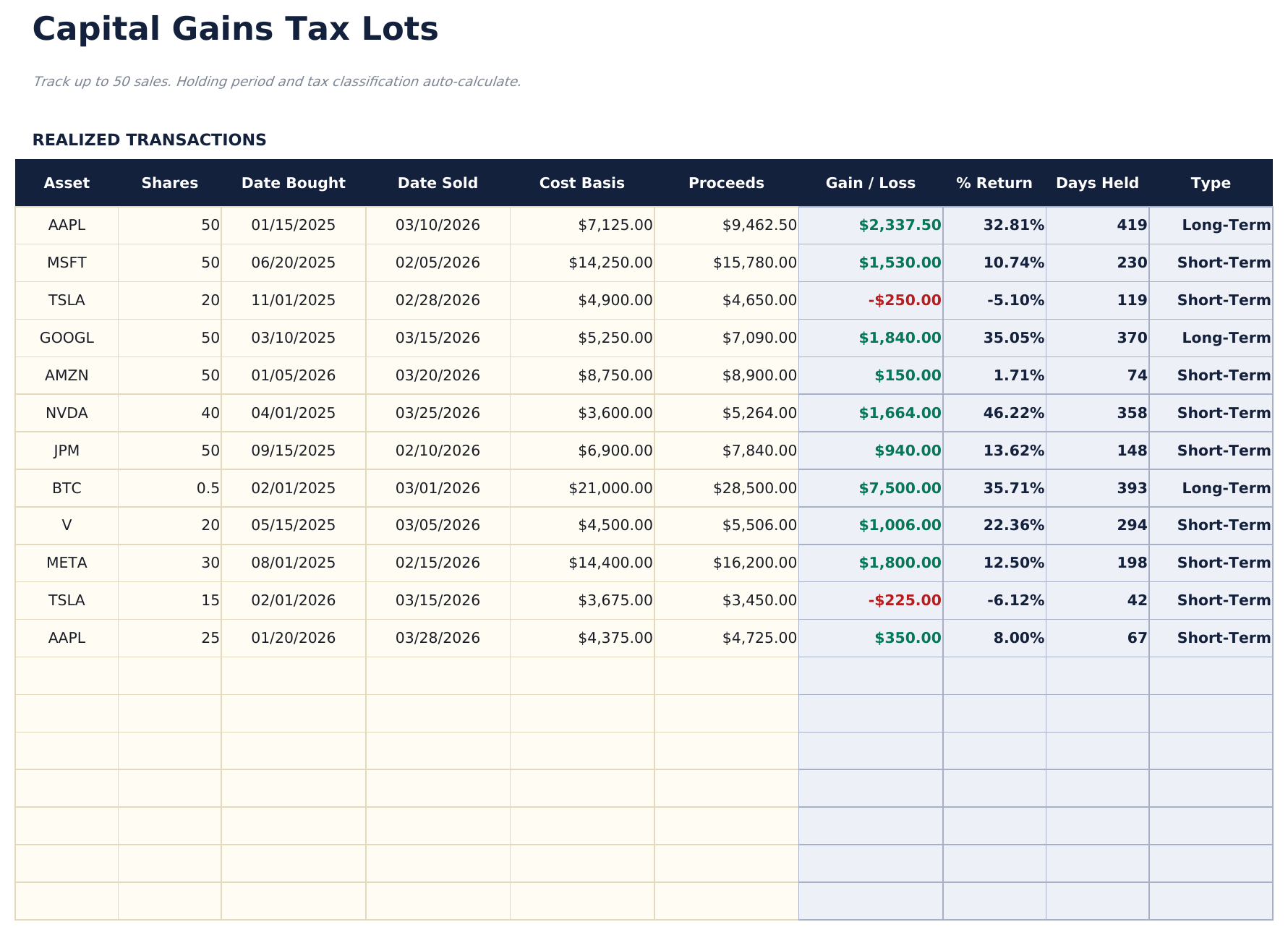
    The record, fifty realised sales deep. Each row takes the asset and the number of shares, both dates, what it cost and what it brought in - and returns the gain, the return as a percentage of what went in, the days held and the term. The percentage is the column that makes lots of different sizes comparable, which a money figure alone never does.

  3. 03 of 05

    Tax Summary

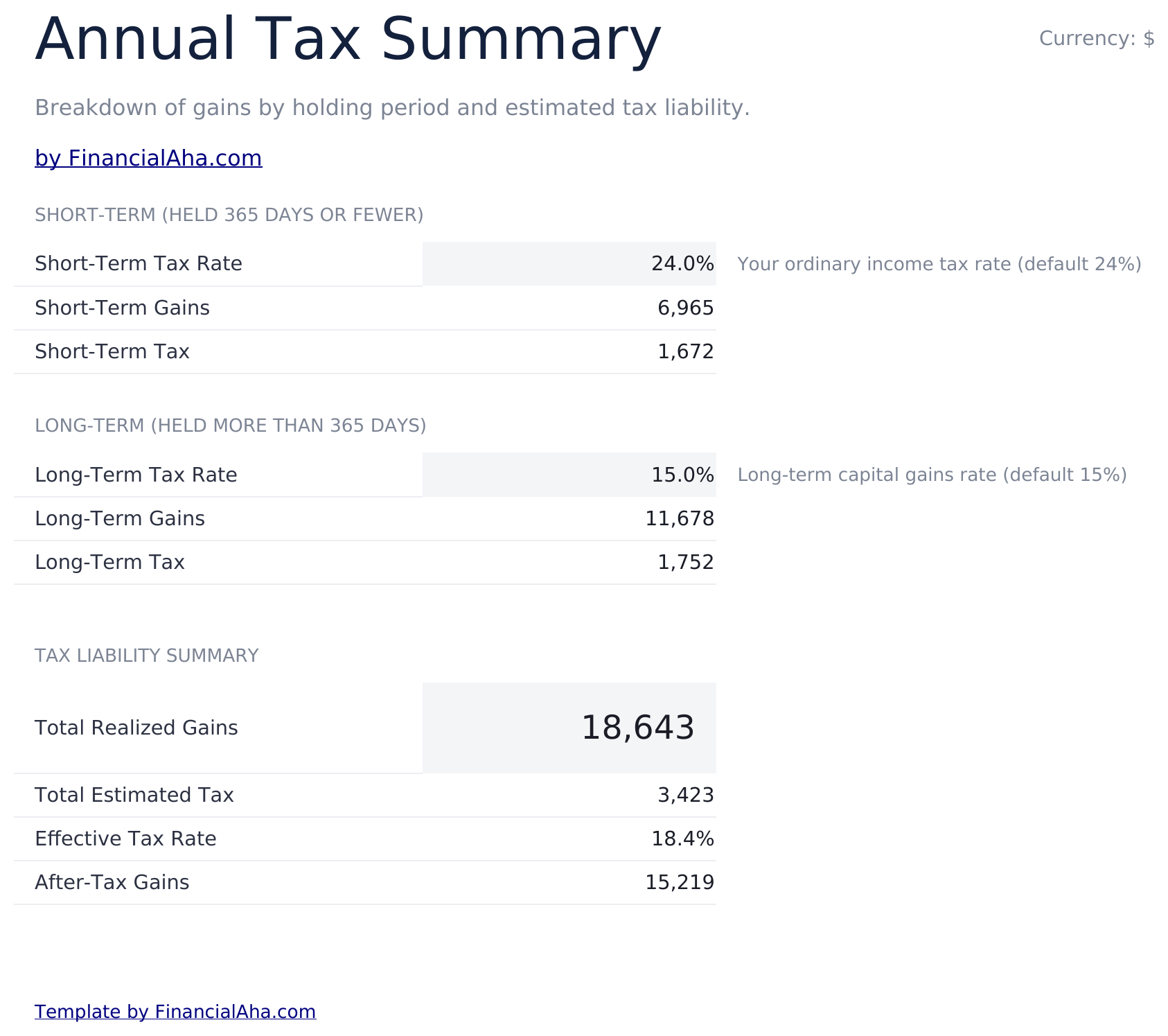
    Where the rates become yours. Both are entered here rather than assumed, the estimate for each term is built from them, and an effective rate across everything realised falls out at the end - which is a different number from either input, because it reflects the actual mix of what you sold.

  4. 04 of 05

    Sensitivity

    The estimate at every combination of the two rates, laid out as a grid, with a side-by-side comparison of three bracket positions underneath. It exists because the rate that applies is not always known in advance, and seeing the span between outcomes is more honest than a single figure that depends on an assumption.

  5. 05 of 05

    Wash Sale Tracker

    Every loss on the lot list, with the question of whether the same asset was bought back shortly afterwards, and a flag where it was. The workbook is careful to call this a helper view rather than a determination - the real rules reach further than a name match, and it points that out itself.

  6. Included guide

    How to Use

    A step-by-step guide on its own tab, covering setup, what cost basis and proceeds should include, where the rates are set, how the grid reads, and the limits of the wash-sale view. Because it ships inside the file, the instructions travel with the template wherever it is opened.

Works in both Google Sheets and Excel

Ultimate Capital Gains Calculator Spreadsheet template for Google Sheets

Upload the Ultimate Capital Gains Calculator Spreadsheet Template to Drive, right-click it, and choose "Open with Google Sheets". This Ultimate Capital Gains Calculator Google Sheets template needs no conversion step and both charts survive the trip intact. The cross-sheet references that feed the Dashboard rely on the existing tab names, so those are worth leaving alone.

Ultimate Capital Gains Calculator Google Sheets template setup

A shared copy of the Ultimate Capital Gains Calculator Google Sheets template suits handing a year's realised sales to whoever prepares your return, since the lots, the rates used and the resulting estimate all sit in one file. Sheets version history covers a figure changed after the fact.

Sharing the Ultimate Capital Gains Calculator Google Sheet

The Ultimate Capital Gains Calculator Google Sheet is a per-sale job through the year and a sitting at the end of it: add each lot as it closes, then set the rates and read the summary, the grid and the wash-sale view together.

Ultimate Capital Gains Calculator Spreadsheet template for Excel

The Ultimate Capital Gains Calculator spreadsheet Excel download is a plain .xlsx. Excel opens this Ultimate Capital Gains Calculator Excel template directly, with no import step and no compatibility prompt, and both charts are native Excel charts that redraw as lots go in. There are no macros and no VBA in the file, so it opens without a security warning.

Ultimate Capital Gains Calculator Excel template setup

The same Ultimate Capital Gains Calculator Excel template opens in Excel on Windows, Excel on Mac, and Excel for the web. It is also the identical file you would upload to Drive, so there is no separate Ultimate Capital Gains Calculator spreadsheet download to choose between.

Ultimate Capital Gains Calculator spreadsheet Excel notes

The Ultimate Capital Gains Calculator spreadsheet Excel file carries no macros and no VBA, so Excel opens it without a trust prompt. The same Ultimate Capital Gains Calculator spreadsheet Excel download also opens in Excel for the web, which matters when you move between a work machine and a personal one.

Opening the Ultimate Capital Gains Calculator spreadsheet Excel file

Nothing in the Ultimate Capital Gains Calculator Excel template is version-specific, so this Ultimate Capital Gains Calculator spreadsheet Excel workbook behaves identically in Excel on Windows, Excel on Mac, and older builds.

Spreadsheet template highlights

What the Ultimate Capital Gains Calculator spreadsheet template tracks

The lot list is what everything else reads from. These are the columns the Ultimate Capital Gains Calculator Spreadsheet Template works from:

Asset
the ticker, fund or holding
Shares
how many units the lot covers
Date Bought
when the position was acquired
Date Sold
when it was disposed of
Cost Basis
what it cost to acquire, fees included
Proceeds
what the sale brought in, net of fees
Gain / Loss auto
derived, proceeds less basis
% Return auto
derived, the gain measured against what went in
Days Held auto
derived, the span between the two dates
Type auto
derived, the term that span falls into

Compare builds

FinancialAha Capital Gains Calculator spreadsheet template: Free, Essentials, and Ultimate compared

Feature Free View Spreadsheet Template Essentials View Spreadsheet Template Ultimate This page
Working sheets 1 2 5
Positions handled One at a time 20 lots 50 lots
Gain or loss Yes Yes, per lot Yes, with % return
Short or long term From days you enter From the dates you enter From the dates you enter
Rates Both set by you Both set by you, under the totals Both set by you, on a summary sheet
Charts 1 2
Totals by term Yes Yes
Effective rate Yes
Bracket grid Every rate combination
Wash sale helper Flags repurchases against losses

The FinancialAha Ultimate Capital Gains Calculator Spreadsheet Template covers five working sheets and fifty lots. The Free Capital Gains Calculator Spreadsheet Template works one position with a holding period you type. The Essentials Capital Gains Calculator Spreadsheet Template for Google Sheets and Excel holds twenty lots, derives the term from the dates, and totals the year - but its estimate rests on placeholder rates you cannot change. This build puts both rates on a summary sheet of your own, reports an effective rate across everything realised, adds a percentage return per lot so different sizes compare, shows the estimate across every rate combination rather than one, and lists losses against any repurchase of the same asset shortly after. Every figure remains an estimate from the rates supplied rather than a determination.

Good to know

Notes on working in the Ultimate Capital Gains Calculator spreadsheet template

  • The rates are yours to set here, and the effective rate that falls out is the more telling figure, because it reflects the mix of what was actually sold.
  • The percentage return column is what makes lots of very different sizes comparable.
  • The grid exists because the applicable rate is often not settled in advance - the span between outcomes is the useful part.
  • The wash-sale view is a helper rather than a determination, and the workbook says so plainly: the real rules reach past a matching name.
  • Everything the sheet produces is an estimate built from figures you supplied. It does not decide what is owed.

How to Use This Template

1

Record your sales

On Tax Lots, enter each realised position with its shares, both dates, cost basis and proceeds.

2

Set your rates

On Tax Summary, enter the two rates you want applied. The effective rate across the year follows.

3

Test the assumption

The sensitivity grid shows the estimate at every rate combination, with three bracket positions compared.

4

Review the losses

The wash-sale view lists losses against any repurchase of the same asset - a prompt to look closer, not a ruling.

Stress-tested with AI.

Every template starts with deep research into how people actually track the topic. We design the layout, build the formulas, and polish the design until it feels like something we would use ourselves. Along the way, we use AI to stress-test the calculations: unusual inputs, edge cases, and formula behavior, checked until the numbers hold.

One-time purchase. No subscription. Works in Excel & Google Sheets.

Frequently Asked Questions

Is the FinancialAha Ultimate Capital Gains Calculator Spreadsheet Template a Google Sheets template?

Yes. Upload the file to Drive and choose "Open with Google Sheets". The Ultimate Capital Gains Calculator Google Sheets template needs no conversion step and both charts survive the trip intact. The cross-sheet references rely on the existing tab names, so those are worth leaving alone.

Is the FinancialAha Ultimate Capital Gains Calculator Spreadsheet Template an Excel template?

Yes. The download is a plain .xlsx, so the Ultimate Capital Gains Calculator Excel template opens directly in Excel with no import step. Both charts are native Excel charts, and there are no macros or VBA.

Will the FinancialAha Ultimate Capital Gains Calculator spreadsheet Excel file open in older versions of Excel?

Yes. The Ultimate Capital Gains Calculator spreadsheet Excel workbook ships as a plain .xlsx, so it opens identically in current Excel and in builds that predate dynamic arrays.

Does the wash sale tracker in the Ultimate Capital Gains Calculator spreadsheet decide whether a loss is disallowed?

No, and the workbook is explicit about it. It lists every loss and flags where the same asset was bought back shortly afterwards, as a prompt to look closer. The actual rules reach further than a matching asset name, so it is a helper view rather than a determination.

Where are the rates set?

On the Tax Summary sheet, where you enter both. The estimate for each term is built from them, and an effective rate across everything realised falls out at the end.

What does the sensitivity grid show?

The estimate at every combination of the two rates, with three bracket positions compared side by side. It exists because the applicable rate is often not settled in advance, and the span between outcomes is more honest than one figure resting on an assumption.

How many transactions does it hold?

Up to fifty realised sales in a single period, each with a percentage return alongside the money figure.

Is any of this a tax calculation I can rely on?

No. Everything the workbook produces is an estimate built from the rates and figures you supplied. It does not determine what is owed, and it does not account for your wider circumstances.

What do I get after buying the Ultimate Capital Gains Calculator spreadsheet template?

You receive the Ultimate Capital Gains Calculator spreadsheet template as an Excel file (.xlsx) that works in Microsoft Excel and Google Sheets. Download it immediately after purchase - no signup or account required.

Is there a free Ultimate Capital Gains Calculator spreadsheet template?

Yes. A free version of the Ultimate Capital Gains Calculator spreadsheet template is available with basic features. The Ultimate version adds advanced analysis, more capacity, and additional sheets.

What if the Ultimate Capital Gains Calculator spreadsheet template does not work for me?

Contact us and we will help troubleshoot. The Ultimate Capital Gains Calculator spreadsheet template works in Microsoft Excel and Google Sheets with no macros required.

Ultimate

Highlights:

Instant download after purchase
No macros or VBA required
All formulas auto-calculate
No subscription required
Works in
Excel Google Sheets

Looking for more Ultimate templates?

We offer Ultimate versions of our most popular spreadsheet templates with advanced features, more capacity, and deeper analysis.

Private & secure

Your financial data stays on your device. We never see it.

Learn more →

Need help?

Check our guides or reach out with questions.

View FAQ →