Gratuito Rendiconto Finanziario Modello di foglio di calcolo
Preparare un rendiconto finanziario con attività operative, di investimento e di finanziamento. Tracciare i flussi di cassa in entrata e in uscita per visualizzare la posizione di cassa netta.
Upgrade your spreadsheet
Here is how you unlock a better version.
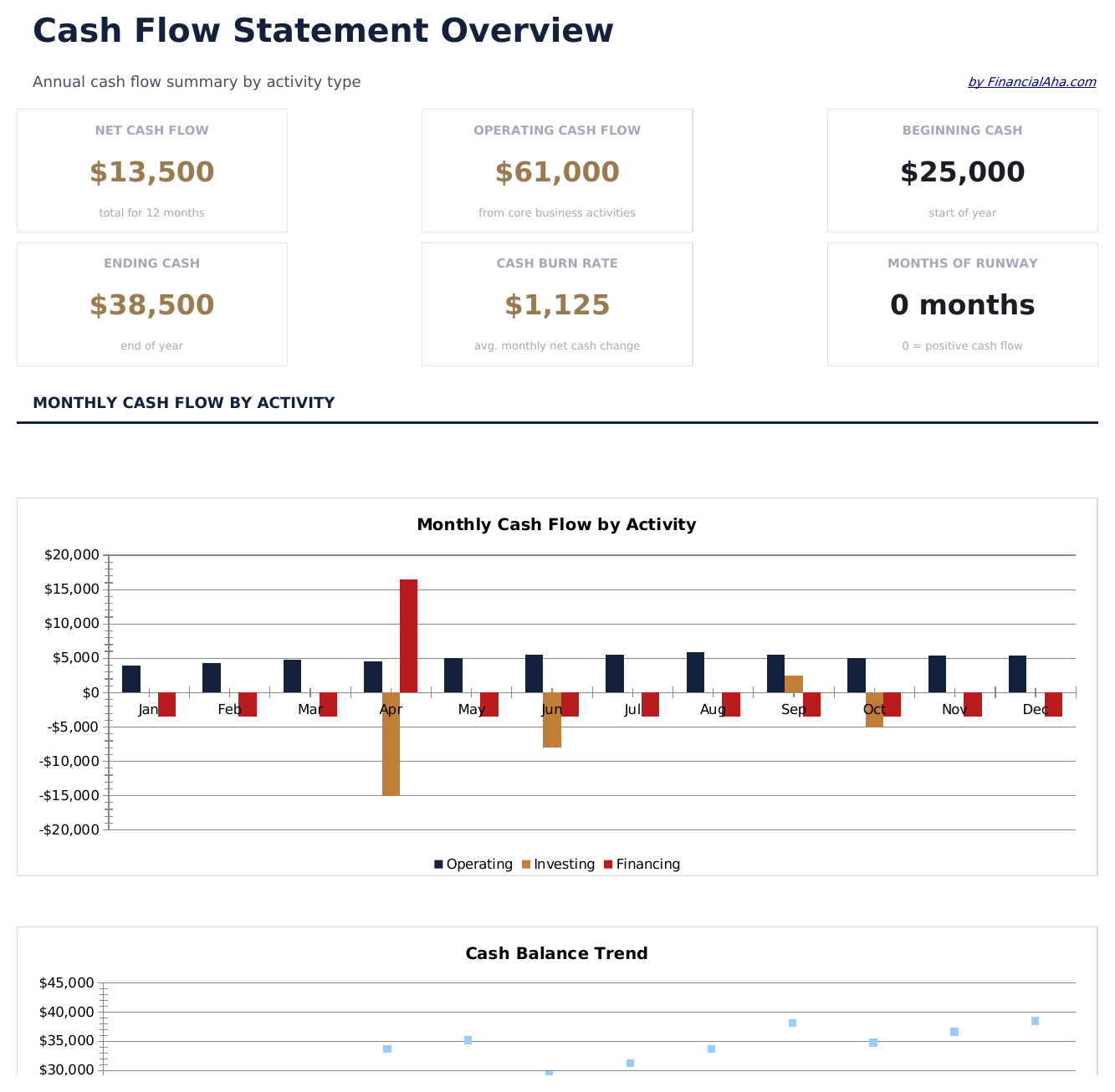
- Full-featured Cash Flow Statement with dashboard and detailed analytics
- Pre-filled subcategories, sample scenarios, and helper calculations
- Larger data capacity for real-world usage
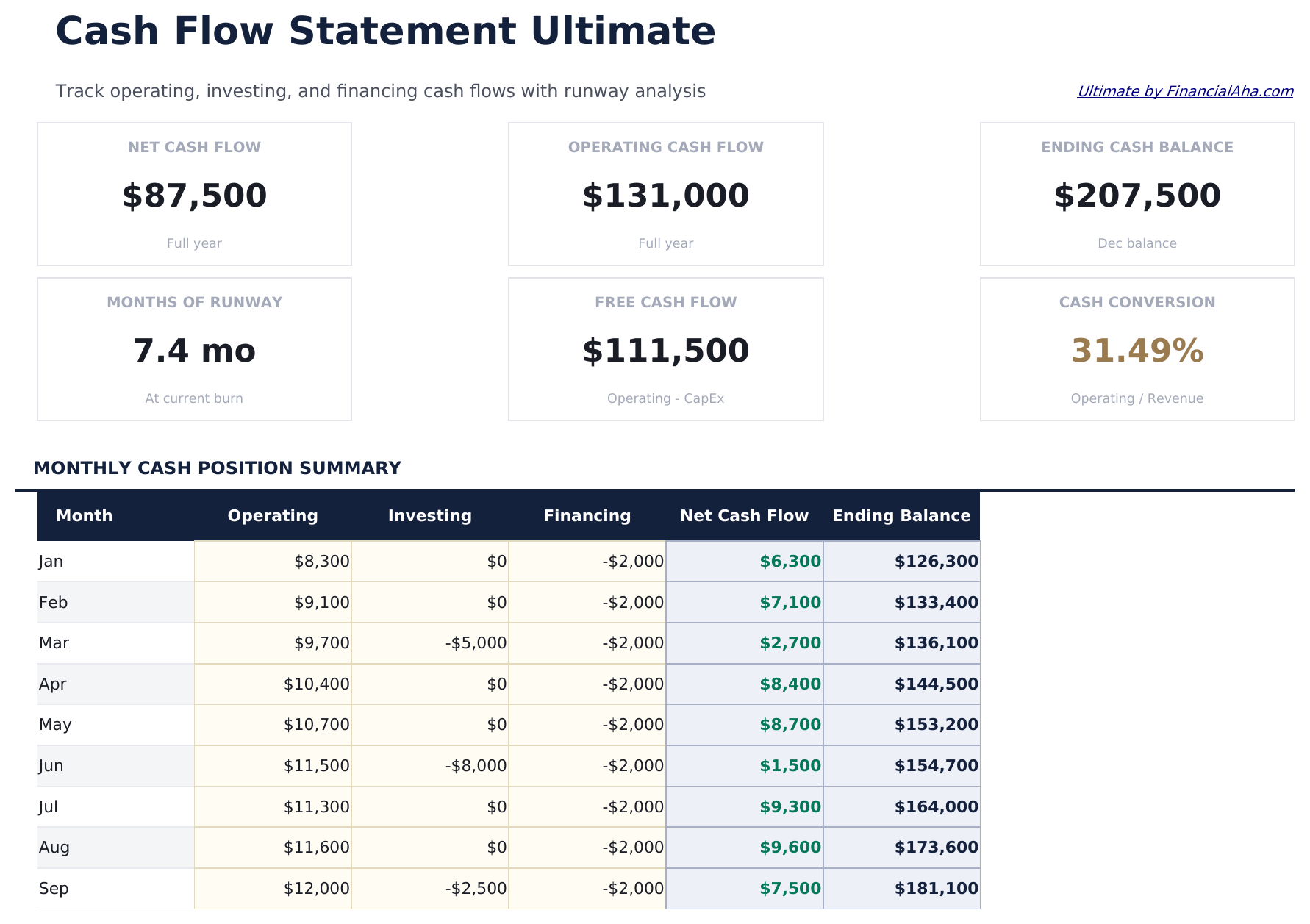
- Operating Activities sheet covering cash receipts, cash payments to suppliers and employees, and other operating items with monthly columns
- Investing Activities sheet tracking capital expenditures, asset purchases, asset sales, and investment transactions by month
- Financing Activities sheet logging loan proceeds, loan repayments, equity investments, and dividend payments by month
Cosa include
- Dashboard con riepilogo del flusso di cassa che mostra il flusso di cassa netto da operazioni, investimenti, finanziamenti e variazione totale
- Rendiconto finanziario in formato contabile standard seguendo il metodo indiretto con tre sezioni di attività
- Sezioni delle attività operative, di investimento e di finanziamento con voci predefinite per le registrazioni comuni del flusso di cassa
- Calcolo automatico del flusso di cassa netto che somma le tre sezioni per mostrare l'aumento o la diminuzione totale della cassa
- Confronto periodo su periodo con celle di input con codice colore (giallo) e totali calcolati automaticamente (blu)
- Funziona in Microsoft Excel, Google Sheets e LibreOffice Calc senza alcuna configurazione richiesta
Free, Essentials e Ultimate - qual è la differenza?
- Pre-filled budget worksheet titled "Cash Flow" with sample income and expense categories
- Automatic totals, running balance, and surplus/deficit calculation
- Color-coded input cells so you know exactly where to type your own numbers
- Step-by-step "How to Use" guide included in a second sheet
- Works in Microsoft Excel, Google Sheets, and LibreOffice Calc - no setup or sign-up
- Tutto quello che c'è in Free
- Full-featured Cash Flow Statement with dashboard and detailed analytics
- Pre-filled subcategories, sample scenarios, and helper calculations
- Larger data capacity for real-world usage
- $12 one-time purchase, lifetime access
- Tutto quello che c'è in Essentials
- Operating Activities sheet covering cash receipts, cash payments to suppliers and employees, and other operating items with monthly columns
- Investing Activities sheet tracking capital expenditures, asset purchases, asset sales, and investment transactions by month
- Financing Activities sheet logging loan proceeds, loan repayments, equity investments, and dividend payments by month
- Dashboard with 6 KPI cards: net operating cash flow, net investing cash flow, net financing cash flow, total net cash, ending cash balance, and months of runway
Come funziona il modello Rendiconto Finanziario
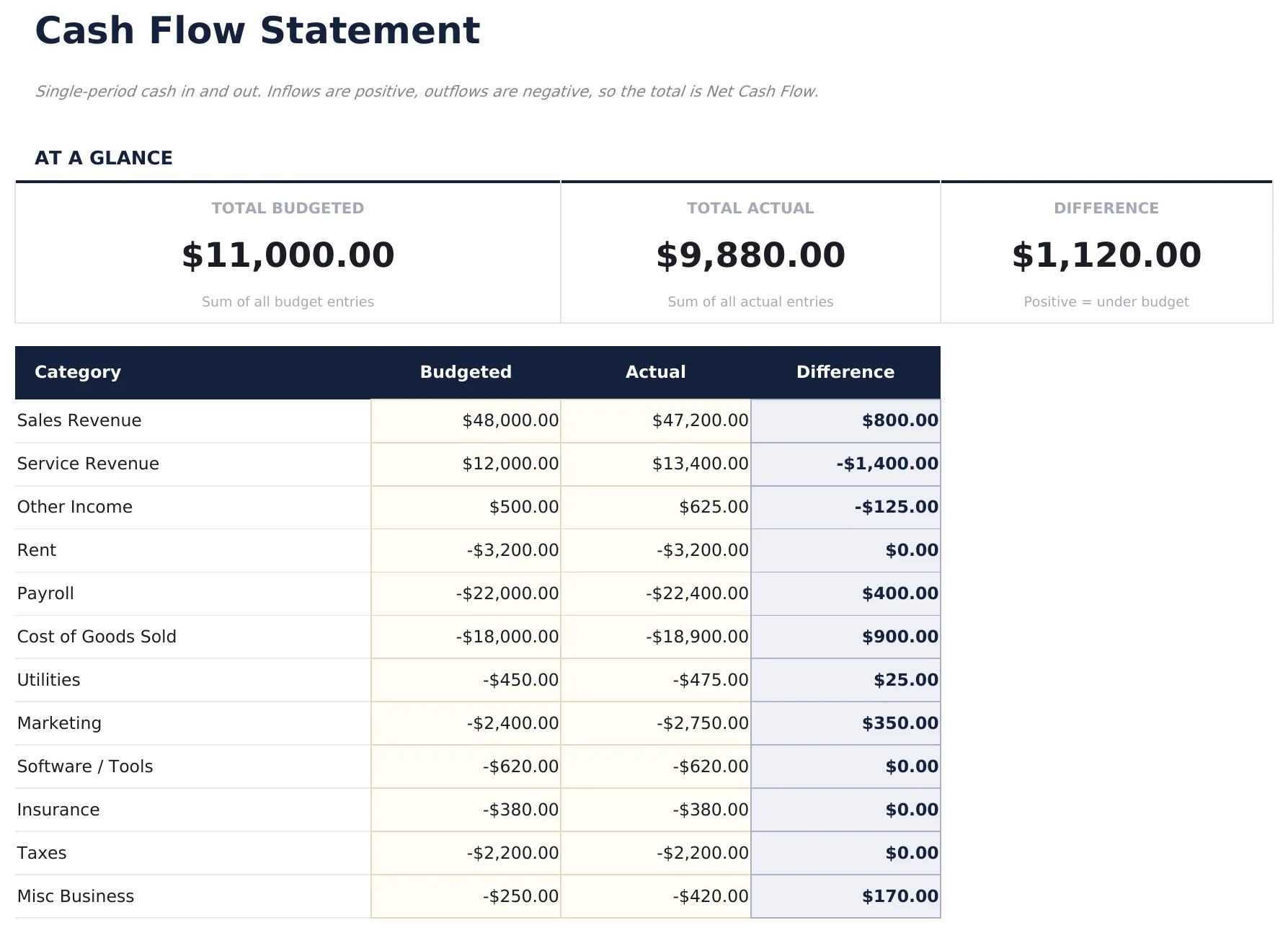
Single-period cash in and out. Inflows are positive, outflows are negative, so the total is Net Cash Flow. A single-period operating cash flow. Enter cash-in rows as positive, cash-out rows as negative. The total at the bottom is Net Cash Flow.
Quando questo modello aiuta
- You just started tracking spending and want a clear monthly snapshot.
- You want to see where your money actually goes compared to what you planned.
- Your expenses changed (new job, moved, new baby) and you need to re-baseline.
- You prefer a spreadsheet you control over a budgeting app.
Consigli per ottenere il massimo
- This is an operating cash flow only. For a full statement, add sections for Investing and Financing activities in a Essentials or Ultimate upgrade.
Errori comuni da evitare
- Forgetting to include savings as a category - treat savings like any other bill so it gets funded first.
- Using gross income instead of take-home. Budget with what actually lands in your account.
- Over-optimistic "variable" categories. Groceries and dining out almost always come in higher than memory suggests.
Come usare questo modello Rendiconto Finanziario
Inserire le attività operative
Compilare la cassa dalle operazioni - utile netto, ammortamento e variazioni nelle voci del capitale circolante come crediti e debiti.
Aggiungere le attività di investimento
Registrare la cassa utilizzata o ricevuta dagli investimenti - acquisti di attrezzature, vendite di immobili o operazioni di investimento.
Aggiungere le attività di finanziamento
Inserire i proventi dei prestiti, i rimborsi dei prestiti, il capitale emesso e i dividendi pagati nella sezione dei finanziamenti.
Verificare il flusso di cassa netto
Il dashboard somma le tre sezioni per mostrare la variazione netta della cassa per il periodo, più i saldi di cassa iniziali e finali.
Creati da Claude AI. Perfezionati da noi.
Utilizziamo Claude AI per creare ogni modello, dopo una ricerca approfondita. Poi interviene il nostro team. Miglioriamo il layout, testiamo ogni formula, correggiamo i casi limite e rifiniamo il design fino a ottenere qualcosa che useremmo noi stessi. L'AI ci porta all'80%. L'ultimo 20% è tutto giudizio umano.
Upgrade your spreadsheet
Here is how you unlock a better version.
- Full-featured Cash Flow Statement with dashboard and detailed analytics
- Pre-filled subcategories, sample scenarios, and helper calculations
- Larger data capacity for real-world usage
- Operating Activities sheet covering cash receipts, cash payments to suppliers and employees, and other operating items with monthly columns
- Investing Activities sheet tracking capital expenditures, asset purchases, asset sales, and investment transactions by month
- Financing Activities sheet logging loan proceeds, loan repayments, equity investments, and dividend payments by month
Domande frequenti
Quale metodo utilizza?
Il modello segue il metodo indiretto, partendo dall'utile netto e rettificando per elementi non monetari e variazioni del capitale circolante per arrivare alla cassa dalle operazioni.
Cosa rientra nelle attività operative vs di investimento?
Le attività operative riguardano l'attività quotidiana - ricavi, spese, crediti e debiti. Le attività di investimento riguardano acquisti e vendite di attività. Le attività di finanziamento riguardano le operazioni su debiti e capitale.
Posso confrontare più periodi?
Sì. Il modello supporta il confronto periodo su periodo con colonne per il periodo corrente e quello precedente affiancati.
L'ammortamento viene aggiunto nuovamente?
Sì. Con il metodo indiretto, l'ammortamento è un costo non monetario aggiunto nuovamente all'utile netto nella sezione delle attività operative.
Come posso aprirlo in Google Sheets?
Carica il file .xlsx su Google Drive, poi aprilo con Google Sheets. Tutte le formule e la formattazione saranno conservate.
Con quale licenza è rilasciato questo modello?
Tutti i modelli gratuiti sono rilasciati sotto licenza CC BY 4.0 (Creative Commons Attribution). Puoi usarli, modificarli e condividerli liberamente - anche per scopi commerciali - a condizione di citare FinancialAha.com. Sono forniti così come sono e non costituiscono consulenza finanziaria.
Altri modelli gratuiti Finanza Aziendale
Cerchi modelli di fogli di calcolo premium?
I nostri modelli a pagamento includono dashboard multi-foglio avanzate, grafici nativi Excel e aggiornamenti continui.
Privato e sicuro
I tuoi dati finanziari restano sul tuo dispositivo. Non li vediamo mai.
Scopri di piu →