Free Credit Card Payoff Spreadsheet Template for Google Sheets & Excel
A balance, a rate, and the monthly payment you intend to make. Back comes how long the card takes to clear, what you will have paid by then, the interest inside that figure, and the interest the current balance is costing this month. The Free Credit Card Payoff spreadsheet template keeps the interest separate from the total, so the cost of the borrowing is visible rather than buried. One working sheet. Google Sheets or Excel. No macros, no VBA.
The FinancialAha Free Credit Card Payoff Spreadsheet Template is a one-sheet workbook for Google Sheets and Excel, with a How to Use guide on a second tab. It works as a Free Credit Card Payoff Excel template and a Free Credit Card Payoff Google Sheets template from the same download. This Free Credit Card Payoff spreadsheet template answers one question about one card: at the balance, rate and monthly payment you enter, how long it takes to clear and what the interest comes to. No macros, no VBA.
Inside the workbook
What's inside the FinancialAha Free Credit Card Payoff spreadsheet template
The FinancialAha Free Credit Card Payoff Spreadsheet Template runs on one working sheet, with the instructions on a tab of their own. It works in both Microsoft Excel and Google Sheets and here is what the Free Credit Card Payoff spreadsheet holds.
01of 01
Card Payoff
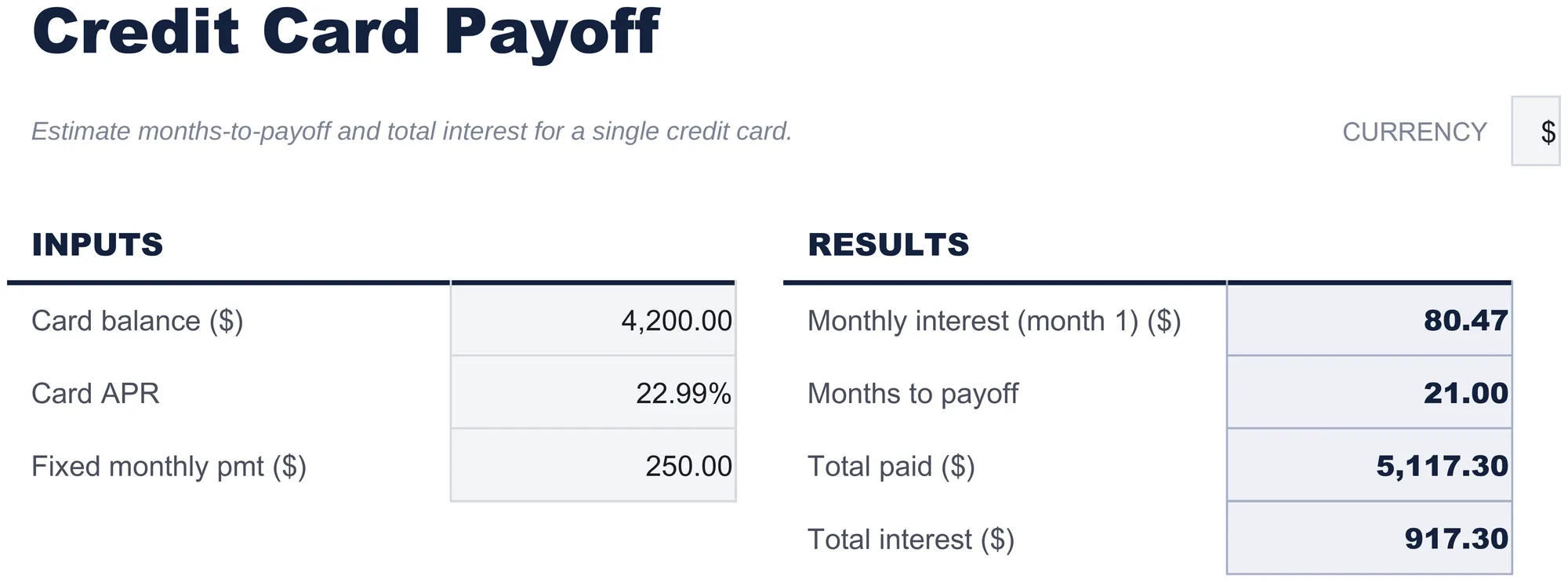
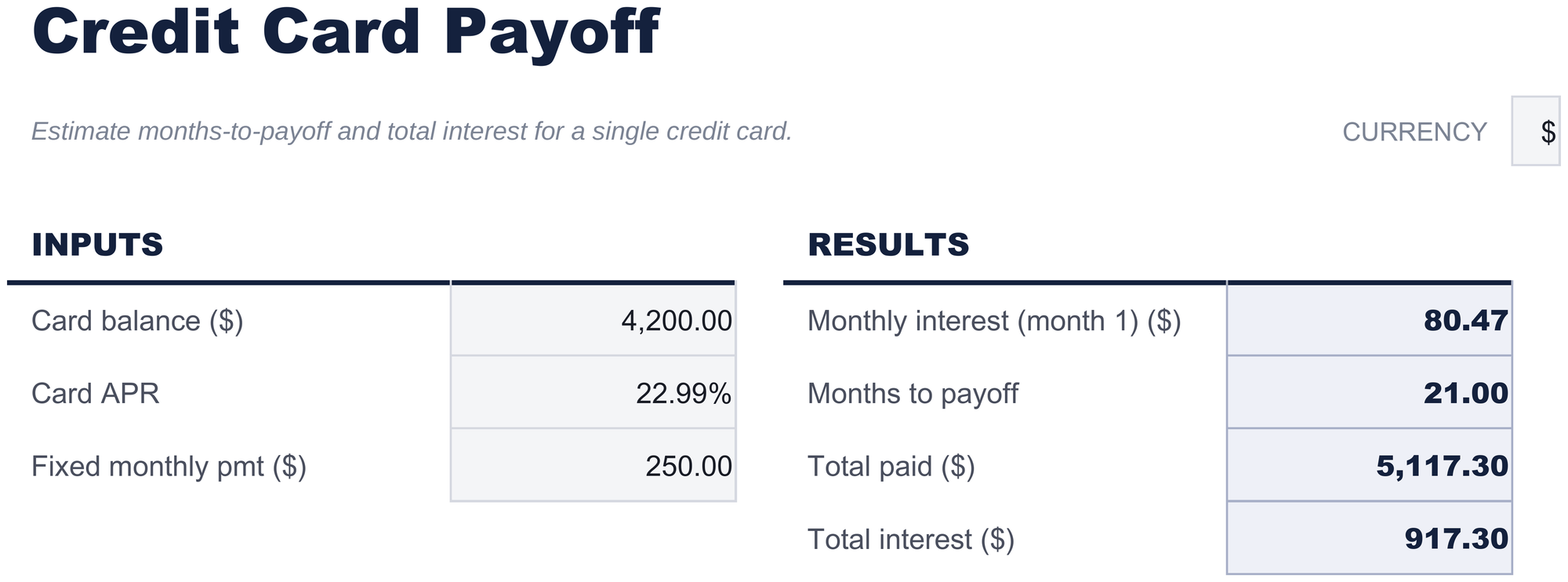
The single working sheet, and the whole template. Three figures go in - what is on the card, the rate it carries, and the amount you intend to pay each month - and four come back: what a month of interest costs at that balance, how many months the card takes to clear, what you will have paid in total, and how much of that was interest rather than balance. Splitting the last two apart is the point, because the total paid on its own says nothing about what the borrowing actually cost.
Card Payoff
Included guide
How to Use
A step-by-step guide on its own tab, covering setup, how to replace the sample values, and how to change the currency. Because it ships inside the file, the instructions travel with the template wherever it is opened.
Works in both Google Sheets and Excel
Free Credit Card Payoff Spreadsheet template for Google Sheets
Upload the Free Credit Card Payoff Spreadsheet Template to Drive, right-click it, and choose "Open with Google Sheets". This Free Credit Card Payoff Google Sheets template needs no conversion step and nothing gets rewritten on the way in - the figures recalculate exactly as they do in Excel. The currency dropdown beside the title relabels each money field, and the whole Free Credit Card Payoff spreadsheet is small enough to open instantly.
Free Credit Card Payoff Google Sheets template setup
A shared copy of the Free Credit Card Payoff Google Sheets template works when a balance is being tackled by two people, and Sheets version history covers a figure typed over. One screen of inputs keeps the Free Credit Card Payoff Spreadsheet Template quick to open on a phone.
Sharing the Free Credit Card Payoff Google Sheet
The Free Credit Card Payoff Google Sheet is built for a sitting rather than a routine: put the card's numbers in, read the four figures, then change the monthly payment and read them again. Because the Free Credit Card Payoff spreadsheet handles one card, duplicating the tab is how a second one gets looked at.
Free Credit Card Payoff Spreadsheet template for Excel
The Free Credit Card Payoff spreadsheet Excel download is a plain .xlsx. Excel opens this Free Credit Card Payoff Excel template directly, with no import step and no compatibility prompt, and every figure updates the moment an input changes. There are no macros and no VBA in the file, so it opens without a security warning.
Free Credit Card Payoff Excel template setup
The same Free Credit Card Payoff Excel template opens in Excel on Windows, Excel on Mac, and Excel for the web. It is also the identical file you would upload to Drive, so there is no separate Free Credit Card Payoff spreadsheet download to choose between.
Free Credit Card Payoff spreadsheet Excel notes
The Free Credit Card Payoff spreadsheet Excel file carries no macros and no VBA, so Excel opens it without a trust prompt. The same Free Credit Card Payoff spreadsheet Excel download also opens in Excel for the web, which matters when you move between a work machine and a personal one.
Opening the Free Credit Card Payoff spreadsheet Excel file
Nothing in the Free Credit Card Payoff Excel template is version-specific, so this Free Credit Card Payoff spreadsheet Excel workbook behaves identically in Excel on Windows, Excel on Mac, and older builds.
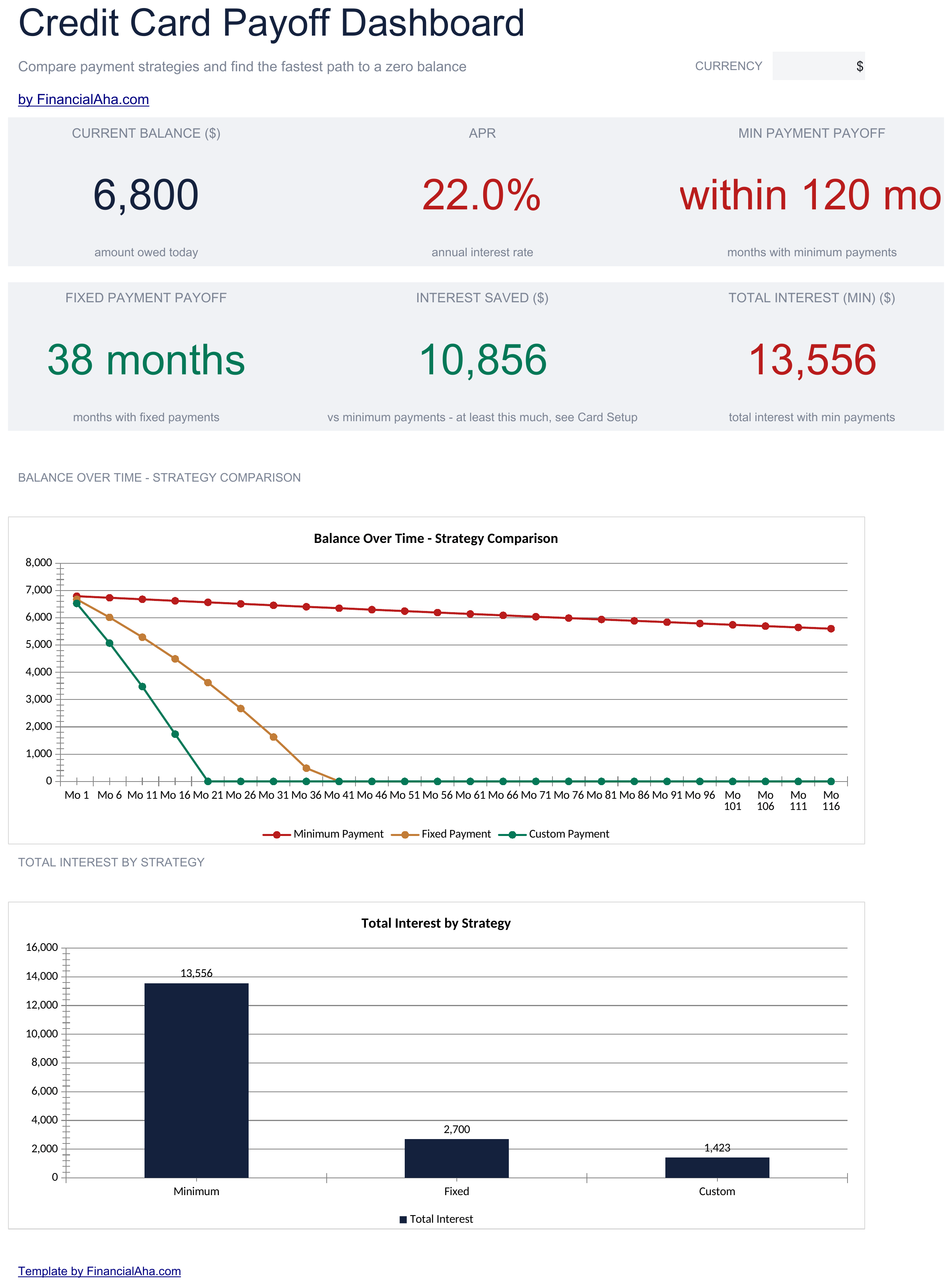
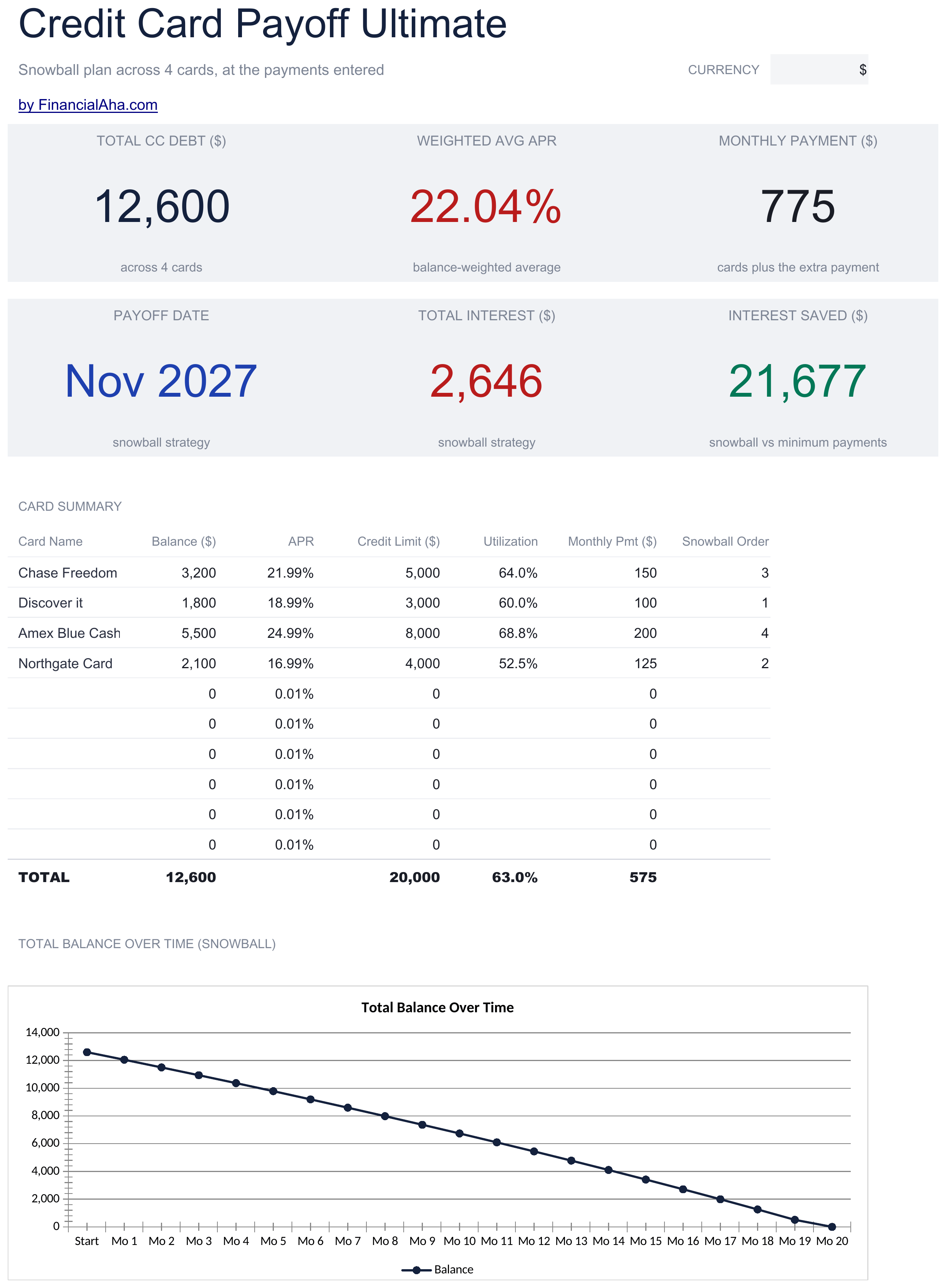
The FinancialAha Free Credit Card Payoff Spreadsheet Template covers one working sheet, one card and one payment amount. That is the honest limit of the Free build: it does not model what happens on minimum payments, shows no month-by-month schedule, and holds only the card you are looking at. The Essentials Credit Card Payoff Spreadsheet Template for Google Sheets and Excel runs three payment amounts side by side across a full schedule - including the minimum-payment path, where the required amount shrinks as the balance falls - and charts the three against each other. The Ultimate Credit Card Payoff Spreadsheet Template handles ten cards at once with a payoff order you set, compares three ways of ordering them, tracks utilisation per card over several months, and adds a balance transfer sheet.
Every template starts with deep research into how people actually track the topic. We design the layout, build the formulas, and polish the design until it feels like something we would use ourselves. Along the way, we use AI to stress-test the calculations: unusual inputs, edge cases, and formula behavior, checked until the numbers hold.
Excel
Sheets
Privacy by default
Your numbers stay in your own file
Formula-driven
All calculations update automatically
Dual compatible
Works in Excel and Google Sheets
Sample data included
See the template in action right away
Frequently Asked Questions
What is the difference between the free, Essentials, and Ultimate Free Credit Card Payoff spreadsheet template?
Free is a single-sheet starter template with sample data and a How to Use guide. Essentials ($19) is the fuller build, with more worked out for you rather than typed. Ultimate ($29) goes further again, splitting the template across more working sheets and adding deeper reporting on top. What each tier holds differs by template - the comparison table on every template page lists it exactly.
Which Free Credit Card Payoff spreadsheet template should I download?
Essentials is the fuller build of this template for ongoing use, and the comparison table on this page lists exactly what it adds. The Free version is a good fit for one-off planning or trying out the layout.
Can I upgrade the Free Credit Card Payoff spreadsheet template later?
Yes. Essentials is a one-time $19 purchase with no subscription. What it adds depends on the template: some builds gain capacity and a dashboard, others richer detail in the same layout. The comparison table on this page lists the differences exactly.
Is the FinancialAha Free Credit Card Payoff Spreadsheet Template a Google Sheets template?
Yes. Upload the file to Drive and choose "Open with Google Sheets". Nothing needs rewriting in the Free Credit Card Payoff Google Sheets template, and the currency dropdown still relabels the money fields.
Is the FinancialAha Free Credit Card Payoff Spreadsheet Template an Excel template?
Yes. The download is a plain .xlsx, so the Free Credit Card Payoff Excel template opens directly in Excel with no import step. There are no macros and no VBA, so it opens without a security warning.
Will the Free Credit Card Payoff spreadsheet Excel file open in older versions of Excel?
Yes. The Free Credit Card Payoff spreadsheet Excel workbook ships as a plain .xlsx, so it opens identically in current Excel and in builds that predate dynamic arrays.
Does the FinancialAha Free Credit Card Payoff Spreadsheet Template show what happens on minimum payments?
No. It works from a steady monthly payment you choose. Modelling the minimum-payment path - where the required amount shrinks as the balance falls - is what the Essentials build adds, alongside a full month-by-month schedule.
Can I use the Free Credit Card Payoff spreadsheet for more than one card?
One at a time. Duplicating the tab gives a second card its own answer; handling ten together with a payoff order is what the Ultimate build does.
Why does the Free Credit Card Payoff spreadsheet show total interest separately from total paid?
Because they answer different questions. Total paid is what leaves your account; total interest is the part of it the borrowing itself cost. Both move when you change the payment - total paid is the balance plus the interest, so it cannot hold still while the interest changes - but the balance is fixed, so the interest is the whole of the difference a bigger payment makes.
Is the Free Credit Card Payoff spreadsheet template safe to download?
Yes. No macros, no tracking. The file is a plain .xlsx that opens directly in Excel or Google Sheets.
How do I open the Free Credit Card Payoff spreadsheet template in Google Sheets?
Upload the .xlsx file to Google Drive, then open it with Google Sheets. All formulas and formatting will be preserved.
Can I use the Free Credit Card Payoff spreadsheet template for commercial work?
All free templates are released under CC BY 4.0 (Creative Commons Attribution). You can use, modify, and share them freely - including for commercial purposes - as long as you credit FinancialAha.com. They are provided as-is and do not constitute financial advice.