Best Value Complete Financial Planning Bundle
✓ Financial Planning✓ Net Worth Tracker✓ Monthly Budgeting✓ Travel Budget Planner✓ Annual Budgeting Planner✓ Monthly Expense Tracker✓ Annual Tax Planner✓ Retirement Planning
View Bundle →

Instant digital delivery · Terms & Conditions apply

Essentials Template - Excel & Google Sheets

Essentials Interest-Only Loan Calculator Spreadsheet Template for Google Sheets & Excel

Both payments and the jump between them, then what the loan costs over its whole life - total interest, and total cost with the principal included. The Essentials Interest-Only Loan Calculator spreadsheet template splits that across a Dashboard, a Loan Setup sheet holding the inputs, and a year-by-year schedule running the full term. Google Sheets and Excel, one file. No macros, no VBA.

Instant digital delivery · Terms & Conditions apply

Essentials Interest-Only Loan Calculator spreadsheet template - Google Sheets and Excel preview

What's Included

  • The interest-only payment and the amortizing payment that follows
  • The increase between them
  • Total interest across the life of the loan
  • Total cost with principal included
  • A year-by-year schedule across the full term
  • Annual interest and annual principal on every year
  • A balance column that sits flat and then falls
  • Each year marked interest only or amortizing
  • Two charts: the payment stepping up, and the balance falling
  • Works in Microsoft Excel and Google Sheets with no setup required

The FinancialAha Essentials Interest-Only Loan Calculator Spreadsheet Template is a three-sheet workbook for Google Sheets and Excel, with a How to Use guide on a fourth tab. It works as an Essentials Interest-Only Loan Calculator Excel template and an Essentials Interest-Only Loan Calculator Google Sheets template from the same download. Both payments and the jump between them, the total interest and total cost across the life of the loan, and a year-by-year schedule that marks which phase each year belongs to. No macros, no VBA.

Inside the workbook

What's inside the FinancialAha Essentials Interest-Only Loan Calculator spreadsheet template

The FinancialAha Essentials Interest-Only Loan Calculator Spreadsheet Template runs on three working sheets, with the instructions on a tab of their own. It works in both Microsoft Excel and Google Sheets and here is what the Essentials Interest-Only Loan Calculator spreadsheet holds.

  1. 01 of 03

    Loan Setup

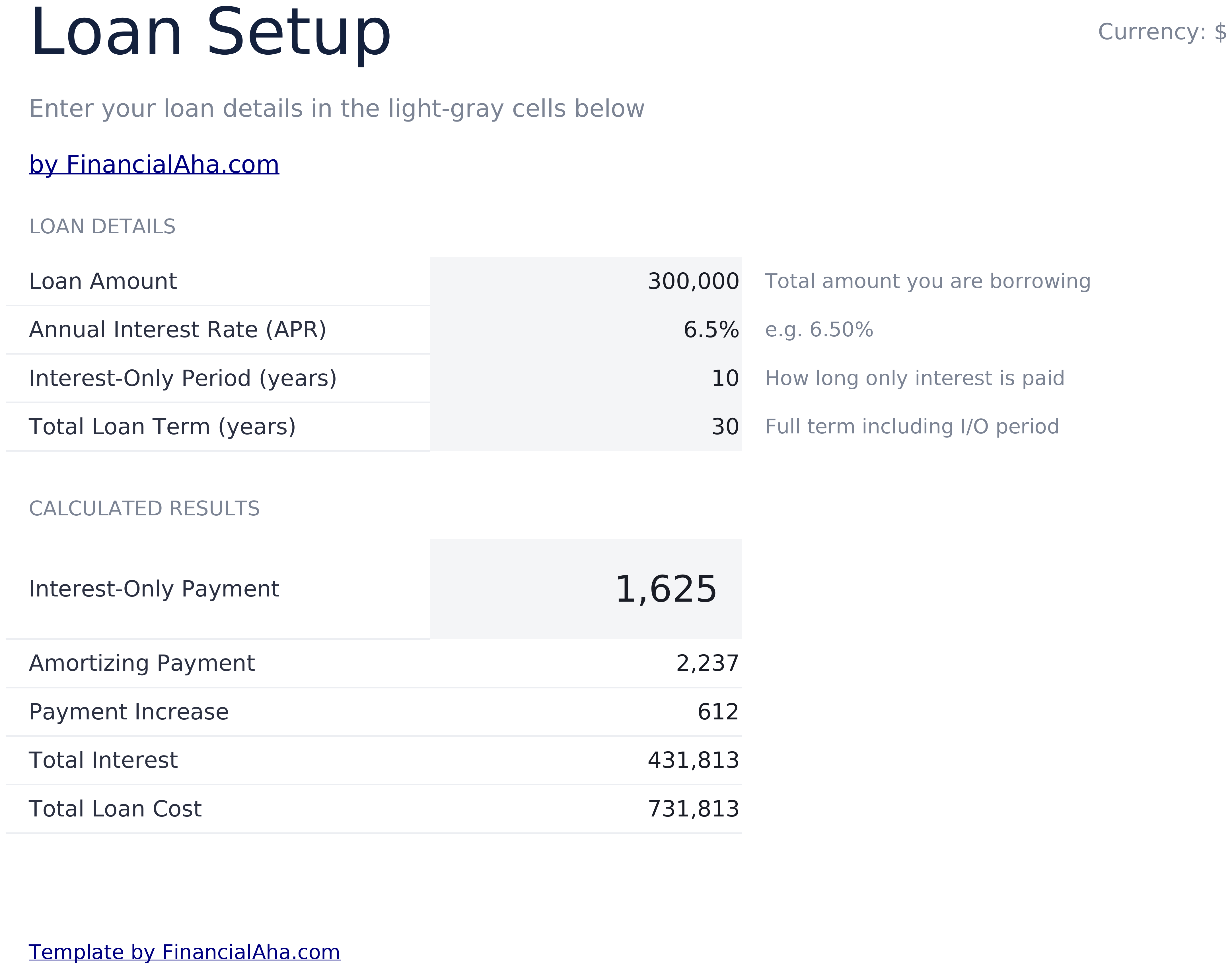
    Four inputs and the figures that follow. The loan, the rate, how many years are interest-only and the full term go in the top block. Underneath: the interest-only payment, the amortizing payment that follows it, the increase between them, and then the two figures the free build does not carry - the total interest across the life of the loan and the total cost with principal included. Those two are the ones that reframe an interest-only loan. The monthly saving during the early years is real, but the balance does not move while it is happening, so the interest paid over the full term is higher than the same loan amortising from the start. Seeing that as one figure is a different experience from reading two payments.

  2. 02 of 03

    Year-by-Year Schedule

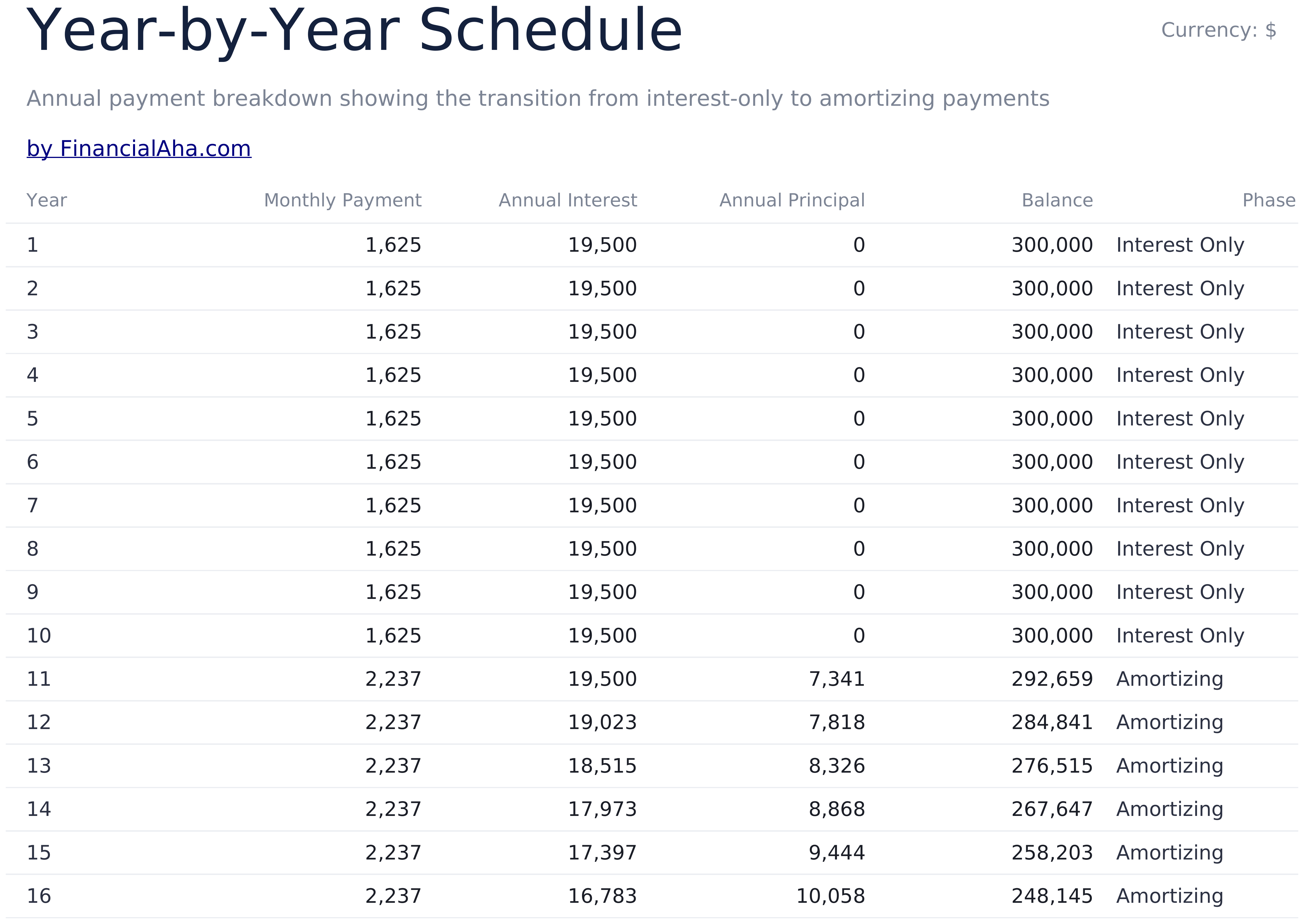
    A row per year, each with the monthly payment for that year, the interest paid across it, the principal repaid, the balance at the end and the phase the year belongs to. The principal column tells the story on its own. It reads zero for every interest-only year - not a small number, zero - and the balance column sits flat beside it at the amount originally borrowed. When the phase changes, both columns move at once. The phase label matters more than it looks. A schedule where the early years behave differently from the later ones is easy to misread; naming each year removes the ambiguity.

  3. 03 of 03

    Dashboard

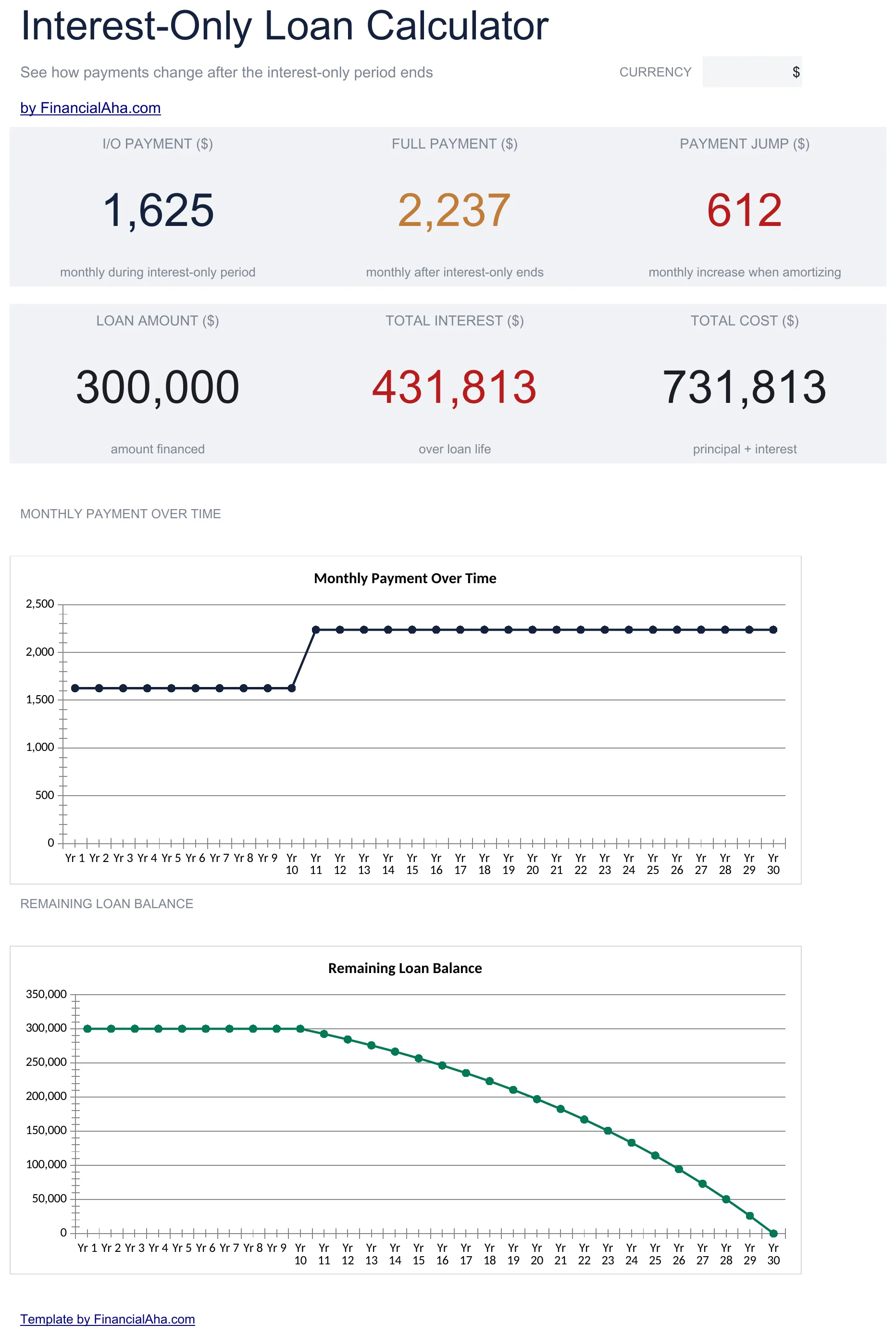
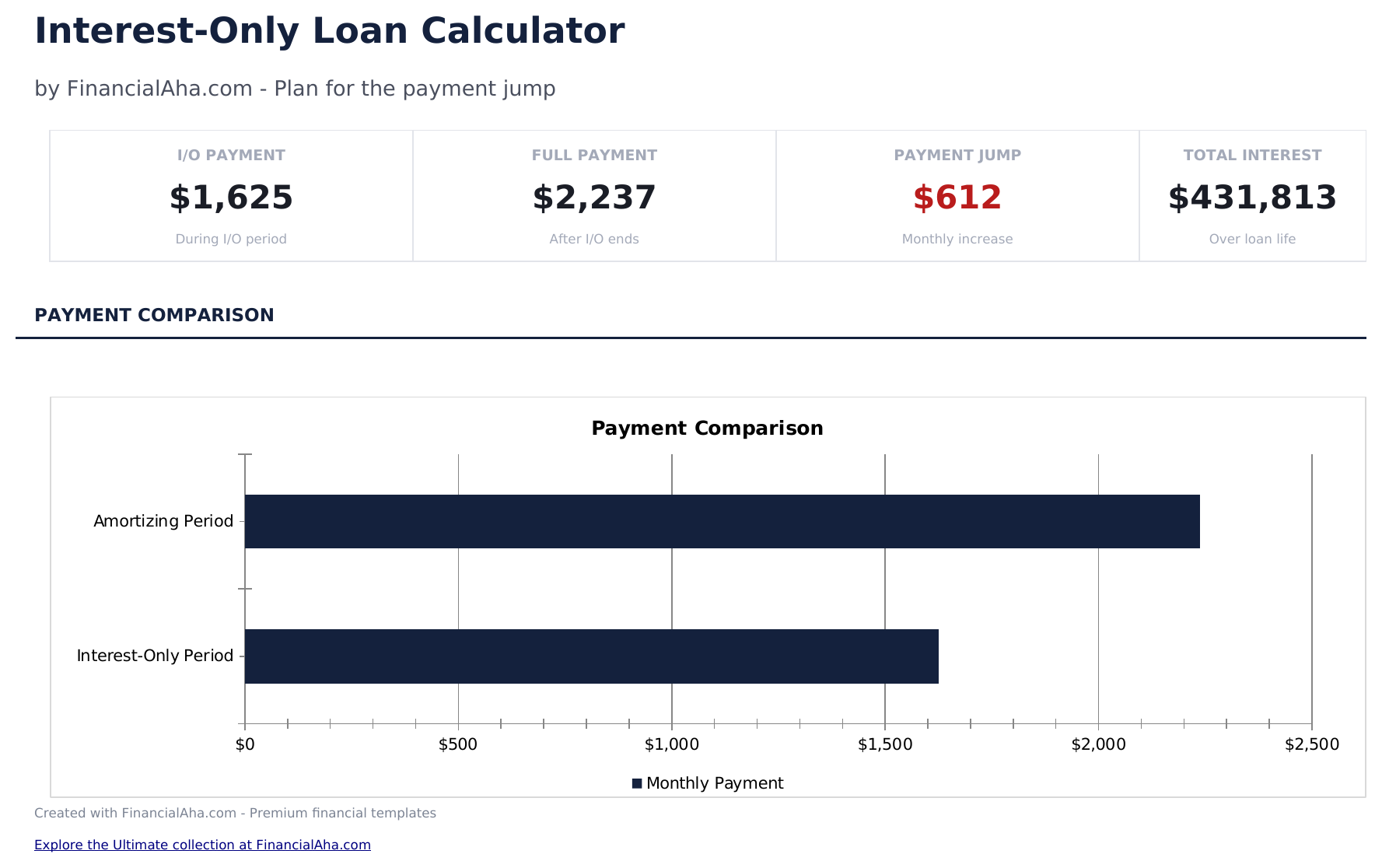
    Six figures and two charts. The top row carries the interest-only payment, the payment after it and the jump between them. The row beneath carries the amount financed, the total interest across the loan's life and the total cost. The charts are the pair worth having together: one plots the monthly payment across the term, which is a flat line then a step; the other plots the remaining balance, which is a flat line then a decline. Side by side they are the clearest statement of what the arrangement does - you pay less for a while and owe exactly the same at the end of it.

  4. Included guide

    How to Use

    A step-by-step guide on its own tab, covering what each input expects, how the two phases differ, how the schedule reads and how to change the currency. Because it ships inside the file, the instructions travel with the template wherever it is opened.

Works in both Google Sheets and Excel

Essentials Interest-Only Loan Calculator Spreadsheet template for Google Sheets

Upload the Essentials Interest-Only Loan Calculator Spreadsheet Template to Drive, right-click it, and choose "Open with Google Sheets". This Essentials Interest-Only Loan Calculator Google Sheets template needs no conversion step, both charts come across, and the schedule recalculates from the setup sheet exactly as it does in Excel.

Essentials Interest-Only Loan Calculator Google Sheets template setup

A shared copy of the Essentials Interest-Only Loan Calculator Google Sheets template suits a decision two people are making, and the balance chart tends to end the conversation faster than the payment figures do.

Running the Essentials Interest-Only Loan Calculator Google Sheet

The Essentials Interest-Only Loan Calculator Google Sheet takes four inputs per scenario, and the schedule, both charts and every total follow from them.

Essentials Interest-Only Loan Calculator Spreadsheet template for Excel

The Essentials Interest-Only Loan Calculator spreadsheet Excel download is a plain .xlsx. Excel opens this Essentials Interest-Only Loan Calculator Excel template directly, with no import step, and both charts are native Excel charts rather than pictures. There are no macros and no VBA in the file.

Essentials Interest-Only Loan Calculator Excel template setup

The same Essentials Interest-Only Loan Calculator Excel template opens in Excel on Windows, Excel on Mac, and Excel for the web. It is also the identical file you would upload to Drive, so there is no separate Essentials Interest-Only Loan Calculator spreadsheet download to choose between.

Essentials Interest-Only Loan Calculator spreadsheet Excel notes

The Essentials Interest-Only Loan Calculator spreadsheet Excel file carries no macros and no VBA, so Excel opens it without a trust prompt.

Opening the Essentials Interest-Only Loan Calculator spreadsheet Excel file

Nothing in the Essentials Interest-Only Loan Calculator Excel template is version-specific, so this Essentials Interest-Only Loan Calculator spreadsheet Excel workbook behaves identically in Excel on Windows, Excel on Mac, and older builds.

Spreadsheet template highlights

What the Essentials Interest-Only Loan Calculator spreadsheet template tracks

Four inputs and a year-by-year schedule. This is what the Essentials Interest-Only Loan Calculator Spreadsheet Template carries across the schedule:

Year
one row per year of the full term
Monthly Payment
the figure in force that year, which steps up when the phase changes
Annual Interest
what that year costs in interest
Annual Principal
zero for every interest-only year, which is the point
Balance
flat while interest-only, falling afterwards
Phase
interest only or amortizing, named rather than inferred

Compare builds

FinancialAha Interest-Only Loan Calculator spreadsheet template: Free and Essentials compared

Feature Free View Spreadsheet Template Essentials This page
Working sheets 1 3
Interest-only payment Yes Yes
Payment after the IO period Yes Yes
The jump between them Yes Yes
Total interest across the loan Yes
Total cost of the loan Yes
Year-by-year schedule 30 years
Interest and principal per year Yes
Phase marked on every year Interest only or amortizing
Balance across the term Yes
Charts 2

The Free Interest-Only Loan Calculator Spreadsheet Template answers the payment question - what you pay during the interest-only years, what you pay after, and the jump between them. The FinancialAha Essentials Interest-Only Loan Calculator Spreadsheet Template adds the cost question: the total interest across the life of the loan and the total cost with principal, plus a year-by-year schedule showing the payment, interest, principal and balance for each year with its phase named, and two charts - one of the payment stepping up, one of the balance sitting flat and then falling.

Good to know

Notes on working in the Essentials Interest-Only Loan Calculator spreadsheet template

  • The principal column reads zero for every interest-only year, and the balance sits flat beside it at the amount borrowed.
  • Total interest across the life of the loan is the figure that reframes the monthly saving.
  • The phase label removes the ambiguity in a schedule whose early years behave differently from its later ones.
  • The payment chart is a flat line and a step; the balance chart is a flat line and a decline. Together they state what the arrangement does.
  • Total interest here is payment-and-term arithmetic rather than a sum of the schedule rows, so rounding can differ by a small amount.
  • The currency dropdown relabels the money columns across every sheet. It changes the label only and does not convert the numbers.

How to Use the Essentials Interest-Only Loan Calculator Spreadsheet Template

1

Enter the loan

Amount and annual rate.

2

Set both periods

Interest-only years, and the full term.

3

Read the two costs

Total interest, and total cost with principal.

4

Follow the schedule

Where principal starts moving, and when.

Stress-tested with AI.

Every template starts with deep research into how people actually track the topic. We design the layout, build the formulas, and polish the design until it feels like something we would use ourselves. Along the way, we use AI to stress-test the calculations: unusual inputs, edge cases, and formula behavior, checked until the numbers hold.

Instant digital delivery · Terms & Conditions apply

Frequently Asked Questions

Is the FinancialAha Essentials Interest-Only Loan Calculator Spreadsheet Template a Google Sheets template?

Yes. Upload the file to Drive and choose "Open with Google Sheets". Both charts come across in the Essentials Interest-Only Loan Calculator Google Sheets template, and the schedule recalculates from the setup sheet exactly as it does in Excel.

Is the FinancialAha Essentials Interest-Only Loan Calculator Spreadsheet Template an Excel template?

Yes. The download is a plain .xlsx, so the Essentials Interest-Only Loan Calculator Excel template opens directly in Excel with no import step. Both charts are native Excel charts rather than pictures, and there are no macros or VBA.

Will the FinancialAha Essentials Interest-Only Loan Calculator spreadsheet Excel file open in older versions of Excel?

Yes. The Essentials Interest-Only Loan Calculator spreadsheet Excel workbook ships as a plain .xlsx, so it opens identically in current Excel and in builds that predate dynamic arrays.

What does the schedule in the Essentials Interest-Only Loan Calculator spreadsheet show that the payments do not?

The principal column reads zero for every interest-only year and the balance sits flat beside it at the amount borrowed. When the phase changes, both move at once - which is the arrangement stated as arithmetic rather than as a description.

Why is total interest in the Essentials Interest-Only Loan Calculator spreadsheet higher than on a normal loan?

Because the balance does not fall while the interest-only payments are being made, so interest keeps accruing on the full amount. The monthly saving early on is real; the total across the life of the loan is where it is paid back.

What does the phase column do in the Essentials Interest-Only Loan Calculator spreadsheet?

Names each year interest only or amortizing. A schedule whose first years behave differently from its later ones is easy to misread, and labelling every row removes the ambiguity.

How is total interest worked out in the Essentials Interest-Only Loan Calculator spreadsheet?

From the payments and the term rather than by summing the schedule rows, so it can differ from the schedule by a small rounding amount.

How do I open the Essentials Interest-Only Loan Calculator spreadsheet template in Google Sheets?

Upload the .xlsx file to Google Drive, then open it with Google Sheets. All formulas and formatting will be preserved.

More Essentials Auto & Loans Templates

Essentials

Highlights:

Dashboard with charts and KPIs
Pre-filled categories and sample data
No sign-up, no subscription
Lifetime free updates
Works in
Excel Google Sheets

Looking for premium spreadsheet templates?

Our paid templates include advanced multi-sheet dashboards, native Excel charts, and ongoing updates.

Private & secure

Your financial data stays on your device. We never see it.

Learn more →

Need help?

Check our guides or reach out with questions.

View FAQ →