Apps automate transaction import; spreadsheets trade that for data ownership, privacy, and a one-time cost instead of a yearly subscription. Over a decade YNAB's $109-a-year plan runs about $1,090, while a template is paid once. Apps fit people for whom manual entry never sticks; spreadsheets fit people who value control and no recurring fee. Running both for one month is the fastest way to see which you actually keep open.
Apps automate transactions. Spreadsheets give you control and privacy. Both work, so the question is which tradeoffs you’re willing to accept and which system you’ll still be using a year from now.
We make spreadsheet templates, so take this comparison with that context in mind. But we genuinely believe spreadsheets work better for most people willing to spend 10 to 20 minutes a week on data entry. Here’s the honest breakdown.
Template option: Monthly Budgeting is a Google Sheets template built around the structure an app gives you: a Summary dashboard, a Budget Plan that sets planned against actual by category, and a Transactions sheet you type into. One-time purchase, no subscription and no bank connection.
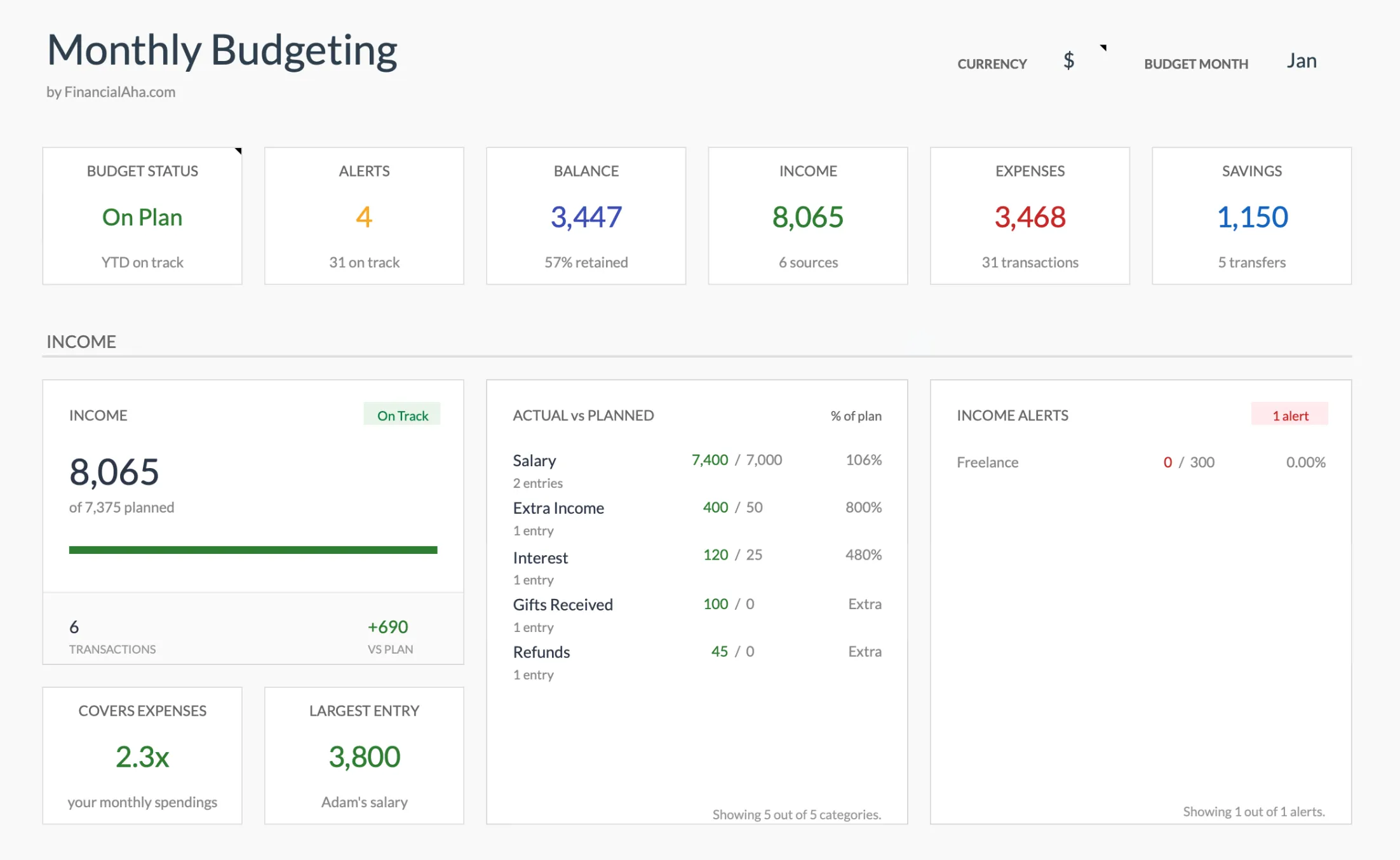
The Monthly Budgeting dashboard (Premium tier): the app-style overview, in a Google Sheet you copy into your own Drive.
What Apps Do Better
Apps have genuine advantages that matter for certain users and situations.
Automatic transaction import is the headline feature. Connect your bank, and transactions appear with categories already assigned, mostly correctly. Monarch Money, YNAB and Quicken Simplifi all deliver on that basic promise. For people who tried spreadsheets and kept falling behind on data entry, automation solves the consistency problem, and a budgeting system that goes unused provides no value.
The mobile experience is purpose-built for phones. Checking budgets while shopping, adding transactions on the go, running a quick category check: apps handle these use cases smoothly in ways that mobile spreadsheets struggle to match.
Notifications provide active alerts. Push messages when you approach a category limit, weekly summaries, spending spikes flagged as they happen. The app reaches out rather than waiting for you to check in.
Couples get shared visibility that is harder to arrange any other way. Shared accounts, a real-time view of household spending, and coordinated budgets all work more smoothly when both partners have the same app on their phones.
What Spreadsheets Do Better
Spreadsheets have their own set of advantages that matter for different users.
Complete customization means every aspect stays under your control. Want a category that doesn’t exist? Add it. Want a calculation the app doesn’t offer? Write the formula. Want to restructure the whole layout? Rebuild it. Apps ask you to work inside their structure, while spreadsheets adapt to yours.
Data ownership means your budget exists in files you control. No company policy restricts access. No app shutdown deletes your history. After Mint’s closure in 2024, former users learned this lesson the hard way.
Privacy improves without bank linking. No credentials flow through third-party aggregators. The file sits where you put it, on your own device or in a cloud account you control, rather than in a budgeting company’s database.
No recurring cost means a one-time purchase covers everything. The difference compounds quietly: YNAB at $109 a year comes to $545 over five years and $1,090 over ten, while a template bought once costs the same in year ten as it did in year one. The budget also never depends on maintaining a subscription or accepting a price increase.
Longevity comes from stable formats. Spreadsheet file formats have been stable for decades. A budget built today will open in software twenty years from now, while apps come and go.
The Manual Entry Question
This is where people feel most strongly. App advocates call manual entry tedious and unsustainable. Spreadsheet users say manual entry creates awareness that automation removes. Both camps are right, for different people.
Some people will never consistently enter transactions by hand. They’ve tried, and it doesn’t stick. For them, automatic import isn’t a luxury, it’s the only path to a budget they actually maintain.
Others find that the act of recording each purchase changes their behavior. Typing a $47.82 restaurant charge into a row before moving on makes the spending feel more deliberate. That’s an observation drawn from how people describe their own habits rather than a research finding, but it comes up often enough to be worth weighing.
A middle path exists as well. Hybrid tools import transactions automatically into a Google Sheet you own outright, which pairs the automation of an app with the flexibility of a spreadsheet. Tiller Money, listed below, works this way.
What Lasting Systems Have in Common
People who budget successfully for years, whichever method they use, tend to share a few traits. They review the budget at least weekly. They don’t aim for perfection. They adjust categories and targets as life changes. And they picked a method that matches their existing habits rather than one that fights them.
App users who keep getting value from the tool spend time reviewing and correcting auto-categorized transactions. Passive users who never open the app after setup get little back regardless of how good the automation is.
Spreadsheet users who stick with it usually build a simple weekly routine, often Sunday evening or Monday morning, running 15 to 20 minutes. Those who try to enter every transaction in real time tend to burn out unless they genuinely enjoy the process.
The Real Tradeoffs
The comparison isn’t about which is objectively better. It’s about which tradeoffs fit your situation.
| Factor | Apps | Spreadsheets |
|---|---|---|
| Transaction entry | Automatic bank sync | Manual, 10 to 20 min a week |
| Cost | $0 to $150 a year | One-time purchase |
| Cost over ten years | $1,090 at YNAB’s $109 a year | Unchanged after the first payment |
| Mobile | Purpose-built app | Workable, rarely comfortable |
| Shared household access | Built in for both partners | Live in Google Sheets, file sharing in Excel |
| Control | Limited to the app’s structure | Unlimited |
| Privacy | Bank linking required | Complete control |
| Data portability | Export before the service closes | Files you already hold |
Neither column is objectively better. The right choice depends on what you value and how you work.
A Framework for Deciding
Lean toward an app if:
- Bank syncing is important to you
- You’ve tried manual tracking and it didn’t stick
- You want a polished mobile experience
- You’re budgeting with a partner and want shared real-time access
- You’re new to budgeting and want the guardrails and education built into a tool like YNAB
- Subscriptions and bank linking don’t bother you
Lean toward a spreadsheet if:
- Privacy and data ownership matter to you
- You want full control over categories, layout and calculations
- A one-time cost suits you better than an ongoing subscription
- You find that manual entry makes you more aware of spending
- You want financial records that stay portable and readable for decades
- Basic spreadsheet skills feel comfortable, or you’d rather start from a pre-built template than build one
Consider trying both if you’re genuinely unsure. Run an app’s free trial for a month and a spreadsheet over the same month. The free Monthly Budget template is enough to run that experiment without paying for anything. Whichever one feels less like a chore at the end of the month is the one more likely to last.
Popular Options
Here’s a quick reference for what’s available in each category.
Apps include YNAB ($109/year) with zero-based methodology, Monarch Money ($99/year) for household budgeting, Copilot ($95/year) for iOS users, Quicken Simplifi for a mobile-first take on the same idea, and Empower (free with limited features) for basic tracking.
Hybrid options like Tiller Money ($99/year) auto-import transactions into your own Google Sheets, combining automation with spreadsheet control.
Spreadsheet templates include our budgeting and financial planning templates and our free budget templates, plus outside options from Vertex42 and the Google Sheets template gallery. Prices shown here are published annual rates as of mid-2026.
The Honest Answer
Neither approach is inherently superior. The budgeting tool that works is the one you open consistently. A free app used daily does more than an expensive template opened once, and a simple spreadsheet maintained weekly does more than a polished app that becomes background noise after the first month.
What tends to matter is knowing where the money went, having a plan for where it goes next, and revisiting that plan often enough for it to stay true. Any tool that gets you there has done its job.
To test the spreadsheet side without spending anything, the free Monthly Budget template covers one month across twelve categories, with budgeted beside actual on every line. If it sticks and you want the dashboard shown above, a transactions log feeding those category totals, and a goals sheet, Monthly Budgeting is the one-time step up.
Related
- Why I Switched From Budgeting Apps to Spreadsheets - First-hand experience switching
- YNAB vs. Spreadsheet Budgeting
- Monthly Budgeting - One month of plan against actual, with a transactions log
- Monthly Expense Tracker - Simple spending log
- Mint Alternatives After the Shutdown
- Google Sheets vs Notion for Personal Finance - If the other tool you are weighing is a workspace app rather than a budgeting app
Frequently asked questions
Can't I just use my bank's app?
Bank apps show transactions but rarely offer budgeting functionality. For planning and tracking against targets, dedicated tools handle the job better.
What happened to Mint?
Mint shut down in early 2024 after Intuit acquired the company. Users had to export data and move elsewhere, a reminder that app dependencies carry real risks.
How long does spreadsheet budgeting take each week?
Most people spend 10 to 20 minutes a week entering transactions and reviewing categories. Some batch-enter at the end of the week, others add transactions daily in a couple of minutes. The total is comparable to the time app users spend reviewing and correcting auto-categorized transactions.
What if I'm not good with spreadsheets?
Pre-built templates remove the need to build anything from scratch. If you can type numbers into cells, you can use a budget template, because the formulas and categories are already set up.
Can I switch from an app to a spreadsheet without losing my data?
Most budgeting apps export transaction history as a CSV file, and that file imports into a spreadsheet, so your history carries over. Expect to spend some time mapping the app's categories onto the template's structure.
Why would anyone pay for budgeting?
Convenience has value for some people. If automatic sync saves time and keeps you engaged with your budget, the subscription may be worth it. But avoiding recurring fees with a one-time purchase also saves real money.
Can a spreadsheet connect to my bank the way an app does?
A plain template does not sync with a bank on its own; transactions go in by pasting from a bank export or by typing them. Hybrid tools like Tiller do pull bank transactions into a Google Sheet you own, which is the closest a spreadsheet gets to app-style automation while keeping the file yours.
Is a free app enough, or is a paid spreadsheet worth it?
Free tools like Empower handle basic tracking and cross-account viewing. A paid template adds structure, planned-versus-actual targets, and a dashboard without a recurring fee. The deciding factor tends to be which one you open every week rather than the price tag.
Sources
- YNAB Pricing - You Need A Budget
- Monarch Pricing - Monarch
- Copilot Money Pricing - Copilot
- Tiller Pricing - Tiller
About this article
Competitor prices checked against each company's published pricing page (YNAB, Monarch, Copilot, Tiller). Ten-year cost figures computed from YNAB's published $109 annual price. Monthly Budgeting claims checked on 2026-09-10 against the shipped Google Sheet (Summary, Budget Plan, Transactions, Goals, Categories tabs); the free Monthly Budget claims checked against the shipped .xlsx. Last reviewed September 2026.