
The Monthly Budget Template logs transactions inside one month for tight, week-to-week feedback; the Annual Budgeting Planner lays all 12 months side by side to catch seasonal costs and track goals. Most people start with the monthly template, then add the annual view once tracking is a habit. The Budgeting Bundle pairs both, plus the travel budget planner, for $49.
Same money. Two different ways to look at it.
The Monthly Budget Template is a microscope. The Annual Budgeting Planner is a telescope. One reveals what is happening right now with granular detail. The other shows where things are heading over the full year. The question is not which lens is correct, it is which one you need first.
The Monthly View: Catching Problems Early
The monthly template tracks income and expenses within a single month at the transaction level. Every purchase gets logged, categorized, and measured against a budget target.
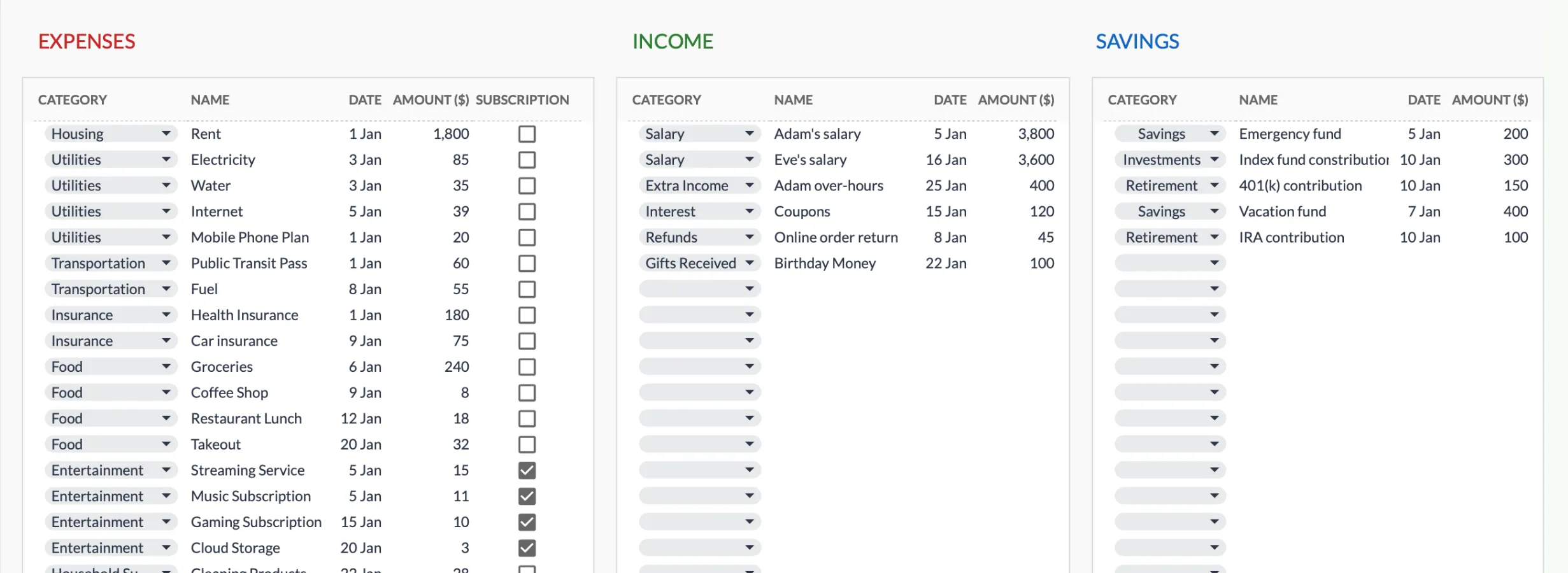 The Monthly Budget Template (Premium) logs each expense, income, and savings entry with its own date, category, and amount.
This creates a tight feedback loop. Overspend on dining out in week two? The numbers show it immediately. There is still time to adjust before the month ends. That quick correction, seeing the overspend and adjusting within the same budget period, is what makes monthly tracking effective for building habits.
The monthly template also aligns with how most bills arrive. Rent, utilities, subscriptions, insurance - they are monthly. Tracking in the same rhythm feels natural rather than forced.
But the monthly view has a blind spot. It does not show what is coming. Annual insurance premiums, holiday spending, car registration, property taxes, the annual subscription you forgot about until the charge appeared - these irregular expenses live outside the monthly window. They show up as surprises, and surprises in a budget feel like failures even when they were completely predictable with a longer view.
The Annual View: Seeing the Full Picture
The annual template lays all 12 months side by side. This wider frame changes what becomes visible.
Seasonal spending patterns emerge. Utility bills climb in winter as heating runs. Retail spending peaks in December. Summer travel costs appear in June and July. None of this is obvious from a single month’s data, but across 12 months the pattern is unmistakable.
Irregular expenses get a home. That $1,200 annual insurance premium goes in the month it is due. The $400 car registration sits in its correct month. Instead of surprise charges disrupting a monthly budget, they are anticipated and planned for.
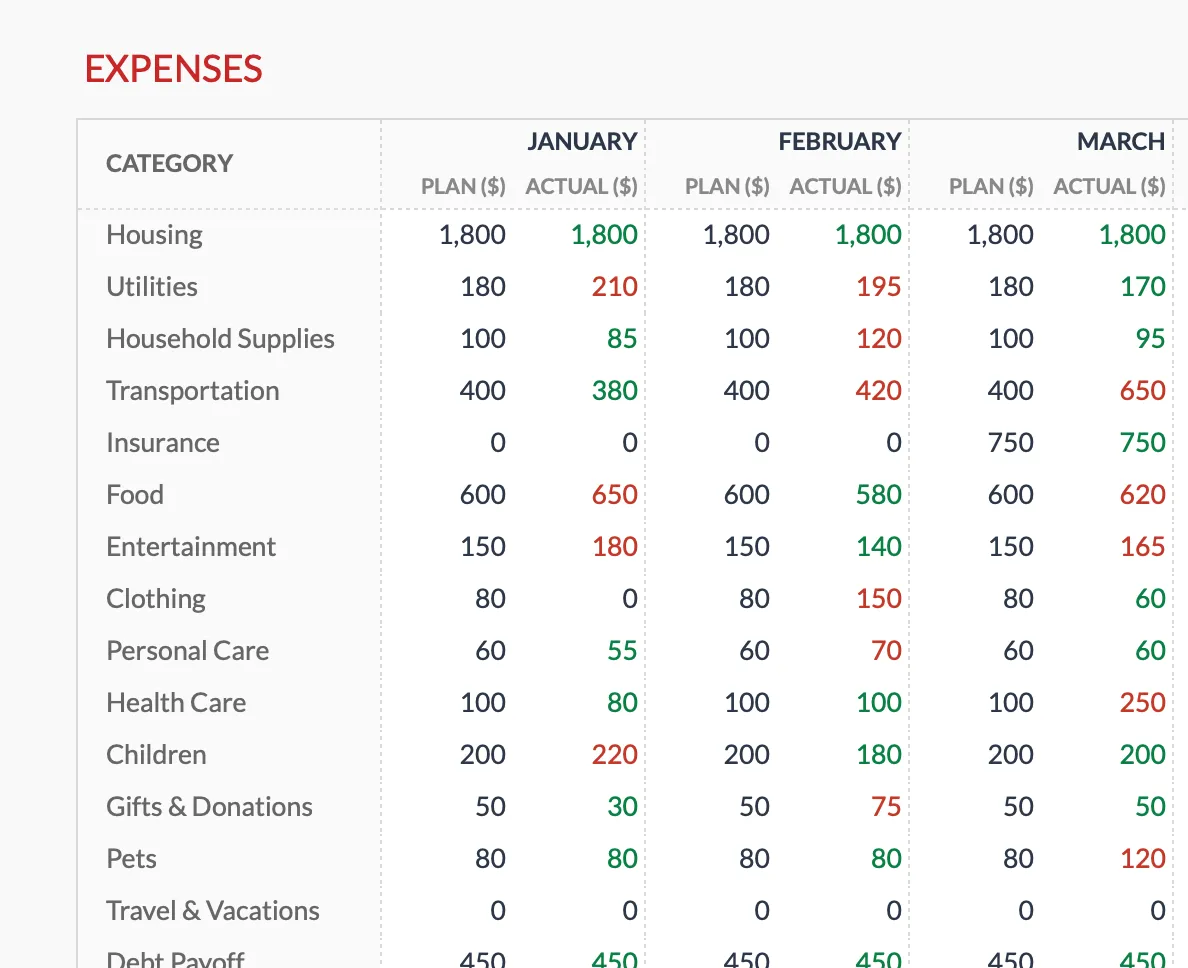 The Annual Budgeting Planner (Premium) lays each category across all 12 months, so an irregular cost like insurance sits in the single month it falls due rather than blindsiding a monthly budget.
Goals get a year-end frame. Saving for a down payment, paying off debt, building an emergency fund: each one sits on the Annual Financial Goals sheet with a target for December 31, the balance you started the year with, and a current balance you update as you go. The sheet works out what has been added, what is remaining, and the pace per month behind that progress, and the Summary counts how many goals are on track.
The trade-off is that the annual template takes more upfront effort. Estimating expenses 12 months out requires some guesswork, especially for first-time budgeters. And the annual view works at a category level, so it does not track individual transactions with the same granularity as the monthly template.
Where Each One Works Alone
The monthly template is enough for someone just starting to track spending. Building the habit of recording transactions, understanding where money goes, and getting comfortable with budget categories - the monthly scope handles all of this. It is simpler to set up, faster to maintain, and provides the immediate feedback that keeps people engaged.
The annual template works on its own for people who already know their spending patterns and want to plan ahead. Someone tracking a year of freelance income, mapping a debt payoff timeline, or preparing for a year with known large expenses (wedding, baby, move) gets more value from the yearly view than from month-by-month transaction tracking.
Where They Work Together
Many people start with the monthly template, build the tracking habit over two or three months, and then realize they want the bigger picture too.
In this setup, the monthly template becomes the operational tool. It is where every transaction lives, where weekly spending checks happen, where the question “can I afford this right now?” gets answered.
The annual template becomes the strategic tool. It is where the year-end goals live, where seasonal planning happens, where the question “am I on track for the year?” gets answered.
The two views complement each other rather than overlap. Monthly tracking without an annual view misses the forest. Annual planning without monthly tracking misses the trees. Our guide on budgeting your money with a monthly and annual approach walks through the same pairing in more detail.
The practical workflow: update the monthly template weekly with transactions and check budget progress. At the end of each month, copy the month’s category totals into the annual template and see how the month fits the bigger picture. Quarterly, use the annual template to adjust plans for the remaining months based on what actually happened. This layered approach takes maybe an extra 15 minutes per month but provides significantly more financial clarity.
The Variable Income Angle
For anyone with irregular income, whether freelancers, commission-based workers, or seasonal employees, the choice between monthly and annual has an extra dimension. Our guide on budgeting for irregular income goes deeper on the tactics.
The monthly template handles variable income well because it covers a single month at a time, with the instructions asking you to keep every transaction inside that month. A $3,000 month and an $8,000 month each get their own set of budget figures. The template does not assume consistency. This is useful for managing spending in real time - knowing exactly what this month’s income allows.
The annual template reveals the patterns that variable income creates. Which months tend to be strong? Which are lean? How does the cash flow cycle run across the year? For freelancers who have been working independently for more than a year, the annual view often surfaces patterns that felt random when experienced month to month.
Both views are useful for different reasons. The monthly template shows overspending inside the month it happens. The annual template shows how much of a strong month went to savings rather than to spending.
Which one to start with
For most people, the monthly template is the natural first step. It is faster to set up, easier to maintain, and provides the kind of immediate feedback that builds momentum. Once tracking feels natural, usually two or three months in, adding the annual view provides context that the monthly template cannot offer alone.
If you are still deciding how to divide your take-home pay across categories in either template, the 50/30/20 budget calculator sketches a starting split you can drop into the monthly or annual layout.
Both templates are one-time purchases, used by 1,000+ customers across 65+ countries. The Budgeting Bundle packages both, plus the Travel Budget Planner, for $49, less than buying them separately.
Related
- Monthly Budget Template - Day-to-day budget tracking
- Annual Budgeting Planner - 12-month budget planning
- Budgeting Bundle - Both templates plus the Travel Budget Planner
- How to Budget Your Money: A Monthly and Annual Approach - Using both time frames together
- When to Switch Budget Templates - The signs it is time to add the annual view to a monthly one
- Annual Budget Templates for Google Sheets (2026) - Free annual options to compare
Frequently asked questions
Can I use both templates at the same time?
Yes, and many people do. The monthly template handles week-to-week spending while the annual template tracks the bigger picture across all 12 months.
Do the two templates share data automatically?
No. They are separate Google Sheets, so figures do not sync between them on their own. The annual planner is where you record each month's category totals when you review how the month went.
Do these templates work in Excel?
Both are built for Google Sheets, which is where the drop-downs, formatting, and formulas are set up and tested. Opening a copy in Excel can break some of that, so the sheets are designed to run in Google Sheets.
Is there a discount for buying both?
The Budgeting Bundle packages the Monthly Budget Template, the Annual Budgeting Planner, and the Travel Budget Planner together for $49, less than buying them separately. Check the templates page for current pricing.
Sources
- Winter Fuels Outlook - U.S. Energy Information Administration
- Advance Monthly Retail Trade Survey - U.S. Census Bureau
About this article
Template sheets, inputs and outputs checked on 2026-09-10 against the shipped Monthly Budgeting Google Sheet (Summary, Budget Plan, Transactions, Goals, Categories, Setup) and Annual Budgeting Planner Google Sheet (Summary, Annual Plan, Annual Financial Goals, Categories, Setup), plus Budgeting Bundle price and contents. Seasonal-spending figures reference U.S. Energy Information Administration winter heating data and U.S. Census Bureau monthly retail sales. Last reviewed September 2026.