An employee payroll spreadsheet keeps a department roster, runs one month from gross pay down to net pay, and derives the rest from it: per-person tax withholding, employer payroll taxes, a benefits cost breakdown, and a budget-vs-actual annual summary. This walkthrough follows the full structure with a worked example, a ten-person team across three departments carrying $49,900 in monthly payroll and $598,800 projected for the year. Our Employee Payroll Ultimate Spreadsheet Template ($29) ships the same structure ready-made for Excel and Google Sheets.
Once a business grows past a handful of people, payroll stops being a single number and turns into a small system. Each person has a department, a pay type, and a start date. Each paycheck splits into federal tax, state tax, Social Security, Medicare, and retirement. The amount the employee takes home is only part of what the month costs, because the employer pays its own share on top and funds the benefits. Most owners can say what last month’s direct deposits added up to. Far fewer can say, without digging, what payroll cost by department, how the year is tracking against the plan, or what the fully loaded figure per person really is. The gap between those questions is structure, and a spreadsheet built for a team closes it.
That structure is six sheets that hand off in order: a roster of who is on the payroll, one month run from gross down to net, a tax-and-employer-cost view, a benefits breakdown, an annual summary, and a dashboard that reads everything back. The examples below come from our Employee Payroll Ultimate Spreadsheet Template ($29), which ships the whole thing ready-made for Excel and Google Sheets. Everything it does is reproducible by hand if you would rather build your own payroll spreadsheet from scratch.
What a team payroll spreadsheet has to hold, and what a basic tracker leaves out
A single-employee pay stub and a ten-person payroll are not the same document. Running payroll records for one pay period with a flat withholding percentage answers the take-home question well, and it is the right size for a small team paid on a steady schedule. A larger roster asks harder questions, and this workbook is built to answer them. It carries four things a single-period tracker does not.
- A department dimension. Every employee belongs to Sales, Engineering, or Admin, and almost every rollup in the file, the dashboard, the annual summary, the 12-month trend, cuts by department. That is what turns a list of paychecks into a view of where the money goes.
- Itemized deductions instead of one percentage. Federal tax comes from an editable bracket table, and state tax, Social Security, Medicare, and the 401(k) deduction each have their own rate cell rather than being folded into a single flat figure.
- The employer’s own costs, separated out. A dedicated Tax Withholding sheet computes the FICA match plus federal and state unemployment tax, and a Benefits Summary tallies health, dental, vision, the retirement match, and paid time off.
- A year, not a period. An Annual Summary compares planned payroll to actual by department and lines up three years side by side, so the file reports a trend rather than a snapshot.
The walkthrough below follows the six sheets in the order the work happens, starting with the roster that feeds all of them and a How to Use sheet that carries the instructions.
Build the roster: the Employee Roster sheet
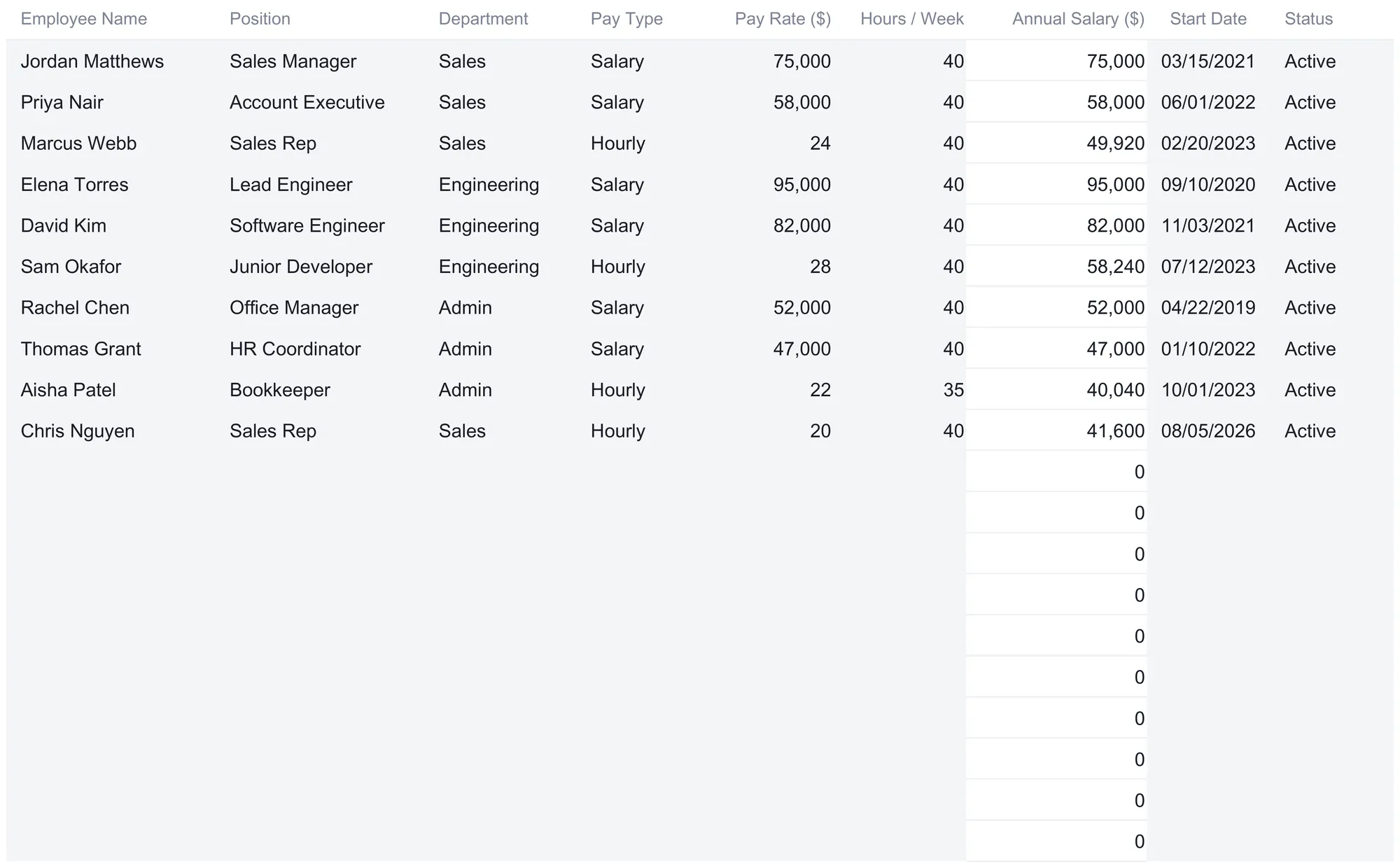
The roster is where each person is described once, and every other sheet reads back from it. Nine columns hold the facts that stay put between pay runs: employee name, position, department, pay type, pay rate, hours per week, the computed annual salary, a start date, and a status. The sample carries a ten-person team across three departments.
| Employee | Position | Department | Pay Type | Pay Rate ($) | Hrs/wk | Annual Salary ($) |
|---|---|---|---|---|---|---|
| Jordan Matthews | Sales Manager | Sales | Salary | 75,000 | 40 | 75,000 |
| Priya Nair | Account Executive | Sales | Salary | 58,000 | 40 | 58,000 |
| Marcus Webb | Sales Rep | Sales | Hourly | 24 | 40 | 49,920 |
| Elena Torres | Lead Engineer | Engineering | Salary | 95,000 | 40 | 95,000 |
| David Kim | Software Engineer | Engineering | Salary | 82,000 | 40 | 82,000 |
| Sam Okafor | Junior Developer | Engineering | Hourly | 28 | 40 | 58,240 |
| Rachel Chen | Office Manager | Admin | Salary | 52,000 | 40 | 52,000 |
| Thomas Grant | HR Coordinator | Admin | Salary | 47,000 | 40 | 47,000 |
| Aisha Patel | Bookkeeper | Admin | Hourly | 22 | 35 | 40,040 |
| Chris Nguyen | Sales Rep | Sales | Hourly | 20 | 40 | 41,600 |
The Pay Type tag does real work. For a Salary row the Pay Rate is an annual figure and passes straight into the Annual Salary column. For an Hourly row that column computes Pay Rate times Hours per Week times 52, so Marcus Webb’s $24 an hour at 40 hours a week reads $49,920, and Aisha Patel’s $22 at a 35-hour week reads $40,040. The same Pay Rate column means two different things depending on the tag beside it, which is the one place to slow down when typing a new hire in.
Two other columns are quietly important. Status is a dropdown of Active, Leave, or Terminated, and setting a row to Terminated drops that person out of every payroll figure while their row stays in place for the record, because the payroll rollups are all written to skip Terminated rows. The dashboard’s headcount and average-salary tiles go a step further and count only rows marked Active. Start Date sits alongside for the same reason, a personnel fact the file keeps even when it does not compute on it. The roster totals confirm the shape at a glance: ten active employees and $598,800 in combined annual salary.
The workbook is sized for twenty employees, rows 5 through 24. Ten hold the sample people to type over, and the ten below them are already wired into Monthly Payroll, Tax Withholding, Benefits Summary, and the dashboard rollups, so an eleventh hire typed into the first blank row flows through the entire file with no formula to edit. That is the design detail worth copying into any payroll spreadsheet built by hand, because the place these files usually break is a name added to the roster but missed by a total somewhere downstream.
Set the rates once: the Monthly Payroll header
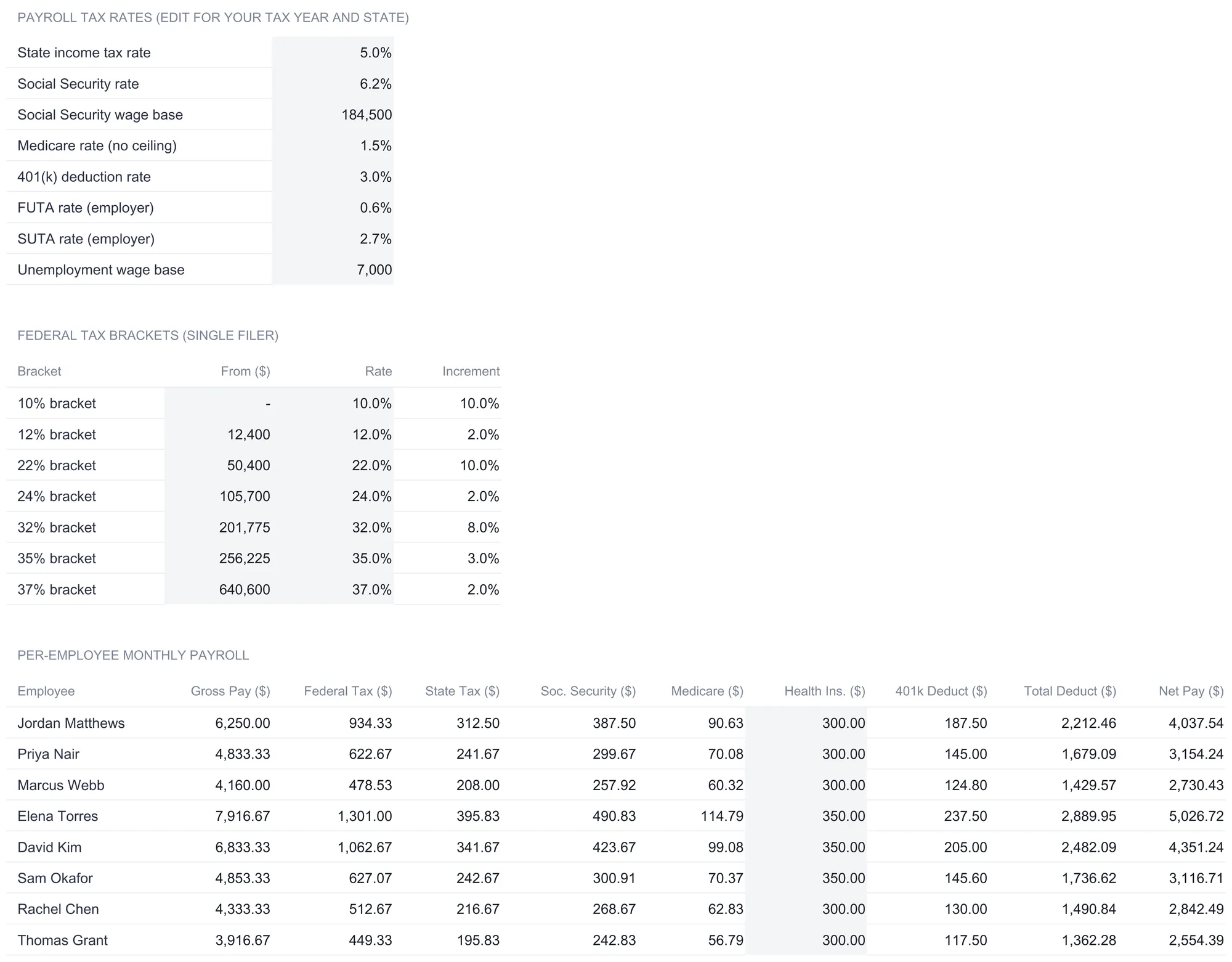
Before any paycheck is figured, the Monthly Payroll sheet lays out the rates that drive every deduction, all of them editable cells rather than fixed numbers baked into formulas. The header notes plainly that these are yours to edit for your tax year and state.
The payroll tax rates block holds eight values in the sample: a state income tax rate of 5 percent, a Social Security rate of 6.2 percent with a wage base of $184,500, a Medicare rate of 1.45 percent with no ceiling (the sheet rounds the label to 1.5 percent), a 401(k) deduction rate of 3 percent, an employer FUTA rate of 0.6 percent, an employer SUTA rate of 2.7 percent, and an unemployment wage base of $7,000. The federal figures in that block match the published ones, while the state and SUTA rates are stand-ins rather than a statement of the correct rate for any particular employer, and each of the eight is a cell precisely so it can be changed.
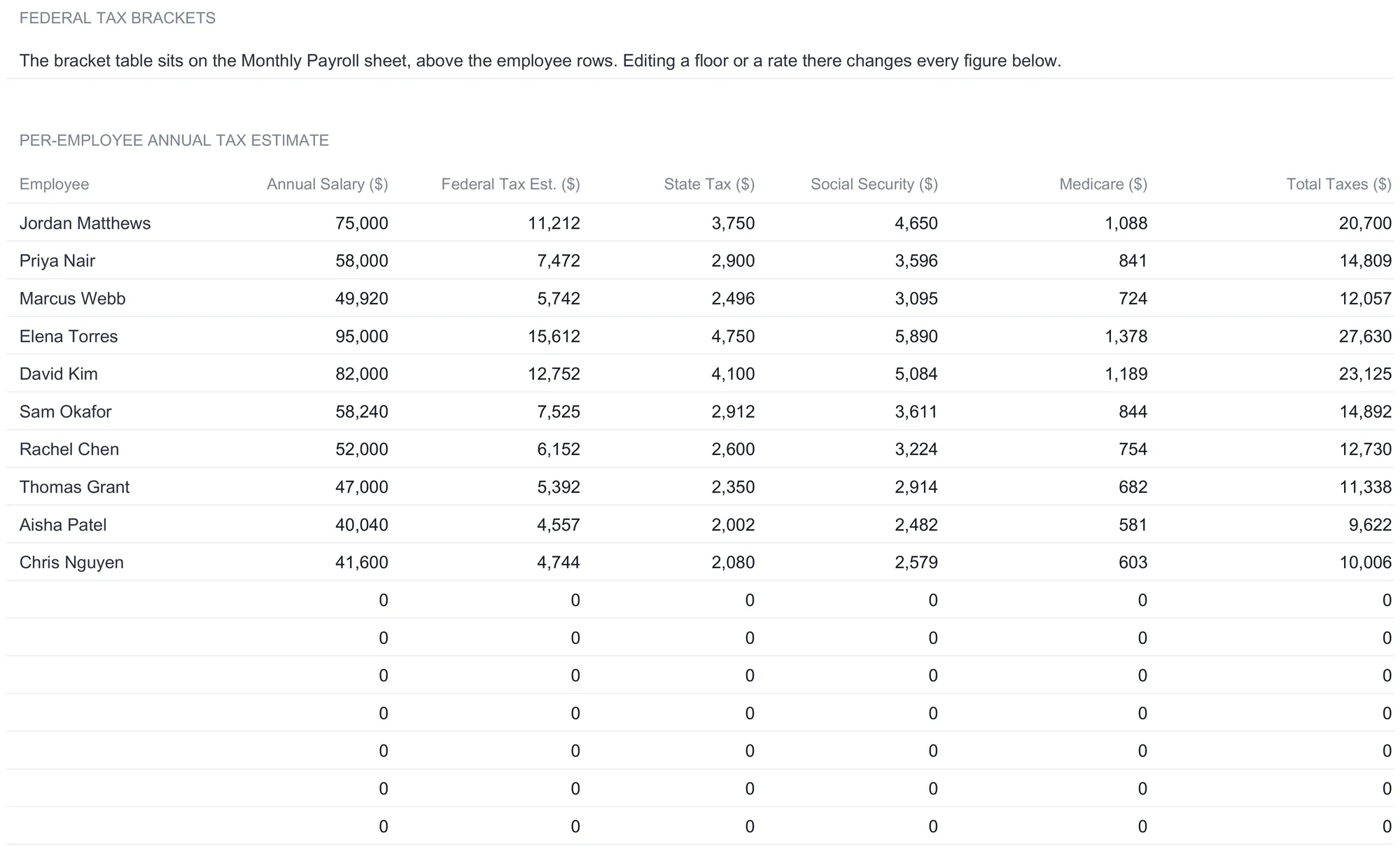
The federal tax bracket table sits just below, carrying a sample 2026 single-filer schedule: a 10 percent band from $0, then 12 percent from $12,400, 22 percent from $50,400, 24 percent from $105,700, 32 percent from $201,775, 35 percent from $256,225, and 37 percent from $640,600. The federal tax on each paycheck is computed from this table progressively, so a $75,000 salary is taxed at 10 percent on its first $12,400, 12 percent on the next $38,000, and 22 percent only on the amount above $50,400, which works out to $11,212 for the year and $934.33 a month. Editing any floor or rate in this one table re-figures every federal number in the workbook at once. It is a planning approximation of the graduated withholding the IRS describes in Publication 15-T, not a substitute for it, and it does not read filing status, allowances, or the details of a W-4.
Run the month: the per-employee payroll table
Below the rates, the per-employee table is where the month comes together. It reads each person from the roster and lays out ten columns, the employee name and then gross pay, federal tax, state tax, Social Security, Medicare, health insurance, the 401(k) deduction, total deductions, and net pay. Only health insurance is typed per person; everything else computes from the rates above.
Jordan Matthews makes the flow concrete. Gross is the $75,000 salary divided by 12, so $6,250.00 for the month. Federal tax is the $934.33 the bracket table produces. State tax is $6,250 at 5 percent, or $312.50. Social Security is 6.2 percent of gross up to the wage base, $387.50 here since the salary is well under $184,500. Medicare is 1.45 percent of gross, $90.63, with no ceiling to worry about at this level. Health insurance is a typed $300.00, and the 401(k) deduction is 3 percent of gross, $187.50. Those six deductions add to $2,212.46, and net pay is the gross minus that, $4,037.54.
| Column | Jordan Matthews | In words |
|---|---|---|
| Gross pay | $6,250.00 | Annual salary ÷ 12 |
| Federal tax | $934.33 | Progressive brackets ÷ 12 |
| State tax | $312.50 | Gross × 5% |
| Social Security | $387.50 | Gross × 6.2% under the wage base |
| Medicare | $90.63 | Gross × 1.45% |
| Health insurance | $300.00 | Typed per employee |
| 401(k) deduction | $187.50 | Gross × 3% |
| Total deductions | $2,212.46 | Sum of the six |
| Net pay | $4,037.54 | Gross - total deductions |
Run that logic down all ten people and the monthly totals read $49,900.00 in gross pay, $6,763.33 in federal tax, $2,495.00 in state tax, $3,093.80 in Social Security, $723.54 in Medicare, $3,150.00 in health insurance, and $1,497.00 in retirement deductions, for $17,722.67 in total deductions and $32,177.33 paid out as net. Every line is rounded to the cent, so each column adds to the total printed under it rather than drifting by a penny.
The ten columns are ordered so the story reads left to right, from gross through each deduction to the net figure at the end, which makes an error easy to trace one column at a time rather than hunting inside a single combined formula. What the sheet does not do is fill itself. There is no time-clock feed, so hours for an hourly week come off the roster’s standard hours and the per-person health figure is typed in. For a settled ten-person payroll that is a few minutes a month; for a larger or more variable one it is real work, which is what dedicated payroll software exists to remove. The trade is the familiar one, a connected service for a business that wants deposits and filings handled, a spreadsheet for one that wants to see every formula, change any of them, and keep the file on its own machine.
At the very bottom of the sheet sits a 12-month tracker, one row per department and one column per month, that ships filled with a sample year of typed figures. It is a log to type into as real months close, and it feeds the trend chart on the dashboard.
Separate the employer’s costs: the Tax Withholding sheet
The Tax Withholding sheet is where the Ultimate template pulls apart two things a paycheck blurs together: what comes out of the employee’s pay, and what the employer spends on top of it. It reads the bracket table and rate cells from Monthly Payroll, so nothing here is a second set of assumptions.
The upper table is a per-employee annual tax estimate. For each person it annualizes the paycheck figures into a yearly view: Jordan Matthews shows $11,212 in federal tax, $3,750 in state tax, $4,650 in Social Security, and $1,088 in Medicare, totaling $20,700 in taxes on a $75,000 salary. Across the ten-person roster the estimate totals $81,160 in federal tax, $29,940 in state tax, $37,125 in Social Security, and $8,684 in Medicare, for $156,909 in taxes withheld over the year. These are amounts taken out of employees’ own pay; they lower take-home without adding to what the wage costs the business.
The lower table runs the other direction, computing the employer’s own payroll taxes. The FICA match repeats the employee’s Social Security and Medicare on the company’s side, so Jordan’s is $5,738. FUTA and SUTA apply only up to the $7,000 unemployment wage base, which is why every employee shows the same $42 of FUTA (0.6 percent of $7,000) and $189 of SUTA (2.7 percent of $7,000) regardless of salary. Jordan’s employer taxes total $5,969, and the Total Cost to Employer column adds that to the wage for $80,969. Across the team the employer side totals $45,809 in FICA match, $420 in FUTA, and $1,890 in SUTA, or $48,119 in employer payroll taxes, bringing the total cost to employer to $646,919 on $598,800 of wages.
The bracket-based estimate and the flat employer rates are planning figures, not filing amounts. Which rates, wage bases, and deposit rules apply to a specific business is a question for a payroll professional, and the value of the sheet is that it lays the pieces out clearly enough to hand over.
Count the rest of the package: the Benefits Summary sheet
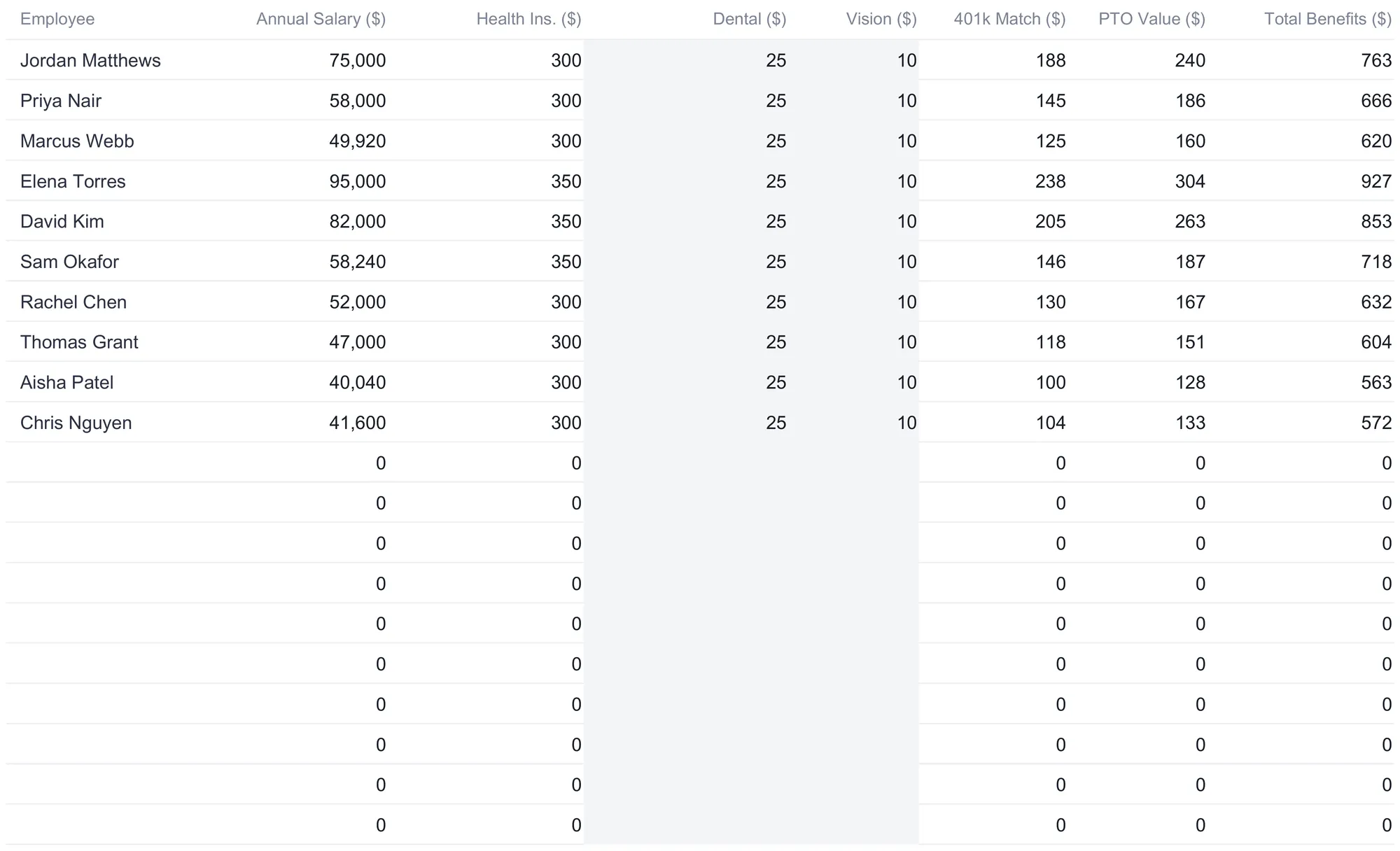
Wages and taxes are only part of what a person costs. The Benefits Summary sheet adds the rest, one row per employee across health insurance, dental, vision, the 401(k) match, and the value of paid time off. Health insurance pulls the same figure entered on Monthly Payroll, dental and vision are typed inputs (a flat $25 and $10 in the sample), the 401(k) match reads the same 3 percent rate the payroll deduction uses, and the PTO value estimates the monthly cost of accrued time off.
Jordan Matthews carries $300 health, $25 dental, $10 vision, a $188 retirement match, and $240 of PTO value, for $763 in monthly benefits. Across the team the monthly totals read $3,150 in health insurance, $250 in dental, $100 in vision, $1,499 in the retirement match, and $1,919 in PTO value, adding to $6,918 a month, which is the figure the dashboard’s benefits tile reports.
Below that sits a Benefits as % of Salary section, which annualizes each person’s benefits and divides by their salary. It reads from about 11.7 percent for Elena Torres, the highest-paid person on the roster, up to roughly 16.9 percent for Aisha Patel, the lowest-paid. Because several benefits are flat dollar amounts rather than a percentage of pay, they weigh more heavily on lower salaries, and seeing the burden expressed as a percentage is often the first time the shape of total compensation becomes obvious.
Read the year: the Annual Summary sheet
The Annual Summary sheet lifts the file out of the single month and into a year-long view, and it is the sheet a single-period tracker has no equivalent for. Two tables sit on it.
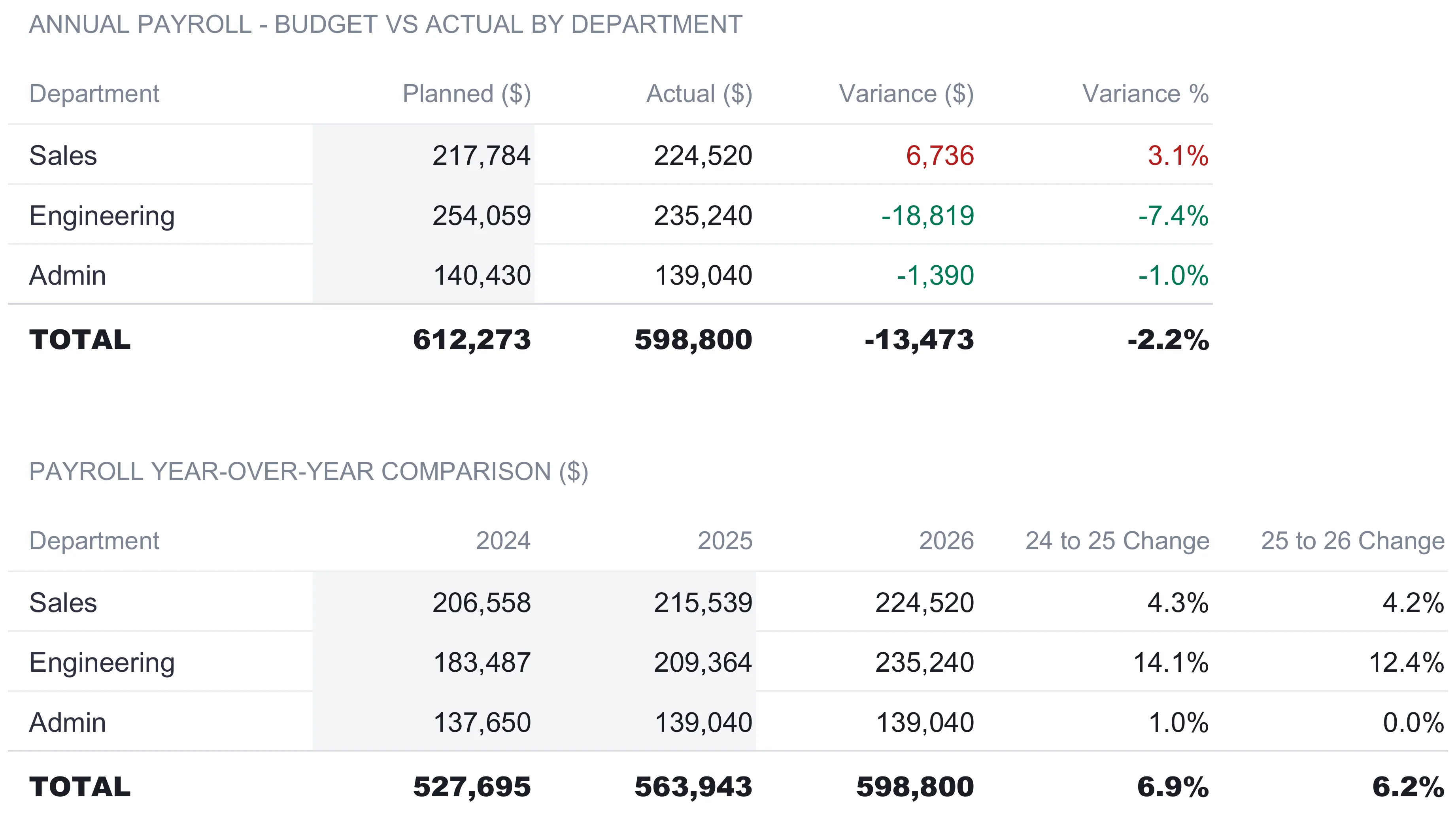
The first compares planned payroll to actual by department. The Planned column is typed each year as a budget; the Actual column reads the roster and leaves out anyone marked Terminated, the same figures the dashboard reports. In the sample, Sales was planned at $217,784 and came in at $224,520, running $6,736 over. Engineering was planned at $254,059 and came in at $235,240, landing $18,819 under. Admin was planned at $140,430 against $139,040 actual, $1,390 under. The team total was planned at $612,273 and came in at $598,800, so payroll finished $13,473 under budget for the year, a variance of 2.2 percent. A budget line that Engineering underran heavily and Sales overran modestly reads differently department by department than it does as a single company total, which is the reason the table splits it.
The second table lines up three years, 2024, 2025, and 2026, with the two earlier years typed and the current year reading the Actual column above it. Sales moves from $206,558 to $215,539 to $224,520, a 4.3 percent step and then a 4.2 percent one. Engineering climbs from $183,487 to $209,364 to $235,240, jumps of 14.1 percent and 12.4 percent that mark a department being built out. Admin holds roughly flat from 2025 to 2026. The team total rises from $527,695 to $563,943 to $598,800, growth of 6.9 percent and then 6.2 percent. A payroll that grows every year is normal; seeing which department is driving the growth is the part worth having.
The dashboard: six numbers and two charts
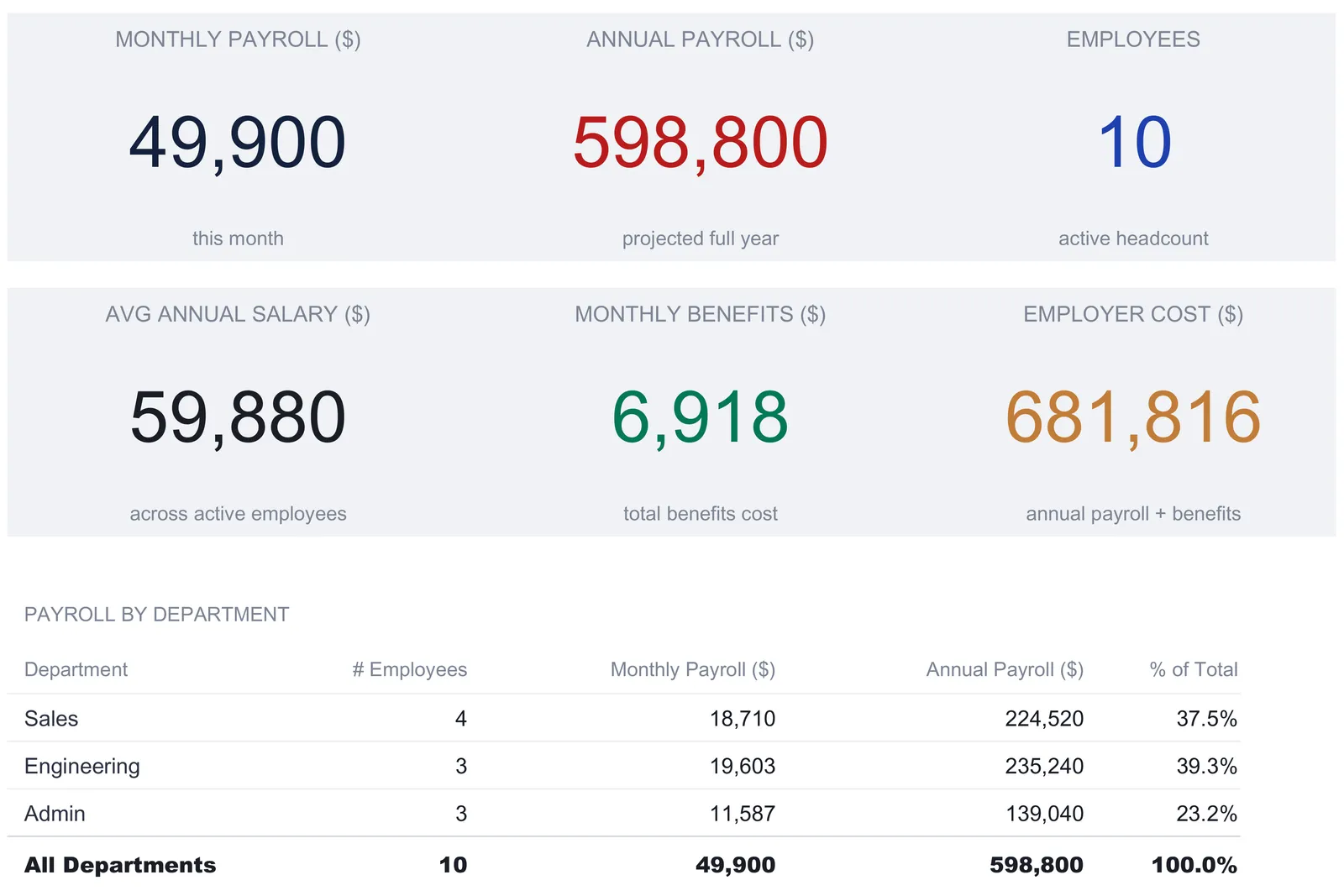
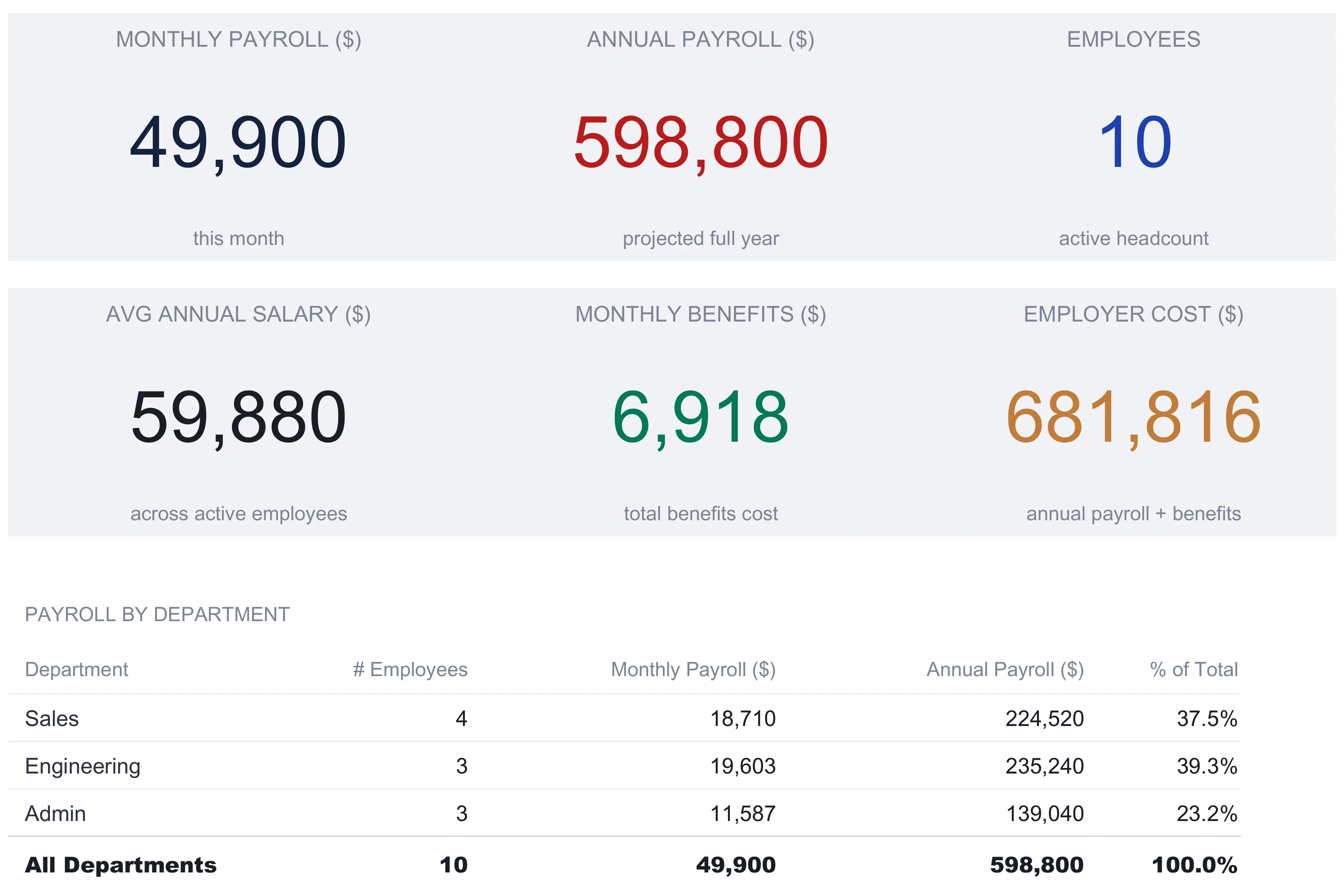
With the roster built and the month run, the Dashboard reads it all back. Six KPI tiles sit across the top:
| Tile | Sample value | What it reads |
|---|---|---|
| Monthly payroll | $49,900 | This month’s gross across the team |
| Annual payroll | $598,800 | The month projected to a full year |
| Employees | 10 | Active headcount on the roster |
| Avg annual salary | $59,880 | Combined salary ÷ headcount |
| Monthly benefits | $6,918 | Total benefits cost per month |
| Employer cost | $681,816 | Annual payroll plus a year of benefits |
Two of these repay a second look. Average annual salary simply divides the $598,800 of combined salary by the ten active people, turning the whole roster into a single $59,880 per-head figure that is easy to carry into a hiring conversation. Employer cost, at $681,816, is the annual payroll with a full year of benefits added, and it is worth reading next to the Total Cost to Employer figure on the Tax Withholding sheet, $646,919, which instead adds the employer’s payroll taxes to wages. Neither is wrong; they simply load two different sets of extras onto the same base, and together they show how far the true cost of a payroll sits above the wages a business reports.
Below the tiles, a Payroll by Department table counts and sums each department by the label in its own first column, so Sales shows 4 people at $224,520 a year (37.5 percent of payroll), Engineering 3 people at $235,240 (39.3 percent), and Admin 3 people at $139,040 (23.2 percent), rebuilding the $598,800 total. Two charts turn the numbers into a picture: annual payroll by department, and a 12-month payroll trend drawn from the log at the bottom of the Monthly Payroll sheet, which rises from about $48,400 in January toward $50,900 in late summer as the sample year plays out. Renaming a department in its own row moves its subtotal with it, since every rollup keys off that label rather than a fixed position.
Gross, net, and the two employer costs in plain terms
Payroll’s confusion lives in a few words that sound alike, and each is a plain step from the one before.
Gross is the wage before anything is removed, a salaried person’s slice of their annual pay or an hourly person’s rate times hours. Jordan’s is $6,250 for the month.
Net pay is what reaches the employee, gross minus the six deductions. Jordan’s $6,250 less $2,212.46 leaves $4,037.54.
Employer cost goes the other way, and the workbook shows it through two lenses. Add a year of benefits to wages and you get the dashboard’s $681,816; add the employer’s payroll taxes to wages and you get the Tax Withholding sheet’s $646,919. Withholding lowers what the employee takes home without changing what the wage costs, while the employer’s taxes and benefits raise the cost without ever touching the paycheck. Those two facts are why net pay and employer cost sit at opposite ends of the same roster, and why a payroll view that shows only take-home is telling a fraction of the story.
Where payroll records end and payroll filing begins
Recording payroll and remitting payroll taxes are two different jobs, and the template does the first. It computes what a month costs, estimates what is withheld, and separates the employer’s share, which is exactly the raw material a filing needs, but it does not deposit anything, generate any form, or connect to any agency. The rates in it are editable planning figures, the federal bracket table is a simplified stand-in for the graduated method in IRS Publication 15-T, and the state income tax and SUTA rates are placeholders that vary by jurisdiction. The FUTA cell carries 0.6 percent, which is the net rate left once the full 5.4 percent state credit is applied against the 6.0 percent gross rate, so it does not fit every employer either.
For US employers, the IRS overview of employment taxes sets out the pieces the template deliberately leaves to others: withholding federal income tax, the Social Security and Medicare shares split between employee and employer, and the separate federal unemployment tax paid from the employer’s own funds. Publication 15, the Employer’s Tax Guide, covers how and when those amounts are deposited and reported. Which rates and deadlines apply to a specific business is a question for a payroll or tax professional, and the point of keeping tidy per-department records is that the answer becomes a lookup rather than a reconstruction when they ask.
Excel or Google Sheets for employee payroll
The template is an .xlsx file built on standard formulas, with no macros and no add-ons, so it behaves the same in Microsoft Excel and in Google Sheets after upload, and the How to Use sheet notes it works in LibreOffice Calc as well. Google Sheets suits a business whose bookkeeper and owner want to open the same live payroll file from different places; Excel suits one that prefers a local file it controls. The structure described here, a department roster feeding one month that feeds the tax, benefits, and annual views, is equally buildable in either, and nothing in this walkthrough depends on a feature only one of them has. A currency selector on the dashboard relabels every money column across the workbook, changing the symbol shown without converting the underlying numbers.
Which template fits the job
- Employee Payroll Ultimate Spreadsheet Template ($29) is the workbook this walkthrough follows: the twenty-slot department roster, one month run from gross to net with itemized deductions, the tax-and-employer-cost sheet, the benefits breakdown, the budget-vs-actual annual summary, and the six-KPI dashboard, ready to use for a team across several departments. The tier family starts smaller, with a free Employee Payroll template for a single-sheet start and an Employee Payroll Essentials ($19) that adds a dashboard around the core payroll sheet. The Ultimate version is the one that carries the department dimension, the employer-tax and benefits sheets, and the annual view.
- Timesheet Weekly Ultimate Spreadsheet Template ($29) sits one step upstream. Payroll starts from hours, and for hourly staff those hours have to come from somewhere; the timesheet workbook logs weekly hours, flags overtime, and allocates time to projects, producing the numbers that the Pay Rate and hours columns on the roster ultimately rest on.
Related
- How to Run Payroll Records in a Spreadsheet - the single-pay-period tracker with a flat withholding percentage, a good fit for a smaller, steadier team
- How to Do Bookkeeping in a Spreadsheet - the ledger and profit-and-loss summary that each month’s payroll cost lands in
- How to Create and Track Invoices in a Spreadsheet - the money-in side of the same small-business toolkit
Frequently asked questions
How is this different from a basic payroll tracker?
A basic tracker runs one pay period with a single flat withholding percentage per person. This workbook is built around a department roster and a full month, and it splits the deductions a flat percentage hides: federal tax from an editable bracket table, a separate state rate, Social Security up to a wage base, and Medicare with no ceiling. It then adds three layers a single-period tracker leaves out entirely, employer payroll taxes in their own table, a benefits cost breakdown, and a budget-vs-actual annual summary by department.
Are the tax rates and brackets in the template correct for my business?
Some are current federal figures and some are placeholders, and none of them is a ruling. The Social Security and Medicare rates, the $184,500 Social Security wage base, the 0.6 percent FUTA rate and the $7,000 unemployment wage base match the published federal figures; the state income tax rate, the SUTA rate and the 401(k) rate are stand-ins that vary by jurisdiction and by plan. Every rate is an editable cell: the state income tax rate, the Social Security rate and wage base, the Medicare rate, the 401(k) rate, and the FUTA and SUTA employer rates. The federal figure comes from a bracket table that ships with a 2026 single-filer schedule and is yours to replace. Real withholding depends on jurisdiction and each employee's Form W-4, and the graduated method the IRS publishes in Publication 15-T is more detailed than a flat state rate or a single bracket table. A payroll or tax professional can confirm the figures that belong on an actual paycheck.
How does the spreadsheet handle salaried and hourly employees?
Each roster row carries a Pay Type of Salary or Hourly. For a Salary row the Pay Rate is the annual figure and flows straight through. For an Hourly row the Annual Salary column computes Pay Rate times Hours per Week times 52, so Marcus Webb's $24 an hour at 40 hours becomes $49,920 a year. The Monthly Payroll sheet then divides whichever annual figure results by 12 to get the month's gross.
What is the difference between the two employer cost figures?
They measure two different things. The Dashboard's Employer Cost tile, $681,816 in the sample, is annual payroll plus the cost of benefits. The Total Cost to Employer column on the Tax Withholding sheet, $646,919, is annual payroll plus the employer's own payroll taxes, the FICA match and the FUTA and SUTA amounts. One lens adds benefits to wages, the other adds employer taxes to wages, and reading them side by side shows why the number a business spends sits well above the wages it reports.
Does the template file or pay payroll taxes?
No. It records what a month costs and estimates what is withheld and what the employer owes, but it does not deposit taxes, produce filings, or connect to any agency. Depositing and reporting withheld income tax, the Social Security and Medicare shares, and federal unemployment tax is separate work, and IRS guidance on employment taxes plus a payroll professional cover how and when that happens.
Sources
- Understanding employment taxes - Internal Revenue Service
- About Publication 15 (Circular E), Employer's Tax Guide - Internal Revenue Service
- About Publication 15-T, Federal Income Tax Withholding Methods - Internal Revenue Service
About this article
Sheets, columns, dropdowns, formulas and sample figures re-checked on 2026-09-10 against the shipped Employee Payroll Ultimate workbook (Dashboard, Employee Roster, Monthly Payroll, Tax Withholding, Benefits Summary, Annual Summary, How to Use), the file customers download. Free and Essentials Employee Payroll and the Weekly Timesheet Ultimate workbooks checked on 2026-09-10 for the tier comparisons. IRS employment-taxes, Publication 15, Publication 15-T, the 2026 single-filer brackets and the FUTA rate and credit checked against the live IRS pages on 2026-09-10. Last reviewed September 2026.