An expense tracker records and categorizes what you actually spent, so you can see where your money goes. A budget template does all of that and adds a planned target for every category, then shows how much of each target is left as the month runs. FinancialAha sells both, the Monthly Expense Tracker at $19 for visibility and the Monthly Budget Template at $29 for targets and goals. Track first to build the habit, then move up when you want a plan to measure spending against.
These two templates get confused a lot. They sound similar but do different things.
The Monthly Expense Tracker records where money goes. The Monthly Budget Template records where money goes AND compares it to where you planned for it to go.
That distinction matters more than it might seem.
What Expense Tracking Actually Is
Expense tracking is observation. You log transactions, categorize them, and see totals. That’s it.
The Monthly Expense Tracker is built for exactly this. Enter what you spend, assign a category, and the template shows you the picture: how much went to food, transportation, entertainment, and everything else.
“Expense tracker” undersells it slightly. Alongside spending it also logs income, savings transfers, and subscriptions, and it derives a savings rate from those figures. What it never does is set a planned number to compare against. Every field records what happened, not what you intended, so the whole workbook stays in the observation lane.
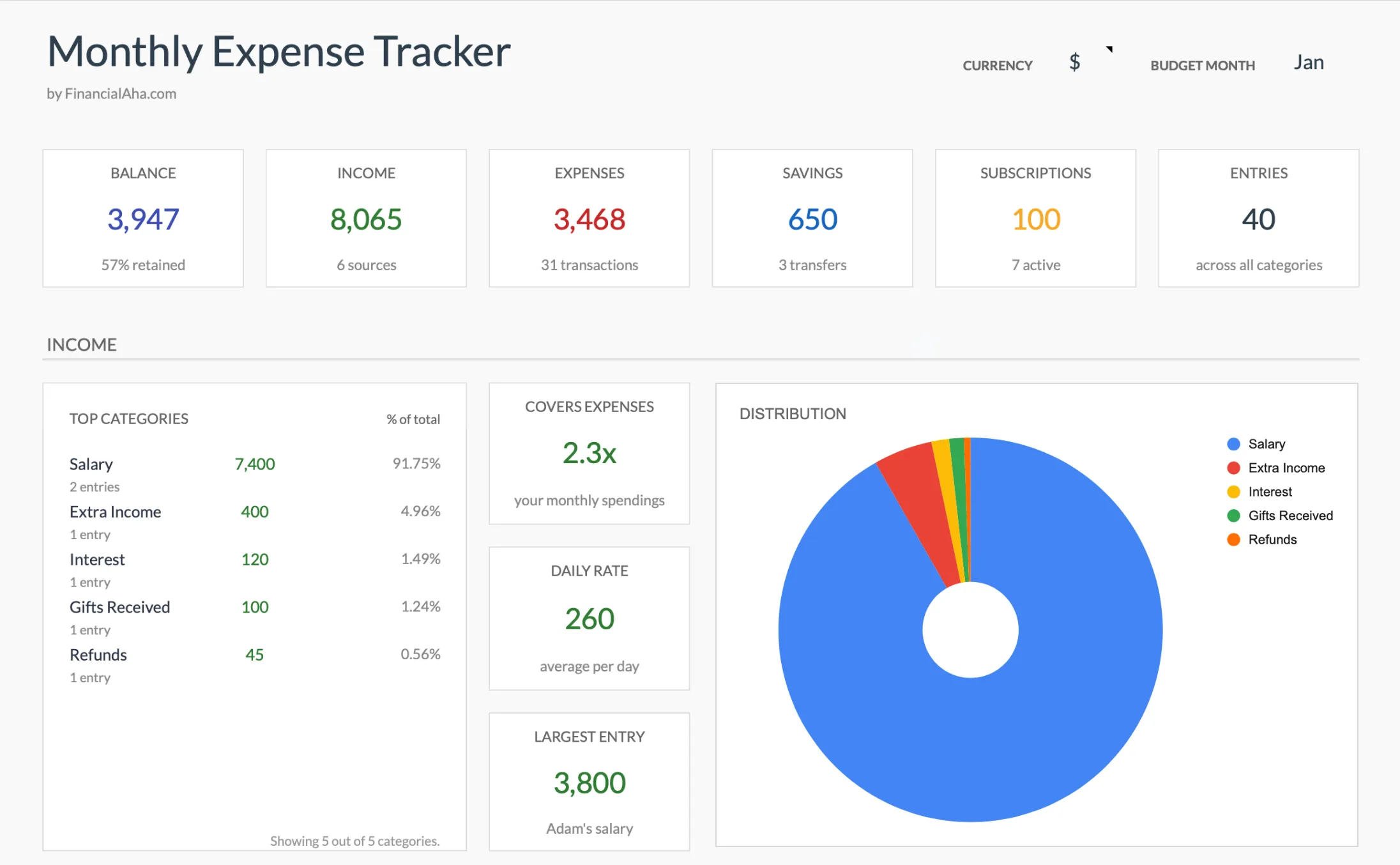 The Monthly Expense Tracker (Premium) summary view: income, expenses, savings, and subscriptions in one dashboard, with a savings rate but no per-category targets.
What Makes It Useful
- Pure visibility. Many people have no idea where their money goes until they start tracking. The awareness itself changes behavior.
- No judgment built in. There are no targets to miss and no over-budget alerts. Just data.
- Low friction. The simpler the system, the more likely it gets used consistently. The tracker’s simplicity is a feature, not a limitation.
- Fast to set up. No need to estimate budgets for categories you’ve never tracked before. Just start recording.
Who It’s For
People who are starting from zero. Anyone who’s never tracked spending before, or who tried budgeting apps and found the targets stressful, often does well with pure tracking first.
It’s also useful for people going through transitions. New job, new city, new relationship - when spending patterns are shifting, tracking without targets gives you data to build on later.
What a Budget Template Adds
Budgeting is tracking plus planning. You set targets for each category, then compare actual spending against those targets throughout the month.
The Monthly Budget Template logs transactions the same way, on the same category lists, and adds:
Targets and Comparisons
Each category gets a planned amount. As you log transactions, the template shows remaining budget in real time. Spent $200 of your $400 food budget by mid-month? The template makes that visible.
Budgeting Frameworks
The template supports approaches like 50/30/20 (needs, wants, savings) and zero-based budgeting (every dollar assigned before the month starts). Both live on the same tab: 50/30/20 shows target versus actual for needs, wants, and savings, while the zero-based view flags any income you have not yet allocated. These frameworks give structure to the planning process.
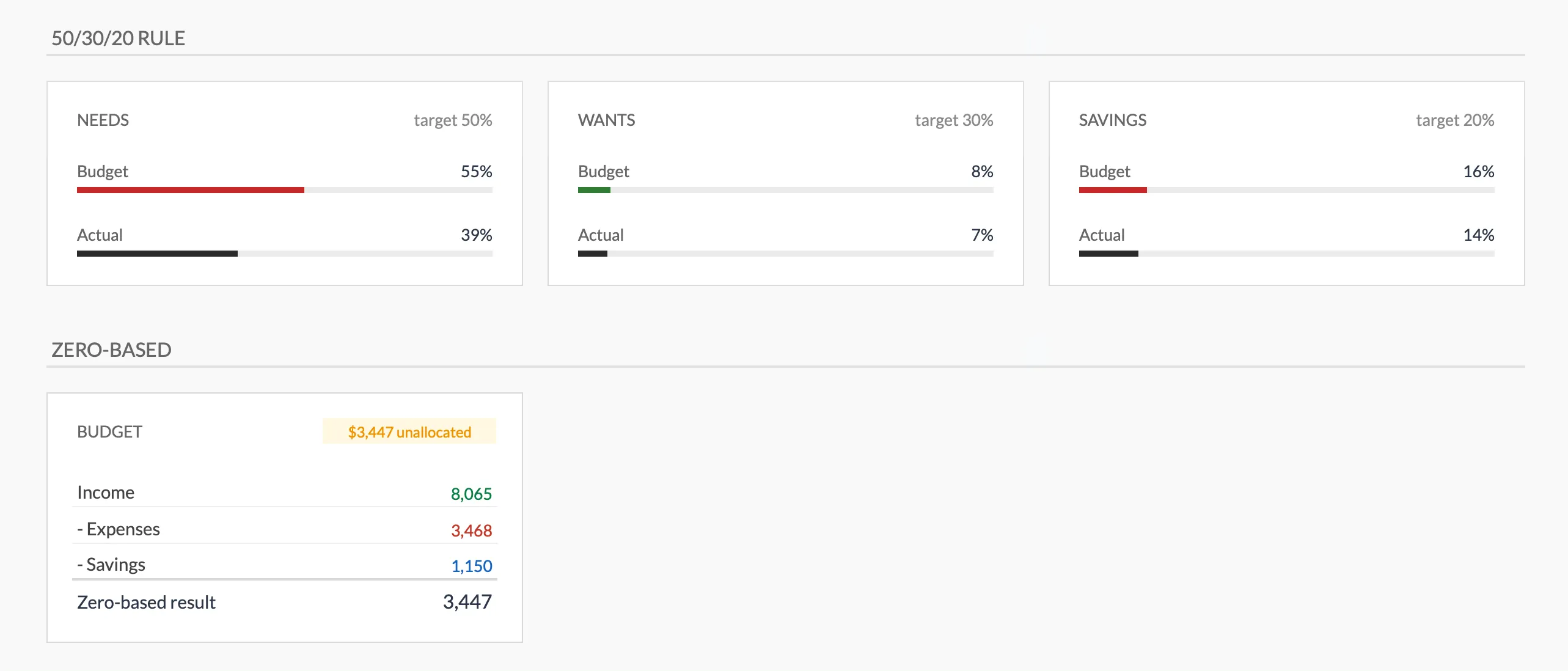 The Monthly Budget Template (Premium) turns spending into a plan: 50/30/20 targets versus actuals on top, a zero-based “unallocated” check below.
Goal Integration
Savings goals get their own sheet, each row holding a target, the amount saved so far, this month’s contribution, what is left, and a progress percentage. That progress repeats on the Summary next to the spending sections, and savings categories carry planned amounts of their own on the Budget Plan, so savings sits inside the plan rather than being whatever is left at month end.
Variance in Numbers
Every category shows its planned amount, the actual pulled from your transactions, the difference between the two, and the percentage of the target spent. A gap between plan and reality becomes a number rather than a hunch. The template covers one month at a time, so comparing months means keeping each one as its own copy or archived sheet, which the instructions walk through.
The Real Difference
Here’s the simplest way to think about it:
| Expense Tracker | Budget Template | |
|---|---|---|
| Records transactions | Yes | Yes |
| Categorizes spending | Yes | Yes |
| Shows spending totals | Yes | Yes |
| Sets targets per category | No | Yes |
| Tracks remaining budget | No | Yes |
| Includes savings goals | No | Yes |
| Supports budgeting frameworks | No | Yes |
| Setup effort | Minimal | Moderate |
The expense tracker answers: “Where did my money go?”
The budget template answers: “Where did my money go, and was that the plan?”
Tracking for Awareness
Some people find that awareness alone is enough to change their financial trajectory. When you see that $340 went to subscription services or $600 to impulse purchases, the natural response is to question whether that’s what you actually want.
No targets needed. No framework required. Just the act of seeing the numbers clearly.
The Consumer Financial Protection Bureau describes logging your spending as the way to get “a realistic picture of what your money, on an average month, is going to.” That clarity is often what prompts a change, without any target attached to it.
Budgeting for Control
Other people find that awareness without structure leads to guilt without action. They know they’re overspending on dining out, but without a target number and a system for staying under it, knowing doesn’t translate to changing.
That’s where the budget template adds value. It turns observations into intentions. “I spent $500 on dining” becomes “I planned for $350 on dining, spent $500, and can see exactly where the extra went.”
The feedback loop is tighter and more actionable.
The Common Progression
A pattern that works for a lot of people:
- Start with the expense tracker. Track everything for one to three months without any targets. Just observe.
- Review the data. Look at category totals. Notice where spending feels intentional and where it doesn’t.
- Set initial targets. Build them from actual spending data rather than aspirational guesses, so the targets are realistic.
- Move to the budget template. Now the targets mean something because they’re based on real numbers, not wishful thinking.
This progression avoids the most common budgeting failure: setting targets based on what you think spending “should” be rather than what it actually is.
Which One Right Now?
If you’ve never tracked spending consistently, the expense tracker is a solid starting point. Build the habit first. Get comfortable with the data.
If you’ve been tracking spending (in any tool) and want more structure, meaning targets to work toward, frameworks to follow, and goals to plan around, the budget template is the next step.
Neither choice locks you in. Both templates share the same transaction layout and the same category lists, so the habits from one fit the other.
Related guides
- Which Financial Template to Start With - Decision guide for all FinancialAha templates
- When to Switch Budget Templates - Knowing when to move from a tracker up to a budget template
- How to Track Expenses in Google Sheets - DIY tracking setup
- How to Create a Monthly Budget in Google Sheets - Budget template setup
Related Templates
- Monthly Expense Tracker - Pure spending visibility
- Monthly Budget Template - Tracking plus targets and goals
Frequently asked questions
Does the Monthly Expense Tracker only track expenses?
No. Alongside expenses it records income, savings transfers, and subscriptions, and it shows a savings rate for the month. What it does not do is set a planned target for each category. That target-versus-actual layer is what the Monthly Budget Template adds.
How much does each template cost?
The Monthly Expense Tracker is $19 and the Monthly Budget Template is $29, both one-time purchases. The tracker is the lower price because it covers tracking only, without the planning layer.
Do I need both templates?
Most people use one at a time. The tracker fits a spending-visibility habit, the budget template fits target-based planning. Both run on the same expense, income and savings category lists, so the habits built in the tracker fit the budget template for anyone who moves up later.
Which one works with the 50/30/20 rule or zero-based budgeting?
The Monthly Budget Template. It includes 50/30/20 needs-wants-savings views and a zero-based allocation check. The Monthly Expense Tracker records what happened but does not compare it against a framework.
Sources
- Budgeting: How to create a budget and stick with it - Consumer Financial Protection Bureau
- Spending Tracker (Your Money, Your Goals) - Consumer Financial Protection Bureau
About this article
Feature comparison checked on 2026-09-10 against the shipped Monthly Expense Tracker Google Sheet (Summary, Transactions, Categories, Instructions) and the shipped Monthly Budgeting Google Sheet (Summary, Budget Plan, Transactions, Goals, Setup, Instructions), including the subscriptions, 50/30/20, and zero-based views. Template prices checked on 2026-09-10 against the FinancialAha product catalog: $19 for the Monthly Expense Tracker, $29 for the Monthly Budget Template. Last reviewed September 2026.