免费 薪资预算 电子表格模板
将预算规划与发薪日期对齐。将每笔工资映射到特定的账单和支出,以实现更清晰的现金流时间安排。
Upgrade your spreadsheet
Here is how you unlock a better version.
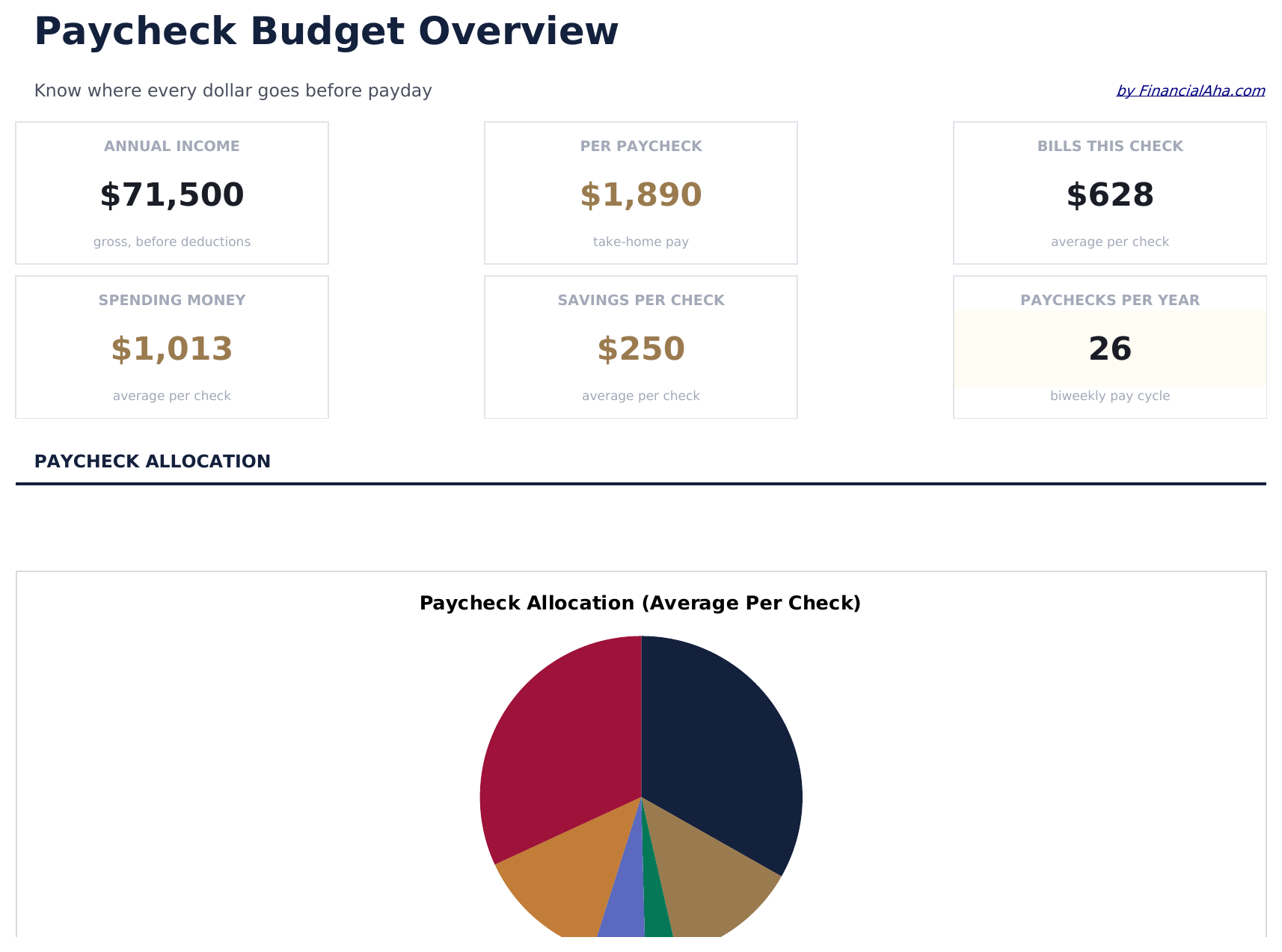
- Full-featured Paycheck Budget with dashboard and detailed analytics
- Pre-filled subcategories, sample scenarios, and helper calculations
- Larger data capacity for real-world usage
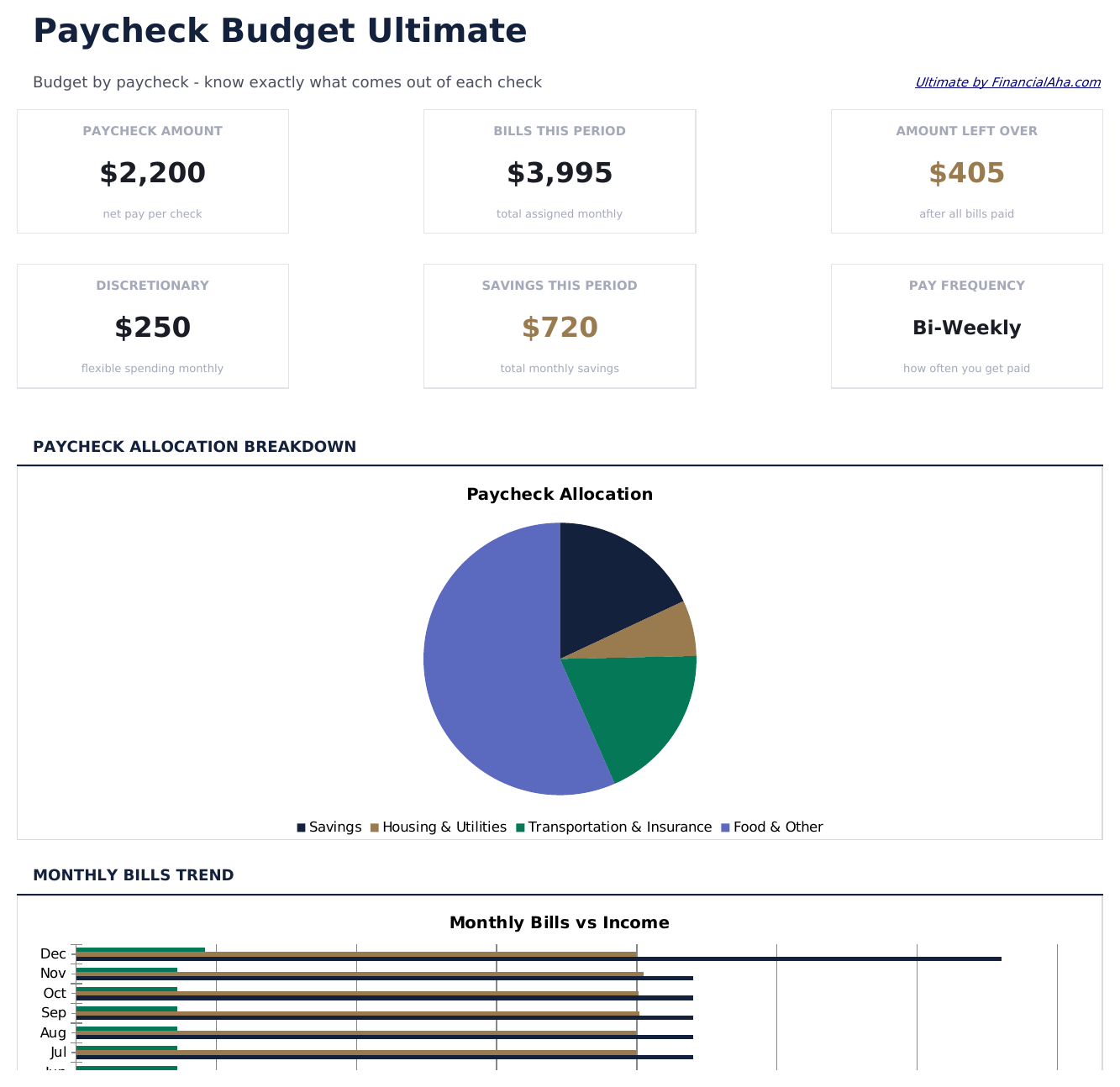
- Pay Setup sheet entering pay frequency, pay dates, and take-home amount per paycheck - supports weekly, bi-weekly, and semi-monthly pay schedules
- Paycheck 1 Budget sheet assigning expenses and savings to the first paycheck of the month with a remaining balance tracker
- Paycheck 2 Budget sheet assigning remaining expenses and savings to the second paycheck with final month balance
包含内容
- 仪表板展示薪资分配视图,显示每笔工资如何在各支出间分配
- 薪资到支出映射,将特定账单和费用分配到单个发薪周期
- 账单到期日对齐列,让您将付款日期与正确的发薪周期匹配
- 每笔工资的剩余余额在扣除所有分配支出后自动计算
- 支持双周、半月和月度发薪计划,带有颜色编码的输入字段
- 可在 Microsoft Excel、Google Sheets 和 LibreOffice Calc 中使用,无需任何设置
Free、Essentials 与 Ultimate - 有什么区别?
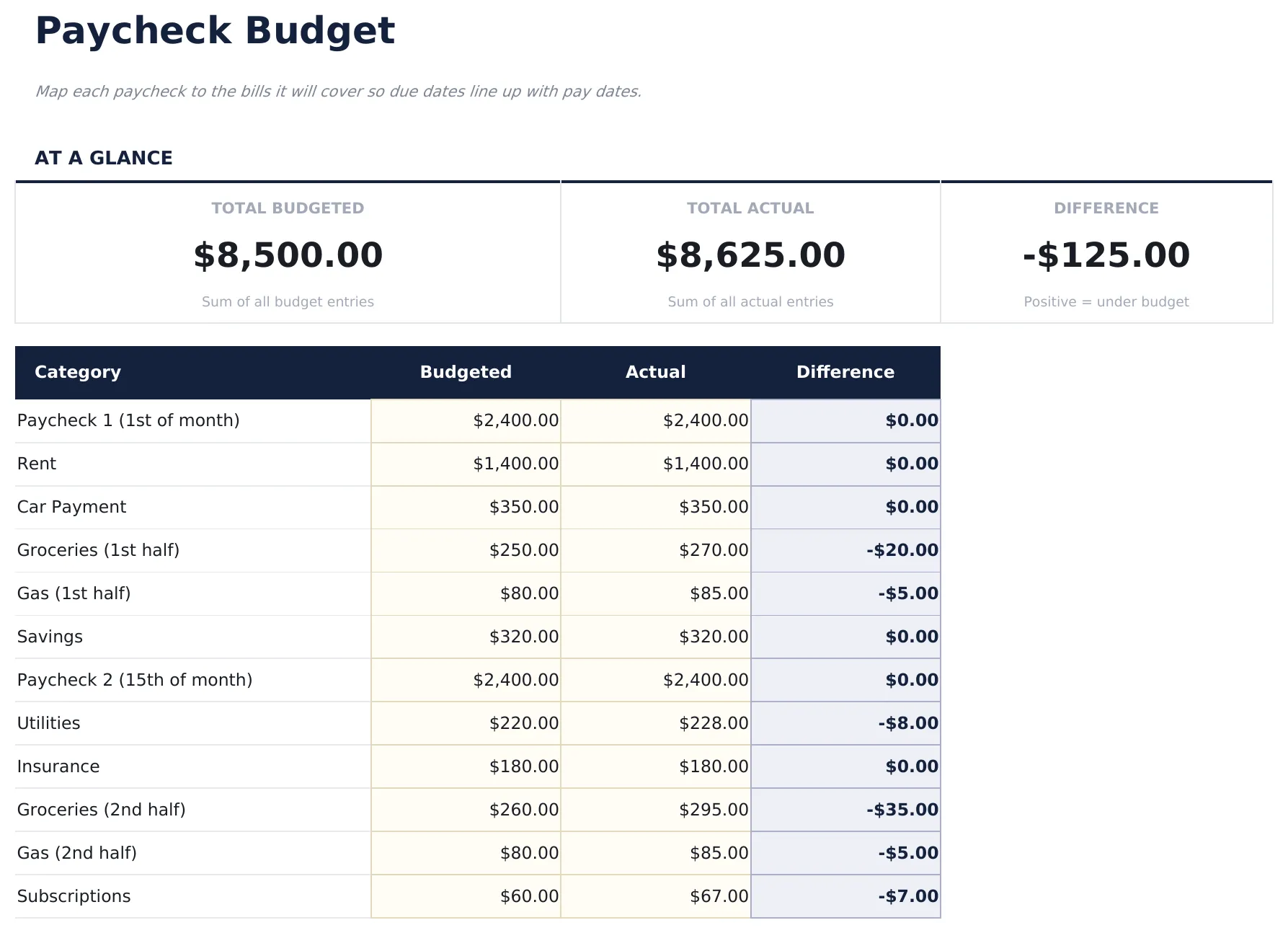
- Pre-filled budget worksheet titled "Paycheck Budget" with sample income and expense categories
- Automatic totals, running balance, and surplus/deficit calculation
- Color-coded input cells so you know exactly where to type your own numbers
- Step-by-step "How to Use" guide included in a second sheet
- Works in Microsoft Excel, Google Sheets, and LibreOffice Calc - no setup or sign-up
- 包含 Free 的全部
- Full-featured Paycheck Budget with dashboard and detailed analytics
- Pre-filled subcategories, sample scenarios, and helper calculations
- Larger data capacity for real-world usage
- $12 one-time purchase, lifetime access
- 包含 Essentials 的全部
- Pay Setup sheet entering pay frequency, pay dates, and take-home amount per paycheck - supports weekly, bi-weekly, and semi-monthly pay schedules
- Paycheck 1 Budget sheet assigning expenses and savings to the first paycheck of the month with a remaining balance tracker
- Paycheck 2 Budget sheet assigning remaining expenses and savings to the second paycheck with final month balance
- Monthly Overview consolidating both paychecks into a single monthly view - total income, total expenses, and net savings for the month
薪资预算 模板的工作原理
Map each paycheck to the bills it will cover so due dates line up with pay dates. Open the spreadsheet, enter your own numbers, and let the formulas do the math.
此模板何时有用
- You just started tracking spending and want a clear monthly snapshot.
- You want to see where your money actually goes compared to what you planned.
- Your expenses changed (new job, moved, new baby) and you need to re-baseline.
- You prefer a spreadsheet you control over a budgeting app.
充分利用的小贴士
- Keep the column labels simple - the formulas work best when categories are consistent month to month.
- Align bills to paychecks regularly - once a week is a good rhythm for most people.
需要避免的常见错误
- Forgetting to include savings as a category - treat savings like any other bill so it gets funded first.
- Using gross income instead of take-home. Budget with what actually lands in your account.
- Over-optimistic "variable" categories. Groceries and dining out almost always come in higher than memory suggests.
如何使用这个薪资预算模板
输入工资详情
添加每笔工资金额和发薪日期。模板支持双周、半月和月度发薪计划。
将账单分配到工资
将每笔账单或支出映射到将支付它的特定工资,将到期日与发薪日对齐。
检查每笔工资的剩余
每笔工资的剩余余额在扣除所有分配账单后自动更新,显示可自由支配的金额。
调整时间安排
如果某个期间负担过重,在工资之间转移支出。目标是在各发薪期间均衡分配义务。
由 Claude AI 构建,经我们精心打磨。
我们使用 Claude AI 在深入研究后起草每个模板。然后由团队接手,优化布局、全面测试每个公式、修复边界情况,并打磨设计,直到达到我们自己愿意使用的标准。AI 完成了 80% 的工作,最后 20% 靠的是人工判断。
Upgrade your spreadsheet
Here is how you unlock a better version.
- Full-featured Paycheck Budget with dashboard and detailed analytics
- Pre-filled subcategories, sample scenarios, and helper calculations
- Larger data capacity for real-world usage
- Pay Setup sheet entering pay frequency, pay dates, and take-home amount per paycheck - supports weekly, bi-weekly, and semi-monthly pay schedules
- Paycheck 1 Budget sheet assigning expenses and savings to the first paycheck of the month with a remaining balance tracker
- Paycheck 2 Budget sheet assigning remaining expenses and savings to the second paycheck with final month balance
常见问题
这个适用于双周发薪吗?
是的。模板支持双周、半月和月度发薪计划。输入每笔工资及其日期和分配到该期间的账单。
如何处理有额外工资的月份?
为额外的发薪期间添加新的工资条目。像其他工资一样为其分配支出或储蓄目标。
我可以将一笔账单分配到两笔工资吗?
模板将每笔账单分配到一笔工资。对于大额账单,有些人会从每笔工资中各存一半用于支付该账单。
如果账单在下次发薪前到期怎么办?
将该账单分配到上一笔工资,以便提前预留资金。到期日对齐列有助于识别时间冲突。
如何在 Google Sheets 中打开?
将 .xlsx 文件上传到 Google Drive,然后使用 Google Sheets 打开。所有公式和格式都会保留。
此模板使用什么许可证?
所有免费模板均采用 CC BY 4.0(知识共享署名)许可证发布。您可以自由使用、修改和分享,包括用于商业用途,只需注明来源为 FinancialAha.com。模板按原样提供,不构成财务建议。