Best Value Complete Financial Planning Bundle
✓ Financial Planning✓ Net Worth Tracker✓ Monthly Budgeting✓ Travel Budget Planner✓ Annual Budgeting Planner✓ Monthly Expense Tracker✓ Annual Tax Planner✓ Retirement Planning
View Bundle →

Instant digital delivery · Terms & Conditions apply

Ultimate Template - Excel & Google Sheets

Ultimate Emergency Fund Calculator Spreadsheet Template for Google Sheets & Excel

Twenty-five expense lines with monthly, annual and share-of-total figures, and six milestone tiers reporting progress, status and the months each is away at your current pace. The Ultimate Emergency Fund Calculator spreadsheet template runs a thirty-six month plan with a remaining-to-target column, sets a what-if grid across months and expense levels beside it, and notes what each tier covers rather than which to pick. Seven sheets. Google Sheets and Excel, one file.

See Preview

Instant digital delivery · Terms & Conditions apply

Emergency Fund Calculator Spreadsheet Template - Ultimate version for Google Sheets and Excel

What's Included

  • Expense lines with monthly, annual and share-of-total figures
  • Six milestone tiers with progress, status and months at your current pace
  • Notes describing what each tier covers rather than which to pick
  • A thirty-six month plan with a remaining-to-target column
  • A what-if grid for target size across months and expense levels
  • A second grid for months to funded across contributions and rates
  • Named emergencies modelled, with recovery time at your contribution
  • A currency dropdown that relabels the money columns across every sheet
  • Works in Microsoft Excel and Google Sheets with no setup required

The FinancialAha Ultimate Emergency Fund Calculator Spreadsheet Template is a six-sheet workbook for Google Sheets and Excel, with a How to Use guide on a seventh tab. It works as an Ultimate Emergency Fund Calculator Excel template and an Ultimate Emergency Fund Calculator Google Sheets template from the same download. Itemised expense lines, six milestone tiers, a thirty-six month plan, and a sheet that models what a real emergency would do to the fund. No macros, no VBA.

Inside the workbook

What's inside the FinancialAha Ultimate Emergency Fund Calculator spreadsheet template

The FinancialAha Ultimate Emergency Fund Calculator Spreadsheet Template runs on six working sheets, with the instructions on a tab of their own. It works in both Microsoft Excel and Google Sheets and here is what the Ultimate Emergency Fund Calculator spreadsheet holds.

  1. 01 of 06

    Expense Analysis

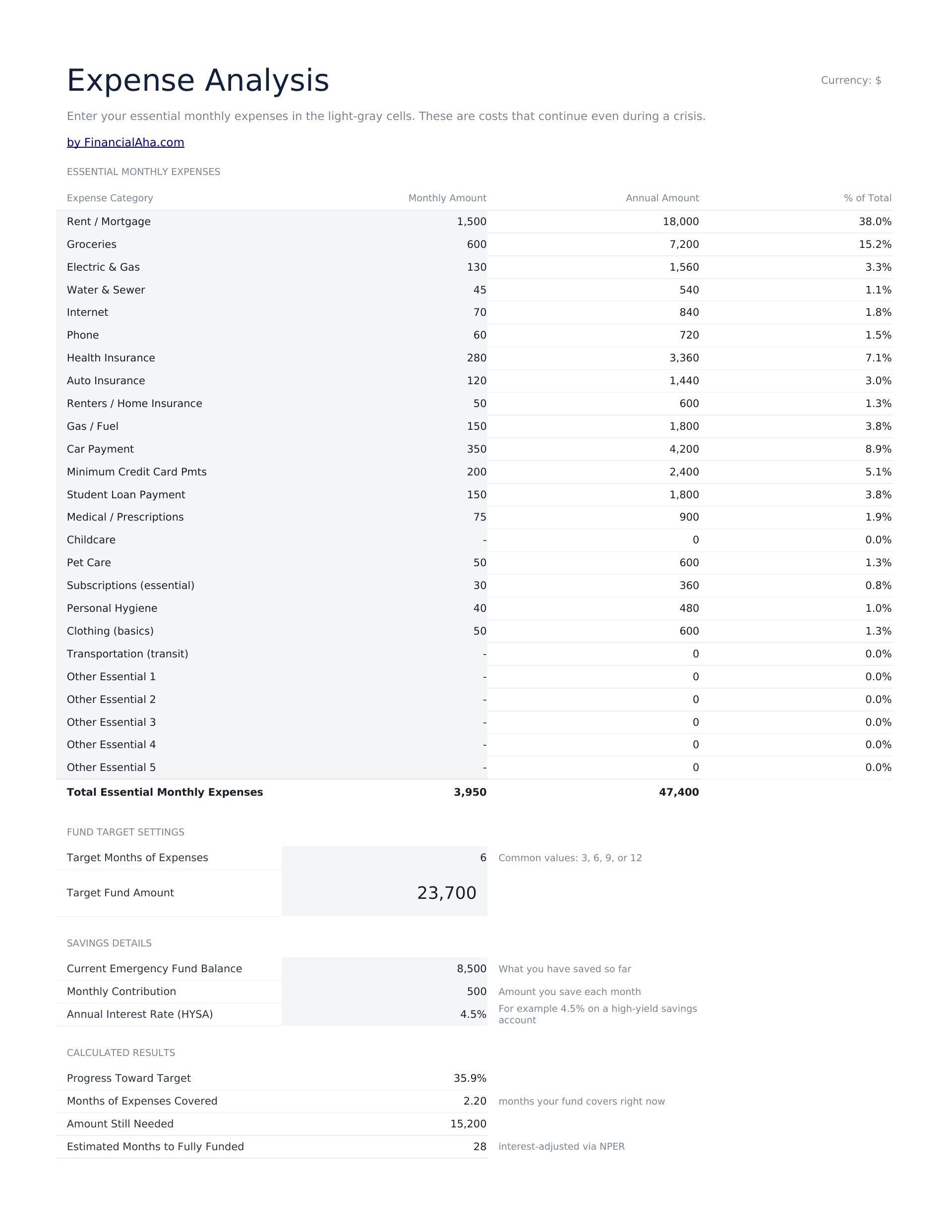
    A line per expense, each with a monthly figure, the annual equivalent and its share of the total. The share column is what this sheet adds over a plain list. A fund is sized on a monthly number, and the share column tells you which lines that number is really made of - which matters because the largest one is the line that would change first in a month with no income.

  2. 02 of 06

    Tiered Targets

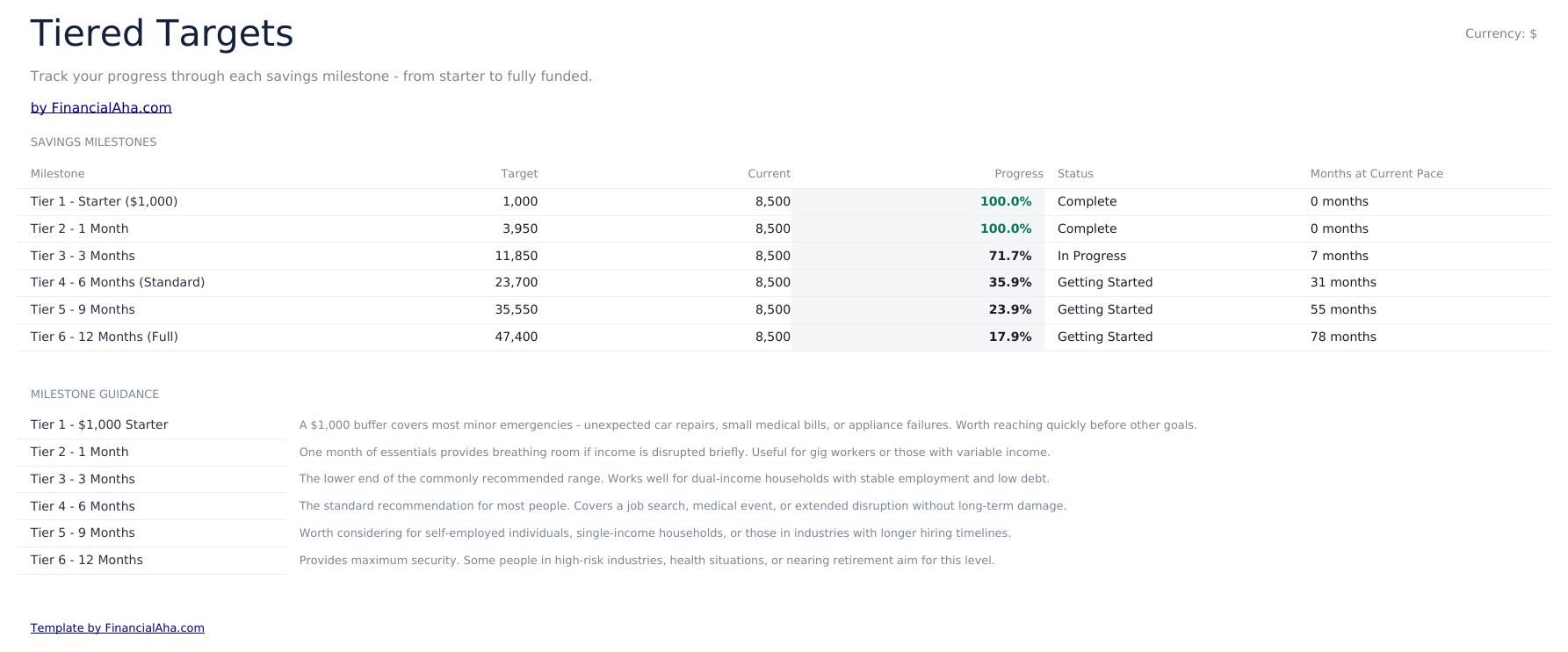
    Six milestones from a starter buffer up to a year of essentials, each with its target, what you have against it, the progress, a status and how many months it takes at your current pace. Tiers rather than one target is the right shape for something that gets built over years. The gap between nothing and six months of essentials is a distance that gets abandoned; the gap between nothing and the first tier is not. Beneath, a note on each tier describes what it covers - a car repair, a disrupted pay cycle, a job search - rather than which one to pick. Which tier is yours depends on how quickly your income could be replaced, and the file has no view on that.

  3. 03 of 06

    Fund Building Plan

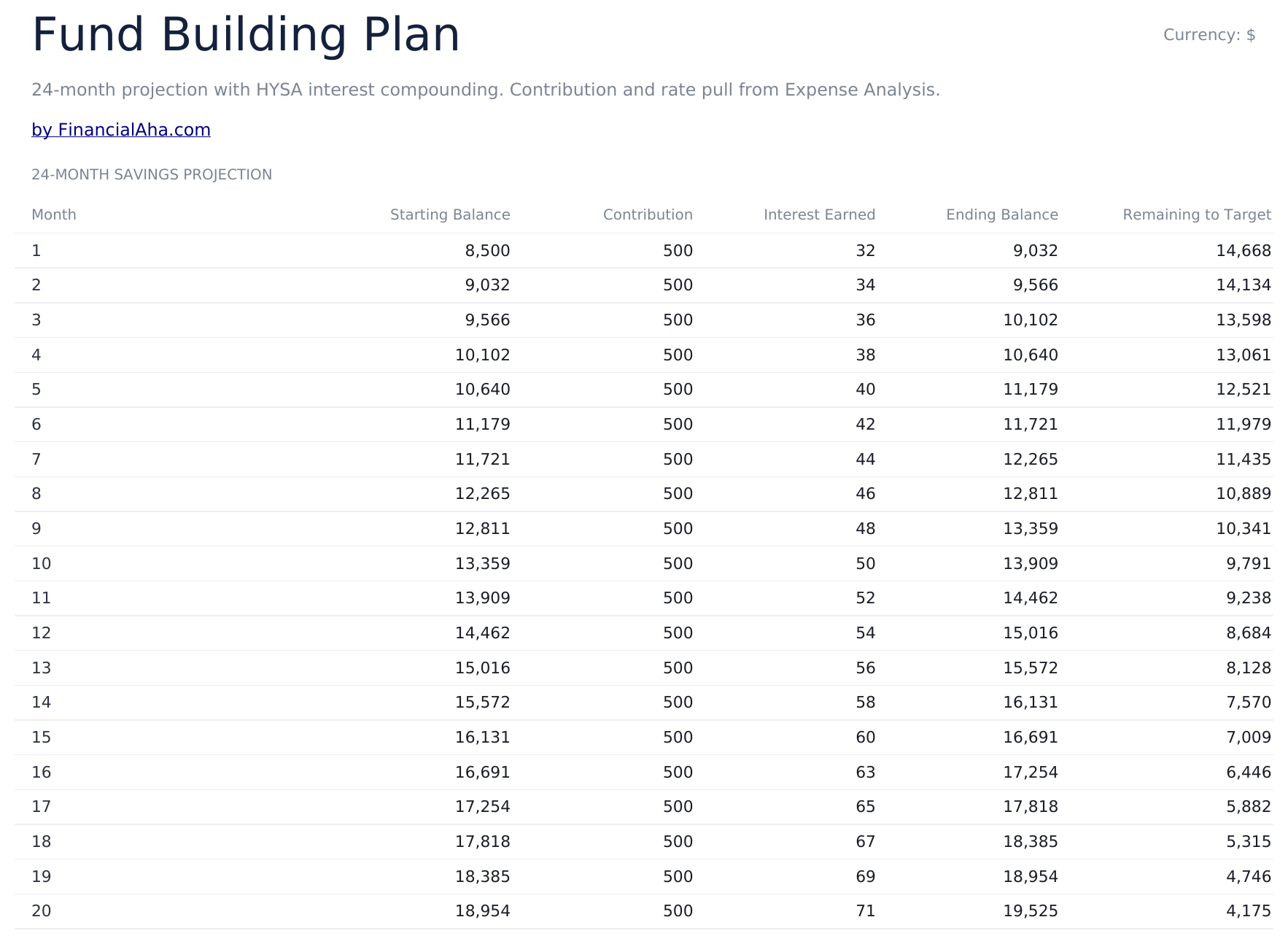
    Thirty-six months with the starting balance, the contribution, the interest and the ending balance - and a column for what is still left to reach the target, which is the one that tells you whether the plan finishes inside the horizon or runs past it.

  4. 04 of 06

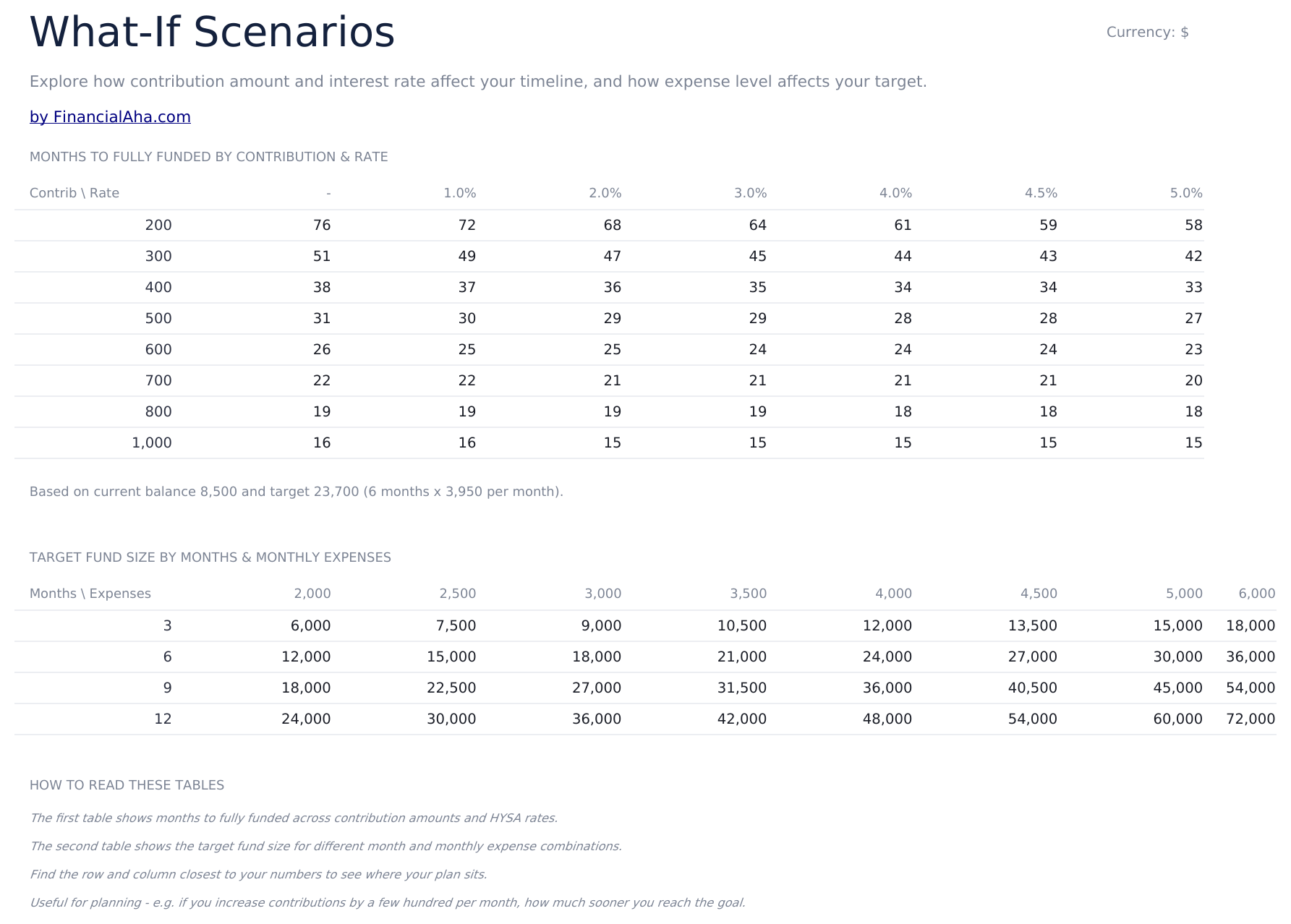
    What-If Scenarios

    Two grids, and every cell in both is a formula. The first reads months to fully funded across a range of contributions and interest rates, solving against the balance and target on your Expense Analysis sheet - so it describes your plan rather than a sample. Where a contribution never closes the gap at that rate, the cell shows a dash. The second reads the target fund size across a range of months and monthly expense levels, each cell its own row times its own column, so editing either axis moves the table. The second grid is the one that changes how people think about the target. A fund is sized on two numbers, and seeing the whole surface makes clear that trimming what counts as essential moves the target further than adding a month does.

  5. 05 of 06

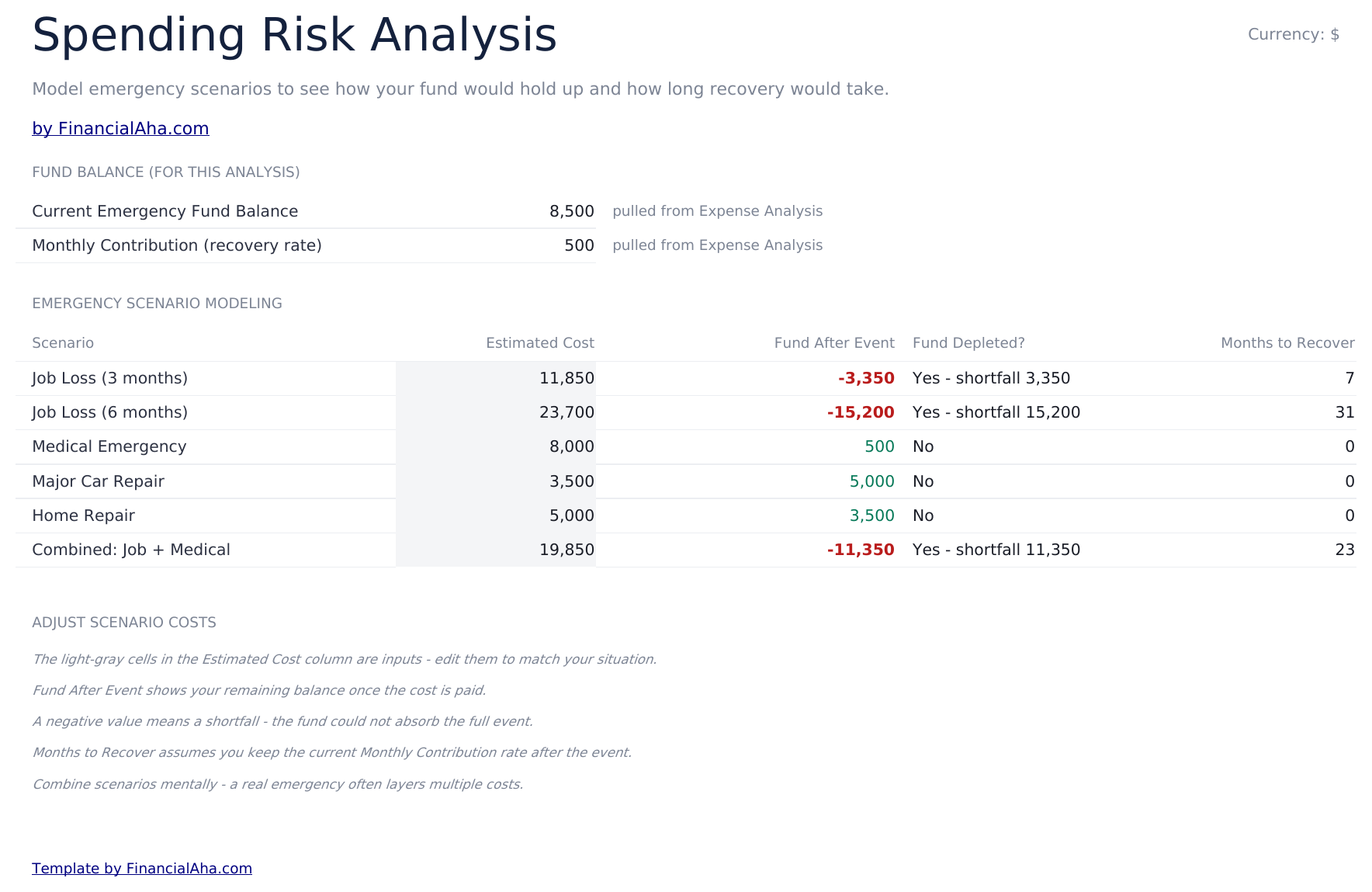
    Spending Risk Analysis

    Named emergencies with an estimated cost each, and for every one: what the fund is left holding, whether it is exhausted, and how long it takes to rebuild at the current contribution. This is the sheet that makes the whole file concrete. A target of six months of essentials is an abstraction; a car transmission at four thousand against a balance of eight is not, and the recovery column is the part that rarely gets worked out - that a single event can cost a year of contributions to undo.

  6. 06 of 06

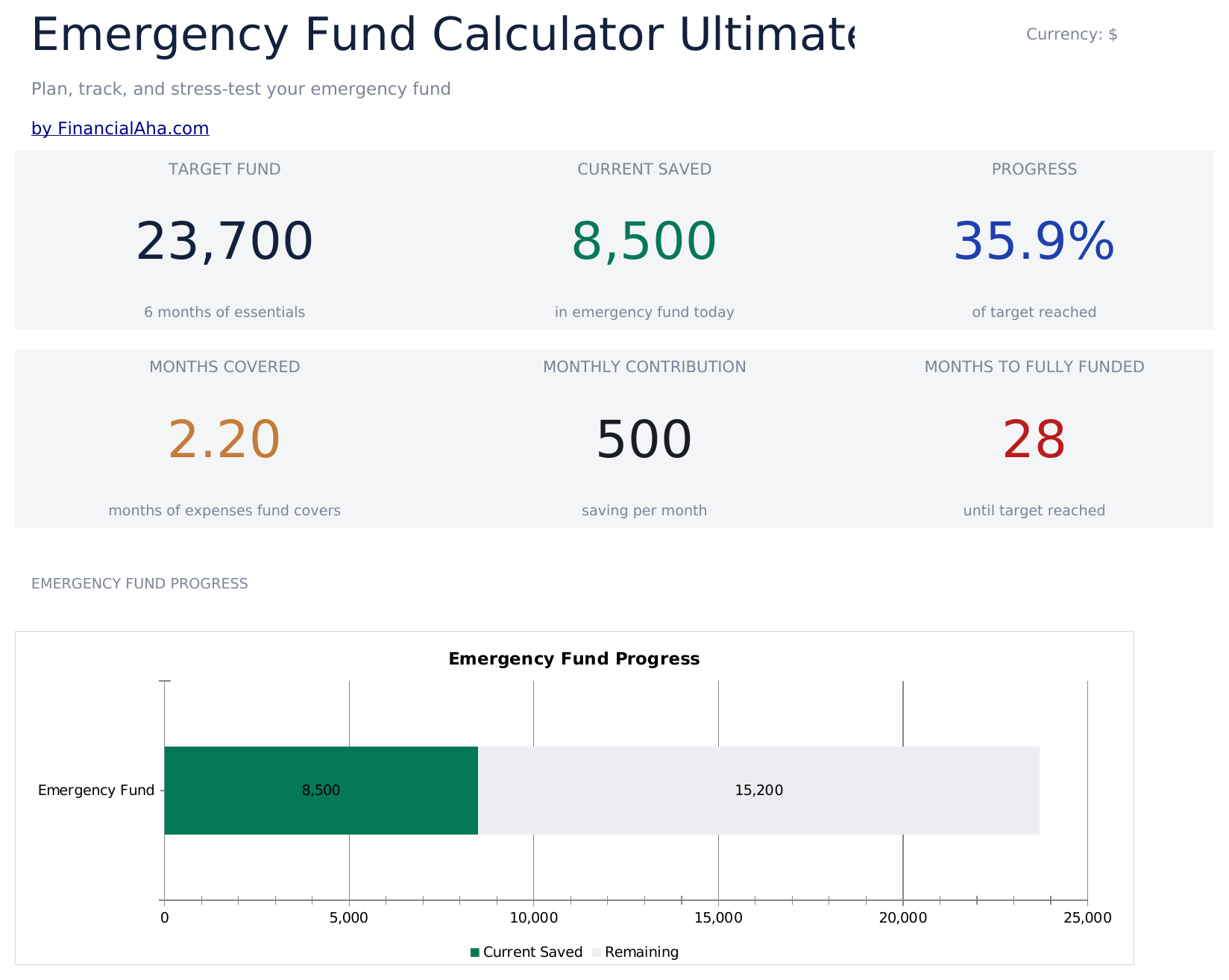
    Dashboard

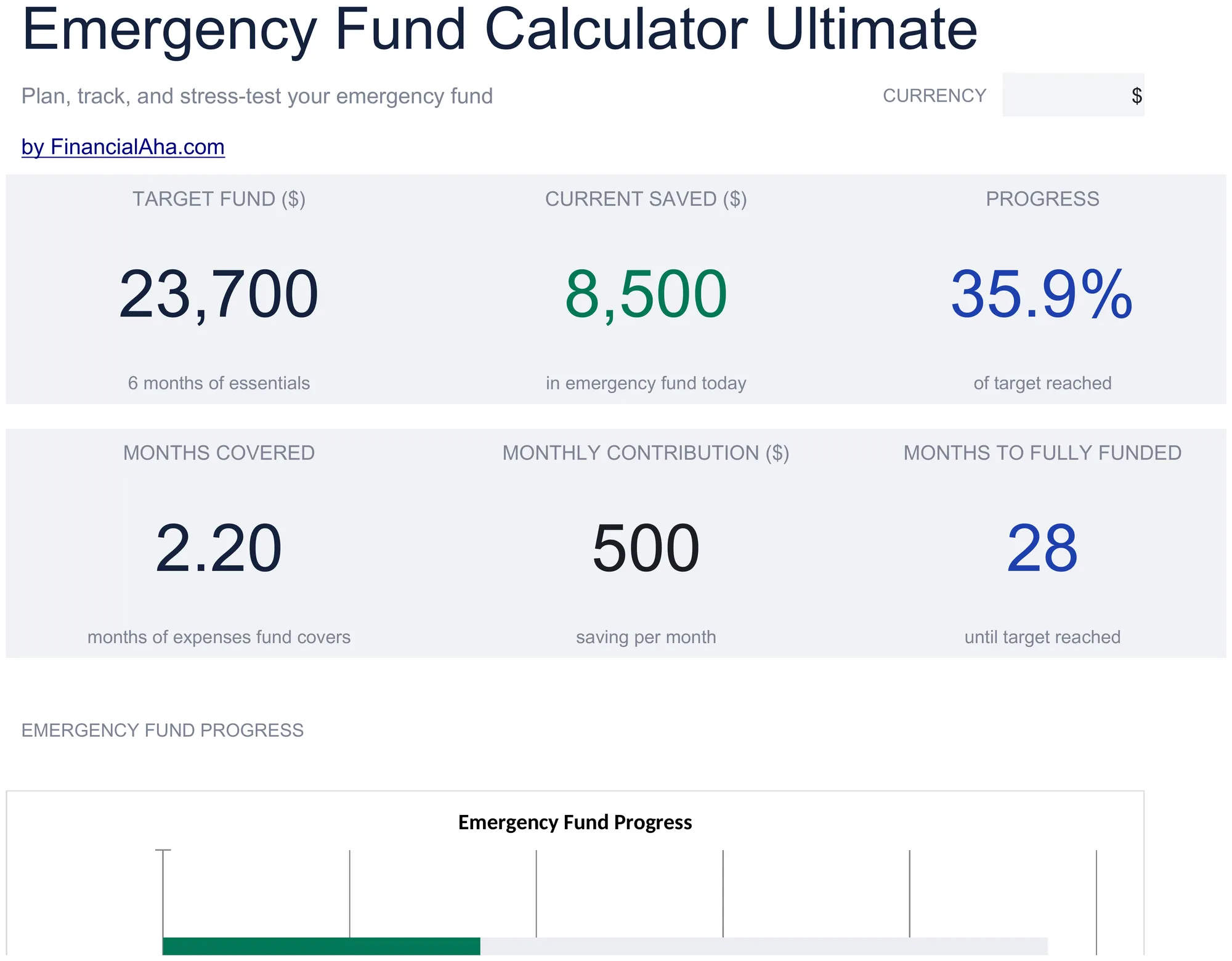
    Six figures. The target fund, what is saved and the share of the target reached on the top row; how many months of expenses the fund currently covers, what goes in each month, and how many months remain until it is fully funded on the second. Months covered and months remaining are the pair worth reading together - one says where the fund stands in the unit that matters, the other says how long the plan takes at the current rate. Two charts sit alongside.

  7. Included guide

    How to Use

    A step-by-step guide on its own tab, covering which sheet takes input, how the tiers and the plan read the expense analysis, and how to change the currency. Because it ships inside the file, the instructions travel with the template wherever it is opened.

Works in both Google Sheets and Excel

Ultimate Emergency Fund Calculator Spreadsheet template for Google Sheets

Upload the Ultimate Emergency Fund Calculator Spreadsheet Template to Drive, right-click it, and choose "Open with Google Sheets". This Ultimate Emergency Fund Calculator Google Sheets template needs no conversion step, the cross-sheet references resolve, and both charts come across intact.

Ultimate Emergency Fund Calculator Google Sheets template setup

A shared copy of the Ultimate Emergency Fund Calculator Google Sheets template suits a household, since the expense list and the scenario sheet are the two parts most worth agreeing on in writing.

Running the Ultimate Emergency Fund Calculator Google Sheets template

The Ultimate Emergency Fund Calculator Google Sheet is revisited when a cost changes or a milestone is reached rather than on a schedule.

Ultimate Emergency Fund Calculator Spreadsheet template for Excel

The Ultimate Emergency Fund Calculator spreadsheet Excel download is a plain .xlsx. Excel opens this Ultimate Emergency Fund Calculator Excel template directly, with no import step, and both charts are native Excel charts. There are no macros and no VBA in the file.

Ultimate Emergency Fund Calculator Excel template setup

The same Ultimate Emergency Fund Calculator Excel template opens in Excel on Windows, Excel on Mac, and Excel for the web. It is also the identical file you would upload to Drive, so there is no separate Ultimate Emergency Fund Calculator spreadsheet download to choose between.

Ultimate Emergency Fund Calculator spreadsheet template notes for Excel

The Ultimate Emergency Fund Calculator spreadsheet Excel file carries no macros and no VBA, so Excel opens it without a trust prompt.

Opening the Ultimate Emergency Fund Calculator spreadsheet Excel file

Nothing in the Ultimate Emergency Fund Calculator Excel template is version-specific, so this Ultimate Emergency Fund Calculator spreadsheet Excel workbook behaves identically in Excel on Windows, Excel on Mac, and older builds.

Spreadsheet template highlights

What the Ultimate Emergency Fund Calculator spreadsheet template tracks

The Expense Analysis sheet runs a line per expense:

Expense Category
the cost, and whether it would still be paid in a month with no income
Monthly Amount ($)
what it costs in a month
Annual Amount ($) auto
derived, twelve times the monthly figure
% of Total
that line's share of the monthly total

Compare builds

FinancialAha Emergency Fund Calculator spreadsheet template: Free, Essentials, and Ultimate compared

Feature Free View Spreadsheet Template Essentials View Spreadsheet Template Ultimate This page
Working sheets 1 3 6
Expenses entered One figure 10 lines 25 lines with shares
Interest on the balance Yes Yes
Month-by-month plan 36 months 36 months, with the gap to target
Milestone tiers Six, with progress and pace
What-if grids Two
Emergency scenarios modelled Yes
Charts 2 2

The Free Emergency Fund Calculator Spreadsheet Template takes a single monthly figure and returns the target and the timing. The Essentials Emergency Fund Calculator Spreadsheet Template builds the figure from itemised lines and runs thirty-six months with interest. The FinancialAha Ultimate Emergency Fund Calculator Spreadsheet Template adds a longer expense list with each line's share of the total, six milestone tiers with progress and pace, two what-if grids, and a sheet that models what specific emergencies would do to the fund and how long it would take to rebuild.

Good to know

Notes on working in the Ultimate Emergency Fund Calculator spreadsheet template

  • The share-of-total column tells you which lines the monthly number is really made of.
  • Tiers rather than one target is the right shape for something built over years - the first one is reachable in a way the last is not.
  • The tier notes describe what each level covers rather than which one to pick.
  • Both grids are formulas. The months grid solves against your own balance and target; the target-size grid moves when either axis is edited.
  • The recovery column on the scenario sheet is the figure that rarely gets worked out.
  • The currency dropdown on the dashboard relabels the money columns across every sheet. It changes the label only and does not convert the numbers.
  • The caption on the target tile names six months of essentials. The months figure behind it is yours to set, so the caption follows the sample rather than your target.

How to Use This Template

1

Analyse the expenses

Analyse the expenses, each with its share of the total.

2

Pick a tier

Six milestones, each with what it covers.

3

Run the plan

Thirty-six months to the target you chose.

4

Model an emergency

What it costs the fund, and the time to rebuild.

Stress-tested with AI.

Every template starts with deep research into how people actually track the topic. We design the layout, build the formulas, and polish the design until it feels like something we would use ourselves. Along the way, we use AI to stress-test the calculations: unusual inputs, edge cases, and formula behavior, checked until the numbers hold.

One-time purchase. No subscription. Works in Excel & Google Sheets.

Frequently Asked Questions

Is the FinancialAha Ultimate Emergency Fund Calculator Spreadsheet Template a Google Sheets template?

Yes. Upload the file to Drive and choose "Open with Google Sheets". The cross-sheet references in the Ultimate Emergency Fund Calculator Google Sheets template resolve on import and both charts come across intact.

Is the FinancialAha Ultimate Emergency Fund Calculator Spreadsheet Template an Excel template?

Yes. The download is a plain .xlsx, so the Ultimate Emergency Fund Calculator Excel template opens directly in Excel with no import step, and both charts are native Excel charts.

Will the FinancialAha Ultimate Emergency Fund Calculator spreadsheet Excel file open in older versions of Excel?

Yes. The Ultimate Emergency Fund Calculator spreadsheet Excel workbook ships as a plain .xlsx, so it opens identically in current Excel and in builds that predate dynamic arrays.

Why does the Ultimate Emergency Fund Calculator spreadsheet use six tiers instead of one target?

Because the gap between nothing and a year of essentials is a long way to look at in one step, and the gap between nothing and a starter buffer is not. Each tier has its own progress and its own pace figure.

Does the Ultimate Emergency Fund Calculator spreadsheet tell me which tier to aim for?

No. The notes describe what each tier covers - a car repair, a disrupted pay cycle, a job search - and which one is yours depends on how quickly your income could be replaced. The file takes no view on that.

What does the spending risk sheet do in the Ultimate Emergency Fund Calculator spreadsheet?

Takes named emergencies at an estimated cost each and reports what the fund is left holding, whether it is exhausted, and how long it takes to rebuild at your contribution - which is the figure a target on its own does not give you.

What is the share-of-total column for in the Ultimate Emergency Fund Calculator spreadsheet?

Seeing which lines the monthly number is really made of. The largest one is the line that carries the most weight in a month with no income.

How many expense lines does the FinancialAha Ultimate Emergency Fund Calculator spreadsheet hold?

Twenty-five. The Essentials build takes ten, and the Free build takes a single typed figure.

What do I get after buying the Ultimate Emergency Fund Calculator spreadsheet template?

You receive the Ultimate Emergency Fund Calculator spreadsheet template as an Excel file (.xlsx) that works in Microsoft Excel and Google Sheets. Download it immediately after purchase - no signup or account required.

Is there a free Ultimate Emergency Fund Calculator spreadsheet template?

Yes. A free version of the Ultimate Emergency Fund Calculator spreadsheet template is available with basic features. The Ultimate version adds advanced analysis, more capacity, and additional sheets.

What if the Ultimate Emergency Fund Calculator spreadsheet template does not work for me?

Contact us and we will help troubleshoot. The Ultimate Emergency Fund Calculator spreadsheet template works in Microsoft Excel and Google Sheets with no macros required.

Ultimate

Highlights:

Instant download after purchase
No macros or VBA required
All formulas auto-calculate
No subscription required
Works in
Excel Google Sheets

Looking for more Ultimate templates?

We offer Ultimate versions of our most popular spreadsheet templates with advanced features, more capacity, and deeper analysis.

Private & secure

Your financial data stays on your device. We never see it.

Learn more →

Need help?

Check our guides or reach out with questions.

View FAQ →