Beste waarde All-in-One Financieel Planningspakket
✓ Financiële Planning✓ Vermogenstracker✓ Maandelijks Budgetteren✓ Reisbudget Planner✓ Jaarlijkse Budgetplanner✓ Maandelijkse Uitgaventracker✓ Jaarlijkse Belastingplanner✓ Pensioenplanning
Bekijk bundel →
Ultimate Ultimate-versie beschikbaar - Noodfondscalculator Ultimate
Essentials-sjabloon - Excel & Google Sheets

Emergency Fund Calculator Essentials-sjabloon

Calculate a target emergency fund amount based on monthly expenses. Track contributions and see how long it takes to reach the goal at current savings rates.

Bekijk de Ultimate-versie →
Emergency Fund Calculator preview

Wat zit erin

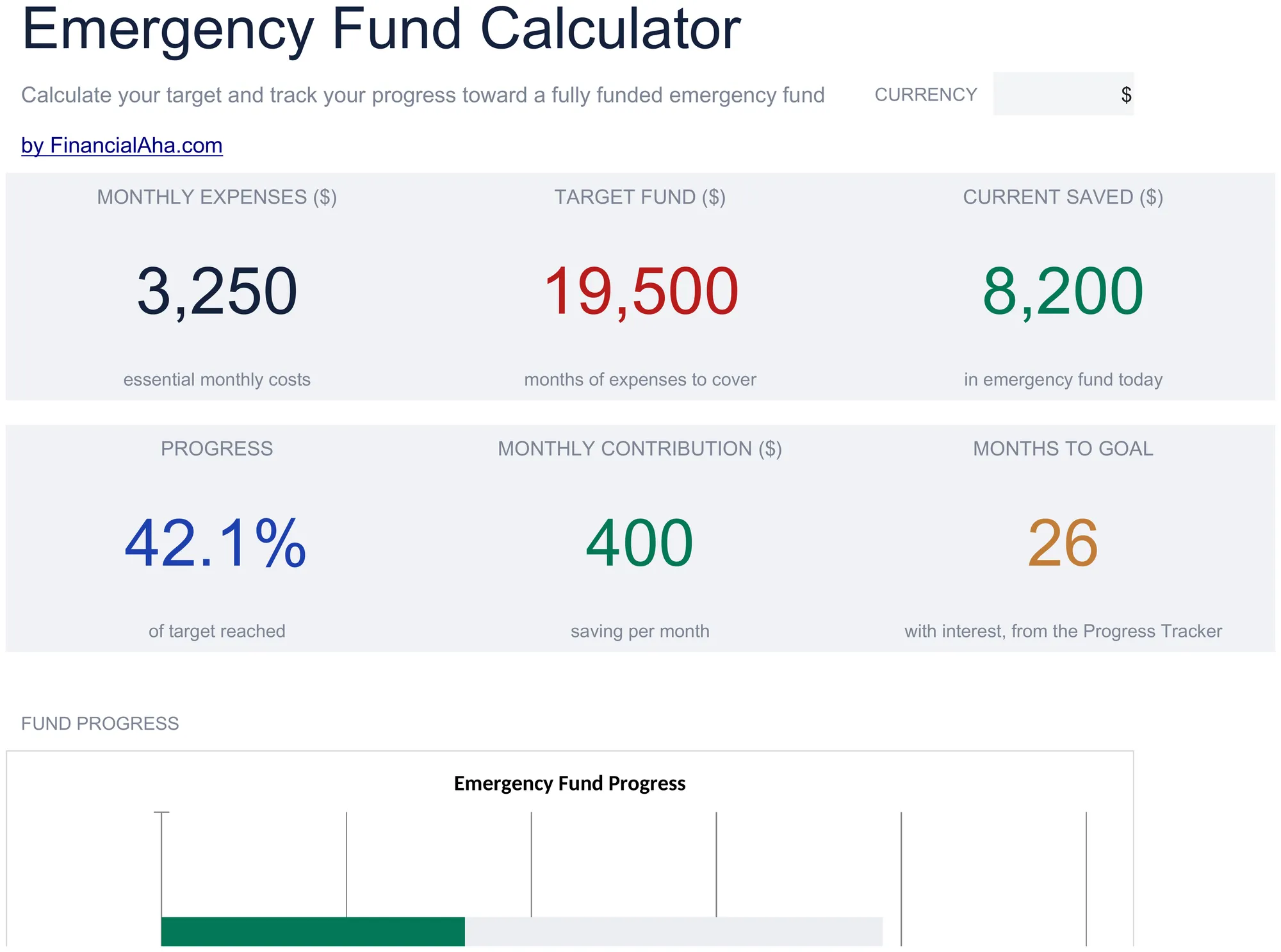
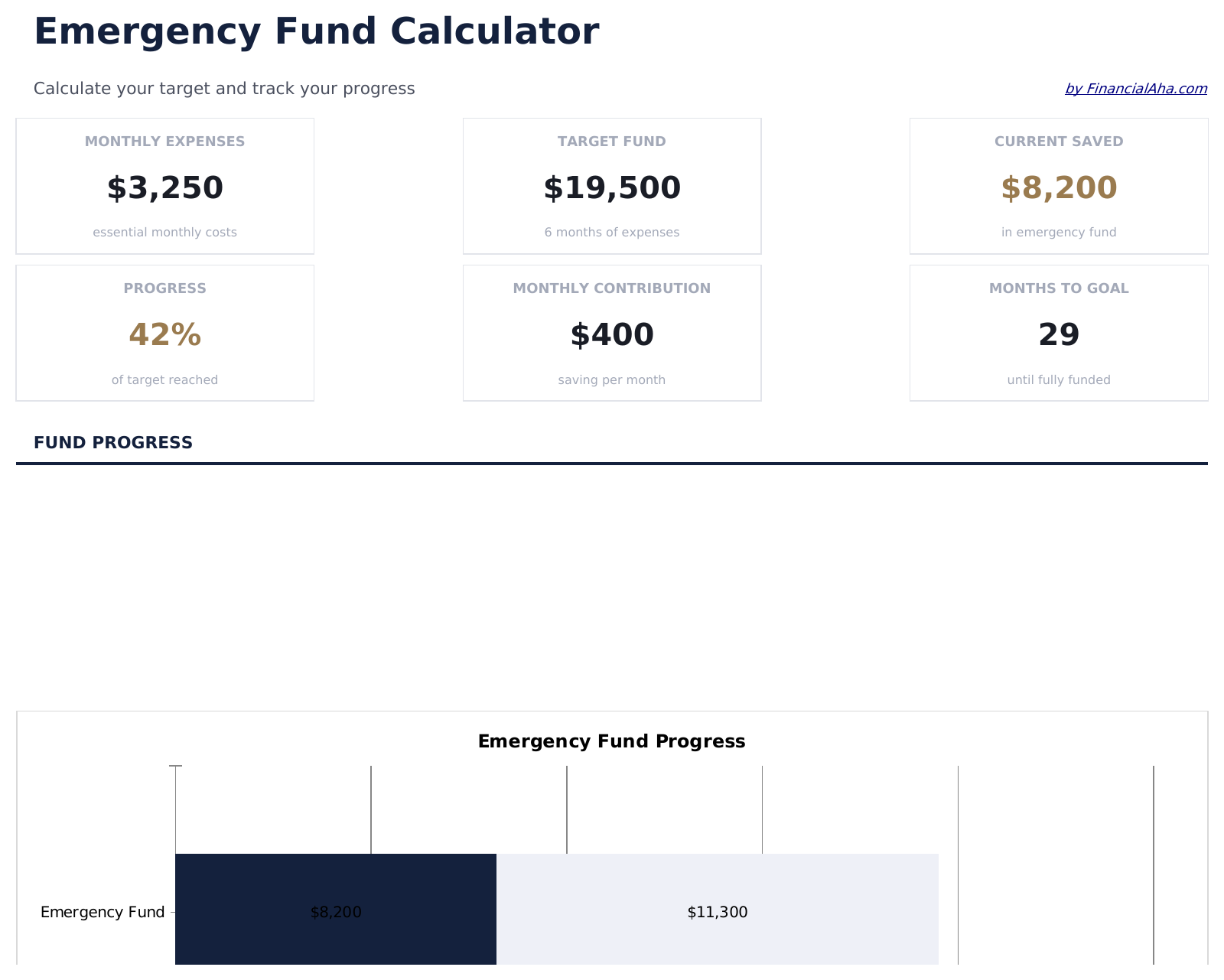
  • Dashboard with fund progress showing target amount, current balance, and percentage toward the goal
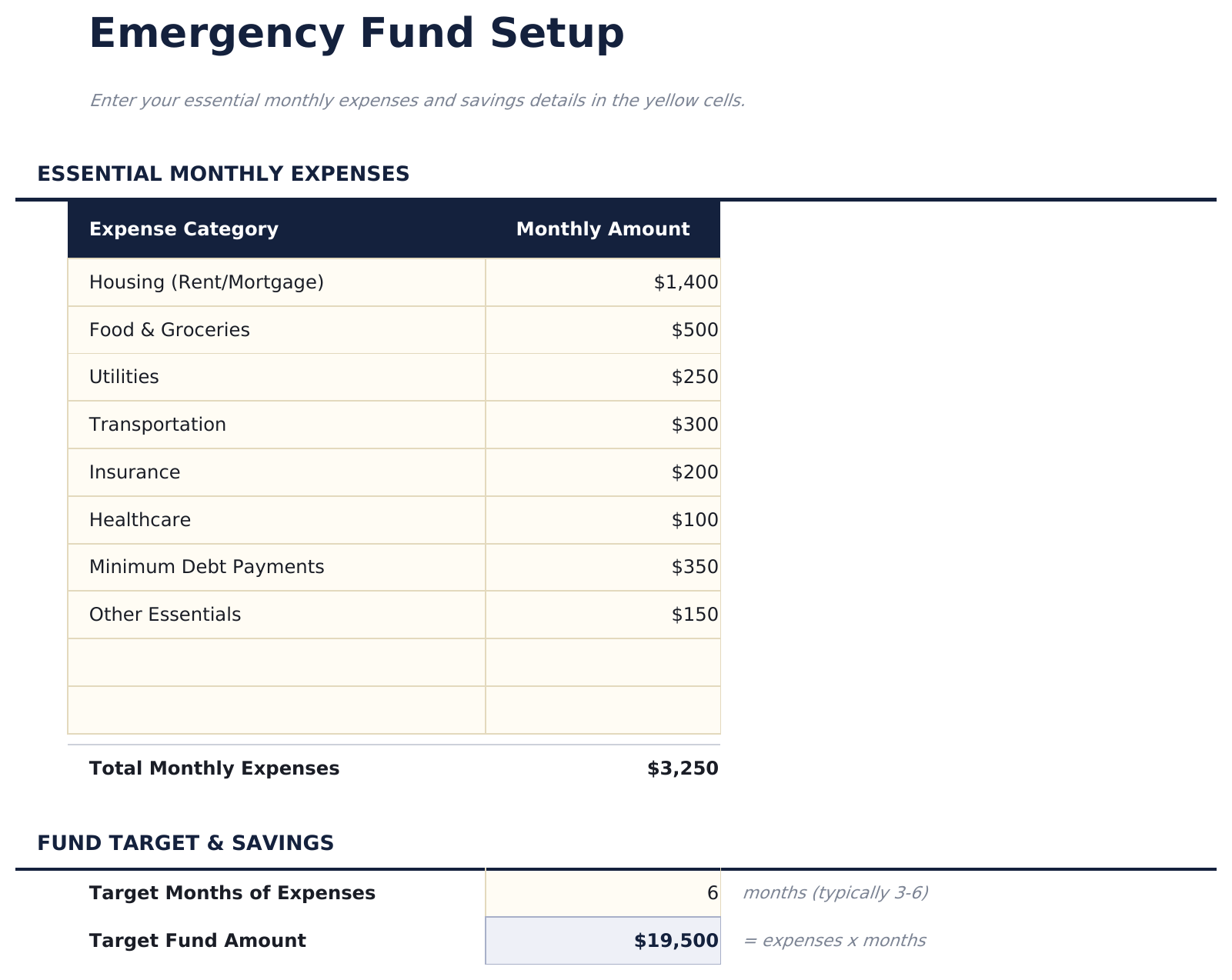
  • Emergency fund setup with monthly expense inputs for rent, food, insurance, utilities, and other essentials
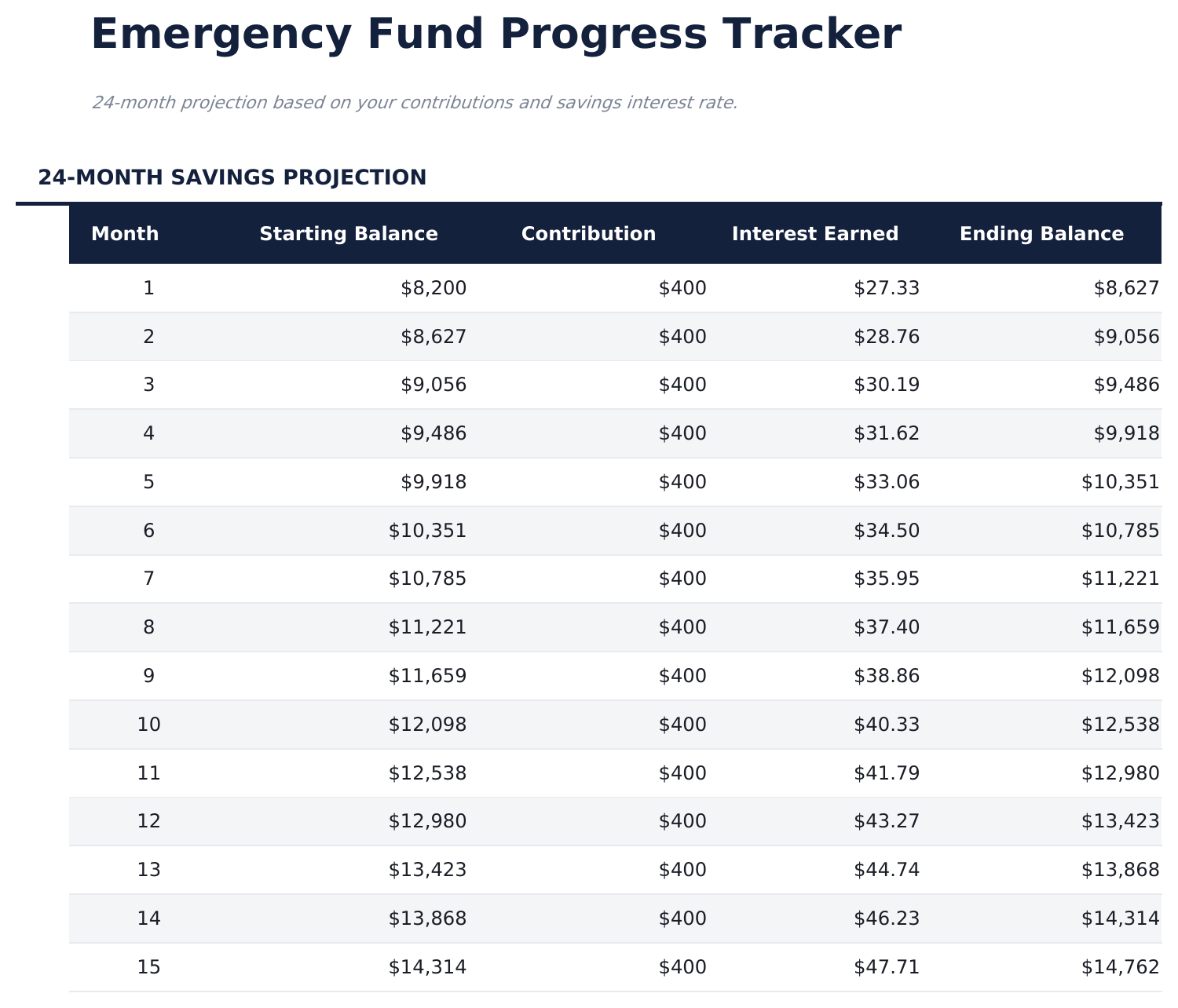
  • Monthly progress tracker with contribution logging and automatic balance updates after each entry
  • Target based on months of expenses - choose 3, 6, 9, or 12 months and the goal amount adjusts automatically
  • Contribution timeline projection estimating how many months until the fund reaches the target amount
  • Works in Microsoft Excel, Google Sheets, and LibreOffice Calc with no setup required
Ultimate Version Available

Need more from this template?

The Essentials version covers everyday tracking. Ultimate goes further with multi-entity support, scenario analysis, and ultimate-grade reporting.

Essentials - $12
  • Dashboard with fund progress showing target amount, current balance, and percentage toward the goal
  • Emergency fund setup with monthly expense inputs for rent, food, insurance, utilities, and other essentials
  • Monthly progress tracker with contribution logging and automatic balance updates after each entry
  • Target based on months of expenses - choose 3, 6, 9, or 12 months and the goal amount adjusts automatically
Ultimate - $19
  • Gedetailleerde uitgavenuitsplitsing met 15 categorieën waaronder wonen, eten, verzekeringen, nutsvoorzieningen, vervoer, medisch en schuldbetalingen
  • Dashboard met 6 KPI's: doelbedrag fonds, huidig saldo, percentage gefinancierd, maandelijkse bijdrage, maanden tot doel en bereikte dekkingsmaanden
  • Meerdere dekkingsscenario's die 3-maanden, 6-maanden, 9-maanden en 12-maanden doelen naast elkaar vergelijken
  • Maandelijkse bijdragetracker met lopend saldo en automatische voortgangspercentage-updates
  • Mijlpaalprojecties die 25%, 50%, 75% en 100% gefinancierde datums markeren op basis van het huidige bijdragetempo
See what's in the Ultimate version One-time purchase. No subscription.

Hoe gebruik je dit Emergency Fund Calculator sjabloon

1

Enter monthly expenses

List your essential monthly expenses - rent, food, insurance, utilities, and transportation. The template totals them automatically.

2

Choose months of coverage

Select how many months of expenses to save for - 3, 6, 9, or 12 months. The target amount adjusts based on your selection.

3

Log contributions

Record each deposit in the progress tracker. The running balance updates automatically as you build the fund.

4

Track progress

The dashboard shows current balance vs target amount and an estimate of when the fund will reach the goal at your current savings rate.

Gebouwd door Claude AI. Verfijnd door ons.

We gebruiken Claude AI om elk sjabloon te ontwerpen, na uitgebreid onderzoek. Daarna neemt ons team het over. We verfijnen de indeling, testen elke formule grondig, lossen randgevallen op en polijsten het ontwerp totdat het iets is dat we zelf ook echt zouden gebruiken. De AI brengt ons 80% van de weg. De laatste 20% is puur menselijk oordeel.

Bekijk de Ultimate-versie →

Veelgestelde vragen

How many months of expenses should I target?

Common targets range from 3 to 12 months. The template lets you choose the number that fits your situation. Six months is a frequently cited starting point.

What expenses should I include?

Include essential monthly costs you would still need to pay during an emergency - housing, food, insurance premiums, utilities, transportation, and minimum debt payments.

Can I change the target later?

Yes. Update the months-of-coverage selection or your monthly expense amounts at any time. The target recalculates automatically.

Does it show how long until I reach the goal?

Yes. The contribution timeline projection estimates the number of months remaining based on your average monthly contribution amount.

Hoe open ik dit in Google Sheets?

Upload het .xlsx-bestand naar Google Drive en open het vervolgens met Google Sheets. Alle formules en opmaak blijven behouden.

Meer Essentials-sjablonen voor Savings & Retirement

Op zoek naar premium spreadsheet-sjablonen?

Onze betaalde sjablonen bevatten geavanceerde dashboards met meerdere werkbladen, ingebouwde Excel-grafieken en doorlopende updates.

Privé & veilig

Uw financiële gegevens blijven op uw apparaat. Wij zien ze nooit.

Meer informatie →

Hulp nodig?

Bekijk onze handleidingen of neem contact op met vragen.

Bekijk FAQ →