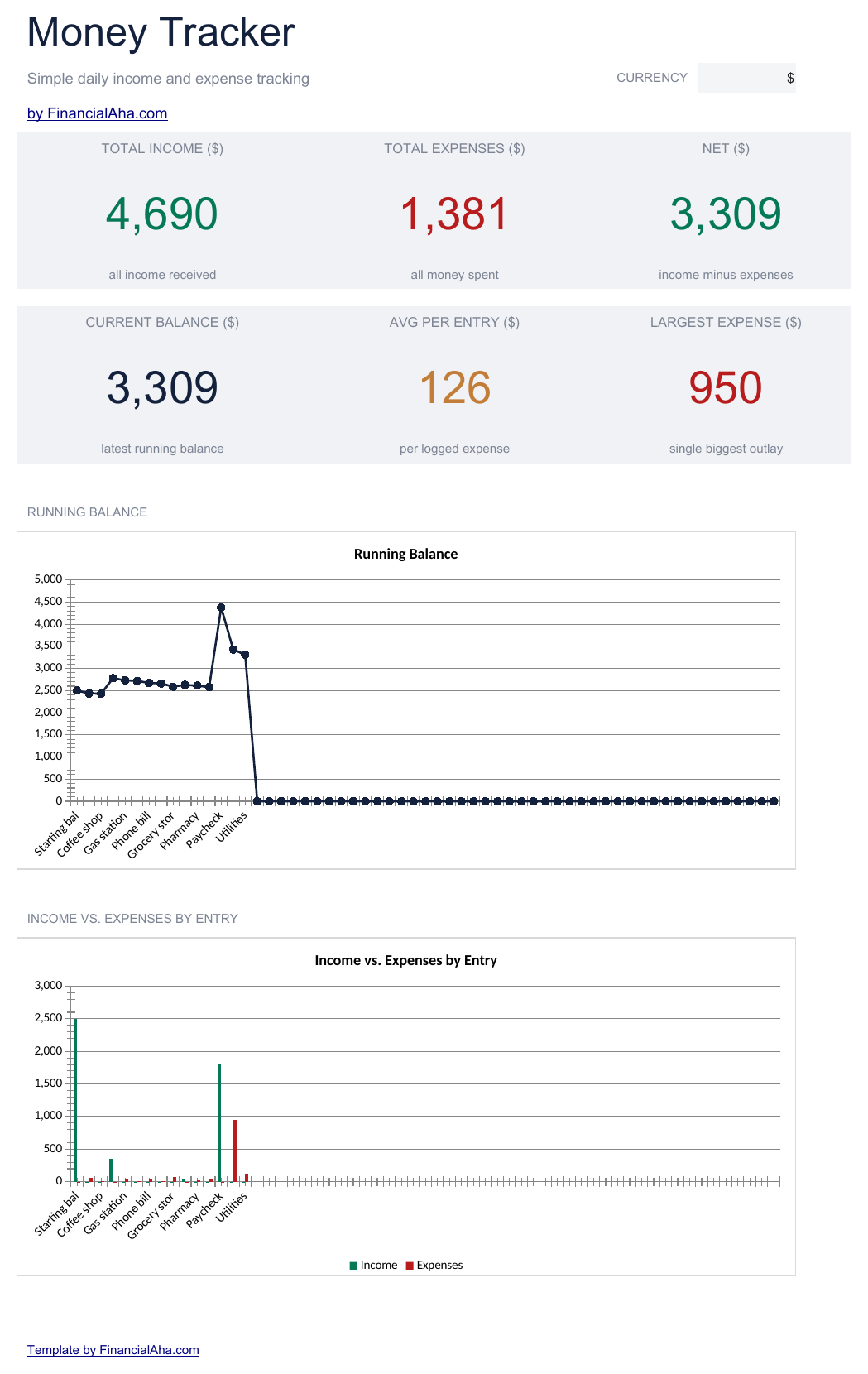
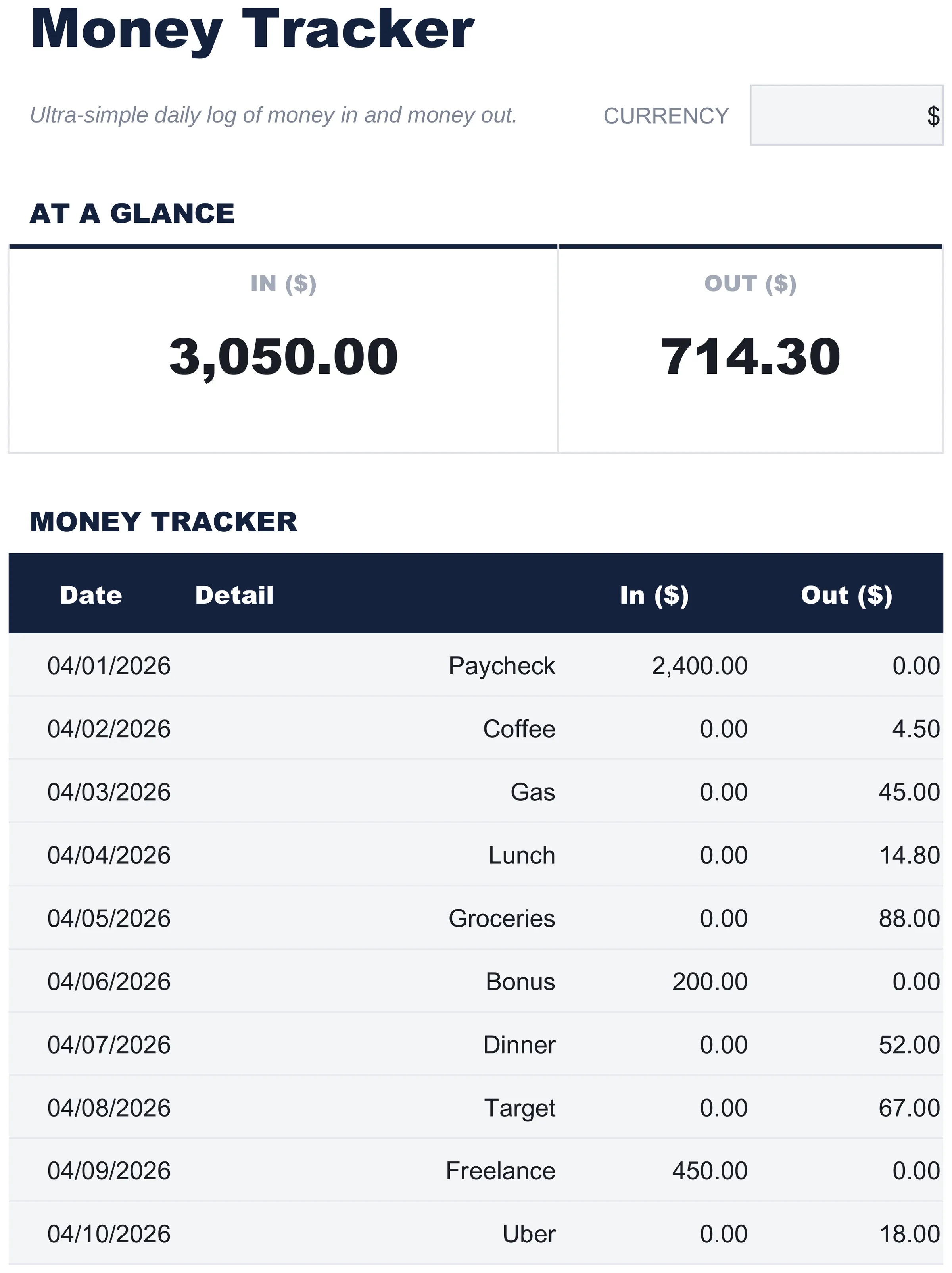
- Four columns: date, detail, money in, money out
- A row per movement on one working sheet
- Both money columns totalled at the foot
- A net row setting one against the other
- No category column, so an entry takes five seconds
Free Money Tracker Spreadsheet Template for Google Sheets & Excel
Four columns and nothing else: date, detail, money in, money out. No category column, so an entry takes five seconds. The Free Money Tracker spreadsheet template gives you 16 rows on one working sheet, totals both money columns at the foot, and sets one against the other on a net row underneath. How to Use sits on a second tab. Google Sheets or Excel, one file. No macros, no VBA.
Get More with the Essentials Money Tracker Spreadsheet Template
Essentials Money Tracker
- Everything in Free
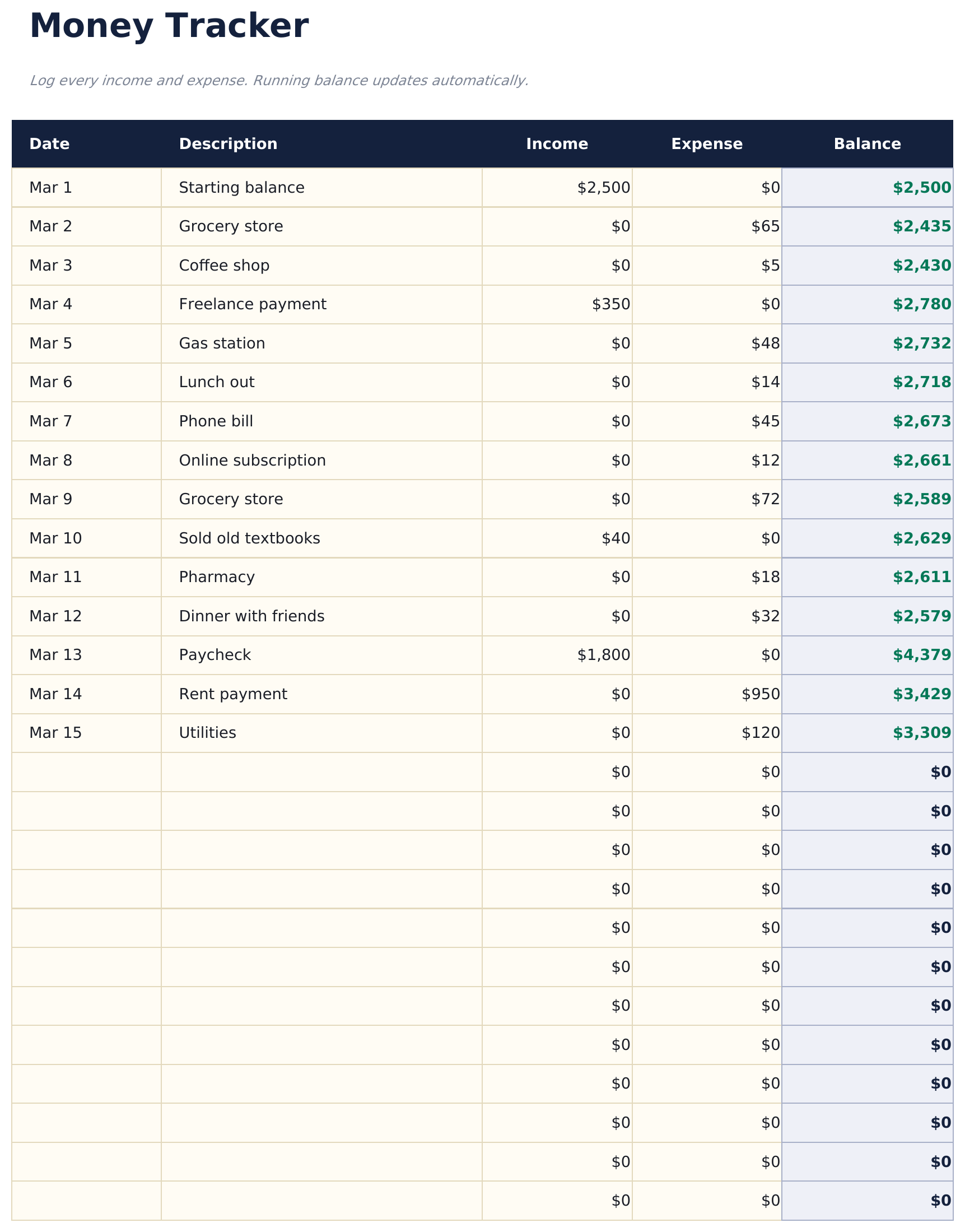
- A running log of every movement
- A running balance that carries forward on every row
- A starting balance row for the column to carry from
- Both money columns totalled, with the net stated
The FinancialAha Free Money Tracker Spreadsheet Template is a one-sheet workbook for Google Sheets and Excel, with a How to Use guide on a second tab. It works as a Free Money Tracker Excel template and a Free Money Tracker Google Sheets template from the same download. A date, what it was, and two columns - money in and money out - with both totalled and the net between them beneath. No macros, no VBA.
Inside the workbook
What's inside the FinancialAha Free Money Tracker spreadsheet template
The FinancialAha Free Money Tracker Spreadsheet Template runs on a single working sheet, with the instructions on a tab of their own. It works in both Microsoft Excel and Google Sheets and here is what the Free Money Tracker spreadsheet holds.
-
01 of 01
Money Log
Four columns: the date, a line of detail, what came in, and what went out. There is no category column, and that is the design rather than an omission. Categorising is the step that stops people logging - it turns a five-second entry into a decision - and a log nobody keeps is worth less than a rough one they do. What this sheet asks for is the two things you always know: when, and how much. Underneath, both columns total, and a net row sets one against the other. That row is the answer the log exists to give: more came in than went out, or it did not. The detail column takes whatever you would recognise the entry by later. It is not a category and nothing groups by it, so a shop name is as useful as a label.
-
Included guide
How to Use
A step-by-step guide on its own tab, covering how to replace the sample data, where the spare rows sit, how to add more, and how to change the currency. Because it ships inside the file, the instructions travel with the template wherever it is opened.
Works in both Google Sheets and Excel
Free Money Tracker Spreadsheet template for Google Sheets
Upload the Free Money Tracker Spreadsheet Template to Drive, right-click it, and choose "Open with Google Sheets". This Free Money Tracker Google Sheets template needs no conversion step and the totals recalculate exactly as they do in Excel.
Free Money Tracker Google Sheets template setup
A Google Sheets copy is the one that gets used, because it is the version you can open on a phone at the till rather than at a desk afterwards.
Running the Free Money Tracker Google Sheet
The Free Money Tracker Google Sheet is a log rather than a plan - a row per movement, entered when it happens. Nothing in it depends on how often you update it.
Also available as:
Free Money Tracker Spreadsheet template for Excel
The Free Money Tracker spreadsheet Excel download is a plain .xlsx. Excel opens this Free Money Tracker Excel template directly, with no import step and no compatibility prompt. There are no macros and no VBA in the file.
Free Money Tracker Excel template setup
The same Free Money Tracker Excel template opens in Excel on Windows, Excel on Mac, and Excel for the web. It is also the identical file you would upload to Drive, so there is no separate Free Money Tracker spreadsheet download to choose between.
Free Money Tracker spreadsheet Excel notes
The Free Money Tracker spreadsheet Excel file carries no macros and no VBA, so Excel opens it without a trust prompt.
Opening the Free Money Tracker spreadsheet Excel file
Nothing in the Free Money Tracker Excel template is version-specific, so this Free Money Tracker spreadsheet Excel workbook behaves identically in Excel on Windows, Excel on Mac, and older builds.
Also available as:
Spreadsheet template highlights
What the Free Money Tracker spreadsheet template tracks
A row per movement. This is what the Free Money Tracker Spreadsheet Template records for each:
- Date
- when the money moved
- Detail
- whatever you would recognise it by later; nothing groups on it
- In ($)
- money received
- Out ($)
- money spent
Compare builds
FinancialAha Money Tracker spreadsheet template: Free and Essentials compared
| Feature | Free This page | Essentials View Spreadsheet Template |
|---|---|---|
| Working sheets | 1 | 2 |
| Transaction rows | 16 | 60 |
| Running balance per row | – | Yes |
| Net for the period | A row at the foot | Yes, plus a current balance |
| Charts | – | 2 |
The FinancialAha Free Money Tracker Spreadsheet Template logs each movement on a row of its own with a net at the foot. The Essentials Money Tracker Spreadsheet Template for Google Sheets and Excel takes sixty, adds a running balance that updates on every row, reports the current balance and the totals on a dashboard, and carries two charts.
Compare the other builds: Essentials Money Tracker spreadsheet template .
Good to know
Notes on working in the Free Money Tracker spreadsheet template
- In and Out each total their own column, and a Net row underneath takes one from the other.
- There is no category column. That is the design rather than an omission.
- The detail column is for recognising a row later rather than for grouping.
- The totals read whatever rows are filled in, so nothing depends on how often it is updated.
- A running balance on every row starts at the Essentials build.
- The dropdown beside the title relabels the In and Out columns. It changes the label and nothing else.
How the Money Tracker template works
The Free Money Tracker Spreadsheet Template is a log rather than a plan. Four columns - the date, a line of detail, what came in and what went out - on a row each, with both money columns totalled and a net row setting one against the other. There is no category column by design: categorising is the step that stops people logging, and what this sheet asks for is the two things you always know.
When this template helps
You want to see where the money went without setting up a budget first.
You are tracking a short period - a trip, a month, a project.
You have tried category-based trackers and stopped filling them in.
You want something you can open on a phone and fill in at the till.
Tips to get the most out of it
- A row takes a date, a few words and one number, which is short enough to fill in standing up.
- The Net row under the totals is the answer the log exists to give.
- A shop name in the detail column serves as well as a tidy label, since nothing groups on it.
Common mistakes to avoid
- Entering an amount in the wrong column, which moves the net by twice the figure.
- Waiting until the end of the week, by which point the small entries are gone.
- Logging a transfer between your own accounts as both in and out on the same day, which nets to nothing but pads both totals.
- Treating the log as a budget. It records what happened; it plans nothing.
How to Use the Free Money Tracker Spreadsheet Template
Frequently Asked Questions
What is the difference between the free and Essentials Free Money Tracker spreadsheet template?
Free is a single-sheet starter template with sample data and a How to Use guide. Essentials ($19) is the fuller build, with more worked out for you rather than typed. This template has no Ultimate build. What each tier holds differs by template - the comparison table on every template page lists it exactly.
Which Free Money Tracker spreadsheet template should I download?
Essentials is the fuller build of this template for ongoing use, and the comparison table on this page lists exactly what it adds. The Free version is a good fit for one-off planning or trying out the layout.
Can I upgrade the Free Money Tracker spreadsheet template later?
Yes. Essentials is a one-time $19 purchase with no subscription. What it adds depends on the template: some builds gain capacity and a dashboard, others richer detail in the same layout. The comparison table on this page lists the differences exactly.
Is the FinancialAha Free Money Tracker Spreadsheet Template a Google Sheets template?
Yes. Upload the file to Drive and choose "Open with Google Sheets". Nothing needs rewriting in the Free Money Tracker Google Sheets template, and the totals recalculate exactly as they do in Excel.
Is the FinancialAha Free Money Tracker Spreadsheet Template an Excel template?
Yes. The download is a plain .xlsx, so the Free Money Tracker Excel template opens directly in Excel with no import step. There are no macros and no VBA in the file.
Will the FinancialAha Free Money Tracker spreadsheet Excel file open in older versions of Excel?
Yes. The Free Money Tracker spreadsheet Excel workbook ships as a plain .xlsx, so it opens identically in current Excel and in builds that predate dynamic arrays.
Why is there no category column in the Free Money Tracker spreadsheet?
Because categorising is the step that stops people logging - it turns a five-second entry into a decision. This sheet asks for the two things you always know: when, and how much.
What does the net row show in the Free Money Tracker spreadsheet?
Money in less money out, for everything logged. It is the answer the log exists to give.
Is there a running balance in the Free Money Tracker spreadsheet?
Not on this build. A balance that carries forward on every row is on the Essentials build.
What goes in the detail column of the Free Money Tracker spreadsheet template?
Whatever you would recognise the entry by later. Nothing groups on it, so a shop name works as well as a label.
How many rows does the FinancialAha Free Money Tracker spreadsheet hold?
Sixteen, with twelve filled in the sample. The Essentials build takes sixty, which is roughly two months of daily entries.
How do I open the Free Money Tracker spreadsheet template in Google Sheets?
Upload the .xlsx file to Google Drive, then open it with Google Sheets. All formulas and formatting will be preserved.
Can I use the Free Money Tracker spreadsheet template for commercial work?
All free templates are released under CC BY 4.0 (Creative Commons Attribution). You can use, modify, and share them freely - including for commercial purposes - as long as you credit FinancialAha.com. They are provided as-is and do not constitute financial advice.
Get every Ultimate template instead
All 58 Ultimate templates in one purchase for $299 - $1,682 value, you keep $1,383.