
Free tools handle basic tracking. Paid tools, typically $8 to $15 a month, add bank syncing, scenario modeling, and progress dashboards. Here is where that cost pays off, who benefits most, and where a one-time template sits between the two.
Free financial tools work for a lot of people. A basic spreadsheet or free budgeting app covers the fundamentals. But there’s a clear gap between what free tools do and what paid ones offer - and for some situations, that gap matters.
Here’s a concrete look at what you’re actually paying for.
Free vs. paid: What’s the real difference?
| Feature | Free tools | Paid tools |
|---|---|---|
| Basic expense tracking | Yes | Yes |
| Bank syncing | Rare | Common |
| Automatic categorization | Basic or none | Detailed, customizable |
| Financial projections | Minimal | Multi-scenario modeling |
| Goal tracking with timelines | Limited | Detailed with milestones |
| Investment analysis | Balance only | Performance, allocation, rebalancing |
| Tax optimization | No | Some tools include it |
| Customer support | Community forums | Direct support |
The pattern: free tools handle “what happened.” Paid tools help with “what happens next.”
Where paid tools earn their cost
Time savings
Manual data entry adds up. A paid tool that syncs bank accounts and auto-categorizes transactions can save 2-4 hours per month compared to manual spreadsheet tracking. Over a year, that’s a full work week returned.
For people who’ve stopped tracking their finances because it takes too long, automation alone can justify the cost.
Projections and scenario modeling
This is the biggest gap. Free tools rarely offer financial projections. Paid tools let you model questions like:
- What if I retire at 60 instead of 65?
- How does paying off my mortgage early affect my long-term net worth?
- What contribution level gets me to my savings goal by a specific date?
These aren’t hypothetical exercises. They’re how people make actual decisions about careers, housing, and retirement timing.
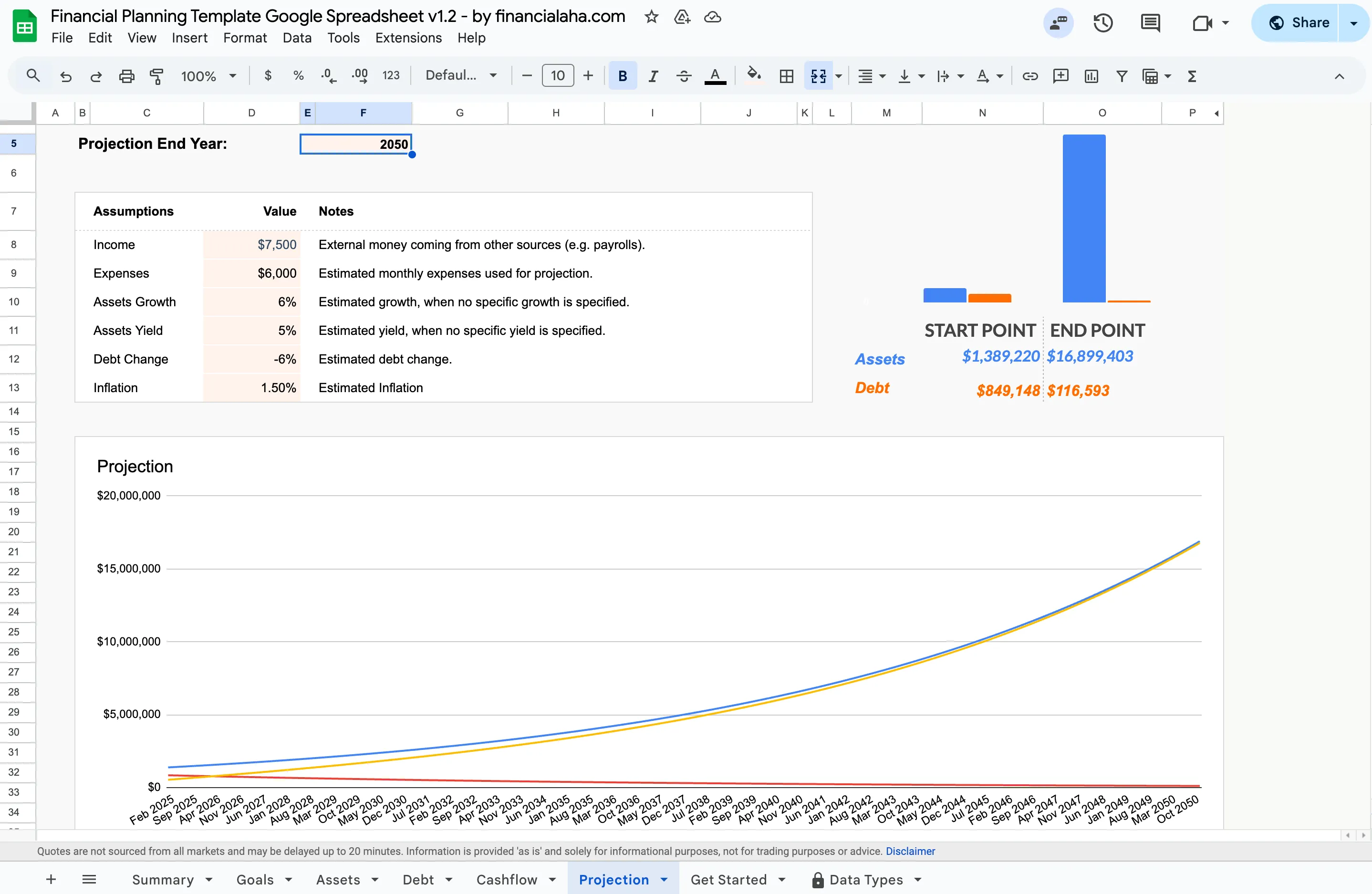
The Financial Planning Template (Premium tier) projects assets, debt, and net worth forward from your own assumptions, then charts the result out to a chosen end year.
Spreadsheet templates like the Financial Planning Template offer projection capabilities without an ongoing subscription, a middle ground between free calculators and full-featured apps. If you are still weighing the two approaches, our spreadsheet or app comparison walks through the trade-offs in detail.
Progress visibility
Seeing actual progress toward a specific goal, such as an emergency fund at 60% or debt payoff on track for March, creates accountability that vague awareness doesn’t. Paid tools typically include dashboards and milestone tracking that make this visual and automatic.
Security
When consolidating multiple financial accounts in one place, security features matter. Paid tools generally offer bank-level encryption, two-factor authentication, and fraud alerts. Free tools vary widely here.
Collaboration
For couples or families managing money together, paid tools often include shared access, joint budgets, and collaborative goal tracking. Free tools rarely handle multi-user scenarios well. Setting up a shared Google Sheet works, but it lacks the permissions and notifications that dedicated tools provide.
Who benefits most from paid tools?
| Situation | Free tool sufficient? | Paid tool adds value? |
|---|---|---|
| Single income, few accounts | Usually | Minimal |
| Multiple bank/investment accounts | Sometimes | Yes - consolidation saves time |
| Couple managing shared finances | Rarely | Yes - collaboration features |
| Self-employed or variable income | Rarely | Yes - projections and tax features |
| Planning for retirement | Depends | Yes - scenario modeling |
| Just starting to track spending | Yes | Not yet |
The cost math
Most paid financial tools cost $8-$15/month. That’s $96-$180 per year. YNAB, for instance, lists $14.99 a month or $109 billed annually, and Monarch lists $14.99 a month or $99.99 a year.
Consider what that buys:
- One avoided late fee: $25-$50 (many tools include bill reminders). The CFPB put the typical credit card late fee at about $32.
- One avoided overdraft: $35 (balance alerts catch these), which matches the median overdraft fee the CFPB found at large banks.
- Better investment decisions: Variable, but even a 0.1% improvement on a $100,000 portfolio is $100/year
- Time saved: 30-50 hours/year of manual tracking
For people with straightforward finances, meaning a single income, few accounts, and no investments, free tools may genuinely be enough. The value of paid tools scales with financial complexity.
The middle ground: One-time purchase templates
Not everyone wants a subscription. Spreadsheet templates from FinancialAha offer structured financial tracking with projections and goal planning - without recurring fees. You get more than a blank spreadsheet but keep the control and privacy of working in Google Sheets.
The Retirement Financial Planning Spreadsheet handles scenario modeling for retirement. The Monthly Budgeting Template covers day-to-day tracking. Both are one-time purchases.
Whether a paid tool makes sense comes down to financial complexity and how much time you’re willing to spend on manual tracking. For basic expense logging, free works fine. For projections, goal tracking, and multi-account management, a paid app or a well-designed template tends to pay for itself.
If projections are the feature pulling you toward a subscription, the Financial Planning Template is the shortest path to modeling them yourself: open it, set your assumptions, and read the chart, all for a one-time price.
Related
- Financial Planning Template - projections, goals, and net worth in Google Sheets, one-time purchase.
- Financial planning software or a spreadsheet? - how the two approaches compare on control, cost, and privacy.
- The best financial planning software in 2026 - where paid apps and templates each fit.
Frequently asked questions
Do I need a paid app if I already track spending in a spreadsheet?
Not for tracking itself. A spreadsheet already records what happened. The gap paid tools fill is forward-looking work, such as bank syncing, multi-scenario projections, and shared dashboards. A structured template with a projection tab covers much of that middle ground without a subscription.
How much do paid financial planning apps cost?
Most full-featured apps run about $8 to $15 a month. YNAB, for example, lists $14.99 a month or $109 billed annually, and Monarch lists $14.99 a month or $99.99 a year. That works out to roughly $96 to $180 a year, so the value scales with how much complexity you are managing.
Is a free budgeting app that syncs my bank accounts safe?
Security varies widely between free tools, which is one reason some people prefer to keep data in their own spreadsheet. Worth checking whether a tool offers encryption, two-factor authentication, and what it does with your data before linking accounts. A template you own has no bank connection to authorize, so nothing is pulled from your accounts.
Can a spreadsheet template really do financial projections?
Yes. The Financial Planning Template models assets, debt, and net worth forward from a set of assumptions (income, expenses, assets growth, assets yield, debt change, and inflation) and charts the result out to a chosen end year. It is a one-time purchase rather than a recurring fee.
Sources
- YNAB Pricing - YNAB (You Need A Budget)
- Data Spotlight: Consumer experiences with overdraft programs - Consumer Financial Protection Bureau
- CFPB Report: typical credit card late fee reached $32 - Consumer Financial Protection Bureau
About this article
Subscription prices checked against YNAB's and Monarch's own pricing pages. Overdraft and late-fee figures checked against Consumer Financial Protection Bureau reports. Template claims checked on 2026-09-10 against the shipped Financial Planning Google Sheet (Summary, Goals, Assets, Debt, Cashflow, Projection tabs) and the Monthly Budgeting and Retirement Financial Planning & Projections sheets. Last reviewed September 2026.