
A working wedding budget spreadsheet runs 80-plus line items across venue, catering, attire, photography, music, florals, and the rest, with each row tracking budgeted amount, deposit paid, balance due, and final cost. The value is seeing every item on one screen before you book, when the average US wedding runs around $33,000. Our Essentials Wedding Budget Excel template groups the work into ten sections with estimated-vs-actual and paid-vs-owing columns for $19.
A working wedding budget spreadsheet has 80 plus rows covering venue, catering, attire, photography, music, florals, stationery, transportation, accommodations, decor, ceremony items, gifts, taxes, gratuities, and a contingency reserve. Each row tracks budget, deposit paid, balance due, and final cost. Our Essentials Wedding Budget Excel template starts from ten sections, each with its own subtotal and rows you rename or add as the list grows, and a dashboard reads them back as you fill in actuals. If you want the full planning walkthrough first, the wedding budget planning guide covers the sequence before the spreadsheet.
The average US wedding cost in 2026 is around $33,000, based on aggregated industry surveys with significant regional variation. Whether your wedding costs $8,000 or $80,000, the trick is the same: 80 plus discrete items, each with its own deposit timing and final invoice. A spreadsheet that catches all of them prevents the surprise items that blow budgets.
What a wedding budget spreadsheet needs to do
Three jobs.
- List every category and item before you book anything. Forgetting alterations or gratuities at planning time means absorbing them later as overage.
- Track deposits separately from final cost. Most vendors take 25 to 50 percent at booking, with the balance due 1 to 4 weeks before the event. Cash flow planning matters.
- Show real-time variance against the total budget. As you book vendors, the dashboard tells you whether you’re on track or whether something has to give.
A spreadsheet does these three jobs better than a wedding-planning app for one reason: you can see the entire budget on one screen.
The 80 rows, by category
Here’s the standard category breakdown. Counts are typical; some weddings will have more or fewer items per category.
| Category | Typical row count | Typical share of total budget |
|---|---|---|
| Venue and rentals | 8 | 25 percent |
| Catering and bar | 10 | 28 percent |
| Photography and video | 6 | 12 percent |
| Music (ceremony plus reception) | 4 | 8 percent |
| Florals and decor | 12 | 8 percent |
| Attire (couple, party, accessories) | 14 | 7 percent |
| Stationery (save the dates, invitations, day-of paper) | 8 | 3 percent |
| Cake and desserts | 4 | 2 percent |
| Officiant and ceremony items | 5 | 1 percent |
| Transportation | 4 | 2 percent |
| Accommodations (couple plus block) | 4 | 2 percent |
| Gifts (party, parents, each other) | 6 | 2 percent |
That’s 85 rows; most weddings end up with 70 to 100 line items.
Add a contingency line at the bottom: 5 to 10 percent of total budget. Things will come up. Budget for them up front so they don’t feel like overruns.
The columns each row needs
Ten columns cover the work.
| Column | Example value |
|---|---|
| Item | Photographer (8 hours) |
| Vendor | Sarah Martinez Photography |
| Budgeted | 4,500 |
| Quote received | 4,200 |
| Deposit | 1,500 |
| Deposit paid date | 2026-03-15 |
| Balance due | 2,700 |
| Balance due date | 2026-09-15 |
| Final cost | (filled in after wedding) |
| Notes | Includes 2 hours engagement shoot |
Ten columns scaled across 80 rows is a lot of cells, but the data is light per cell and updates infrequently.
A worked example
Couple budget: $28,000 wedding, 130 guests, October 2026.
Major line items:
| Category | Budget | Notes |
|---|---|---|
| Venue + tables/chairs/linens | 5,800 | Local farm venue, minimal rentals |
| Catering ($90/person plus 20 percent gratuity) | 14,040 | Plated dinner, includes service staff |
| Bar (beer, wine, signature cocktail) | 2,400 | Limited selection, no full bar |
| Photographer (8 hours) | 3,200 | Local |
| Florals (centerpieces, bouquets) | 1,800 | Seasonal flowers, simple arrangements |
| Music (DJ for reception, friend for ceremony) | 1,400 | DJ only |
| Cake + dessert table | 600 | Single tier plus assorted desserts |
| Attire (dress, alterations, suit) | 2,200 | Off-the-rack dress, rental tux |
| Stationery (digital save the dates, printed invites) | 600 | Limited printing |
| Officiant | 400 | Friend ordained, gift |
| Hair and makeup | 600 | Bride only |
| Transportation (car for couple) | 200 | Single vehicle |
| Marriage license | 80 | County fee |
| Misc and contingency | 1,680 | 6 percent of total |
| Total budgeted | 35,000 | Over by $7,000 |
The dashboard immediately shows the budget is over by $7,000. The conversation that follows: cut catering ($90/person to $70/person = $2,600), cut photographer hours (8 to 6 = $800), cut florals ($1,800 to $1,000 = $800), cut bar ($2,400 to $1,500 = $900), absorb $1,900 with the contingency. New total: $30,000. Still $2,000 over but workable.
That’s the value of laying it all out before booking anything.
Deposit and balance timing
Most vendors take a deposit at booking and the balance 1 to 4 weeks before the wedding. The deposit and balance-due-date columns from the layout above help you forecast cash flow.
For an October wedding, typical timing:
- Deposits: January through March (when bookings happen).
- Balances: August through early October.
If you have $9,000 in deposits to pay across January and February, that’s a real cash flow event for most couples. Knowing it 4 months ahead lets you budget cash reserves accordingly.
Where the spreadsheet helps that an app doesn’t
Wedding planning apps (Zola, The Knot, Wedding Wire) all offer budget tools. The spreadsheet-versus-app trade-off applies here as it does to any budget, and for a wedding the spreadsheet has three advantages.
You can see all 80 line items on one screen. Most apps require navigation between categories. The spreadsheet shows the whole thing at once, which is necessary for the trade-off conversations.
You own the data. No platform lock-in. If Zola changes their pricing or shuts down a feature, the spreadsheet doesn’t care.
Custom categories without limits. Apps have fixed category lists. A one-off like $400 of custom rubber stamps for the bar napkins doesn’t fit any app’s pre-set categories. In a spreadsheet, it’s just another row.
The apps have advantages too: vendor directories, RSVP integration, public website builder. Use both if it helps; the spreadsheet handles the budget specifically.
Three additions couples tend to add
Three small additions that turn out to matter for a lot of couples.
A who-pays-what column. When parents are contributing to specific items (catering covered by bride’s parents, photographer covered by groom’s parents), tracking it row-by-row prevents end-of-night reconciliation surprises.
A rehearsal-dinner section. Often forgotten in the main wedding budget; can run $1,000 to $5,000 separately. Add as its own mini-section so it doesn’t sneak in as an overage.
A “what we cut” log. As budget conversations happen and you decide to cut things, log them. Useful for two reasons: avoid re-adding accidentally, and post-wedding reflection on what mattered vs what didn’t.
How to use the template
The Essentials Wedding Budget Excel template is $19 and includes:
- Line items grouped into sections (venue and catering, photography and video, and so on), each with its own subtotal
- Estimated and actual side by side on every item, plus how much has been paid and what is still owing
- A notes column for the context behind a price agreed months before it is paid
- A dashboard reading total budget, spent, and remaining, plus percent used, line items paid, and still owed
- Two charts, including budget vs actual by category
- A currency dropdown that relabels the money columns
- One .xlsx that opens in both Microsoft Excel and Google Sheets, with no macros or VBA
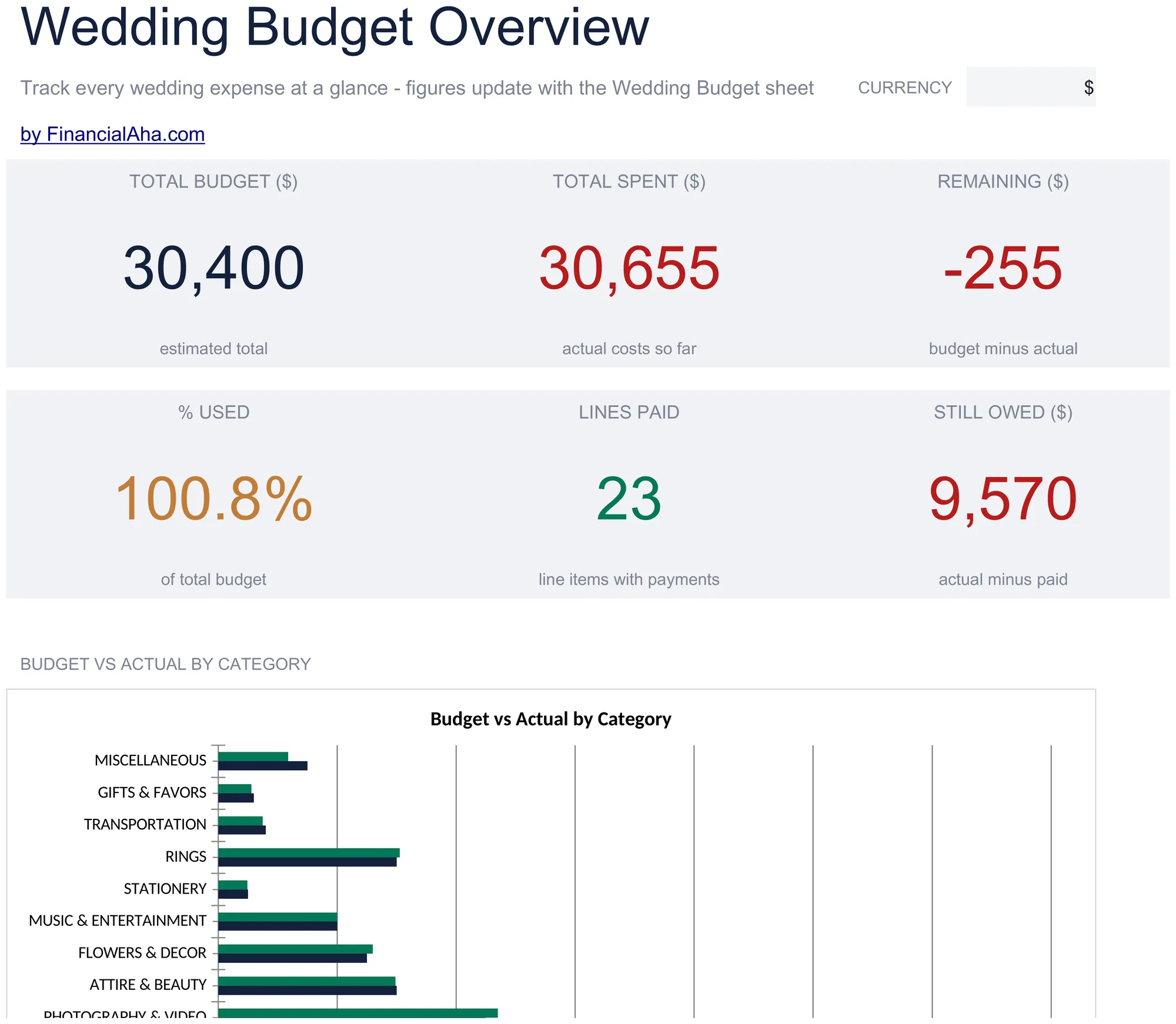 The Essentials Wedding Budget template ($19) dashboard: estimated total against actual spend, with the still-owed figure that a wedding budget most often goes without.
Vendor contacts, payment due dates, a 50-row payment log, and per-guest cost by category sit on the Ultimate Wedding Budget template rather than the Essentials build. If you’d rather build it yourself, the structure above is reproducible from scratch; the template saves a few hours and helps you avoid forgetting categories.
Where to take it next
The direct next step is the Essentials Wedding Budget template ($19) if you want the sections and paid-versus-owing columns without building them. For weddings with many suppliers, or ongoing budgeting after the day:
- Wedding Budget Ultimate ($29) - Up to 40 vendor rows with contacts, a 50-row payment log, 14 budget categories with variance and status, deposit paid against balance due with a due date per vendor, and per-guest cost by category.
- Monthly Budgeting - Planned-versus-actual monthly budget with a summary dashboard, a budget figure per category, and a transactions sheet, for finances after the wedding.
- Annual Budgeting Planner - A 12-month plan-versus-actual grid across income, expenses, and savings, with monthly totals and a year summary.
Related
Frequently asked questions
Should I include the engagement ring and honeymoon in this budget?
Conventionally, no. The engagement ring usually predates the wedding budget. The honeymoon is its own trip with its own travel budget. Couples sometimes track all three together; either approach is fine, but most wedding budgets are wedding-only.
What's a realistic contingency percentage?
5 to 10 percent of total budget. Higher (10 percent) for first-time planners or weddings with many vendors; lower (5 percent) for simpler weddings or planners with experience. Almost no wedding lands within 1 percent of plan; budgeting for that is honest.
How do I handle vendor tips?
Add a row per vendor for tip, calculated as 15 to 20 percent of their fee for service vendors (catering staff, photographer, DJ) and 10 to 15 percent for others. Or add a single "tips and gratuities" line for 5 to 8 percent of total budget. Both work; just don't forget it.
Can I share this spreadsheet with my partner and parents?
Yes. Google Sheets sharing handles it; everyone can see live updates. For Excel, save to OneDrive or a shared drive. Many couples set up read-only access for parents who are contributing.
What about taxes?
Most catering and bar invoices include tax in the quote; verify before signing. Service charges (typically 18 to 22 percent) are usually a separate line. Both belong in the budgeted total rather than added later.
Does the $19 Essentials template calculate cost per guest?
No. The Essentials Wedding Budget template tracks estimated against actual and how much has been paid against what is still owing, grouped into sections with subtotals. Per-guest cost by category, a vendor list with contacts, payment due dates, and a payment log are on the Ultimate build ($29).
What does the "remaining" column mean, budget left or money still owed?
In the Essentials template, remaining means still owing on that item, the actual cost minus what has been paid. It is not what is left in the budget for the item, which is a different figure. Deposits go in months ahead and balances close to the day, so the still-owing number is what tells you what is about to leave your account.
About this article
Sheets, columns, tiers, and prices checked on 2026-09-10 against the shipped Essentials Wedding Budget workbook (Dashboard, Wedding Budget, How to Use) and the Ultimate Wedding Budget workbook (Dashboard, Budget Overview, Vendor Tracker, Payment Schedule, Guest Cost Analysis, Budget vs Actual). The average wedding cost and the worked example are illustrative industry-survey figures, not government statistics. Last reviewed September 2026.