Best Value Complete Financial Planning Bundle
✓ Financial Planning✓ Net Worth Tracker✓ Monthly Budgeting✓ Travel Budget Planner✓ Annual Budgeting Planner✓ Monthly Expense Tracker✓ Annual Tax Planner✓ Retirement Planning
View Bundle →
Wedding Budget

Instant digital delivery · Terms & Conditions apply

Essentials Template - Excel & Google Sheets

Essentials Wedding Budget Spreadsheet Template for Google Sheets & Excel

Items grouped into sections, each section carrying its own subtotal, with estimated and actual side by side on every item. The Essentials Wedding Budget spreadsheet template also records how much of an item has actually been paid and works out what is still owing on it, and leaves a notes column for the context behind a price. A dashboard reads the sections back. Google Sheets and Excel, one file. No macros, no VBA.

See Ultimate Spreadsheet Template

Instant digital delivery · Terms & Conditions apply

View Ultimate Wedding Budget Spreadsheet Template
$29
Essentials Wedding Budget spreadsheet template - Google Sheets and Excel preview

What's Included

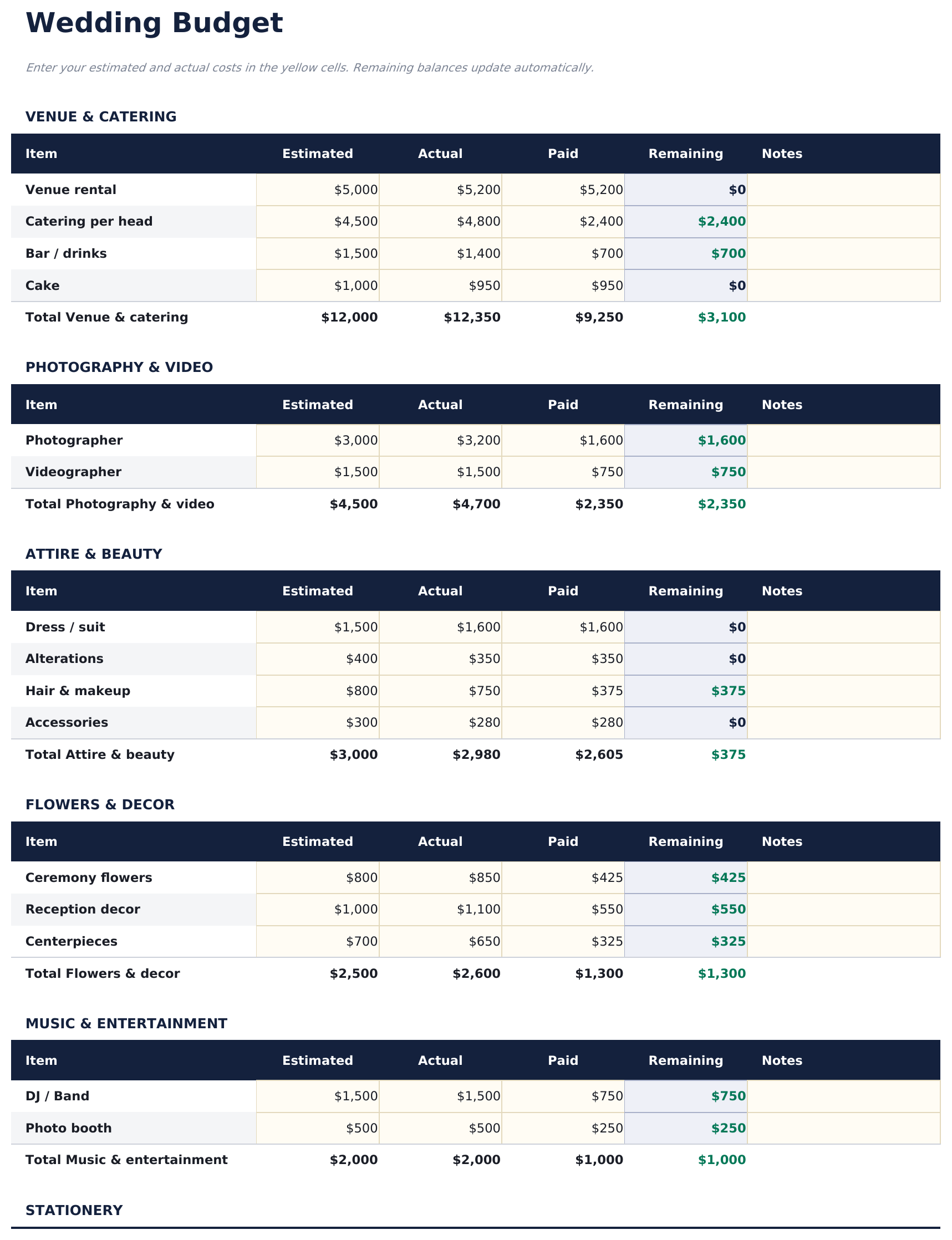
  • Items grouped into sections, each with its own subtotal
  • Estimated and actual side by side on every item
  • How much of each item has actually been paid
  • What is still owing on it, worked out for you
  • A notes column for the context behind a price
  • Total budget, total spent and what remains
  • Two charts breaking the picture down
  • A currency dropdown that relabels the money columns
  • Laid out for a planning period rather than a single sitting
  • Works in Microsoft Excel and Google Sheets with no setup required
Ultimate Version Available

Need more from this template?

The Essentials Spreadsheet Template covers everyday tracking. The Ultimate Spreadsheet Template gives each part of the template its own sheet, with more capacity and deeper reporting on top.

Essentials - $19
  • Items grouped into sections, each with its own subtotal
  • Estimated and actual side by side on every item
  • How much of each item has actually been paid
  • What is still owing on it, worked out for you
Ultimate - $29
  • Variance, percentage used and a status on every category
  • Category, total, deposit and balance due on every vendor
  • A due date and contact details on every vendor
  • A payment log with method and status on every line
  • A guest count that drives per-category cost per guest
See what's in the Ultimate version One-time purchase. No subscription.

The FinancialAha Essentials Wedding Budget Spreadsheet Template is a two-sheet workbook for Google Sheets and Excel, with a How to Use guide on a third tab. It works as an Essentials Wedding Budget Excel template and an Essentials Wedding Budget Google Sheets template from the same download. Items grouped into sections with their own subtotals, each carrying what it was estimated at, what it came to, what has been paid and what is still owing on it. No macros, no VBA.

Inside the workbook

What's inside the FinancialAha Essentials Wedding Budget spreadsheet template

The FinancialAha Essentials Wedding Budget Spreadsheet Template runs on two working sheets, with the instructions on a tab of their own. It works in both Microsoft Excel and Google Sheets and here is what the Essentials Wedding Budget spreadsheet holds.

  1. 01 of 02

    Wedding Budget

    The budget is broken into sections rather than run as one list - venue and catering together, photography and video together, and so on - each with its own items and its own subtotal. Every item carries four figures: what you estimated, what it turned out to be, how much of it you have paid, and what is still owing on it. That fourth column is the one a wedding budget most often goes without. Suppliers take deposits months ahead and balances close to the day, so at any point between booking and the wedding a category is partly settled and partly not - and a sheet that only knows the total cost cannot tell you what is about to leave your account. The remaining figure here is what you still owe on an item rather than what is left in the budget for it. The notes column earns its place across a long planning period. A price agreed in March and questioned in September is a conversation that goes better with a line of context beside the number.

  2. 02 of 02

    Dashboard

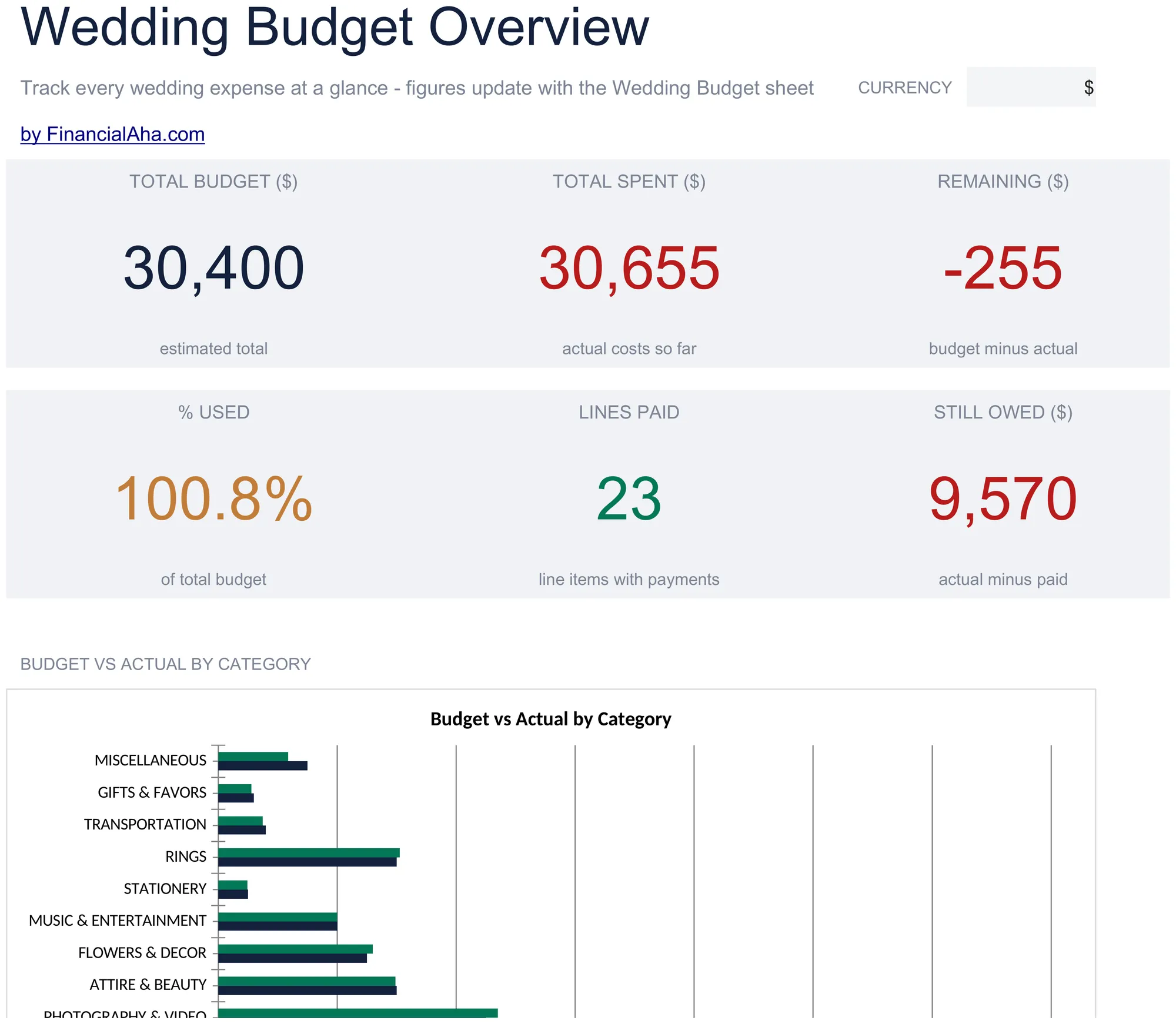
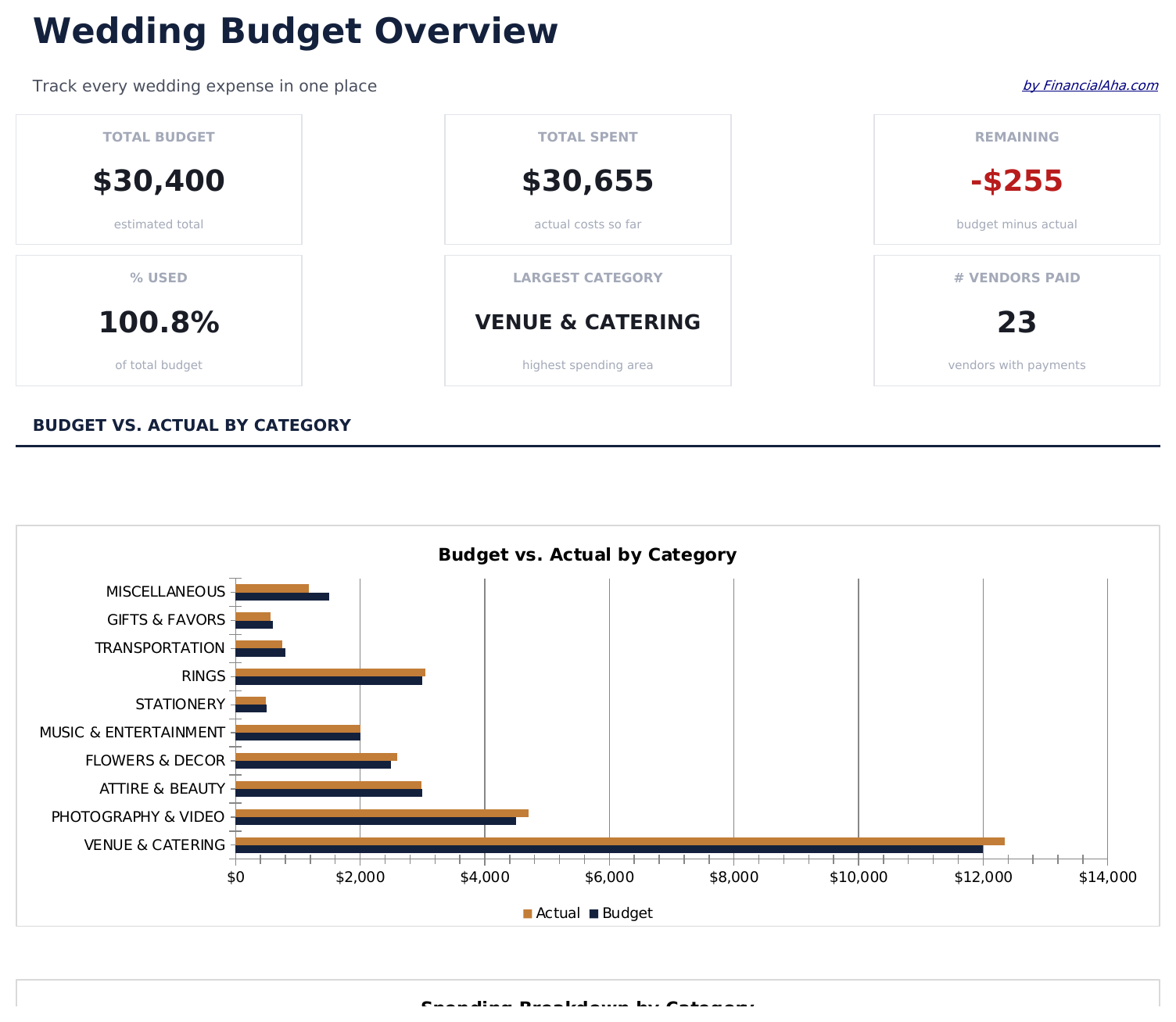
    Six figures. The total budget, what has been spent against it and what remains on the top row; how much of the budget is used, how many line items have had a payment made, and what is still owed on the second. The still-owed figure is the one that matters as the date approaches - the gap between what has been committed and what has actually left the account is where a wedding budget goes wrong, and it is a different number from what remains. The value of the dashboard here is that section subtotals hide the shape of the whole. Venue and catering will dominate almost any wedding budget, and seeing that proportion drawn rather than listed is what prompts the conversation about whether the split is the one you meant.

  3. Included guide

    How to Use

    A step-by-step guide on its own tab, covering what each column expects, the difference between what is remaining to pay and what is left in the budget, and how to change the currency. Because it ships inside the file, the instructions travel with the template wherever it is opened.

Works in both Google Sheets and Excel

Essentials Wedding Budget Spreadsheet template for Google Sheets

Upload the Essentials Wedding Budget Spreadsheet Template to Drive, right-click it, and choose "Open with Google Sheets". This Essentials Wedding Budget Google Sheets template needs no conversion step, both charts come across, and the section totals recalculate exactly as they do in Excel.

Essentials Wedding Budget Google Sheets template setup

A shared copy of the Essentials Wedding Budget Google Sheets template suits two families contributing to one wedding, where what has been paid matters as much as what things cost.

Running the Essentials Wedding Budget Google Sheet

The Essentials Wedding Budget Google Sheet takes an entry when a quote is agreed and another when a deposit or balance is paid. The remaining column follows from those two.

Essentials Wedding Budget Spreadsheet template for Excel

The Essentials Wedding Budget spreadsheet Excel download is a plain .xlsx. Excel opens this Essentials Wedding Budget Excel template directly, with no import step, and both charts are native Excel charts rather than pictures. There are no macros and no VBA in the file.

Essentials Wedding Budget Excel template setup

The same Essentials Wedding Budget Excel template opens in Excel on Windows, Excel on Mac, and Excel for the web. It is also the identical file you would upload to Drive, so there is no separate Essentials Wedding Budget spreadsheet download to choose between.

Essentials Wedding Budget spreadsheet Excel notes

The Essentials Wedding Budget spreadsheet Excel file carries no macros and no VBA, so Excel opens it without a trust prompt.

Opening the Essentials Wedding Budget spreadsheet Excel file

Nothing in the Essentials Wedding Budget Excel template is version-specific, so this Essentials Wedding Budget spreadsheet Excel workbook behaves identically in Excel on Windows, Excel on Mac, and older builds.

Spreadsheet template highlights

What the Essentials Wedding Budget spreadsheet template tracks

Items grouped into sections. This is what the Essentials Wedding Budget Spreadsheet Template carries on each:

Item
one line per thing you are paying for, inside its section
Estimated
what you expected it to cost
Actual
what it turned out to be
Paid
how much of it has actually left your account
Remaining auto
derived, and meaning still owing on that item rather than left in the budget
Notes
the context behind a price, which matters across a long planning period

Compare builds

FinancialAha Wedding Budget spreadsheet template: Free, Essentials, and Ultimate compared

Feature Free View Spreadsheet Template Essentials This page Ultimate View Spreadsheet Template
Working sheets 1 2 6
Categories 15 lines Grouped into sections with subtotals 14 with variance and status
Estimated against actual Yes Yes Yes
How much has been paid Per item Per vendor
Still owing Per item and per section Per vendor
Notes on a line Yes Yes
Vendor list with contacts 40 vendors
Payment due dates Yes
Payment log 50 payments
Cost per guest By category
Charts 2 2

The Free Wedding Budget Spreadsheet Template tracks cost by category - planned against actual, with the gap on each line. The FinancialAha Essentials Wedding Budget Spreadsheet Template tracks cash alongside it: every item carries what has been paid and what is still owing, grouped into sections with their own subtotals and a notes column, with a dashboard and two charts. The Ultimate Wedding Budget Spreadsheet Template adds the logistics - vendors with contacts, deposits, balances and due dates, a payment log, and the cost per guest by category.

Good to know

Notes on working in the Essentials Wedding Budget spreadsheet template

  • Remaining means still owing on an item, not left in the budget for it - the two are easy to confuse and mean opposite things.
  • Suppliers take deposits months ahead and balances close to the day, which is why the paid column matters between booking and the wedding.
  • Section subtotals hide the shape of the whole, which is what the charts are for.
  • The notes column is worth using early - a price agreed in March is easier to defend in September with a line of context.
  • Vendor contacts, due dates and a payment log are on the Ultimate build.
  • The currency dropdown relabels the money columns across the workbook. It changes the label only and does not convert the numbers.

How to Use the Essentials Wedding Budget Spreadsheet Template

1

List the items

Inside the section each belongs to.

2

Estimate then update

What you expected, and what it came to.

3

Record the payments

Deposits now, balances closer to the day.

4

Watch what is owing

The remaining column shows what is still to go.

Stress-tested with AI.

Every template starts with deep research into how people actually track the topic. We design the layout, build the formulas, and polish the design until it feels like something we would use ourselves. Along the way, we use AI to stress-test the calculations: unusual inputs, edge cases, and formula behavior, checked until the numbers hold.

See Ultimate Spreadsheet Template

Instant digital delivery · Terms & Conditions apply

Frequently Asked Questions

Is the FinancialAha Essentials Wedding Budget Spreadsheet Template a Google Sheets template?

Yes. Upload the file to Drive and choose "Open with Google Sheets". Both charts come across in the Essentials Wedding Budget Google Sheets template, and the section totals recalculate exactly as they do in Excel.

Is the FinancialAha Essentials Wedding Budget Spreadsheet Template an Excel template?

Yes. The download is a plain .xlsx, so the Essentials Wedding Budget Excel template opens directly in Excel with no import step. Both charts are native Excel charts rather than pictures, and there are no macros or VBA.

Will the FinancialAha Essentials Wedding Budget spreadsheet Excel file open in older versions of Excel?

Yes. The Essentials Wedding Budget spreadsheet Excel workbook ships as a plain .xlsx, so it opens identically in current Excel and in builds that predate dynamic arrays.

What does the remaining column in the Essentials Wedding Budget spreadsheet mean?

What is still owing on that item - the actual cost less what you have paid. It is not what is left in the budget for the item, which is a different figure and easy to confuse.

Why does the Essentials Wedding Budget spreadsheet track what has been paid?

Because suppliers take deposits months ahead and balances close to the day. Between booking and the wedding, a category is partly settled and partly not, and a sheet that only knows the total cannot tell you what is about to leave your account.

Why does the Essentials Wedding Budget spreadsheet group items into sections?

Because a wedding budget has natural clusters - venue and catering, photography and video - and section subtotals make it possible to see where the weight sits without reading every line.

Does the Essentials Wedding Budget spreadsheet track vendors and due dates?

No. Vendor contacts, deposits and balances by supplier, payment due dates and a payment log are on the Ultimate build.

How do I open the Essentials Wedding Budget spreadsheet template in Google Sheets?

Upload the .xlsx file to Google Drive, then open it with Google Sheets. All formulas and formatting will be preserved.

More Essentials Personal Budgeting Templates

Essentials

Highlights:

Dashboard with charts and KPIs
Pre-filled categories and sample data
No sign-up, no subscription
Lifetime free updates
Works in
Excel Google Sheets

Looking for premium spreadsheet templates?

Our paid templates include advanced multi-sheet dashboards, native Excel charts, and ongoing updates.

Private & secure

Your financial data stays on your device. We never see it.

Learn more →

Need help?

Check our guides or reach out with questions.

View FAQ →