
A dedicated subscription tracker gives every recurring charge one row (service, category, billing cycle, monthly and annualized cost, renewal date, and a still-using status), so the yearly total finally becomes visible. Annualizing is the whole point: a typical household often runs somewhere between $1,500 and $4,000 a year once every card and app-store charge is added up. Build the columns yourself in about 20 minutes, or pick a tier of the purpose-built Subscription Tracker template: the free log to start, the $19 Essentials for the totals-and-charts dashboard, or the $29 Ultimate flagship that adds a category breakdown, annual projections, price history, and a cancellation ROI sheet for up to 50 subscriptions.
Most people underestimate their subscription spending by a wide margin. A streaming service here, a productivity tool there, an annual renewal that auto-charged in March that you forgot about. Adding them up in one place is usually the most useful 10 minutes anyone spends on personal finance in a year. Building the six columns from scratch takes about 20 minutes; our Subscription Tracker Excel template starts from that same list with the annualized dashboard already built.
The reason subscription spending gets out of control for most households is that every individual charge looks small in isolation, spread across two credit cards and one debit card and the Apple billing system, which means the total only becomes visible when you force yourself to add it all up in one place on one day with the intent of actually looking at the number.
What the tracker needs
Six columns.
| Column | Example |
|---|---|
| Service | Netflix |
| Category | Streaming |
| Frequency | Monthly |
| Amount | 22.99 |
| Annualized | =Amount * 12 (or whatever) |
| Renewal date | 2026-08-15 |
| Still using? | Yes / No / Sometimes |
The Annualized column is the value-add. A $22.99 monthly charge is $275.88 a year. A $14.99 monthly charge is $179.88. They don’t sound much different until you multiply.
The Still using column is the action-driving column. Anything tagged “No” is a cancellation candidate.
The annualized math
Different subscriptions bill differently. A nested IF covers the common cases (anything that isn’t monthly, annual, or quarterly falls through to weekly):
Annualized = IF(Frequency = "Monthly", Amount * 12, IF(Frequency = "Annual", Amount, IF(Frequency = "Quarterly", Amount * 4, Amount * 52)))Cleaner, and it scales to more frequencies: a lookup table.
| Frequency | Multiplier |
|---|---|
| Daily | 365 |
| Weekly | 52 |
| Biweekly | 26 |
| Monthly | 12 |
| Quarterly | 4 |
| Semi-annual | 2 |
| Annual | 1 |
Use VLOOKUP or INDEX/MATCH to multiply Amount by the right factor.
A worked example: typical household audit
Anna and Sam, dual-income, May 2026.
Streaming (annualized):
- Netflix Standard: $179.88
- Disney+ Bundle: $239.88
- HBO Max: $179.88
- Apple TV+: $119.88
- Spotify Family: $239.88
- YouTube Premium: $167.88
Streaming total: $1,127.28
Software/productivity:
- Adobe Creative Cloud: $719.88
- Notion family: $96
- iCloud 2TB: $119.88
- Google One 2TB: $99.99
- 1Password Family: $59.88
Software total: $1,095.63
Fitness/health:
- Peloton: $539.88
- Apple Fitness+: $79.88
- ClassPass: $719.88
Fitness total: $1,339.64
Other:
- Costco membership: $130
- Amazon Prime: $179
- New York Times: $208
- Substack subscriptions (5): $300
- Patreon: $144
- ChatGPT Plus: $239.88
Other total: $1,200.88
Grand total annualized: $4,763.43
That’s $397/month average, hidden across multiple cards and renewal cadences. Most people in this household assumed the number was around $200/month.
The audit reveals:
- Two video streaming services they hadn’t watched in 4 months ($359.76)
- iCloud and Google One both at 2TB (one is enough, $239.87 saved)
- ClassPass usage dropped after returning to a regular gym ($719.88 candidate for cancellation)
Cancelling those three: $1,319.51 a year saved. That’s the value of running the audit.
The 10-minute audit routine
Once a quarter (mark in calendar):
Minute 1 to 3: gather.
- Pull last quarter’s bank and credit card statements.
- Filter for recurring charges.
- Add any new subscriptions to the spreadsheet.
Minute 4 to 6: verify.
- For each row, check the “Still using” column.
- Mark “No” or “Sometimes” for anything you don’t actively use.
Minute 7 to 10: act.
- For “No” rows, cancel today.
- For “Sometimes” rows, set a 30-day “cancel if no use” reminder.
40 minutes a year. Often saves $1,000+ for typical households.
Where the spreadsheet helps that an app doesn’t
Several apps offer subscription tracking (Rocket Money, which absorbed the old Truebill, plus Trim, Bobby, and others). They have advantages: auto-detection from bank feeds, one-tap cancellation in some cases, browser extensions.
The spreadsheet has different advantages.
No bank credentials shared. You enter subscriptions manually; nothing shared with a third party.
Includes things bank-detection misses. App-store subscriptions (charged via Apple/Google billing), employer-shared accounts where you split costs, family plans where one person pays. Bank scrapers often miss these.
Renewal dates. Most apps surface this; spreadsheets do too with one column.
Categorization for budget alignment. The Category column groups subscriptions the way a budget groups spending. The monthly budget template comes at it from the other side: every transaction has a Subscription column, and the Summary carries a Subscriptions tile with the monthly recurring total and how many are active.
For most households, a spreadsheet plus a quarterly audit does the same job without adding another paid app to the list. There is a certain irony in paying a monthly subscription to track your subscriptions.
Common patterns the audit reveals
After running this audit with multiple households, the same patterns appear.
Streaming sprawl. Average household has 4 to 6 streaming services and actively watches 2.
Storage redundancy. People often have iCloud, Google One, Dropbox, and OneDrive simultaneously, paying for multi-TB on each.
Forgotten freemium upgrades. Notion, Evernote, Todoist, Trello. People upgrade for a project, never downgrade.
Annual renewals that auto-charge. Domain registrars, antivirus, password managers. The annual charge feels like a fresh decision but most people don’t make one consciously.
Family-plan opportunities. Many services (Spotify, YouTube Premium, Apple One, NYT) have family tiers that are cheaper per person than individual plans. Households with multiple individual subscriptions often save by consolidating.
Geographic mismatches. Subscribing to a US service from Europe (or vice versa) often costs more than the local equivalent. Some VPN math is involved here; not always worth it.
What I’d add to the basic tracker
Three additions worth the few extra minutes of setup.
Card-of-record column. Which credit card or account each subscription bills to. Useful when you change cards (auto-charges fail; subscriptions break) and when you reconcile statements.
Owner column. For households, who pays for and uses each subscription. Avoids “I thought you cancelled that” conversations.
Last-used note. For app-style subscriptions, a quick note when you actually used it helps the next audit. “Watched 3 movies in May” tells you Netflix is earning its $22.99.
Three columns, real insight gain.
Picking a tier
The tracker comes at three levels. All three open in Excel, Google Sheets, and LibreOffice Calc, and the two paid tiers are a one-time purchase rather than another subscription.
The free Subscription Tracker is the log on its own: one row per service with a monthly and an annualized figure, a Total row under the table, and an At a Glance strip at the top carrying the monthly total and the annual total. It arrives with twelve sample services and four blank rows under them, enough to see the number once and decide what to do about it.
The Subscription Tracker Essentials ($19) adds a dashboard, plus a status and a next-renewal date on every row. That dashboard carries the monthly total, the projected annual total, the active-service count, the largest single service, the average per active service, and the potential annual savings from anything marked cancelled, alongside a category pie chart and a monthly-versus-annual bar chart.
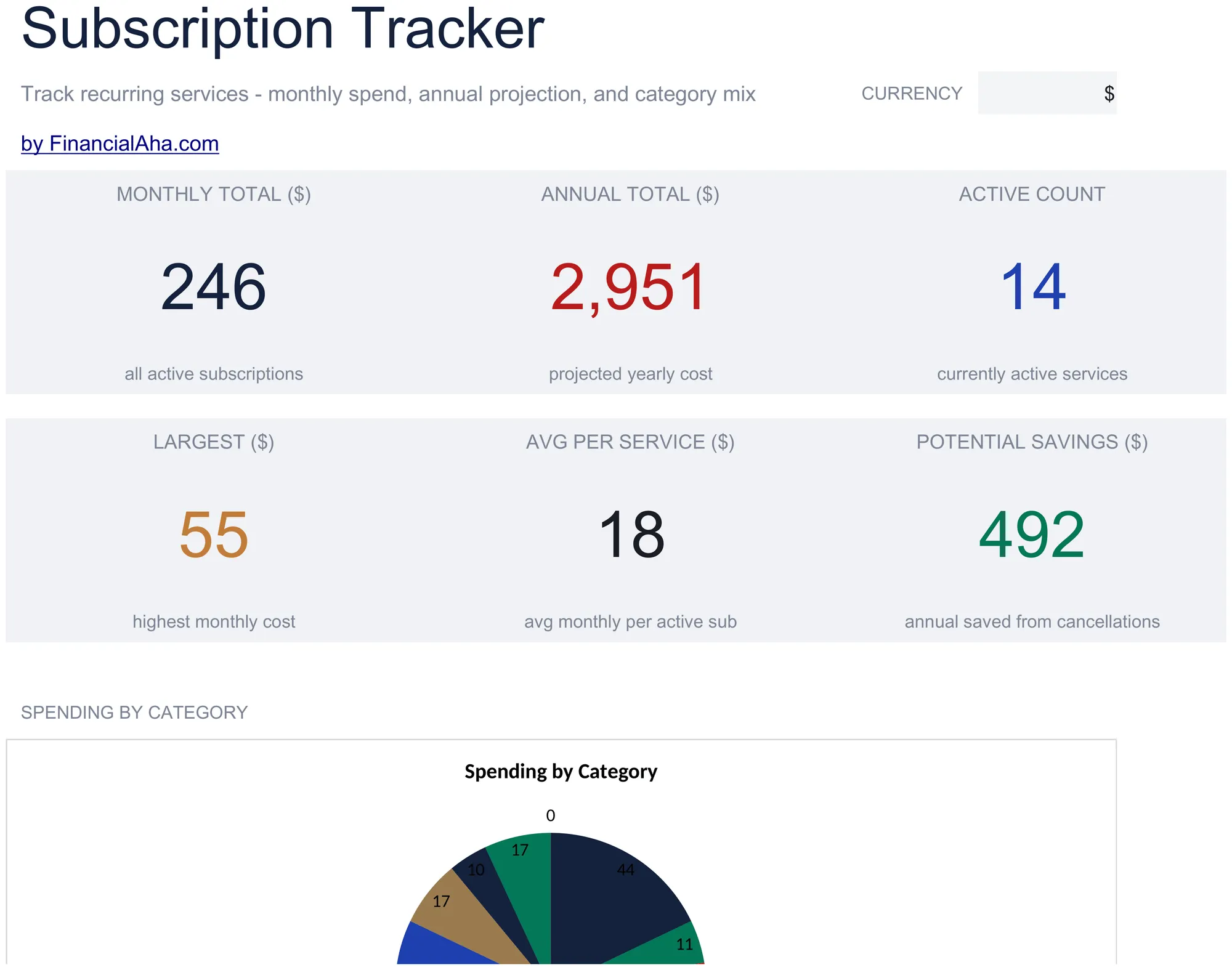
The Subscription Tracker Essentials ($19) dashboard: monthly and projected annual totals, active count, and category mix, all updating as you edit the subscriptions sheet.
The Subscription Tracker Ultimate ($29) is the flagship, and the one to reach for when the audit becomes a habit. It holds up to 50 subscriptions and stacks four more sheets on top of the Essentials dashboard: a Category Breakdown showing each category’s share of the total, Annual Projections that spread the cost across all twelve months, a Price History log that highlights increases above 15 percent, and a Cancellation ROI sheet that totals the savings already realized and tracks them against milestones.
Building the columns from scratch takes about 20 minutes. Each paid tier saves that setup and adds the dashboard and analysis on top.
Where to go next
Run the quarterly audit once and the number stops being a surprise. If you would rather not keep a separate file at all, folding subscriptions into your overall budget is the other path, and tracking subscriptions and recurring expenses inside a monthly budget walks through it. These budget templates also sit naturally next to the tracker:
- Monthly Budget Template - Planned-vs-actual monthly budget with a Summary dashboard and per-category targets, plus a Subscription column on the Transactions sheet feeding a subscriptions tile on that dashboard.
- Monthly Expense Tracker - Simple daily log with category totals. No targets, just tracking.
Related
Frequently asked questions
Should I include things like internet and phone?
Optional. They're recurring but functionally utilities. Most people exclude them from "subscriptions" and put them in the regular monthly budget. Either approach is consistent, as long as you pick one and stay with it.
What about app store auto-renewals I forgot?
Check iPhone Settings > Apple ID > Subscriptions, or Play Store > Subscriptions. These often surface forgotten ones that bank-feed apps miss, since they bill through Apple or Google rather than the card directly. Adding them to the spreadsheet keeps the annual total honest.
How do I handle annual renewals that haven't hit yet?
Enter them with the annual amount and the upcoming renewal date. Shading the cell when the date is within 60 days is a common way to keep the next charge visible before it auto-renews.
What if my partner manages some subscriptions?
One shared spreadsheet. Both people add their own; both review quarterly. Surprisingly often, both people are paying for the same service through different cards.
Does the annualized math work the same in Google Sheets?
Yes. The multiplier logic (frequency times an annual factor) and VLOOKUP/INDEX-MATCH work identically in Google Sheets, Excel, and LibreOffice Calc, since the template ships in .xlsx format that all three open.
Are subscription cancellation services worth it?
Sometimes. Rocket Money and similar tools charge a recurring fee and can cancel on your behalf. For anyone comfortable running the audit themselves, a spreadsheet plus a quarterly review covers the same ground without adding another subscription.
About this article
Tier prices, sheets and dashboard figures checked on 2026-09-10 against the shipped Subscription Tracker workbooks: free (Subscriptions, How to Use), Essentials $19 (Dashboard, Subscriptions, How to Use), and Ultimate $29 (Dashboard, Subscriptions, Category Breakdown, Annual Projections, Price History, Cancellation ROI, How to Use). Annualized-cost multipliers (weekly x52, monthly x12, quarterly x4, annual x1) verified arithmetically. Last reviewed September 2026.