
Neither method wins outright. Monthly budgeting gives a tight weekly feedback loop that catches overspending early; annual budgeting lays all 12 months side by side so irregular costs like insurance or property tax stop arriving as surprises. Most people run the monthly view day to day and reconcile it against an annual plan each quarter, using the two together rather than choosing one.
Monthly budgets track spending as it happens. Annual budgets reveal the full picture across 12 months. Each serves a different purpose, and knowing which fits a given situation is useful.
Looking for a template comparison? See Monthly Budget vs Annual Budget Template - Which Do You Need? for a side-by-side look at the two FinancialAha templates.
Quick Comparison
| Monthly Budgeting | Annual Budgeting | |
|---|---|---|
| Time frame | One month at a time | All 12 months at once |
| Best at | Catching overspending, weekly adjustments | Revealing irregular expenses, seasonal patterns |
| Weak at | Missing annual costs, hiding long-term trends | Day-to-day cash flow, quick adjustments |
| Suits | Variable income, tight budgets, building habits | Stable income, goal planning, irregular expenses |
The Irregular Expense Problem
This is where the two approaches diverge most. A $1,200 annual insurance premium looks different depending on the lens:
- Monthly view: A $1,200 spike in one month that blows the budget
- Annual view: One of twelve planned months, balanced by lower months elsewhere
- Sinking fund approach: $100 set aside each month, ready when the bill arrives
The monthly budget looks perfect until property tax is due. An annual view makes that expense feel planned rather than surprising.
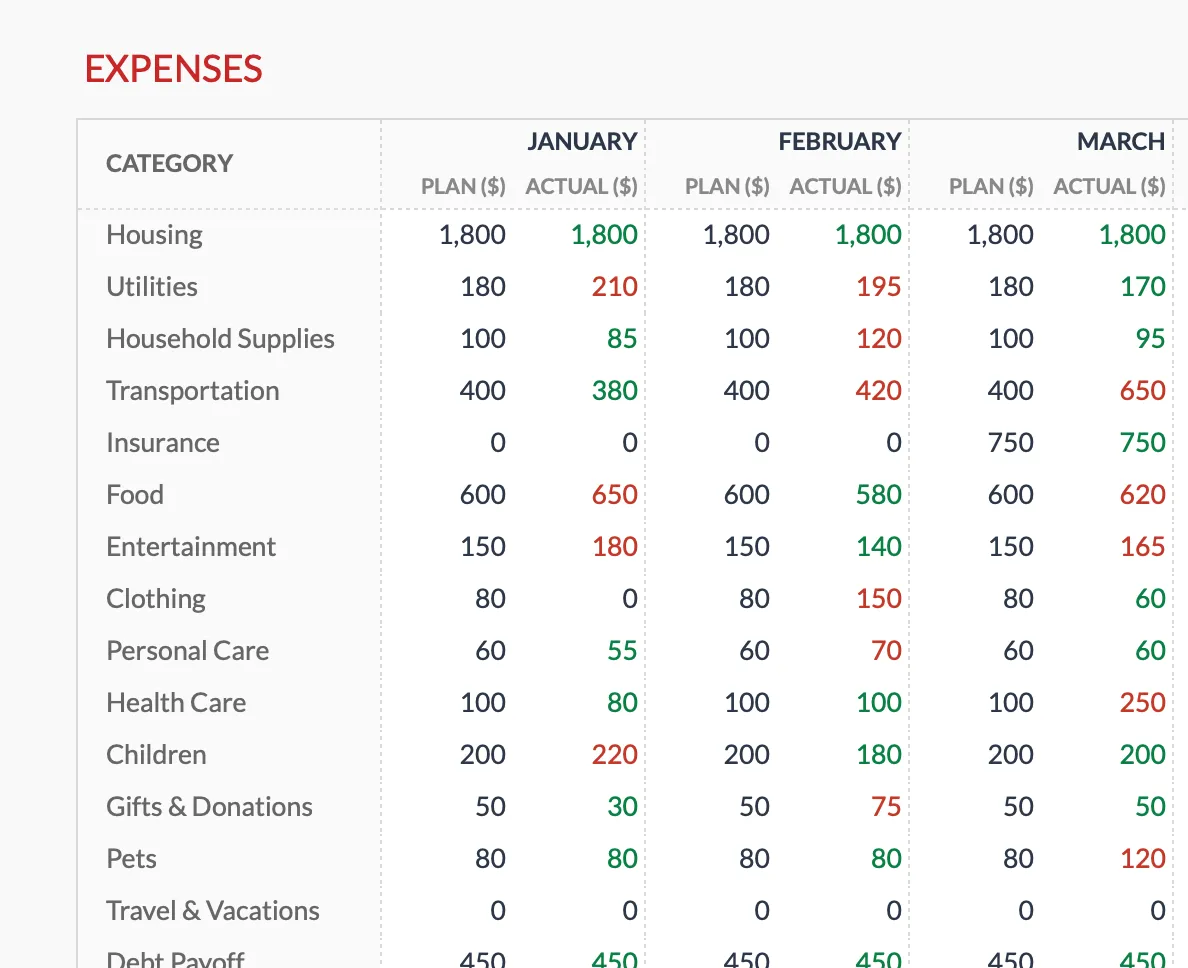 The Annual Budgeting Planner (Premium) places each category across all 12 months, so the Insurance line sits empty in January and February then lands at $750 in March, one of the four months the sample premium falls due.
Seasonal patterns behave the same way. Household energy bills tend to climb through the coldest months as heating runs, and retail spending peaks every December. A single month never reveals this, but twelve months laid side by side make the rhythm obvious enough to plan around.
When Each Approach Fits
Monthly works well when:
- Income varies paycheck to paycheck
- Every dollar matters in the short term
- Someone is building a tracking habit for the first time
- Circumstances change frequently
Annual works well when:
- Income is stable and predictable
- The main goal is planning for large expenses or savings targets
- Irregular costs (insurance, registration, memberships) keep causing surprises
- Seasonal income patterns need to be balanced across the year
Combining Both
The two approaches connect naturally:
- Annual budget / 12 = monthly targets
- Monthly actuals x 12 = annual reality check
One practical approach: set up the annual overview first with all categories and their 12-month totals. Derive monthly targets from those totals. Track spending monthly. Reconcile against the annual plan quarterly.
If the sticking point is the starting split across categories, the 50/30/20 budget calculator sketches a rough allocation of take-home pay that drops into either the monthly or annual layout.
To run both views in practice, the Monthly Budget Template handles day-to-day tracking and the Annual Budgeting Planner holds the 12-month plan. The Budgeting Bundle packages both, plus the Travel Budget Planner, for $49. All are one-time purchases used by 1,000+ customers across 65+ countries.
Related
- Monthly Budget vs Annual Budget Template - Side-by-side template comparison
- Annual Budgeting Planner - Full year view
- Monthly Budget Template - Day-to-day tracking
- Budget for Irregular Expenses - Giving one-off costs a home
- How to Build a Rolling 12-Month Budget - The always-forward hybrid of the monthly and annual views
- Monthly Budget Review: What to Check and When - Running the monthly feedback loop this article describes
- Sinking Funds Explained - Setting money aside month by month
- How to Budget Your Money: A Monthly and Annual Approach - Using both time frames together
Frequently asked questions
Can I start an annual budget mid-year?
Yes. One approach is to fill in the remaining months from today and add a rough projection for the rest of the year, then refine the figures as real numbers come in.
How detailed should an annual budget be?
Most people keep the same categories as their monthly budget and add rows for the irregular costs that only appear once or twice a year, such as insurance or car registration, rather than trying to forecast every transaction 12 months out.
What if my income varies a lot month to month?
Worth using cautious income estimates for the annual plan, then letting the monthly view track what actually lands each month. The annual view also surfaces which months tend to run strong or lean once a full year of data is in.
Do the monthly and annual views update each other automatically?
No. They are separate sheets, so figures do not sync on their own. The usual rhythm is to record each month's category totals in the annual view when you review how the month went.
How do I handle expenses I did not see coming?
A sinking fund set aside each month covers predictable-but-irregular bills, while a separate emergency fund absorbs true surprises. The annual view is where those irregular costs get a specific month to live in.
Sources
- Winter Fuels Outlook - U.S. Energy Information Administration
- Advance Monthly Retail Trade Survey - U.S. Census Bureau
About this article
Template sheets, inputs and outputs checked on 2026-09-10 against the shipped Monthly Budgeting Google Sheet (Summary, Budget Plan, Transactions, Goals) and the shipped Annual Budgeting Planner Google Sheet (Summary, Annual Plan, Categories). Seasonal-spending figures reference U.S. Energy Information Administration winter heating data and U.S. Census Bureau monthly retail sales. Last reviewed September 2026.