
Lunch Money costs $10/month or a pay-what-you-want annual plan (floor around $50, sticker $100). Its rules engine, review queue, multi-currency, and tags all rebuild in Google Sheets. The fastest exit is a one-time $29 Monthly Budget Template with the transactions tab, categories, planned vs actual, and a dashboard already wired, so the migration is a weekend afternoon.
Lunch Money makes one strong design choice: nothing posts to your budget until you, the human, look at it. If that manual-first workflow is why you picked it, here is the part the pricing page does not mention: the workflow is itself spreadsheet-shaped, and every distinctive piece of it ports to a file you own.
The fastest version of that file is the Monthly Budget Template ($29 once), which already has the transactions tab, category dropdowns, planned vs actual per category, and a Summary dashboard wired. It does not ship a rules engine or a review queue, so those two builds below are the part you add. Lunch Money, by contrast, is $10/month or a pay-what-you-want annual plan starting around $50 for as long as you stay.
This article is the port, piece by piece: the rules engine, the review queue, multi-currency, and tags, each rebuilt in Google Sheets, plus the migration steps for your existing data. The renewal is the subscription’s question; the file is one answer.
The Lunch Money workflow in one sentence
A rules engine auto-files transactions into a pending queue you review before anything touches the budget. Everything else (multi-currency, tags, an open API) is supporting cast around that one loop.
The two pieces of the spine, in slightly more detail:
- Rules engine. Each rule is a
match this string -> assign this categorypair, evaluated in order. Auditable, editable, no learning model. Closest mainstream analogue: Gmail filters. - Review queue. New transactions arrive in
pending. Nothing affects budget totals until you click through.
Two more reasons power users stay: more than 160 currencies with historical exchange rates (a 2024 EUR transaction converts at the 2024 rate, not today’s), and tags that sit on top of categories so reporting can slice across the tree without restructuring it. Plus an open API and a CSV-everything stance, which cuts both ways: the same export that makes Lunch Money portable is the file the migration section below starts from.
All four port to Sheets. The rules engine is the load-bearing one, so it goes first.
What the subscription costs
Lunch Money runs a pay-what-you-want annual model. The floor is roughly $50, the listed sticker is $100, and some users pay more. Monthly billing is a flat $10. There are no feature tiers; everyone gets the same product at every price.
Over time:
| Years | Annual ($100/yr) | Monthly ($120/yr) | Floor ($50/yr) |
|---|---|---|---|
| 1 | $100 | $120 | $50 |
| 5 | $500 | $600 | $250 |
| 10 | $1,000 | $1,200 | $500 |
| 30 | $3,000 | $3,600 | $1,500 |
For someone opening the app daily, $100/year reads as a fair spend. For someone who opened it twice last quarter, the annual renewal becomes the moment to ask what it is doing.
The Sheets workflow at a glance
Four tabs cover what Lunch Money does.
- Transactions. One row per transaction, with a
Statuscolumn (pending or reviewed) and an optionalCurrencycolumn. - Rules. A two-column lookup of merchant strings to categories.
- Review queue. A filtered view of Transactions where Status = pending.
- Categories. Category name, group, and a monthly target.
Setup from scratch is roughly 90 minutes. The Monthly Budget Template ships the transactions log and the categories list, which leaves the Rules tab, the status column and the review view to build. Ongoing time is 10 to 20 minutes a week, the same range as actively reviewing a Lunch Money queue.
The rules engine in Google Sheets
This is the load-bearing section. The other three Lunch Money pieces (review queue, multi-currency, tags) are simpler ports. If the rules engine in a dozen-odd lines of formula does not convince you, nothing further in this article will.
Start with a Rules tab. Two columns: a substring to match against the payee, and the category to assign.
| Match (payee contains) | Category |
|---|---|
| whole foods | Groceries |
| trader joe | Groceries |
| netflix | Subscriptions |
| spotify | Subscriptions |
| uber | Transportation |
| shell | Transportation |
| amazon | Shopping |
| payroll | Income |
| transferwise | FX transfer |
In the Transactions tab, the Category column becomes a formula instead of free text. The cleanest version uses INDEX / MATCH with a SEARCH wrapper, so each row scans the rules list and returns the first match:
=IF(B2="", "",
  IFERROR(
    INDEX(Rules!$B$2:$B$50,
          MATCH(1,
                ARRAYFORMULA(ISNUMBER(SEARCH(Rules!$A$2:$A$50, B2))
                             * (Rules!$A$2:$A$50 <> "")),
                0)),
    "Uncategorized"))
B2 is the payee cell. SEARCH returns a number when the rule string appears in the payee, and an error otherwise; ISNUMBER turns that into TRUE or FALSE. The * (Rules!$A$2:$A$50 <> "") factor matters: SEARCH treats an empty rule cell as a match for everything, so without it the blank rows under your rules list “match” every payee and unmatched transactions come back as an empty cell instead of “Uncategorized”. The guard zeroes those rows out. MATCH finds the first 1, INDEX returns that rule’s category, and anything that matches nothing falls through to “Uncategorized” for you to look at on Friday. The ranges stop at row 50, so extend both if the rules list grows past that.
One refinement worth knowing. MATCH will not iterate row by row inside ARRAYFORMULA, so the auto-expanding version uses BYROW instead. It applies the same lookup to every payee in the column, so new pasted rows categorize without dragging the formula down:
=BYROW(B2:B, LAMBDA(payee,
  IF(payee="", "",
    IFERROR(
      INDEX(Rules!$B$2:$B$50,
            MATCH(1,
                  ARRAYFORMULA(ISNUMBER(SEARCH(Rules!$A$2:$A$50, payee))
                               * (Rules!$A$2:$A$50 <> "")),
                  0)),
      "Uncategorized"))))
You maintain one header cell and the column takes care of itself.
Unlike an AI categorizer, every assignment is auditable. Click the cell, read the Rules tab, see the rule that fired. Wrong assignment? Edit one row in Rules, and every past and future transaction with that payee updates on recalculation.
The review queue in a spreadsheet
Lunch Money’s review queue gates new transactions until you approve them. The Sheets version is a Status column with two values, pending and reviewed, plus a filtered view.
Transactions arrive with pending by default. Make Status a dropdown rather than a formula: select the column, Data > Data validation, list of items pending, reviewed. New rows get pending typed or pasted in with the rest of the transaction. As you work through the queue, you flip rows to reviewed from the dropdown. A formula in that cell would be destroyed the first time you overwrote it, and overwriting is the whole workflow.
A Review Queue tab is a single QUERY:
=QUERY(Transactions!A:G,
       "SELECT A, B, C, D, E
        WHERE G = 'pending' ORDER BY A DESC", 1)
Filtering on the source tab works too, but a dedicated QUERY tab keeps the review process out of the main log. Reporting formulas can also reference WHERE G = 'reviewed' so pending transactions stay out of budget totals until you sign off. That is the core Lunch Money design choice, replicated in one column and one filter.
Multi-currency without leaving Sheets
Lunch Money’s multi-currency handling is unusually good, and the spreadsheet equivalent is useful for anyone running international accounts.
A Currency column on the Transactions tab carries the original currency code. A second column holds the home-currency amount, computed at the rate that applied on the transaction date:
=D2 * GOOGLEFINANCE("CURRENCY:" & E2 & "USD", "price", A2)D2 is the original amount, E2 is the currency code, A2 is the transaction date. GOOGLEFINANCE returns the historical rate for that date, which matches Lunch Money’s behaviour for old transactions.
Two caveats. GOOGLEFINANCE covers most major currencies but not every minor one, and the historical-rate function can return a small array (date and price) rather than a single number; in that case wrap with INDEX(..., 1, 2). For currencies GOOGLEFINANCE does not handle, a manual Rates tab with monthly snapshots covers the gap.
Tags alongside categories
Lunch Money lets one transaction carry one category and any number of tags. The Sheets version is a Tags column with comma-separated values. To total spend by tag, a SUMPRODUCT pattern works:
=SUMPRODUCT(ISNUMBER(SEARCH("Tokyo-2026", G2:G)) * D2:D)That sums the amount column for every row whose tag column contains the target string. Reports can slice by category, by tag, or both, without restructuring the category tree. Not as smooth as Lunch Money’s tag UI; functionally equivalent.
The one thing Sheets cannot match
Lunch Money has a polished, focused web UI built by a small team that ships consistently. The spreadsheet does not. No roadmap, no changelog, no “they fixed the recurring chart bug last Tuesday.” You are trading active product development for a static workbook that does exactly what you set it up to do.
For some users that is a feature: the software stops moving, and the workflow stays put. For others it is a real loss, especially if the Lunch Money team’s design taste was part of why the app worked at all.
When Lunch Money still wins
Three situations where switching would lose value.
You use the review queue daily. Lunch Money is built around that gated review. If you click through pending transactions every morning with coffee, the UI is built for it and the spreadsheet is not.
You run accounts in three or more currencies. The historical-rate handling is better than what most casual Sheets users will set up, and the difference compounds with daily use.
You value the API. Lunch Money’s open API is rare in this category. Scripts you built against it do not port without rewriting.
If two or more of those fit, staying put is reasonable. For everyone else, the rest of this page is the exit path.
When the spreadsheet wins
The queue piles up and you batch-approve on Sundays anyway. If your real behaviour is weekly bulk review, the Sheets version already matches it.
The recurring cost stopped feeling like value. $100/year over a decade is $1,000. Break-even on a $29 template lands around 15 weeks at the annual tier.
You want the math visible. Every term in the rules engine, the review queue, and the currency conversion is a cell you can click. App-level math is mostly closed.
You want categorization without vendor updates. A rules tab is readable by anyone who can read a row. AI categorization mostly is not.
Same trade we covered in the Copilot Money alternative walkthrough: automation for cost, ownership, and flexibility.
Comparison: Lunch Money vs Sheets vs FinancialAha template
| Capability | Lunch Money | DIY Google Sheets | FinancialAha template |
|---|---|---|---|
| Cost | ~$50-$120/yr | Free (your time) | $29 once |
| Rules engine | Native, ordered | INDEX/MATCH on Rules tab | You add the Rules tab |
| Review queue | Native, central | Status column + QUERY view | You add the status column |
| Multi-currency | Native, historical rates | GOOGLEFINANCE + helper tab | One currency cell, no conversion |
| Tags | Native | Comma column + SUMPRODUCT | You add the tag column |
| Bank sync | Plaid (US, some intl) | Weekly CSV paste | Manual entry |
| API | Open, documented | Sheets API + Apps Script | Sheets API + Apps Script |
| Mobile | Web-responsive | Generic Sheets app | Generic Sheets app |
| Data ownership | Their servers | Your Drive | Your Drive |
| Works outside US | Yes (notable strength) | Yes | Yes |
| Setup time | 30 min | 90 min | Rules and review tabs only |
| Ongoing time | 5-10 min/day passive | 10-20 min/wk active | 10-20 min/wk active |
Lunch Money wins on the polished review-queue UX and the multi-currency story. Sheets wins on cost, ownership, and the fact that every formula is yours to edit. The template column is the shortcut between the two: the same ownership as DIY Sheets, with the transactions log, the categories, the planned versus actual view and the dashboard already built, for less than four months of the subscription.
Migrating from Lunch Money
If you want to test the spreadsheet workflow without losing history, the path is short.
- In Lunch Money, export transactions as CSV (full export, no row limit).
- Open the Monthly Budget Template and copy the current month’s rows into the Transactions tab. The workbook covers one month, and expenses, income and savings each sit in their own block with a category dropdown, so the columns need a one-time rearrangement while older months stay in the export file.
- Build the Rules tab from your existing Lunch Money rules. Most accounts need 10 to 30 rules to cover the bulk of recurring transactions.
- Run both tools in parallel for one cycle. At month-end, compare what each captured and decide which to keep.
The transition usually takes a weekend afternoon. The friction is the habit change rather than the data move, and the parallel month means nothing is lost if you go back.
Templates that fit this
If you would rather start from a finished file than build every tab yourself, the Monthly Budget Template ($29 once) has the transactions tab, a Categories sheet feeding the category dropdowns, planned vs actual per category on the Budget Plan tab, and a Summary dashboard already wired. The rules engine and the review queue from this article are builds you add on top, and the $29 is the last money the workflow costs.
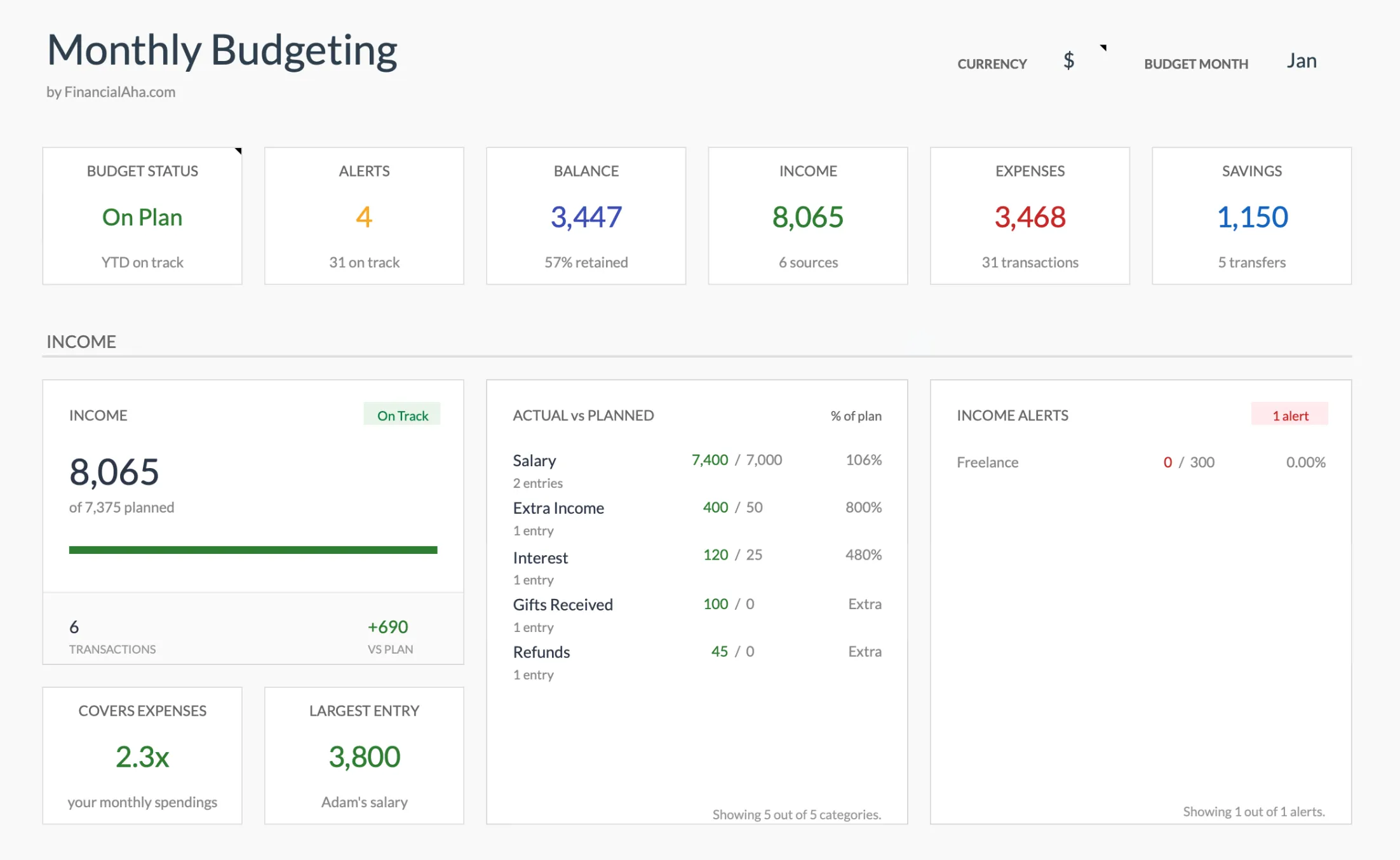
The Monthly Budget Template (Premium tier) dashboard: budget status, alerts, balance, income, expenses and savings tiles, plus the actual versus planned breakdown, already wired.
For the first month or two while you build up the rules list, some people prefer the lighter Monthly Expense Tracker ($19), a clean log with category totals and no monthly targets to wrestle with yet.
Related
- Copilot Money Alternative: Build the Same Workflow in Google Sheets
- YNAB Alternative in Google Sheets: The Method, Mapped Cell by Cell
- Tiller Alternative: Google Sheets Budgeting Without the Subscription
- Buxfer Alternative in Google Sheets - multi-currency and multi-account tracking, another self-owned rebuild
Frequently asked questions
What does Lunch Money do well?
Manual-first transaction review with a categorization rules engine, multi-currency support (notable for users with international accounts), and a clean web interface. The 'review pending' queue makes weekly bookkeeping fast.
Why would I leave Lunch Money?
Common reasons: $100/year subscription, preference for owning data outside any service, or a workflow that has already partly moved to a spreadsheet anyway. Some users also outgrow Lunch Money's reporting depth.
Can I import my Lunch Money data?
Lunch Money supports CSV export. Importing into Google Sheets requires a one-time categorization-mapping pass; the structure is similar enough that most users finish in 30 to 60 minutes.
Does the spreadsheet have a rules engine?
Not natively, but a 'rules' tab of merchant-to-category mappings combined with a VLOOKUP or QUERY formula approximates the same behavior. The trade-off is that updates are manual (you maintain the rules tab) rather than learned.
Sources
- Lunch Money Pricing - Lunch Money
- Lunch Money Multi-Currency Support - Lunch Money
About this article
The rules-engine and review-queue formulas were reviewed and corrected. Lunch Money pricing checked against the company's published pricing page. Template sheets, inputs and outputs checked on 2026-09-10 against the shipped Monthly Budgeting Google Sheet (Summary, Budget Plan, Transactions, Goals, Categories, Setup tabs). Last reviewed September 2026.