
Build a side hustle income tracker in Google Sheets with four tabs: an income log, an expense log categorized to Schedule C lines, a tax set-aside that pulls 25 to 35 percent off every deposit, and a dashboard. The dashboard surfaces three numbers a personal budget hides: net profit, tax owed, and your effective hourly rate. That last figure, take-home divided by hours worked, is the one most side hustlers have never calculated, and it is often surprising.
A side hustle that lives inside a personal budget tends to disappear into it. The $850 from a weekend freelance gig hits checking, gets absorbed into groceries and rent, and by April the bookkeeping question is “how much did this thing actually make me, and what do I owe on it?” Most side hustlers without a separate tracker answer that with a shrug.
The structure that fixes this is a small spreadsheet with four tabs. It does three things a personal budget cannot: it isolates revenue and expenses from household money, it pulls a tax cut off every deposit, and it tells you what the work pays per hour.
Why side income deserves its own tracker
The IRS Schedule C is the form sole proprietors file with their 1040 to report business income and loss (source). If a side hustle earns net more than $400 in a year, the IRS expects a Schedule C and a Schedule SE for self-employment tax, which runs 15.3 percent on top of regular income tax (source).
Two practical consequences:
- The categories on Schedule C are the natural categories for an expense log to use from day one. Rebuilding categories in March costs hours.
- Self-employment tax is a real line item, separate from income tax. A side hustler with $20,000 in net SE earnings owes roughly $2,800 in SE tax (15.3 percent on 92.35 percent of net) before any income tax. A personal budget has no place to surface this.
A separate tracker isolates the math. Revenue, expenses, tax obligation, and effective hourly rate all live in one place that you can look at in 30 seconds.
To put a real number on the self-employment tax slice before it feeds the set-aside tab, the self-employment tax calculator runs the 15.3 percent math from your net profit:
A worked example: weekend graphic design
We will use the same example throughout. Maya, a marketing manager with a day job, takes on freelance graphic design on weekends. Three to four clients a month, mostly logo refreshes and social media kits. Five months of activity.
| Month | Gross revenue | Expenses | Hours worked |
|---|---|---|---|
| Mar | 2,400 | 180 | 22 |
| Apr | 3,100 | 220 | 28 |
| May | 1,800 | 165 | 17 |
| Jun | 2,950 | 410 | 26 |
| Jul | 3,600 | 195 | 31 |
Totals over five months: $13,850 gross, $1,170 expenses, 124 hours. We will return to these numbers in the dashboard and hourly rate sections.
The four tabs
Tab 1: Income log
One row per deposit. Not one row per invoice - that lives elsewhere if you need it. The income log is cash, because cash is what the IRS taxes for most sole proprietors.
| Column | Example |
|---|---|
| Date | 2026-05-12 |
| Client | Bright Coffee Co. |
| Project | Logo redesign |
| Gross amount | 1,200 |
| Platform fees | 36 |
| Net deposit | 1,164 |
| Payment method | Stripe |
| Tax % | 30 |
| Tax set-aside | 349 |
| After-tax net | 815 |
Three things to flag here:
- The Platform fees column captures Stripe’s 2.9 percent plus 30 cents, PayPal’s percentages, Wave’s flat fee per ACH. Skip this column and effective revenue looks bigger than it is.
- Tax set-aside is the dollar amount that moves to a separate account on the day of the deposit. The percent comes next.
- After-tax net is what counts as “income” everywhere downstream. The household sees this number, not the gross.
Tab 2: Expense log
One row per business expense. The Category column is the single most important field, and it maps directly to Schedule C lines.
| Column | Example |
|---|---|
| Date | 2026-04-18 |
| Vendor | Adobe Creative Cloud |
| Description | Monthly subscription |
| Amount | 60 |
| Category | Software (Line 22) |
| Payment method | Business card |
| Receipt link | Drive URL |
Common Schedule C categories for a side hustle (Part II of the form):
| Schedule C line | Common side hustle examples |
|---|---|
| Line 8 Advertising | Social ads, business cards, portfolio site hosting |
| Line 11 Contract labor | Subcontractors, freelance editors, 1099 payments |
| Line 17 Legal and professional | Bookkeeper, attorney, tax prep fees |
| Line 18 Office expense | Postage, small office supplies |
| Line 22 Supplies / software | Adobe, Figma, Canva Pro, Notion |
| Line 25 Utilities | Business-use percent of internet, phone |
| Line 27a Other expenses | Education, professional dues, business meals (50 percent) |
| Line 30 Home office | Simplified or actual method |
Sticking to these categories from the first transaction means that, at year-end, the totals copy line-by-line into tax software. Rebuilding them in February is an avoidable tax-prep tax.
Tab 3: Tax set-aside
The tax set-aside is the mechanism that prevents an April surprise. The principle is simple: every time money lands, a percent of it moves into a separate tax savings account before any of it is treated as income.
The percent is the open question. Common guidance ranges from 25 to 35 percent, and the right number depends on the filer’s federal bracket, state tax, self-employment tax, and any business deductions. A first-year side hustler in a state with income tax often lands in the higher half of that range. A low-income year with significant deductions can land in the lower half. The exact number is a tax-planning question, not a budgeting one.
A simple structure for the tab:
| Date | Direction | Amount | Note |
|---|---|---|---|
| 2026-03-12 | In | 720 | 30% of $2,400 March deposits |
| 2026-04-15 | Out | 1,800 | Q1 estimated payment |
| 2026-05-18 | In | 540 | 30% of $1,800 May deposits |
Two columns matter most: the running balance, and the variance against actual quarterly estimates paid. If the balance grows faster than estimates draw it down, the percent may be conservative. If the balance keeps going negative against estimates, the percent is too low. For a fuller walkthrough of estimated-tax math, the Quarterly Estimated Tax Spreadsheet post covers the safe harbor rule and a worked example.
The deposit-by-deposit mechanic is the part that works. Money sitting in operating cash starts to feel spendable. Money in a labelled tax savings account does not.
Tab 4: Dashboard
The dashboard is the 30-second view. It pulls from the three logs above.
| Metric | Mar | Apr | May | Jun | Jul | YTD |
|---|---|---|---|---|---|---|
| Gross revenue | 2,400 | 3,100 | 1,800 | 2,950 | 3,600 | 13,850 |
| Platform fees | 72 | 93 | 54 | 89 | 108 | 416 |
| Business expenses | 180 | 220 | 165 | 410 | 195 | 1,170 |
| Net profit | 2,148 | 2,787 | 1,581 | 2,451 | 3,297 | 12,264 |
| Tax set-aside (30%) | 644 | 836 | 474 | 735 | 989 | 3,678 |
| Take-home | 1,504 | 1,951 | 1,107 | 1,716 | 2,308 | 8,586 |
| Hours worked | 22 | 28 | 17 | 26 | 31 | 124 |
| Effective hourly | $68 | $70 | $65 | $66 | $74 | $69 |
Net profit is gross revenue minus platform fees minus business expenses. Take-home is net profit minus the tax set-aside, which is the number Maya actually sees in her household budget. Effective hourly is take-home divided by hours worked.
Hourly rate: the calculation most side hustlers skip
A logo project priced at $1,400 sounds like good money. That same project, once it takes 18 hours of design, two rounds of revisions, and three hours of email, is roughly $67 per hour before expenses, before taxes, before the platform fee. Take-home is closer to $40 an hour.
The math:
- Project revenue minus platform fee minus direct expenses = net project revenue.
- Net project revenue minus tax set-aside = take-home from this project.
- Take-home divided by total hours worked = effective hourly rate.
For Maya’s full five months: net profit $12,264, minus tax set-aside $3,678, equals take-home $8,586. Divided by 124 hours, the effective hourly rate is roughly $69.
That number is information, not a verdict. Some questions it answers:
- Would Maya accept $69 per hour for a regular job in this field? If yes, the side hustle is paying competitively. If no, the work is underpriced or the time estimate is off.
- Which clients pay the highest effective rate? The income log paired with a Project hours column shows that. Some clients pay 2x the rate of others on the same kind of work.
- Are revisions eating the margin? If quoted hours are 8 and actual hours are 18, the implied rate on that project drops by half. That is a pricing signal, not a willpower problem.
The point of tracking hours is not virtue. Tracking hours shows whether the implied hourly rate matches what you would accept for a regular job. That is information you can use to decide whether to raise prices, drop a low-margin client, or simply stop quoting jobs that take twice as long as planned.
Per-client profitability
A column called Project hours on the income log enables per-client analysis. Sum revenue by client, sum hours by client, divide. The result is sometimes a sharp contrast.
A small example, three of Maya’s clients over the five months:
| Client | Net revenue | Hours | Effective hourly |
|---|---|---|---|
| Bright Coffee Co. | 3,400 | 38 | $89 |
| Northbridge Studio | 2,800 | 52 | $54 |
| Mednet Pediatrics | 4,200 | 48 | $88 |
Bright Coffee and Mednet pay roughly the same hourly. Northbridge pays 40 percent less for the same kind of work. That is a number worth seeing once a quarter, even if no immediate decision follows.
The 1099 reconciliation at year-end
In January, payers send 1099-NEC forms for any contractor they paid at or above the reporting threshold during the year. For payments made in 2026 and later that threshold is $2,000, up from the old $600 floor after a change in the IRS Instructions for Forms 1099-MISC and 1099-NEC. The IRS expects the numbers on those forms to match what gets reported on Schedule C.
The income log is what makes that reconciliation a 20-minute task instead of a frantic afternoon. Filter the log by Client, sum the Gross amount column for the year, and compare to the 1099-NEC totals as they arrive. If the spreadsheet shows $7,400 from one client and the 1099-NEC shows $6,800, one of them is missing a payment. Catching this in January is much easier than catching it in April with a tax preparer waiting on a number.
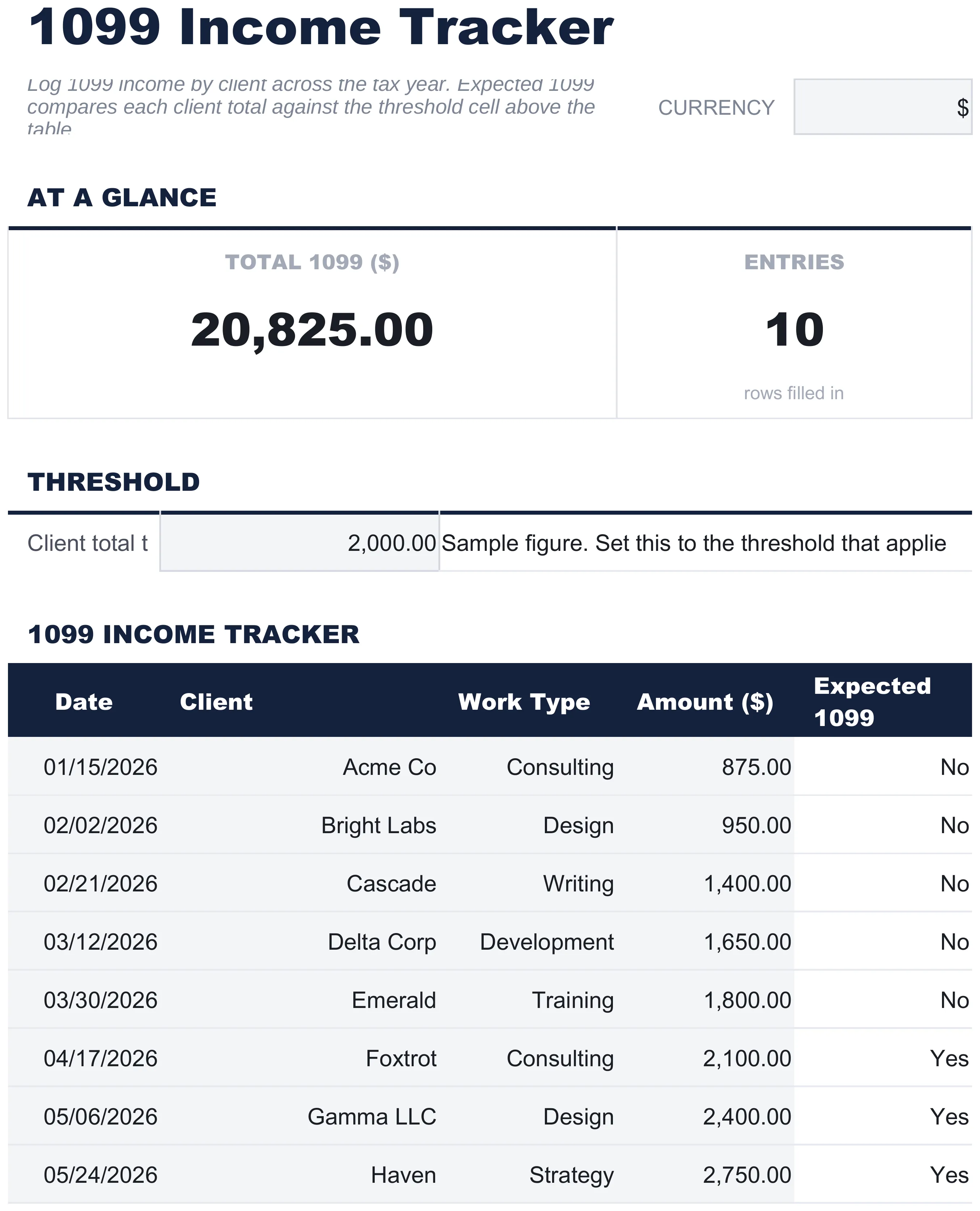 The free 1099 Income Tracker (Free tier) logs income by client and flags which totals cross the reporting threshold.
A side note: not every client sends a 1099. A payer who paid you under $2,000 for 2026 work often sends no form at all. It is still income, still taxable, and still belongs on Schedule C. The spreadsheet is the record of total income, regardless of how many 1099s arrive.
For the broader deduction map, see 25 Self-Employed Tax Deductions for 2026, which covers home office, vehicle, health insurance, and retirement contributions in detail.
When household and side hustle interact
The side hustle tracker handles the business side. The personal budget handles the household side. They meet at one number: the take-home that transfers from the side hustle’s holding account into household checking.
How that meeting point usually looks:
- Stable side hustle income: the household budget can treat it like a second paycheck.
- Lumpy month to month: the baseline method works the same as it does for full-time freelancers. Pay yourself a fixed monthly amount, let the variance live upstream in a holding account. The budget for irregular income post walks through the four-tab structure for that.
- Growing toward primary income: the same spreadsheet structure scales. The income log gets longer, the expense log adds rows, and the tax set-aside percent may need to rise as bracket rises. The framing changes more than the spreadsheet does.
For the freelancer-side cash flow piece that tracks invoiced revenue against payment timing, see Freelancer Cash Flow Spreadsheet: Monthly Reconciliation in 15 Minutes.
When the side hustle outgrows the spreadsheet
Signals the spreadsheet is straining:
- More than 20 clients per month, with multiple invoices each. Invoice management starts to want a dedicated tool.
- Inventory tracking. Spreadsheets handle revenue and expenses well. Cost of goods sold with units is harder.
- Payroll. The first 1099 contractor is fine in the expense log. The first W-2 employee usually means a payroll service.
- Multi-state tax exposure. Selling across state lines into sales-tax-collecting states adds complexity that accounting software handles better.
Below those thresholds, a spreadsheet usually wins. Lower cost, more flexible reports, faster setup, and the categories already match Schedule C.
Templates that fit
- “I want a free starting point for tracking 1099 income from multiple payers” - The free 1099 Income Tracker covers the income log side with a single sheet and sample data. Good fit for a side hustle with two or three clients and no expense complexity.
- “I want a 12-month cash flow projection with best, expected and worst cases” - The Cash Flow Forecast template plans twelve months across three income rows and seven expense categories you can rename and mark Fixed or Variable. An Actual sheet sits beside the plan and reports a forecast accuracy figure, while the dashboard carries a low cash alert and a projected low point. There is no client or invoice tracking in it, so the income log above stays where deposit-level detail lives.
- “I want the year’s income by type, deductions and quarterly payments in one place” - The Annual Tax Planner logs income by type, Self-Employment among them, applies an editable rate to each type, then subtracts a deduction benefit and any credits to reach a net tax liability. A quarterly tab holds four rows for what has been paid, and a documents checklist tracks the W-2s, 1099s and receipts as they arrive. Self-employment tax and Schedule C lines are not part of it, so that math stays in the tracker above.
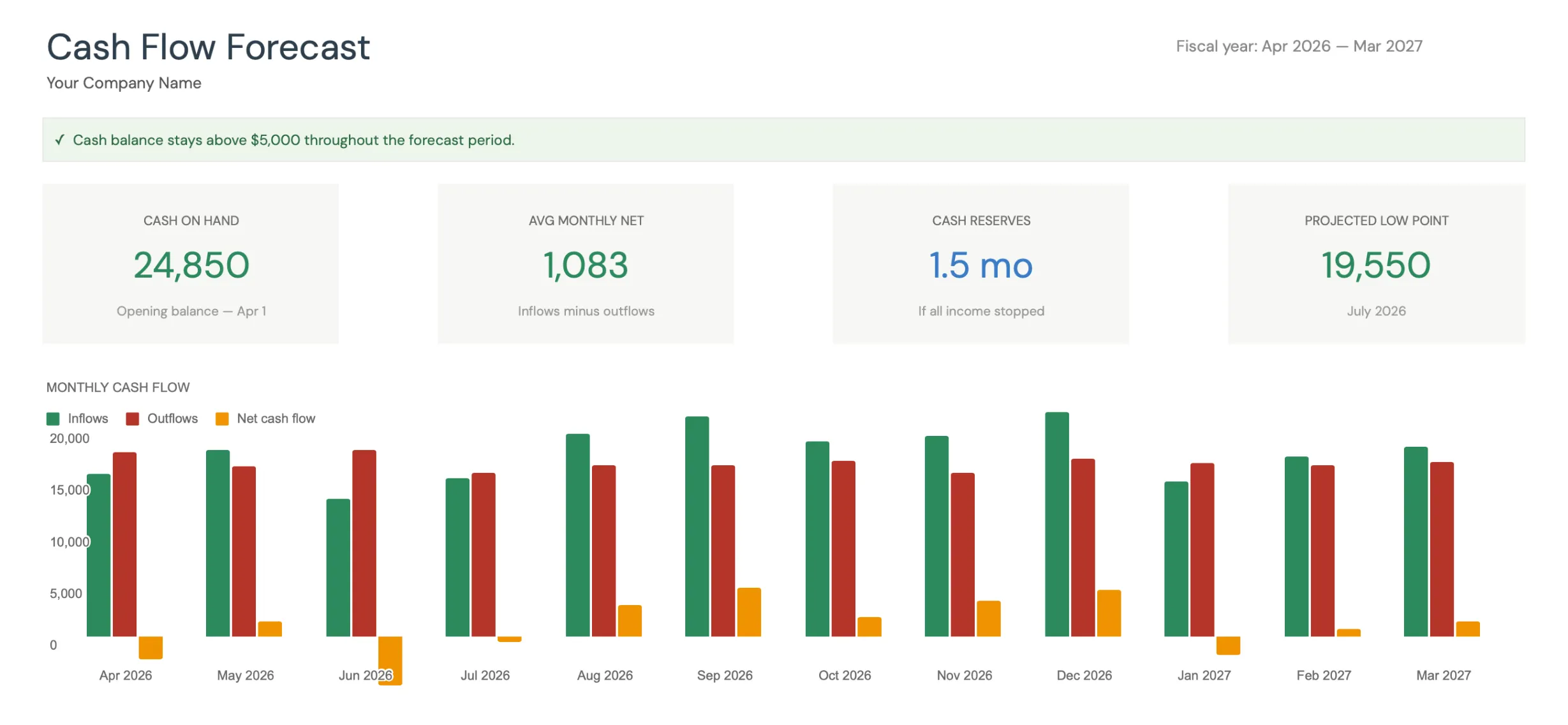 The Premium Cash Flow Forecast template turns monthly income and expense totals into a 12-month projection with a cash reserves figure in months.
Neither paid template is built on Schedule C lines. The Cash Flow Forecast groups spending into seven renamable expense categories and the Annual Tax Planner groups deductions into its own categories, so the Schedule C mapping stays in the expense log above.
Related
Frequently asked questions
Why a separate tracker for side income?
Mixing W-2 and 1099 income in one personal budget masks the side hustle's actual contribution. A separate tracker shows revenue minus expenses, the implied hourly rate, and the tax obligation - three numbers a personal budget hides.
How do I categorize expenses?
Use Schedule C categories from the start - advertising, supplies, software, professional fees, home office, vehicle. Sticking to Schedule C lines saves hours at year-end tax prep.
Should I set aside taxes from every payment?
Common practice is to transfer 25 to 35 percent of every deposit into a separate account before treating any of it as income. The exact percentage depends on bracket, state, and SE tax. Some side hustlers underestimate and end up owing in April.
What if my side hustle becomes my full income?
The tracker scales. At some point it becomes the primary income, and the separate-account structure for taxes becomes the main payroll structure. The spreadsheet does not change; the framing does.
Will I get a 1099 for every client that paid me?
No. For payments made in 2026 and later, a client only has to send a 1099-NEC once they pay you $2,000 or more in the year, up from the old $600 floor. Smaller payments, and cash or peer-to-peer transfers that never trigger a form, are still income and still belong on Schedule C. The income log is the record either way.
Should the income log record when I invoice or when I get paid?
Most sole proprietors report on a cash basis, so the income log records the deposit date, not the invoice date. Logging cash received keeps the tracker aligned with what the IRS taxes for a typical side hustle. Invoice-to-payment timing is a separate cash flow question that a dedicated cash flow sheet handles.
Sources
- About Schedule C (Form 1040), Profit or Loss From Business - Internal Revenue Service
- Self-Employment Tax (Social Security and Medicare Taxes) - Internal Revenue Service
- Instructions for Forms 1099-MISC and 1099-NEC - Internal Revenue Service
About this article
Schedule C category lines, the self-employment tax rate, and the $400 filing floor are checked against IRS forms and instructions. The 1099-NEC reporting threshold reflects the increase to $2,000 in the current IRS instructions for tax years after 2025. Claims about the linked templates were checked on 2026-09-10 against the shipped workbooks: the free 1099 Income Tracker, the Premium Cash Flow Forecast (Dashboard, Forecast, Actual, Scenarios, Settings) and the Premium Annual Tax Planner (Dashboard, Income, Deductions, Quarterly, Documents Checklist). Last reviewed September 2026.