
A freelancer cash flow spreadsheet tracks three streams: invoices issued (revenue), payments received (cash), and operating expenses. The gap between invoiced and collected is your accounts receivable; the gap between cash in and cash out is your operating cash flow. This is the 15-minute monthly routine that keeps the two straight, plus a Google Sheets template that forecasts the next 12 months.
For a solo freelancer, cash flow is more important than profit. You can be profitable on paper and still go bankrupt if your invoices take 60 days to collect and your rent is due tomorrow. This post covers the 15-minute monthly reconciliation routine that keeps the picture honest, and where our Cash Flow Forecast template picks up the projection once the reconciliation is done.
Three things to track
1. Invoices issued. What you billed clients this month. This is revenue in accounting terms but not yet cash.
2. Payments received. What hit your bank account this month. May correspond to invoices from prior months. This is cash.
3. Operating expenses. What went out: software subscriptions, contractor payments, business insurance, taxes, etc.
The reconciliation is comparing these three streams against each other and against your bank balance.
The three sheets
Sheet 1: invoices issued
One row per invoice. Columns:
| Column | Example |
|---|---|
| Invoice date | 2026-04-15 |
| Invoice number | INV-2026-042 |
| Client | Acme Corp |
| Amount | 4,800 |
| Due date | 2026-05-15 |
| Status | Sent / Paid / Overdue |
| Payment date | (filled when paid) |
| Payment amount | (filled when paid) |
| Days to pay | =Payment date - Invoice date |
| Notes | Q2 retainer |
Filter by Status to see what’s outstanding. Sort by Days to pay to identify problem clients.
Sheet 2: payments received
One row per payment. Columns:
| Column | Example |
|---|---|
| Payment date | 2026-05-22 |
| Client | Acme Corp |
| Amount | 4,800 |
| Method | ACH / Check / Stripe / PayPal |
| Fees | 0 |
| Net received | =Amount - Fees |
| Invoice number | INV-2026-042 |
| Notes |
The Method and Fees columns matter. Stripe’s standard rate is 2.9 percent plus 30 cents per successful card charge; ACH might take a few dollars; checks are free but slow. Knowing the cost per channel is useful when you decide how to invoice.
Sheet 3: operating expenses
One row per business expense. Columns:
| Column | Example |
|---|---|
| Date | 2026-05-08 |
| Category | Software |
| Vendor | Adobe Creative Cloud |
| Amount | 60 |
| Tax-deductible? | Yes |
| Notes | Annual subscription, prorated monthly |
Categories should align with Schedule C lines for tax purposes (advertising, supplies, software, professional fees, etc.). For the full self-employed deduction list, see 25 Self-Employed Tax Deductions for 2026.
The 15-minute monthly reconciliation
Once a month (the 1st works for most people), 15 minutes of attention.
Minute 1 to 5: invoices.
- Pull last month’s invoices issued from your invoicing tool (Stripe, Wave, Bonsai, etc.).
- Verify each is in the spreadsheet. Add any missing.
- Update Status for any that have been paid since last reconciliation.
Minute 6 to 10: payments.
- Open your business bank account.
- Filter to last month’s deposits.
- Verify each is in the spreadsheet. Add any missing. Match each to an invoice.
- Cross-check: total deposits in your bank should match total payments in the sheet.
Minute 11 to 15: expenses.
- Pull last month’s business credit card statement.
- Categorize each charge that isn’t already in the spreadsheet.
- Verify total expenses in the sheet matches the statement.
Output: four totals for the month that are no longer guesses: revenue invoiced, cash received, expenses paid, and the net between the last two. Those are the numbers the forecast runs on.
15 minutes a month, 3 hours a year, complete cash flow picture.
A worked example
Anya, freelance copywriter, May 2026.
Invoices issued:
- INV-091: Acme Corp, $3,200, sent May 3, due June 3
- INV-092: BrightSky, $1,800, sent May 10, due June 10
- INV-093: Acme Corp, $4,400, sent May 22, due June 22
- INV-094: Mednet, $2,200, sent May 28, due June 28
Total invoiced: $11,600.
Payments received:
- $3,400 from BrightSky (April invoice)
- $5,200 from Acme Corp (April invoice)
- $1,800 from Mednet (April invoice)
Total received: $10,400.
Operating expenses:
- Software: $185 (Adobe, Notion, ConvertKit)
- Bookkeeping: $120
- Health insurance premium: $480
- Self-employment tax (Q2 estimate): $1,650
- Solo 401(k) contribution: $2,500
- Office supplies: $40
- Internet (60 percent business): $54
Total expenses: $5,029.
Net cash flow for May: $10,400 - $5,029 = $5,371.
Bank balance increased $5,371 from May 1 to May 31 (or however close it matches; small variance is normal due to timing).
Accounts receivable: $11,600 (invoiced) minus $10,400 (received from prior months) = different concept; A/R is the sum of unpaid invoices regardless of when issued. Anya has $11,600 in unpaid invoices outstanding at end of May (assuming none of May’s were paid yet).
Where the spreadsheet helps that accounting software doesn’t
For a solo freelancer, full accounting software (QuickBooks Online, Xero, FreshBooks) is often overkill. The spreadsheet has advantages.
Lower cost. The template is a one-time $29. Full accounting software runs on a monthly subscription (QuickBooks Online’s entry plan sits in the $30 to $40 a month range), so over a few years the gap is hundreds of dollars against a single payment.
Custom views. Pivot the data however you want. Group by client, by month, by category. Accounting software has fixed reports.
Tax preparation. You choose the category names on the expense sheet, so they can follow the Schedule C lines you actually file. At year end, the totals copy into tax software.
Cash flow projection. The 12-month forward projection (next section) is where spreadsheets shine. Accounting software shows what happened; spreadsheets project what will.
The 12-month forward projection
The fourth sheet, and the one that changes decisions. It takes the totals from the reconciliation and runs them forward.
| Month | Recurring revenue | One-time revenue | Operating expenses | Tax estimates | Net cash flow | Cumulative |
|---|---|---|---|---|---|---|
| Jun 2026 | 5,200 | 3,800 | 4,200 | 0 | 4,800 | 4,800 |
| Jul 2026 | 5,200 | 1,500 | 4,200 | 0 | 2,500 | 7,300 |
| Aug 2026 | 5,200 | 2,000 | 4,400 | 0 | 2,800 | 10,100 |
| Sep 2026 | 5,200 | 4,500 | 4,200 | 1,650 | 3,850 | 13,950 |
| Oct 2026 | 5,200 | 3,000 | 4,400 | 0 | 3,800 | 17,750 |
| … |
Recurring revenue is monthly retainers or subscription clients. One-time revenue is project work. The forecast is realistic if you base it on signed engagements; aspirational if you’re projecting from new business pipeline.
The Cumulative column is the bank balance forecast. When it dips negative or below your minimum cash buffer, that’s where the forecast tells you to either accelerate billing, raise prices, or cut expenses.
This is the use case business cash flow software targets, but at 1 to 5 person scale, a spreadsheet handles it well.
Common mistakes
Treating invoiced revenue as cash. A $5,000 invoice is not $5,000 in your account until it’s paid. Confusing the two leads to spending money you haven’t received.
Ignoring payment timing patterns by client. Some clients pay net-30 reliably; some are net-60 in practice; some are net-90+. The forecast should account for actual payment behavior, not stated terms.
Forgetting quarterly taxes. The IRS expects self-employed people to pay tax as they earn it through estimated quarterly payments, not once in April. A freelancer with $80K net income can owe several thousand dollars each quarter in federal tax alone, once self-employment tax and income tax are combined. Leaving that out of the cash flow picture is a common way to get surprised. The Quarterly Estimated Tax Spreadsheet walks through the math.
Not separating personal and business. Mixing personal and business in one bank account makes reconciliation 10x harder. A separate business account is the single best $0 investment a freelancer can make.
Reconciling annually instead of monthly. Easy to fall behind. The 15-minute monthly habit is the difference between accurate quarterly tax estimates and a March surprise.
What our paid template adds
The manual three-sheet system above is where you track invoices, payments and expenses. The Cash Flow Forecast template is $29 and is the forecasting layer on top of those totals:
- A 12-month forecast: opening balance, categorized inflows and outflows, net cash flow and closing balance for each month
- Actuals tracking against the forecast, with forecast-accuracy KPIs
- Best, expected and worst-case scenario modeling
- A dashboard with cash on hand, average monthly net, projected low point, and a runway figure (months of reserves if income stopped)
- Seven expense categories you rename in the Settings sheet, each marked Fixed or Variable so the scenarios only scale the variable ones
- A low cash alert threshold that flags any month the closing balance falls under it
- Google Sheets format (make a copy to your own Drive)
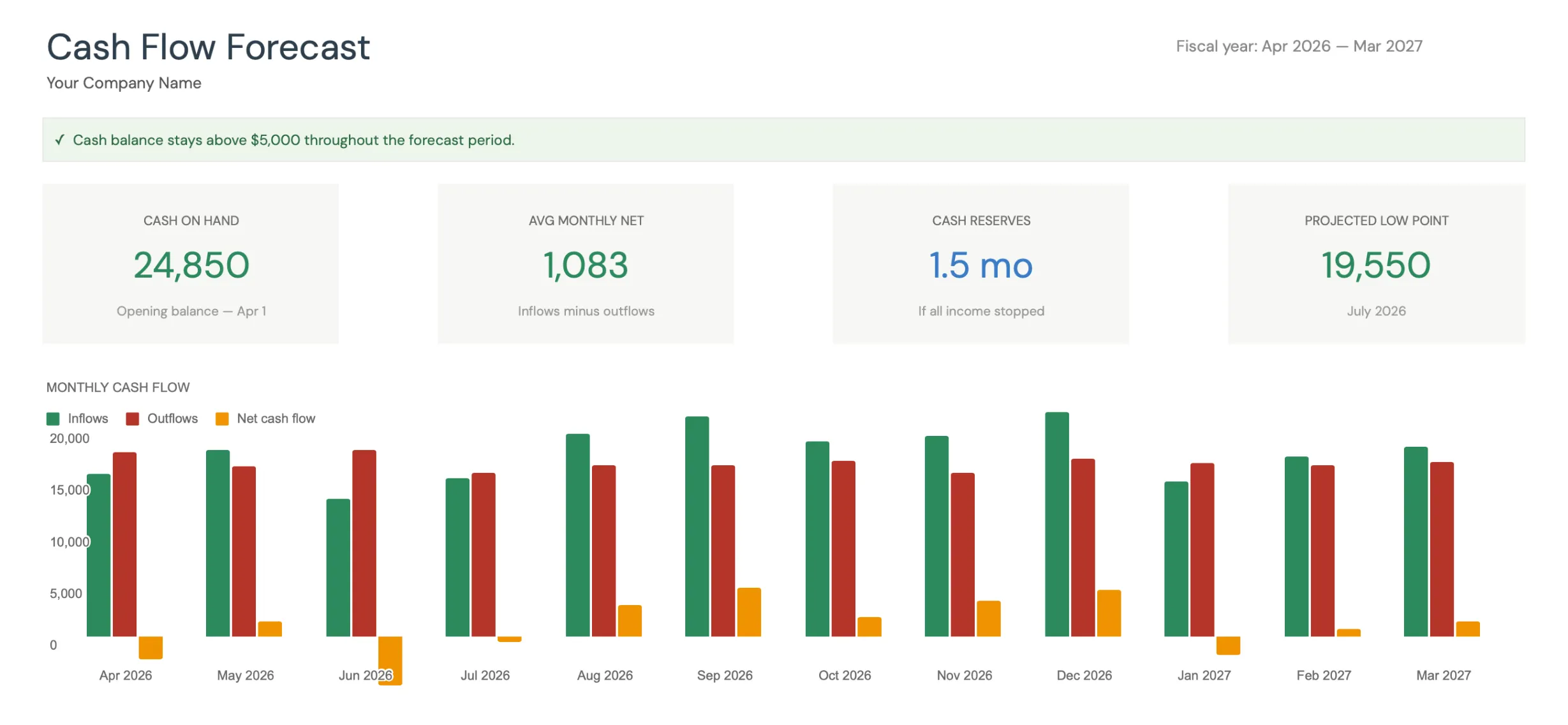 The dashboard in the FinancialAha Cash Flow Forecast template (Premium tier). The runway figure reads “1.5 mo - if all income stopped.”
If you’d rather build the whole thing from scratch, the manual structure earlier is reproducible in about two hours. Most freelancers find that monthly reconciliation discipline matters more than tool choice.
Get the template
- Cash Flow Forecast - 12-month cash flow forecast with actuals tracking, scenarios, and a runway figure.
- Annual Tax Planner - track income, deductions, and quarterly estimated payments in one place, with a document checklist.
Related
- Quarterly Estimated Tax Spreadsheet
- 25 Self-Employed Tax Deductions for 2026
- QuickBooks vs Wave for Freelancers - when the free or paid app is worth it over a sheet
- Cash Flow Forecast Template for Business - the same math scaled up past a one-person operation
- Our Business Spreadsheet Library, Built Out - the full set of workbooks the freelancer sheet sits inside
Frequently asked questions
Should I use cash basis or accrual?
For a solo freelancer, cash basis is usually right (you report income when paid, expenses when paid). It's simpler and matches your tax filing if you're under the IRS thresholds for accrual requirement. The spreadsheet works for either; just be consistent.
Do I need separate sheets per client?
Not unless you have a small number of large clients. Most freelancers do better with a single Invoices sheet filtered by client when needed. The Pivot Table or filter view gets you per-client breakdowns from one source of truth.
How do I handle currency for international clients?
Add a Currency column on the Invoices sheet. Convert to your home currency at payment date for the Payments sheet. The dashboard reports in home currency. The exchange rate variance between invoice and payment is a small business cost; track separately if it matters.
Should I track time spent per project alongside revenue?
Optional but useful. A separate Time Tracking sheet (or app like Toggl) helps calculate effective hourly rate per client. Some freelancers integrate this into the same workbook; others keep it separate.
What if I have W-2 income too?
Track separately. The freelance cash flow spreadsheet covers business income only. W-2 income is personal cash flow; track in the [Monthly Budgeting Template](@route:templates.product:budgeting:monthly-budgeting) or similar.
Does the Cash Flow Forecast template track invoices and accounts receivable line by line?
No. The template is built around cash flow forecasting: a 12-month projection of inflows and outflows, closing balance each month, and a runway figure. The per-invoice Invoices sheet described in this guide is something you keep in any spreadsheet to feed those totals; the template is the forecasting and dashboard layer on top.
Will the template import from Stripe or my bank automatically?
No. It's a manual workflow: you paste or type last month's numbers during the reconciliation. That is by design for privacy, since nothing connects to your bank or payment processor. The trade-off is the 15 minutes a month covered above.
Sources
- Pricing and fees - Stripe
- Self-Employed Individuals Tax Center - Internal Revenue Service
- Estimated Taxes - Internal Revenue Service
About this article
Template sheets, inputs and outputs checked on 2026-09-10 against the shipped Cash Flow Forecast Google Sheet (Dashboard, Forecast, Actual, Scenarios, Settings, Instructions) and the shipped Annual Tax Planner (Dashboard, Income, Deductions, Quarterly, Documents Checklist). Payment-processor and tax figures checked against Stripe's published pricing and the IRS self-employment and estimated-tax guidance. Last reviewed September 2026.