
For most people tracking net worth, Google Sheets is the more practical choice: it is free, auto-saves, opens on any device, shares with a partner or advisor through one link, and pulls live investment prices with GOOGLEFINANCE. Excel, at $99.99 a year for Microsoft 365 Personal, wins on pivot-table analysis, faster handling of large files, and true offline and local-only storage. The bigger factor is consistency, since a sheet updated monthly for years holds more insight than an elaborate workbook opened twice and abandoned.
Picture someone three years into tracking their net worth. They’ve got 36 monthly snapshots. A line chart that actually shows something meaningful. Columns for a house, two retirement accounts, a car loan that’s almost paid off, and a student loan balance that keeps shrinking. They can see the month they got a raise. The dip when they replaced the roof. The slow, satisfying climb after that.
Now picture them trying to switch platforms.
That’s the thing about net worth tracking that makes it different from most spreadsheet tasks. It accumulates. The longer it runs, the more valuable it gets and the harder it becomes to move. Picking the right tool early matters more than people expect.
Our templates work in Google Sheets. The Net Worth Tracker is built for Google Sheets, with cloud access, automatic calculations, and easy sharing with a partner or advisor.
Starting From Zero
In the first few months, the platform barely matters. Any spreadsheet can hold a list of assets and debts. SUM formulas work the same everywhere. A bank balance is a bank balance.
What does matter early on is friction. How easy is it to actually sit down and update the numbers? This is where Google Sheets pulls ahead for many people. It’s free, it opens in a browser, and it saves automatically. There’s no file to manage, no “where did I save that?” moment three weeks later. Pull it up on a phone to check a balance, update it from a laptop that evening. The low barrier to entry helps build the habit, and habit is what makes net worth tracking useful.
Excel, by contrast, needs a subscription ($99.99 a year for Microsoft 365 Personal) and a more deliberate workflow. Open the app, find the file, save when finished. None of that is hard, but the small additional steps add up when the goal is consistency over months and years. If you just want to see where you stand before choosing a platform, the net worth calculator gives you a starting figure in a browser, and calculating net worth in Google Sheets walks through the formulas to make it recurring.
Six Months In: The Investment Question
Once the basic tracking habit is established, a common next step is adding investment accounts. And here the two platforms diverge in an interesting way.
Google Sheets has a built-in function called GOOGLEFINANCE that pulls stock prices, mutual fund values, and currency exchange rates directly into cells. Type =GOOGLEFINANCE("GOOG") and the current price appears (prices are delayed up to 20 minutes, which is fine for a monthly net worth snapshot). For someone with a brokerage account or retirement funds in index ETFs, this means portfolio values can update automatically, with no logging into three different accounts to check balances.
Excel (Microsoft 365) has STOCKHISTORY, which works well for historical price data, plus Power Query for pulling in external data sources. The desktop app also connects to Power BI for deeper analysis. These are capable tools, but they require more setup than typing a single formula.
For someone whose net worth is mostly cash, a home, and some debt, this distinction won’t matter much. But as investment holdings grow, automatic price feeds can save real time each month.
The Year-Two Shift
Something changes around the one-year mark. There’s enough data to start asking questions. Not just “what’s my net worth?” but “how fast is it changing?” and “which assets are actually growing?”
This is where the platforms start to feel genuinely different.
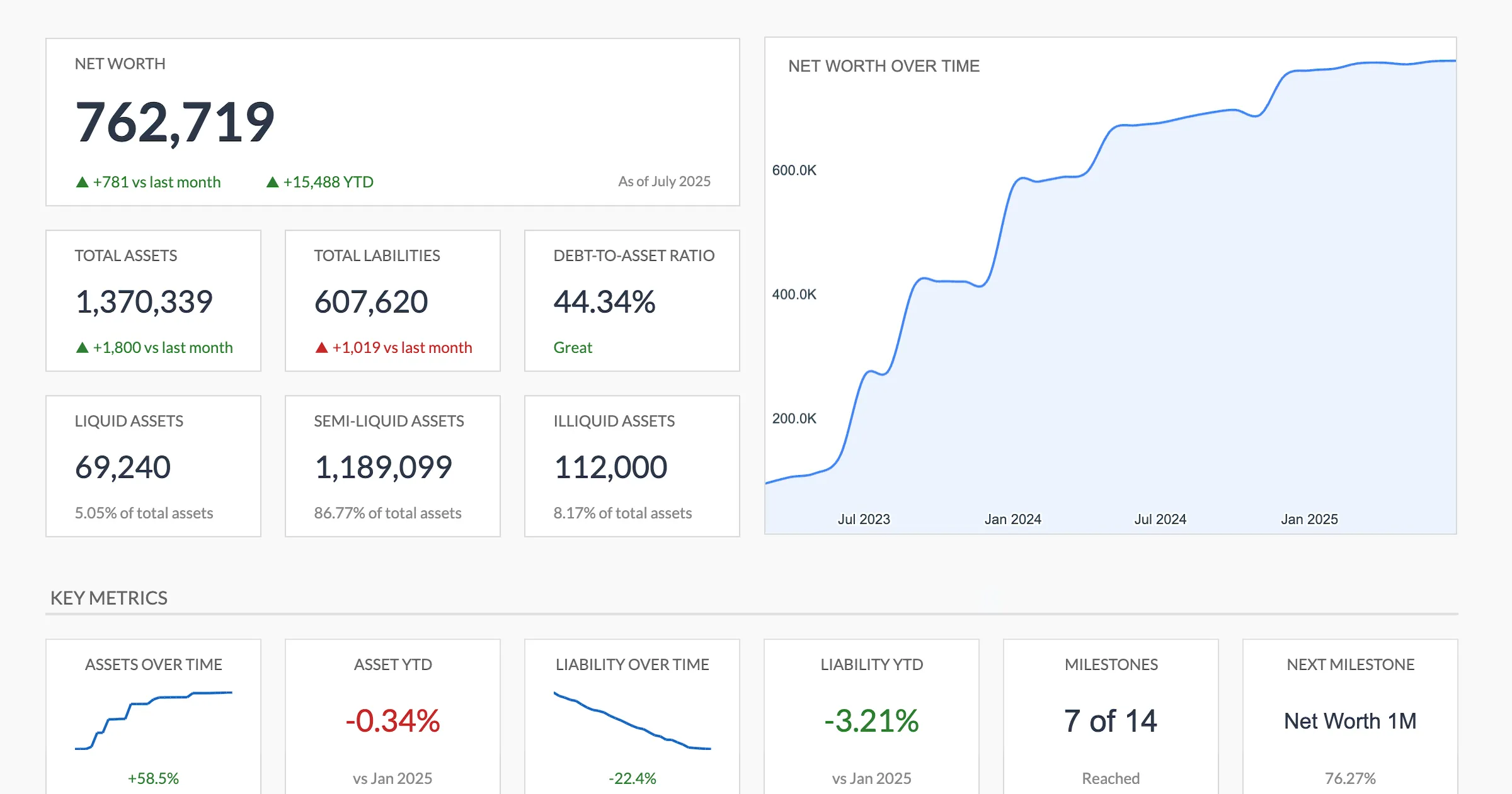
The Net Worth Tracker (Premium tier) builds the trend chart and category breakdowns automatically in Google Sheets, so the year-two questions are answered without setting up pivot tables.
Google Sheets handles basic charting and trend lines well enough. A line chart of monthly net worth over 18 months looks fine. Conditional formatting can highlight months where net worth increased or decreased. For straightforward “am I heading in the right direction?” analysis, it covers the ground.
Excel, though, has stronger analytical tools. Its pivot tables are more flexible: grouping by quarter, filtering by asset type, comparing year-over-year growth by category. For someone who wants to understand not just the total but the composition of their net worth over time, Excel’s data tools provide a noticeably richer experience.
Worth noting: most people don’t actually need pivot tables for net worth tracking. A simple chart does the job. But for the analytically minded, this is where Excel earns its subscription cost.
Sharing the Picture
Net worth tracking sometimes involves other people. A partner who wants visibility into household finances. An advisor reviewing the full financial picture before a meeting.
Google Sheets handles sharing with almost no effort. Send a link with view-only access. The other person opens it in a browser, with no software required and no file to download. For couples tracking household net worth together, both can edit simultaneously. Real-time updates, no version conflicts. The same shared-access advantage plays out across the household budget too, which the Google Sheets vs Excel for family budgeting comparison covers in depth.
Excel sharing works through OneDrive or email. Co-authoring exists but feels less natural for real-time collaboration. In practice, many households using Excel end up with one person maintaining the file and sharing screenshots or summaries with the other.
For solo trackers, this barely matters. For anyone involving a second person, whether a partner, advisor, or accountant, Google Sheets removes a layer of hassle.
Three Years and Counting
At this point, the spreadsheet holds serious history. Dozens of monthly entries. Maybe property value estimates, car depreciation, loan paydown schedules.
Large datasets are where Excel’s desktop app shines. It handles big files faster. Scrolling through years of data feels smoother. Complex calculations run quicker. If someone has been meticulously tracking 15 asset categories monthly for three years, that’s over 500 data points, and Excel won’t flinch.
Google Sheets can handle this volume too, for the record. It might slow down slightly with heavy formulas across many rows, but for typical net worth tracking it stays within comfortable limits.
The more practical concern at this stage is data safety. Three years of financial history is painful to lose. Google Sheets stores everything on Google’s servers with automatic backup and version history. Accidentally delete a row? Roll it back. Laptop dies? Log in from another device. Excel files stored locally are vulnerable to hardware failure unless a backup system is in place. OneDrive mitigates this, but it requires intentional setup.
When the Platform Really Matters
Privacy is worth thinking about separately. Some people are uncomfortable storing detailed financial data on Google’s servers, even when it is encrypted. Excel with local-only storage keeps everything on a personal device. That’s a legitimate preference, and for those people, the convenience tradeoffs are worth it.
Offline access is another real consideration. Excel works without internet, full stop. Google Sheets needs a connection (offline mode exists in Chrome but requires advance setup). In practice, net worth updates usually happen when someone can also check their bank apps, which also need internet. But the option for fully disconnected work belongs to Excel.
What Happens If You Switch Later
The intro pictured someone trying to move three years of history to a new platform. Here is what that actually involves, because it is less dramatic than the dread suggests.
Going from Google Sheets to Excel is a clean export: File then Download then Microsoft Excel (.xlsx). The whole workbook comes across, and ordinary formulas such as SUM, arithmetic, and lookups keep working because both apps share the same core function set. Charts usually survive too. The one piece that does not translate is GOOGLEFINANCE, which has no Excel counterpart; any cell that pulled live prices arrives as a static value and has to be rebuilt with STOCKHISTORY or the Excel Stocks data type. If your net worth is mostly cash, property, and loans, there is little live data to lose and the move is close to painless.
Going the other way, from Excel to Google Sheets, works through File then Import then Upload. Standard formulas convert, though a few Excel-only functions and some advanced pivot-table configurations may need a second look. The practical takeaway is that the numbers are portable in both directions. What is genuinely hard to recreate is the habit and the years of consistent monthly entries behind them, which is the real reason to choose a platform you will keep opening.
Finding What Fits
The honest version of this comparison: Google Sheets is easier to start with and easier to maintain. It’s free, always accessible, and the sharing and auto-save features reduce the logistical friction that kills tracking habits. For most people beginning to monitor their net worth, it’s the more practical starting point.
Excel is the more powerful analytical tool. It handles large datasets more comfortably, offers deeper data analysis capabilities, and provides the option of true local storage. For someone who already has Microsoft 365 and prefers desktop software, it’s a strong choice.
The platform matters less than the consistency. A Google Sheet updated every month for two years contains far more insight than an elaborate Excel workbook opened twice and abandoned.
Where to go next depends on what you have decided. If Google Sheets is the platform, the Net Worth Tracker ($29 once) arrives with the Net Worth Over Time chart, the asset and liability categories and the monthly columns already wired, so the work is swapping the sample accounts for your own and inserting a column at the start of each new month. If you would rather build it yourself first, how to calculate net worth in Google Sheets covers the formulas from a blank sheet.
Related
Frequently asked questions
Can Google Sheets handle complex net worth calculations?
Yes. Google Sheets supports all the formulas you need for net worth tracking: SUM, conditional formatting, GOOGLEFINANCE for live investment prices, and IMPORTRANGE to pull data from other spreadsheets. Most personal net worth tracking stays well within its capabilities.
Is Excel better for tracking net worth over many years?
Excel handles large historical datasets slightly faster, and its pivot tables make it easier to analyze trends across years. But Google Sheets works fine for most people tracking net worth monthly or quarterly, even over a decade or more.
Can I share my net worth spreadsheet with a financial advisor?
Google Sheets makes this straightforward: share a view-only link and your advisor sees real-time data without needing any software. Excel files can be emailed or shared via OneDrive, but the experience is less seamless for ongoing collaboration.
Which is more private for sensitive financial data like net worth?
Excel with local-only storage keeps everything on your device. Google Sheets stores data on Google's encrypted servers. Both cloud options offer strong security, but if keeping financial data off third-party servers matters to you, a local Excel file is the most private option.
Can I move my net worth spreadsheet from Google Sheets to Excel later?
Yes. File then Download then Microsoft Excel (.xlsx) exports the whole workbook, and most SUM and lookup formulas, plus charts, carry over intact. The main thing that does not survive is GOOGLEFINANCE, which has no Excel equivalent; those cells need rebuilding with STOCKHISTORY or the Excel Stocks data type after the switch.
Does GOOGLEFINANCE pull every account in my net worth?
No. GOOGLEFINANCE only returns prices for publicly traded securities, funds, and currencies. Bank balances, home equity, car values, and private holdings still have to be typed in or updated by hand, so it automates the investment slice of net worth rather than the whole picture.
Sources
- Compare All Microsoft 365 Plans - Microsoft
- GOOGLEFINANCE Function - Google
- STOCKHISTORY Function - Microsoft
About this article
Microsoft 365 subscription pricing checked against Microsoft's published plan-comparison page. GOOGLEFINANCE and STOCKHISTORY behavior checked against Google and Microsoft's function documentation. Net Worth Tracker sheets, inputs and outputs checked on 2026-09-10 against the shipped Google Sheet (Summary, Assets, Liabilities, Milestones, Setup, Instructions tabs). Last reviewed September 2026.