For most small businesses a one-time Google Sheets template covers cash flow forecasting better than a subscription. The $29 Cash Flow Forecast Template projects 12 months, models best, expected and worst-case scenarios, and compares your forecast against actuals. Dedicated apps like Float or Pulse, and the planners built into QuickBooks and Xero, mainly earn their keep once forecasting becomes a weekly, multi-person routine.
Running out of cash kills more small businesses than running out of customers. That’s not hyperbole - profitable businesses close regularly because they couldn’t cover payroll while waiting on invoices. A decent cash flow forecast prevents that.
Quick pick: The Cash Flow Forecast Template (one-time purchase) handles 12-month projections with three scenarios (best/expected/worst case), forecast vs actuals tracking, KPI dashboard, and configurable expense categories - all in Google Sheets. For businesses that need full accounting alongside forecasting, QuickBooks or Xero are better fits. For a free starting point, Google Sheets’ built-in templates offer a basic framework to build on.
The good news is that you don’t need expensive software to do this well. Here’s what’s available and what works for different situations.
Why Forecasting Matters More Than Tracking
Most accounting tools focus on what already happened. Cash flow forecasting looks forward - when will money arrive, when do bills come due, and will there be enough in between? That forward view is where the real value lives for small businesses.
Seasonal businesses feel this most acutely. A landscaping company might do 70% of revenue between April and October but still has fixed costs in winter. A consulting firm might have strong quarters followed by gaps between projects. The forecast makes these patterns visible before they become crises.
Spreadsheet Templates
The Cash Flow Forecast Template handles the core of what most small businesses need - revenue projections, expense categories, running cash balance, and visual indicators showing when cash gets tight.
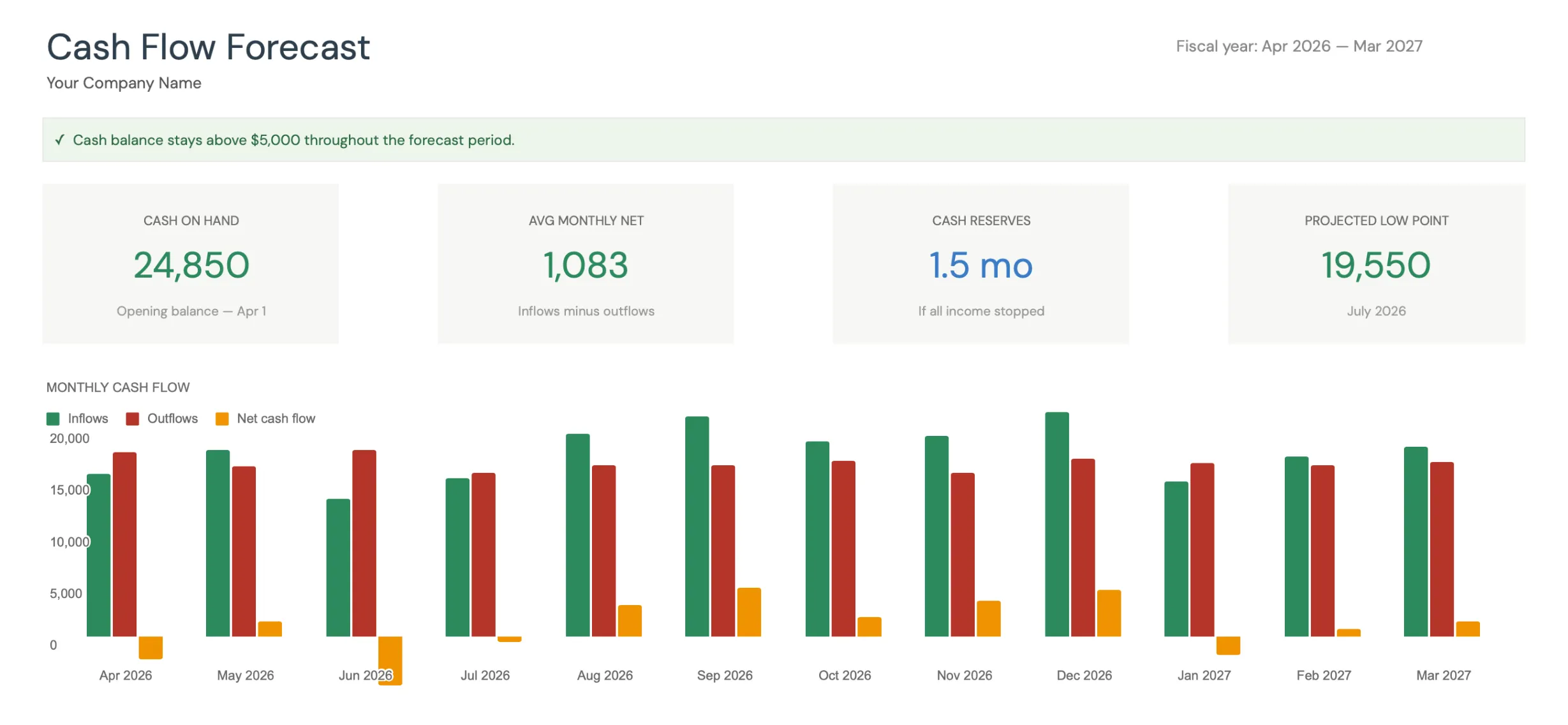 The dashboard in FinancialAha’s Cash Flow Forecast Template (Premium tier) surfaces cash on hand, average monthly net, months of reserves, and the projected low point across a 12-month fiscal year.
What makes spreadsheets work for this: Scenario planning. “What if that big client pays 30 days late?” Change one cell, and the effect cascades across every month that follows. “What if we hire in Q3 instead of Q2?” Adjust the timing and compare. This kind of flexible modeling is where spreadsheets genuinely outperform most software.
The template approach also avoids the setup overhead of accounting software. Open it, enter your numbers, see your forecast. No account configuration, no chart of accounts setup, no learning curve beyond basic spreadsheet skills.
The trade-off: Manual data entry. Your accounting system doesn’t feed into the spreadsheet automatically (though you can export and copy-paste). For businesses with hundreds of monthly transactions, this matters. For businesses with a manageable transaction volume, it’s straightforward.
Free Google Sheets Templates
Google “cash flow forecast template” and you’ll find dozens of free options. Some are genuinely useful, most are too basic to be practical.
The common issues with free templates: they handle a single revenue stream, don’t account for irregular expenses, lack scenario comparison, and break when you try to modify them. A template that only has “Revenue” as a single line item doesn’t help a business with three income streams that each behave differently.
Free templates work as a starting point for understanding the concept. For ongoing business use, the limitations usually surface within the first month. If you are weighing where to build one, Google Sheets vs Excel for business cash flow covers the trade-offs between the two.
Accounting Software Forecasting
QuickBooks and Xero both include cash flow forecasting features in their paid tiers. The advantage is that historical data feeds directly into the forecast - no manual entry of past patterns.
QuickBooks Cash Flow Planner uses your actual transaction history to project forward. It’s convenient but limited in scenario planning. You see one projected future based on past patterns, not the “what if” flexibility that makes forecasting valuable.
Xero’s short-term cash flow projection works similarly - useful for seeing the next 30 days based on known invoices and bills, less useful for strategic planning months ahead.
Float and Pulse are dedicated cash flow apps that integrate with accounting software. Float (plans start at $130/month) connects to QuickBooks or Xero and provides scenario planning, budget comparison, and visual timelines. Pulse (from $29/month) focuses on simple cash projections. Both add real value if you’re already in the accounting software ecosystem, though the subscription is a recurring cost where a spreadsheet template is a one-time purchase.
What Actually Matters in a Cash Flow Tool
Multiple revenue streams. Most businesses have more than one income source. The template needs to handle different payment timings for each.
Variable payment terms. Net-30, net-60, retainers, project milestones - revenue doesn’t arrive the day it’s earned. Good forecasting accounts for the actual cash timing.
Irregular expenses. Annual insurance, quarterly taxes, equipment purchases - these lump-sum outlays create cash flow valleys that regular monthly tracking misses.
Scenario comparison. The whole point of forecasting is to test “what if” situations before they happen. A tool that only shows one scenario provides limited planning value.
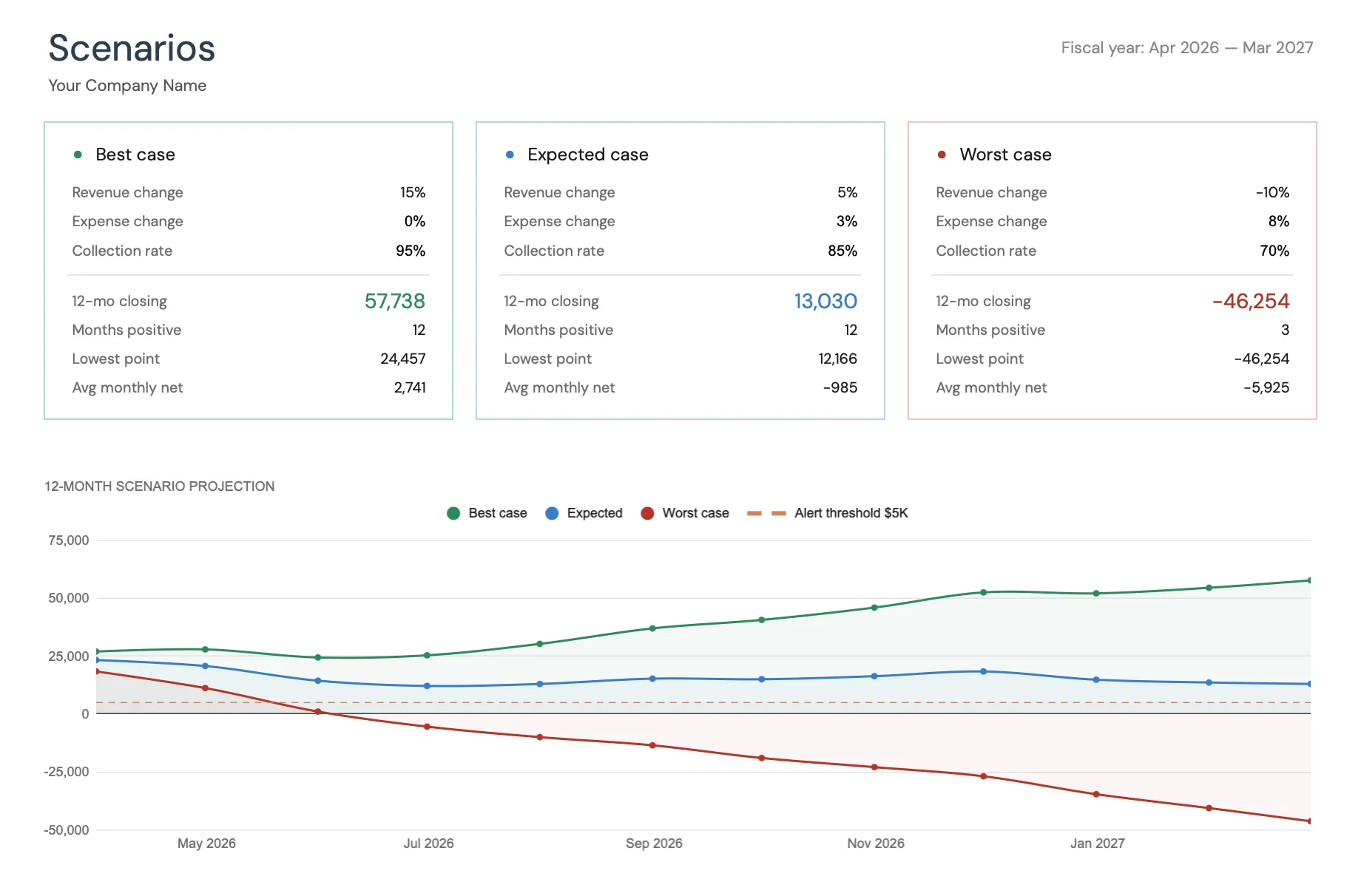 Best, expected, and worst-case scenarios side by side in the Cash Flow Forecast Template (Premium tier), each with its own revenue, expense, and collection-rate assumptions and a low-cash alert threshold on the chart.
Rolling updates. A forecast done once becomes stale fast. The process needs to be simple enough that you’ll actually update it weekly or monthly.
Runway visibility. A forecast should tell you how many months of cash you have left if income stalls. If you want a quick estimate before setting up a full forecast, the financial runway calculator turns your cash balance and monthly burn into months of runway.
Choosing What Fits
Sole proprietors and freelancers: A spreadsheet template handles what you need. Transaction volume is manageable for manual entry, and the customization lets you model your specific situation precisely. If your business and personal money still share one account, personal budgeting and business cash flow are worth separating before you forecast.
Small teams (2-20 employees): Either a detailed spreadsheet or accounting software with forecasting add-ons. The deciding factor is usually transaction volume - if you’re already in QuickBooks or Xero, adding a forecasting integration avoids duplicate data entry.
Growing businesses: This is where dedicated tools like Float start making sense. When cash flow management becomes a weekly leadership activity with multiple stakeholders, the collaboration and integration features justify the subscription. For a longer horizon than 12 months, the version investors tend to ask for, the 5-Year Financial Projections template links income statement, balance sheet, and cash flow across five years.
Regardless of the tool, the habit matters more than the software. A rough forecast reviewed weekly beats a sophisticated one built once and forgotten.
The most direct next step is to open a structure that already has the projection, scenarios, and actuals wired up. The Cash Flow Forecast Template gets you from a blank sheet to a working 12-month forecast in about 15 minutes, then you update it monthly as real numbers come in.
Related
- Cash Flow Forecast Template - 12-month small business cash flow forecasting with scenarios and actuals
- 5-Year Financial Projections - income statement, balance sheet, and cash flow projected five years out
- Google Sheets vs Excel for business cash flow - which tool to build your forecast in
- Personal budget vs business cash flow - separating personal and business money
- QuickBooks vs Wave for Freelancers - when an accounting app beats a forecast spreadsheet
- Freelancer cash flow spreadsheet - the solo-operator version of the same forecast
Frequently asked questions
What is a cash flow forecast?
A cash flow forecast projects when money comes in and when it goes out over a future period - usually 13 weeks or 12 months. It helps businesses anticipate cash shortages before they happen and plan for seasonal variations in revenue and expenses.
How far ahead should a small business forecast cash flow?
Most small businesses benefit from a 13-week (rolling quarter) forecast for near-term management and a 12-month forecast for strategic planning. The 13-week version is updated weekly and focuses on immediate cash needs. The annual version helps with bigger decisions like hiring or equipment purchases.
Can I use a spreadsheet instead of accounting software for cash flow forecasting?
Yes, and many small businesses prefer it. Spreadsheets offer more flexibility in scenario planning and are easier to customize for specific business models. Accounting software excels at tracking what already happened, while spreadsheets are often better for forward-looking projections.
What's the difference between cash flow and profit?
A business can be profitable on paper but run out of cash if customers pay slowly or expenses come in large chunks. Cash flow tracks the actual movement of money, when it arrives and when it leaves, regardless of when revenue was technically earned or expenses incurred.
Is a paid cash flow template worth it over a free one?
It depends on what you need. Free templates usually cover a single revenue line and a fixed expense list, which is enough to learn the concept. A paid template like the $29 Cash Flow Forecast Template adds the pieces that free versions rarely include: best, expected and worst-case scenarios, forecast vs actuals tracking, a KPI dashboard, and configurable expense categories that hold together when you edit them.
Can a spreadsheet forecast handle multiple revenue streams and payment terms?
Yes, because you enter cash in the month you expect it to land rather than the month it was invoiced. Revenue often arrives well after it is earned, through net-30 invoices, retainers and project milestones. The Cash Flow Forecast Template splits inflows into revenue / sales, other income, and loans or investment across all 12 months, and each scenario carries a collection rate assumption, so you can also see the year where only 70 percent of projected income turns into cash.
Sources
- Float Pricing - Float
- Pulse Pricing - Pulse
- Short-term cash flow in Analytics - Xero Central
About this article
Competitor pricing checked against Float's and Pulse's published pricing pages. Template sheets, inputs and outputs checked on 2026-09-10 against the shipped Cash Flow Forecast Google Sheet (Dashboard, Forecast, Actual, Scenarios, Settings, Instructions tabs). Last reviewed September 2026.