
QuickBooks Online is a paid subscription that starts around $30 a month. Wave's free Starter plan still covers invoicing and manual bookkeeping, but bank auto-import and receipt scanning now sit behind its $19-a-month Pro plan. For a freelancer with a few clients, neither is required: a spreadsheet tracks income, expenses, and a tax set-aside at no cost, and the $29 Cash Flow Forecast Template covers the projection side with a 12-month forecast, an actuals sheet, and best, expected and worst case scenarios in Google Sheets.
Freelancers need to track income, expenses, invoices, and taxes. The question isn’t whether to track; it’s what tool fits the current stage of the business.
For many freelancers, the real decision isn’t QuickBooks vs. Wave. It’s whether accounting software is needed at all, or whether a spreadsheet covers it. That starts with seeing how business cash flow differs from a personal budget: irregular client income, deductible expenses, and a tax set-aside are the three moving parts a freelance sheet has to handle.
The Decision Framework
| Your Situation | Starting Point |
|---|---|
| 1-3 clients, simple expenses | Spreadsheet |
| 5+ clients, many expense categories | Free accounting software (Wave) |
| Complex taxes, inventory, employees | Paid accounting software (QuickBooks) |
| Growing fast, need accountant integration | QuickBooks |
Most freelancers start simpler than they think they need to.
When a Spreadsheet Is Enough
A spreadsheet handles freelance finances well when:
- Income comes from a small number of clients
- Expenses fall into a few clear categories
- No inventory or complex tax situations
- Cash flow is relatively predictable
What a freelance cash flow spreadsheet tracks:
| Month | Client A | Client B | Client C | Total Income | Expenses | Net Cash Flow |
|---|---|---|---|---|---|---|
| Jan | $3,000 | $1,500 | - | $4,500 | $1,200 | $3,300 |
| Feb | $3,000 | $1,500 | $2,000 | $6,500 | $1,400 | $5,100 |
| Mar | $3,000 | - | $2,000 | $5,000 | $1,100 | $3,900 |
Add a tax set-aside column (many self-employed people hold back 25-30% of net income to cover income tax plus the 15.3% self-employment tax) and the spreadsheet becomes a quarterly tax planning tool too. The Self-Employment Tax Calculator estimates that combined figure, and quarterly estimated payments are due in April, June, September, and January.
The Cash Flow Forecast Template covers the projection half of that in Google Sheets, laid out by month rather than by client. Its Forecast sheet runs 12 months across, with three inflow rows (revenue or sales, other income, and loans or investment) and seven expense categories you rename in Settings. An Actual sheet mirrors that layout for the numbers that really landed, and a Scenarios sheet runs best, expected and worst case versions off your own revenue, expense and collection-rate assumptions. It is $29, part of the same catalog trusted by 1,000+ customers across 65+ countries.
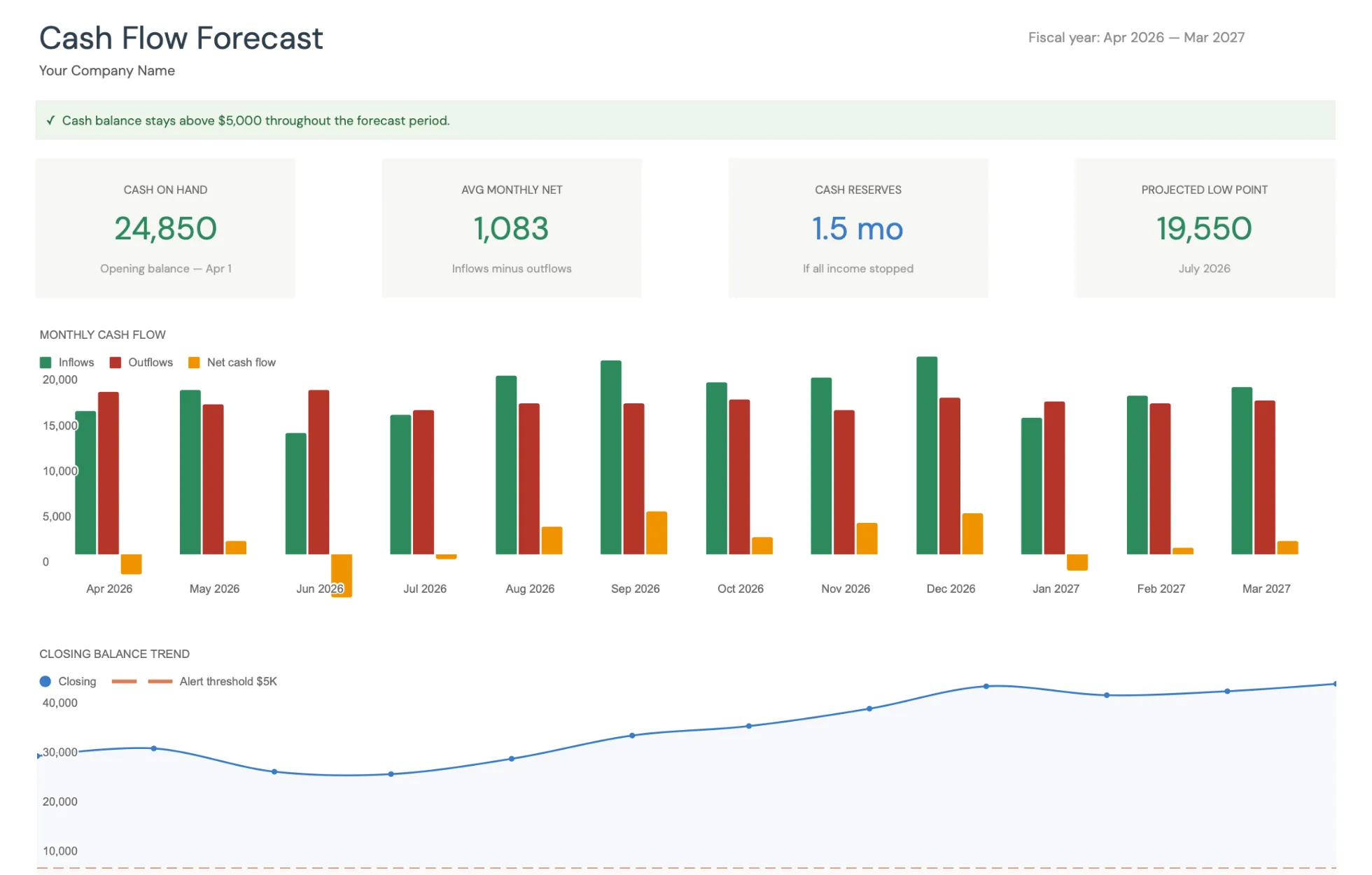
The Cash Flow Forecast Template (Premium tier) dashboard: cash on hand, average monthly net, cash reserves and the projected low point, a monthly inflow and outflow chart, and a closing balance trend drawn against the low cash alert threshold.
When to Move to Accounting Software
Some signals suggest a spreadsheet is no longer enough:
- Invoice volume. Sending 10+ invoices per month makes manual tracking tedious.
- Bank reconciliation. Matching dozens of transactions monthly by hand eats time.
- Tax complexity. Multiple expense categories, depreciation, or contractor payments (1099s) benefit from automated categorization.
- Accountant handoff. Most accountants expect QuickBooks or similar software files, not spreadsheets.
QuickBooks vs. Wave: Quick Comparison
| Feature | QuickBooks Simple Start | Wave Starter (Free) |
|---|---|---|
| Price | ~$30/month | $0 (Pro tier $19/month) |
| Invoicing | Full-featured | Unlimited, solid basics |
| Bank connection | Yes, smart categorization | Manual entry (auto-import is Pro) |
| Receipt scanning | Included | Paid add-on |
| Tax integration | TurboTax, accountant-ready | Manual export to accountant |
| Reporting | Extensive | Essential reports only |
| Mobile app | Full-featured | Basic |
| Scales to employees | Yes (higher tiers) | Limited |
Wave’s free Starter plan still covers unlimited invoicing and manual bookkeeping at no cost. Two features many freelancers assume are free have moved to the paid side, though: since Wave restructured its pricing, automatic bank import lives on the Pro plan ($19/month) and receipt scanning is a separate add-on. Manual data entry stays free.
QuickBooks adds depth: smarter categorization, richer reports, and stronger tax-prep integration. The subscription (around $30 a month and up, per QuickBooks pricing) is the tradeoff.
The Progression Path
Many freelancers follow a natural progression. It usually starts with a spreadsheet while there are only a few clients, moves to Wave once invoicing volume climbs, and lands on QuickBooks when the business grows into complex taxes and an accountant relationship.
There’s no reason to jump to the most complex tool first. Starting with a spreadsheet builds an understanding of cash flow patterns that’s useful regardless of what tool comes next.
Setting Up a Freelance Cash Flow Spreadsheet
A practical starting setup needs just four tabs:
- Income tracker - Client, invoice date, amount, date paid, status
- Expense log - Date, category, vendor, amount, tax-deductible (yes/no)
- Monthly cash flow - Income minus expenses, running balance
- Tax set-aside - Quarterly estimated tax calculations
This covers what most early-stage freelancers need. When it starts feeling limiting, that’s the signal to look at dedicated software.
The Cash Flow Forecast Template takes a different cut at the same job. It ships as seven sheets rather than four: Forecast, Actual, Scenarios, Dashboard, Settings, Instructions, and a Helpers sheet that does the scenario maths in the background. There is no invoice log or receipt store in it, income enters as a monthly total, and tax sits in the Insurance / taxes expense row rather than on its own set-aside tab, so freelancers who want invoice-level detail tend to keep a separate client log alongside it. If the numbers ever outgrow a spreadsheet, the Wave-then-QuickBooks progression above is the route most freelancers take.
Related
- Cash Flow Forecast Template - 12-month business cash flow projections in Google Sheets
- Personal Budget vs Business Cash Flow: What’s the Difference - when a personal budget stops being enough
- Self-Employment Tax Calculator - estimate the 15.3% self-employed people pay on top of income tax
- Freelancer Cash Flow Spreadsheet - the free-sheet route for income, expenses, and a tax set-aside
- Our Business Spreadsheet Library, Built Out - bookkeeping and cash flow workbooks as your business grows
- Cash Flow Forecast Templates for Small Business - ready-made forecast sheets compared before you commit to an app
Frequently asked questions
Is Wave really free for freelancers?
Wave's free Starter plan still covers unlimited invoicing and manual bookkeeping at no cost. Since Wave restructured its pricing, though, automatic bank import and receipt scanning moved to the paid Pro plan ($19/month) or a receipt add-on, and payment processing and payroll have always carried fees. For a freelancer who types in transactions and sends invoices by hand, the free tier still works; for hands-off bank sync, Wave is no longer free.
Is QuickBooks overkill for freelancers?
It can be, especially the higher-tier plans. QuickBooks Simple Start is designed for solo businesses and covers what most freelancers need. The more expensive plans add features like inventory tracking and project profitability that many freelancers will not use.
Can I switch from Wave to QuickBooks later?
Yes. QuickBooks can import data from other accounting tools. The transition takes some effort but is manageable. Some freelancers start with a spreadsheet or Wave and move to QuickBooks as their business grows and needs more features.
How much should a freelancer set aside for taxes?
A common rule of thumb is 25-30% of net income to cover income tax plus the 15.3% self-employment tax, though the right figure depends on your bracket, deductions, and state. A tax set-aside column in a cash flow spreadsheet, or the Self-Employment Tax Calculator, turns that into a running number instead of a year-end surprise.
Do freelancers actually need accounting software?
It depends on complexity. Some freelancers with a few clients and straightforward expenses manage fine with spreadsheets. A cash flow forecast template can handle income projections and expense tracking without the overhead of full accounting software.
Sources
- Wave Pricing - Wave
- QuickBooks Online Pricing - QuickBooks (Intuit)
- Estimated Taxes - Internal Revenue Service
About this article
Wave's plan structure and fees were checked against Wave's published pricing page. Cash Flow Forecast Template sheets, inputs and outputs checked on 2026-09-10 against the shipped Google Sheet (Dashboard, Forecast, Actual, Scenarios, Settings, Instructions, Helpers). Last reviewed September 2026.