Lifetime Deal Complete Personal Financial Planning Bundle →
✓ Financial Planning✓ Net Worth Tracker✓ Monthly Budgeting✓ Travel Budget Planner✓ Annual Budgeting Planner✓ Monthly Expense Tracker✓ Annual Tax Planner✓ Retirement Planning
View Bundle →

Instant digital delivery · Terms & Conditions apply

Ultimate Template - Excel & Google Sheets

Ultimate 60/20/20 Budget Spreadsheet Template for Google Sheets & Excel

Living, goals and flexible each get a sheet - seventeen lines, eleven, twelve - with the variance shown in money and as a percentage on every one. The Ultimate 60/20/20 Budget spreadsheet template derives each target from your own allocation percentages rather than fixed shares, takes six income lines, and keeps twelve months of history behind the current one. Six working sheets and a dashboard reading the split you achieved against the one you set. Google Sheets and Excel.

See Preview

Instant digital delivery · Terms & Conditions apply

60/20/20 Budget Spreadsheet Template - Ultimate version for Google Sheets and Excel

What's Included

  • Six income lines with a combined total
  • Allocation percentages you can change rather than fixed shares
  • Each target derived from your percentage and your income
  • A sheet for each bucket, with its own categories
  • Variance in money and as a percentage on every line
  • Target percentage against actual percentage per bucket
  • A goals rate and an over-or-under figure
  • Twelve months of living expenses by category
  • Two charts
  • Works in Microsoft Excel and Google Sheets with no setup required

The FinancialAha Ultimate 60/20/20 Budget Spreadsheet Template is a six-sheet workbook for Google Sheets and Excel, with a How to Use guide on a seventh tab. It works as an Ultimate 60/20/20 Budget Excel template and an Ultimate 60/20/20 Budget Google Sheets template from the same download. Each bucket gets its own sheet, the allocation percentages are yours to change, and the dashboard sets the split you actually achieved against the one you aimed at. No macros, no VBA.

Inside the workbook

What's inside the FinancialAha Ultimate 60/20/20 Budget spreadsheet template

The FinancialAha Ultimate 60/20/20 Budget Spreadsheet Template runs on six working sheets, with the instructions on a tab of their own. It works in both Microsoft Excel and Google Sheets and here is what the Ultimate 60/20/20 Budget spreadsheet holds.

  1. 01 of 06

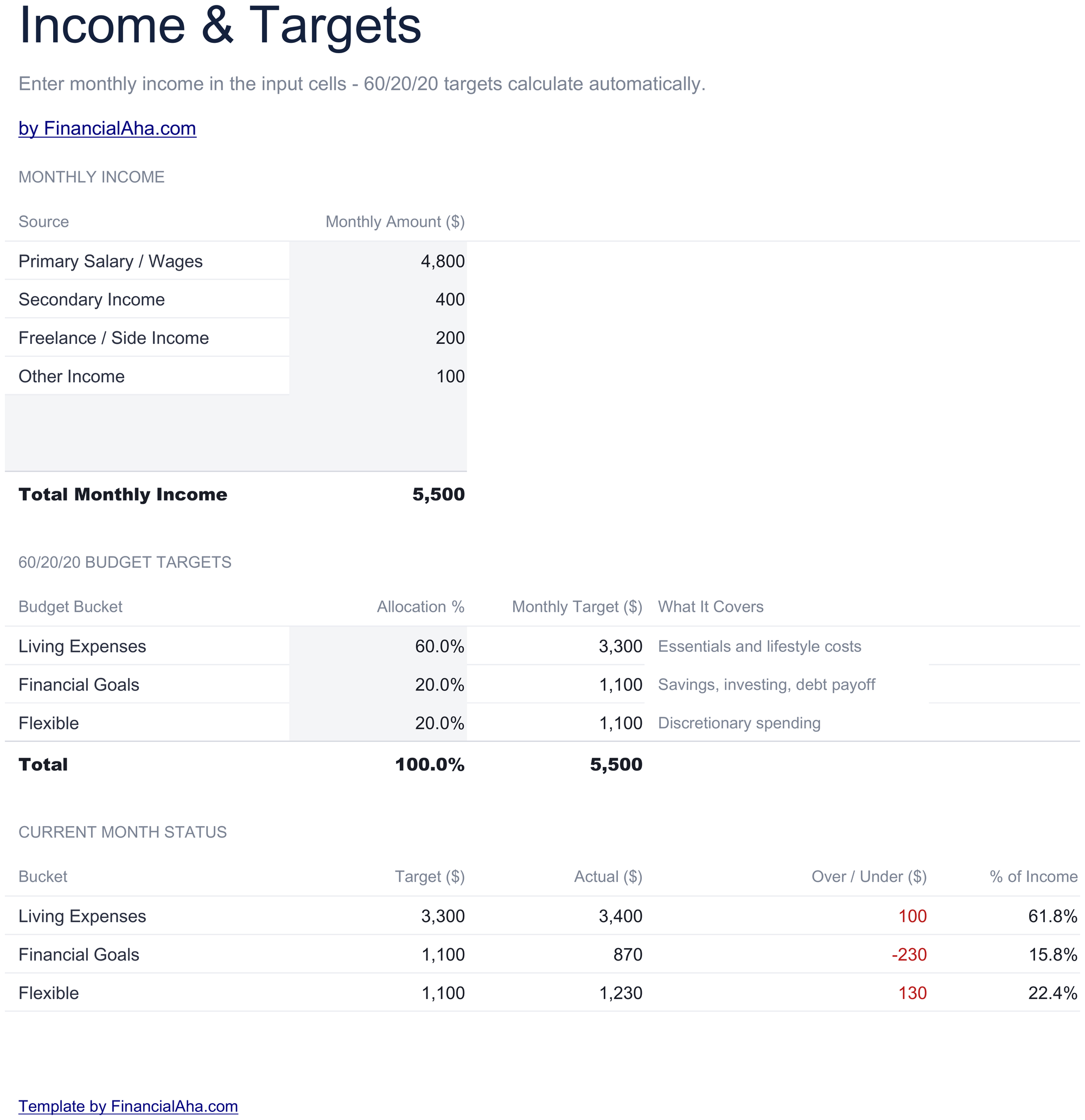
    Income & Targets

    Six income lines totalled, then the three buckets with their allocation percentages beside them - and those percentages are cells you can change rather than figures baked into the file. That matters more than it sounds. Sixty, twenty and twenty is a convention, not a fact about anyone's circumstances: a household with a large rent in an expensive city cannot make the living bucket fit sixty percent no matter how it economises, and a template that insisted on it would produce a permanently failing budget. Being able to set the split to what your position actually allows turns the sheet from a test into a plan. Each target is the percentage applied to your total income, so both inputs feed straight through to the three figures beneath.

  2. 02 of 06

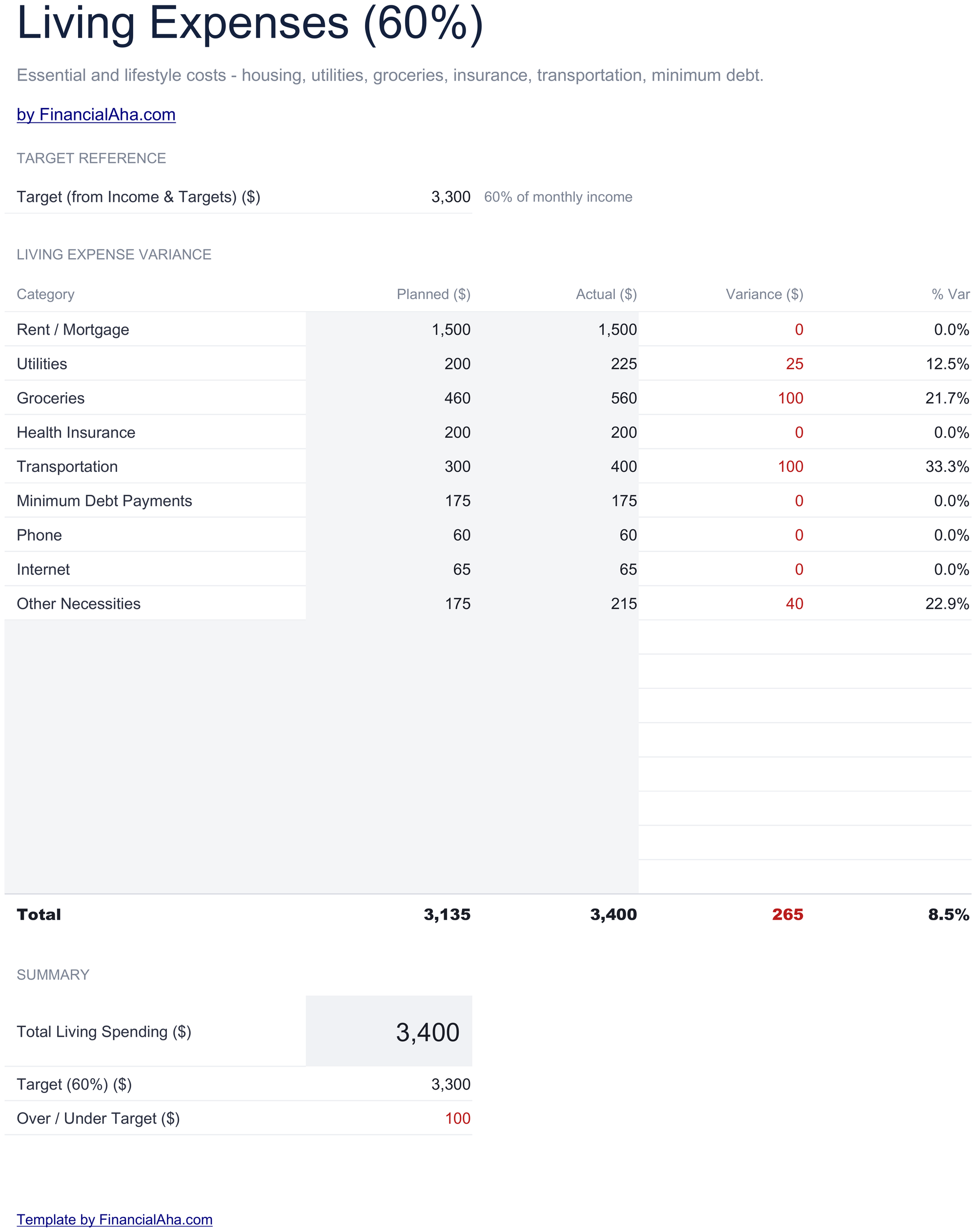
    Living (60%)

    The bucket that decides whether the whole split works, with its categories, what you planned for each, what you actually spent, the variance in money and the variance as a percentage. The percentage variance column earns its place on this sheet in particular. Rent going over by fifty is a rounding error on a large line; a small category going over by fifty may have doubled. The money column ranks them the wrong way round and the percentage column corrects it.

  3. 03 of 06

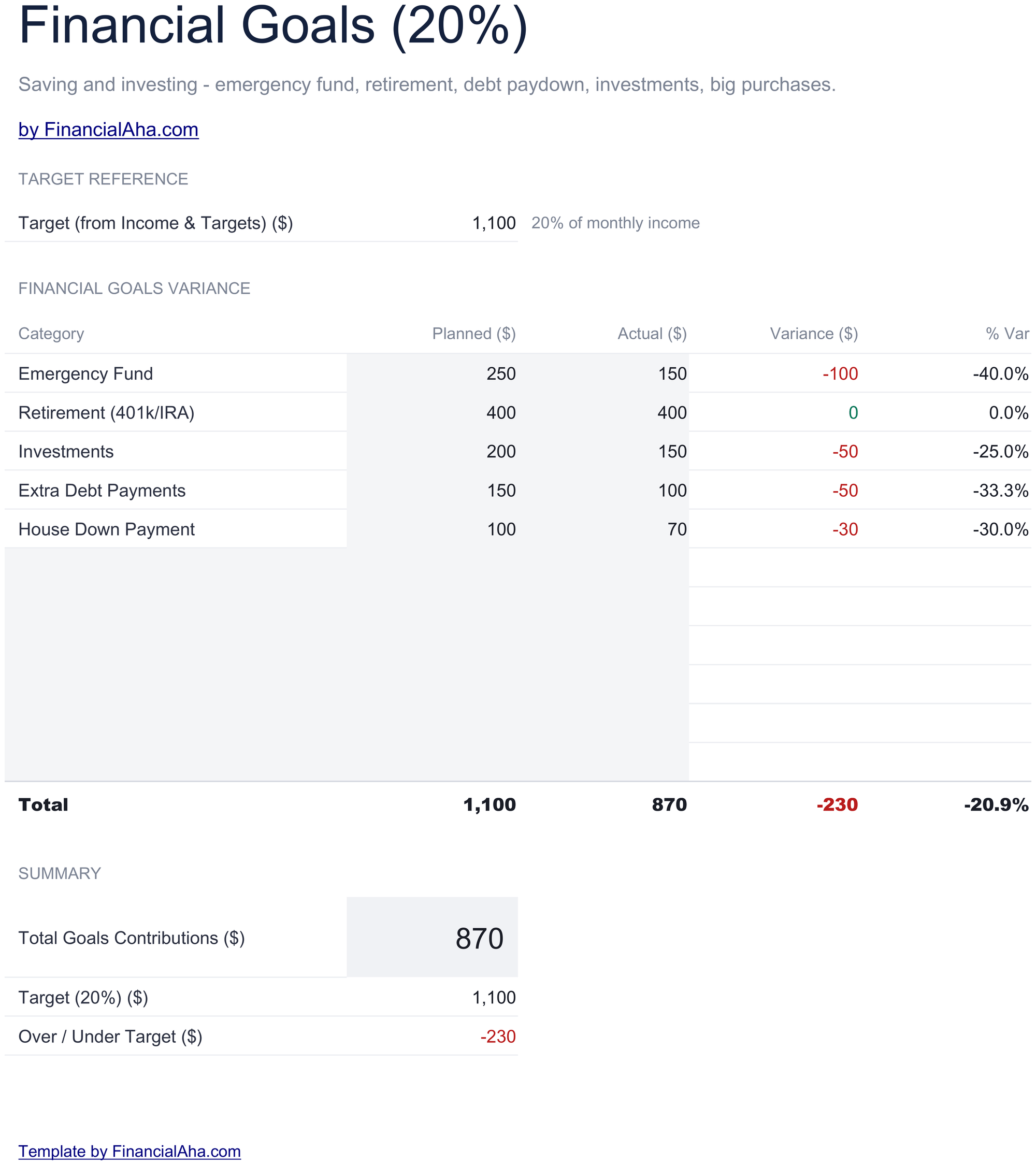
    Goals (20%)

    Savings, investing and debt payoff, tracked the same way - planned against actual with both variance figures. Separating this bucket from the rest is what stops it being the flexible one. Money that has not been assigned tends to get spent, and a bucket with its own sheet, its own target and its own variance is considerably harder to quietly borrow from.

  4. 04 of 06

    Flexible (20%)

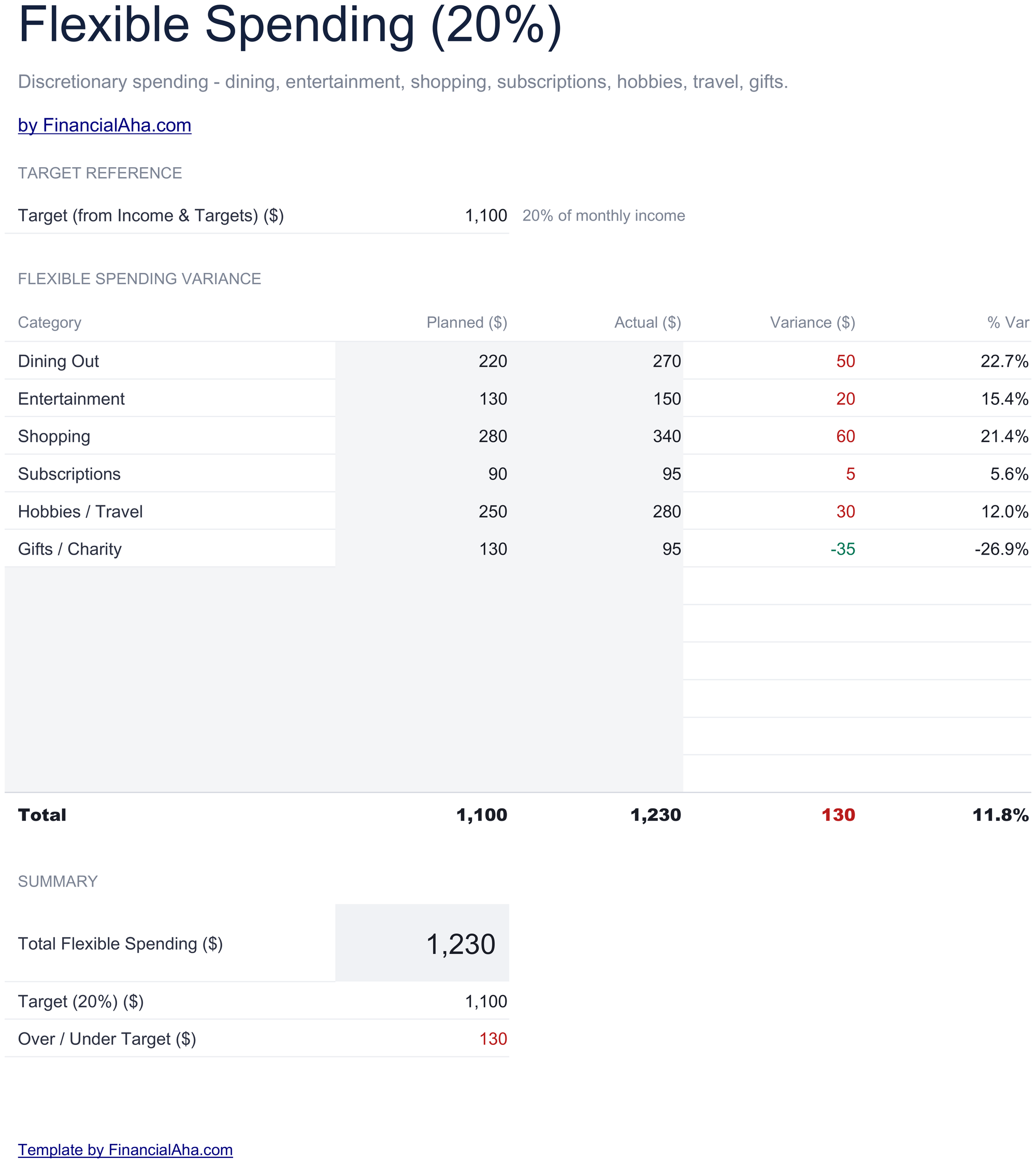
    Discretionary spending, on the same planned-against-actual footing. It is the bucket most likely to absorb a bad month, and having it tracked separately is what shows whether it did. A month that came in on target overall while the flexible bucket ran to nothing is a different month from one that simply worked.

  5. 05 of 06

    12-Month Tracking

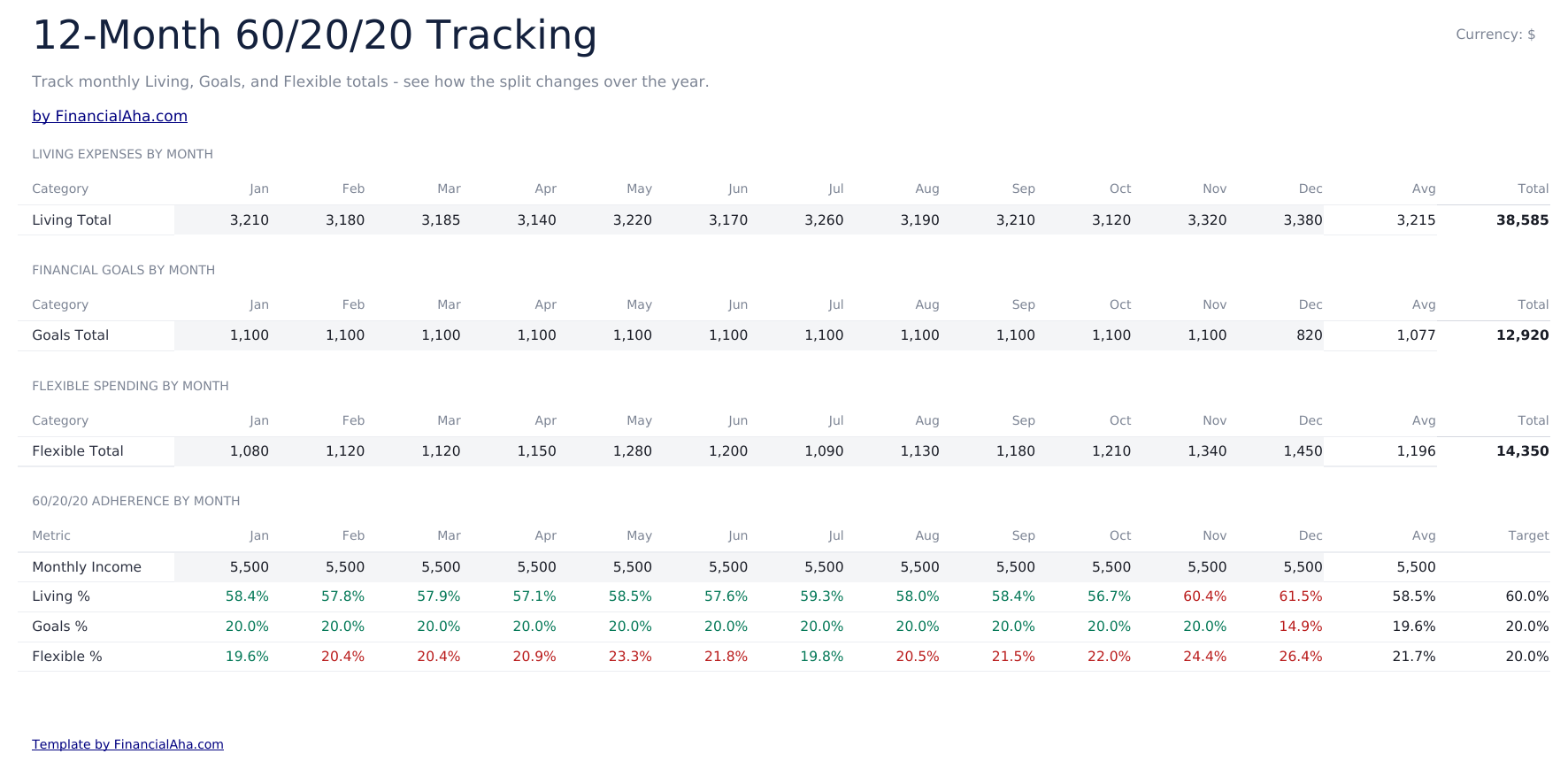
    Living expenses by category across the year, with the totals along each row and down each column. A single month tells you what happened; twelve tell you what is normal. The categories that move with the season and the ones that only ever creep upward look identical in March and quite different across a full year.

  6. 06 of 06

    Dashboard

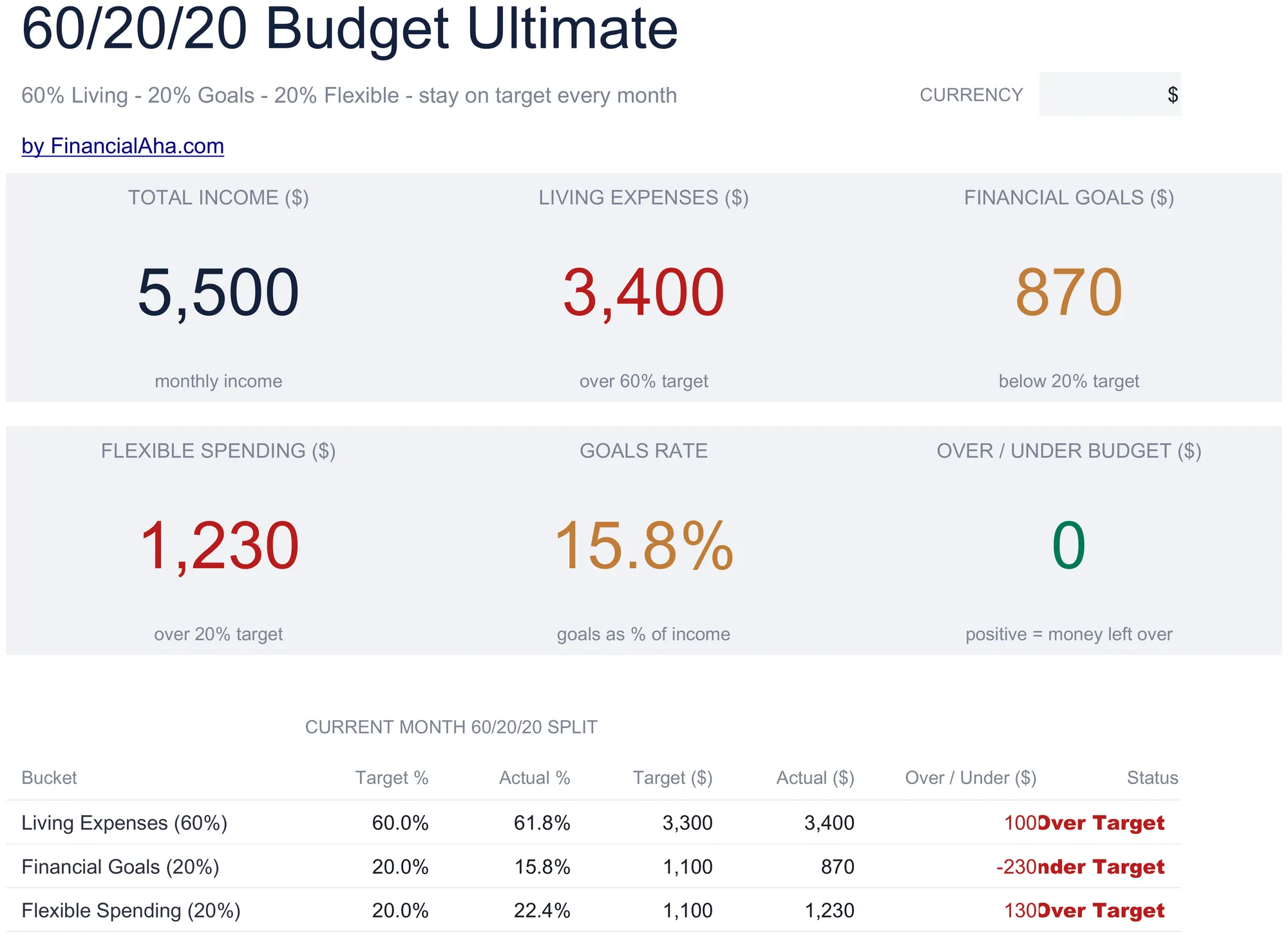
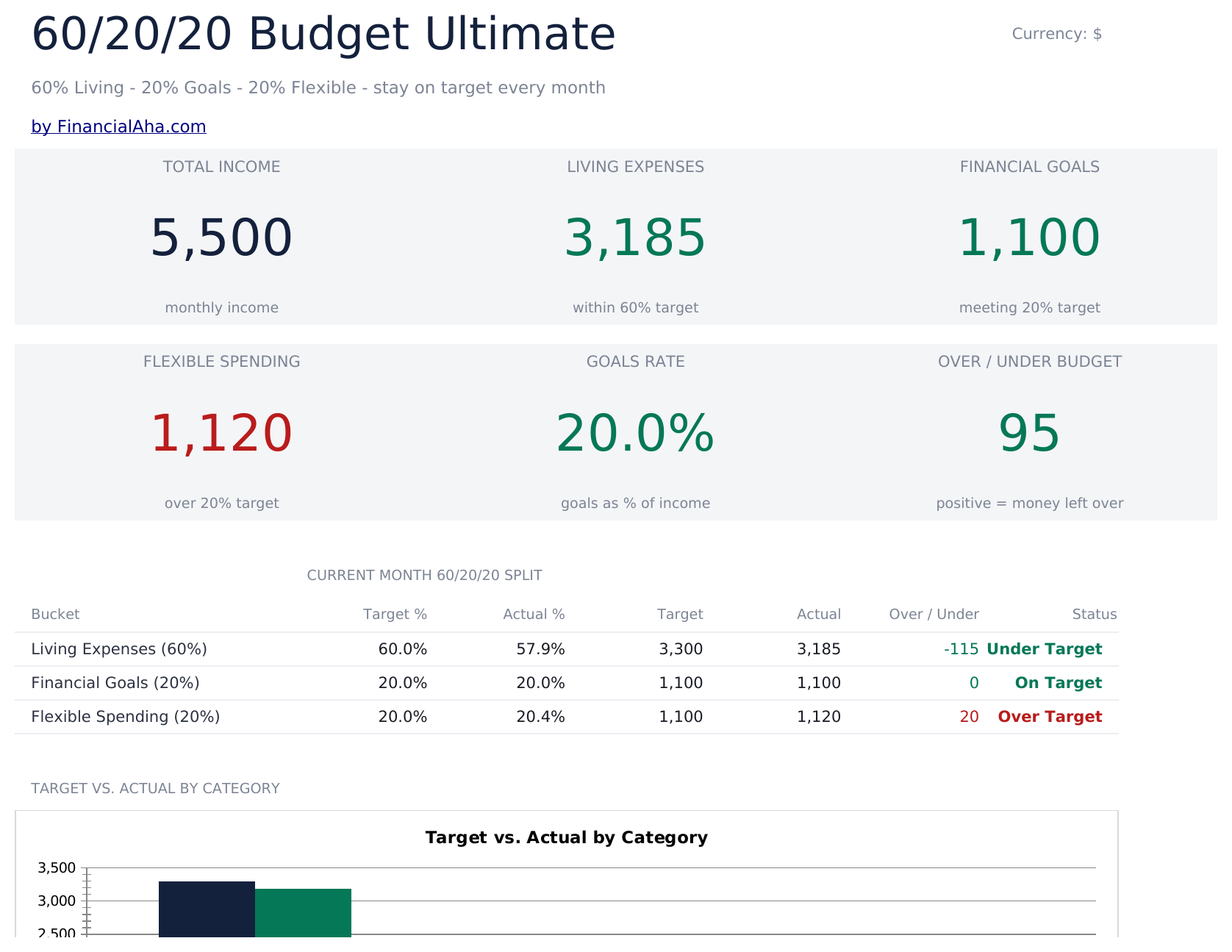
    Total income and the three bucket figures, a goals rate, and an over-or-under figure - alongside the comparison the whole workbook is built for: your target percentage against your actual percentage for each bucket, with the money beside it. Setting the two percentages side by side is more useful than either alone. The money figures tell you what happened; the percentages tell you what shape your spending has, and that shape is what stays constant when your income changes. Two charts plot the split.

  7. Included guide

    How to Use

    A step-by-step guide on its own tab, covering the order the sheets are filled in, how the targets follow from income and the percentages you set, and how to change the currency. Because it ships inside the file, the instructions travel with the template wherever it is opened.

Works in both Google Sheets and Excel

Ultimate 60/20/20 Budget Spreadsheet template for Google Sheets

Upload the Ultimate 60/20/20 Budget Spreadsheet Template to Drive, right-click it, and choose "Open with Google Sheets". This Ultimate 60/20/20 Budget Google Sheets template needs no conversion step, both charts come across, and every target recalculates from your income and percentages exactly as it does in Excel.

Ultimate 60/20/20 Budget Google Sheets template setup

A shared copy of the Ultimate 60/20/20 Budget Google Sheets template suits a household where the buckets are handled by different people, since each has a sheet of its own to work in.

Running the Ultimate 60/20/20 Budget Google Sheet

The Ultimate 60/20/20 Budget Google Sheet takes actual figures on the bucket sheets as the month runs. The dashboard percentages follow.

Ultimate 60/20/20 Budget Spreadsheet template for Excel

The Ultimate 60/20/20 Budget spreadsheet Excel download is a plain .xlsx. Excel opens this Ultimate 60/20/20 Budget Excel template directly, with no import step, and both charts are native Excel charts rather than pictures. There are no macros and no VBA in the file.

Ultimate 60/20/20 Budget Excel template setup

The same Ultimate 60/20/20 Budget Excel template opens in Excel on Windows, Excel on Mac, and Excel for the web. It is also the identical file you would upload to Drive, so there is no separate Ultimate 60/20/20 Budget spreadsheet download to choose between.

Ultimate 60/20/20 Budget spreadsheet Excel notes

The Ultimate 60/20/20 Budget spreadsheet Excel file carries no macros and no VBA, so Excel opens it without a trust prompt.

Opening the Ultimate 60/20/20 Budget spreadsheet Excel file

Nothing in the Ultimate 60/20/20 Budget Excel template is version-specific, so this Ultimate 60/20/20 Budget spreadsheet Excel workbook behaves identically in Excel on Windows, Excel on Mac, and older builds.

Spreadsheet template highlights

What the Ultimate 60/20/20 Budget spreadsheet template tracks

Six income lines, three bucket sheets and a twelve-month grid. This is what the Ultimate 60/20/20 Budget Spreadsheet Template carries on each bucket sheet:

Category
one line per spending category in that bucket
Planned
what you set aside for it
Actual
what you spent
Variance auto
derived, in money
% Var auto
derived, which is what stops a large line dominating the comparison

Compare builds

FinancialAha 60/20/20 Budget spreadsheet template: Free, Essentials, and Ultimate compared

Feature Free View Spreadsheet Template Essentials View Spreadsheet Template Ultimate This page
Working sheets 1 2 6
Targets derived from income Yes Yes Yes
Income entered One figure 5 sources 6 sources
Buckets as separate sections One table, targets above it Sections with their own totals A sheet each
Status per line – Yes Yes
Variance in money and percent Money Money Both
Actual split against target split – – Percentages compared
Twelve-month tracking – – Yes
Allocation percentages editable Fixed at 60/20/20 Fixed at 60/20/20 Editable
Charts – 2 2

The Free 60/20/20 Budget Spreadsheet Template works its targets out from one income figure above a single table, and the Essentials build takes income across three sources with each bucket as its own section. The FinancialAha Ultimate 60/20/20 Budget Spreadsheet Template gives each bucket a sheet of its own with variance in money and percent, makes the allocation percentages themselves editable rather than fixed, compares the split you achieved against the one you aimed at, and tracks living expenses across twelve months.

Good to know

Notes on working in the Ultimate 60/20/20 Budget spreadsheet template

  • The allocation percentages are cells you can change, which turns the sheet from a test into a plan.
  • Sixty, twenty and twenty is a convention rather than a fact about anyone's circumstances.
  • Percentage variance stops a large line dominating a comparison the money column ranks the wrong way round.
  • A goals bucket with its own sheet and its own target is harder to quietly borrow from.
  • The target-against-actual percentages describe the shape of your spending, which is what stays constant when income changes.
  • The currency dropdown relabels the money columns across every sheet. It changes the label only and does not convert the numbers.
  • The captions under the bucket figures say whether spending is over or under target. They describe the sample rather than your figures - the status column in the split table is the one that follows your own numbers.

How to Use This Template

1

Enter income

Up to six sources, totalled.

2

Set the percentages

The split your position actually allows.

3

Work each bucket

Planned and actual on its own sheet.

4

Compare the splits

What you aimed at against what happened.

Stress-tested with AI.

Every template starts with deep research into how people actually track the topic. We design the layout, build the formulas, and polish the design until it feels like something we would use ourselves. Along the way, we use AI to stress-test the calculations: unusual inputs, edge cases, and formula behavior, checked until the numbers hold.

One-time purchase. No subscription. Works in Excel & Google Sheets.

Frequently Asked Questions

Is the FinancialAha Ultimate 60/20/20 Budget Spreadsheet Template a Google Sheets template?

Yes. Upload the file to Drive and choose "Open with Google Sheets". Both charts come across in the Ultimate 60/20/20 Budget Google Sheets template, and every target recalculates from your income and percentages exactly as it does in Excel.

Is the FinancialAha Ultimate 60/20/20 Budget Spreadsheet Template an Excel template?

Yes. The download is a plain .xlsx, so the Ultimate 60/20/20 Budget Excel template opens directly in Excel with no import step. Both charts are native Excel charts rather than pictures, and there are no macros or VBA.

Will the FinancialAha Ultimate 60/20/20 Budget spreadsheet Excel file open in older versions of Excel?

Yes. The Ultimate 60/20/20 Budget spreadsheet Excel workbook ships as a plain .xlsx, so it opens identically in current Excel and in builds that predate dynamic arrays.

Can I change the allocation percentages?

Yes. They are cells rather than figures baked into the file. Sixty, twenty and twenty is a convention, not a fact about anyone's circumstances - a household with a large rent in an expensive city cannot make the living bucket fit sixty percent, and a template that insisted on it would produce a permanently failing budget.

Why report variance as a percentage as well as money?

Because rent going over by fifty is a rounding error on a large line while a small category going over by fifty may have doubled. The money column ranks them the wrong way round.

Why does the goals bucket get its own sheet?

Because money that has not been assigned tends to get spent. A bucket with its own sheet, its own target and its own variance is considerably harder to quietly borrow from.

What do the target and actual percentages show together?

The shape of your spending rather than its size. Money figures tell you what happened; the percentages are what stays comparable when your income changes.

What do I get after buying the Ultimate 60/20/20 Budget spreadsheet template?

You receive the Ultimate 60/20/20 Budget spreadsheet template as an Excel file (.xlsx) that works in Microsoft Excel and Google Sheets. Download it immediately after purchase - no signup or account required.

Is there a free Ultimate 60/20/20 Budget spreadsheet template?

Yes. A free version of the Ultimate 60/20/20 Budget spreadsheet template is available with basic features. The Ultimate version adds advanced analysis, more capacity, and additional sheets.

What if the Ultimate 60/20/20 Budget spreadsheet template does not work for me?

Contact us and we will help troubleshoot. The Ultimate 60/20/20 Budget spreadsheet template works in Microsoft Excel and Google Sheets with no macros required.

Ultimate

Highlights:

Instant download after purchase
No macros or VBA required
All formulas auto-calculate
No subscription required
Works in
Excel Google Sheets

Looking for more Ultimate templates?

We offer Ultimate versions of our most popular spreadsheet templates with advanced features, more capacity, and deeper analysis.

Private & secure

Your financial data stays on your device. We never see it.

Learn more →

Need help?

Check our guides or reach out with questions.

View FAQ →