Lifetime Deal Complete Personal Financial Planning Bundle →
✓ Financial Planning✓ Net Worth Tracker✓ Monthly Budgeting✓ Travel Budget Planner✓ Annual Budgeting Planner✓ Monthly Expense Tracker✓ Annual Tax Planner✓ Retirement Planning
View Bundle →

Instant digital delivery · Terms & Conditions apply

Ultimate Template - Excel & Google Sheets

Ultimate NPV & IRR Calculator Spreadsheet Template for Google Sheets & Excel

Three project sheets, pre-named as examples and yours to rename, each carrying fifteen years of cash flow and its own discount rate, so different risks are not held to one hurdle. The Ultimate NPV & IRR Calculator spreadsheet template shows the discount factor beside every year and ranks all three on value, rate of return, payback, profitability index and simple return. Seven tabs, sensitivity included. Google Sheets and Excel, one file. No macros, no VBA.

See Preview

Instant digital delivery · Terms & Conditions apply

NPV & IRR Calculator Spreadsheet Template - Ultimate version for Google Sheets and Excel

What's Included

  • Three project sheets, pre-named as examples and yours to rename
  • Fifteen years of cash flow on each
  • A separate discount rate per project, so different risks are not held to one hurdle
  • The discount factor shown beside every year, so the discounting is legible
  • Value, rate of return, payback, profitability index and simple return for all three
  • A ranking block ordering the projects on each metric in turn
  • Each project's value across a range of discount rates
  • The point at which a case stops working made visible
  • A per-project summary and a chart on the dashboard
  • Works in Microsoft Excel and Google Sheets with no macros required

The FinancialAha Ultimate NPV & IRR Calculator Spreadsheet Template for Google Sheets and Excel is a six-sheet workbook that carries three projects at once, with a How to Use guide on a seventh tab. It ships as an Ultimate NPV & IRR Calculator Excel template and an Ultimate NPV & IRR Calculator Google Sheets template in one file. This Ultimate NPV & IRR Calculator spreadsheet template gives each project fifteen years and its own discount rate, ranks them against one another on every metric, and shows where the value turns negative as the rate moves. No macros, no VBA.

Inside the workbook

What's inside the FinancialAha Ultimate NPV & IRR Calculator spreadsheet template

The FinancialAha Ultimate NPV & IRR Calculator Spreadsheet Template runs on six working sheets - three you fill in, three that report back - plus the guide. It works in both Microsoft Excel and Google Sheets and here is what the Ultimate NPV & IRR Calculator spreadsheet holds.

  1. 01 of 06

    Dashboard

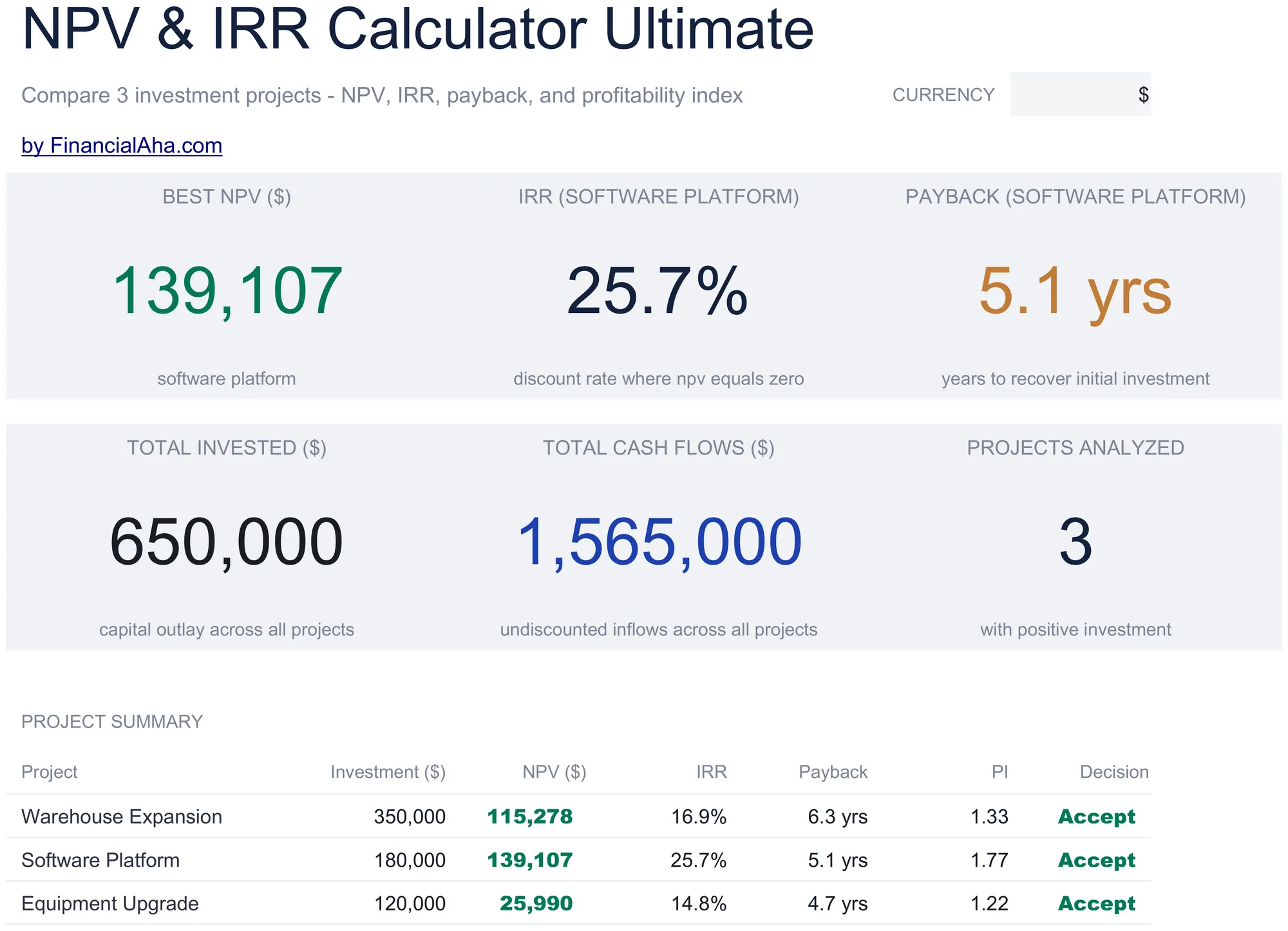
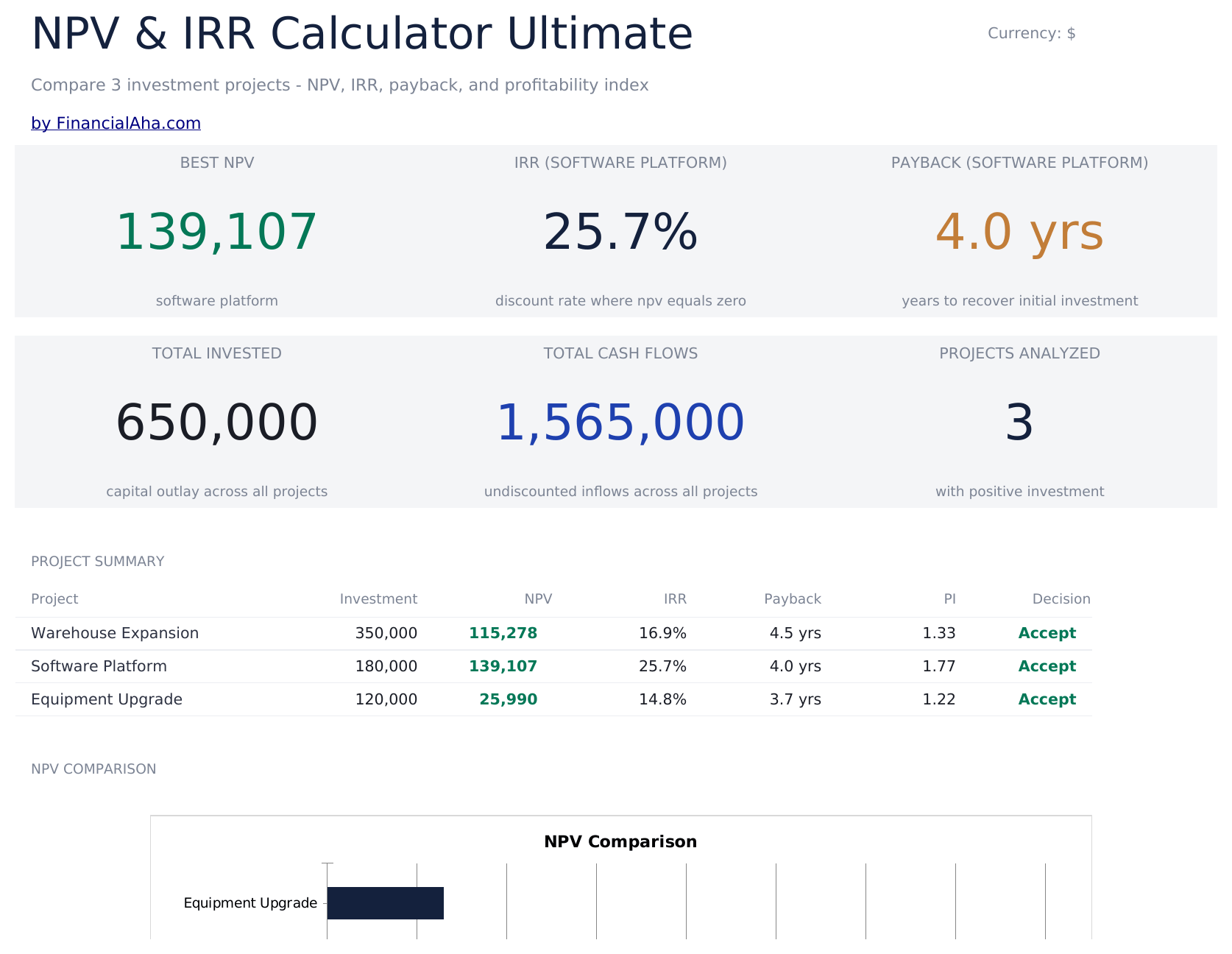
    The whole comparison in six figures - the strongest net present value across the projects, then the rate of return and the payback period for one named project specifically, the total committed, the total the projects return, and how many are being analysed - with every project listed beneath carrying its own investment, value, rate of return, payback, index and a flag against the conventional threshold. It is the page you would put in front of someone before the detail.

  2. 02 of 06

    Warehouse Expansion

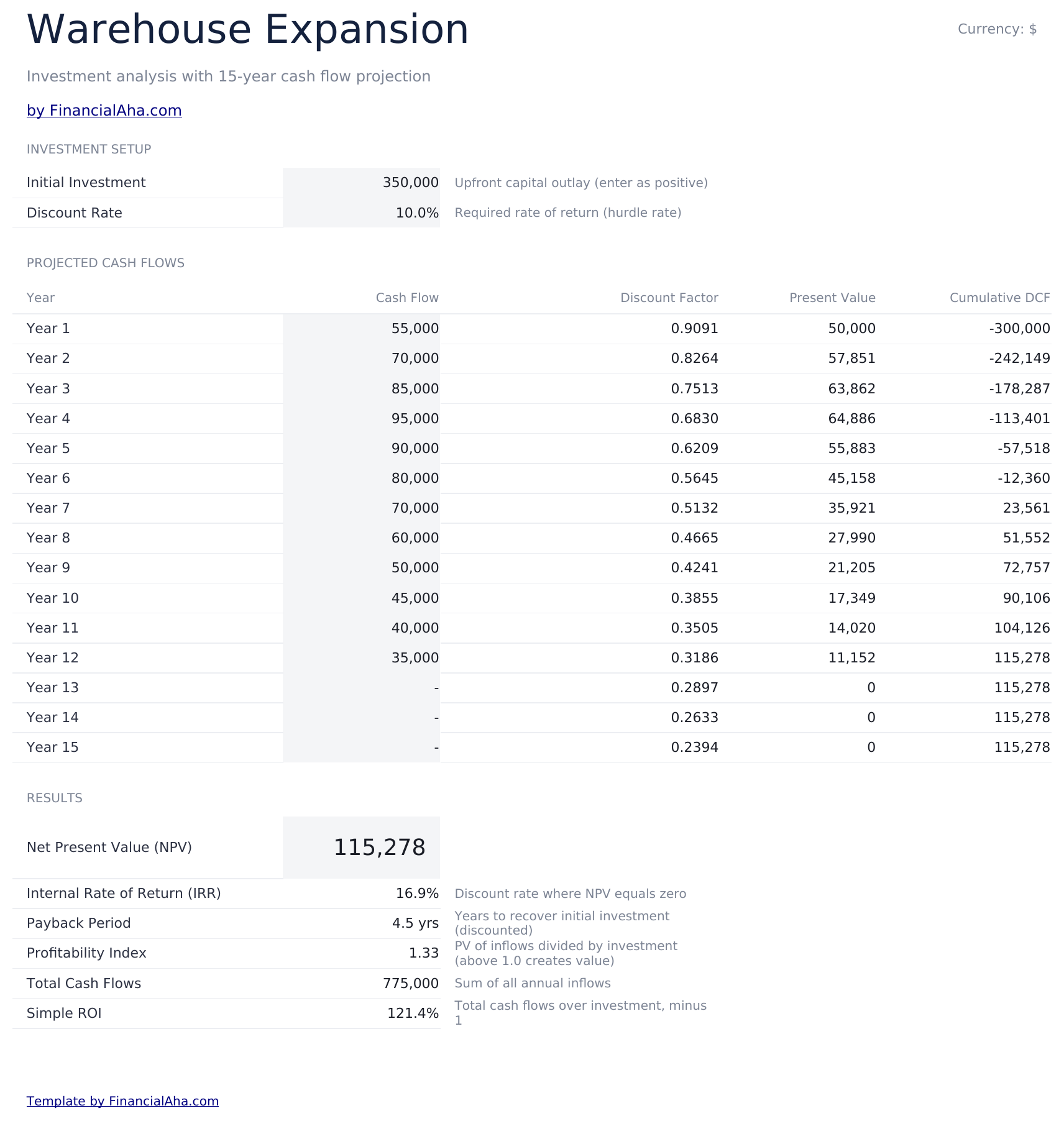
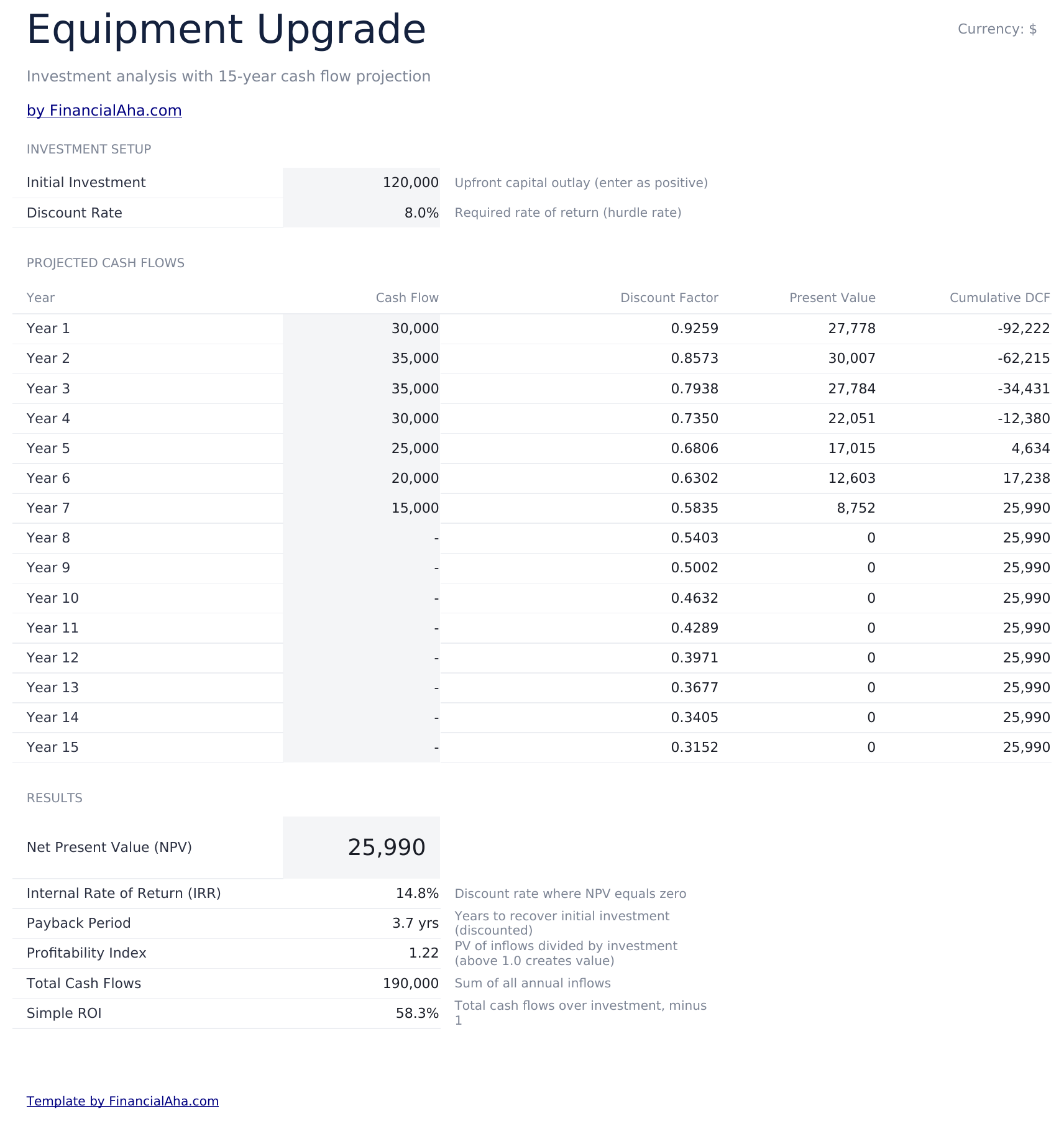
    The first of three project sheets, pre-named as an example and yours to rename. Fifteen years of cash flow, each with the discount factor applied to it, the present value that produces, and the running discounted total. Giving each project its own discount rate rather than one shared rate is the detail that matters, because projects of different risk are not fairly measured against the same hurdle.

  3. 03 of 06

    Software Platform

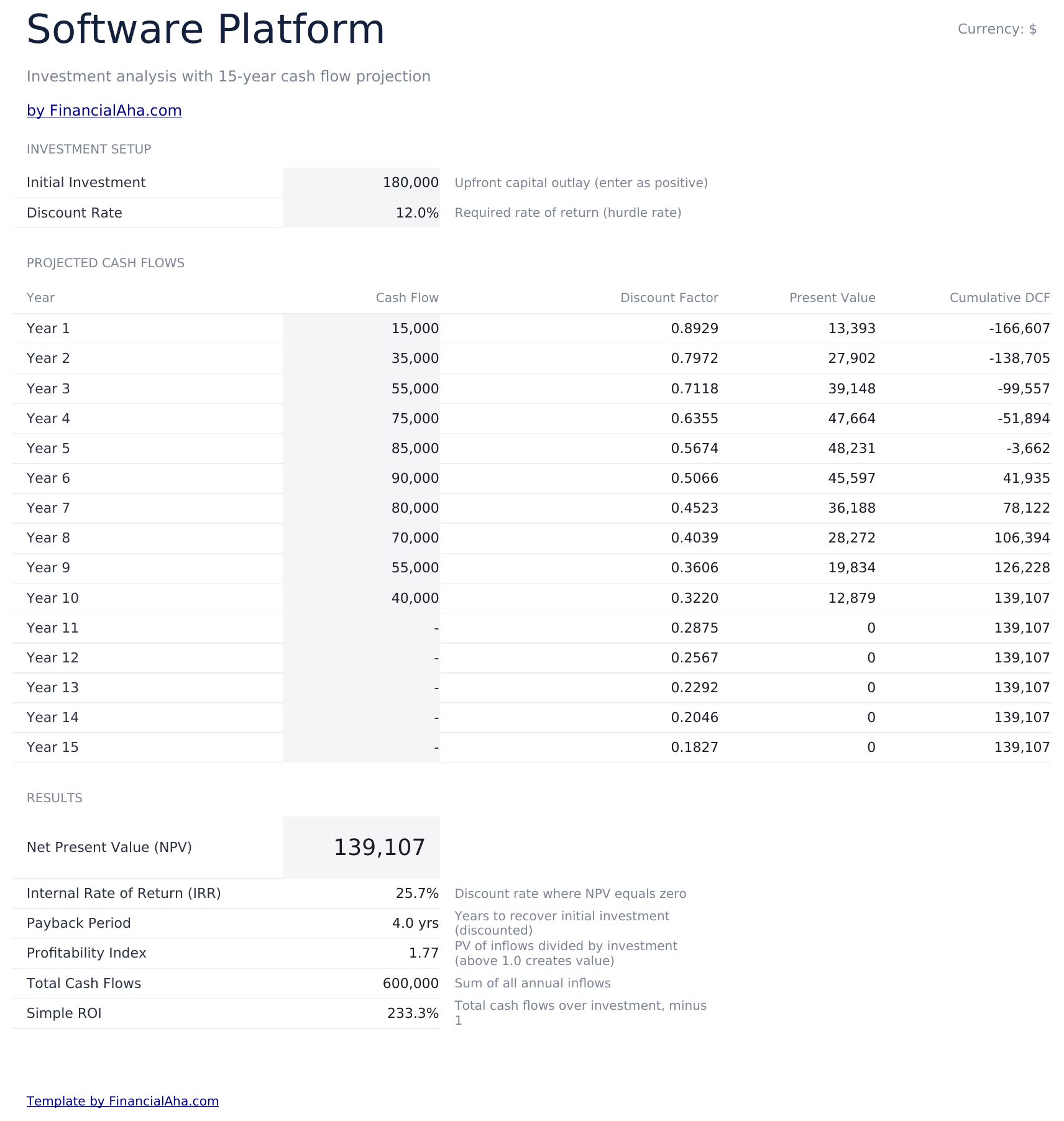
    The second project sheet, identical in layout so the two can be read line for line. Fifteen years is long enough to cover the horizon most capital decisions are argued over, and having the discount factor visible beside each year makes the discounting legible rather than something happening inside a formula.

  4. 04 of 06

    Equipment Upgrade

    The third project sheet, on the same layout again. Three slots is a deliberate number - it is enough to force a genuine comparison rather than a yes-or-no on a single case, without becoming a portfolio model.

  5. 05 of 06

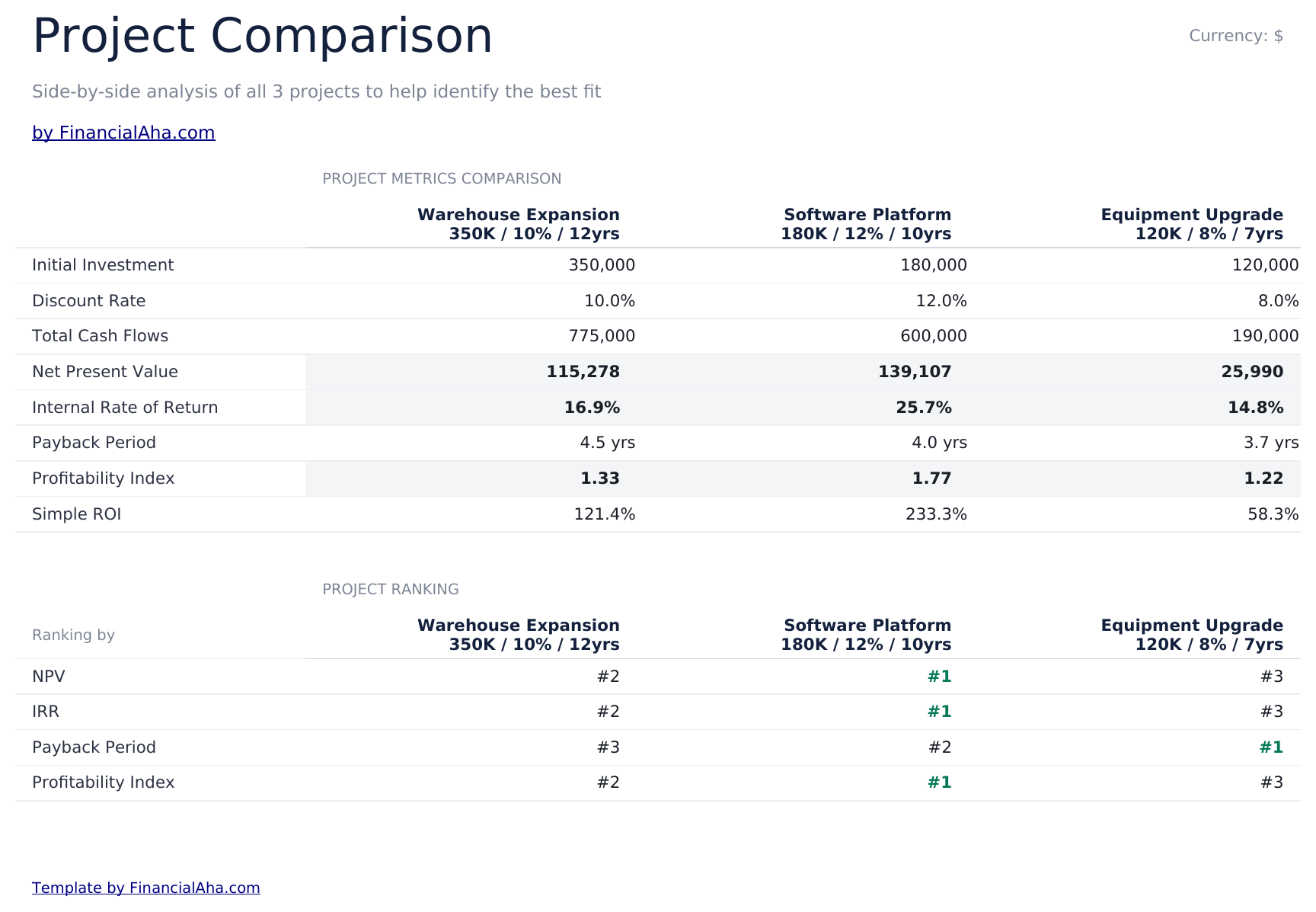
    Comparison

    All three set side by side on every metric, then ranked against one another on each. The ranking block is the part worth studying, because the orders tend to disagree: the project that ranks first on present value is often not the one that pays back soonest, and the index can favour a third. A single metric hides that; four rankings side by side make it unavoidable.

  6. 06 of 06

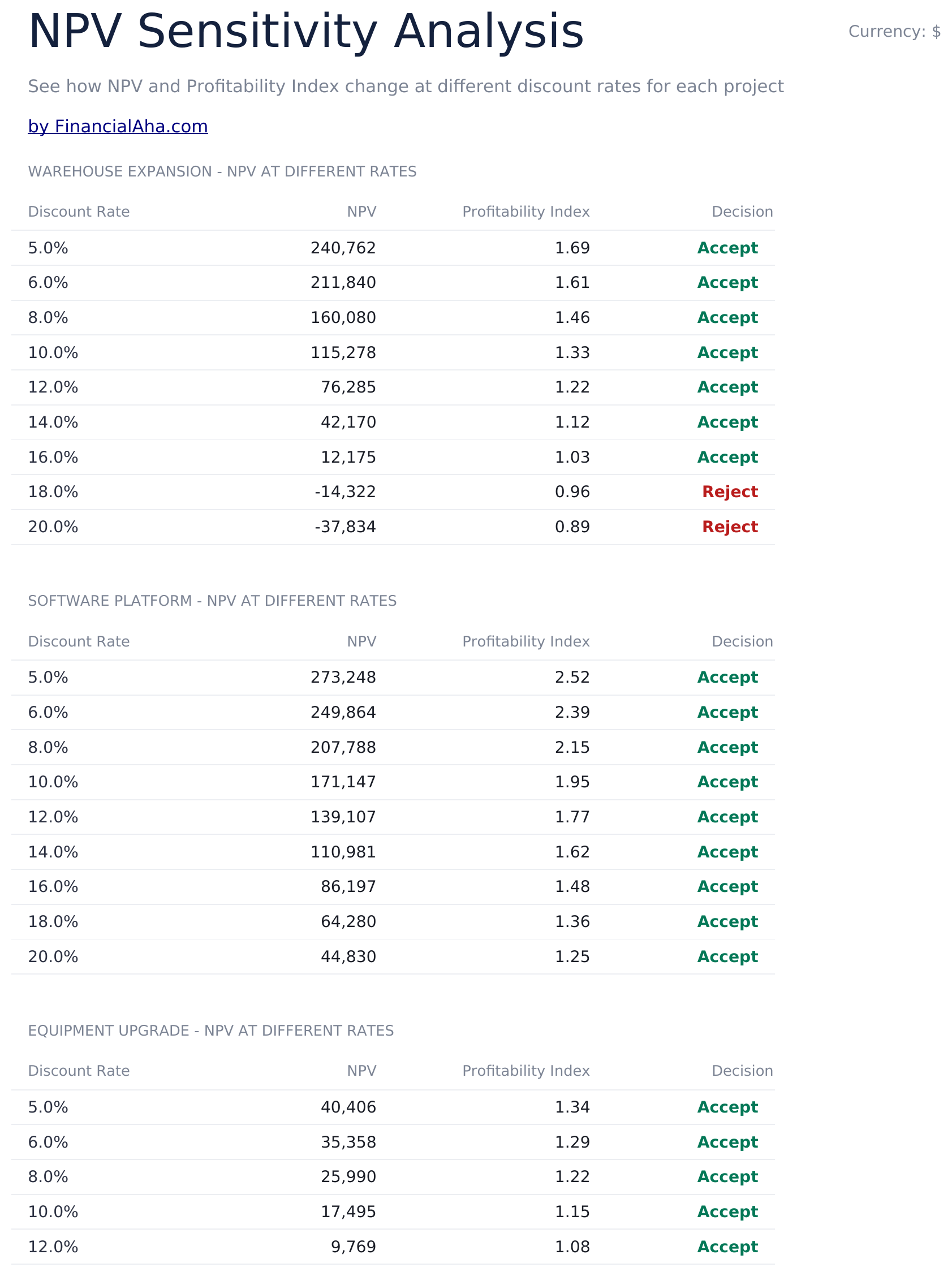
    Sensitivity

    Each project's value across a range of discount rates rather than the one you chose, with the profitability index and the conventional threshold flag beside it. This is where the rate at which a case stops working becomes visible - and a project that only holds up at a low rate is a different proposition from one that survives the whole range.

  7. Included guide

    How to Use

    A step-by-step guide on its own tab, covering setup, how the discount factors and present values are built, how to read the ranking block, and what the sensitivity range shows. Because it ships inside the file, the instructions travel with the template wherever it is opened.

Works in both Google Sheets and Excel

Ultimate NPV & IRR Calculator Spreadsheet template for Google Sheets

Upload the Ultimate NPV & IRR Calculator Spreadsheet Template to Drive, right-click it, and choose "Open with Google Sheets". This Ultimate NPV & IRR Calculator Google Sheets template needs no conversion step and the chart survives the trip intact. The cross-sheet references that build the comparison and sensitivity sheets rely on the existing tab names, so renaming a project inside the sheet is safer than renaming the tab.

Ultimate NPV & IRR Calculator Google Sheets template setup

A shared copy of the Ultimate NPV & IRR Calculator Google Sheets template suits a capital decision being argued by several people, since every assumption behind every ranking is visible rather than asserted. Sheets version history covers a rate typed over, and comments sit well on a cash flow estimate that needs defending.

Sharing the Ultimate NPV & IRR Calculator Google Sheet

This is not a daily sheet. The Ultimate NPV & IRR Calculator Google Sheet is worked through when a decision is live, and the sensitivity sheet is where the conversation tends to end up.

Ultimate NPV & IRR Calculator Spreadsheet template for Excel

The Ultimate NPV & IRR Calculator spreadsheet Excel download is a plain .xlsx. Excel opens this Ultimate NPV & IRR Calculator Excel template directly, with no import step and no compatibility prompt, and the chart is a native Excel chart that redraws as the inputs change. There are no macros and no VBA in the file, so it opens without a security warning.

Ultimate NPV & IRR Calculator Excel template setup

The same Ultimate NPV & IRR Calculator Excel template opens in Excel on Windows, Excel on Mac, and Excel for the web. It is also the identical file you would upload to Drive, so there is no separate Ultimate NPV & IRR Calculator spreadsheet download to choose between.

Ultimate NPV & IRR Calculator spreadsheet Excel notes

The Ultimate NPV & IRR Calculator spreadsheet Excel file carries no macros and no VBA, so Excel opens it without a trust prompt - which matters when a model is being sent to a board or a lender that blocks macro-enabled attachments.

Opening the Ultimate NPV & IRR Calculator spreadsheet Excel file

Nothing in the Ultimate NPV & IRR Calculator Excel template is version-specific, so this Ultimate NPV & IRR Calculator spreadsheet Excel workbook behaves identically in Excel on Windows, Excel on Mac, and older builds.

Spreadsheet template highlights

What the Ultimate NPV & IRR Calculator spreadsheet template tracks

Three project sheets feed the comparison and the sensitivity range. These are the columns the Ultimate NPV & IRR Calculator Spreadsheet Template works from:

Year
each of the fifteen periods on a project sheet
Cash Flow
what that year is expected to produce
Discount Factor auto
derived, the multiplier that year's money is reduced by
Present Value auto
derived, the flow once that factor has been applied
Cumulative DCF auto
derived, the running discounted total, which is where payback lands
Discount Rate
set per project, so projects of different risk are not held to one hurdle
NPV auto
derived, per project and compared across all three
IRR auto
derived, the rate at which a project's value would be exactly zero
Payback auto
derived, when the discounted flows cover the investment
PI auto
derived, the return per unit invested, which compares projects of different sizes
Decision auto
derived, a flag against the conventional above-zero threshold
Ranking by
how the three order against each other on each metric in turn

Compare builds

FinancialAha NPV & IRR Calculator spreadsheet template: Free, Essentials, and Ultimate compared

Feature Free View Spreadsheet Template Essentials View Spreadsheet Template Ultimate This page
Working sheets 1 2 6
Projects One One Three, compared
Years of cash flow 5 10 15 per project
NPV Yes Yes Per project
IRR – Yes Per project
Payback period – Yes Per project
Profitability index – Yes Per project
Discounted and cumulative cash flow – Yes Yes, with discount factors
Ranking across metrics – – Yes
NPV across a range of rates – – Yes
Charts – 2 1

The FinancialAha Ultimate NPV & IRR Calculator Spreadsheet Template covers six working sheets and three projects. The Free NPV & IRR Calculator Spreadsheet Template discounts five years for one project and returns no rate of return at all. The Essentials NPV & IRR Calculator Spreadsheet Template for Google Sheets and Excel covers ten years for one project with the rate of return, payback and profitability index. This build gives each of three projects fifteen years and its own discount rate, ranks them against one another on four metrics at once - where the orders tend to disagree - and runs each project's value across a range of rates so the point at which a case stops working is visible rather than assumed.

Good to know

Notes on working in the Ultimate NPV & IRR Calculator spreadsheet template

  • The rankings disagree, and that is the useful part - the strongest project on present value is often not the one that pays back soonest.
  • Each project carries its own discount rate, because projects of different risk are not fairly measured against one hurdle.
  • A project that only holds up at a low discount rate is a different proposition from one that survives the whole range.
  • The three project sheets ship pre-named as examples and are yours to rename to your own cases.
  • The currency dropdown sits on the Dashboard and relabels money columns across the whole Ultimate NPV & IRR Calculator spreadsheet. It changes the label only and does not convert the numbers.
  • Two of the dashboard figures - the rate of return and the payback period - are reported for one named project rather than for whichever comes out best. The three project sheets carry the same figures for each.

How to Use This Template

1

Set up each project

Investment, discount rate and fifteen years of cash flow on its own sheet.

2

Rename the sheets to your cases

They ship pre-named as examples.

3

Read the comparison

All three on every metric, then ranked against each other on each.

4

Check the sensitivity

Each project's value across a range of rates, not just the one you chose.

Stress-tested with AI.

Every template starts with deep research into how people actually track the topic. We design the layout, build the formulas, and polish the design until it feels like something we would use ourselves. Along the way, we use AI to stress-test the calculations: unusual inputs, edge cases, and formula behavior, checked until the numbers hold.

One-time purchase. No subscription. Works in Excel & Google Sheets.

Frequently Asked Questions

Is the FinancialAha Ultimate NPV & IRR Calculator Spreadsheet Template a Google Sheets template?

Yes. Upload the file to Drive and choose "Open with Google Sheets". The Ultimate NPV & IRR Calculator Google Sheets template needs no conversion step and the chart survives the trip intact. The cross-sheet references rely on the existing tab names, so renaming a project inside the sheet is safer than renaming the tab.

Is the FinancialAha Ultimate NPV & IRR Calculator Spreadsheet Template an Excel template?

Yes. The download is a plain .xlsx, so the Ultimate NPV & IRR Calculator Excel template opens directly in Excel with no import step. The chart is a native Excel chart, and there are no macros or VBA - which matters when a model is going to a board or a lender.

Will the FinancialAha Ultimate NPV & IRR Calculator spreadsheet Excel file open in older versions of Excel?

Yes. The Ultimate NPV & IRR Calculator spreadsheet Excel workbook ships as a plain .xlsx, so it opens identically in current Excel and in builds that predate dynamic arrays.

How many projects does the Ultimate NPV & IRR Calculator spreadsheet compare?

Three, each with its own sheet, fifteen years of cash flow and its own discount rate. They ship pre-named as examples and are yours to rename.

Why does each project get its own discount rate in the Ultimate NPV & IRR Calculator spreadsheet?

Because projects of different risk are not fairly measured against the same hurdle. Forcing one rate across all three flatters the riskier case.

What does the ranking block show in the Ultimate NPV & IRR Calculator spreadsheet?

How the three order against each other on value, rate of return, payback and profitability index. The orders disagree - the strongest on present value need not be the fastest to pay back - and seeing four rankings at once makes that impossible to miss.

What is the sensitivity sheet for in the Ultimate NPV & IRR Calculator spreadsheet?

It runs each project's value across a range of discount rates rather than the single one you chose, so the rate at which a case stops working is visible. A project that only holds at a low rate is a different proposition from one that survives the range.

Does the Ultimate NPV & IRR Calculator spreadsheet tell me which project to choose?

No. It reports each project on every metric, ranks them, and flags each against the conventional above-zero threshold. Where the rankings disagree, the judgement is yours.

What do I get after buying the Ultimate NPV & IRR Calculator spreadsheet template?

You receive the Ultimate NPV & IRR Calculator spreadsheet template as an Excel file (.xlsx) that works in Microsoft Excel and Google Sheets. Download it immediately after purchase - no signup or account required.

Is there a free Ultimate NPV & IRR Calculator spreadsheet template?

Yes. A free version of the Ultimate NPV & IRR Calculator spreadsheet template is available with basic features. The Ultimate version adds advanced analysis, more capacity, and additional sheets.

What if the Ultimate NPV & IRR Calculator spreadsheet template does not work for me?

Contact us and we will help troubleshoot. The Ultimate NPV & IRR Calculator spreadsheet template works in Microsoft Excel and Google Sheets with no macros required.

Ultimate

Highlights:

Instant download after purchase
No macros or VBA required
All formulas auto-calculate
No subscription required
Works in
Excel Google Sheets

Looking for more Ultimate templates?

We offer Ultimate versions of our most popular spreadsheet templates with advanced features, more capacity, and deeper analysis.

Private & secure

Your financial data stays on your device. We never see it.

Learn more →

Need help?

Check our guides or reach out with questions.

View FAQ →